• RSIF8
    Roll no: 86
    Coding no: 23
    Coding Topic: **ChatGPT Clone (Non-Functional) – Web-Based**

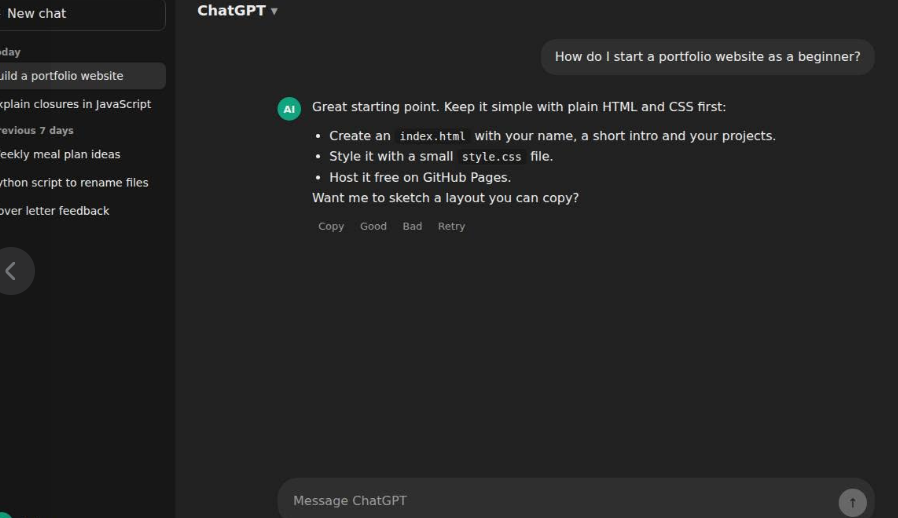
    In this task, I created a **non-functional web-based ChatGPT Clone** to understand the structure, layout, and user interface of a modern chatbot application. The project includes a clean chat interface with a sidebar, chat window, and message input area, designed using **HTML, CSS, and JavaScript**.

    The purpose of this project was to learn how chatbot interfaces are organized and how front-end technologies are used to build responsive and user-friendly web applications. Although the clone does not include AI functionality, it provides a realistic representation of the ChatGPT interface.

    While working on this project, I improved my skills in **HTML, CSS, JavaScript, UI design, and responsive web development**. I also learned the importance of organizing project files and documenting my work professionally using a **README.md** file.

    After completing the project, I uploaded the source code to **GitHub**, making it easier to manage, share, and showcase my work. This experience also strengthened my understanding of version control and project documentation.

    Overall, this project was educational and rewarding. It enhanced my front-end development skills and gave me practical experience in designing modern web interfaces while preparing me for more advanced AI-powered chatbot projects in the future.

    #ChatGPTClone #WebDevelopment #HTML #CSS #JavaScript #GitHub #FrontendDevelopment #UIUX #Programming #StudentLearning #RSIF8
    12w
    RSIF8 Roll no: 86 Coding no: 23 Coding Topic: **ChatGPT Clone (Non-Functional) – Web-Based** 💻🤖✨ In this task, I created a **non-functional web-based ChatGPT Clone** to understand the structure, layout, and user interface of a modern chatbot application. The project includes a clean chat interface with a sidebar, chat window, and message input area, designed using **HTML, CSS, and JavaScript**. 📱💡 The purpose of this project was to learn how chatbot interfaces are organized and how front-end technologies are used to build responsive and user-friendly web applications. Although the clone does not include AI functionality, it provides a realistic representation of the ChatGPT interface. 🌐🎨 While working on this project, I improved my skills in **HTML, CSS, JavaScript, UI design, and responsive web development**. I also learned the importance of organizing project files and documenting my work professionally using a **README.md** file. 📚🚀 After completing the project, I uploaded the source code to **GitHub**, making it easier to manage, share, and showcase my work. This experience also strengthened my understanding of version control and project documentation. 💻📂 Overall, this project was educational and rewarding. It enhanced my front-end development skills and gave me practical experience in designing modern web interfaces while preparing me for more advanced AI-powered chatbot projects in the future. 🌟✨ #ChatGPTClone #WebDevelopment #HTML #CSS #JavaScript #GitHub #FrontendDevelopment #UIUX #Programming #StudentLearning #RSIF8 💻🤖🚀✨ 12w
    0 Comments 0 Shares 165 Views
  • RSIF8
    Roll No:84
    cording task no:4
    Topic :cording
    Day:210
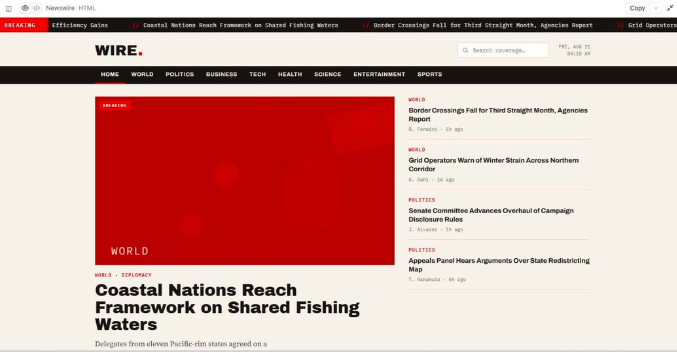
    Developed a functional CNN-inspired news website with a dynamic homepage, organized news categories, and dedicated article pages. The project focuses on creating a modern news-reading experience with easy navigation and a clean, responsive design.
    The project includes a dynamic homepage, multiple news categories, article pages, and interactive web features. The complete project is uploaded to GitHub with a detailed README.md file explaining the project and setup instructions.
    This project is a great demonstration of web development, UI design, responsive layouts, and functional website development. ‍
    #CNNClone #WebDevelopment #FunctionalWebsite #NewsWebsite #HTML #CSS #JavaScript #FrontendDevelopment #WebDesign #GitHub #CodingProject #ResponsiveDesign #Programming #Developer #TechProject
    RSIF8 Roll No:84 cording task no:4 Topic :cording Day:210 Developed a functional CNN-inspired news website with a dynamic homepage, organized news categories, and dedicated article pages. 🚀 The project focuses on creating a modern news-reading experience with easy navigation and a clean, responsive design. 📱💻 The project includes a dynamic homepage, multiple news categories, article pages, and interactive web features. The complete project is uploaded to GitHub with a detailed README.md file explaining the project and setup instructions. 🔥📚 This project is a great demonstration of web development, UI design, responsive layouts, and functional website development. 🌟👨‍💻 #CNNClone #WebDevelopment #FunctionalWebsite #NewsWebsite #HTML #CSS #JavaScript #FrontendDevelopment #WebDesign #GitHub #CodingProject #ResponsiveDesign #Programming #Developer #TechProject 📰💻🚀✨
    0 Comments 0 Shares 230 Views
  • #RSISB
    Roll No : 55
    Level 2
    Work Book A
    Talk With Ai On Software : 02
    Talk With AI: 50 Questions About Software Development, Coding, Artificial Intelligence, and the Future of Technology!
    Hello everyone! Welcome to my new educational AI Talk Session!
    My name is Faizan Ali SoftwareWala, and in this session, I am exploring the amazing world of software with Artificial Intelligence (AI).
    Software is one of the most important parts of our modern world. We use software every day on our computers, mobile phones, websites, educational platforms, businesses, and many other digital systems. From simple mobile applications to advanced AI assistants, software is helping people solve problems, save time, improve productivity, and connect with the world.
    In this special session, I asked AI 50 interesting and educational questions about software to expand my knowledge, discover new ideas, and understand how technology works.
    Throughout this conversation, I explored several important topics, including:
    1. Introduction to Software: What software is, why it is important, the different types of software, and how software has changed our daily lives.
    2. Software Development and Coding: How software is created, which programming languages beginners can learn, the importance of HTML, CSS, JavaScript, and PHP, and how developers find and fix errors in their projects.
    3. Artificial Intelligence and Modern Technology: How AI is changing software development, how AI chatbots work, how APIs connect different applications, and how developers can use AI tools to build smarter digital solutions.
    4. Software Business and Online Earning: How beginners can earn money through software development, how freelancing works, how to find clients, how software companies generate income, and how a simple software idea can become a successful business.
    5. The Future of Software Development: Whether AI will replace software developers, which skills will be valuable in the future, how young students can learn coding for free, and how technology can solve real-world problems.
    6. Software Development in Pakistan: How software can improve education, support businesses, create earning opportunities, and help young Pakistanis develop innovative solutions for local and international challenges.
    7. Advice for Young Software Developers: I also explored how a young student can improve coding skills, build a professional portfolio, develop creative thinking, start working on real projects, and move toward becoming a successful software developer.
    My Mission and Vision
    My goal is not just to learn coding or create websites. My bigger mission is to become a skilled software developer, an innovative problem solver, and a future leader who uses technology to make a positive difference in people's lives.
    I believe that age should never stop anyone from learning new skills, exploring technology, building projects, or working toward their dreams. Every expert starts as a beginner, and every successful project begins with an idea.
    As a student, I want to continue learning about software development, artificial intelligence, web development, and digital innovation. I want to build useful projects, experiment with new technologies, improve my English communication skills, and learn how to turn ideas into practical solutions.
    I also believe that AI is a powerful learning partner. When we ask meaningful questions, explore different perspectives, and practice consistently, we can improve our understanding and discover new opportunities. AI can help us learn faster, but our own creativity, critical thinking, dedication, and hard work are equally important.
    Why Is This Session Important?
    This session is designed for students, beginners, aspiring software developers, technology enthusiasts, and anyone who wants to understand the world of software.
    If you are interested in coding, websites, applications, AI tools, freelancing, startups, or the future of technology, I hope this conversation inspires you to start learning and creating something useful.
    Remember, you do not need to know everything before you begin. Start with the basics, practice every day, build small projects, learn from your mistakes, and gradually improve your skills. The most important thing is to take action and remain consistent.
    Watch the Session and Join the Journey!
    Watch my AI Talk Session, explore the 50 questions, learn something new, and share your thoughts in the comments.
    Which area of software development interests you the most: web development, app development, artificial intelligence, cybersecurity, or software business?
    Write your answer in the comments!
    Like this session if you found it educational.
    Share it with students and friends who want to learn about software.
    Follow my journey for more AI talks, educational sessions, coding projects, and technology-related content.
    My Message to Every Young Learner:
    “Don't just use technology. Learn how it works, build something meaningful with it, and use your skills to solve real problems.”
    Keep Learning
    Keep Coding
    Keep Building
    Keep Innovating
    Keep Improving
    And Never Give Up!
    Thank you for being part of my learning journey. See you in the next educational session!
    Created by: Faizan Ali SoftwareWala
    #TalkWithAI #SoftwareDevelopment #SoftwareEngineering #SoftwareDeveloper #ArtificialIntelligence #AI #Coding #Programming #WebDevelopment #LearnToCode #Technology #TechEducation #Freelancing #SoftwareBusiness #FutureOfTechnology #ProblemSolving #DigitalSkills
    @followers
    Asma Shaheen EducationWali

    #RSISB Roll No : 55 Level 2 Work Book A Talk With Ai On Software : 02 🎙️💻🤖 Talk With AI: 50 Questions About Software Development, Coding, Artificial Intelligence, and the Future of Technology! 🚀🌍 Hello everyone! 👋 Welcome to my new educational AI Talk Session! My name is Faizan Ali SoftwareWala, and in this session, I am exploring the amazing world of software with Artificial Intelligence (AI). 💻✨ Software is one of the most important parts of our modern world. We use software every day on our computers, mobile phones, websites, educational platforms, businesses, and many other digital systems. From simple mobile applications to advanced AI assistants, software is helping people solve problems, save time, improve productivity, and connect with the world. 🌐📱 In this special session, I asked AI 50 interesting and educational questions about software to expand my knowledge, discover new ideas, and understand how technology works. 🤖🧠 Throughout this conversation, I explored several important topics, including: 💻 1. Introduction to Software: What software is, why it is important, the different types of software, and how software has changed our daily lives. ⌨️ 2. Software Development and Coding: How software is created, which programming languages beginners can learn, the importance of HTML, CSS, JavaScript, and PHP, and how developers find and fix errors in their projects. 🤖 3. Artificial Intelligence and Modern Technology: How AI is changing software development, how AI chatbots work, how APIs connect different applications, and how developers can use AI tools to build smarter digital solutions. 💰 4. Software Business and Online Earning: How beginners can earn money through software development, how freelancing works, how to find clients, how software companies generate income, and how a simple software idea can become a successful business. 🚀 5. The Future of Software Development: Whether AI will replace software developers, which skills will be valuable in the future, how young students can learn coding for free, and how technology can solve real-world problems. 🇵🇰 6. Software Development in Pakistan: How software can improve education, support businesses, create earning opportunities, and help young Pakistanis develop innovative solutions for local and international challenges. 🌟 7. Advice for Young Software Developers: I also explored how a young student can improve coding skills, build a professional portfolio, develop creative thinking, start working on real projects, and move toward becoming a successful software developer. 🎯 My Mission and Vision My goal is not just to learn coding or create websites. My bigger mission is to become a skilled software developer, an innovative problem solver, and a future leader who uses technology to make a positive difference in people's lives. I believe that age should never stop anyone from learning new skills, exploring technology, building projects, or working toward their dreams. Every expert starts as a beginner, and every successful project begins with an idea. 💡 As a student, I want to continue learning about software development, artificial intelligence, web development, and digital innovation. I want to build useful projects, experiment with new technologies, improve my English communication skills, and learn how to turn ideas into practical solutions. I also believe that AI is a powerful learning partner. When we ask meaningful questions, explore different perspectives, and practice consistently, we can improve our understanding and discover new opportunities. AI can help us learn faster, but our own creativity, critical thinking, dedication, and hard work are equally important. 🧠🔥 🌍 Why Is This Session Important? This session is designed for students, beginners, aspiring software developers, technology enthusiasts, and anyone who wants to understand the world of software. If you are interested in coding, websites, applications, AI tools, freelancing, startups, or the future of technology, I hope this conversation inspires you to start learning and creating something useful. Remember, you do not need to know everything before you begin. Start with the basics, practice every day, build small projects, learn from your mistakes, and gradually improve your skills. The most important thing is to take action and remain consistent. 💪 🎬 Watch the Session and Join the Journey! Watch my AI Talk Session, explore the 50 questions, learn something new, and share your thoughts in the comments. 💬 Which area of software development interests you the most: web development, app development, artificial intelligence, cybersecurity, or software business? 👇 Write your answer in the comments! 👍 Like this session if you found it educational. 📲 Share it with students and friends who want to learn about software. 🔔 Follow my journey for more AI talks, educational sessions, coding projects, and technology-related content. ✨ My Message to Every Young Learner: “Don't just use technology. Learn how it works, build something meaningful with it, and use your skills to solve real problems.” Keep Learning 📚 Keep Coding 💻 Keep Building 🛠️ Keep Innovating 💡 Keep Improving 🌱 And Never Give Up! 🔥🚀 Thank you for being part of my learning journey. See you in the next educational session! 👋🎙️ Created by: Faizan Ali SoftwareWala 💻 #TalkWithAI #SoftwareDevelopment #SoftwareEngineering #SoftwareDeveloper #ArtificialIntelligence #AI #Coding #Programming #WebDevelopment #LearnToCode #Technology #TechEducation #Freelancing #SoftwareBusiness #FutureOfTechnology #ProblemSolving #DigitalSkills @followers Asma Shaheen EducationWali

    0 Comments 0 Shares 699 Views 13
  • **Day 159 | Coding Task **

    **Simple Chat Application — Connect, Communicate & Create!**

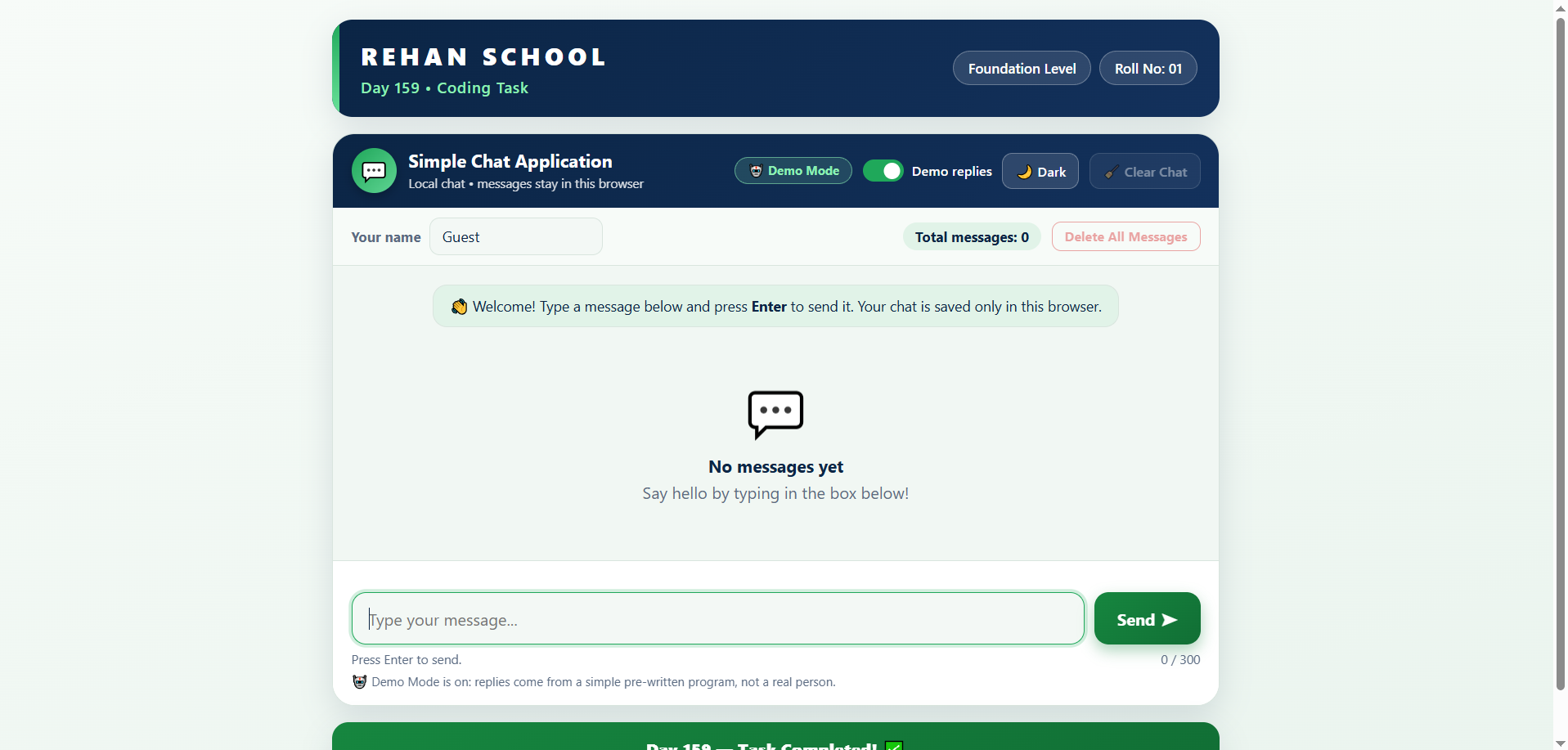
    Today, I created a **Simple Chat Application** using HTML, CSS, and JavaScript!

    This project features a clean chat interface where users can send messages, view timestamps, save conversations in their browser, and explore demo replies. I also added features like dark mode, message counting, and chat management to make the application more interactive and user-friendly.

    Through this project, I learned how to build interactive web applications, manage messages, and use local storage to save data. Every coding task helps me develop new skills and turn my ideas into reality!

    **Foundation Level**
    **Roll No: 01**
    **Day 159 — Task Completed!**

    **Rehan School — Learning Today, Creating Tomorrow! **

    #Day159 #SimpleChatApplication #CodingTask #HTML #CSS #JavaScript #WebDevelopment #RehanSchool #LearningByDoing #FutureAICreator
    💻 **Day 159 | Coding Task 💬** 🗨️ **Simple Chat Application — Connect, Communicate & Create!** Today, I created a **Simple Chat Application** using HTML, CSS, and JavaScript! 🚀✨ This project features a clean chat interface where users can send messages, view timestamps, save conversations in their browser, and explore demo replies. I also added features like dark mode, message counting, and chat management to make the application more interactive and user-friendly. Through this project, I learned how to build interactive web applications, manage messages, and use local storage to save data. Every coding task helps me develop new skills and turn my ideas into reality! 💡 🎓 **Foundation Level** 🔢 **Roll No: 01** ✅ **Day 159 — Task Completed!** **Rehan School — Learning Today, Creating Tomorrow! 🌟** #Day159 #SimpleChatApplication #CodingTask #HTML #CSS #JavaScript #WebDevelopment #RehanSchool #LearningByDoing #FutureAICreator
    0 Comments 0 Shares 751 Views
  • RSIF8
    Roll no.49
    Class:Foundation
    Coding task no.26
    Coding task topic:Coding Task: ChatGPT Clone — A Web-Based Chat Interface**

    Welcome to my latest coding project! In this task, I created a **static, web-based ChatGPT-style chat interface** inspired by modern AI chat applications. The goal was to design a clean, user-friendly layout that looks like a chatbot platform.

    **Key Features:**
    A ChatGPT-style chat window
    A text input box for typing messages
    A send button for the interface
    A clean and simple web design
    A README file explaining the project
    GitHub upload for project sharing and version control

    **Skills Practiced:**
    Web interface design
    HTML, CSS, and JavaScript basics
    UI/UX design principles
    GitHub repository management
    Writing project documentation

    **Note:** This is a non-functional static interface created for learning and design practice. It does not connect to an AI model or generate real ChatGPT responses.

    Every project is an opportunity to learn, improve, and build something new!

    Like | Comment | Share | Follow for more coding projects and creative learning.

    #ChatGPTClone #CodingProject #WebDevelopment #HTML #CSS #JavaScript #FrontendDevelopment #ChatInterface #UIDesign #UXDesign #GitHub #README #Programming #CodingChallenge #BeginnerDeveloper #LearningToCode #TechProjects #AyeshAhmed
    RSIF8 Roll no.49 Class:Foundation Coding task no.26 Coding task topic:Coding Task: ChatGPT Clone — A Web-Based Chat Interface** 🚀 Welcome to my latest coding project! 🌟 In this task, I created a **static, web-based ChatGPT-style chat interface** inspired by modern AI chat applications. The goal was to design a clean, user-friendly layout that looks like a chatbot platform. ✨ **Key Features:** 💬 A ChatGPT-style chat window ⌨️ A text input box for typing messages 📩 A send button for the interface 🎨 A clean and simple web design 📄 A README file explaining the project 🐙 GitHub upload for project sharing and version control 🛠️ **Skills Practiced:** 🌐 Web interface design 💻 HTML, CSS, and JavaScript basics 🎨 UI/UX design principles 📂 GitHub repository management 📝 Writing project documentation 📌 **Note:** This is a non-functional static interface created for learning and design practice. It does not connect to an AI model or generate real ChatGPT responses. Every project is an opportunity to learn, improve, and build something new! 🚀✨ 👍 Like | 💬 Comment | 🔄 Share | 🔔 Follow for more coding projects and creative learning. #ChatGPTClone #CodingProject #WebDevelopment #HTML #CSS #JavaScript #FrontendDevelopment #ChatInterface #UIDesign #UXDesign #GitHub #README #Programming #CodingChallenge #BeginnerDeveloper #LearningToCode #TechProjects #AyeshAhmed
    0 Comments 0 Shares 1597 Views
  • RSI F8
    Coding TAsk NO:7
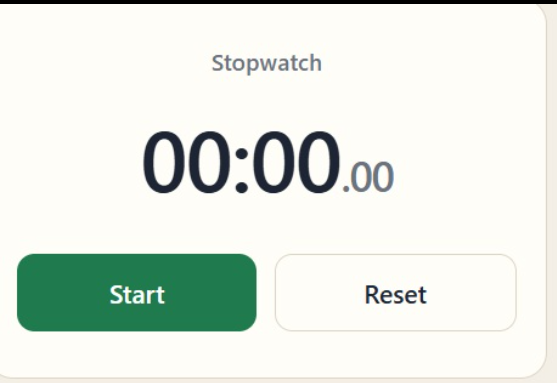
    Roll No:13 Create a Stopwatch App Using Claude.ai
    Introduction
    Today, technology plays an important role in our daily lives. We use digital applications for learning, working, communication, entertainment, and many other activities. One of the simplest but most useful digital tools is a stopwatch. A stopwatch helps us measure the amount of time spent on a particular activity. It is useful for students, teachers, athletes, programmers, and anyone who wants to manage time effectively.
    For this coding task, I created a Stopwatch App using Claude.ai. The main purpose of this project is to develop a simple, interactive, and user-friendly application that allows users to start, stop, and reset a timer. This project also helps me understand the basics of web development and learn how artificial intelligence can assist us in creating useful digital products.
    What Is a Stopwatch App?
    A stopwatch is a time-measuring application that records the duration of an activity. Unlike a regular clock, which displays the current time, a stopwatch measures how much time has passed since it was started. Users can pause the timer whenever necessary and reset it to zero when they want to begin a new session.
    The Stopwatch App is designed to make time measurement simple and convenient. Instead of using a physical stopwatch, users can open the application on their computer, tablet, or mobile phone. With just a few clicks, they can measure the time required to complete different tasks.
    This application demonstrates how a simple idea can be transformed into a useful digital tool with the help of programming and AI technology.
    Main Objective of This Project
    The main objective of this coding task is to create a working stopwatch application with three essential functions: Start, Stop, and Reset. These functions allow users to control the timer easily and measure elapsed time according to their needs.
    Another important objective is to improve my coding skills by working with HTML, CSS, and JavaScript. I want to understand how a website is structured, how its design is created, and how interactive features are implemented.
    By completing this project with Claude.ai,
    RSI F8 Coding TAsk NO:7 Roll No:13⏱️ Create a Stopwatch App Using Claude.ai Introduction Today, technology plays an important role in our daily lives. We use digital applications for learning, working, communication, entertainment, and many other activities. One of the simplest but most useful digital tools is a stopwatch. A stopwatch helps us measure the amount of time spent on a particular activity. It is useful for students, teachers, athletes, programmers, and anyone who wants to manage time effectively. For this coding task, I created a Stopwatch App using Claude.ai. The main purpose of this project is to develop a simple, interactive, and user-friendly application that allows users to start, stop, and reset a timer. This project also helps me understand the basics of web development and learn how artificial intelligence can assist us in creating useful digital products. What Is a Stopwatch App? A stopwatch is a time-measuring application that records the duration of an activity. Unlike a regular clock, which displays the current time, a stopwatch measures how much time has passed since it was started. Users can pause the timer whenever necessary and reset it to zero when they want to begin a new session. The Stopwatch App is designed to make time measurement simple and convenient. Instead of using a physical stopwatch, users can open the application on their computer, tablet, or mobile phone. With just a few clicks, they can measure the time required to complete different tasks. This application demonstrates how a simple idea can be transformed into a useful digital tool with the help of programming and AI technology. Main Objective of This Project The main objective of this coding task is to create a working stopwatch application with three essential functions: Start, Stop, and Reset. These functions allow users to control the timer easily and measure elapsed time according to their needs. Another important objective is to improve my coding skills by working with HTML, CSS, and JavaScript. I want to understand how a website is structured, how its design is created, and how interactive features are implemented. By completing this project with Claude.ai,
    0 Comments 0 Shares 912 Views


  • RSIF8
    Coding Book TaskNO:6
    Rool NO:13

    understand how different programming concepts work together. It also encouraged me to explore more advanced projects and learn how real-world applications are developed.
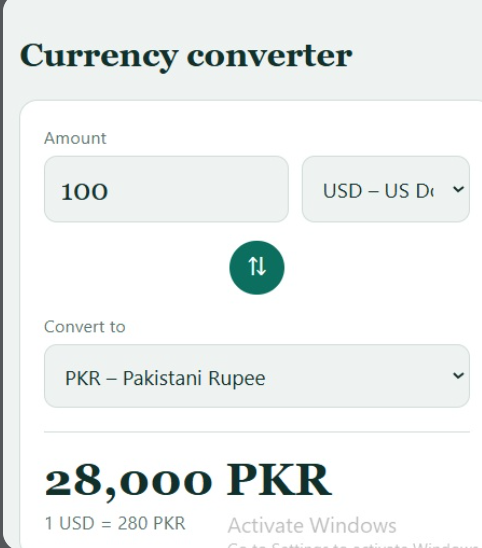
    Overall, the Currency Converter project is a valuable and practical coding task. It combines programming, mathematics, data, APIs, and user-interface design in one application. By completing this project, I gained more confidence in coding and learned how to use technology to create something useful. I hope to continue improving my programming skills and build more creative, helpful, and interactive applications in the future.
    #RSF8
    #CurrencyConverter
    #CodingTask
    #ClaudeAI
    #Programming
    #WebDevelopment
    #HTML
    #CSS
    #JavaScript
    #API
    #ExchangeRate
    #LearningToCode
    #CodingJourney
    #RehanSchool
    #FoundationLevel
    #MadeByMe
    RSIF8 Coding Book TaskNO:6 Rool NO:13 understand how different programming concepts work together. It also encouraged me to explore more advanced projects and learn how real-world applications are developed. Overall, the Currency Converter project is a valuable and practical coding task. It combines programming, mathematics, data, APIs, and user-interface design in one application. By completing this project, I gained more confidence in coding and learned how to use technology to create something useful. I hope to continue improving my programming skills and build more creative, helpful, and interactive applications in the future. #RSF8 🎓✨ #CurrencyConverter 💱 #CodingTask 💻 #ClaudeAI 🤖 #Programming #WebDevelopment #HTML #CSS #JavaScript #API #ExchangeRate #LearningToCode #CodingJourney #RehanSchool #FoundationLevel 📚 #MadeByMe 🚀
    0 Comments 0 Shares 1379 Views
  • Mohsin RSi F8
    Roll NO:13
    Coding Task NO:18
    Class: Foundation Level
    Made by Me

    Edit
    Simple Chat Application — Long Description

    Complete the Coding Task: Simple Chat Application

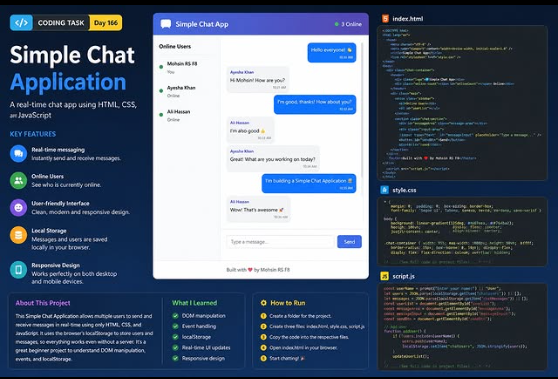
    This project is a Simple Chat Application created to understand the basic concepts of web development using HTML, CSS, and JavaScript. The main purpose of this project is to create a clean and interactive chatting interface where users can type messages, send them, and see conversations displayed on the screen.

    The application demonstrates how modern websites can respond to user actions and update their content dynamically. HTML is used to create the structure of the chat interface, including the message area, input field, buttons, and user section. CSS is used to design the application with a clean, modern, responsive layout that can work on both desktop and mobile screens. JavaScript adds functionality by handling user input, sending messages, updating the chat area, and creating an interactive experience.

    While building this project, I learned important concepts such as DOM manipulation, event handling, functions, arrays, objects, user input, and dynamic content updates. I also learned how JavaScript can communicate with elements on a webpage and change their content without refreshing the entire page.

    The project is a great beginner-friendly example because it combines three important web technologies into one practical application. Instead of only learning individual coding concepts, this task shows how HTML, CSS, and JavaScript can work together to create something useful and interactive.

    One of the most interesting parts of the project is the message system. A user can enter a message into the text box and click the Send button to display it in the conversation area. The interface can also include timestamps, user names, online indicators, and different message styles to make the experience feel more like a real chat application.

    This project also helped me understand the importance of user-friendly design.
    Mohsin RSi F8 🎓✨ Roll NO:13 Coding Task NO:18 Class: Foundation Level 📚 Made by Me 💻🚀 Edit 💬 Simple Chat Application — Long Description Complete the Coding Task: Simple Chat Application 💻💬 This project is a Simple Chat Application created to understand the basic concepts of web development using HTML, CSS, and JavaScript. The main purpose of this project is to create a clean and interactive chatting interface where users can type messages, send them, and see conversations displayed on the screen. The application demonstrates how modern websites can respond to user actions and update their content dynamically. HTML is used to create the structure of the chat interface, including the message area, input field, buttons, and user section. CSS is used to design the application with a clean, modern, responsive layout that can work on both desktop and mobile screens. JavaScript adds functionality by handling user input, sending messages, updating the chat area, and creating an interactive experience. While building this project, I learned important concepts such as DOM manipulation, event handling, functions, arrays, objects, user input, and dynamic content updates. I also learned how JavaScript can communicate with elements on a webpage and change their content without refreshing the entire page. The project is a great beginner-friendly example because it combines three important web technologies into one practical application. Instead of only learning individual coding concepts, this task shows how HTML, CSS, and JavaScript can work together to create something useful and interactive. One of the most interesting parts of the project is the message system. A user can enter a message into the text box and click the Send button to display it in the conversation area. The interface can also include timestamps, user names, online indicators, and different message styles to make the experience feel more like a real chat application. This project also helped me understand the importance of user-friendly design.
    0 Comments 0 Shares 610 Views
  • RSIF8
    Roll no:17
    Coding task no:24
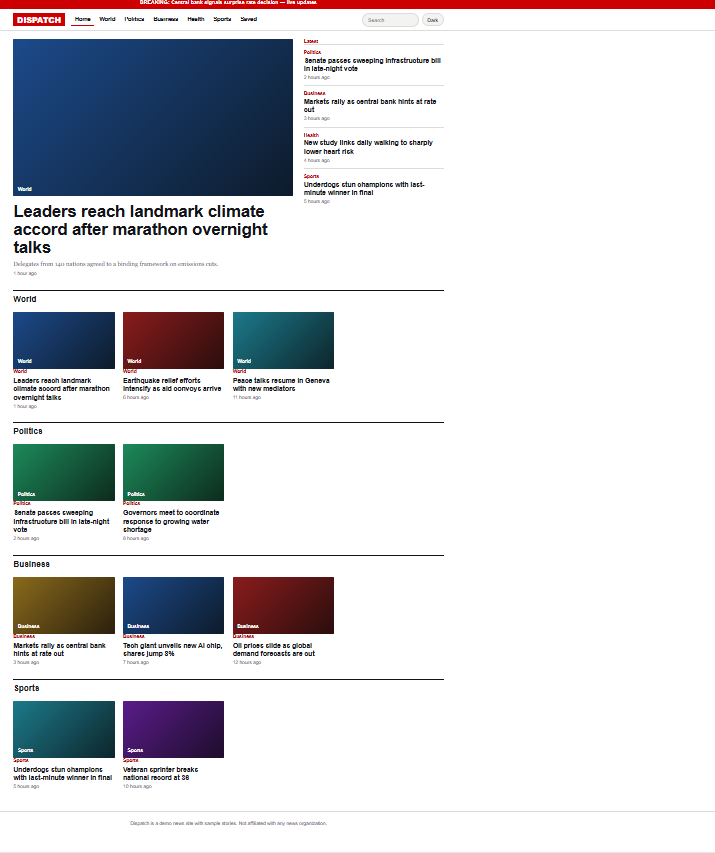
    Topic:Coding Task — CNN Clone (Functional, Web-Based, 3 days).

    Description: Coding Task — CNN Clone

    I am working on an exciting coding project: building a functional, web-based CNN Clone! My goal is to create a news website inspired by CNN, with a clean design, news headlines, categories, images, and interactive features. This 3-day coding challenge will help me improve my web development, problem-solving, and coding skills. ‍ Learning by building is the best way to grow!

    #️⃣ Hashtags:

    #CNNClone #CodingTask #WebDevelopment #CodingWithAI #RehanSchool #RehanAI #LearnToCode #HTML #CSS #JavaScript #Programming #AIandTechnology #3DayChallenge #FutureDeveloper

    Emojis: ‍
    RSIF8 Roll no:17 Coding task no:24 Topic:Coding Task — CNN Clone (Functional, Web-Based, 3 days). 💻 Description: Coding Task — CNN Clone 🌐📰 I am working on an exciting coding project: building a functional, web-based CNN Clone! 🚀 My goal is to create a news website inspired by CNN, with a clean design, news headlines, categories, images, and interactive features. 📰✨ This 3-day coding challenge will help me improve my web development, problem-solving, and coding skills. 💡👩‍💻 Learning by building is the best way to grow! 🔥 #️⃣ Hashtags: #CNNClone #CodingTask #WebDevelopment #CodingWithAI #RehanSchool #RehanAI #LearnToCode #HTML #CSS #JavaScript #Programming #AIandTechnology #3DayChallenge #FutureDeveloper 💻🚀 Emojis: 💻 👩‍💻 🌐 📰 🚀 💡 🎯 🔥 📚 ✨
    0 Comments 0 Shares 1328 Views
  • Mohsin RS F8
    Roll NO:13
    Coding Task NO:15
    Class: Foundation Level
    Made by Me

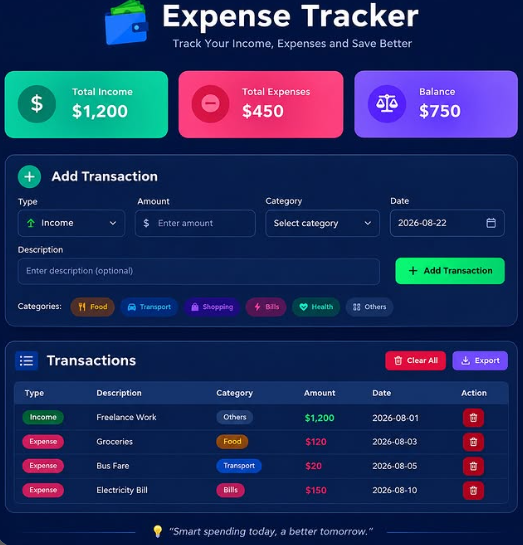
    Complete the Coding Task: Expense Tracker

    I completed the Expense Tracker coding task as a practical project to learn how technology can be used to organize and manage everyday financial information. The main purpose of this project is to create a simple and user-friendly application where users can record their income and expenses and easily see their overall balance.

    An Expense Tracker is a useful project for beginners because it combines several important programming concepts in one application. Instead of only displaying information on a webpage, the project allows the user to enter data, interact with buttons and forms, and see the information update dynamically.

    The application allows users to add transactions by entering details such as a description, amount, type, category, and date. A transaction can be marked as either income or an expense. Categories can help organize different types of spending, such as food, transportation, education, shopping, bills, entertainment, or other expenses.

    One of the most useful features of the project is the summary section. It displays the total income, total expenses, and remaining balance. Whenever a new transaction is added, the application calculates the updated totals automatically. This makes it easier to understand how the recorded money is being managed.

    The project also includes a transaction list where users can view their previous entries. Each transaction shows important information such as its description, category, amount, and date. If an entry is no longer needed, the user can delete it. There is also a Clear All option for removing all stored transactions.

    For the development of this project, I used HTML, CSS, and JavaScript. HTML was used to create the structure of the application, including the forms, summary cards, buttons, and transaction list. CSS was used to create a clean and responsive interface that can work on different screen sizes. JavaScript was used to add functionality, perform calculations, manage transactions, and update the interface whenever the data changes.
    Mohsin RS F8 🎓✨ Roll NO:13 Coding Task NO:15 Class: Foundation Level 📚 Made by Me 💻🚀 💰 Complete the Coding Task: Expense Tracker I completed the Expense Tracker coding task as a practical project to learn how technology can be used to organize and manage everyday financial information. The main purpose of this project is to create a simple and user-friendly application where users can record their income and expenses and easily see their overall balance. An Expense Tracker is a useful project for beginners because it combines several important programming concepts in one application. Instead of only displaying information on a webpage, the project allows the user to enter data, interact with buttons and forms, and see the information update dynamically. The application allows users to add transactions by entering details such as a description, amount, type, category, and date. A transaction can be marked as either income or an expense. Categories can help organize different types of spending, such as food, transportation, education, shopping, bills, entertainment, or other expenses. One of the most useful features of the project is the summary section. It displays the total income, total expenses, and remaining balance. Whenever a new transaction is added, the application calculates the updated totals automatically. This makes it easier to understand how the recorded money is being managed. The project also includes a transaction list where users can view their previous entries. Each transaction shows important information such as its description, category, amount, and date. If an entry is no longer needed, the user can delete it. There is also a Clear All option for removing all stored transactions. For the development of this project, I used HTML, CSS, and JavaScript. HTML was used to create the structure of the application, including the forms, summary cards, buttons, and transaction list. CSS was used to create a clean and responsive interface that can work on different screen sizes. JavaScript was used to add functionality, perform calculations, manage transactions, and update the interface whenever the data changes.
    0 Comments 0 Shares 712 Views
More Results