


#rsisb
Roll no.239
Foundation Level
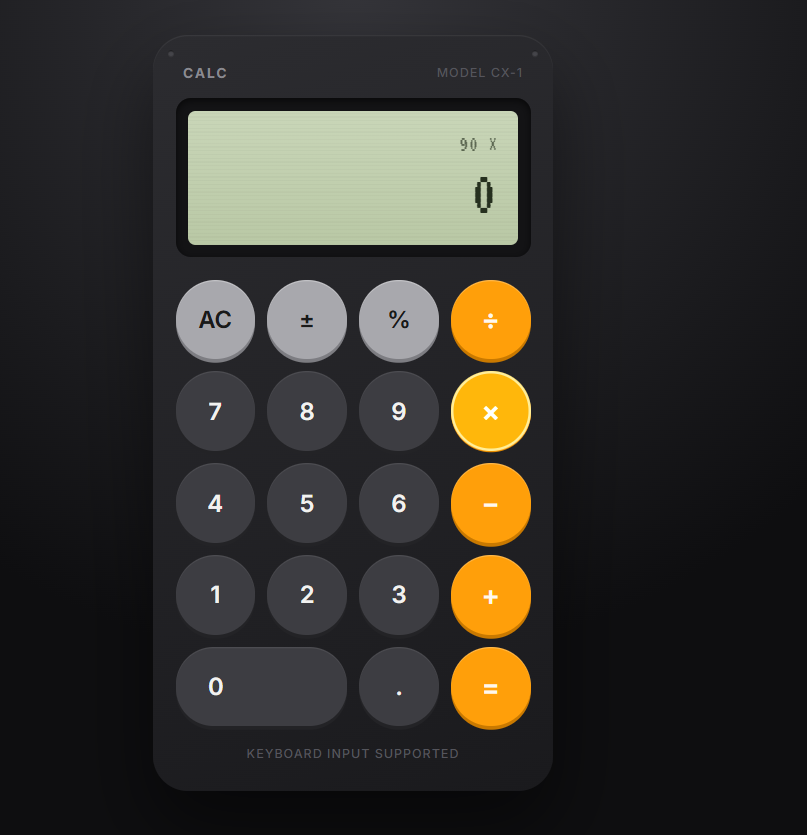
A **Basic Calculator with GUI (Graphical User Interface)** is a simple computer program that allows users to perform basic mathematical calculations through an easy-to-use visual interface. Instead of typing commands, users can click buttons to enter numbers and mathematical operations.
A basic calculator usually includes buttons for **addition (+), subtraction (-), multiplication (×), and division (÷)**. It also has a display area where users can see the numbers they enter and the results of their calculations.
The main purpose of creating a calculator with a GUI is to learn how graphical applications work. It helps beginners understand important programming concepts such as **buttons, input fields, events, functions, and user interaction**.
For example, if a user enters **10 + 5** and presses the equals button, the calculator displays **15**.
A Basic Calculator with GUI is a useful beginner-level programming project because it combines simple mathematics with practical interface design. It can later be improved by adding features such as **percentage, square root, decimal numbers, clear buttons, calculation history, and a better design**.
Overall, this project is an excellent way for beginners to practice programming while creating a useful and interactive application.
Roll no.239
Foundation Level
A **Basic Calculator with GUI (Graphical User Interface)** is a simple computer program that allows users to perform basic mathematical calculations through an easy-to-use visual interface. Instead of typing commands, users can click buttons to enter numbers and mathematical operations.
A basic calculator usually includes buttons for **addition (+), subtraction (-), multiplication (×), and division (÷)**. It also has a display area where users can see the numbers they enter and the results of their calculations.
The main purpose of creating a calculator with a GUI is to learn how graphical applications work. It helps beginners understand important programming concepts such as **buttons, input fields, events, functions, and user interaction**.
For example, if a user enters **10 + 5** and presses the equals button, the calculator displays **15**.
A Basic Calculator with GUI is a useful beginner-level programming project because it combines simple mathematics with practical interface design. It can later be improved by adding features such as **percentage, square root, decimal numbers, clear buttons, calculation history, and a better design**.
Overall, this project is an excellent way for beginners to practice programming while creating a useful and interactive application.
#rsisb
Roll no.239
Foundation Level
A **Basic Calculator with GUI (Graphical User Interface)** is a simple computer program that allows users to perform basic mathematical calculations through an easy-to-use visual interface. Instead of typing commands, users can click buttons to enter numbers and mathematical operations.
A basic calculator usually includes buttons for **addition (+), subtraction (-), multiplication (×), and division (÷)**. It also has a display area where users can see the numbers they enter and the results of their calculations.
The main purpose of creating a calculator with a GUI is to learn how graphical applications work. It helps beginners understand important programming concepts such as **buttons, input fields, events, functions, and user interaction**.
For example, if a user enters **10 + 5** and presses the equals button, the calculator displays **15**.
A Basic Calculator with GUI is a useful beginner-level programming project because it combines simple mathematics with practical interface design. It can later be improved by adding features such as **percentage, square root, decimal numbers, clear buttons, calculation history, and a better design**.
Overall, this project is an excellent way for beginners to practice programming while creating a useful and interactive application.
0 Comments
0 Shares
104 Views