


# FOUNDATION LEVEL
## DAY 47
### CODING TASK
**Simple To-Do List App**
**Roll Number: 005**
### Description
Today’s coding task is a **Simple To-Do List App** made using **HTML, CSS, and JavaScript**.
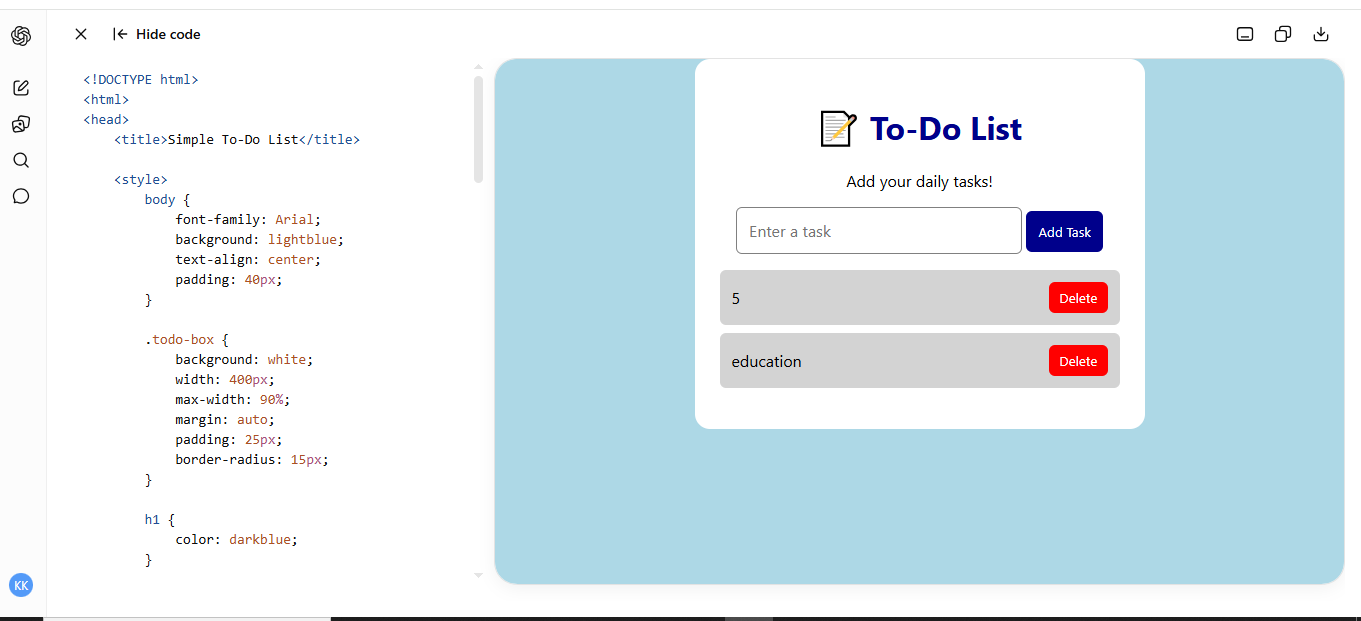
The purpose of this project is to create a simple task list where the user can enter a task and add it to the list. Each task appears on the screen with a **Delete** button.
JavaScript is used to take the user's input, create a new task, display it on the webpage, and remove the task when the Delete button is clicked.
### Technologies Used
* **HTML** – Creates the structure of the To-Do List.
* **CSS** – Makes the application simple and attractive.
* **JavaScript** – Adds and deletes tasks.
### Main Features
* Enter a new task.
* Add the task to the list.
* Display tasks on the webpage.
* Delete individual tasks.
* Shows an alert if the input is empty.
### JavaScript Concepts Used
* Variables
* Functions
* `if` condition
* `document.getElementById()`
* `createElement()`
* `appendChild()`
* `remove()`
* Button
## DAY 47
### CODING TASK
**Simple To-Do List App**
**Roll Number: 005**
### Description
Today’s coding task is a **Simple To-Do List App** made using **HTML, CSS, and JavaScript**.
The purpose of this project is to create a simple task list where the user can enter a task and add it to the list. Each task appears on the screen with a **Delete** button.
JavaScript is used to take the user's input, create a new task, display it on the webpage, and remove the task when the Delete button is clicked.
### Technologies Used
* **HTML** – Creates the structure of the To-Do List.
* **CSS** – Makes the application simple and attractive.
* **JavaScript** – Adds and deletes tasks.
### Main Features
* Enter a new task.
* Add the task to the list.
* Display tasks on the webpage.
* Delete individual tasks.
* Shows an alert if the input is empty.
### JavaScript Concepts Used
* Variables
* Functions
* `if` condition
* `document.getElementById()`
* `createElement()`
* `appendChild()`
* `remove()`
* Button
# FOUNDATION LEVEL
## DAY 47
### CODING TASK
**Simple To-Do List App**
**Roll Number: 005**
### Description
Today’s coding task is a **Simple To-Do List App** made using **HTML, CSS, and JavaScript**.
The purpose of this project is to create a simple task list where the user can enter a task and add it to the list. Each task appears on the screen with a **Delete** button.
JavaScript is used to take the user's input, create a new task, display it on the webpage, and remove the task when the Delete button is clicked.
### Technologies Used
* **HTML** – Creates the structure of the To-Do List.
* **CSS** – Makes the application simple and attractive.
* **JavaScript** – Adds and deletes tasks.
### Main Features
* Enter a new task.
* Add the task to the list.
* Display tasks on the webpage.
* Delete individual tasks.
* Shows an alert if the input is empty.
### JavaScript Concepts Used
* Variables
* Functions
* `if` condition
* `document.getElementById()`
* `createElement()`
* `appendChild()`
* `remove()`
* Button
0 Comments
0 Shares
203 Views