


Day 96
rollno:=006
foundation level
Coding Task
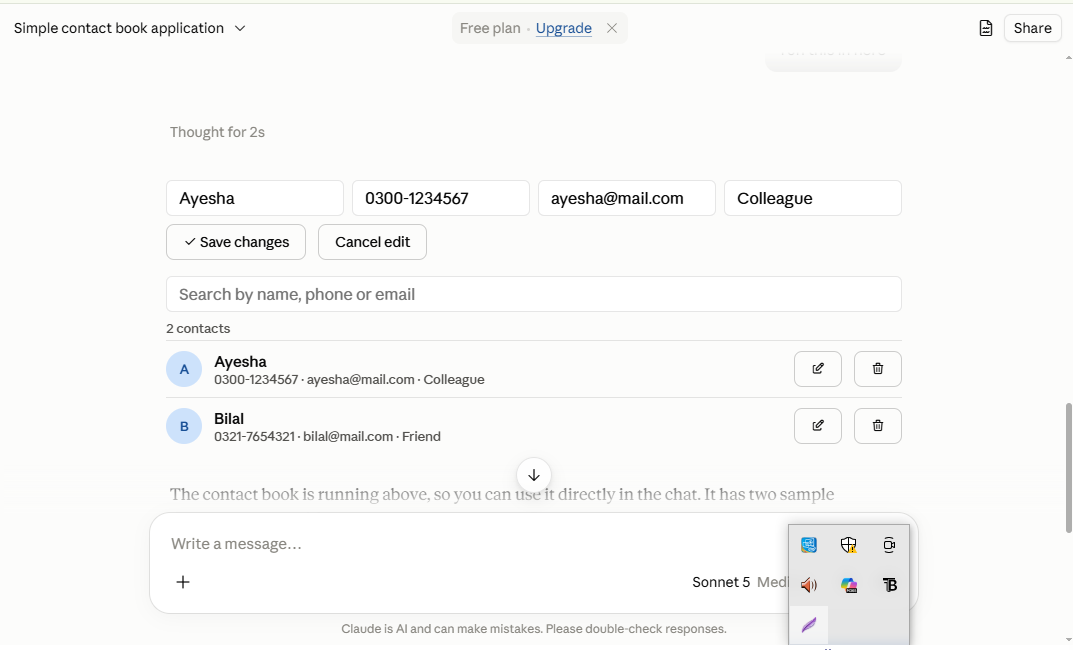
What it is: a simple contact book that lets you store and manage people's contact details. It runs as an interactive widget inside the chat, and there is also a Python command-line version.
What each contact holds: a name, a phone number, an email address, and a short note (for example "Colleague" or "Friend"). Name and phone are required, and email and note are optional.
Features:
Add: create a contact from the form. Duplicate names are rejected, and missing required fields show a short error message.
View: all contacts appear in a list, sorted alphabetically, each with an initials avatar and a count at the top.
Search: the list filters as you type, matching name, phone or email without regard to upper or lower case.
Edit: the pencil icon loads a contact back into the form. Save changes updates it, and Cancel edit backs out.
Delete: the trash icon removes a contact immediately.
How it works:
Contacts are held in a simple list of records (name, phone, email, note).
Every action (add, edit, delete, search) updates that list and redraws the display.
The widget keeps contacts in memory only, so they reset when the chat reloads.
The Python version saves them to a contacts.json file, so they persist between runs.
rollno:=006
foundation level
Coding Task
What it is: a simple contact book that lets you store and manage people's contact details. It runs as an interactive widget inside the chat, and there is also a Python command-line version.
What each contact holds: a name, a phone number, an email address, and a short note (for example "Colleague" or "Friend"). Name and phone are required, and email and note are optional.
Features:
Add: create a contact from the form. Duplicate names are rejected, and missing required fields show a short error message.
View: all contacts appear in a list, sorted alphabetically, each with an initials avatar and a count at the top.
Search: the list filters as you type, matching name, phone or email without regard to upper or lower case.
Edit: the pencil icon loads a contact back into the form. Save changes updates it, and Cancel edit backs out.
Delete: the trash icon removes a contact immediately.
How it works:
Contacts are held in a simple list of records (name, phone, email, note).
Every action (add, edit, delete, search) updates that list and redraws the display.
The widget keeps contacts in memory only, so they reset when the chat reloads.
The Python version saves them to a contacts.json file, so they persist between runs.
Day 96
rollno:=006
foundation level
💻 Coding Task
What it is: a simple contact book that lets you store and manage people's contact details. It runs as an interactive widget inside the chat, and there is also a Python command-line version.
What each contact holds: a name, a phone number, an email address, and a short note (for example "Colleague" or "Friend"). Name and phone are required, and email and note are optional.
Features:
Add: create a contact from the form. Duplicate names are rejected, and missing required fields show a short error message.
View: all contacts appear in a list, sorted alphabetically, each with an initials avatar and a count at the top.
Search: the list filters as you type, matching name, phone or email without regard to upper or lower case.
Edit: the pencil icon loads a contact back into the form. Save changes updates it, and Cancel edit backs out.
Delete: the trash icon removes a contact immediately.
How it works:
Contacts are held in a simple list of records (name, phone, email, note).
Every action (add, edit, delete, search) updates that list and redraws the display.
The widget keeps contacts in memory only, so they reset when the chat reloads.
The Python version saves them to a contacts.json file, so they persist between runs.
0 تبصرے
0 شیئرز
398 ویوز