


Day 110
rollno:-006
foundation level
Coding Task
Digital Display Screen: A light green, LCD-style display at the top shows the calculation 870 × 20 = in smaller dark text, with the result 17400 highlighted in large bold numbers below it. Calculator Keypad Layout:Top Function Row: Features a red C (Clear) button, a backspace/delete icon, a percentage symbol (%), and a division symbol (÷). Number Keypad: White rounded square buttons containing black digits 1 through 9, with a wider double-width 0 button at the bottom. Arithmetic Operators: Positioned on the far right column in medium blue square buttons: multiplication (×), subtraction (−), and addition (+). Equals Button: A prominent orange square equals button (=) located in the bottom-right corner. Taskbar Overlay Menu: A small floating utility panel sits at the bottom center displaying system icons, including a security shield warning, a camera icon, a speaker symbol, and a feather/pen tool icon.
rollno:-006
foundation level
Coding Task
Digital Display Screen: A light green, LCD-style display at the top shows the calculation 870 × 20 = in smaller dark text, with the result 17400 highlighted in large bold numbers below it. Calculator Keypad Layout:Top Function Row: Features a red C (Clear) button, a backspace/delete icon, a percentage symbol (%), and a division symbol (÷). Number Keypad: White rounded square buttons containing black digits 1 through 9, with a wider double-width 0 button at the bottom. Arithmetic Operators: Positioned on the far right column in medium blue square buttons: multiplication (×), subtraction (−), and addition (+). Equals Button: A prominent orange square equals button (=) located in the bottom-right corner. Taskbar Overlay Menu: A small floating utility panel sits at the bottom center displaying system icons, including a security shield warning, a camera icon, a speaker symbol, and a feather/pen tool icon.
Day 110
rollno:-006
foundation level
💻 Coding Task
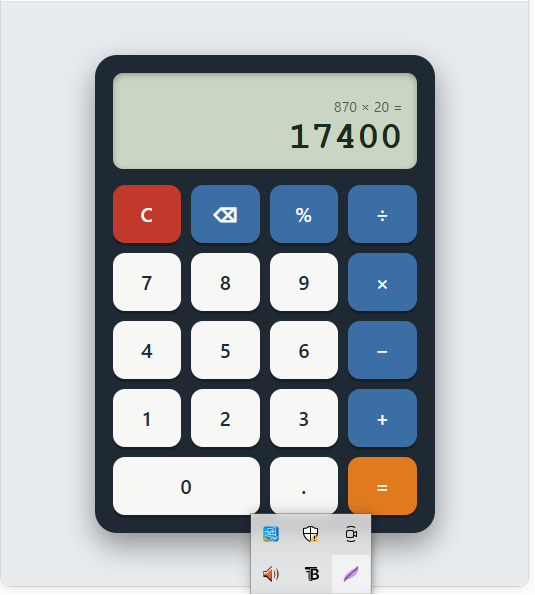
Digital Display Screen: A light green, LCD-style display at the top shows the calculation 870 × 20 = in smaller dark text, with the result 17400 highlighted in large bold numbers below it. Calculator Keypad Layout:Top Function Row: Features a red C (Clear) button, a backspace/delete icon, a percentage symbol (%), and a division symbol (÷). Number Keypad: White rounded square buttons containing black digits 1 through 9, with a wider double-width 0 button at the bottom. Arithmetic Operators: Positioned on the far right column in medium blue square buttons: multiplication (×), subtraction (−), and addition (+). Equals Button: A prominent orange square equals button (=) located in the bottom-right corner. Taskbar Overlay Menu: A small floating utility panel sits at the bottom center displaying system icons, including a security shield warning, a camera icon, a speaker symbol, and a feather/pen tool icon.
0 Commentarios
0 Acciones
546 Views