


RSIF8
Coding Book TaskNO:5
Rool NO:13
Weather App – Coding Task
For this coding task, I created a Weather App using Claude.ai. The purpose of this project is to develop a useful and interactive application that allows users to check the current weather information of any city. Weather is an important part of our everyday lives because it affects our travel, outdoor activities, school, work, and many other daily plans. By creating this application, I learned how technology can make it easier to access useful information quickly.
The Weather App has a simple and user-friendly interface. The user can enter the name of a city into a search box and then click the search button to find its current weather. The application processes the city name and displays the available weather information on the screen. This makes it possible for users to check weather conditions for different cities without needing to use a complicated system.
The application can display important weather details such as the current temperature, weather condition, humidity, wind speed, and other relevant information. Depending on the weather service being used, additional information can also be displayed. Showing this information in an organized way makes the application easier to understand and more useful for the user.
One of the most interesting parts of this project was learning how a web application can use an API to obtain information from an external service. A weather API can provide current weather data, and the application can request that information and display it to the user. This introduced me to an important concept in modern web development because many real-world applications depend on APIs to retrieve information from online services.
While working on this project with Claude.ai, I also learned how different programming languages work together. HTML can be used to create the structure of the Weather App, CSS can be used to design and style the interface, and JavaScript can be used to make the application interactive and handle the weather data. Understanding how these technologies work together helped me improve my web development skills.
Coding Book TaskNO:5
Rool NO:13
Weather App – Coding Task
For this coding task, I created a Weather App using Claude.ai. The purpose of this project is to develop a useful and interactive application that allows users to check the current weather information of any city. Weather is an important part of our everyday lives because it affects our travel, outdoor activities, school, work, and many other daily plans. By creating this application, I learned how technology can make it easier to access useful information quickly.
The Weather App has a simple and user-friendly interface. The user can enter the name of a city into a search box and then click the search button to find its current weather. The application processes the city name and displays the available weather information on the screen. This makes it possible for users to check weather conditions for different cities without needing to use a complicated system.
The application can display important weather details such as the current temperature, weather condition, humidity, wind speed, and other relevant information. Depending on the weather service being used, additional information can also be displayed. Showing this information in an organized way makes the application easier to understand and more useful for the user.
One of the most interesting parts of this project was learning how a web application can use an API to obtain information from an external service. A weather API can provide current weather data, and the application can request that information and display it to the user. This introduced me to an important concept in modern web development because many real-world applications depend on APIs to retrieve information from online services.
While working on this project with Claude.ai, I also learned how different programming languages work together. HTML can be used to create the structure of the Weather App, CSS can be used to design and style the interface, and JavaScript can be used to make the application interactive and handle the weather data. Understanding how these technologies work together helped me improve my web development skills.
RSIF8
Coding Book TaskNO:5
Rool NO:13
Weather App – Coding Task 🌦️
For this coding task, I created a Weather App using Claude.ai. The purpose of this project is to develop a useful and interactive application that allows users to check the current weather information of any city. Weather is an important part of our everyday lives because it affects our travel, outdoor activities, school, work, and many other daily plans. By creating this application, I learned how technology can make it easier to access useful information quickly.
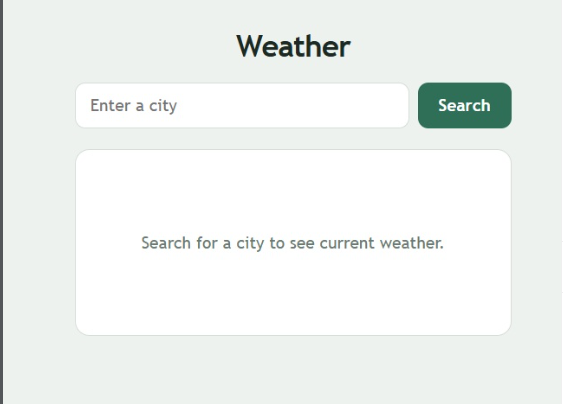
The Weather App has a simple and user-friendly interface. The user can enter the name of a city into a search box and then click the search button to find its current weather. The application processes the city name and displays the available weather information on the screen. This makes it possible for users to check weather conditions for different cities without needing to use a complicated system.
The application can display important weather details such as the current temperature, weather condition, humidity, wind speed, and other relevant information. Depending on the weather service being used, additional information can also be displayed. Showing this information in an organized way makes the application easier to understand and more useful for the user.
One of the most interesting parts of this project was learning how a web application can use an API to obtain information from an external service. A weather API can provide current weather data, and the application can request that information and display it to the user. This introduced me to an important concept in modern web development because many real-world applications depend on APIs to retrieve information from online services.
While working on this project with Claude.ai, I also learned how different programming languages work together. HTML can be used to create the structure of the Weather App, CSS can be used to design and style the interface, and JavaScript can be used to make the application interactive and handle the weather data. Understanding how these technologies work together helped me improve my web development skills.
0 Reacties
0 aandelen
53 Views