


Mohsin RS F8
Coding Task NO:10
Class: Foundation Level
Made by Me
Simple Contact Book — Detailed Description
The Simple Contact Book is a beginner-friendly Python programming project created to demonstrate how we can use code to store and manage information in an organized way. The main purpose of this project is to create a simple digital contact book where users can save important contact details and access them whenever needed.
In this project, Python's dictionary data structure is used to store contacts. Each contact has a name and a corresponding phone number. The program provides an easy-to-use menu through which the user can choose different actions. This makes the project simple to understand while also introducing important programming concepts.
The first option is Add Contact, which allows the user to enter a person's name and phone number. After entering the information, the contact is stored in the contact book. The second option is View Contacts, which displays all the contacts that have been saved. This helps users quickly see the information stored in the program.
The third option is Search Contact. With this feature, users can enter a name and find the corresponding phone number from the contact list. This demonstrates how Python can search through stored information. The fourth option is Delete Contact, which allows users to remove a contact that they no longer need. Finally, the Exit option closes the program safely.
This project helped me understand several important programming concepts, including variables, dictionaries, user input, loops, conditional statements, searching, adding data, deleting data, and menu-driven programs. It also showed me how a simple Python program can solve a practical everyday problem.
Although this is a small project, it is an excellent starting point for learning programming. In the future, this Contact Book could be improved by adding features such as email addresses, multiple phone numbers, contact editing, alphabetical sorting, saving contacts permanently to a file, and a graphical user interface.
Coding Task NO:10
Class: Foundation Level
Made by Me
Simple Contact Book — Detailed Description
The Simple Contact Book is a beginner-friendly Python programming project created to demonstrate how we can use code to store and manage information in an organized way. The main purpose of this project is to create a simple digital contact book where users can save important contact details and access them whenever needed.
In this project, Python's dictionary data structure is used to store contacts. Each contact has a name and a corresponding phone number. The program provides an easy-to-use menu through which the user can choose different actions. This makes the project simple to understand while also introducing important programming concepts.
The first option is Add Contact, which allows the user to enter a person's name and phone number. After entering the information, the contact is stored in the contact book. The second option is View Contacts, which displays all the contacts that have been saved. This helps users quickly see the information stored in the program.
The third option is Search Contact. With this feature, users can enter a name and find the corresponding phone number from the contact list. This demonstrates how Python can search through stored information. The fourth option is Delete Contact, which allows users to remove a contact that they no longer need. Finally, the Exit option closes the program safely.
This project helped me understand several important programming concepts, including variables, dictionaries, user input, loops, conditional statements, searching, adding data, deleting data, and menu-driven programs. It also showed me how a simple Python program can solve a practical everyday problem.
Although this is a small project, it is an excellent starting point for learning programming. In the future, this Contact Book could be improved by adding features such as email addresses, multiple phone numbers, contact editing, alphabetical sorting, saving contacts permanently to a file, and a graphical user interface.
Mohsin RS F8 🎓✨
Coding Task NO:10
Class: Foundation Level 📚
Made by Me 💻🚀
📱 Simple Contact Book — Detailed Description
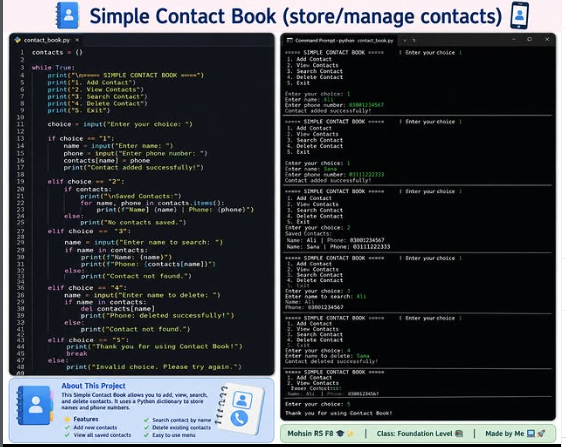
The Simple Contact Book is a beginner-friendly Python programming project created to demonstrate how we can use code to store and manage information in an organized way. The main purpose of this project is to create a simple digital contact book where users can save important contact details and access them whenever needed. 💻📱
In this project, Python's dictionary data structure is used to store contacts. Each contact has a name and a corresponding phone number. The program provides an easy-to-use menu through which the user can choose different actions. This makes the project simple to understand while also introducing important programming concepts.
The first option is Add Contact, which allows the user to enter a person's name and phone number. After entering the information, the contact is stored in the contact book. The second option is View Contacts, which displays all the contacts that have been saved. This helps users quickly see the information stored in the program.
The third option is Search Contact. With this feature, users can enter a name and find the corresponding phone number from the contact list. This demonstrates how Python can search through stored information. The fourth option is Delete Contact, which allows users to remove a contact that they no longer need. Finally, the Exit option closes the program safely.
This project helped me understand several important programming concepts, including variables, dictionaries, user input, loops, conditional statements, searching, adding data, deleting data, and menu-driven programs. It also showed me how a simple Python program can solve a practical everyday problem.
Although this is a small project, it is an excellent starting point for learning programming. In the future, this Contact Book could be improved by adding features such as email addresses, multiple phone numbers, contact editing, alphabetical sorting, saving contacts permanently to a file, and a graphical user interface. 🚀
0 Commentarios
0 Acciones
70 Views