


Be the first to
Mohsin RS F8
Coding Task NO:11
Class: Foundation Level
Made by Me
Rock, Paper, Scissors Game — Long Description
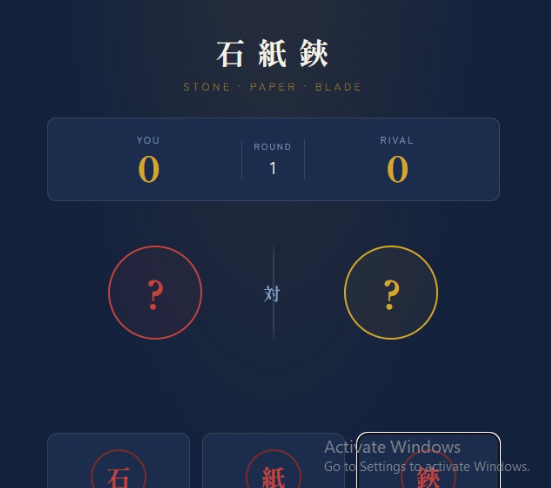
The Rock, Paper, Scissors Game is a simple, interactive, and entertaining web-based game created using HTML, CSS, and JavaScript. The main purpose of this project is to demonstrate how basic web technologies can be combined to create an interactive game with buttons, animations, game logic, score tracking, and real-time results.
In this game, the player competes against the computer by choosing one of three options: Rock, Paper, or Scissors. After the player makes a selection, the computer automatically chooses one of the three options. JavaScript then compares both choices and determines the winner according to the classic rules of the game.
The rules are very simple: Rock beats Scissors, Scissors beats Paper, and Paper beats Rock. If both the player and computer choose the same option, the round ends in a draw. The result is displayed immediately so that the player can easily understand what happened in that round.
The project also focuses on creating a clean and attractive user interface. HTML provides the structure of the game, including the title, buttons, score area, player and computer choices, and result section. CSS is used to make the interface visually appealing by adding colors, spacing, rounded buttons, backgrounds, transitions, and responsive design. The goal is to make the game easy to understand and enjoyable to play on different screen sizes.
The most important part of the project is the JavaScript game logic. JavaScript detects which button the player clicks, generates a random choice for the computer, compares the two choices, and updates the game result and scores. This demonstrates important programming concepts such as variables, functions, conditional statements, random number generation, event handling, and DOM manipulation.
The game can also help beginners understand how websites can respond to user actions. Instead of simply displaying static information, the page reacts whenever the player selects Rock, Paper, or Scissors. The score can be updated after every round, allowing the player to continue
Be the first to
Mohsin RS F8 🎓✨
Coding Task NO:11
Class: Foundation Level 📚
Made by Me 💻🚀
Rock, Paper, Scissors Game — Long Description
The Rock, Paper, Scissors Game is a simple, interactive, and entertaining web-based game created using HTML, CSS, and JavaScript. The main purpose of this project is to demonstrate how basic web technologies can be combined to create an interactive game with buttons, animations, game logic, score tracking, and real-time results.
In this game, the player competes against the computer by choosing one of three options: 🪨 Rock, 📄 Paper, or ✂️ Scissors. After the player makes a selection, the computer automatically chooses one of the three options. JavaScript then compares both choices and determines the winner according to the classic rules of the game.
The rules are very simple: Rock beats Scissors, Scissors beats Paper, and Paper beats Rock. If both the player and computer choose the same option, the round ends in a draw. The result is displayed immediately so that the player can easily understand what happened in that round.
The project also focuses on creating a clean and attractive user interface. HTML provides the structure of the game, including the title, buttons, score area, player and computer choices, and result section. CSS is used to make the interface visually appealing by adding colors, spacing, rounded buttons, backgrounds, transitions, and responsive design. The goal is to make the game easy to understand and enjoyable to play on different screen sizes.
The most important part of the project is the JavaScript game logic. JavaScript detects which button the player clicks, generates a random choice for the computer, compares the two choices, and updates the game result and scores. This demonstrates important programming concepts such as variables, functions, conditional statements, random number generation, event handling, and DOM manipulation.
The game can also help beginners understand how websites can respond to user actions. Instead of simply displaying static information, the page reacts whenever the player selects Rock, Paper, or Scissors. The score can be updated after every round, allowing the player to continue
0 Kommentare
0 Anteile
43 Ansichten