


Mohsin RS F8
Coding Task NO:12
Class: Foundation Level
Made by Me
— Password Generator
A Password Generator is a useful and practical coding project designed to create strong and random passwords quickly. In today’s digital world, we use passwords for social media accounts, email, websites, applications, and many other online services. Using weak or easily guessed passwords can put accounts at risk, so learning how a password generator works is a great way to understand both programming and basic cybersecurity concepts.
The main purpose of this project is to allow the user to generate a password according to their preferred settings. The generator can include uppercase letters, lowercase letters, numbers, and special characters. By combining different types of characters, the program can create passwords that are much harder to guess than simple words or predictable patterns.
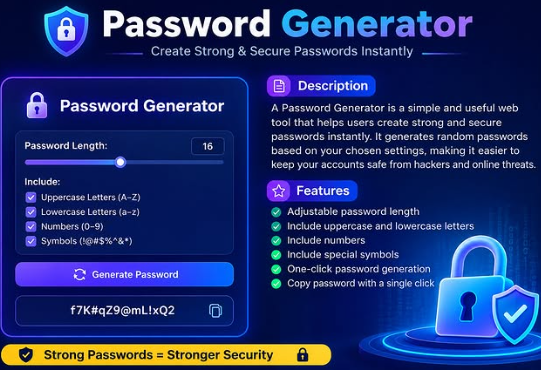
This project can be created using HTML, CSS, and JavaScript. HTML is used to build the structure of the interface, such as the password display, length selector, checkboxes, and generate button. CSS is used to make the application attractive, organized, and easy to use. JavaScript handles the main functionality by selecting characters randomly and creating a new password whenever the user clicks the Generate Password button.
One of the most useful features of this project is adjustable password length. Users can choose how long they want the generated password to be. The project can also provide options for uppercase letters, lowercase letters, numbers, and symbols. This makes the generator flexible and allows users to create different types of passwords based on their needs.
Another helpful feature is the copy button. After a password is generated, the user can copy it with a single click instead of manually selecting and typing it. This makes the application faster and more convenient to use.
Building a Password Generator is also a great way to practice important JavaScript concepts. While creating this project, students can learn about variables, functions, arrays, random selection, loops, conditional statements, event listeners, and DOM manipulation.
Mohsin RS F8 🎓✨
Coding Task NO:12
Class: Foundation Level 📚
Made by Me 💻🚀
— Password Generator 🔐💻
A Password Generator is a useful and practical coding project designed to create strong and random passwords quickly. In today’s digital world, we use passwords for social media accounts, email, websites, applications, and many other online services. Using weak or easily guessed passwords can put accounts at risk, so learning how a password generator works is a great way to understand both programming and basic cybersecurity concepts.
The main purpose of this project is to allow the user to generate a password according to their preferred settings. The generator can include uppercase letters, lowercase letters, numbers, and special characters. By combining different types of characters, the program can create passwords that are much harder to guess than simple words or predictable patterns.
This project can be created using HTML, CSS, and JavaScript. HTML is used to build the structure of the interface, such as the password display, length selector, checkboxes, and generate button. CSS is used to make the application attractive, organized, and easy to use. JavaScript handles the main functionality by selecting characters randomly and creating a new password whenever the user clicks the Generate Password button.
One of the most useful features of this project is adjustable password length. Users can choose how long they want the generated password to be. The project can also provide options for uppercase letters, lowercase letters, numbers, and symbols. This makes the generator flexible and allows users to create different types of passwords based on their needs.
Another helpful feature is the copy button. After a password is generated, the user can copy it with a single click instead of manually selecting and typing it. This makes the application faster and more convenient to use.
Building a Password Generator is also a great way to practice important JavaScript concepts. While creating this project, students can learn about variables, functions, arrays, random selection, loops, conditional statements, event listeners, and DOM manipulation.
0 تبصرے
0 شیئرز
44 ویوز