


Mohsin RS F8
Coding Task NO:13
Class: Foundation Level
Made by Me
Basic Text Editor:
The Basic Text Editor is a useful and beginner-friendly coding project that demonstrates how a simple text-editing application can be created using modern web technologies. The main purpose of this project is to provide users with a clean and easy-to-use digital workspace where they can write, edit, format, and manage text. Instead of using a complicated professional word processor, this project focuses on the essential features that users need for everyday writing.
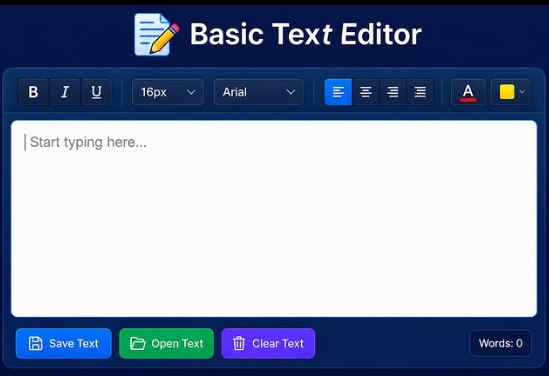
The interface of the Basic Text Editor can be designed with a large editing area in the center of the screen. This area provides enough space for users to type notes, assignments, stories, ideas, messages, or other written content. A clear and organized toolbar can be placed above the editor so that important formatting tools are easy to find. The design can use modern colors, rounded buttons, simple icons, and a responsive layout to create an attractive and comfortable user experience.
One of the most important parts of the editor is the text-formatting toolbar. Users can use options such as Bold, Italic, and Underline to change the appearance of selected text. Font size and font family controls can give users additional flexibility when preparing their content. Text-alignment buttons can allow users to align their writing to the left, center, right, or justify it. Color controls can also be included so that users can highlight or personalize important sections of their text.
The application can also include useful text-management features. A Save button can be used to store the user's work, while an Open button can help retrieve previously saved content. A Clear button can remove the current text when the user wants to begin a new document. These features make the project more practical because users are not limited to simply typing text; they can also manage their work within the application.
A word and character counter is another useful feature that can be added to the editor.
Coding Task NO:13
Class: Foundation Level
Made by Me
Basic Text Editor:
The Basic Text Editor is a useful and beginner-friendly coding project that demonstrates how a simple text-editing application can be created using modern web technologies. The main purpose of this project is to provide users with a clean and easy-to-use digital workspace where they can write, edit, format, and manage text. Instead of using a complicated professional word processor, this project focuses on the essential features that users need for everyday writing.
The interface of the Basic Text Editor can be designed with a large editing area in the center of the screen. This area provides enough space for users to type notes, assignments, stories, ideas, messages, or other written content. A clear and organized toolbar can be placed above the editor so that important formatting tools are easy to find. The design can use modern colors, rounded buttons, simple icons, and a responsive layout to create an attractive and comfortable user experience.
One of the most important parts of the editor is the text-formatting toolbar. Users can use options such as Bold, Italic, and Underline to change the appearance of selected text. Font size and font family controls can give users additional flexibility when preparing their content. Text-alignment buttons can allow users to align their writing to the left, center, right, or justify it. Color controls can also be included so that users can highlight or personalize important sections of their text.
The application can also include useful text-management features. A Save button can be used to store the user's work, while an Open button can help retrieve previously saved content. A Clear button can remove the current text when the user wants to begin a new document. These features make the project more practical because users are not limited to simply typing text; they can also manage their work within the application.
A word and character counter is another useful feature that can be added to the editor.
Mohsin RS F8 🎓✨
Coding Task NO:13
Class: Foundation Level 📚
Made by Me 💻🚀
Basic Text Editor:
The Basic Text Editor is a useful and beginner-friendly coding project that demonstrates how a simple text-editing application can be created using modern web technologies. The main purpose of this project is to provide users with a clean and easy-to-use digital workspace where they can write, edit, format, and manage text. Instead of using a complicated professional word processor, this project focuses on the essential features that users need for everyday writing.
The interface of the Basic Text Editor can be designed with a large editing area in the center of the screen. This area provides enough space for users to type notes, assignments, stories, ideas, messages, or other written content. A clear and organized toolbar can be placed above the editor so that important formatting tools are easy to find. The design can use modern colors, rounded buttons, simple icons, and a responsive layout to create an attractive and comfortable user experience.
One of the most important parts of the editor is the text-formatting toolbar. Users can use options such as Bold, Italic, and Underline to change the appearance of selected text. Font size and font family controls can give users additional flexibility when preparing their content. Text-alignment buttons can allow users to align their writing to the left, center, right, or justify it. Color controls can also be included so that users can highlight or personalize important sections of their text.
The application can also include useful text-management features. A Save button can be used to store the user's work, while an Open button can help retrieve previously saved content. A Clear button can remove the current text when the user wants to begin a new document. These features make the project more practical because users are not limited to simply typing text; they can also manage their work within the application.
A word and character counter is another useful feature that can be added to the editor.
0 Comentários
0 Compartilhamentos
35 Visualizações