


Mohsin RSi F8
Roll NO:13
Coding Task NO:18
Class: Foundation Level
Made by Me
Edit
Simple Chat Application — Long Description
Complete the Coding Task: Simple Chat Application
This project is a Simple Chat Application created to understand the basic concepts of web development using HTML, CSS, and JavaScript. The main purpose of this project is to create a clean and interactive chatting interface where users can type messages, send them, and see conversations displayed on the screen.
The application demonstrates how modern websites can respond to user actions and update their content dynamically. HTML is used to create the structure of the chat interface, including the message area, input field, buttons, and user section. CSS is used to design the application with a clean, modern, responsive layout that can work on both desktop and mobile screens. JavaScript adds functionality by handling user input, sending messages, updating the chat area, and creating an interactive experience.
While building this project, I learned important concepts such as DOM manipulation, event handling, functions, arrays, objects, user input, and dynamic content updates. I also learned how JavaScript can communicate with elements on a webpage and change their content without refreshing the entire page.
The project is a great beginner-friendly example because it combines three important web technologies into one practical application. Instead of only learning individual coding concepts, this task shows how HTML, CSS, and JavaScript can work together to create something useful and interactive.
One of the most interesting parts of the project is the message system. A user can enter a message into the text box and click the Send button to display it in the conversation area. The interface can also include timestamps, user names, online indicators, and different message styles to make the experience feel more like a real chat application.
This project also helped me understand the importance of user-friendly design.
Roll NO:13
Coding Task NO:18
Class: Foundation Level
Made by Me
Edit
Simple Chat Application — Long Description
Complete the Coding Task: Simple Chat Application
This project is a Simple Chat Application created to understand the basic concepts of web development using HTML, CSS, and JavaScript. The main purpose of this project is to create a clean and interactive chatting interface where users can type messages, send them, and see conversations displayed on the screen.
The application demonstrates how modern websites can respond to user actions and update their content dynamically. HTML is used to create the structure of the chat interface, including the message area, input field, buttons, and user section. CSS is used to design the application with a clean, modern, responsive layout that can work on both desktop and mobile screens. JavaScript adds functionality by handling user input, sending messages, updating the chat area, and creating an interactive experience.
While building this project, I learned important concepts such as DOM manipulation, event handling, functions, arrays, objects, user input, and dynamic content updates. I also learned how JavaScript can communicate with elements on a webpage and change their content without refreshing the entire page.
The project is a great beginner-friendly example because it combines three important web technologies into one practical application. Instead of only learning individual coding concepts, this task shows how HTML, CSS, and JavaScript can work together to create something useful and interactive.
One of the most interesting parts of the project is the message system. A user can enter a message into the text box and click the Send button to display it in the conversation area. The interface can also include timestamps, user names, online indicators, and different message styles to make the experience feel more like a real chat application.
This project also helped me understand the importance of user-friendly design.
Mohsin RSi F8 🎓✨
Roll NO:13
Coding Task NO:18
Class: Foundation Level 📚
Made by Me 💻🚀
Edit
💬 Simple Chat Application — Long Description
Complete the Coding Task: Simple Chat Application 💻💬
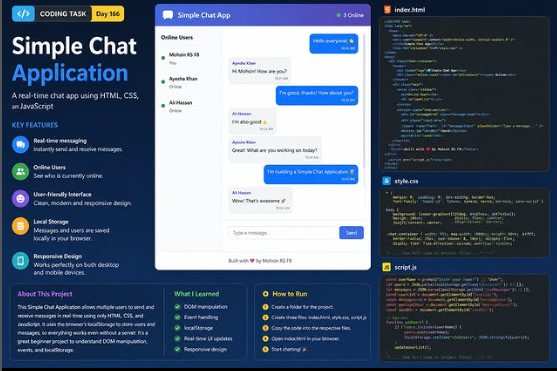
This project is a Simple Chat Application created to understand the basic concepts of web development using HTML, CSS, and JavaScript. The main purpose of this project is to create a clean and interactive chatting interface where users can type messages, send them, and see conversations displayed on the screen.
The application demonstrates how modern websites can respond to user actions and update their content dynamically. HTML is used to create the structure of the chat interface, including the message area, input field, buttons, and user section. CSS is used to design the application with a clean, modern, responsive layout that can work on both desktop and mobile screens. JavaScript adds functionality by handling user input, sending messages, updating the chat area, and creating an interactive experience.
While building this project, I learned important concepts such as DOM manipulation, event handling, functions, arrays, objects, user input, and dynamic content updates. I also learned how JavaScript can communicate with elements on a webpage and change their content without refreshing the entire page.
The project is a great beginner-friendly example because it combines three important web technologies into one practical application. Instead of only learning individual coding concepts, this task shows how HTML, CSS, and JavaScript can work together to create something useful and interactive.
One of the most interesting parts of the project is the message system. A user can enter a message into the text box and click the Send button to display it in the conversation area. The interface can also include timestamps, user names, online indicators, and different message styles to make the experience feel more like a real chat application.
This project also helped me understand the importance of user-friendly design.
0 Comentários
0 Compartilhamentos
39 Visualizações