


RSIF8
Coding Book TaskNO: 1
Create a Basic Calculator App Using Claude.ai
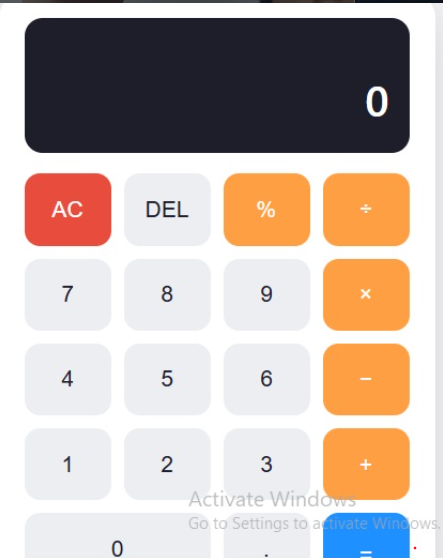
As part of my coding task, I created a Basic Calculator App using Claude.ai. The main purpose of this project was to understand how an AI tool can help in creating a simple and useful application while also learning the basic concepts of programming and user interaction.
The calculator is designed to perform four fundamental mathematical operations: addition, subtraction, multiplication, and division. The user can enter two numbers, select the required operation, and get the result quickly. This makes the application simple, practical, and easy to use.
For addition, the calculator combines two numbers and displays their total. For subtraction, it calculates the difference between the two numbers. For multiplication, it calculates the product, while the division operation calculates how many times one number can be divided by another. These four operations are some of the most important basic concepts in mathematics and programming.
While working on this project, I learned how a calculator application receives input from the user, processes that information, performs a mathematical operation, and then displays the output. I also learned that even a small application requires proper logic and careful handling of different situations. For example, division by zero needs to be handled properly so that the application does not produce an incorrect result.
Using Claude.ai for this project also gave me an opportunity to explore how artificial intelligence can support the coding process. AI can help generate ideas, explain programming concepts, suggest code, identify errors, and improve an existing project. However, understanding what the code does is also important because it helps me learn instead of simply copying the generated code.
This project helped me improve my understanding of variables, user input, functions, mathematical operators, conditions, and output. I also gained more confidence in creating a small working application and understanding the connection between the code and the final user interface.
Coding Book TaskNO: 1
Create a Basic Calculator App Using Claude.ai
As part of my coding task, I created a Basic Calculator App using Claude.ai. The main purpose of this project was to understand how an AI tool can help in creating a simple and useful application while also learning the basic concepts of programming and user interaction.
The calculator is designed to perform four fundamental mathematical operations: addition, subtraction, multiplication, and division. The user can enter two numbers, select the required operation, and get the result quickly. This makes the application simple, practical, and easy to use.
For addition, the calculator combines two numbers and displays their total. For subtraction, it calculates the difference between the two numbers. For multiplication, it calculates the product, while the division operation calculates how many times one number can be divided by another. These four operations are some of the most important basic concepts in mathematics and programming.
While working on this project, I learned how a calculator application receives input from the user, processes that information, performs a mathematical operation, and then displays the output. I also learned that even a small application requires proper logic and careful handling of different situations. For example, division by zero needs to be handled properly so that the application does not produce an incorrect result.
Using Claude.ai for this project also gave me an opportunity to explore how artificial intelligence can support the coding process. AI can help generate ideas, explain programming concepts, suggest code, identify errors, and improve an existing project. However, understanding what the code does is also important because it helps me learn instead of simply copying the generated code.
This project helped me improve my understanding of variables, user input, functions, mathematical operators, conditions, and output. I also gained more confidence in creating a small working application and understanding the connection between the code and the final user interface.
RSIF8
Coding Book TaskNO: 1
🧮 Create a Basic Calculator App Using Claude.ai
As part of my coding task, I created a Basic Calculator App using Claude.ai. The main purpose of this project was to understand how an AI tool can help in creating a simple and useful application while also learning the basic concepts of programming and user interaction.
The calculator is designed to perform four fundamental mathematical operations: addition, subtraction, multiplication, and division. The user can enter two numbers, select the required operation, and get the result quickly. This makes the application simple, practical, and easy to use.
For addition, the calculator combines two numbers and displays their total. For subtraction, it calculates the difference between the two numbers. For multiplication, it calculates the product, while the division operation calculates how many times one number can be divided by another. These four operations are some of the most important basic concepts in mathematics and programming.
While working on this project, I learned how a calculator application receives input from the user, processes that information, performs a mathematical operation, and then displays the output. I also learned that even a small application requires proper logic and careful handling of different situations. For example, division by zero needs to be handled properly so that the application does not produce an incorrect result.
Using Claude.ai for this project also gave me an opportunity to explore how artificial intelligence can support the coding process. AI can help generate ideas, explain programming concepts, suggest code, identify errors, and improve an existing project. However, understanding what the code does is also important because it helps me learn instead of simply copying the generated code.
This project helped me improve my understanding of variables, user input, functions, mathematical operators, conditions, and output. I also gained more confidence in creating a small working application and understanding the connection between the code and the final user interface.
0 Commentarii
0 Distribuiri
52 Views