


RSi F8
Roll NO:13
Task NO:110
Class: Foundation Level
Made by Me
Basic Calculator with GUI is a simple and useful coding project designed to create a calculator application with a graphical user interface. The main purpose of this project is to provide users with an easy and interactive way to perform basic mathematical calculations.
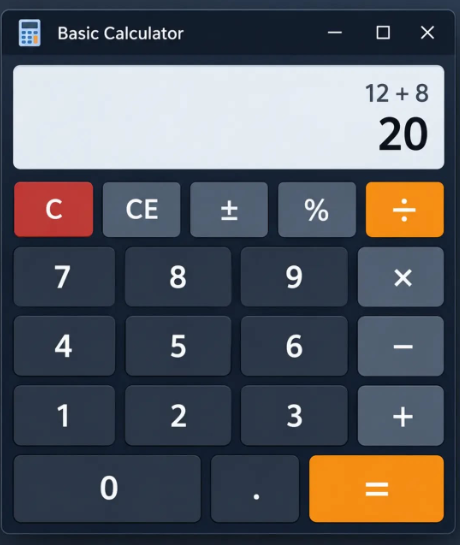
The calculator includes a clean display area where numbers and results are shown, along with buttons for common operations such as addition (+), subtraction (−), multiplication (×), and division (÷). It can also include useful buttons such as Clear (C), decimal point (.), percentage (%), and equals ) to make calculations easier and more convenient.
This project demonstrates important programming concepts such as GUI design, button handling, user input, mathematical operations, event-driven programming, and displaying results. Each button performs a specific function when clicked, allowing the user to enter numbers and calculate the desired result.
Creating a Basic Calculator with GUI is a great beginner-friendly project because it combines programming logic with visual design. It helps students understand how software applications respond to user actions and how different components of a graphical interface work together.
Overall, this project provides practical experience in building an interactive application while developing problem-solving, logical thinking, and programming skills. It is a simple but valuable project for learning the fundamentals of GUI-based application development.
Roll NO:13
Task NO:110
Class: Foundation Level
Made by Me
Basic Calculator with GUI is a simple and useful coding project designed to create a calculator application with a graphical user interface. The main purpose of this project is to provide users with an easy and interactive way to perform basic mathematical calculations.
The calculator includes a clean display area where numbers and results are shown, along with buttons for common operations such as addition (+), subtraction (−), multiplication (×), and division (÷). It can also include useful buttons such as Clear (C), decimal point (.), percentage (%), and equals ) to make calculations easier and more convenient.
This project demonstrates important programming concepts such as GUI design, button handling, user input, mathematical operations, event-driven programming, and displaying results. Each button performs a specific function when clicked, allowing the user to enter numbers and calculate the desired result.
Creating a Basic Calculator with GUI is a great beginner-friendly project because it combines programming logic with visual design. It helps students understand how software applications respond to user actions and how different components of a graphical interface work together.
Overall, this project provides practical experience in building an interactive application while developing problem-solving, logical thinking, and programming skills. It is a simple but valuable project for learning the fundamentals of GUI-based application development.
RSi F8 🎓✨
Roll NO:13
Task NO:110
Class: Foundation Level 📚
Made by Me 💻🚀
Basic Calculator with GUI is a simple and useful coding project designed to create a calculator application with a graphical user interface. The main purpose of this project is to provide users with an easy and interactive way to perform basic mathematical calculations.
The calculator includes a clean display area where numbers and results are shown, along with buttons for common operations such as addition (+), subtraction (−), multiplication (×), and division (÷). It can also include useful buttons such as Clear (C), decimal point (.), percentage (%), and equals 😊) to make calculations easier and more convenient.
This project demonstrates important programming concepts such as GUI design, button handling, user input, mathematical operations, event-driven programming, and displaying results. Each button performs a specific function when clicked, allowing the user to enter numbers and calculate the desired result.
Creating a Basic Calculator with GUI is a great beginner-friendly project because it combines programming logic with visual design. It helps students understand how software applications respond to user actions and how different components of a graphical interface work together.
Overall, this project provides practical experience in building an interactive application while developing problem-solving, logical thinking, and programming skills. It is a simple but valuable project for learning the fundamentals of GUI-based application development.
0 Comentários
0 Compartilhamentos
47 Visualizações