


RSIF8
CLASS: FOUNDATION LEVEL
CODING TASK NO:8
Day 8 – AI Game: Create an Alarm Clock App Using Claude.ai
Today, I worked on the Day 8 AI Game task, which was to create an Alarm Clock App using Claude.ai. The main objective of this task was to build a simple and useful application that allows users to set an alarm for their desired time. This project helped me explore how artificial intelligence can assist in creating applications and make everyday activities easier and more convenient.
An alarm clock is a useful tool that helps people manage their daily routines and stay organized. People use alarms to wake up in the morning, remember important tasks, prepare for school, attend meetings, and follow their schedules. By creating an alarm clock application, I explored how technology can help users manage their time more effectively.
During this task, I focused on designing an easy-to-use interface where users can select a specific time and set an alarm. A good alarm clock app should display the current time clearly and provide simple controls for setting, activating, and canceling an alarm. The interface should be organized, attractive, and user-friendly so that people can use it without difficulty.
I used Claude.ai as an AI assistant to help me develop the application. AI tools can make coding easier by helping users generate code, understand programming concepts, identify errors, and improve their designs. This experience helped me understand how artificial intelligence can support the software development process and turn an idea into a working project.
While working on this application, I learned about important programming concepts such as time handling, user input, event handling, and application logic. These concepts are useful for developing many other applications, including digital clocks, timers, reminders, and scheduling tools. I also learned that testing an application is important to make sure its features work correctly.
One of the most important parts of this project was thinking about the user's experience.
CLASS: FOUNDATION LEVEL
CODING TASK NO:8
Day 8 – AI Game: Create an Alarm Clock App Using Claude.ai
Today, I worked on the Day 8 AI Game task, which was to create an Alarm Clock App using Claude.ai. The main objective of this task was to build a simple and useful application that allows users to set an alarm for their desired time. This project helped me explore how artificial intelligence can assist in creating applications and make everyday activities easier and more convenient.
An alarm clock is a useful tool that helps people manage their daily routines and stay organized. People use alarms to wake up in the morning, remember important tasks, prepare for school, attend meetings, and follow their schedules. By creating an alarm clock application, I explored how technology can help users manage their time more effectively.
During this task, I focused on designing an easy-to-use interface where users can select a specific time and set an alarm. A good alarm clock app should display the current time clearly and provide simple controls for setting, activating, and canceling an alarm. The interface should be organized, attractive, and user-friendly so that people can use it without difficulty.
I used Claude.ai as an AI assistant to help me develop the application. AI tools can make coding easier by helping users generate code, understand programming concepts, identify errors, and improve their designs. This experience helped me understand how artificial intelligence can support the software development process and turn an idea into a working project.
While working on this application, I learned about important programming concepts such as time handling, user input, event handling, and application logic. These concepts are useful for developing many other applications, including digital clocks, timers, reminders, and scheduling tools. I also learned that testing an application is important to make sure its features work correctly.
One of the most important parts of this project was thinking about the user's experience.
RSIF8
CLASS: FOUNDATION LEVEL
CODING TASK NO:8
⏰ Day 8 – AI Game: Create an Alarm Clock App Using Claude.ai
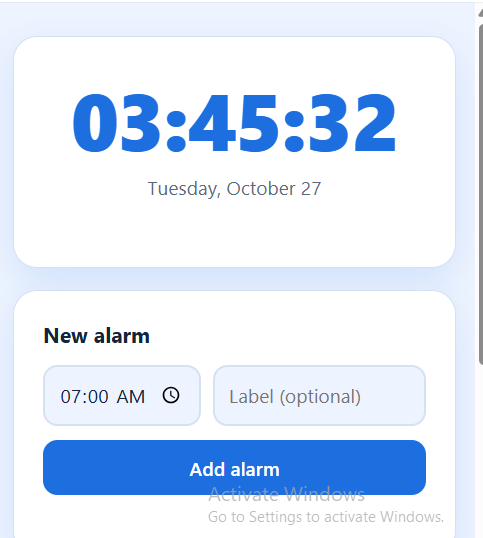
Today, I worked on the Day 8 AI Game task, which was to create an Alarm Clock App using Claude.ai. The main objective of this task was to build a simple and useful application that allows users to set an alarm for their desired time. This project helped me explore how artificial intelligence can assist in creating applications and make everyday activities easier and more convenient.
An alarm clock is a useful tool that helps people manage their daily routines and stay organized. People use alarms to wake up in the morning, remember important tasks, prepare for school, attend meetings, and follow their schedules. By creating an alarm clock application, I explored how technology can help users manage their time more effectively.
During this task, I focused on designing an easy-to-use interface where users can select a specific time and set an alarm. A good alarm clock app should display the current time clearly and provide simple controls for setting, activating, and canceling an alarm. The interface should be organized, attractive, and user-friendly so that people can use it without difficulty.
I used Claude.ai as an AI assistant to help me develop the application. AI tools can make coding easier by helping users generate code, understand programming concepts, identify errors, and improve their designs. This experience helped me understand how artificial intelligence can support the software development process and turn an idea into a working project.
While working on this application, I learned about important programming concepts such as time handling, user input, event handling, and application logic. These concepts are useful for developing many other applications, including digital clocks, timers, reminders, and scheduling tools. I also learned that testing an application is important to make sure its features work correctly.
One of the most important parts of this project was thinking about the user's experience.
0 Commentarios
0 Acciones
161 Views