


RSIF8
ROLLNO:13
CLASS: FOUNDATION LEVEL
CODING TASK NO:9
Claude Calendar is a web-based calendar app that lets you add events either the traditional way (filling in a form) or by simply typing what you want in plain English and letting Claude figure out the details. It runs as a published page on Claude.ai, so you can open it from any browser using the link, and it adapts to phones, tablets and desktops.
The Main Calendar
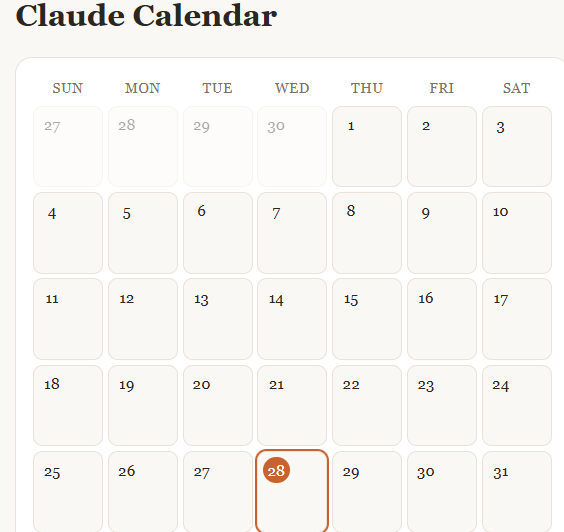
The center of the app is a full month view laid out in a seven-column grid, Sunday through Saturday. Each day is a clickable cell showing its date number. Days from the previous and next months appear faded so the grid is always complete. Today’s date is highlighted with an orange circle, so you can find your place instantly. When a day has events, small labels appear inside the cell showing the time and title. If a day is busy, the cell shows the first two and the rest are visible in the detail panel.
At the top, arrow buttons move you backward and forward one month, and a “Today” button jumps you straight back to the current month and selects today’s date.
Adding Events with Claude
This is the headline feature. In the “Add with Claude” box, you type a natural sentence such as:
“Lunch with Sara next Friday at 1pm”
“Team meeting tomorrow at 9:30”
“Mom’s birthday on November 14”
“Dentist appointment in two weeks”
When you press Add (or hit Enter), the app sends your sentence to Claude along with today’s date, so relative phrases like “tomorrow,” “next Friday” or “in two weeks” are resolved correctly. Claude returns a clean title, an exact date and, if you mentioned one, a time. The event is then placed on the calendar, the view jumps to the right month, and a confirmation message tells you exactly what was added. If Claude can’t understand the request, or if too many requests are made in a short period, the app shows a friendly message and suggests rephrasing or using manual entry instead. The first time you use this feature, Claude.ai will ask for your permission.
Adding Events Manually
For times when you’d rather be precise, there’s an “Add manually” card with a title field, a date picker and an optional time picker.
ROLLNO:13
CLASS: FOUNDATION LEVEL
CODING TASK NO:9
Claude Calendar is a web-based calendar app that lets you add events either the traditional way (filling in a form) or by simply typing what you want in plain English and letting Claude figure out the details. It runs as a published page on Claude.ai, so you can open it from any browser using the link, and it adapts to phones, tablets and desktops.
The Main Calendar
The center of the app is a full month view laid out in a seven-column grid, Sunday through Saturday. Each day is a clickable cell showing its date number. Days from the previous and next months appear faded so the grid is always complete. Today’s date is highlighted with an orange circle, so you can find your place instantly. When a day has events, small labels appear inside the cell showing the time and title. If a day is busy, the cell shows the first two and the rest are visible in the detail panel.
At the top, arrow buttons move you backward and forward one month, and a “Today” button jumps you straight back to the current month and selects today’s date.
Adding Events with Claude
This is the headline feature. In the “Add with Claude” box, you type a natural sentence such as:
“Lunch with Sara next Friday at 1pm”
“Team meeting tomorrow at 9:30”
“Mom’s birthday on November 14”
“Dentist appointment in two weeks”
When you press Add (or hit Enter), the app sends your sentence to Claude along with today’s date, so relative phrases like “tomorrow,” “next Friday” or “in two weeks” are resolved correctly. Claude returns a clean title, an exact date and, if you mentioned one, a time. The event is then placed on the calendar, the view jumps to the right month, and a confirmation message tells you exactly what was added. If Claude can’t understand the request, or if too many requests are made in a short period, the app shows a friendly message and suggests rephrasing or using manual entry instead. The first time you use this feature, Claude.ai will ask for your permission.
Adding Events Manually
For times when you’d rather be precise, there’s an “Add manually” card with a title field, a date picker and an optional time picker.
RSIF8
ROLLNO:13
CLASS: FOUNDATION LEVEL
CODING TASK NO:9
Claude Calendar is a web-based calendar app that lets you add events either the traditional way (filling in a form) or by simply typing what you want in plain English and letting Claude figure out the details. It runs as a published page on Claude.ai, so you can open it from any browser using the link, and it adapts to phones, tablets and desktops.
The Main Calendar
The center of the app is a full month view laid out in a seven-column grid, Sunday through Saturday. Each day is a clickable cell showing its date number. Days from the previous and next months appear faded so the grid is always complete. Today’s date is highlighted with an orange circle, so you can find your place instantly. When a day has events, small labels appear inside the cell showing the time and title. If a day is busy, the cell shows the first two and the rest are visible in the detail panel.
At the top, arrow buttons move you backward and forward one month, and a “Today” button jumps you straight back to the current month and selects today’s date.
Adding Events with Claude
This is the headline feature. In the “Add with Claude” box, you type a natural sentence such as:
“Lunch with Sara next Friday at 1pm”
“Team meeting tomorrow at 9:30”
“Mom’s birthday on November 14”
“Dentist appointment in two weeks”
When you press Add (or hit Enter), the app sends your sentence to Claude along with today’s date, so relative phrases like “tomorrow,” “next Friday” or “in two weeks” are resolved correctly. Claude returns a clean title, an exact date and, if you mentioned one, a time. The event is then placed on the calendar, the view jumps to the right month, and a confirmation message tells you exactly what was added. If Claude can’t understand the request, or if too many requests are made in a short period, the app shows a friendly message and suggests rephrasing or using manual entry instead. The first time you use this feature, Claude.ai will ask for your permission.
Adding Events Manually
For times when you’d rather be precise, there’s an “Add manually” card with a title field, a date picker and an optional time picker.
0 Reacties
0 aandelen
157 Views