


RSIF8
ROLL NO:13
CLASS: FOUNDATION LEVEL
CODING TASK NO:11
Day 11 Coding with ChatGPT – Calculator App Code
Introduction
For my Day 11 Coding with ChatGPT task, I worked on creating a simple and user-friendly Calculator App using HTML, CSS, and JavaScript. The main purpose of this project was to learn how to build a useful web application with the help of ChatGPT and understand the basic concepts of web development.
A calculator is a very useful tool in our daily lives. We use calculators in mathematics, education, shopping, budgeting, and many other activities. Instead of performing every calculation manually, we can use a calculator to get results quickly and easily. Through this project, I learned how a simple calculator can be created using three important web development technologies.
About My Calculator App
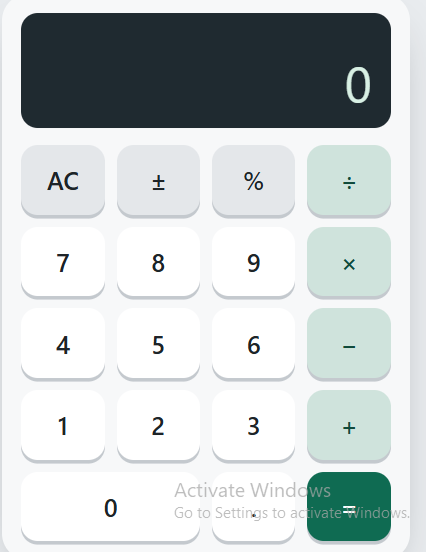
My Calculator App is designed to perform four basic mathematical operations: addition, subtraction, multiplication, and division. The app provides a simple interface where users can enter numbers, select mathematical operators, and calculate the result.
The main goal was to make the calculator easy to understand and convenient to use. A clear layout, readable buttons, and a visible display help users enter numbers and view their calculations. This project also helped me understand how different parts of a web application work together.
Technologies Used
1. HTML – Structure of the App
HTML stands for HyperText Markup Language. It is used to create the basic structure of the calculator. I used HTML to organize the calculator display, number buttons, mathematical operators, and other important elements.
2. CSS – Design and Styling
CSS stands for Cascading Style Sheets. It is used to make the calculator look attractive and organized. CSS helps control colors, spacing, button sizes, text styles, borders, and the overall layout. It also helps make the app easier to use on different screen
ROLL NO:13
CLASS: FOUNDATION LEVEL
CODING TASK NO:11
Day 11 Coding with ChatGPT – Calculator App Code
Introduction
For my Day 11 Coding with ChatGPT task, I worked on creating a simple and user-friendly Calculator App using HTML, CSS, and JavaScript. The main purpose of this project was to learn how to build a useful web application with the help of ChatGPT and understand the basic concepts of web development.
A calculator is a very useful tool in our daily lives. We use calculators in mathematics, education, shopping, budgeting, and many other activities. Instead of performing every calculation manually, we can use a calculator to get results quickly and easily. Through this project, I learned how a simple calculator can be created using three important web development technologies.
About My Calculator App
My Calculator App is designed to perform four basic mathematical operations: addition, subtraction, multiplication, and division. The app provides a simple interface where users can enter numbers, select mathematical operators, and calculate the result.
The main goal was to make the calculator easy to understand and convenient to use. A clear layout, readable buttons, and a visible display help users enter numbers and view their calculations. This project also helped me understand how different parts of a web application work together.
Technologies Used
1. HTML – Structure of the App
HTML stands for HyperText Markup Language. It is used to create the basic structure of the calculator. I used HTML to organize the calculator display, number buttons, mathematical operators, and other important elements.
2. CSS – Design and Styling
CSS stands for Cascading Style Sheets. It is used to make the calculator look attractive and organized. CSS helps control colors, spacing, button sizes, text styles, borders, and the overall layout. It also helps make the app easier to use on different screen
RSIF8
ROLL NO:13
CLASS: FOUNDATION LEVEL
CODING TASK NO:11
Day 11 Coding with ChatGPT – Calculator App Code
Introduction
For my Day 11 Coding with ChatGPT task, I worked on creating a simple and user-friendly Calculator App using HTML, CSS, and JavaScript. The main purpose of this project was to learn how to build a useful web application with the help of ChatGPT and understand the basic concepts of web development.
A calculator is a very useful tool in our daily lives. We use calculators in mathematics, education, shopping, budgeting, and many other activities. Instead of performing every calculation manually, we can use a calculator to get results quickly and easily. Through this project, I learned how a simple calculator can be created using three important web development technologies.
About My Calculator App
My Calculator App is designed to perform four basic mathematical operations: addition, subtraction, multiplication, and division. The app provides a simple interface where users can enter numbers, select mathematical operators, and calculate the result.
The main goal was to make the calculator easy to understand and convenient to use. A clear layout, readable buttons, and a visible display help users enter numbers and view their calculations. This project also helped me understand how different parts of a web application work together.
Technologies Used
1. HTML – Structure of the App
HTML stands for HyperText Markup Language. It is used to create the basic structure of the calculator. I used HTML to organize the calculator display, number buttons, mathematical operators, and other important elements.
2. CSS – Design and Styling
CSS stands for Cascading Style Sheets. It is used to make the calculator look attractive and organized. CSS helps control colors, spacing, button sizes, text styles, borders, and the overall layout. It also helps make the app easier to use on different screen
0 Comentários
0 Compartilhamentos
148 Visualizações