• RSIF8
    Roll No: 112
    Coding Post Task No: 1
    Coding Post Topic: Create a Basic Calculator
    ### My Basic Calculator Project
    I created a **Basic Calculator** that performs four fundamental mathematical operations: **Addition , Subtraction , Multiplication , and Division **.
    The purpose of this project was to practice programming concepts by creating a simple and useful calculator. Through this activity, I learned how to take input, process calculations, use mathematical operators, and display the correct result to the user.
    The calculator allows the user to enter numbers and select the required operation. It then performs the calculation and shows the result. This project helped me understand how programming can be used to solve everyday problems in a simple and efficient way.
    ### Operations Included
    **Addition:** Adds two numbers together.
    **Subtraction:** Finds the difference between two numbers.
    **Multiplication:** Multiplies two numbers.
    **Division:** Divides one number by another.
    Creating this calculator was a great learning experience because it helped me improve my understanding of **logic, operators, user input, calculations, and programming fundamentals**.
    I’m happy to share my project and continue improving my coding skills through more practical projects. Every small project is a step toward becoming a better programmer!
    **I have also shared a screenshot of my Basic Calculator to show the project and its working.**
    ### What I Learned
    How to perform basic mathematical operations
    How to use programming operators
    How to work with user input
    How to apply logic in a simple program
    How to create a useful beginner-level project
    How practical projects can improve programming skills
    Thank you for viewing my project!
    I’m looking forward to learning more, creating new projects, and improving my technical skills.
    ### Hashtags
    #BasicCalculator #CalculatorProject #Programming #Coding #CodingJourney #LearnToCode #ProgrammingForBeginners #StudentProject #CodingSkills #TechSkills #ComputerScience #ProgrammingProject #BeginnerProject #LearningProgramming #PracticalLearning #DigitalSkills #FutureProgrammer #RSIF8 #StudentLearning #KeepLearning #LearnAndGrow
    RSIF8 Roll No: 112 Coding Post Task No: 1 Coding Post Topic: Create a Basic Calculator ### ๐Ÿงฎ๐Ÿ’ป My Basic Calculator Project I created a **Basic Calculator** that performs four fundamental mathematical operations: **Addition โž•, Subtraction โž–, Multiplication โœ–๏ธ, and Division โž—**. The purpose of this project was to practice programming concepts by creating a simple and useful calculator. Through this activity, I learned how to take input, process calculations, use mathematical operators, and display the correct result to the user. ๐Ÿ’ป๐Ÿ“šโœจ The calculator allows the user to enter numbers and select the required operation. It then performs the calculation and shows the result. This project helped me understand how programming can be used to solve everyday problems in a simple and efficient way. ๐Ÿš€๐Ÿง  ### ๐Ÿ”ข Operations Included โž• **Addition:** Adds two numbers together. โž– **Subtraction:** Finds the difference between two numbers. โœ–๏ธ **Multiplication:** Multiplies two numbers. โž— **Division:** Divides one number by another. Creating this calculator was a great learning experience because it helped me improve my understanding of **logic, operators, user input, calculations, and programming fundamentals**. ๐ŸŒŸ๐Ÿ’ก I’m happy to share my project and continue improving my coding skills through more practical projects. Every small project is a step toward becoming a better programmer! ๐Ÿ‘ฉ‍๐Ÿ’ป๐Ÿš€๐Ÿ“– ๐Ÿ“ธ **I have also shared a screenshot of my Basic Calculator to show the project and its working.** ### ๐ŸŒŸ What I Learned โœ… How to perform basic mathematical operations โœ… How to use programming operators โœ… How to work with user input โœ… How to apply logic in a simple program โœ… How to create a useful beginner-level project โœ… How practical projects can improve programming skills Thank you for viewing my project! ๐Ÿ™Œโœจ I’m looking forward to learning more, creating new projects, and improving my technical skills. ๐Ÿ’ป๐ŸŒฑ๐Ÿš€ ### ๐Ÿ”– Hashtags #BasicCalculator #CalculatorProject #Programming #Coding #CodingJourney #LearnToCode #ProgrammingForBeginners #StudentProject #CodingSkills #TechSkills #ComputerScience #ProgrammingProject #BeginnerProject #LearningProgramming #PracticalLearning #DigitalSkills #FutureProgrammer #RSIF8 #StudentLearning #KeepLearning #LearnAndGrow ๐Ÿงฎ โž• โž– โœ–๏ธ โž— ๐Ÿ’ป ๐Ÿ‘ฉ‍๐Ÿ’ป ๐Ÿ“š ๐Ÿง  ๐Ÿ’ก ๐ŸŒŸ ๐Ÿš€ ๐ŸŽฏ โœจ๐Ÿ™Œ
    0 Commenti 0 condivisioni 870 Views
  • #rsisb
    Roll no.239
    Coding task no.13
    Foundation Level


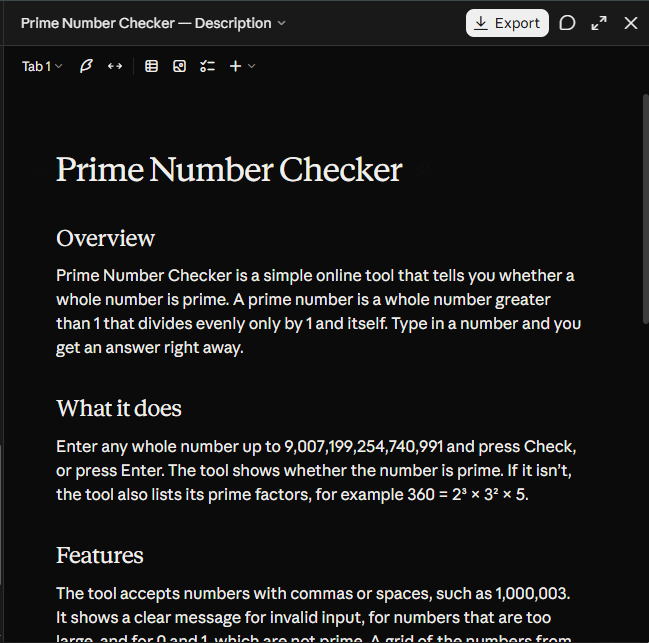
    A **Prime Number Checker** is a simple program or tool that determines whether a given number is a **prime number** or not.

    A **prime number** is a number greater than **1** that can only be divided evenly by **1 and itself**.

    ### Examples:

    * **2** → Prime Number
    * **3** → Prime Number
    * **5** → Prime Number
    * **7** → Prime Number
    * **4** → Not a Prime Number (divisible by 1, 2, and 4)
    * **9** → Not a Prime Number (divisible by 1, 3, and 9)

    ### How It Works:

    The program takes a number as input and checks whether it has any divisors other than **1 and itself**. If it does not, the number is prime.

    Prime Number Checker projects are excellent for beginners because they help improve understanding of **loops, conditions, and logical thinking** in programming.

    #PrimeNumber #Coding #Programming #JavaScript #Python #LearnToCode #ComputerScience
    #rsisb Roll no.239 Coding task no.13 Foundation Level A **Prime Number Checker** is a simple program or tool that determines whether a given number is a **prime number** or not. A **prime number** is a number greater than **1** that can only be divided evenly by **1 and itself**. ### โœจ Examples: * **2** → Prime Number โœ… * **3** → Prime Number โœ… * **5** → Prime Number โœ… * **7** → Prime Number โœ… * **4** → Not a Prime Number โŒ (divisible by 1, 2, and 4) * **9** → Not a Prime Number โŒ (divisible by 1, 3, and 9) ### ๐Ÿ’ป How It Works: The program takes a number as input and checks whether it has any divisors other than **1 and itself**. If it does not, the number is prime. Prime Number Checker projects are excellent for beginners because they help improve understanding of **loops, conditions, and logical thinking** in programming. ๐Ÿš€๐Ÿ’ก #PrimeNumber #Coding #Programming #JavaScript #Python #LearnToCode #ComputerScience ๐Ÿ’ป๐Ÿ”ขโœจ
    0 Commenti 0 condivisioni 1175 Views
  • RSISB
    Roll No: 209
    Story Post No.30

    **Adventures in Coding Land**

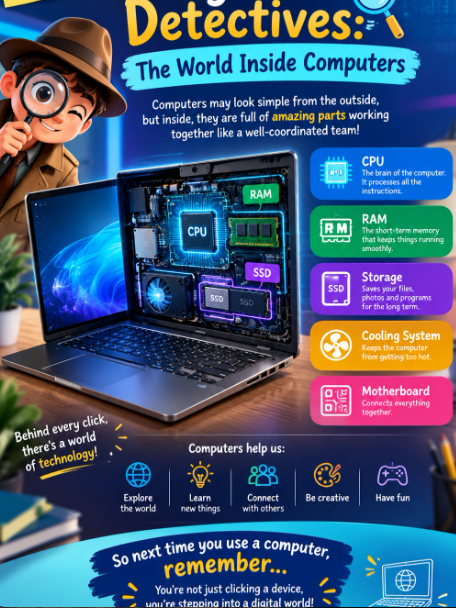
    Welcome to **Coding Land**, where every line of code becomes a new adventure! Explore the exciting world of **programming, logic, algorithms, loops, functions, debugging, and technology** through creativity and curiosity.

    Just like an adventure, coding is full of challenges, discoveries, and amazing possibilities. Every error is a lesson, every solution is a victory, and every project is a step toward becoming a better coder!

    **Code. Learn. Create. Adventure!**
    Let your curiosity guide you and turn your ideas into reality through the power of coding.

    #AdventuresInCodingLand #Coding #Programming #LearnToCode #CodingJourney #FutureCoder #ComputerScience #Technology #CodingAdventure #ProgrammingSkills #Algorithms #Debugging #Innovation #Creativity #YoungCoders #CodeLearnCreate
    RSISB Roll No: 209 Story Post No.30 ๐ŸŒŸ๐Ÿ’ป **Adventures in Coding Land** ๐Ÿš€๐ŸŒˆ Welcome to **Coding Land**, where every line of code becomes a new adventure! ๐Ÿง‘‍๐Ÿ’ปโœจ Explore the exciting world of **programming, logic, algorithms, loops, functions, debugging, and technology** through creativity and curiosity. ๐Ÿง ๐Ÿ”๐Ÿค– Just like an adventure, coding is full of challenges, discoveries, and amazing possibilities. ๐Ÿฐ๐ŸŒŸ Every error is a lesson, every solution is a victory, and every project is a step toward becoming a better coder! ๐Ÿ’ก๐Ÿ† ๐Ÿš€ **Code. Learn. Create. Adventure!** Let your curiosity guide you and turn your ideas into reality through the power of coding. ๐ŸŒ๐Ÿ’ปโœจ #AdventuresInCodingLand #Coding #Programming #LearnToCode #CodingJourney #FutureCoder #ComputerScience #Technology #CodingAdventure #ProgrammingSkills #Algorithms #Debugging #Innovation #Creativity #YoungCoders #CodeLearnCreate ๐Ÿš€๐Ÿ’ป๐Ÿง ๐ŸŒŸ๐Ÿค–
    0 Commenti 0 condivisioni 2811 Views

  • #rsisb
    roll no.247
    Foundation level
    # Simple Calculator
    **Simple Calculator – Making Everyday Math Easy!**
    A **Simple Calculator** is a useful and beginner-friendly application designed to make basic mathematical calculations quick, accurate, and convenient. Whether you are a student learning mathematics, a beginner exploring programming, or simply someone who needs to calculate numbers quickly, a calculator provides an easy way to perform everyday calculations.
    This project focuses on the fundamental arithmetic operations: **addition (+), subtraction (-), multiplication (×), and division (÷)**. Users can enter numbers, select an operation, and instantly see the result. The simple interface makes it easy to understand and use, while also demonstrating important concepts such as user input, mathematical operators, buttons, functions, and displaying results.
    Creating a Simple Calculator is also an excellent programming project for beginners. It helps learners understand how different parts of an application work together. From designing the interface to writing the calculation logic, every step provides an opportunity to develop problem-solving and programming skills.
    A calculator project can also be expanded with additional features such as decimal numbers, percentage calculations, clear and delete buttons, keyboard support, calculation history, and more advanced mathematical functions. This makes it a great starting point for learning how simple applications can gradually become more powerful and interactive.
    **Key Features:**
    Addition
    Subtraction
    Multiplication
    Division
    Easy-to-use interface
    Fast calculations
    Beginner-friendly design
    Useful for learning programming
    Clear and understandable results
    **Learning Value:**
    Working on a Simple Calculator helps learners practice logical thinking, understand basic programming concepts, handle user input, and create interactive applications. It demonstrates how mathematics and technology can come together to solve everyday problems.
    **Conclusion:**
    The Simple Calculator may be a small project, but it teaches some very important ideas about programming and application development. It is a perfect beginner project for turning basic mathematical operations into an interactive digital tool. Keep learning, keep experimenting, and keep building!
    #SimpleCalculator #Calculator #Math #Mathematics #Programming #Coding #BeginnerProject #CodingForBeginners #LearnProgramming #ComputerScience #Technology #Education #StudentProject #MathSkills #ProblemSolving #ProgrammingProject #DigitalLearning #CodingSkills #CreativeCoding #LearnToCode #TechEducation #BasicCalculator #EasyCoding #Innovation
    #rsisb roll no.247 Foundation level # Simple Calculator ๐Ÿงฎโœจ ๐Ÿงฎ **Simple Calculator – Making Everyday Math Easy!** ๐Ÿ”ข๐Ÿ’ก A **Simple Calculator** is a useful and beginner-friendly application designed to make basic mathematical calculations quick, accurate, and convenient. โž•โž–โœ–๏ธโž— Whether you are a student learning mathematics, a beginner exploring programming, or simply someone who needs to calculate numbers quickly, a calculator provides an easy way to perform everyday calculations. ๐Ÿ“š๐Ÿ’ป This project focuses on the fundamental arithmetic operations: **addition (+), subtraction (-), multiplication (×), and division (÷)**. Users can enter numbers, select an operation, and instantly see the result. โšก๐Ÿ”ข The simple interface makes it easy to understand and use, while also demonstrating important concepts such as user input, mathematical operators, buttons, functions, and displaying results. ๐ŸŽฏ Creating a Simple Calculator is also an excellent programming project for beginners. ๐Ÿ‘จ‍๐Ÿ’ป๐Ÿ‘ฉ‍๐Ÿ’ป It helps learners understand how different parts of an application work together. From designing the interface to writing the calculation logic, every step provides an opportunity to develop problem-solving and programming skills. ๐Ÿš€๐Ÿง  A calculator project can also be expanded with additional features such as decimal numbers, percentage calculations, clear and delete buttons, keyboard support, calculation history, and more advanced mathematical functions. ๐ŸŒŸ๐Ÿ“ฑ This makes it a great starting point for learning how simple applications can gradually become more powerful and interactive. โœจ **Key Features:** ๐Ÿ”น Addition โž• ๐Ÿ”น Subtraction โž– ๐Ÿ”น Multiplication โœ–๏ธ ๐Ÿ”น Division โž— ๐Ÿ”น Easy-to-use interface ๐Ÿ–ฅ๏ธ ๐Ÿ”น Fast calculations โšก ๐Ÿ”น Beginner-friendly design ๐ŸŒฑ ๐Ÿ”น Useful for learning programming ๐Ÿ’ป ๐Ÿ”น Clear and understandable results โœ… ๐Ÿ“š **Learning Value:** Working on a Simple Calculator helps learners practice logical thinking, understand basic programming concepts, handle user input, and create interactive applications. ๐Ÿง ๐Ÿ’ป It demonstrates how mathematics and technology can come together to solve everyday problems. ๐ŸŒŸ **Conclusion:** The Simple Calculator may be a small project, but it teaches some very important ideas about programming and application development. ๐Ÿงฎ๐Ÿš€ It is a perfect beginner project for turning basic mathematical operations into an interactive digital tool. Keep learning, keep experimenting, and keep building! ๐Ÿ’ก๐ŸŒˆ #SimpleCalculator #Calculator #Math #Mathematics #Programming #Coding #BeginnerProject #CodingForBeginners #LearnProgramming #ComputerScience #Technology #Education #StudentProject #MathSkills #ProblemSolving #ProgrammingProject #DigitalLearning #CodingSkills #CreativeCoding #LearnToCode #TechEducation #BasicCalculator #EasyCoding #Innovation
    0 Commenti 0 condivisioni 2736 Views
  • #rsisb
    Roll no.239
    Coding task no.15
    Foundation Level

    Challenge your mind and test your vocabulary with an exciting **Word Guessing Game!** Guess the hidden word by using clues, thinking carefully, and making smart choices.

    This fun and interactive game is a great way to improve **vocabulary, spelling, memory, concentration, and problem-solving skills**. Every guess brings you one step closer to discovering the secret word!

    Whether you're playing with friends , practicing English , or building your coding skills through a simple game project , word guessing is an entertaining way to learn while having fun.

    **Think smart. Guess carefully. Discover the word!**

    #WordGuessingGame #WordGame #GuessTheWord #Vocabulary #EnglishVocabulary #LearningEnglish #EnglishGame #BrainGame #MindGame #PuzzleGame #FunLearning #EducationalGame #GameDevelopment #Coding #Programming #Python #JavaScript #HTML #CSS #CodingProject #BeginnerCoding #ComputerScience #Students #StudentProject #LearnToCode #ProgrammingForBeginners #ProblemSolving #CriticalThinking #BrainTraining #MemoryGame #Spelling #LanguageLearning #InteractiveGame #FunGame #GameChallenge #TechEducation #STEM #Education #Learning #Knowledge #CreativeCoding #CodingForStudents #BuildGames #GameProject #DigitalLearning #SmartLearning #LearnAndPlay #ChallengeYourMind
    #rsisb Roll no.239 Coding task no.15 Foundation Level Challenge your mind and test your vocabulary with an exciting **Word Guessing Game!** ๐ŸŽฏ๐Ÿ“š Guess the hidden word by using clues, thinking carefully, and making smart choices. ๐Ÿ’ก๐Ÿ” This fun and interactive game is a great way to improve **vocabulary, spelling, memory, concentration, and problem-solving skills**. ๐Ÿง โœ๏ธ๐Ÿ“– Every guess brings you one step closer to discovering the secret word! ๐Ÿ”๐Ÿ”ค Whether you're playing with friends ๐Ÿ‘ฅ, practicing English ๐Ÿ‡ฌ๐Ÿ‡ง, or building your coding skills through a simple game project ๐Ÿ’ป, word guessing is an entertaining way to learn while having fun. ๐Ÿš€๐ŸŽฎ ๐Ÿ”ฅ **Think smart. Guess carefully. Discover the word!** ๐Ÿ†โœจ #WordGuessingG๐Ÿ™ƒame #WordGame #GuessTheWord #Vocabulary #EnglishVocabulary #LearningEnglish #EnglishGame #BrainGame #MindGame #PuzzleGame #FunLearning #EducationalGame #GameDevelopment #Coding #Programming #Python #JavaScript #HTML #CSS #CodingProject #BeginnerCoding #ComputerScience #Students #StudentProject #LearnToCode #ProgrammingForBeginners #ProblemSolving #CriticalThinking #BrainTraining #MemoryGame #Spelling #LanguageLearning #InteractiveGame #FunGame #GameChallenge #TechEducation #STEM #Education #Learning #Knowledge #CreativeCoding #CodingForStudents #BuildGames #GameProject #DigitalLearning #SmartLearning #LearnAndPlay #ChallengeYourMind ๐ŸŽฎ๐Ÿง ๐Ÿ”ค๐Ÿ’ป๐Ÿš€๐Ÿ†โœจ
    0 Commenti 0 condivisioni 5224 Views
  • #rsisb
    roll no 46
    4 codinge task

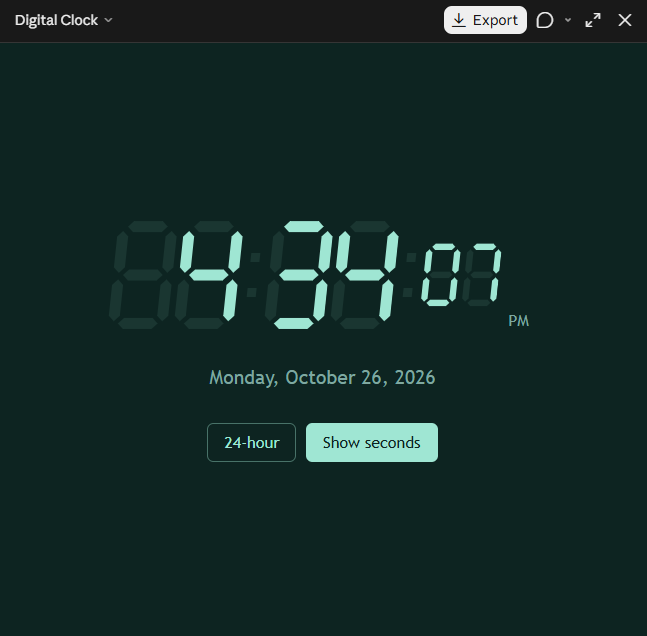
    Exciting things are about to begin! A **Countdown Timer** is a simple but powerful way to track time, build excitement, stay organized, and complete tasks on time. Whether you are preparing for an important event, starting a presentation, studying for a challenge, playing a game, or simply trying to improve your time-management skills, a countdown timer makes every second meaningful!

    This project helped me understand how technology can make everyday activities more interactive and useful. By watching the numbers count down, we learn the importance of **focus, patience, planning, and using our time wisely**.

    A countdown is more than just numbers moving toward zero—it reminds us that **time is valuable** and every moment is an opportunity to learn, create, and achieve something amazing.

    **Start the timer. Stay focused. Keep learning. Make every second count!**

    #CountdownTimer #EverySecondCounts #TimeManagement #TimeIsPrecious #StayFocused #Productivity #CodingProject #CodingForKids #LearningThroughCoding #Technology #DigitalSkills #CreativeCoding #ComputerScience #Programming #StudentProject #Innovation #FutureCoder #KeepLearning #MakeEverySecondCount #TechSkills
    #rsisb roll no 46 4 codinge task Exciting things are about to begin! ๐ŸŽ‰ A **Countdown Timer** is a simple but powerful way to track time, build excitement, stay organized, and complete tasks on time. Whether you are preparing for an important event, starting a presentation, studying for a challenge, playing a game, or simply trying to improve your time-management skills, a countdown timer makes every second meaningful! ๐ŸŽฏ๐Ÿ’ป This project helped me understand how technology can make everyday activities more interactive and useful. By watching the numbers count down, we learn the importance of **focus, patience, planning, and using our time wisely**. โฑ๏ธ๐Ÿ“šโœจ A countdown is more than just numbers moving toward zero—it reminds us that **time is valuable** and every moment is an opportunity to learn, create, and achieve something amazing. ๐ŸŒŸ๐Ÿ’ก ๐Ÿš€ **Start the timer. Stay focused. Keep learning. Make every second count!** ๐Ÿ’ชโฐ #CountdownTimer #EverySecondCounts #TimeManagement #TimeIsPrecious #StayFocused #Productivity #CodingProject #CodingForKids #LearningThroughCoding #Technology #DigitalSkills #CreativeCoding #ComputerScience #Programming #StudentProject #Innovation #FutureCoder #KeepLearning #MakeEverySecondCount #TechSkills โณโฐ๐Ÿ’ป๐Ÿš€๐ŸŽฏ๐Ÿ“š๐ŸŒŸ๐Ÿ”ฅ๐Ÿ’ก
    0 Commenti 0 condivisioni 3434 Views
  • #rsisb
    Roll No.247
    coding task
    Foundation Level

    # Basic Quiz Application

    The **Basic Quiz Application** is a simple, interactive, and engaging project designed to make learning more enjoyable and accessible. This application allows users to answer multiple-choice questions, test their knowledge, and receive their scores at the end of the quiz. Whether you're a student practicing school subjects, a beginner learning general knowledge, or simply someone who enjoys challenging their brain, this quiz application provides a fun way to learn and improve.

    The application features a clean and user-friendly interface that makes navigation easy for everyone. Users can read each question carefully, select the answer they believe is correct, and move through the quiz step by step. At the end, the application calculates the score and provides feedback on the user's performance.

    One of the main goals of this project is to demonstrate how a simple software application can combine **education, interaction, and technology**. It can also be customized with different subjects, question categories, difficulty levels, timers, scoreboards, and many other features.

    ### Key Features

    * Multiple-choice quiz questions
    * Simple and easy-to-use interface
    * Knowledge-testing activities
    * Automatic score calculation
    * Final results and performance feedback
    * Option to restart and take the quiz again
    * Suitable for educational and practice purposes
    * Beginner-friendly application concept
    * Easy to customize with new questions and topics

    This **Basic Quiz Application** is an excellent beginner project for understanding fundamental programming concepts such as variables, conditional statements, loops, functions, user input, and score calculation. It can serve as a foundation for developing more advanced quiz systems in the future.

    Overall, the Basic Quiz Application combines **learning and fun** in one simple platform. It encourages users to think, learn, practice, and improve their knowledge while demonstrating the power of interactive applications.

    #BasicQuiz #QuizApplication #QuizApp #Learning #Education #OnlineQuiz #KnowledgeTest #BrainChallenge #StudentProject #ProgrammingProject #BeginnerProject #InteractiveLearning #EducationalA
    pp #Coding #ComputerScience #TechProject #PracticeQuiz #GeneralKnowledge #LearningIsFun #QuizTime
    #rsisb Roll No.247 coding task Foundation Level # Basic Quiz Application ๐ŸŽฏ๐Ÿง  The **Basic Quiz Application** is a simple, interactive, and engaging project designed to make learning more enjoyable and accessible. ๐Ÿ“šโœจ This application allows users to answer multiple-choice questions, test their knowledge, and receive their scores at the end of the quiz. Whether you're a student practicing school subjects, a beginner learning general knowledge, or simply someone who enjoys challenging their brain, this quiz application provides a fun way to learn and improve. ๐Ÿ“๐Ÿ’ก The application features a clean and user-friendly interface that makes navigation easy for everyone. ๐Ÿ‘จ‍๐Ÿ’ป๐Ÿ–ฅ๏ธ Users can read each question carefully, select the answer they believe is correct, and move through the quiz step by step. At the end, the application calculates the score and provides feedback on the user's performance. ๐Ÿ†๐Ÿ“Š One of the main goals of this project is to demonstrate how a simple software application can combine **education, interaction, and technology**. ๐Ÿš€๐Ÿ’ป It can also be customized with different subjects, question categories, difficulty levels, timers, scoreboards, and many other features. ### ๐ŸŒŸ Key Features * ๐Ÿ“ Multiple-choice quiz questions * ๐ŸŽฏ Simple and easy-to-use interface * ๐Ÿง  Knowledge-testing activities * ๐Ÿ“Š Automatic score calculation * ๐Ÿ† Final results and performance feedback * ๐Ÿ”„ Option to restart and take the quiz again * ๐Ÿ“š Suitable for educational and practice purposes * ๐Ÿ’ป Beginner-friendly application concept * ๐ŸŽจ Easy to customize with new questions and topics This **Basic Quiz Application** is an excellent beginner project for understanding fundamental programming concepts such as variables, conditional statements, loops, functions, user input, and score calculation. ๐Ÿ‘จ‍๐Ÿ’ปโš™๏ธ It can serve as a foundation for developing more advanced quiz systems in the future. Overall, the Basic Quiz Application combines **learning and fun** in one simple platform. ๐ŸŒŸ๐Ÿ“– It encourages users to think, learn, practice, and improve their knowledge while demonstrating the power of interactive applications. ๐Ÿš€๐Ÿง  #BasicQuiz #QuizApplication #QuizApp #Learning #Education #OnlineQuiz #KnowledgeTest #BrainChallenge #StudentProject #ProgrammingProject #BeginnerProject #InteractiveLearning #EducationalA pp #Coding #ComputerScience #TechProject #PracticeQuiz #GeneralKnowledge #LearningIsFun #QuizTime ๐ŸŽฏ๐Ÿง ๐Ÿ“š๐Ÿ’ป๐Ÿ†โœจ๐Ÿš€
    0 Commenti 0 condivisioni 4454 Views
  • #rsisb
    Roll no.247
    Foundation level# Basic Calculator with GUI

    Welcome to **Basic Calculator with GUI** — a simple, user-friendly, and interactive calculator project designed to make everyday mathematical calculations quick, easy, and enjoyable! This project demonstrates how a calculator can be built with a **Graphical User Interface (GUI)**, allowing users to perform calculations by simply clicking buttons instead of typing commands.

    The calculator provides essential mathematical operations such as **addition , subtraction , multiplication , and division **. It is designed with a clean and straightforward interface so that beginners, students, and anyone interested in programming can easily understand how a GUI-based application works.

    One of the most interesting aspects of this project is the combination of **programming logic and visual design**. Users can enter numbers, select mathematical operators, and instantly see the result displayed on the calculator screen. This makes the project a great example of how programming can be used to create practical and interactive applications.

    The **Basic Calculator with GUI** is also an excellent learning project for students who are beginning their programming journey. Through this project, learners can understand important concepts such as **variables, functions, event handling, buttons, input fields, operators, conditional logic, and GUI components**. These concepts provide a strong foundation for developing more advanced software applications in the future.

    The simple design makes the calculator easy to navigate, while the interactive buttons provide a smooth user experience. Whether you want to calculate a total, subtract numbers, multiply values, or divide one number by another, this calculator provides the essential tools needed for basic arithmetic.

    This project also highlights the importance of creating applications that are not only functional but also **easy to use and visually understandable**. A well-designed GUI helps users interact with software naturally and makes complex programming concepts more accessible.

    Overall, the **Basic Calculator with GUI** is a fun, educational, and practical programming project. It is perfect for beginners who want to practice GUI development while building something useful. With additional features, the project can later be expanded into a more advanced calculator with percentage calculations, decimal support, square roots, memory functions, calculation history, and more!

    **Project Highlights:**
    Simple and clean GUI design
    Addition, subtraction, multiplication, and division
    Interactive calculator buttons
    Easy-to-understand interface
    Beginner-friendly programming project
    Useful for learning GUI development
    Great practice for programming logic
    Can be expanded with advanced features

    **Learn. Code. Calculate. Create!**

    #BasicCalculator #CalculatorGUI #GUICalculator #Programming #Coding #ComputerScience #PythonProject #BeginnerProject #ProgrammingForBeginners #GUIProgramming #SoftwareDevelopment #CodingProject #MathCalculator #LearnProgramming #StudentProject #TechProject #InteractiveApplication #ComputerProgramming #CodingJourney #ProgrammingSkills #Education #Technology #Developer #CodeLearning #CreativeCoding #Math #CalculatorProject
    #rsisb Roll no.247 Foundation level# Basic Calculator with GUI ๐Ÿงฎ๐Ÿ’ป Welcome to **Basic Calculator with GUI** — a simple, user-friendly, and interactive calculator project designed to make everyday mathematical calculations quick, easy, and enjoyable! ๐ŸŽ‰โœจ This project demonstrates how a calculator can be built with a **Graphical User Interface (GUI)**, allowing users to perform calculations by simply clicking buttons instead of typing commands. ๐Ÿ–ฑ๏ธ๐Ÿ”ข The calculator provides essential mathematical operations such as **addition โž•, subtraction โž–, multiplication โœ–๏ธ, and division โž—**. It is designed with a clean and straightforward interface so that beginners, students, and anyone interested in programming can easily understand how a GUI-based application works. ๐Ÿ’ก๐Ÿ‘จ‍๐Ÿ’ป๐Ÿ‘ฉ‍๐Ÿ’ป One of the most interesting aspects of this project is the combination of **programming logic and visual design**. ๐ŸŽจ๐Ÿ’ป Users can enter numbers, select mathematical operators, and instantly see the result displayed on the calculator screen. This makes the project a great example of how programming can be used to create practical and interactive applications. ๐Ÿš€ The **Basic Calculator with GUI** is also an excellent learning project for students who are beginning their programming journey. ๐Ÿ“š๐ŸŒŸ Through this project, learners can understand important concepts such as **variables, functions, event handling, buttons, input fields, operators, conditional logic, and GUI components**. These concepts provide a strong foundation for developing more advanced software applications in the future. ๐Ÿง ๐Ÿ’ป The simple design makes the calculator easy to navigate, while the interactive buttons provide a smooth user experience. ๐Ÿ”ข๐Ÿ–ฑ๏ธ Whether you want to calculate a total, subtract numbers, multiply values, or divide one number by another, this calculator provides the essential tools needed for basic arithmetic. โœ… This project also highlights the importance of creating applications that are not only functional but also **easy to use and visually understandable**. ๐ŸŒŸ A well-designed GUI helps users interact with software naturally and makes complex programming concepts more accessible. Overall, the **Basic Calculator with GUI** is a fun, educational, and practical programming project. ๐Ÿงฎโœจ It is perfect for beginners who want to practice GUI development while building something useful. With additional features, the project can later be expanded into a more advanced calculator with percentage calculations, decimal support, square roots, memory functions, calculation history, and more! ๐Ÿš€๐Ÿ”ข ๐ŸŽฏ **Project Highlights:** ๐Ÿ”น Simple and clean GUI design ๐Ÿ”น Addition, subtraction, multiplication, and division ๐Ÿ”น Interactive calculator buttons ๐Ÿ”น Easy-to-understand interface ๐Ÿ”น Beginner-friendly programming project ๐Ÿ”น Useful for learning GUI development ๐Ÿ”น Great practice for programming logic ๐Ÿ”น Can be expanded with advanced features ๐Ÿ’ป **Learn. Code. Calculate. Create!** ๐Ÿงฎ๐Ÿš€ #BasicCalculator #CalculatorGUI #GUICalculator #Programming #Coding #ComputerScience #PythonProject #BeginnerProject #ProgrammingForBeginners #GUIProgramming #SoftwareDevelopment #CodingProject #MathCalculator #LearnProgramming #StudentProject #TechProject #InteractiveApplication #ComputerProgramming #CodingJourney #ProgrammingSkills #Education #Technology #Developer #CodeLearning #CreativeCoding #Math #CalculatorProject ๐Ÿงฎ๐Ÿ’ป
    0 Commenti 0 condivisioni 6345 Views
  • #rsisb
    Roll no.240
    Coding No.20
    Foundation Level

    # **Flashcard App**

    **Description**

    Boost your learning with this **Flashcard App**, a simple and interactive study tool designed to help students memorize information more effectively. Whether you're learning vocabulary, science terms, historical dates, programming concepts, or exam questions, this app makes studying engaging and efficient.

    The Flashcard App allows users to create, edit, and review flashcards with ease. Simply enter a question or term on one side and the answer or explanation on the other. Flip the card to test your memory and strengthen your understanding through active recall—a proven learning technique that improves long-term retention.

    This project is ideal for beginners who want to practice programming concepts such as user input, data storage, navigation between cards, event handling, and graphical user interface (GUI) development. It combines functionality with a clean, user-friendly design to create an enjoyable learning experience.

    Whether you're preparing for school exams, language tests, professional certifications, or personal learning goals, this Flashcard App is a practical tool that helps you study smarter, not harder.

    If you enjoyed this project, don't forget to **Like**, **Share**, and **Subscribe** for more programming projects, educational tools, and coding tutorials!

    #FlashcardApp #Python #Programming #Coding #StudyTool #Education #Learning #StudentProject #PythonGUI #Flashcards #Memory #ActiveRecall #ExamPreparation #ComputerScience #LearnToCode

    Rehan School Islamabad Campus
    Asma Shaheen EducationWali
    Irum Asim
    Saima Happinesswali
    #rsisb Roll no.240 Coding No.20 Foundation Level # **Flashcard App** ๐Ÿ“š **Description** Boost your learning with this **Flashcard App**, a simple and interactive study tool designed to help students memorize information more effectively. Whether you're learning vocabulary, science terms, historical dates, programming concepts, or exam questions, this app makes studying engaging and efficient. The Flashcard App allows users to create, edit, and review flashcards with ease. Simply enter a question or term on one side and the answer or explanation on the other. Flip the card to test your memory and strengthen your understanding through active recall—a proven learning technique that improves long-term retention. This project is ideal for beginners who want to practice programming concepts such as user input, data storage, navigation between cards, event handling, and graphical user interface (GUI) development. It combines functionality with a clean, user-friendly design to create an enjoyable learning experience. Whether you're preparing for school exams, language tests, professional certifications, or personal learning goals, this Flashcard App is a practical tool that helps you study smarter, not harder. ๐Ÿ‘ If you enjoyed this project, don't forget to **Like**, **Share**, and **Subscribe** for more programming projects, educational tools, and coding tutorials! #FlashcardApp #Python #Programming #Coding #StudyTool #Education #Learning #StudentProject #PythonGUI #Flashcards #Memory #ActiveRecall #ExamPreparation #ComputerScience #LearnToCode ๐Ÿ“š๐Ÿ’ป๐ŸŽ“ Rehan School Islamabad Campus Asma Shaheen EducationWali Irum Asim Saima Happinesswali
    0 Commenti 0 condivisioni 5751 Views
  • #rsisb
    Roll No.240
    Coding No.16
    Foundation Level
    # Password Generator

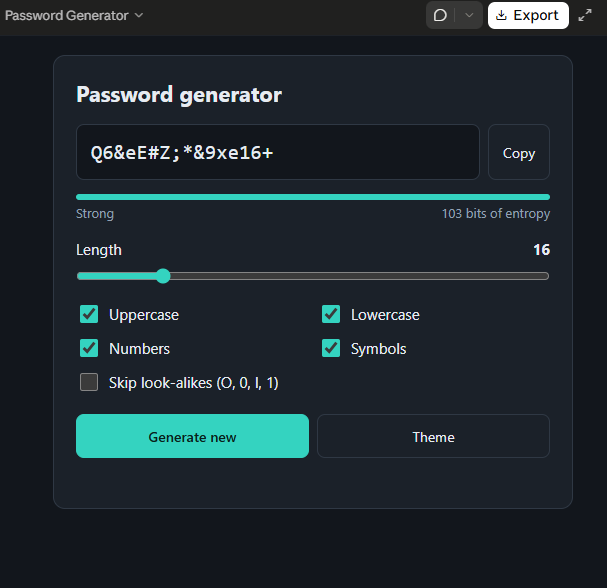
    A **Password Generator** is a simple yet highly useful application that creates strong, random, and secure passwords to help protect online accounts and sensitive information. Instead of using easy-to-guess passwords such as names, birthdays, or common words, a password generator produces unique combinations of uppercase letters, lowercase letters, numbers, and special symbols, making passwords much more resistant to hacking and unauthorized access.

    This project is ideal for beginners learning programming because it introduces essential concepts such as random number generation, string manipulation, loops, conditional statements, and user input. Developers can build a password generator using languages like Python, Java, C++, JavaScript, or C#, with either a command-line interface or a graphical user interface (GUI).

    A typical password generator allows users to customize their passwords by selecting the desired length and choosing whether to include uppercase letters, lowercase letters, digits, and special characters. The generated password is random, unique, and difficult to predict, significantly improving online security.

    More advanced versions of a password generator can include features such as password strength indicators, one-click copy to clipboard, password history, QR code generation, and secure password storage using encryption. These enhancements make the application even more practical for everyday use.

    As cybersecurity becomes increasingly important in today's digital world, using strong and unique passwords for every account is one of the most effective ways to protect personal and professional information. Building a Password Generator project not only strengthens programming skills but also promotes good cybersecurity practices, making it an excellent project for students, developers, and technology enthusiasts.

    **#PasswordGenerator #CyberSecurity #Python #Programming #Coding #GUI #RandomPassword #TechProject #InformationSecurity #SoftwareDevelopment #PythonProject #LearnToCode #DigitalSecurity #ComputerScience #Technology**

    Rehan School Islamabad Campus
    Asma Shaheen EducationWali
    Irum Asim
    Saima Happinesswali
    #rsisb Roll No.240 Coding No.16 Foundation Level # ๐Ÿ” Password Generator A **Password Generator** is a simple yet highly useful application that creates strong, random, and secure passwords to help protect online accounts and sensitive information. Instead of using easy-to-guess passwords such as names, birthdays, or common words, a password generator produces unique combinations of uppercase letters, lowercase letters, numbers, and special symbols, making passwords much more resistant to hacking and unauthorized access. This project is ideal for beginners learning programming because it introduces essential concepts such as random number generation, string manipulation, loops, conditional statements, and user input. Developers can build a password generator using languages like Python, Java, C++, JavaScript, or C#, with either a command-line interface or a graphical user interface (GUI). A typical password generator allows users to customize their passwords by selecting the desired length and choosing whether to include uppercase letters, lowercase letters, digits, and special characters. The generated password is random, unique, and difficult to predict, significantly improving online security. More advanced versions of a password generator can include features such as password strength indicators, one-click copy to clipboard, password history, QR code generation, and secure password storage using encryption. These enhancements make the application even more practical for everyday use. As cybersecurity becomes increasingly important in today's digital world, using strong and unique passwords for every account is one of the most effective ways to protect personal and professional information. Building a Password Generator project not only strengthens programming skills but also promotes good cybersecurity practices, making it an excellent project for students, developers, and technology enthusiasts. **#PasswordGenerator #CyberSecurity #Python #Programming #Coding #GUI #RandomPassword #TechProject #InformationSecurity #SoftwareDevelopment #PythonProject #LearnToCode #DigitalSecurity #ComputerScience #Technology** ๐Ÿ”๐Ÿ’ป๐Ÿ›ก๏ธ๐Ÿš€ Rehan School Islamabad Campus Asma Shaheen EducationWali Irum Asim Saima Happinesswali
    0 Commenti 0 condivisioni 6330 Views
Pagine in Evidenza