• RSIF8
    ROLL NO:13
    TASK NO:7

    How to Download and Use Canva?

    Canva is a simple and powerful design platform that helps people create beautiful graphics, presentations, posters, social media posts, videos, documents, and many other creative projects. It is especially useful for students, beginners, content creators, teachers, and anyone who wants to learn graphic designing without needing advanced technical skills.

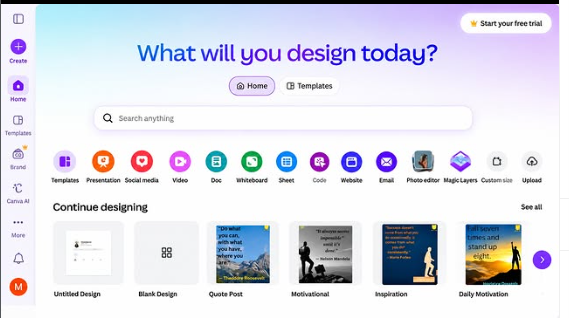
    To get started with Canva, the first step is to download the Canva app on your device or open Canva through a web browser. Canva is available on different devices, so you can choose the option that works best for you. After opening Canva, you can create an account using an available sign-in option and begin exploring the platform.

    Once you enter Canva, you will find many different design options and ready-made templates. You can search for the type of project you want to create, such as an Instagram post, presentation, poster, invitation, video, document, or other design. Templates can be very helpful for beginners because they provide a starting point and allow you to customize the design according to your own ideas.

    Using Canva is quite easy. You can select a template and then change its text, images, fonts, layouts, and other design elements. You can also upload your own pictures and add them to your project. Canva provides different tools that allow you to arrange elements and create a design that matches your topic and personal style.

    Another useful feature is the ability to create designs from a blank page. This gives you more freedom to experiment with different layouts and ideas. You can choose a background, add headings, insert pictures, and organize everything in a clean and creative way.

    After completing your design, you can preview it and make any necessary changes. When you are satisfied with your work, you can export or share the design using the options provided by Canva. Depending on the type of project and available features, you can use different formats for sa
    RSIF8 ROLL NO:13 TASK NO:7 ๐ŸŽจ How to Download and Use Canva? Canva is a simple and powerful design platform that helps people create beautiful graphics, presentations, posters, social media posts, videos, documents, and many other creative projects. It is especially useful for students, beginners, content creators, teachers, and anyone who wants to learn graphic designing without needing advanced technical skills. To get started with Canva, the first step is to download the Canva app on your device or open Canva through a web browser. Canva is available on different devices, so you can choose the option that works best for you. After opening Canva, you can create an account using an available sign-in option and begin exploring the platform. Once you enter Canva, you will find many different design options and ready-made templates. You can search for the type of project you want to create, such as an Instagram post, presentation, poster, invitation, video, document, or other design. Templates can be very helpful for beginners because they provide a starting point and allow you to customize the design according to your own ideas. Using Canva is quite easy. You can select a template and then change its text, images, fonts, layouts, and other design elements. You can also upload your own pictures and add them to your project. Canva provides different tools that allow you to arrange elements and create a design that matches your topic and personal style. Another useful feature is the ability to create designs from a blank page. This gives you more freedom to experiment with different layouts and ideas. You can choose a background, add headings, insert pictures, and organize everything in a clean and creative way. After completing your design, you can preview it and make any necessary changes. When you are satisfied with your work, you can export or share the design using the options provided by Canva. Depending on the type of project and available features, you can use different formats for sa
    0 Comments 0 Shares 1315 Views
  • RSIF8
    Roll NO:13
    Task no :5
    task topic How to Create an Instagram Account?

    Instagram is a popular social media platform where people can share photos, videos, stories, and creative ideas with others. Creating an Instagram account is a simple process, but it is important to understand the basic steps and use the platform responsibly and safely.

    The first step in creating an Instagram account is to download the Instagram app from the official app store on your phone or use Instagram through a web browser. After opening the app, you can choose the option to create a new account. Instagram will ask for some basic information, such as an email address or phone number, which can be used to create and manage the account.

    Next, you will need to choose a username. Your username is the name people can use to find your profile, so it is a good idea to choose something simple, appropriate, and easy to remember. You can also add a profile picture and write a short bio that explains your interests or what you want to share.

    A strong password is another important part of creating an account. Your password should be difficult for other people to guess, and you should never share it with friends or strangers. If available, using additional account-security features such as two-step verification can provide extra protection.

    After setting up your profile, you can customize your account according to your interests. You can follow people, creators, educational pages, sports accounts, and other topics that you enjoy. Instagram may also recommend accounts based on your interests, helping you discover new content.

    When using Instagram, privacy and safety should always be important priorities. Avoid sharing personal information such as your home address, passwords, private contact details, or other information that could put your privacy at risk. It is also important to think carefully before posting photos, videos, comments, or other content because anything shared online can potentially be saved or reshared by others.

    Instagram can be used for much more than entertainment. Students can use social media to discover educational content, follow creative communities, share project
    RSIF8 Roll NO:13 Task no :5 task topic How to Create an Instagram Account? Instagram is a popular social media platform where people can share photos, videos, stories, and creative ideas with others. Creating an Instagram account is a simple process, but it is important to understand the basic steps and use the platform responsibly and safely. The first step in creating an Instagram account is to download the Instagram app from the official app store on your phone or use Instagram through a web browser. After opening the app, you can choose the option to create a new account. Instagram will ask for some basic information, such as an email address or phone number, which can be used to create and manage the account. Next, you will need to choose a username. Your username is the name people can use to find your profile, so it is a good idea to choose something simple, appropriate, and easy to remember. You can also add a profile picture and write a short bio that explains your interests or what you want to share. A strong password is another important part of creating an account. Your password should be difficult for other people to guess, and you should never share it with friends or strangers. If available, using additional account-security features such as two-step verification can provide extra protection. After setting up your profile, you can customize your account according to your interests. You can follow people, creators, educational pages, sports accounts, and other topics that you enjoy. Instagram may also recommend accounts based on your interests, helping you discover new content. When using Instagram, privacy and safety should always be important priorities. Avoid sharing personal information such as your home address, passwords, private contact details, or other information that could put your privacy at risk. It is also important to think carefully before posting photos, videos, comments, or other content because anything shared online can potentially be saved or reshared by others. Instagram can be used for much more than entertainment. Students can use social media to discover educational content, follow creative communities, share project
    0 Comments 0 Shares 1550 Views
  • **Rhythms of Pakistan: A Nation’s Pulse**

    Every nation has a heartbeat, and Pakistan’s heartbeat can be heard through its music, culture, traditions, languages, and the dreams of its people.

    **“Rhythms of Pakistan: A Nation’s Pulse”** is more than just a song—it is a celebration of the spirit, beauty, diversity, and cultural energy of Pakistan. From the majestic mountains of the north to the vibrant streets of our cities , from the warmth of our villages to the shores of the Arabian Sea , Pakistan carries countless stories within its rhythm.

    This song is a tribute to the colors that make Pakistan unique—our traditional music , beautiful languages , rich heritage , colorful festivals , delicious traditions , and the incredible people who continue to shape the nation’s story.

    Each beat represents a part of Pakistan. Each melody carries a memory. Each rhythm reflects the hopes, dreams, struggles, celebrations, and unity of a nation with a powerful cultural identity.

    May the rhythm of Pakistan continue to inspire us to appreciate our heritage, respect our diversity, support one another, and dream of a brighter tomorrow.

    Turn up the volume, feel the beat, and let the **pulse of Pakistan** speak through the music!

    **Pakistan’s rhythm. Pakistan’s spirit. Pakistan’s heartbeat.**

    #RhythmsOfPakistan #Pakistan #PakistanZindabad #PakistaniMusic #PakistaniCulture #PakistaniHeritage #PakistanPride #MadeInPakistan #MusicOfPakistan #DesiMusic #SouthAsianMusic #PakistaniArtists #PakistaniCreators #CulturalHeritage #OurPakistan #BeautifulPakistan #ExplorePakistan #LovePakistan #PakistanCulture #NationPulse #MusicalJourney #MusicLovers #InstagramMusic #ReelsPakistan #PakistaniReels #DesiVibes #CulturalVibes #Unity #Hope #Dreams #Peace # # # #
    ๐Ÿ‡ต๐Ÿ‡ฐ๐ŸŽถ **Rhythms of Pakistan: A Nation’s Pulse** ๐ŸŽถ๐Ÿ‡ต๐Ÿ‡ฐ Every nation has a heartbeat, and Pakistan’s heartbeat can be heard through its music, culture, traditions, languages, and the dreams of its people. โค๏ธ๐ŸŒ™ **“Rhythms of Pakistan: A Nation’s Pulse”** is more than just a song—it is a celebration of the spirit, beauty, diversity, and cultural energy of Pakistan. From the majestic mountains of the north ๐Ÿ”๏ธ to the vibrant streets of our cities ๐ŸŒ†, from the warmth of our villages ๐ŸŒพ to the shores of the Arabian Sea ๐ŸŒŠ, Pakistan carries countless stories within its rhythm. This song is a tribute to the colors that make Pakistan unique—our traditional music ๐ŸŽต, beautiful languages ๐Ÿ—ฃ๏ธ, rich heritage ๐Ÿ›๏ธ, colorful festivals ๐ŸŽ‰, delicious traditions ๐Ÿฒ, and the incredible people who continue to shape the nation’s story. ๐Ÿ‡ต๐Ÿ‡ฐโœจ Each beat represents a part of Pakistan. Each melody carries a memory. Each rhythm reflects the hopes, dreams, struggles, celebrations, and unity of a nation with a powerful cultural identity. โค๏ธ๐Ÿค May the rhythm of Pakistan continue to inspire us to appreciate our heritage, respect our diversity, support one another, and dream of a brighter tomorrow. ๐ŸŒŸ๐Ÿ‡ต๐Ÿ‡ฐ Turn up the volume, feel the beat, and let the **pulse of Pakistan** speak through the music! ๐ŸŽง๐Ÿ”ฅ ๐ŸŽถ **Pakistan’s rhythm. Pakistan’s spirit. Pakistan’s heartbeat.** ๐Ÿ‡ต๐Ÿ‡ฐโค๏ธ #RhythmsOfPakistan #Pakistan #PakistanZindabad #PakistaniMusic #PakistaniCulture #PakistaniHeritage #PakistanPride #MadeInPakistan #MusicOfPakistan #DesiMusic #SouthAsianMusic #PakistaniArtists #PakistaniCreators #CulturalHeritage #OurPakistan #BeautifulPakistan #ExplorePakistan #LovePakistan #PakistanCulture #NationPulse #MusicalJourney #MusicLovers #InstagramMusic #ReelsPakistan #PakistaniReels #DesiVibes #CulturalVibes #Unity #Hope #Dreams #Peace #๐Ÿ‡ต๐Ÿ‡ฐ #๐ŸŽถ #โค๏ธ #โœจ
    0 Comments 0 Shares 7822 Views 8
  • #rsisb
    Roll no.239
    Story post no.35
    Foundation Level

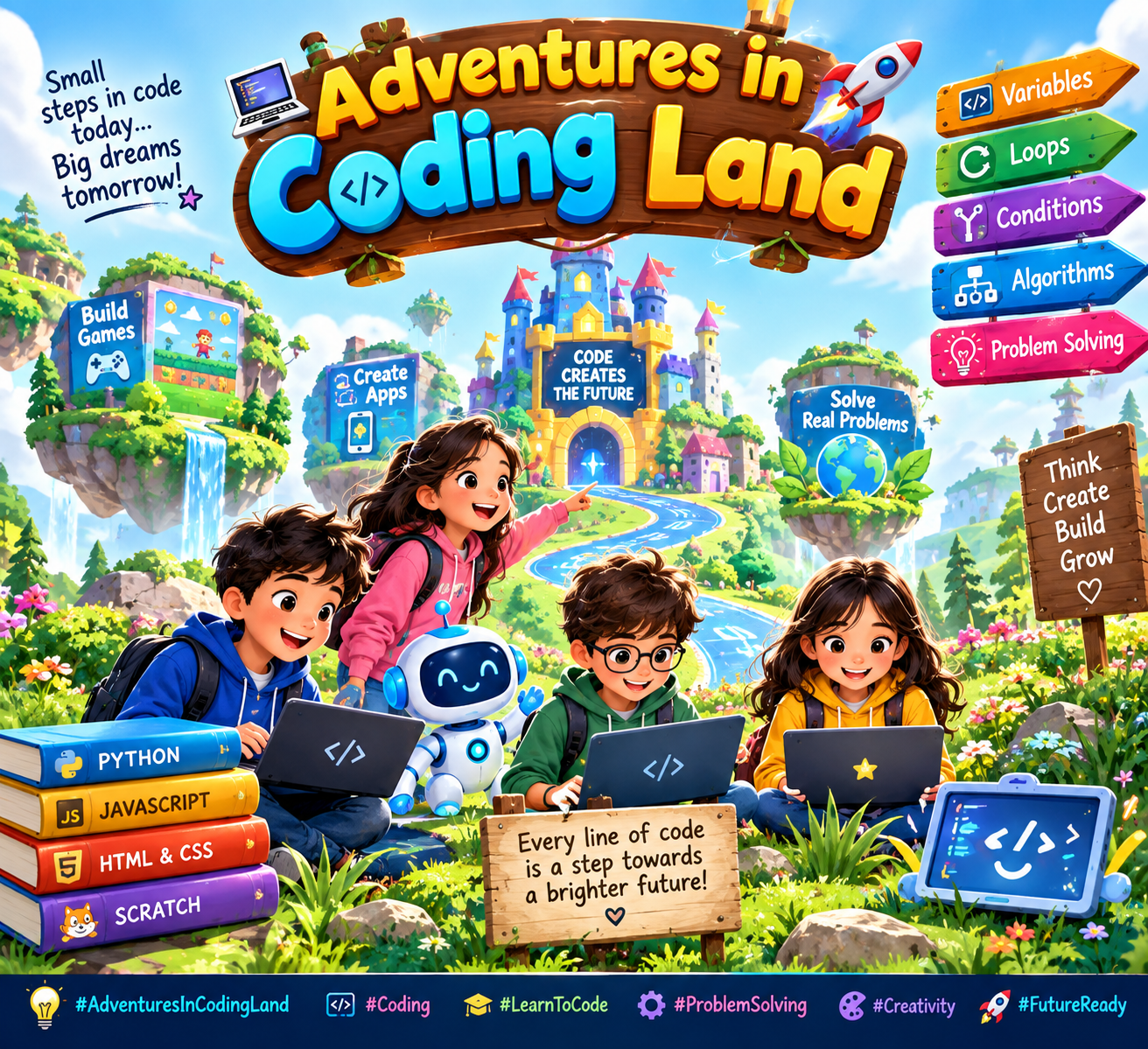
    **Adventures in Coding Land** is an exciting journey into the world of programming, where creativity, problem-solving, and technology come together. ‍‍

    In this fun adventure, young learners discover how computers follow instructions called **code**. They explore exciting ideas like variables, loops, conditions, algorithms, and problem-solving through simple and engaging challenges.

    Coding is more than just writing lines of code—it is a way to turn ideas into reality. From creating games and animations to building useful apps and solving real-world problems, coding gives students the power to become creators and innovators.

    **Adventures in Coding Land** encourages children to experiment, learn from mistakes, think creatively, and never give up. Every coding challenge is a new adventure, and every mistake is an opportunity to learn something new.

    #AdventuresInCodingLand #Coding #Programming #LearnToCode #CodingForKids #ComputerScience #Technology #STEM #YoungCoders #CodingJourney #Creativity #ProblemSolving
    #rsisb Roll no.239 Story post no.35 Foundation Level **Adventures in Coding Land** is an exciting journey into the world of programming, where creativity, problem-solving, and technology come together. ๐ŸŒŸ๐Ÿ‘จ‍๐Ÿ’ป๐Ÿ‘ฉ‍๐Ÿ’ป In this fun adventure, young learners discover how computers follow instructions called **code**. They explore exciting ideas like variables, loops, conditions, algorithms, and problem-solving through simple and engaging challenges. ๐Ÿงฉ๐Ÿ’ก Coding is more than just writing lines of code—it is a way to turn ideas into reality. From creating games and animations to building useful apps and solving real-world problems, coding gives students the power to become creators and innovators. ๐ŸŽฎ๐Ÿ“ฑ๐Ÿš€ **Adventures in Coding Land** encourages children to experiment, learn from mistakes, think creatively, and never give up. Every coding challenge is a new adventure, and every mistake is an opportunity to learn something new. ๐ŸŒˆโœจ #AdventuresInCodingLand #Coding #Programming #LearnToCode #CodingForKids #ComputerScience #Technology #STEM #YoungCoders #CodingJourney #Creativity #ProblemSolving ๐Ÿ’ป๐ŸŒŸ๐Ÿš€
    0 Comments 0 Shares 1731 Views
  • RSIF8
    Roll no.29
    Task no.4
    Task Topic: How to create a YouTube account

    Starting your journey on YouTube is incredibly easy! Because YouTube is owned by Google, your passport to the platform is simply a Google Account. Whether you want to subscribe to your favorite creators, save playlists, or start uploading your own videos, here is exactly how to set up your account in just a few minutes.

    **Step 1: Sign In with Google**
    First, open your web browser and head over to YouTube.com, or simply open the YouTube app on your mobile device. Click the "Sign In" button located in the top right-hand corner of the screen. Enter your existing Google or Gmail credentials to log in. If you do not have a Google account yet, click "Create account" and follow the quick prompts to set one up.

    **Step 2: Access the Channel Creation Menu**
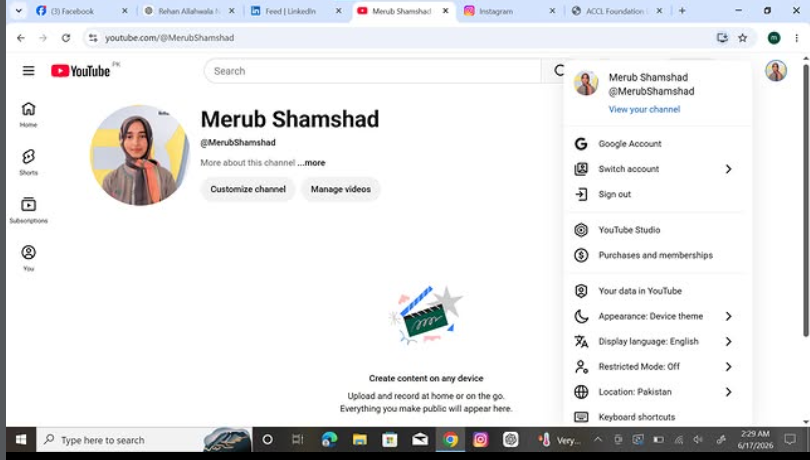
    Once you are logged in, look at the top right corner of the page where your profile icon is located. Click on your profile picture, and a dropdown menu will appear. From this menu, click on the option that says "Create a channel."

    **Step 3: Choose Your Account Type**
    You will now see a prompt asking how you want to create your channel. You have two choices:

    * **Personal Channel:** Choose this if you want to use your own name and profile picture.
    * **Brand/Business Channel:** Choose this if you want to use a custom name, a business name, or if you plan to have multiple people manage the account with you in the future.

    **Step 4: Customize and Launch**
    Name your channel, upload a profile picture, and add a brief bio to your "About" section telling viewers what your channel is all about. Once you click "Create," your brand new YouTube account is fully active and ready for action!

    ---

    #YouTube #HowTo #YouTubeTutorial #CreateAccount #TechTips ContentCreator #NewChannel #TechGuide #YouTubeCommunity
    RSIF8 Roll no.29 Task no.4 Task Topic: How to create a YouTube account Starting your journey on YouTube is incredibly easy! Because YouTube is owned by Google, your passport to the platform is simply a Google Account. Whether you want to subscribe to your favorite creators, save playlists, or start uploading your own videos, here is exactly how to set up your account in just a few minutes. **Step 1: Sign In with Google** First, open your web browser and head over to YouTube.com, or simply open the YouTube app on your mobile device. Click the "Sign In" button located in the top right-hand corner of the screen. Enter your existing Google or Gmail credentials to log in. If you do not have a Google account yet, click "Create account" and follow the quick prompts to set one up. **Step 2: Access the Channel Creation Menu** Once you are logged in, look at the top right corner of the page where your profile icon is located. Click on your profile picture, and a dropdown menu will appear. From this menu, click on the option that says "Create a channel." **Step 3: Choose Your Account Type** You will now see a prompt asking how you want to create your channel. You have two choices: * **Personal Channel:** Choose this if you want to use your own name and profile picture. * **Brand/Business Channel:** Choose this if you want to use a custom name, a business name, or if you plan to have multiple people manage the account with you in the future. **Step 4: Customize and Launch** Name your channel, upload a profile picture, and add a brief bio to your "About" section telling viewers what your channel is all about. Once you click "Create," your brand new YouTube account is fully active and ready for action! --- #YouTube โœจ#HowTo #YouTubeTutorial #CreateAccount #TechTips ๐Ÿš€ContentCreator #NewChannel ๐ŸŽฅ #TechGuide #YouTubeCommunity๐Ÿ“ฑ
    0 Comments 0 Shares 2851 Views
  • RSIF8
    Roll no 94
    task no 5
    task topic How to Create an Instagram Account

    Download the Instagram app from your app store.
    Tap Sign Up.
    Enter your email, phone number, or choose a social login.
    Create a unique username and secure password.
    Add a profile photo and complete your profile.
    Start following friends, creators, and your favorite pages!

    Now you're ready to share photos, videos, stories, and connect with people around the world!

    #Instagram #InstagramAccount #SocialMediaTips #DigitalLife #OnlineCommunity #CreateAccount #InstagramGuide #TechTips #SocialNetworking #GetStarted
    RSIF8 Roll no 94 task no 5 task topicโœจ How to Create an Instagram Account โœจ๐Ÿ“ฑ 1๏ธโƒฃ Download the Instagram app from your app store. 2๏ธโƒฃ Tap Sign Up. 3๏ธโƒฃ Enter your email, phone number, or choose a social login. 4๏ธโƒฃ Create a unique username and secure password. 5๏ธโƒฃ Add a profile photo and complete your profile. 6๏ธโƒฃ Start following friends, creators, and your favorite pages! ๐ŸŽ‰ ๐ŸŒŸ Now you're ready to share photos, videos, stories, and connect with people around the world! #Instagram #InstagramAccount #SocialMediaTips #DigitalLife #OnlineCommunity #CreateAccount #InstagramGuide #TechTips #SocialNetworking #GetStarted ๐Ÿš€๐Ÿ“ธ
    0 Comments 0 Shares 2863 Views
  • RSIF8
    roll no 94
    task no 4
    task topic How to create a youtube account
    How to Create a YouTube Account!

    Want to watch videos, subscribe to your favorite creators, and upload your own content? Creating a YouTube account is quick and easy!

    Go to YouTube
    Click Sign In
    Sign in with your Google/Gmail account (or create one if you don't have it)
    Set up your profile and channel name
    Start watching, subscribing, commenting, and uploading videos!

    A YouTube account opens the door to learning new skills, sharing your creativity, and connecting with millions of people around the world.

    #YouTube #YouTubeAccount #CreateYouTubeAccount #YouTubeChannel #DigitalSkills #LearnOnline #ContentCreator #SocialMediaTips #TechTutorial #OnlineLearning #VideoCreation #YouTuber
    RSIF8 roll no 94 task no 4 task topic How to create a youtube account ๐ŸŽฅ How to Create a YouTube Account! ๐Ÿ“ฑโœจ Want to watch videos, subscribe to your favorite creators, and upload your own content? Creating a YouTube account is quick and easy! ๐Ÿš€ โœ… Go to YouTube โœ… Click Sign In โœ… Sign in with your Google/Gmail account (or create one if you don't have it) โœ… Set up your profile and channel name โœ… Start watching, subscribing, commenting, and uploading videos! ๐ŸŽฌ๐ŸŒŸ A YouTube account opens the door to learning new skills, sharing your creativity, and connecting with millions of people around the world. ๐ŸŒ๐Ÿ’ก #YouTube #YouTubeAccount #CreateYouTubeAccount #YouTubeChannel #DigitalSkills #LearnOnline #ContentCreator #SocialMediaTips #TechTutorial #OnlineLearning #VideoCreation #YouTuber ๐Ÿš€๐ŸŽฅ๐Ÿ“ฑโœจ
    0 Comments 0 Shares 3637 Views
  • RSIF8
    Roll no 101
    task no 04
    task topic How to Create a YouTube Account?
    Ready to explore YouTube and discover amazing videos? This simple and beginner-friendly tutorial will guide you through the basics of creating and setting up a YouTube account.

    Whether you're completely new to YouTube or just want to understand how the platform works, this guide will help you get started step by step.

    In this video, you'll learn:
    How to get started with YouTube
    How to sign in using a Google Account
    How to set up your YouTube profile
    How to search for videos and channels
    How to subscribe to channels
    How to save videos for later
    How to manage basic account settings
    Helpful privacy and safety tips

    Perfect for beginners! Follow along with the tutorial and learn the essential YouTube features at your own pace.

    Start your YouTube experience today and discover content, creators, and topics you enjoy!

    Like the video
    Share your thoughts
    Follow for more simple tech tutorials
    Share this guide with someone who is new to YouTube!

    #YouTube #YouTubeAccount #CreateYouTubeAccount #YouTubeTutorial #YouTubeGuide #YouTubeTips #HowTo #StepByStep #YouTubeForBeginners #BeginnerTutorial #GoogleAccount #TechTips #Technology #DigitalSkills #LearnYouTube #OnlineTutorial #VideoTutorial #TechGuide #DigitalLearning #SocialMediaTips #EasyGuide #YouTubeHelp #Tutorial #LearnTechnology #NewToYouTube
    RSIF8 Roll no 101 task no 04 task topic How to Create a YouTube Account? Ready to explore YouTube and discover amazing videos? ๐ŸŒŽโœจ This simple and beginner-friendly tutorial will guide you through the basics of creating and setting up a YouTube account. ๐Ÿ“ฑ๐Ÿ’ป Whether you're completely new to YouTube or just want to understand how the platform works, this guide will help you get started step by step. ๐Ÿ˜Š ๐Ÿ“Œ In this video, you'll learn: ๐Ÿ”น How to get started with YouTube ๐Ÿ”น How to sign in using a Google Account ๐Ÿ” ๐Ÿ”น How to set up your YouTube profile ๐Ÿ‘ค ๐Ÿ”น How to search for videos and channels ๐Ÿ”Ž ๐Ÿ”น How to subscribe to channels ๐Ÿ”” ๐Ÿ”น How to save videos for later โญ ๐Ÿ”น How to manage basic account settings โš™๏ธ ๐Ÿ”น Helpful privacy and safety tips ๐Ÿ”’ ๐Ÿ’ก Perfect for beginners! Follow along with the tutorial and learn the essential YouTube features at your own pace. ๐ŸŽฌ Start your YouTube experience today and discover content, creators, and topics you enjoy! ๐ŸŒŸ ๐Ÿ‘ Like the video ๐Ÿ’ฌ Share your thoughts ๐Ÿ”” Follow for more simple tech tutorials ๐Ÿ“ฒ Share this guide with someone who is new to YouTube! #YouTube #YouTubeAccount #CreateYouTubeAccount #YouTubeTutorial #YouTubeGuide #YouTubeTips #HowTo #StepByStep #YouTubeForBeginners #BeginnerTutorial #GoogleAccount #TechTips #Technology #DigitalSkills #LearnYouTube #OnlineTutorial #VideoTutorial #TechGuide #DigitalLearning #SocialMediaTips #EasyGuide #YouTubeHelp #Tutorial #LearnTechnology #NewToYouTube ๐ŸŽฅ๐Ÿ“ฑ๐Ÿ’ปโœจ๐Ÿš€
    0 Comments 0 Shares 7195 Views