



RSIF8
Roll NO:11
Task post no : 5
Task topic How to Create an Instagram
Account?
How to Create an Instagram Account (Step-by-Step Guide)
Want to join the world of reels, photos, and creativity? Let’s make your Instagram account in just a few minutes!
Step 1: Download the App
Open Play Store (Android) or App Store (iPhone)
Search for Instagram
Tap Install / Get
Step 2: Open & Sign Up
Open the app
Tap Sign Up
Choose one option:
Sign up with Email
Sign up with Phone Number
Step 3: Create Login Details
Enter your name
Create a username (your unique ID)
Create a strong password
Tip: Pick a cool username like:
anam_creates
life.with.anam
official.anam
Step 4: Add Profile Info
Now make your profile attractive
Add a Profile Photo
Write a Bio (short intro)
Example bio ideas:
Dream big | Work hard | Stay kind
Student | Creator | Learner
Living my story one post at a time
Step 5: Find Friends
Instagram will ask to connect contacts
Tap Follow to start building your community
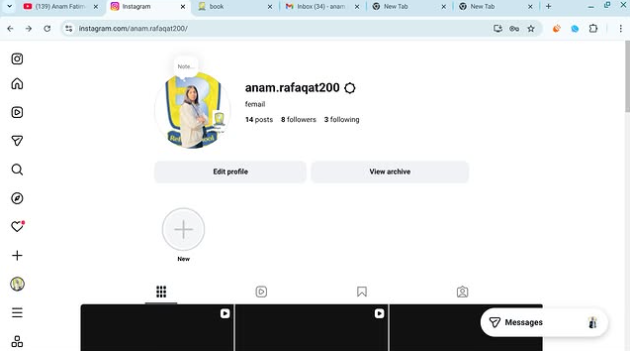
Step 6: Your Account is Ready!
Congratulations You are now on Instagram!
Post your first photo:
Tap + icon → Upload → Write caption → Post
Something Different (Fun First Post Idea)
Instead of a normal photo, make a “Hello Instagram” intro post
Caption idea:
Hello world!
This is my new space to share my journey, creativity and daily life
Follow me for positivity, learning & fun
#NewOnInstagram #FirstPost #HelloWorld #InstaJourney #DreamBigRSIF8RSIF8
Roll NO:11
Task post no : 5
Task topic How to Create an Instagram
Account?
How to Create an Instagram Account (Step-by-Step Guide)
Want to join the world of reels, photos, and creativity? Let’s make your Instagram account in just a few minutes!
Step 1: Download the App
Open Play Store (Android) or App Store (iPhone)
Search for Instagram
Tap Install / Get
Step 2: Open & Sign Up
Open the app
Tap Sign Up
Choose one option:
Sign up with Email
Sign up with Phone Number
Step 3: Create Login Details
Enter your name
Create a username (your unique ID)
Create a strong password
Tip: Pick a cool username like:
anam_creates
life.with.anam
official.anam
Step 4: Add Profile Info
Now make your profile attractive
Add a Profile Photo
Write a Bio (short intro)
Example bio ideas:
Dream big | Work hard | Stay kind
Student | Creator | Learner
Living my story one post at a time
Step 5: Find Friends
Instagram will ask to connect contacts
Tap Follow to start building your community
Step 6: Your Account is Ready!
Congratulations You are now on Instagram!
Post your first photo:
Tap + icon → Upload → Write caption → Post
Something Different (Fun First Post Idea)
Instead of a normal photo, make a “Hello Instagram” intro post
Caption idea:
Hello world!
This is my new space to share my journey, creativity and daily life
Follow me for positivity, learning & fun
#NewOnInstagram #FirstPost #HelloWorld #InstaJourney #DreamBigRSIF8RSIF8
RSIF8
Roll NO:11
Task post no : 5
Task topic How to Create an Instagram
Account?
📸✨ How to Create an Instagram Account (Step-by-Step Guide) 🚀🔥
Want to join the world of reels, photos, and creativity? Let’s make your Instagram account in just a few minutes! 💥💬
📲 Step 1: Download the App
👉 Open Play Store (Android) or App Store (iPhone)
🔍 Search for Instagram
⬇️ Tap Install / Get
📝 Step 2: Open & Sign Up
1️⃣ Open the app
2️⃣ Tap Sign Up
3️⃣ Choose one option:
📧 Sign up with Email
📱 Sign up with Phone Number
🔐 Step 3: Create Login Details
✔️ Enter your name
✔️ Create a username (your unique ID) 😎
✔️ Create a strong password 🔑
Tip: Pick a cool username like:
✨ anam_creates
✨ life.with.anam
✨ official.anam
👤 Step 4: Add Profile Info
Now make your profile attractive 💖
📷 Add a Profile Photo
📝 Write a Bio (short intro)
Example bio ideas:
🌸 Dream big | Work hard | Stay kind
🎓 Student | 📸 Creator | 💫 Learner
✨ Living my story one post at a time
👥 Step 5: Find Friends
Instagram will ask to connect contacts 📱
Tap Follow to start building your community 🤝💬
🎉 Step 6: Your Account is Ready!
Congratulations 🥳 You are now on Instagram!
Post your first photo:
📸 Tap + icon → Upload → Write caption → Post 🚀
💡 Something Different (Fun First Post Idea) 🌈
Instead of a normal photo, make a “Hello Instagram” intro post 👋
Caption idea:
✨ Hello world!
This is my new space to share my journey, creativity and daily life 💫
Follow me for positivity, learning & fun 🌸💖
#NewOnInstagram #FirstPost #HelloWorld #InstaJourney #DreamBigRSIF8RSIF8
0 Commentarios
0 Acciones
4139 Views