• #rsisb
    Roll no 248
    Foundation level
    Codting Task no 35
    ### Basic Calculator with GUI

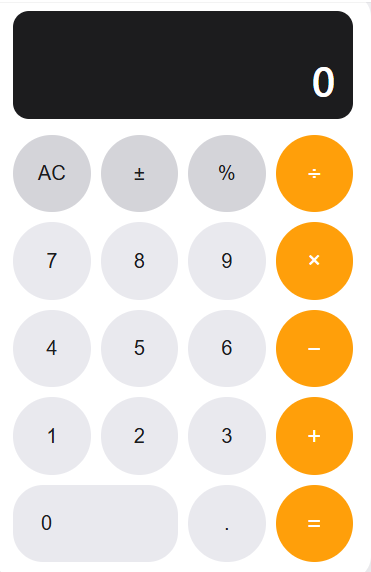
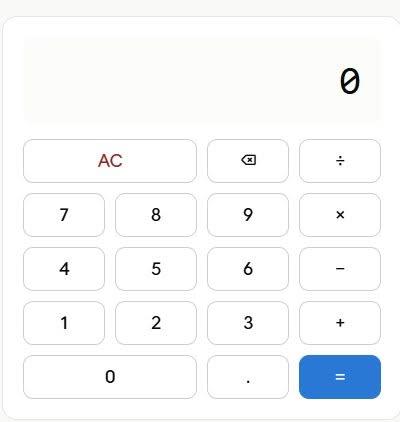
    I created a **Basic Calculator with GUI** that allows users to perform simple mathematical operations easily.
    The calculator has a simple and user-friendly interface with buttons for numbers and basic operations. It is a great beginner project for learning **Python, GUI design, and programming logic**.

    **Features:**

    * Addition
    * Subtraction
    * Multiplication
    * Division
    * Clear button
    * Simple and easy-to-use GUI

    #BasicCalculator #GUI #Python #Coding #Programming #BeginnerProject #CalculatorApp #LearnCoding #PythonProject #ComputerScience #CodingJourney
    #rsisb Roll no 248 Foundation level Codting Task no 35 ### 🧮 Basic Calculator with GUI I created a **Basic Calculator with GUI** 🖥️✨ that allows users to perform simple mathematical operations easily. ➕➖✖️➗ The calculator has a simple and user-friendly interface with buttons for numbers and basic operations. It is a great beginner project for learning **Python, GUI design, and programming logic**. 💻🚀 🔢 **Features:** * ➕ Addition * ➖ Subtraction * ✖️ Multiplication * ➗ Division * 🧹 Clear button * 🖥️ Simple and easy-to-use GUI #BasicCalculator #GUI #Python #Coding #Programming #BeginnerProject #CalculatorApp #LearnCoding #PythonProject #ComputerScience #CodingJourney 💻🧮🚀✨
    0 Commentaires 0 Parts 213 Vue
  • Mohsin RS F8
    coding task no:3
    Roll no:13

    Built a Simple To-Do List Application in Python!

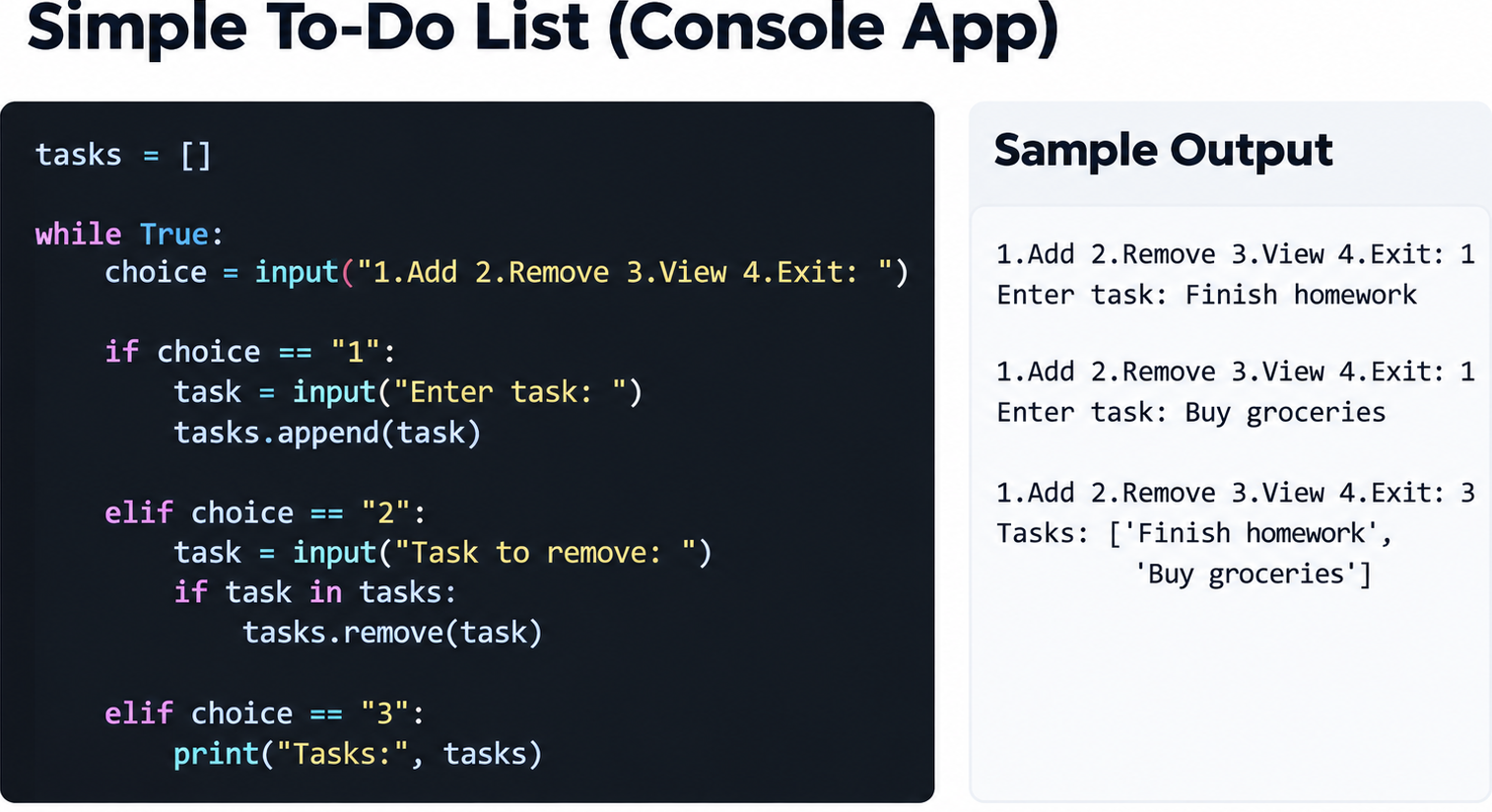
    As part of a coding challenge, I developed a simple console-based To-Do List that allows users to add, remove, and view tasks with ease. This project demonstrates the fundamentals of Python programming, including the use of lists, loops, and conditional statements to create an interactive application.

    Through this project, I gained hands-on experience in managing data, handling user input, and designing a simple menu-driven program. Even small applications like this help strengthen problem-solving skills and lay the foundation for building more advanced software in the future.

    Features:
    Add new tasks
    Remove completed tasks
    View all current tasks
    User-friendly menu system

    Building projects like these is a great way to practice coding and understand how programming can be used to organize everyday activities efficiently. Every line of code is a step toward becoming a better developer!

    #Python #CodingChallenge #Programming #ToDoList #PythonProjects #DeveloperJourney #LearnToCode #ComputerScience #CodingLife #TechSkills

    I prefer this response
    ChatGPT
    Response 2
    Simple To-Do List – Description

    Staying organized is one of the most important skills in both personal and professional life. This simple To-Do List application is designed to help users manage their daily tasks efficiently. The program allows users to add new tasks, remove completed or unnecessary tasks, and view all current tasks in an organized list.

    Built using basic Python concepts such as lists, loops, and conditional statements, this project demonstrates how programming can be used to solve everyday problems. The application provides a user-friendly menu that makes task management simple and effective. Users can continuously update their task list until they decide to exit the program.

    This project is an excellent example for beginners learning Python, as it introduces important programming fundamentals while creating something practical and useful. By working on this application, developers gain experience with data storage, user input
    Mohsin RS F8 🎓✨ coding task no:3 Roll no:13 🚀 Built a Simple To-Do List Application in Python! 🐍 As part of a coding challenge, I developed a simple console-based To-Do List that allows users to add, remove, and view tasks with ease. This project demonstrates the fundamentals of Python programming, including the use of lists, loops, and conditional statements to create an interactive application. Through this project, I gained hands-on experience in managing data, handling user input, and designing a simple menu-driven program. Even small applications like this help strengthen problem-solving skills and lay the foundation for building more advanced software in the future. ✨ Features: ✅ Add new tasks ✅ Remove completed tasks ✅ View all current tasks ✅ User-friendly menu system Building projects like these is a great way to practice coding and understand how programming can be used to organize everyday activities efficiently. Every line of code is a step toward becoming a better developer! 💻🔥 #Python #CodingChallenge #Programming #ToDoList #PythonProjects #DeveloperJourney #LearnToCode #ComputerScience #CodingLife #TechSkills I prefer this response ChatGPT Response 2 📝 Simple To-Do List – Description Staying organized is one of the most important skills in both personal and professional life. This simple To-Do List application is designed to help users manage their daily tasks efficiently. The program allows users to add new tasks, remove completed or unnecessary tasks, and view all current tasks in an organized list. Built using basic Python concepts such as lists, loops, and conditional statements, this project demonstrates how programming can be used to solve everyday problems. The application provides a user-friendly menu that makes task management simple and effective. Users can continuously update their task list until they decide to exit the program. This project is an excellent example for beginners learning Python, as it introduces important programming fundamentals while creating something practical and useful. By working on this application, developers gain experience with data storage, user input
    0 Commentaires 0 Parts 642 Vue
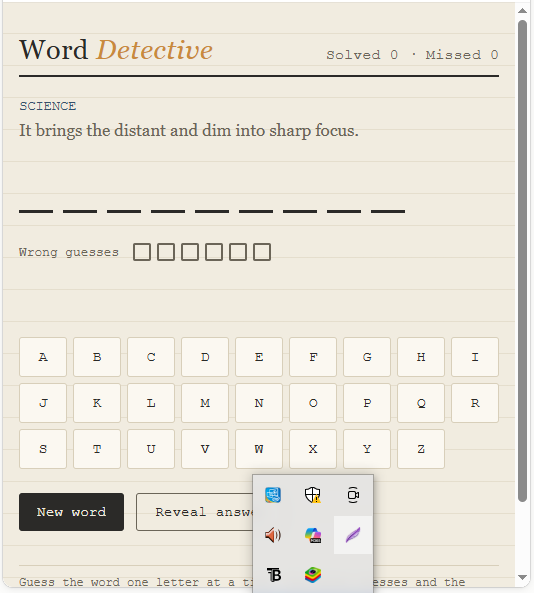
  • Word Detective is an interactive word-guessing game where players try to discover a hidden word using clues. The game displays a clue and blank spaces representing the letters of the secret word. Players click the alphabet buttons to make guesses while keeping track of solved words and missed guesses.

    Goal: Guess the hidden word using the clue with as few wrong guesses as possible.

    Features:

    Alphabet buttons for guessing letters
    Clues to help find the word
    Wrong-guess counter
    New Word button
    Reveal Answer option
    Fun detective-style interface

    #WordDetective #WordGame #GuessingGame #PythonProject #CodingProject #Programming #LearningToCode #ComputerCourses

    Day:-169
    rollno:-006
    foundation level
    Canva Post
    Word Detective is an interactive word-guessing game where players try to discover a hidden word using clues. The game displays a clue and blank spaces representing the letters of the secret word. Players click the alphabet buttons to make guesses while keeping track of solved words and missed guesses. 🎯 Goal: Guess the hidden word using the clue with as few wrong guesses as possible. Features: 🔤 Alphabet buttons for guessing letters 💡 Clues to help find the word ❌ Wrong-guess counter 🆕 New Word button 👀 Reveal Answer option 🕵️ Fun detective-style interface #WordDetective #WordGame #GuessingGame #PythonProject #CodingProject #Programming #LearningToCode #ComputerCourses Day:-169 rollno:-006 foundation level 🎨 Canva Post
    0 Commentaires 0 Parts 869 Vue
  • #rsisb
    Roll no.247
    Foundation level# Basic Calculator with GUI

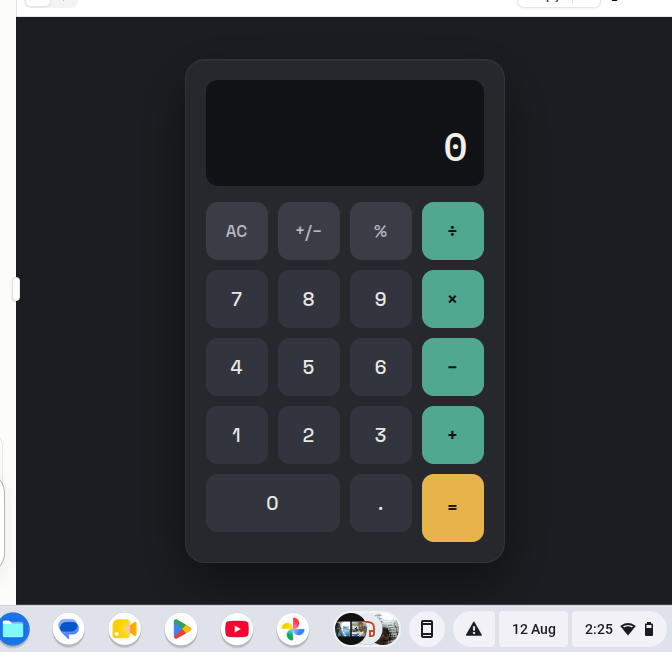
    Welcome to **Basic Calculator with GUI** — a simple, user-friendly, and interactive calculator project designed to make everyday mathematical calculations quick, easy, and enjoyable! This project demonstrates how a calculator can be built with a **Graphical User Interface (GUI)**, allowing users to perform calculations by simply clicking buttons instead of typing commands.

    The calculator provides essential mathematical operations such as **addition , subtraction , multiplication , and division **. It is designed with a clean and straightforward interface so that beginners, students, and anyone interested in programming can easily understand how a GUI-based application works.

    One of the most interesting aspects of this project is the combination of **programming logic and visual design**. Users can enter numbers, select mathematical operators, and instantly see the result displayed on the calculator screen. This makes the project a great example of how programming can be used to create practical and interactive applications.

    The **Basic Calculator with GUI** is also an excellent learning project for students who are beginning their programming journey. Through this project, learners can understand important concepts such as **variables, functions, event handling, buttons, input fields, operators, conditional logic, and GUI components**. These concepts provide a strong foundation for developing more advanced software applications in the future.

    The simple design makes the calculator easy to navigate, while the interactive buttons provide a smooth user experience. Whether you want to calculate a total, subtract numbers, multiply values, or divide one number by another, this calculator provides the essential tools needed for basic arithmetic.

    This project also highlights the importance of creating applications that are not only functional but also **easy to use and visually understandable**. A well-designed GUI helps users interact with software naturally and makes complex programming concepts more accessible.

    Overall, the **Basic Calculator with GUI** is a fun, educational, and practical programming project. It is perfect for beginners who want to practice GUI development while building something useful. With additional features, the project can later be expanded into a more advanced calculator with percentage calculations, decimal support, square roots, memory functions, calculation history, and more!

    **Project Highlights:**
    Simple and clean GUI design
    Addition, subtraction, multiplication, and division
    Interactive calculator buttons
    Easy-to-understand interface
    Beginner-friendly programming project
    Useful for learning GUI development
    Great practice for programming logic
    Can be expanded with advanced features

    **Learn. Code. Calculate. Create!**

    #BasicCalculator #CalculatorGUI #GUICalculator #Programming #Coding #ComputerScience #PythonProject #BeginnerProject #ProgrammingForBeginners #GUIProgramming #SoftwareDevelopment #CodingProject #MathCalculator #LearnProgramming #StudentProject #TechProject #InteractiveApplication #ComputerProgramming #CodingJourney #ProgrammingSkills #Education #Technology #Developer #CodeLearning #CreativeCoding #Math #CalculatorProject
    #rsisb Roll no.247 Foundation level# Basic Calculator with GUI 🧮💻 Welcome to **Basic Calculator with GUI** — a simple, user-friendly, and interactive calculator project designed to make everyday mathematical calculations quick, easy, and enjoyable! 🎉✨ This project demonstrates how a calculator can be built with a **Graphical User Interface (GUI)**, allowing users to perform calculations by simply clicking buttons instead of typing commands. 🖱️🔢 The calculator provides essential mathematical operations such as **addition ➕, subtraction ➖, multiplication ✖️, and division ➗**. It is designed with a clean and straightforward interface so that beginners, students, and anyone interested in programming can easily understand how a GUI-based application works. 💡👨‍💻👩‍💻 One of the most interesting aspects of this project is the combination of **programming logic and visual design**. 🎨💻 Users can enter numbers, select mathematical operators, and instantly see the result displayed on the calculator screen. This makes the project a great example of how programming can be used to create practical and interactive applications. 🚀 The **Basic Calculator with GUI** is also an excellent learning project for students who are beginning their programming journey. 📚🌟 Through this project, learners can understand important concepts such as **variables, functions, event handling, buttons, input fields, operators, conditional logic, and GUI components**. These concepts provide a strong foundation for developing more advanced software applications in the future. 🧠💻 The simple design makes the calculator easy to navigate, while the interactive buttons provide a smooth user experience. 🔢🖱️ Whether you want to calculate a total, subtract numbers, multiply values, or divide one number by another, this calculator provides the essential tools needed for basic arithmetic. ✅ This project also highlights the importance of creating applications that are not only functional but also **easy to use and visually understandable**. 🌟 A well-designed GUI helps users interact with software naturally and makes complex programming concepts more accessible. Overall, the **Basic Calculator with GUI** is a fun, educational, and practical programming project. 🧮✨ It is perfect for beginners who want to practice GUI development while building something useful. With additional features, the project can later be expanded into a more advanced calculator with percentage calculations, decimal support, square roots, memory functions, calculation history, and more! 🚀🔢 🎯 **Project Highlights:** 🔹 Simple and clean GUI design 🔹 Addition, subtraction, multiplication, and division 🔹 Interactive calculator buttons 🔹 Easy-to-understand interface 🔹 Beginner-friendly programming project 🔹 Useful for learning GUI development 🔹 Great practice for programming logic 🔹 Can be expanded with advanced features 💻 **Learn. Code. Calculate. Create!** 🧮🚀 #BasicCalculator #CalculatorGUI #GUICalculator #Programming #Coding #ComputerScience #PythonProject #BeginnerProject #ProgrammingForBeginners #GUIProgramming #SoftwareDevelopment #CodingProject #MathCalculator #LearnProgramming #StudentProject #TechProject #InteractiveApplication #ComputerProgramming #CodingJourney #ProgrammingSkills #Education #Technology #Developer #CodeLearning #CreativeCoding #Math #CalculatorProject 🧮💻

    0 Commentaires 0 Parts 8057 Vue
  • #rsisb
    Roll No.240
    Coding No.16
    Foundation Level
    # Password Generator

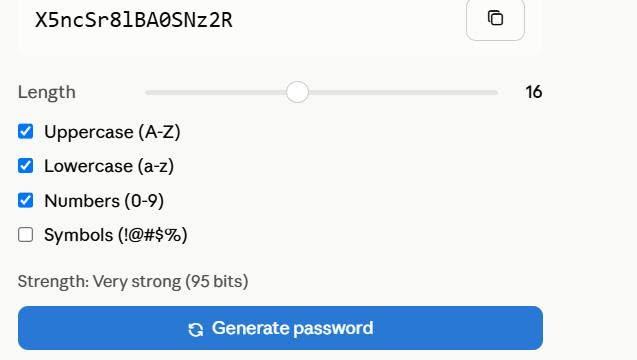
    A **Password Generator** is a simple yet highly useful application that creates strong, random, and secure passwords to help protect online accounts and sensitive information. Instead of using easy-to-guess passwords such as names, birthdays, or common words, a password generator produces unique combinations of uppercase letters, lowercase letters, numbers, and special symbols, making passwords much more resistant to hacking and unauthorized access.

    This project is ideal for beginners learning programming because it introduces essential concepts such as random number generation, string manipulation, loops, conditional statements, and user input. Developers can build a password generator using languages like Python, Java, C++, JavaScript, or C#, with either a command-line interface or a graphical user interface (GUI).

    A typical password generator allows users to customize their passwords by selecting the desired length and choosing whether to include uppercase letters, lowercase letters, digits, and special characters. The generated password is random, unique, and difficult to predict, significantly improving online security.

    More advanced versions of a password generator can include features such as password strength indicators, one-click copy to clipboard, password history, QR code generation, and secure password storage using encryption. These enhancements make the application even more practical for everyday use.

    As cybersecurity becomes increasingly important in today's digital world, using strong and unique passwords for every account is one of the most effective ways to protect personal and professional information. Building a Password Generator project not only strengthens programming skills but also promotes good cybersecurity practices, making it an excellent project for students, developers, and technology enthusiasts.

    **#PasswordGenerator #CyberSecurity #Python #Programming #Coding #GUI #RandomPassword #TechProject #InformationSecurity #SoftwareDevelopment #PythonProject #LearnToCode #DigitalSecurity #ComputerScience #Technology**

    Rehan School Islamabad Campus
    Asma Shaheen EducationWali
    Irum Asim
    Saima Happinesswali
    #rsisb Roll No.240 Coding No.16 Foundation Level # 🔐 Password Generator A **Password Generator** is a simple yet highly useful application that creates strong, random, and secure passwords to help protect online accounts and sensitive information. Instead of using easy-to-guess passwords such as names, birthdays, or common words, a password generator produces unique combinations of uppercase letters, lowercase letters, numbers, and special symbols, making passwords much more resistant to hacking and unauthorized access. This project is ideal for beginners learning programming because it introduces essential concepts such as random number generation, string manipulation, loops, conditional statements, and user input. Developers can build a password generator using languages like Python, Java, C++, JavaScript, or C#, with either a command-line interface or a graphical user interface (GUI). A typical password generator allows users to customize their passwords by selecting the desired length and choosing whether to include uppercase letters, lowercase letters, digits, and special characters. The generated password is random, unique, and difficult to predict, significantly improving online security. More advanced versions of a password generator can include features such as password strength indicators, one-click copy to clipboard, password history, QR code generation, and secure password storage using encryption. These enhancements make the application even more practical for everyday use. As cybersecurity becomes increasingly important in today's digital world, using strong and unique passwords for every account is one of the most effective ways to protect personal and professional information. Building a Password Generator project not only strengthens programming skills but also promotes good cybersecurity practices, making it an excellent project for students, developers, and technology enthusiasts. **#PasswordGenerator #CyberSecurity #Python #Programming #Coding #GUI #RandomPassword #TechProject #InformationSecurity #SoftwareDevelopment #PythonProject #LearnToCode #DigitalSecurity #ComputerScience #Technology** 🔐💻🛡️🚀 Rehan School Islamabad Campus Asma Shaheen EducationWali Irum Asim Saima Happinesswali
    0 Commentaires 0 Parts 7906 Vue
  • #rsisb
    Roll No.240
    Coding No.15
    Foundation Level

    # Basic Calculator with GUI

    A **Basic Calculator with GUI (Graphical User Interface)** is a beginner-friendly programming project that allows users to perform everyday mathematical calculations through an interactive visual interface instead of typing commands. The calculator typically includes buttons for numbers (0–9), arithmetic operators (+, −, ×, ÷), a display screen, and function buttons such as **Clear (C)** and **Equals )**.

    This project is an excellent way to learn the fundamentals of GUI development using programming languages such as Python with Tkinter, Java Swing, C# Windows Forms, or other GUI frameworks. It helps developers understand how user interface components, event handling, and programming logic work together to create a functional desktop application.

    A basic calculator can perform operations like addition, subtraction, multiplication, and division instantly, making calculations simple and efficient. As users interact with the buttons, the application processes the input, performs the requested calculation, and displays the result in real time.

    Building a GUI calculator strengthens programming skills by introducing concepts such as variables, functions, conditional statements, error handling, and interface design. It also serves as a strong foundation for creating more advanced applications with additional features like scientific calculations, memory functions, percentage operations, and square roots.

    Whether you're
    a student learning programming or a beginner exploring software development, creating a Basic Calculator with GUI is a practical and rewarding project that combines logic, creativity, and user-friendly design into one useful application.

    **#BasicCalculator #GUI #Python #Tkinter #Programming #Coding #SoftwareDevelopment #PythonProject #DesktopApplication #LearnToCode #BeginnerProject #CodingJourney #ComputerScience #Technology #AppDevelopment**

    Rehan School Islamabad Campus
    Asma Shaheen EducationWali
    Irum Asim
    Saima Happinesswali
    #rsisb Roll No.240 Coding No.15 Foundation Level # 🧮 Basic Calculator with GUI A **Basic Calculator with GUI (Graphical User Interface)** is a beginner-friendly programming project that allows users to perform everyday mathematical calculations through an interactive visual interface instead of typing commands. The calculator typically includes buttons for numbers (0–9), arithmetic operators (+, −, ×, ÷), a display screen, and function buttons such as **Clear (C)** and **Equals 😊)**. This project is an excellent way to learn the fundamentals of GUI development using programming languages such as Python with Tkinter, Java Swing, C# Windows Forms, or other GUI frameworks. It helps developers understand how user interface components, event handling, and programming logic work together to create a functional desktop application. A basic calculator can perform operations like addition, subtraction, multiplication, and division instantly, making calculations simple and efficient. As users interact with the buttons, the application processes the input, performs the requested calculation, and displays the result in real time. Building a GUI calculator strengthens programming skills by introducing concepts such as variables, functions, conditional statements, error handling, and interface design. It also serves as a strong foundation for creating more advanced applications with additional features like scientific calculations, memory functions, percentage operations, and square roots. Whether you're a student learning programming or a beginner exploring software development, creating a Basic Calculator with GUI is a practical and rewarding project that combines logic, creativity, and user-friendly design into one useful application. **#BasicCalculator #GUI #Python #Tkinter #Programming #Coding #SoftwareDevelopment #PythonProject #DesktopApplication #LearnToCode #BeginnerProject #CodingJourney #ComputerScience #Technology #AppDevelopment** 🧮💻🚀 Rehan School Islamabad Campus Asma Shaheen EducationWali Irum Asim Saima Happinesswali
    0 Commentaires 0 Parts 5989 Vue