



RSI F8
Task NO:8
ROLL: NO13
Download and Use ChatGPT Voice
In today's modern world, Artificial Intelligence (AI) is becoming an important part of our daily lives. It helps us learn new things, solve problems, improve our skills, and make our work easier. One of the most interesting features of ChatGPT is Voice Mode, which allows users to communicate with AI by speaking instead of typing. The task “Download and Use ChatGPT Voice” helped me learn how to use this useful technology and understand how voice-based communication can make learning more interactive, simple, and enjoyable.
ChatGPT Voice is a helpful feature that allows users to have conversations with ChatGPT using their voice. Instead of writing every question, users can speak naturally and listen to the responses. This makes communication easier and provides a more conversational learning experience. It can be especially useful when practising English, asking questions, learning new topics, and improving communication skills.
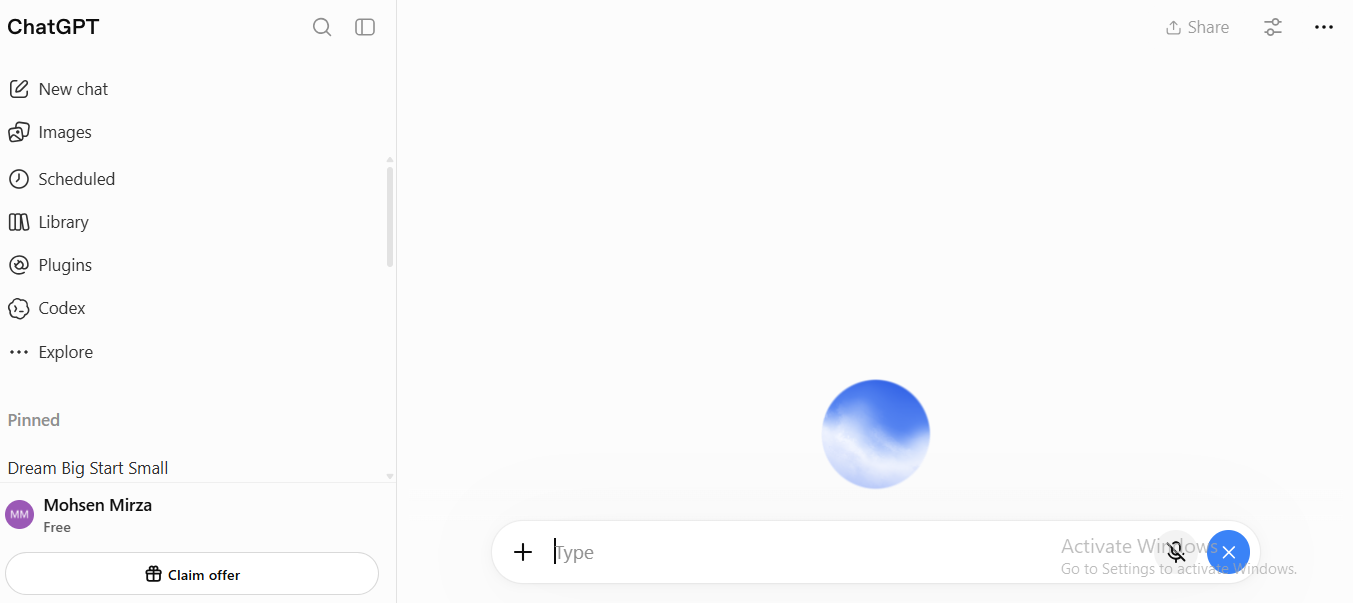
To begin using ChatGPT Voice, I learned that I can access ChatGPT through its official website or the official ChatGPT mobile application. On a computer, I can visit the ChatGPT website and sign in to my account. On a mobile phone, I can install the official ChatGPT app from the Google Play Store or Apple App Store. After opening ChatGPT, I can look for the Voice icon and follow the instructions to start a voice conversation. Depending on the device and available features, microphone permission may be required.
One of the biggest advantages of ChatGPT Voice is that it can help students practise English speaking. Sometimes, students feel shy or nervous when speaking English in front of other people. With voice conversations, they can practise asking questions, answering them, learning new vocabulary, and improving sentence formation. They can also ask ChatGPT to explain difficult words in simple English. Regular practice can help students become more confident in their communication skills.
Another advantage is that ChatGPT Voice makes learning more interactive. For example, I can ask questions about science, mathematics, technology, history, and general knowledge. I can also practise interview questions, prepare for school assignments, and learn how to introduce myself in English. Instead of only reading information on a screen, I can communicate with ChatGPT and listen to its explanations. This can make learning more engaging and help me explore different subjects.
ChatGPT Voice can also help me develop better communication habits. I can practise speaking clearly, asking meaningful questions, and explaining my ideas. For example, I can request a mock interview, practise a short presentation, or have a conversation about my favourite topic. These activities can help me prepare for future educational opportunities and improve my ability to express myself.
During this task, I also understood the importance of using Artificial Intelligence responsibly. AI is a useful learning assistant, but its answers should not always be assumed to be correct. For important schoolwork, I should check information from reliable sources and think critically about the answers. I should also protect my personal information and avoid sharing passwords, private details, or other sensitive information during voice conversations.
It is important to remember that ChatGPT Voice availability and usage limits may vary depending on the device, account, app version, and plan. Users should download applications only from official sources and review the permissions requested by their devices. ChatGPT can be used through its official website without necessarily downloading a separate application on a computer.
This activity was a valuable learning experience because it introduced me to a modern AI feature that can support education, communication, and personal development. I learned that technology is not only for entertainment; it can also be used to build knowledge, practise important skills, and explore new opportunities. By using ChatGPT Voice regularly and responsibly, I can make my learning journey more productive and enjoyable.
In conclusion, Download and Use ChatGPT Voice is a useful task that teaches students how to communicate with Artificial Intelligence through voice. It can support English practice, improve communication, answer questions, and make learning more interactive. I am happy to explore new technologies and improve my skills step by step. I believe that learning how to use modern AI tools responsibly is an important part of becoming a confident, creative, and lifelong learner.
My Learning Goal: To use ChatGPT Voice to practise English, improve my communication skills, ask meaningful questions, and continue learning something new every day.
#ChatGPT #ChatGPTVoice #ArtificialIntelligence #AI #VoiceMode #LearnWithAI #EnglishSpeaking #CommunicationSkills #DigitalLearning #Technology #OnlineLearning #RehanSchool #FoundationLevel #LearningJourney #MadeByMe
Add my personal step-by-step experience
Task NO:8
ROLL: NO13
Download and Use ChatGPT Voice
In today's modern world, Artificial Intelligence (AI) is becoming an important part of our daily lives. It helps us learn new things, solve problems, improve our skills, and make our work easier. One of the most interesting features of ChatGPT is Voice Mode, which allows users to communicate with AI by speaking instead of typing. The task “Download and Use ChatGPT Voice” helped me learn how to use this useful technology and understand how voice-based communication can make learning more interactive, simple, and enjoyable.
ChatGPT Voice is a helpful feature that allows users to have conversations with ChatGPT using their voice. Instead of writing every question, users can speak naturally and listen to the responses. This makes communication easier and provides a more conversational learning experience. It can be especially useful when practising English, asking questions, learning new topics, and improving communication skills.
To begin using ChatGPT Voice, I learned that I can access ChatGPT through its official website or the official ChatGPT mobile application. On a computer, I can visit the ChatGPT website and sign in to my account. On a mobile phone, I can install the official ChatGPT app from the Google Play Store or Apple App Store. After opening ChatGPT, I can look for the Voice icon and follow the instructions to start a voice conversation. Depending on the device and available features, microphone permission may be required.
One of the biggest advantages of ChatGPT Voice is that it can help students practise English speaking. Sometimes, students feel shy or nervous when speaking English in front of other people. With voice conversations, they can practise asking questions, answering them, learning new vocabulary, and improving sentence formation. They can also ask ChatGPT to explain difficult words in simple English. Regular practice can help students become more confident in their communication skills.
Another advantage is that ChatGPT Voice makes learning more interactive. For example, I can ask questions about science, mathematics, technology, history, and general knowledge. I can also practise interview questions, prepare for school assignments, and learn how to introduce myself in English. Instead of only reading information on a screen, I can communicate with ChatGPT and listen to its explanations. This can make learning more engaging and help me explore different subjects.
ChatGPT Voice can also help me develop better communication habits. I can practise speaking clearly, asking meaningful questions, and explaining my ideas. For example, I can request a mock interview, practise a short presentation, or have a conversation about my favourite topic. These activities can help me prepare for future educational opportunities and improve my ability to express myself.
During this task, I also understood the importance of using Artificial Intelligence responsibly. AI is a useful learning assistant, but its answers should not always be assumed to be correct. For important schoolwork, I should check information from reliable sources and think critically about the answers. I should also protect my personal information and avoid sharing passwords, private details, or other sensitive information during voice conversations.
It is important to remember that ChatGPT Voice availability and usage limits may vary depending on the device, account, app version, and plan. Users should download applications only from official sources and review the permissions requested by their devices. ChatGPT can be used through its official website without necessarily downloading a separate application on a computer.
This activity was a valuable learning experience because it introduced me to a modern AI feature that can support education, communication, and personal development. I learned that technology is not only for entertainment; it can also be used to build knowledge, practise important skills, and explore new opportunities. By using ChatGPT Voice regularly and responsibly, I can make my learning journey more productive and enjoyable.
In conclusion, Download and Use ChatGPT Voice is a useful task that teaches students how to communicate with Artificial Intelligence through voice. It can support English practice, improve communication, answer questions, and make learning more interactive. I am happy to explore new technologies and improve my skills step by step. I believe that learning how to use modern AI tools responsibly is an important part of becoming a confident, creative, and lifelong learner.
My Learning Goal: To use ChatGPT Voice to practise English, improve my communication skills, ask meaningful questions, and continue learning something new every day.
#ChatGPT #ChatGPTVoice #ArtificialIntelligence #AI #VoiceMode #LearnWithAI #EnglishSpeaking #CommunicationSkills #DigitalLearning #Technology #OnlineLearning #RehanSchool #FoundationLevel #LearningJourney #MadeByMe
Add my personal step-by-step experience
RSI F8
Task NO:8
ROLL: NO13
Download and Use ChatGPT Voice 🎙️🤖
In today's modern world, Artificial Intelligence (AI) is becoming an important part of our daily lives. It helps us learn new things, solve problems, improve our skills, and make our work easier. One of the most interesting features of ChatGPT is Voice Mode, which allows users to communicate with AI by speaking instead of typing. The task “Download and Use ChatGPT Voice” helped me learn how to use this useful technology and understand how voice-based communication can make learning more interactive, simple, and enjoyable.
ChatGPT Voice is a helpful feature that allows users to have conversations with ChatGPT using their voice. Instead of writing every question, users can speak naturally and listen to the responses. This makes communication easier and provides a more conversational learning experience. It can be especially useful when practising English, asking questions, learning new topics, and improving communication skills.
To begin using ChatGPT Voice, I learned that I can access ChatGPT through its official website or the official ChatGPT mobile application. On a computer, I can visit the ChatGPT website and sign in to my account. On a mobile phone, I can install the official ChatGPT app from the Google Play Store or Apple App Store. After opening ChatGPT, I can look for the Voice icon and follow the instructions to start a voice conversation. Depending on the device and available features, microphone permission may be required.
One of the biggest advantages of ChatGPT Voice is that it can help students practise English speaking. Sometimes, students feel shy or nervous when speaking English in front of other people. With voice conversations, they can practise asking questions, answering them, learning new vocabulary, and improving sentence formation. They can also ask ChatGPT to explain difficult words in simple English. Regular practice can help students become more confident in their communication skills.
Another advantage is that ChatGPT Voice makes learning more interactive. For example, I can ask questions about science, mathematics, technology, history, and general knowledge. I can also practise interview questions, prepare for school assignments, and learn how to introduce myself in English. Instead of only reading information on a screen, I can communicate with ChatGPT and listen to its explanations. This can make learning more engaging and help me explore different subjects.
ChatGPT Voice can also help me develop better communication habits. I can practise speaking clearly, asking meaningful questions, and explaining my ideas. For example, I can request a mock interview, practise a short presentation, or have a conversation about my favourite topic. These activities can help me prepare for future educational opportunities and improve my ability to express myself.
During this task, I also understood the importance of using Artificial Intelligence responsibly. AI is a useful learning assistant, but its answers should not always be assumed to be correct. For important schoolwork, I should check information from reliable sources and think critically about the answers. I should also protect my personal information and avoid sharing passwords, private details, or other sensitive information during voice conversations.
It is important to remember that ChatGPT Voice availability and usage limits may vary depending on the device, account, app version, and plan. Users should download applications only from official sources and review the permissions requested by their devices. ChatGPT can be used through its official website without necessarily downloading a separate application on a computer.
This activity was a valuable learning experience because it introduced me to a modern AI feature that can support education, communication, and personal development. I learned that technology is not only for entertainment; it can also be used to build knowledge, practise important skills, and explore new opportunities. By using ChatGPT Voice regularly and responsibly, I can make my learning journey more productive and enjoyable.
In conclusion, Download and Use ChatGPT Voice is a useful task that teaches students how to communicate with Artificial Intelligence through voice. It can support English practice, improve communication, answer questions, and make learning more interactive. I am happy to explore new technologies and improve my skills step by step. I believe that learning how to use modern AI tools responsibly is an important part of becoming a confident, creative, and lifelong learner.
My Learning Goal: To use ChatGPT Voice to practise English, improve my communication skills, ask meaningful questions, and continue learning something new every day.
#ChatGPT #ChatGPTVoice #ArtificialIntelligence #AI #VoiceMode #LearnWithAI #EnglishSpeaking #CommunicationSkills #DigitalLearning #Technology #OnlineLearning #RehanSchool #FoundationLevel #LearningJourney #MadeByMe 🚀🎙️📚
Add my personal step-by-step experience
0 Commentaires
0 Parts
267 Vue