Mohsin RS F8
Roll NO:13
Coding Task NO:15
Class: Foundation Level
Made by Me
Complete the Coding Task: Expense Tracker
I completed the Expense Tracker coding task as a practical project to learn how technology can be used to organize and manage everyday financial information. The main purpose of this project is to create a simple and user-friendly application where users can record their income and expenses and easily see their overall balance.
An Expense Tracker is a useful project for beginners because it combines several important programming concepts in one application. Instead of only displaying information on a webpage, the project allows the user to enter data, interact with buttons and forms, and see the information update dynamically.
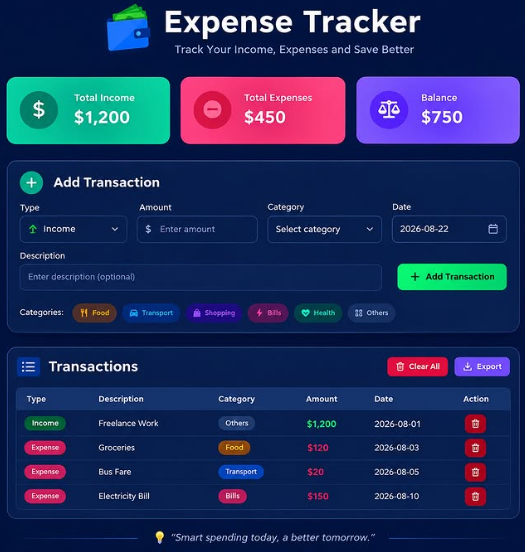
The application allows users to add transactions by entering details such as a description, amount, type, category, and date. A transaction can be marked as either income or an expense. Categories can help organize different types of spending, such as food, transportation, education, shopping, bills, entertainment, or other expenses.
One of the most useful features of the project is the summary section. It displays the total income, total expenses, and remaining balance. Whenever a new transaction is added, the application calculates the updated totals automatically. This makes it easier to understand how the recorded money is being managed.
The project also includes a transaction list where users can view their previous entries. Each transaction shows important information such as its description, category, amount, and date. If an entry is no longer needed, the user can delete it. There is also a Clear All option for removing all stored transactions.
For the development of this project, I used HTML, CSS, and JavaScript. HTML was used to create the structure of the application, including the forms, summary cards, buttons, and transaction list. CSS was used to create a clean and responsive interface that can work on different screen sizes. JavaScript was used to add functionality, perform calculations, manage transactions, and update the interface whenever the data changes.
5w
Roll NO:13
Coding Task NO:15
Class: Foundation Level
Made by Me
Complete the Coding Task: Expense Tracker
I completed the Expense Tracker coding task as a practical project to learn how technology can be used to organize and manage everyday financial information. The main purpose of this project is to create a simple and user-friendly application where users can record their income and expenses and easily see their overall balance.
An Expense Tracker is a useful project for beginners because it combines several important programming concepts in one application. Instead of only displaying information on a webpage, the project allows the user to enter data, interact with buttons and forms, and see the information update dynamically.
The application allows users to add transactions by entering details such as a description, amount, type, category, and date. A transaction can be marked as either income or an expense. Categories can help organize different types of spending, such as food, transportation, education, shopping, bills, entertainment, or other expenses.
One of the most useful features of the project is the summary section. It displays the total income, total expenses, and remaining balance. Whenever a new transaction is added, the application calculates the updated totals automatically. This makes it easier to understand how the recorded money is being managed.
The project also includes a transaction list where users can view their previous entries. Each transaction shows important information such as its description, category, amount, and date. If an entry is no longer needed, the user can delete it. There is also a Clear All option for removing all stored transactions.
For the development of this project, I used HTML, CSS, and JavaScript. HTML was used to create the structure of the application, including the forms, summary cards, buttons, and transaction list. CSS was used to create a clean and responsive interface that can work on different screen sizes. JavaScript was used to add functionality, perform calculations, manage transactions, and update the interface whenever the data changes.
5w
Mohsin RS F8 🎓✨
Roll NO:13
Coding Task NO:15
Class: Foundation Level 📚
Made by Me 💻🚀
💰 Complete the Coding Task: Expense Tracker
I completed the Expense Tracker coding task as a practical project to learn how technology can be used to organize and manage everyday financial information. The main purpose of this project is to create a simple and user-friendly application where users can record their income and expenses and easily see their overall balance.
An Expense Tracker is a useful project for beginners because it combines several important programming concepts in one application. Instead of only displaying information on a webpage, the project allows the user to enter data, interact with buttons and forms, and see the information update dynamically.
The application allows users to add transactions by entering details such as a description, amount, type, category, and date. A transaction can be marked as either income or an expense. Categories can help organize different types of spending, such as food, transportation, education, shopping, bills, entertainment, or other expenses.
One of the most useful features of the project is the summary section. It displays the total income, total expenses, and remaining balance. Whenever a new transaction is added, the application calculates the updated totals automatically. This makes it easier to understand how the recorded money is being managed.
The project also includes a transaction list where users can view their previous entries. Each transaction shows important information such as its description, category, amount, and date. If an entry is no longer needed, the user can delete it. There is also a Clear All option for removing all stored transactions.
For the development of this project, I used HTML, CSS, and JavaScript. HTML was used to create the structure of the application, including the forms, summary cards, buttons, and transaction list. CSS was used to create a clean and responsive interface that can work on different screen sizes. JavaScript was used to add functionality, perform calculations, manage transactions, and update the interface whenever the data changes.
5w
0 Kommentare
0 Anteile
4 Ansichten