



Accl Foundation Level (Rehan School Urdu Bazar Campus )
Day : 110 Coding Task
Roll No : 17
Accl Task
Basic Calculator with GUI
Day 110 | Coding Task: Basic Calculator with GUI | It Really Works! 8 ÷ 5 = 1.6
Welcome back to Day 110 of our Coding Journey!
Today's task was not just created, it was tested live!
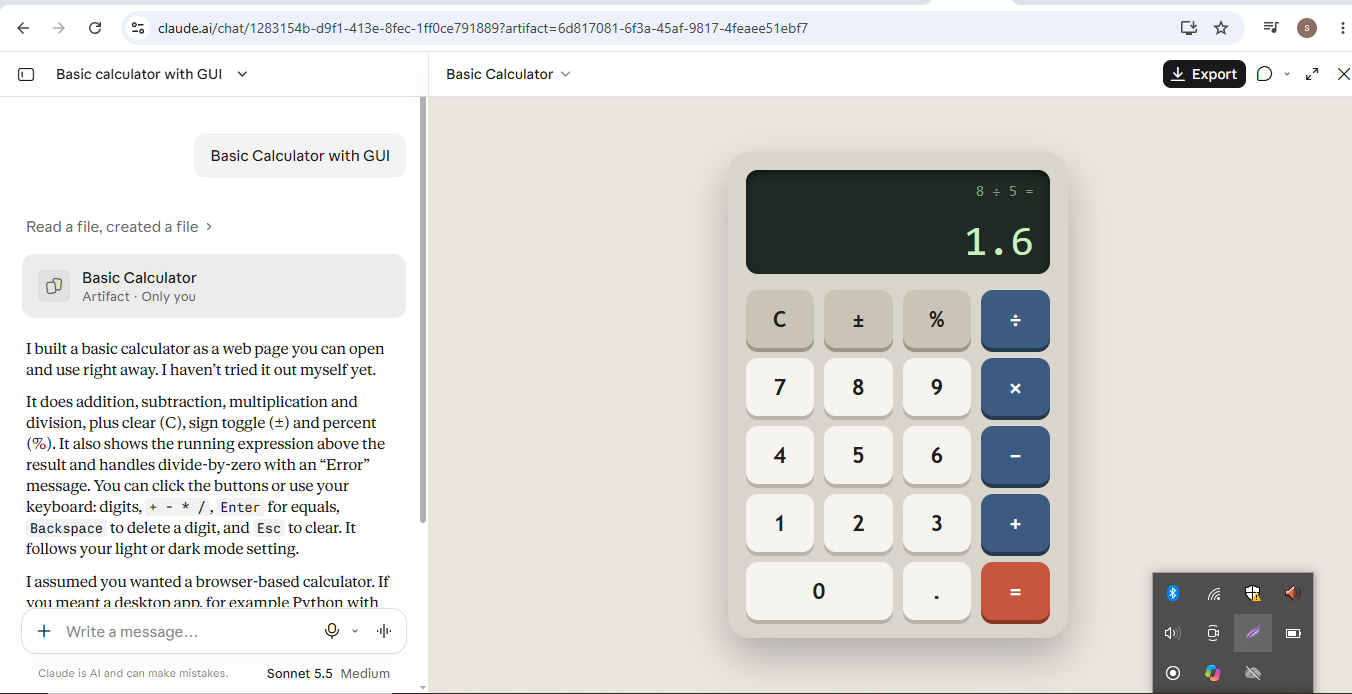
Look at this photo, my Basic Calculator with GUI is working perfectly! On the screen you can see:
> 8 ÷ 5 = 1.6
It means my calculator is now doing real calculations!
What Is Inside This Calculator?
A beautiful Black Display Screen – Where you can see the calculation (8 ÷ 5) and the answer (1.6) below!
All Buttons: 0-9, + - x ÷, C, =, %, .
C = Clear everything
± = Change Plus to Minus
% = Find Percentage
= = Show the Final Answer!
What Did I Learn From This Task?
- How to create a GUI – What the user sees on the screen!
- How Logic works when you click a button!
- Addition , Subtraction , Multiplication , Division – All in one calculator!
- If you divide by 0, it shows an Error!
This task is very special for me because this is the first time my calculator is working live!
If you are also learning coding, follow my journey from Day 1 to Day 110 – Every day a new task, every day something new!
Tell me in the comments: Did you know the answer of 8 ÷ 5?
If you liked this video, don't forget to LIKE , COMMENT , SHARE , and SUBSCRIBE !
See you tomorrow in Day 111 with a new task!
#Day110 #CodingTask #BasicCalculator #CalculatorWithGUI #ItWorks #8DividedBy5 #LearnCoding #CodingForBeginners #CodingJourney #GUI #WebDevelopment #Programming #CodeWithMe #100DaysOfCode #ViralCoding #TechLearning
Link : https://claude.ai/share/30c7750c-5ee1-46ee-9cc7-3868329fc162 See less
Day : 110 Coding Task
Roll No : 17
Accl Task
Basic Calculator with GUI
Day 110 | Coding Task: Basic Calculator with GUI | It Really Works! 8 ÷ 5 = 1.6
Welcome back to Day 110 of our Coding Journey!
Today's task was not just created, it was tested live!
Look at this photo, my Basic Calculator with GUI is working perfectly! On the screen you can see:
> 8 ÷ 5 = 1.6
It means my calculator is now doing real calculations!
What Is Inside This Calculator?
A beautiful Black Display Screen – Where you can see the calculation (8 ÷ 5) and the answer (1.6) below!
All Buttons: 0-9, + - x ÷, C, =, %, .
C = Clear everything
± = Change Plus to Minus
% = Find Percentage
= = Show the Final Answer!
What Did I Learn From This Task?
- How to create a GUI – What the user sees on the screen!
- How Logic works when you click a button!
- Addition , Subtraction , Multiplication , Division – All in one calculator!
- If you divide by 0, it shows an Error!
This task is very special for me because this is the first time my calculator is working live!
If you are also learning coding, follow my journey from Day 1 to Day 110 – Every day a new task, every day something new!
Tell me in the comments: Did you know the answer of 8 ÷ 5?
If you liked this video, don't forget to LIKE , COMMENT , SHARE , and SUBSCRIBE !
See you tomorrow in Day 111 with a new task!
#Day110 #CodingTask #BasicCalculator #CalculatorWithGUI #ItWorks #8DividedBy5 #LearnCoding #CodingForBeginners #CodingJourney #GUI #WebDevelopment #Programming #CodeWithMe #100DaysOfCode #ViralCoding #TechLearning
Link : https://claude.ai/share/30c7750c-5ee1-46ee-9cc7-3868329fc162 See less
Accl Foundation Level (Rehan School Urdu Bazar Campus )
Day : 110 Coding Task
Roll No : 17
Accl Task
Basic Calculator with GUI
🧮 Day 110 | Coding Task: Basic Calculator with GUI | It Really Works! 8 ÷ 5 = 1.6 💻✨
Welcome back to Day 110 of our Coding Journey! 🥰🚀
Today's task was not just created, it was tested live! 😍💻
Look at this photo, my Basic Calculator with GUI is working perfectly! On the screen you can see:
> 8 ÷ 5 = 1.6 ✨
It means my calculator is now doing real calculations! 🎉
✨ What Is Inside This Calculator?
✅ A beautiful Black Display Screen – Where you can see the calculation (8 ÷ 5) and the answer (1.6) below! 👀
✅ All Buttons: 0-9, + - x ÷, C, =, %, . 🎛️
✅ C = Clear everything 🧹
✅ ± = Change Plus to Minus 🔄
✅ % = Find Percentage 💯
✅ = = Show the Final Answer! ❤️
💡 What Did I Learn From This Task?
- How to create a GUI – What the user sees on the screen! 🎨
- How Logic works when you click a button! 🧠
- Addition ➕, Subtraction ➖, Multiplication ✖️, Division ➗ – All in one calculator!
- If you divide by 0, it shows an Error! ⚠️
This task is very special for me because this is the first time my calculator is working live! 🥺❤️
If you are also learning coding, follow my journey from Day 1 to Day 110 – Every day a new task, every day something new! 🎓🌍
Tell me in the comments: Did you know the answer of 8 ÷ 5? 😂👇
If you liked this video, don't forget to LIKE 👍, COMMENT 💬, SHARE 🔄, and SUBSCRIBE 🔔!
See you tomorrow in Day 111 with a new task! 🚀✨
#Day110 #CodingTask #BasicCalculator #CalculatorWithGUI #ItWorks #8DividedBy5 #LearnCoding #CodingForBeginners #CodingJourney #GUI #WebDevelopment #Programming #CodeWithMe #100DaysOfCode #ViralCoding #TechLearning
Link : https://claude.ai/share/30c7750c-5ee1-46ee-9cc7-3868329fc162 See less
0 Commentarii
0 Distribuiri
457 Views