• #rsisb
    Roll no.239
    Story Post no.21
    Foundation Level

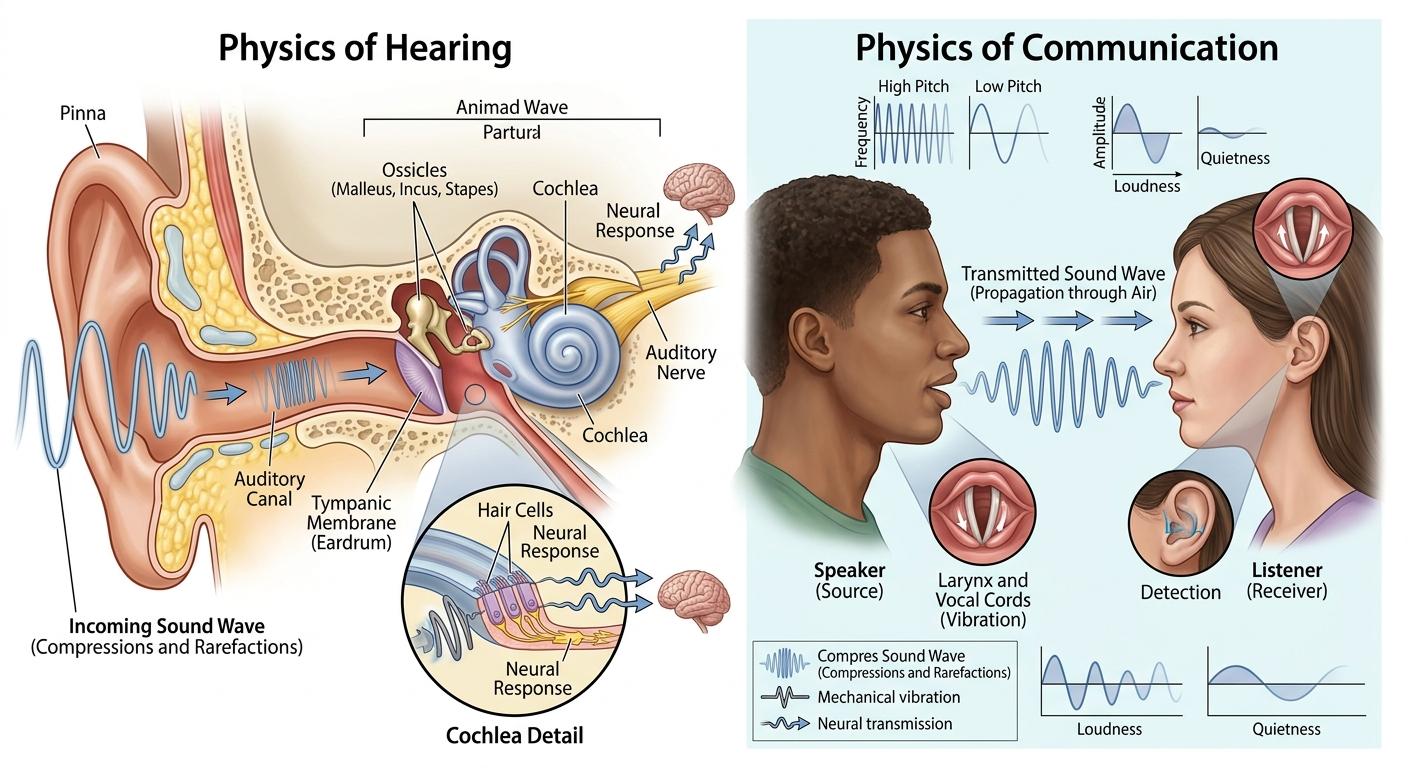
    Sound is all around us! From the voices we hear to the music we enjoy , sound waves play an important role in our daily lives. But have you ever wondered how sound travels and how our ears help us hear?

    Sound is produced when an object vibrates. These vibrations travel through a medium such as air, water, or solids in the form of **sound waves** . Our ears receive these waves and send signals to the brain, allowing us to recognize voices, music, and many other sounds.

    The physics of sound helps us understand important concepts such as **frequency, amplitude, wavelength, pitch, and loudness** . Sound is not only a fascinating scientific phenomenon—it is also essential for **hearing, communication, technology, music, and human connection**

    Let's explore the amazing world of sound and discover how invisible waves help us communicate with the world around us!

    #SoundWaves #Physics #PhysicsOfSound #Science #Hearing #Communication #Acoustics #SoundScience #Frequency #Amplitude #Wavelength #Vibrations #Pitch #Loudness #HumanEar #HowWeHear #ScienceEducation #LearnScience #LearnPhysics #EducationalContent #ScienceFacts #Knowledge #Technology #Audio #Music #WavePhysics #ExploreScience #StudentLife #EducationMatters #DiscoverMore
    #rsisb Roll no.239 Story Post no.21 Foundation Level Sound is all around us! From the voices we hear 🗣️ to the music we enjoy 🎶, sound waves play an important role in our daily lives. But have you ever wondered how sound travels and how our ears help us hear? 🤔🔬 Sound is produced when an object vibrates. These vibrations travel through a medium such as air, water, or solids in the form of **sound waves** 🌊. Our ears receive these waves and send signals to the brain, allowing us to recognize voices, music, and many other sounds. 👂🧠✨ The physics of sound helps us understand important concepts such as **frequency, amplitude, wavelength, pitch, and loudness** 📊🔊. Sound is not only a fascinating scientific phenomenon—it is also essential for **hearing, communication, technology, music, and human connection** 🌍❤️🎵 Let's explore the amazing world of sound and discover how invisible waves help us communicate with the world around us! 🚀🔬🌊 #SoundWaves 🔊 #Physics 🌊 #PhysicsOfSound 🎓 #Science 🔬 #Hearing 👂 #Communication 🗣️ #Acoustics 🎧 #SoundScience 📚 #Frequency 📈 #Amplitude 📊 #Wavelength 🌐 #Vibrations ⚡ #Pitch 🎵 #Loudness 🔊 #HumanEar 👂 #HowWeHear 🧠 #ScienceEducation 🎓 #LearnScience 📖 #LearnPhysics 💡 #EducationalContent 📚 #ScienceFacts 🔍 #Knowledge ✨ #Technology 💻 #Audio 🎶 #Music 🎵 #WavePhysics 🌊 #ExploreScience 🚀 #StudentLife 🧑‍🎓 #EducationMatters 🌟 #DiscoverMore 🔭
    0 Σχόλια 0 Μοιράστηκε 260 Views
  • #rsisb
    Roll No.269
    Foundation Level
    Account Creation

    ## How to Use Restream for Interviews?

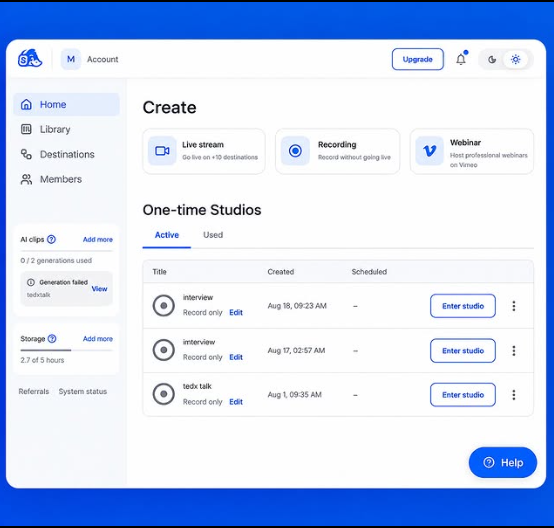
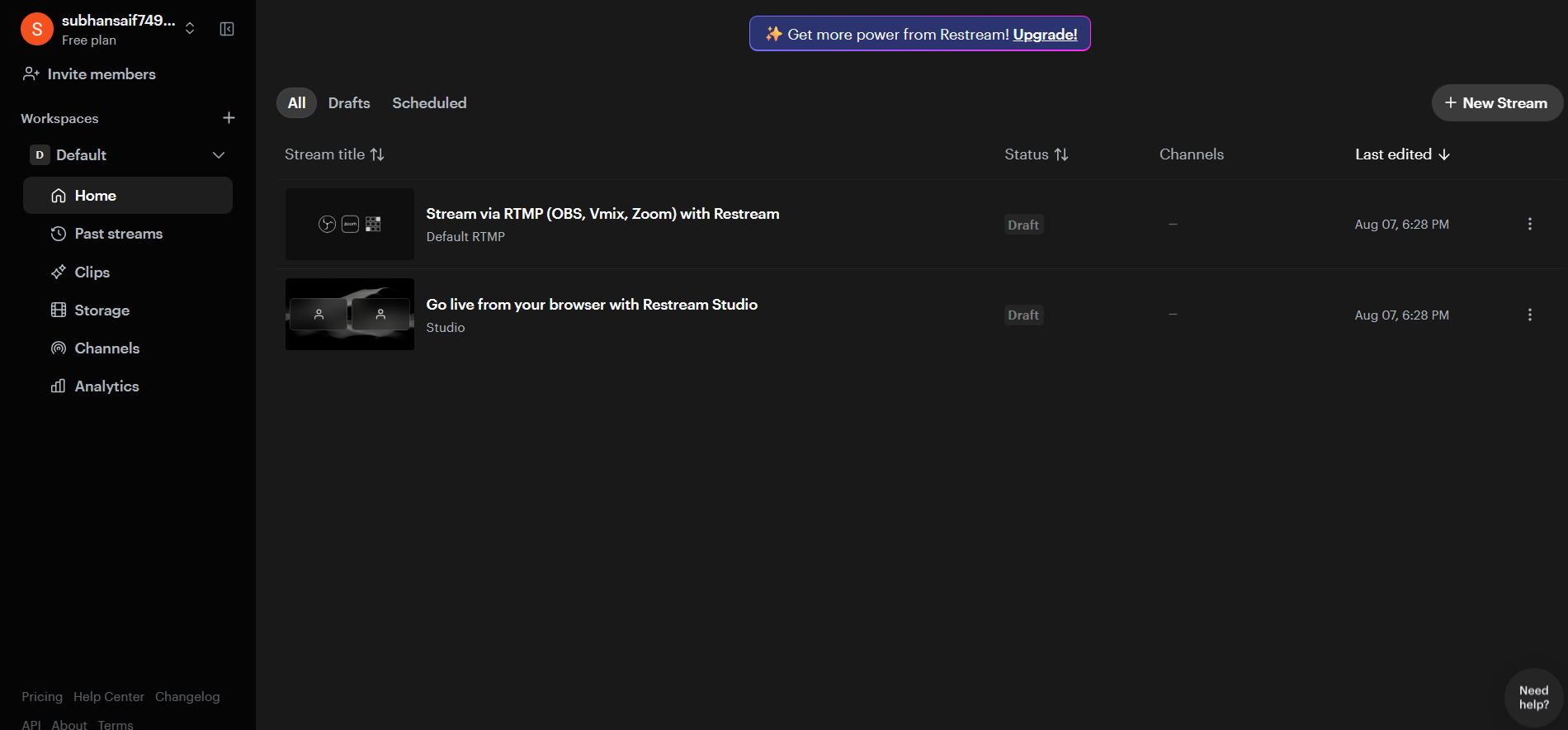
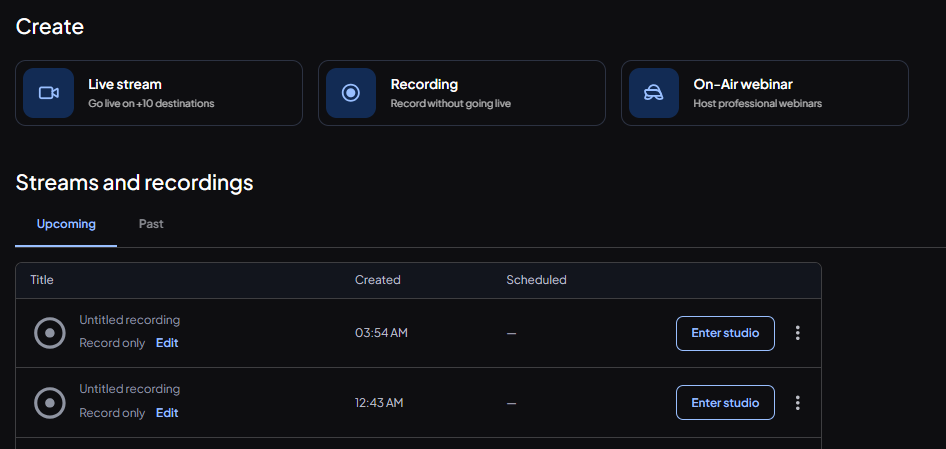
    **Restream** is a streaming platform that lets you host an online interview and broadcast it to multiple platforms at the same time. It can be useful for school interviews, online discussions, podcasts, and live sessions.

    ### Video Description

    In this video, I will explain **how to use Restream for interviews** step by step. We will learn how to create a Restream account, set up a live studio, invite a guest, check the microphone and camera, and prepare everything before starting the interview.

    I will also explain how to add your guest to the interview, manage the interview screen, use the chat, share your screen, and control the live broadcast.

    ### Topics Covered

    What is Restream?
    How to create an account
    How to open Restream Studio
    How to set up your camera and microphone
    How to invite a guest
    How to prepare interview questions
    How to check audio and video
    How to share your screen
    How to use the interview layout
    How to manage comments and chat
    How to start and end the interview
    Basic tips for a smooth online interview

    Restream can make online interviews more organized and professional. Whether you are a **student, teacher, content creator, or beginner**, this tutorial will help you understand the basic process of conducting an interview online.

    If you enjoy this video, don't forget to **Like , Share , and Subscribe ** for more tutorials, technology guides, and student projects.

    Thank you for watching!
    Keep learning, keep practicing, and keep creating!

    #Restream #RestreamStudio #HowToUseRestream #RestreamInterview #OnlineInterview #InterviewTutorial #LiveStreaming #LiveInterview #StreamingTips #DigitalSkills #Technology #StudentProjects #OnlineLearning #ContentCreation #LiveStream #TechTutorial #BeginnerGuide #Education
    #rsisb Roll No.269 Foundation Level Account Creation ## 🎥 How to Use Restream for Interviews? **Restream** is a streaming platform that lets you host an online interview and broadcast it to multiple platforms at the same time. It can be useful for school interviews, online discussions, podcasts, and live sessions. 🎤💻 ### 📝 Video Description In this video, I will explain **how to use Restream for interviews** step by step. 🎙️✨ We will learn how to create a Restream account, set up a live studio, invite a guest, check the microphone and camera, and prepare everything before starting the interview. I will also explain how to add your guest to the interview, manage the interview screen, use the chat, share your screen, and control the live broadcast. 💻🎤 ### 🎯 Topics Covered ✅ What is Restream? ✅ How to create an account ✅ How to open Restream Studio ✅ How to set up your camera and microphone ✅ How to invite a guest ✅ How to prepare interview questions ✅ How to check audio and video ✅ How to share your screen ✅ How to use the interview layout ✅ How to manage comments and chat ✅ How to start and end the interview ✅ Basic tips for a smooth online interview Restream can make online interviews more organized and professional. Whether you are a **student, teacher, content creator, or beginner**, this tutorial will help you understand the basic process of conducting an interview online. 🌟📚 If you enjoy this video, don't forget to **Like 👍, Share 📤, and Subscribe 🔔** for more tutorials, technology guides, and student projects. Thank you for watching! 🙏 Keep learning, keep practicing, and keep creating! 🚀💻🎙️ #Restream #RestreamStudio #HowToUseRestream #RestreamInterview #OnlineInterview #InterviewTutorial #LiveStreaming #LiveInterview #StreamingTips #DigitalSkills #Technology #StudentProjects #OnlineLearning #ContentCreation #LiveStream #TechTutorial #BeginnerGuide #Education 🎤💻✨
    0 Σχόλια 0 Μοιράστηκε 1460 Views
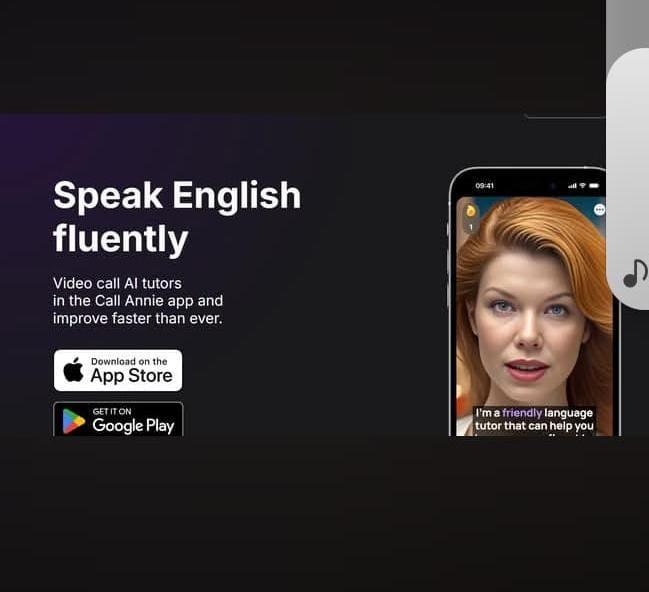
  • Task: How to Download and Use CallAnnie
    Book: Accl
    Task no: 8
    *StreamYard Studio Setup Screen*
    This image shows the StreamYard studio setup page before entering a live broadcast. On the left side, there is a webcam preview displaying a person sitting in front of a plain wall. The camera quality is set to *480p*, and microphone, camera, and settings controls are visible below the video preview. Device options for the camera, microphone, and speakers are also shown at the bottom.
    On the right side, StreamYard displays the message *"Let's set up your studio", indicating that the user is preparing to join the studio. The microphone status shows *"Working"*, confirming that audio is being detected. There are fields to enter a **Display Name* and an optional *Headline, along with a blue *"Enter studio"** button to proceed.
    This screen is used to check your camera, microphone, and audio settings before starting or joining a live stream.
    #StreamYard #LiveStreaming #StudioSetup #OnlineBroadcast #ContentCreator #VideoStreaming #StreamingTools See less See less
    Task: How to Download and Use CallAnnie Book: Accl Task no: 8 📹 *StreamYard Studio Setup Screen* This image shows the StreamYard studio setup page before entering a live broadcast. On the left side, there is a webcam preview displaying a person sitting in front of a plain wall. The camera quality is set to *480p*, and microphone, camera, and settings controls are visible below the video preview. Device options for the camera, microphone, and speakers are also shown at the bottom. On the right side, StreamYard displays the message *"Let's set up your studio", indicating that the user is preparing to join the studio. The microphone status shows *"Working"*, confirming that audio is being detected. There are fields to enter a **Display Name* and an optional *Headline, along with a blue *"Enter studio"** button to proceed. 💡 This screen is used to check your camera, microphone, and audio settings before starting or joining a live stream. #StreamYard #LiveStreaming #StudioSetup #OnlineBroadcast #ContentCreator #VideoStreaming #StreamingTools 🚀 See less See less
    0 Σχόλια 0 Μοιράστηκε 891 Views
  • #rsisb
    Roll no.239
    Account Creation no.8
    Foundation Level


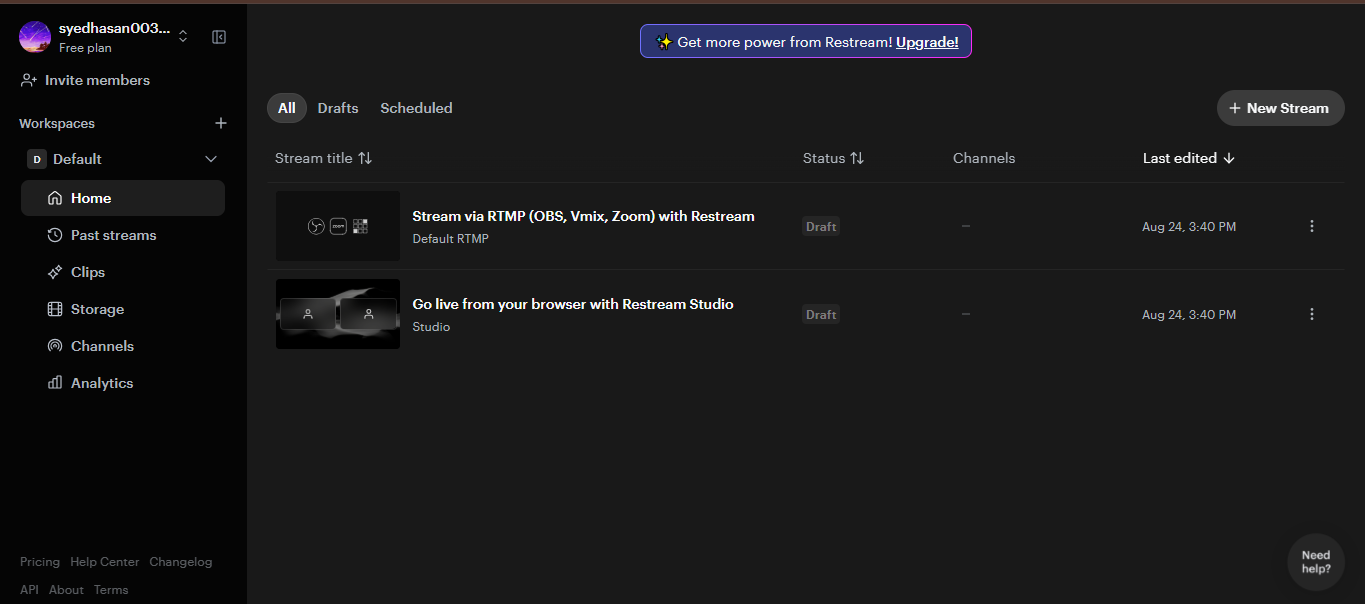
    **Restream** is a useful online platform for hosting and broadcasting interviews, live conversations, webinars, and other types of video content. It can help you connect with a guest remotely and, depending on your setup and account features, broadcast your interview to multiple platforms at the same time.

    In this topic, **“How to Use Restream for Interviews?”**, we explore the basic process of preparing, hosting, and managing an online interview through Restream.

    The first step is to **create or sign in to your Restream account** and prepare your live-streaming setup. Before starting the interview, you should make sure that your **camera, microphone, internet connection, and computer** are working properly. Good audio is especially important because viewers can tolerate average video quality more easily than unclear or interrupted sound.

    Next, you can prepare your interview space and invite your guest. Depending on the Restream features available to you, your guest may be able to join remotely without needing a complicated setup. Before going live, it is a good idea to send your guest the necessary joining information and explain how the interview will work.

    You should also decide **where you want to broadcast your interview**. Restream can be used to manage streaming destinations, allowing creators to reach audiences across supported social platforms. Connecting your preferred channels ahead of time can make the live-streaming process smoother.

    Preparation is one of the most important parts of a successful interview. Create a list of **questions, discussion topics, introductions, and closing remarks** before going live. You can begin by welcoming viewers, introducing yourself and your guest, and briefly explaining the topic of the interview.

    During the interview, communicate clearly with your guest and give them enough time to answer. Avoid interrupting unnecessarily, listen carefully, and use follow-up questions when an interesting point comes up.

    Restream can also make online interviews more engaging by supporting features such as **on-screen elements, chat interaction, branding, and other streaming tools**, depending on the current plan and features available. These tools can help make your broadcast look more organized and professional.

    Before going live, always perform a **test run**. Check the microphone volume, camera framing, lighting, internet connection, guest audio, and stream destinations. A short test can prevent many technical problems during the actual interview.

    After the interview begins, keep an eye on the stream and watch for technical issues. If your guest's audio becomes unclear or the connection drops, calmly troubleshoot the problem rather than rushing through the conversation.

    A successful Restream interview is not only about technology—it is also about **good communication, preparation, confidence, and audience engagement**. With practice, you can create interviews that are informative, interesting, and enjoyable for your viewers.

    Whether you are interviewing a **student, teacher, professional, entrepreneur, creator, or community member**, learning how to use Restream can help you conduct online interviews and share meaningful conversations with a wider audience.

    **Prepare well, test your equipment, ask thoughtful questions, communicate clearly, and focus on your guest and audience.** With the right preparation, your Restream interview can become a professional and engaging live experience.

    ### Hashtags

    #Restream #RestreamInterview #OnlineInterview #LiveInterview #LiveStreaming #InterviewTips #StreamingTips #VideoInterview #OnlineStreaming #DigitalSkills #ContentCreation #LiveBroadcast #YouTubeLive #SocialMedia #StreamingSetup #InterviewSkills #CommunicationSkills #Technology #DigitalEducation #OnlineLearning #CreatorTips #LiveContent #ProfessionalInterview #StreamOnline #VirtualInterview #InterviewPreparation #TechSkills #LearnRestream #DigitalContent #LiveEvent
    #rsisb Roll no.239 Account Creation no.8 Foundation Level **Restream** is a useful online platform for hosting and broadcasting interviews, live conversations, webinars, and other types of video content. It can help you connect with a guest remotely and, depending on your setup and account features, broadcast your interview to multiple platforms at the same time. In this topic, **“How to Use Restream for Interviews?”**, we explore the basic process of preparing, hosting, and managing an online interview through Restream. 🎙️✨ The first step is to **create or sign in to your Restream account** and prepare your live-streaming setup. Before starting the interview, you should make sure that your **camera, microphone, internet connection, and computer** are working properly. Good audio is especially important because viewers can tolerate average video quality more easily than unclear or interrupted sound. Next, you can prepare your interview space and invite your guest. Depending on the Restream features available to you, your guest may be able to join remotely without needing a complicated setup. Before going live, it is a good idea to send your guest the necessary joining information and explain how the interview will work. 👥🎥 You should also decide **where you want to broadcast your interview**. Restream can be used to manage streaming destinations, allowing creators to reach audiences across supported social platforms. Connecting your preferred channels ahead of time can make the live-streaming process smoother. Preparation is one of the most important parts of a successful interview. Create a list of **questions, discussion topics, introductions, and closing remarks** before going live. You can begin by welcoming viewers, introducing yourself and your guest, and briefly explaining the topic of the interview. During the interview, communicate clearly with your guest and give them enough time to answer. Avoid interrupting unnecessarily, listen carefully, and use follow-up questions when an interesting point comes up. 🎤🗣️ Restream can also make online interviews more engaging by supporting features such as **on-screen elements, chat interaction, branding, and other streaming tools**, depending on the current plan and features available. These tools can help make your broadcast look more organized and professional. Before going live, always perform a **test run**. Check the microphone volume, camera framing, lighting, internet connection, guest audio, and stream destinations. A short test can prevent many technical problems during the actual interview. 🔊💡 After the interview begins, keep an eye on the stream and watch for technical issues. If your guest's audio becomes unclear or the connection drops, calmly troubleshoot the problem rather than rushing through the conversation. A successful Restream interview is not only about technology—it is also about **good communication, preparation, confidence, and audience engagement**. With practice, you can create interviews that are informative, interesting, and enjoyable for your viewers. Whether you are interviewing a **student, teacher, professional, entrepreneur, creator, or community member**, learning how to use Restream can help you conduct online interviews and share meaningful conversations with a wider audience. 🌍🎙️ **Prepare well, test your equipment, ask thoughtful questions, communicate clearly, and focus on your guest and audience.** With the right preparation, your Restream interview can become a professional and engaging live experience. 🚀🎥 ### 🔖 Hashtags #Restream #RestreamInterview #OnlineInterview #LiveInterview #LiveStreaming #InterviewTips #StreamingTips #VideoInterview #OnlineStreaming #DigitalSkills #ContentCreation #LiveBroadcast #YouTubeLive #SocialMedia #StreamingSetup #InterviewSkills #CommunicationSkills #Technology #DigitalEducation #OnlineLearning #CreatorTips #LiveContent #ProfessionalInterview #StreamOnline #VirtualInterview #InterviewPreparation #TechSkills #LearnRestream #DigitalContent #LiveEvent 🎤💻🌐✨
    0 Σχόλια 0 Μοιράστηκε 5218 Views
  • #rsisb
    RollNo.247
    Interview no .1
    foundation Level

    # Conduct an Interview: Friend or Neighbor | StreamYard Session

    Have you ever wondered what amazing stories the people around you have to share? In this engaging **StreamYard interview session**, you'll learn how to conduct a meaningful interview with a **friend or neighbor** while improving your communication, listening, and public speaking skills.

    This session is perfect for students, educators, content creators, and anyone who wants to become a better interviewer. Learn how to ask thoughtful questions, encourage interesting conversations, and create a welcoming atmosphere where your guest feels comfortable sharing their experiences.

    During this interview, you can explore topics such as:
    Childhood memories
    Community life
    Education and learning
    Career journey
    Hobbies and passions
    Life lessons and advice
    Friendship and kindness
    Personal growth and future dreams

    Using **StreamYard**, you can easily host a live or recorded interview with professional-quality audio and video. Whether you're creating content for YouTube, Facebook, or your classroom, this session will help you build confidence and connect with your audience.

    Interviewing others is not just about asking questions—it's about listening carefully, respecting different perspectives, and discovering inspiring stories hidden in everyday lives. Every conversation has the power to teach us something new!

    If you enjoy this interview, don't forget to:
    Like the video
    Share your thoughts in the comments
    Subscribe for more educational and inspirational content
    Share this video with your friends and family!

    Together, let's celebrate meaningful conversations and the incredible stories that make every person unique.

    #Interview #StreamYard #LiveInterview #FriendInterview #NeighborInterview #CommunicationSkills #PublicSpeaking #Conversation #Storytelling #Education #Learning #StudentActivities #Community #Confidence #LifeLessons #Inspiration #ContentCreator #OnlineLearning #VirtualInterview #YouTubeEducation #Podcast #Knowledge #Discussion
    #rsisb RollNo.247 Interview no .1 foundation Level # 🎤 Conduct an Interview: Friend or Neighbor | StreamYard Session 🌟 Have you ever wondered what amazing stories the people around you have to share? 🤔💬 In this engaging **StreamYard interview session**, you'll learn how to conduct a meaningful interview with a **friend or neighbor** while improving your communication, listening, and public speaking skills. 🎙️✨ This session is perfect for students, educators, content creators, and anyone who wants to become a better interviewer. Learn how to ask thoughtful questions, encourage interesting conversations, and create a welcoming atmosphere where your guest feels comfortable sharing their experiences. 🌍❤️ During this interview, you can explore topics such as: 🌟 Childhood memories 🏡 Community life 🎓 Education and learning 💼 Career journey 🎯 Hobbies and passions 💡 Life lessons and advice 🤝 Friendship and kindness 🌱 Personal growth and future dreams Using **StreamYard**, you can easily host a live or recorded interview with professional-quality audio and video. Whether you're creating content for YouTube, Facebook, or your classroom, this session will help you build confidence and connect with your audience. 📹🎥 Interviewing others is not just about asking questions—it's about listening carefully, respecting different perspectives, and discovering inspiring stories hidden in everyday lives. Every conversation has the power to teach us something new! 🌈✨ 👍 If you enjoy this interview, don't forget to: ✅ Like the video 💬 Share your thoughts in the comments 🔔 Subscribe for more educational and inspirational content 📢 Share this video with your friends and family! Together, let's celebrate meaningful conversations and the incredible stories that make every person unique. 🌍💙 #Interview 🎤 #StreamYard 📺 #LiveInterview #FriendInterview #NeighborInterview #CommunicationSkills #PublicSpeaking #Conversation #Storytelling #Education #Learning #StudentActivities #Community #Confidence #LifeLessons #Inspiration #ContentCreator #OnlineLearning #VirtualInterview #YouTubeEducation #Podcast #Knowledge #Discussion
    1
    0 Σχόλια 0 Μοιράστηκε 2771 Views 7
  • #rsisb
    RollNo.247
    Foundation LEVEL

    ## How to Use Restream for Interviews | Complete Beginner's Guide

    Restream is a powerful live streaming platform that makes online interviews simple, professional, and engaging. Whether you're hosting a podcast, interviewing industry experts, conducting educational sessions, or streaming live events, Restream allows you to broadcast to multiple platforms at the same time—including YouTube, Facebook, LinkedIn, Twitch, and more.

    To get started, create a Restream account and connect your favorite social media channels. Once connected, open **Restream Studio** directly in your web browser—no software installation is required!

    Invite your interview guest by sending them a unique invitation link. They can join with just a browser, webcam, and microphone. Before going live, check your audio, video, lighting, and internet connection to ensure a smooth experience.

    Customize your live stream with your brand logo, banners, overlays, and backgrounds to make your interview look polished and professional. You can also display viewer comments on screen, making your audience feel involved and encouraging real-time interaction.

    During the interview:

    * Ask clear and engaging questions.
    * Listen carefully to your guest.
    * Maintain eye contact with the camera.
    * Encourage meaningful discussion.
    * Interact with viewers by responding to comments and questions.

    One of Restream's biggest advantages is that you can reach audiences across multiple platforms with a single live broadcast, saving both time and effort. This helps increase your visibility, grow your audience, and build stronger connections with your community.

    After the interview ends, review your stream, note areas for improvement, and reuse the recording as valuable content for future posts, clips, or podcasts. Continuous practice will help you become a more confident and professional interviewer.

    Whether you're a beginner or an experienced content creator, Restream provides an easy and reliable way to create high-quality live interviews that educate, inspire, and engage audiences around the world. Start your live streaming journey today and share your voice with the world!

    #Restream #LiveStreaming #Interviews #Podcast #StreamingTips #ContentCreator #YouTubeLive #FacebookLive #LinkedInLive #LiveInterview #OnlineInterview #StreamingGuide #VideoMarketing #SocialMedia #Broadcast #DigitalCreator #TechTips #LiveVideo #RemoteInterview #ProfessionalStreaming #GrowYourAudience #CreatorTools #OnlineLearning #Success #Innovation
    #rsisb RollNo.247 Foundation LEVEL ## 🎤 How to Use Restream for Interviews | Complete Beginner's Guide 🚀 Restream is a powerful live streaming platform that makes online interviews simple, professional, and engaging. Whether you're hosting a podcast, interviewing industry experts, conducting educational sessions, or streaming live events, Restream allows you to broadcast to multiple platforms at the same time—including YouTube, Facebook, LinkedIn, Twitch, and more. 🌍✨ To get started, create a Restream account and connect your favorite social media channels. Once connected, open **Restream Studio** directly in your web browser—no software installation is required! 🖥️💡 Invite your interview guest by sending them a unique invitation link. They can join with just a browser, webcam, and microphone. Before going live, check your audio, video, lighting, and internet connection to ensure a smooth experience. 🎥🎙️ Customize your live stream with your brand logo, banners, overlays, and backgrounds to make your interview look polished and professional. You can also display viewer comments on screen, making your audience feel involved and encouraging real-time interaction. 💬❤️ During the interview: * 🎤 Ask clear and engaging questions. * 👂 Listen carefully to your guest. * 😊 Maintain eye contact with the camera. * 💡 Encourage meaningful discussion. * 📢 Interact with viewers by responding to comments and questions. One of Restream's biggest advantages is that you can reach audiences across multiple platforms with a single live broadcast, saving both time and effort. This helps increase your visibility, grow your audience, and build stronger connections with your community. 🌐📈 After the interview ends, review your stream, note areas for improvement, and reuse the recording as valuable content for future posts, clips, or podcasts. Continuous practice will help you become a more confident and professional interviewer. Whether you're a beginner or an experienced content creator, Restream provides an easy and reliable way to create high-quality live interviews that educate, inspire, and engage audiences around the world. Start your live streaming journey today and share your voice with the world! 🚀🎉 #Restream #LiveStreaming #Interviews #Podcast #StreamingTips #ContentCreator #YouTubeLive #FacebookLive #LinkedInLive #LiveInterview #OnlineInterview #StreamingGuide #VideoMarketing #SocialMedia #Broadcast #DigitalCreator #TechTips #LiveVideo #RemoteInterview #ProfessionalStreaming #GrowYourAudience #CreatorTools #OnlineLearning #Success #Innovation
    0 Σχόλια 0 Μοιράστηκε 5656 Views
  • Coding Task: 82
    Prompt :
    "Develop a fully functional audiobook platform inspired by Audible, allowing users to browse, listen to, and manage audiobooks."
    Click Here for Try : https://rsk152.rehanschool.us/audible_clone/
    Coding Task: 82 Prompt : "Develop a fully functional audiobook platform inspired by Audible, allowing users to browse, listen to, and manage audiobooks." Click Here for Try : https://rsk152.rehanschool.us/audible_clone/
    0 Σχόλια 0 Μοιράστηκε 164 Views 0
  • I’m excited to share that I have successfully completed my latest development task assigned by Sir Rehan Allahwala .

    I have built a fully functional Audible-style application that delivers a smooth and engaging user experience. The app allows users to listen to audio content seamlessly, explore a growing collection of books, and stay updated with newly added titles.

    In addition, the platform includes user profile management features, enabling users to easily edit and personalize their profiles. All core functionalities are working efficiently, making the application 100% operational.

    Grateful for the learning opportunity and guidance provided by Sir Rehan Allahwala. Looking forward to building more impactful projects ahead.
    #Development #AppDevelopment #LearningJourney #allhawala
    I’m excited to share that I have successfully completed my latest development task assigned by Sir Rehan Allahwala . I have built a fully functional Audible-style application that delivers a smooth and engaging user experience. The app allows users to listen to audio content seamlessly, explore a growing collection of books, and stay updated with newly added titles. In addition, the platform includes user profile management features, enabling users to easily edit and personalize their profiles. All core functionalities are working efficiently, making the application 100% operational. Grateful for the learning opportunity and guidance provided by Sir Rehan Allahwala. Looking forward to building more impactful projects ahead. #Development #AppDevelopment #LearningJourney #allhawala
    0 Σχόλια 0 Μοιράστηκε 428 Views 0
  • Title

    WhatsApp Clone (Functional) | Coding Book 2 Task 7

    Description

    Completed Coding Book 2 – Task 7 (WhatsApp Clone – Functional).

    This project is a complete real-time messaging platform inspired by WhatsApp. It enables users to register securely, create personal and group chats, exchange text messages, voice notes, images, videos, documents, and stickers, while supporting live messaging, typing indicators, read receipts, notifications, and media sharing. The platform also includes user profiles, group management, admin controls, analytics, and a responsive interface designed for real-world deployment.

    Features

    User Registration & Login
    Real-Time Messaging
    One-to-One & Group Chats
    Image, Video & File Sharing
    Voice Notes & Stickers
    Typing Indicator & Online Status
    Read Receipts & Message Reactions
    Status/Stories
    Audio & Video Call UI
    Contact Management
    User Profiles
    Admin Dashboard
    Dark/Light Mode
    Responsive Design
    PHP, MySQL & Socket.IO Backend
    Production-Ready Architecture

    Student Details:
    Coding Book: 2
    Task: 7 – WhatsApp Clone (Functional)
    Roll No: 51

    Website Link:
    https://rsmc51.rehanschool.us/WhatsApp-Clone/

    Hashtags

    #CodingBook2 #Task7 #WhatsAppClone #MessagingApp #RealTimeChat #HTML #CSS #JavaScript #PHP #MySQL #SocketIO #NodeJS #Bootstrap #ResponsiveDesign #FrontendDevelopment #BackendDevelopment #FullStackDevelopment #Programming #StudentProject #PortfolioProject #LearnToCode #WebAppDevelopment
    Title WhatsApp Clone (Functional) | Coding Book 2 Task 7 Description 💬 Completed Coding Book 2 – Task 7 (WhatsApp Clone – Functional). This project is a complete real-time messaging platform inspired by WhatsApp. It enables users to register securely, create personal and group chats, exchange text messages, voice notes, images, videos, documents, and stickers, while supporting live messaging, typing indicators, read receipts, notifications, and media sharing. The platform also includes user profiles, group management, admin controls, analytics, and a responsive interface designed for real-world deployment. Features ✅ User Registration & Login ✅ Real-Time Messaging ✅ One-to-One & Group Chats ✅ Image, Video & File Sharing ✅ Voice Notes & Stickers ✅ Typing Indicator & Online Status ✅ Read Receipts & Message Reactions ✅ Status/Stories ✅ Audio & Video Call UI ✅ Contact Management ✅ User Profiles ✅ Admin Dashboard ✅ Dark/Light Mode ✅ Responsive Design ✅ PHP, MySQL & Socket.IO Backend ✅ Production-Ready Architecture Student Details: 📚 Coding Book: 2 📝 Task: 7 – WhatsApp Clone (Functional) 🎓 Roll No: 51 🌐 Website Link: https://rsmc51.rehanschool.us/WhatsApp-Clone/ Hashtags #CodingBook2 #Task7 #WhatsAppClone #MessagingApp #RealTimeChat #HTML #CSS #JavaScript #PHP #MySQL #SocketIO #NodeJS #Bootstrap #ResponsiveDesign #FrontendDevelopment #BackendDevelopment #FullStackDevelopment #Programming #StudentProject #PortfolioProject #LearnToCode #WebAppDevelopment
    0 Σχόλια 0 Μοιράστηκε 2143 Views
  • Title

    WhatsApp Clone (Functional) | Coding Book 2 Task 7

    Description

    Completed Coding Book 2 – Task 7 (WhatsApp Clone – Functional).

    This project is a complete real-time messaging platform inspired by WhatsApp. It enables users to register securely, create personal and group chats, exchange text messages, voice notes, images, videos, documents, and stickers, while supporting live messaging, typing indicators, read receipts, notifications, and media sharing. The platform also includes user profiles, group management, admin controls, analytics, and a responsive interface designed for real-world deployment.

    Features

    User Registration & Login
    Real-Time Messaging
    One-to-One & Group Chats
    Image, Video & File Sharing
    Voice Notes & Stickers
    Typing Indicator & Online Status
    Read Receipts & Message Reactions
    Status/Stories
    Audio & Video Call UI
    Contact Management
    User Profiles
    Admin Dashboard
    Dark/Light Mode
    Responsive Design
    PHP, MySQL & Socket.IO Backend
    Production-Ready Architecture

    Student Details:
    Coding Book: 2
    Task: 7 – WhatsApp Clone (Functional)
    Roll No: 51

    Website Link:
    https://rsmc51.rehanschool.us/WhatsApp-Clone/

    Hashtags

    #CodingBook2 #Task7 #WhatsAppClone #MessagingApp #RealTimeChat #HTML #CSS #JavaScript #PHP #MySQL #SocketIO #NodeJS #Bootstrap #ResponsiveDesign #FrontendDevelopment #BackendDevelopment #FullStackDevelopment #Programming #StudentProject #PortfolioProject #LearnToCode #WebAppDevelopment
    Title WhatsApp Clone (Functional) | Coding Book 2 Task 7 Description 💬 Completed Coding Book 2 – Task 7 (WhatsApp Clone – Functional). This project is a complete real-time messaging platform inspired by WhatsApp. It enables users to register securely, create personal and group chats, exchange text messages, voice notes, images, videos, documents, and stickers, while supporting live messaging, typing indicators, read receipts, notifications, and media sharing. The platform also includes user profiles, group management, admin controls, analytics, and a responsive interface designed for real-world deployment. Features ✅ User Registration & Login ✅ Real-Time Messaging ✅ One-to-One & Group Chats ✅ Image, Video & File Sharing ✅ Voice Notes & Stickers ✅ Typing Indicator & Online Status ✅ Read Receipts & Message Reactions ✅ Status/Stories ✅ Audio & Video Call UI ✅ Contact Management ✅ User Profiles ✅ Admin Dashboard ✅ Dark/Light Mode ✅ Responsive Design ✅ PHP, MySQL & Socket.IO Backend ✅ Production-Ready Architecture Student Details: 📚 Coding Book: 2 📝 Task: 7 – WhatsApp Clone (Functional) 🎓 Roll No: 51 🌐 Website Link: https://rsmc51.rehanschool.us/WhatsApp-Clone/ Hashtags #CodingBook2 #Task7 #WhatsAppClone #MessagingApp #RealTimeChat #HTML #CSS #JavaScript #PHP #MySQL #SocketIO #NodeJS #Bootstrap #ResponsiveDesign #FrontendDevelopment #BackendDevelopment #FullStackDevelopment #Programming #StudentProject #PortfolioProject #LearnToCode #WebAppDevelopment
    0 Σχόλια 0 Μοιράστηκε 1421 Views
Αναζήτηση αποτελεσμάτων