• RSIF8
    Roll no 94
    Canva post no 19
    Canva post topic
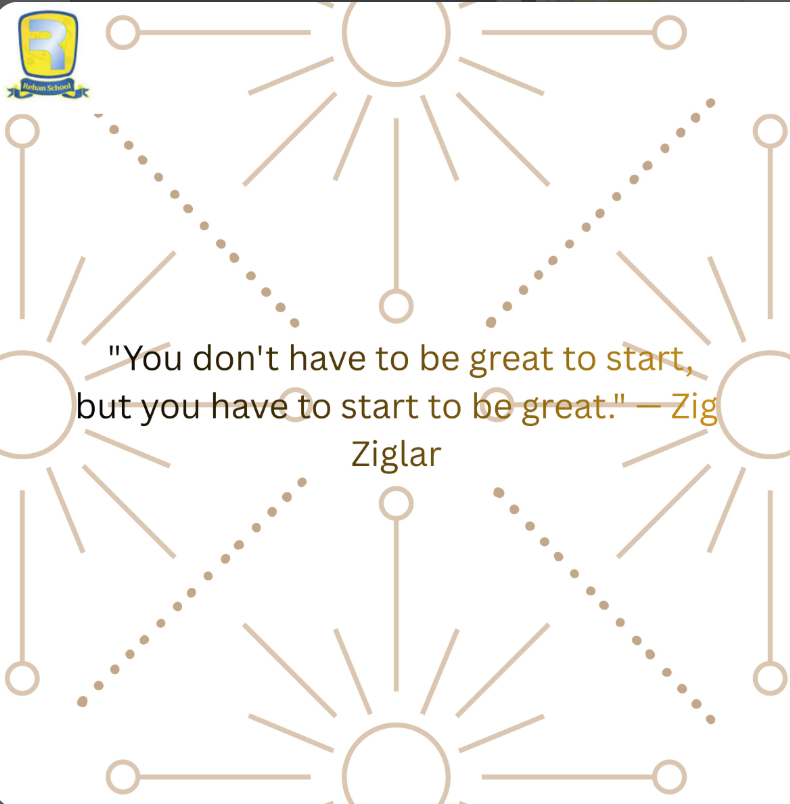
    Every expert was once a beginner. The hardest part is often taking the very first step, but that step can change everything. Keep learning, keep growing, and trust the process.
    "You don't have to be great to start, but you have to start to be great." — Zig Ziglar
    Start today. Progress is built one step at a time!
    #Motivation #Inspiration #SuccessMindset #GrowthMindset #KeepGoing #BelieveInYourself #StartToday #DreamBig #PositiveVibes #ZigZiglar
    RSIF8 Roll no 94 Canva post no 19 Canva post topic ✨ Every expert was once a beginner. The hardest part is often taking the very first step, but that step can change everything. Keep learning, keep growing, and trust the process. 🚀 💬 "You don't have to be great to start, but you have to start to be great." — Zig Ziglar 🌟 Start today. Progress is built one step at a time! #Motivation #Inspiration #SuccessMindset #GrowthMindset #KeepGoing #BelieveInYourself #StartToday #DreamBig #PositiveVibes #ZigZiglar 🚀✨💪🌈
    0 Comments 0 Shares 452 Views
  • RSIF8
    Roll no:14
    coding task no:13
    coding topic:**Basic Calculator with GUI
    **Basic Calculator with GUI – A Simple and User-Friendly Application**

    **Description:**

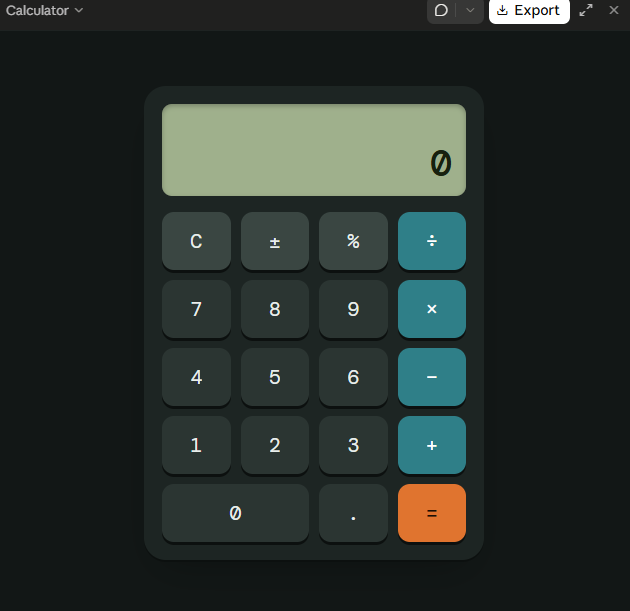
    The Basic Calculator with GUI is a beginner-friendly programming project designed to perform essential mathematical calculations through a simple, interactive, and user-friendly graphical interface. Instead of entering commands, users can perform calculations by clicking buttons, making the application easy and convenient to use.

    This project allows users to perform basic arithmetic operations, including **addition (+), subtraction (−), multiplication (×), and division (÷)**. It features a clear display screen for showing numbers and results, along with dedicated buttons for entering values, selecting operations, clearing the display, and calculating answers.

    **Key Features:**

    - **Addition:** Add two or more numbers easily.
    - **Subtraction:** Calculate the difference between numbers.
    - **Multiplication:** Multiply numbers quickly.
    - **Division:** Divide numbers and display the results.
    - **Graphical User Interface (GUI):** An interactive layout with clickable buttons.
    - **Clear Button:** Reset the display and start a new calculation.
    - **Instant Results:** Perform calculations quickly and efficiently.
    - **Error Handling:** Handle invalid calculations, such as division by zero.

    **Learning Objectives:**

    The main goal of this project is to help beginners understand the fundamentals of programming and GUI development. It introduces important concepts such as button events, user input, mathematical operators, functions, conditional statements, and displaying output on the screen.

    **Conclusion:**

    The Basic Calculator with GUI is an excellent project for anyone beginning their programming journey. It combines practical mathematical operations with an interactive design, demonstrating how code can be transformed into a useful desktop application. With further improvements, the calculator can also include percentage calculations, decimal numbers, keyboard support, and a more attractive interface.

    **Project Goal:** To create a simple, reliable, and easy-to-use calculator that makes everyday mathematical calculations faster and more convenient.

    #BasicCalculator #GUI #ProgrammingProject #BeginnerCoding #PythonProgramming #AppDevelopment #LearnToCode #ComputerScience #CodingForBeginners #SoftwareDevelopment
    RSIF8 Roll no:14 coding task no:13 coding topic:**Basic Calculator with GUI 🧮 **Basic Calculator with GUI – A Simple and User-Friendly Application** 💻 ✨ **Description:** The Basic Calculator with GUI is a beginner-friendly programming project designed to perform essential mathematical calculations through a simple, interactive, and user-friendly graphical interface. Instead of entering commands, users can perform calculations by clicking buttons, making the application easy and convenient to use. 🚀📱 This project allows users to perform basic arithmetic operations, including **addition (+), subtraction (−), multiplication (×), and division (÷)**. It features a clear display screen for showing numbers and results, along with dedicated buttons for entering values, selecting operations, clearing the display, and calculating answers. 🎯 **Key Features:** - ➕ **Addition:** Add two or more numbers easily. - ➖ **Subtraction:** Calculate the difference between numbers. - ✖️ **Multiplication:** Multiply numbers quickly. - ➗ **Division:** Divide numbers and display the results. - 🖥️ **Graphical User Interface (GUI):** An interactive layout with clickable buttons. - 🔄 **Clear Button:** Reset the display and start a new calculation. - ⚡ **Instant Results:** Perform calculations quickly and efficiently. - ⚠️ **Error Handling:** Handle invalid calculations, such as division by zero. 📚 **Learning Objectives:** The main goal of this project is to help beginners understand the fundamentals of programming and GUI development. It introduces important concepts such as button events, user input, mathematical operators, functions, conditional statements, and displaying output on the screen. 🌟 **Conclusion:** The Basic Calculator with GUI is an excellent project for anyone beginning their programming journey. It combines practical mathematical operations with an interactive design, demonstrating how code can be transformed into a useful desktop application. With further improvements, the calculator can also include percentage calculations, decimal numbers, keyboard support, and a more attractive interface. 💡 **Project Goal:** To create a simple, reliable, and easy-to-use calculator that makes everyday mathematical calculations faster and more convenient. #BasicCalculator #GUI #ProgrammingProject #BeginnerCoding #PythonProgramming #AppDevelopment #LearnToCode #ComputerScience #CodingForBeginners #SoftwareDevelopment 💻🧮🚀
    0 Comments 0 Shares 301 Views
  • RSIF8
    Roll no:17
    Day 5 of learning Turkish

    **Day 6 of Learning Turkish!**

    Today is my sixth day of learning Turkish! I am excited to continue learning this beautiful language and discovering new words every day. Each learning session helps me improve my pronunciation, increase my knowledge, and become more confident. I believe that consistency and practice are the keys to success!

    **Let's Learn Turkish!**

    Merhaba — Hello
    Günaydın — Good morning
    Teşekkür ederim — Thank you
    Nasılsın? — How are you?
    Çok güzel — Very beautiful

    One day, one lesson, and one step closer to my dream! I will keep learning and never give up!

    #Day6 #LearningTurkish #TurkishLanguage #TurkishForBeginners #LanguageLearning #MyLearningJourney #LearnEveryDay #NewSkills #KeepLearning #TurkishCulture
    RSIF8 Roll no:17 Day 5 of learning Turkish 🇹🇷✨ **Day 6 of Learning Turkish!** 📚❤️ Today is my sixth day of learning Turkish! 🎉🇹🇷 I am excited to continue learning this beautiful language and discovering new words every day. 🌸🗣️ Each learning session helps me improve my pronunciation, increase my knowledge, and become more confident. 💪💖 I believe that consistency and practice are the keys to success! 🌟🌍 💬 **Let's Learn Turkish!** 👋 Merhaba — Hello 🌞 Günaydın — Good morning 🙏 Teşekkür ederim — Thank you 😊 Nasılsın? — How are you? 💖 Çok güzel — Very beautiful One day, one lesson, and one step closer to my dream! 🚀🇹🇷 I will keep learning and never give up! 💫📖❤️ #Day6 #LearningTurkish #TurkishLanguage #TurkishForBeginners #LanguageLearning #MyLearningJourney #LearnEveryDay #NewSkills #KeepLearning #TurkishCulture 🇹🇷🌍📚🌸✨
    0 Comments 0 Shares 195 Views 10
  • RSIF8
    Roll no:14
    coding task no:12
    coding task topic:Simple Contact Book (store/manage contacts)

    **Simple Contact Book – Store and Manage Contacts**

    **Description:**

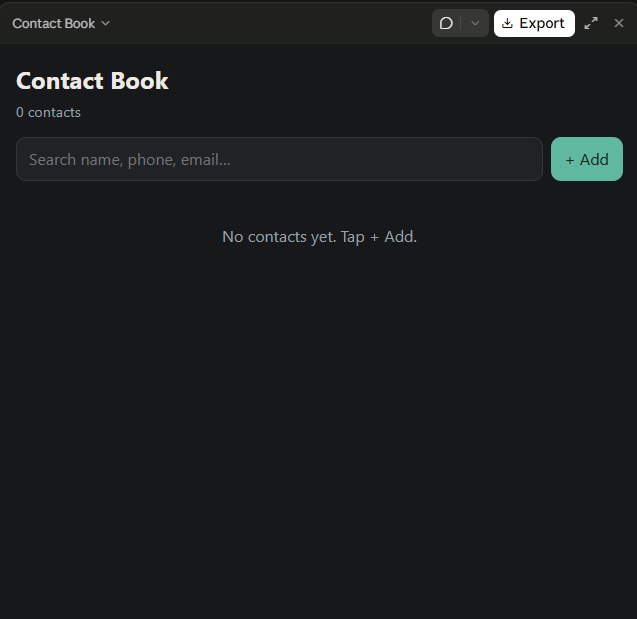
    The Simple Contact Book is a useful and user-friendly application designed to store, organize, and manage contact information easily. This project allows users to save important details such as names, phone numbers, and email addresses in one convenient place. Instead of searching through a long list of contacts, users can quickly find the information they need whenever required.

    The application includes essential features such as **adding new contacts, viewing saved contacts, editing existing information, deleting unwanted contacts, and searching for specific people**. These features make contact management simple, fast, and efficient.

    The main purpose of this project is to provide a practical solution for organizing personal or professional contacts while learning the fundamentals of programming and application development. It helps beginners understand important concepts such as data storage, user input, searching, updating records, and deleting information.

    With its simple design and easy-to-use features, the Simple Contact Book is an excellent beginner-friendly programming project. It demonstrates how technology can make everyday tasks easier and more organized.

    **Key Features:**
    - Add new contacts.
    - View all saved contacts.
    - Edit contact details.
    - Delete unwanted contacts.
    - Search contacts by name or phone number.
    - Keep contact information organized.

    **Project Goal:** To develop a simple, efficient, and user-friendly application that makes storing and managing contacts quick and convenient.

    #SimpleContactBook #ProgrammingProject #ContactManager #BeginnerCoding #AppDevelopment #LearnProgramming #ComputerScience #CodingProject #Technology #StudentProject

    RSIF8 Roll no:14 coding task no:12 coding task topic:Simple Contact Book (store/manage contacts) 📱 **Simple Contact Book – Store and Manage Contacts** 📇 **Description:** The Simple Contact Book is a useful and user-friendly application designed to store, organize, and manage contact information easily. 📒✨ This project allows users to save important details such as names, phone numbers, and email addresses in one convenient place. Instead of searching through a long list of contacts, users can quickly find the information they need whenever required. The application includes essential features such as **adding new contacts, viewing saved contacts, editing existing information, deleting unwanted contacts, and searching for specific people**. 🔍📞 These features make contact management simple, fast, and efficient. The main purpose of this project is to provide a practical solution for organizing personal or professional contacts while learning the fundamentals of programming and application development. 💻🚀 It helps beginners understand important concepts such as data storage, user input, searching, updating records, and deleting information. With its simple design and easy-to-use features, the Simple Contact Book is an excellent beginner-friendly programming project. It demonstrates how technology can make everyday tasks easier and more organized. 🌟 **Key Features:** - ➕ Add new contacts. - 📋 View all saved contacts. - ✏️ Edit contact details. - 🗑️ Delete unwanted contacts. - 🔎 Search contacts by name or phone number. - 📱 Keep contact information organized. 🎯 **Project Goal:** To develop a simple, efficient, and user-friendly application that makes storing and managing contacts quick and convenient. #SimpleContactBook #ProgrammingProject #ContactManager #BeginnerCoding #AppDevelopment #LearnProgramming #ComputerScience #CodingProject #Technology #StudentProject 💻📱✨
    0 Comments 0 Shares 329 Views
  • Mohsin RS F8
    Roll NO:13
    Coding Task NO:15
    Class: Foundation Level
    Made by Me

    Complete the Coding Task: Expense Tracker

    I completed the Expense Tracker coding task as a practical project to learn how technology can be used to organize and manage everyday financial information. The main purpose of this project is to create a simple and user-friendly application where users can record their income and expenses and easily see their overall balance.

    An Expense Tracker is a useful project for beginners because it combines several important programming concepts in one application. Instead of only displaying information on a webpage, the project allows the user to enter data, interact with buttons and forms, and see the information update dynamically.

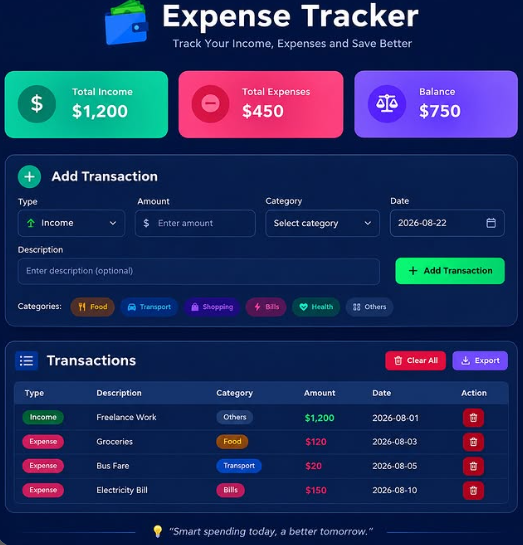
    The application allows users to add transactions by entering details such as a description, amount, type, category, and date. A transaction can be marked as either income or an expense. Categories can help organize different types of spending, such as food, transportation, education, shopping, bills, entertainment, or other expenses.

    One of the most useful features of the project is the summary section. It displays the total income, total expenses, and remaining balance. Whenever a new transaction is added, the application calculates the updated totals automatically. This makes it easier to understand how the recorded money is being managed.

    The project also includes a transaction list where users can view their previous entries. Each transaction shows important information such as its description, category, amount, and date. If an entry is no longer needed, the user can delete it. There is also a Clear All option for removing all stored transactions.

    For the development of this project, I used HTML, CSS, and JavaScript. HTML was used to create the structure of the application, including the forms, summary cards, buttons, and transaction list. CSS was used to create a clean and responsive interface that can work on different screen sizes. JavaScript was used to add functionality, perform calculations, manage transactions, and update the interface whenever the data changes.

    Mohsin RS F8 🎓✨ Roll NO:13 Coding Task NO:15 Class: Foundation Level 📚 Made by Me 💻🚀 💰 Complete the Coding Task: Expense Tracker I completed the Expense Tracker coding task as a practical project to learn how technology can be used to organize and manage everyday financial information. The main purpose of this project is to create a simple and user-friendly application where users can record their income and expenses and easily see their overall balance. An Expense Tracker is a useful project for beginners because it combines several important programming concepts in one application. Instead of only displaying information on a webpage, the project allows the user to enter data, interact with buttons and forms, and see the information update dynamically. The application allows users to add transactions by entering details such as a description, amount, type, category, and date. A transaction can be marked as either income or an expense. Categories can help organize different types of spending, such as food, transportation, education, shopping, bills, entertainment, or other expenses. One of the most useful features of the project is the summary section. It displays the total income, total expenses, and remaining balance. Whenever a new transaction is added, the application calculates the updated totals automatically. This makes it easier to understand how the recorded money is being managed. The project also includes a transaction list where users can view their previous entries. Each transaction shows important information such as its description, category, amount, and date. If an entry is no longer needed, the user can delete it. There is also a Clear All option for removing all stored transactions. For the development of this project, I used HTML, CSS, and JavaScript. HTML was used to create the structure of the application, including the forms, summary cards, buttons, and transaction list. CSS was used to create a clean and responsive interface that can work on different screen sizes. JavaScript was used to add functionality, perform calculations, manage transactions, and update the interface whenever the data changes.

    0 Comments 0 Shares 198 Views
  • RSIF8
    ROLL NO:13
    TASK NO:7

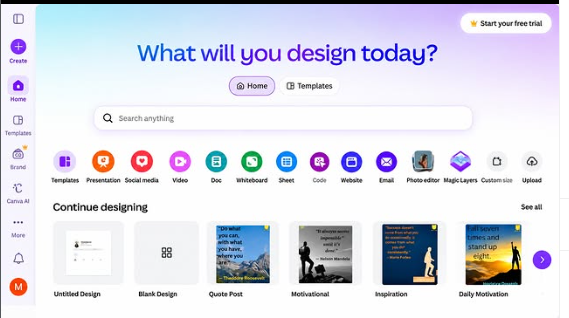
    How to Download and Use Canva?

    Canva is a simple and powerful design platform that helps people create beautiful graphics, presentations, posters, social media posts, videos, documents, and many other creative projects. It is especially useful for students, beginners, content creators, teachers, and anyone who wants to learn graphic designing without needing advanced technical skills.

    To get started with Canva, the first step is to download the Canva app on your device or open Canva through a web browser. Canva is available on different devices, so you can choose the option that works best for you. After opening Canva, you can create an account using an available sign-in option and begin exploring the platform.

    Once you enter Canva, you will find many different design options and ready-made templates. You can search for the type of project you want to create, such as an Instagram post, presentation, poster, invitation, video, document, or other design. Templates can be very helpful for beginners because they provide a starting point and allow you to customize the design according to your own ideas.

    Using Canva is quite easy. You can select a template and then change its text, images, fonts, layouts, and other design elements. You can also upload your own pictures and add them to your project. Canva provides different tools that allow you to arrange elements and create a design that matches your topic and personal style.

    Another useful feature is the ability to create designs from a blank page. This gives you more freedom to experiment with different layouts and ideas. You can choose a background, add headings, insert pictures, and organize everything in a clean and creative way.

    After completing your design, you can preview it and make any necessary changes. When you are satisfied with your work, you can export or share the design using the options provided by Canva. Depending on the type of project and available features, you can use different formats for saving or sharing your work.
    RSIF8 ROLL NO:13 TASK NO:7 🎨 How to Download and Use Canva? Canva is a simple and powerful design platform that helps people create beautiful graphics, presentations, posters, social media posts, videos, documents, and many other creative projects. It is especially useful for students, beginners, content creators, teachers, and anyone who wants to learn graphic designing without needing advanced technical skills. To get started with Canva, the first step is to download the Canva app on your device or open Canva through a web browser. Canva is available on different devices, so you can choose the option that works best for you. After opening Canva, you can create an account using an available sign-in option and begin exploring the platform. Once you enter Canva, you will find many different design options and ready-made templates. You can search for the type of project you want to create, such as an Instagram post, presentation, poster, invitation, video, document, or other design. Templates can be very helpful for beginners because they provide a starting point and allow you to customize the design according to your own ideas. Using Canva is quite easy. You can select a template and then change its text, images, fonts, layouts, and other design elements. You can also upload your own pictures and add them to your project. Canva provides different tools that allow you to arrange elements and create a design that matches your topic and personal style. Another useful feature is the ability to create designs from a blank page. This gives you more freedom to experiment with different layouts and ideas. You can choose a background, add headings, insert pictures, and organize everything in a clean and creative way. After completing your design, you can preview it and make any necessary changes. When you are satisfied with your work, you can export or share the design using the options provided by Canva. Depending on the type of project and available features, you can use different formats for saving or sharing your work.
    0 Comments 0 Shares 356 Views
  • #rsisb
    Roll no # 273
    Earning Task no # 1
    Level # 1

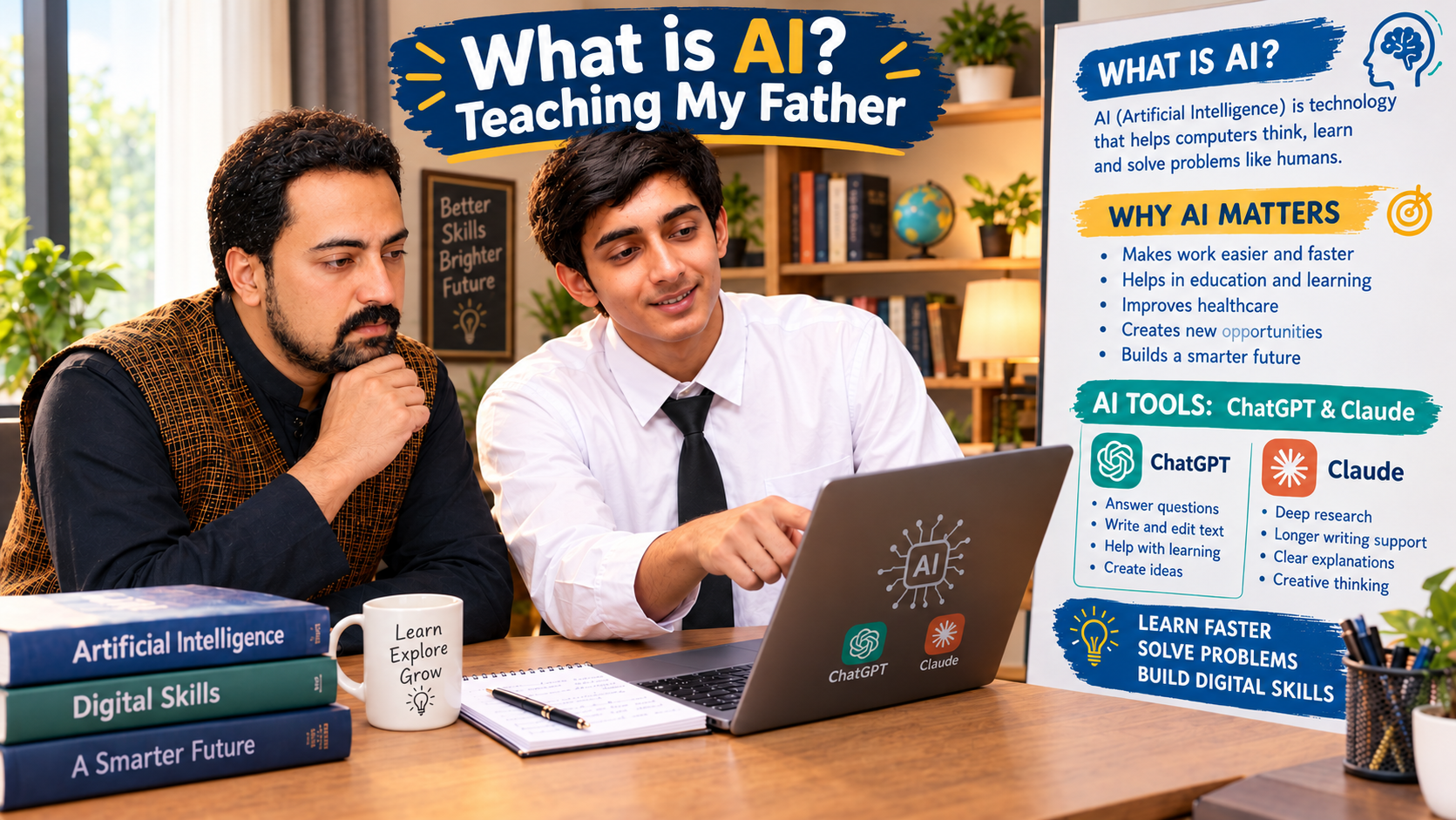
    **What Is AI? Teaching My Father About Artificial Intelligence! ‍**

    Technology is changing the world, and Artificial Intelligence (AI) is becoming an important part of our daily lives! In this special learning session, I am guiding my father and explaining what AI is, why it matters, and how we can use AI tools to learn new skills, solve problems, and make our lives easier.

    **What Is AI?**
    Artificial Intelligence is a technology that enables computers to perform tasks such as understanding language, answering questions, generating ideas, and helping people learn.

    **AI Tools We Explored:**
    **ChatGPT** — For learning, answering questions, writing, and generating ideas.
    **Claude AI** — For explanations, writing assistance, and working through complex topics.
    **AI Skills** — Discovering new ways to improve creativity, productivity, and digital knowledge.

    ‍ **Learning Together, Growing Together!**
    My goal is to show that learning technology has no age limit. Whether you are a student, a parent, a teacher, or a beginner, you can start exploring AI step by step. The future belongs to those who stay curious, keep learning, and use technology wisely!

    **Your Turn:** Have you ever explained AI to your parents or family members? Share your experience in the comments!

    Like, Share, and Follow for more educational content, AI tutorials, digital skills, and exciting learning sessions!

    #️⃣ **Hashtags:**

    #ArtificialIntelligence #WhatIsAI #TeachingMyFather #AIForBeginners #ChatGPT #ClaudeAI #AISkills #LearnAI #DigitalSkills #AIEducation #Technology #FutureOfAI #FamilyLearning #LearnTogether #TechEducation #SmartLearning #DigitalLiteracy #Innovation #OnlineLearning #KeepLearning Asma Shaheen EducationWali@highlight
    #rsisb Roll no # 273 Earning Task no # 1 Level # 1 🤖💡 **What Is AI? Teaching My Father About Artificial Intelligence! 👨‍💻❤️** Technology is changing the world, and Artificial Intelligence (AI) is becoming an important part of our daily lives! 🌍🚀 In this special learning session, I am guiding my father and explaining what AI is, why it matters, and how we can use AI tools to learn new skills, solve problems, and make our lives easier. 💻📚 🤖 **What Is AI?** Artificial Intelligence is a technology that enables computers to perform tasks such as understanding language, answering questions, generating ideas, and helping people learn. ✨ **AI Tools We Explored:** 🔹 **ChatGPT** — For learning, answering questions, writing, and generating ideas. 🔹 **Claude AI** — For explanations, writing assistance, and working through complex topics. 🔹 **AI Skills** — Discovering new ways to improve creativity, productivity, and digital knowledge. 👨‍👦 **Learning Together, Growing Together!** ❤️ My goal is to show that learning technology has no age limit. Whether you are a student, a parent, a teacher, or a beginner, you can start exploring AI step by step. The future belongs to those who stay curious, keep learning, and use technology wisely! 🌟 💬 **Your Turn:** Have you ever explained AI to your parents or family members? Share your experience in the comments! 👇 ❤️ Like, Share, and Follow for more educational content, AI tutorials, digital skills, and exciting learning sessions! #️⃣ **Hashtags:** #ArtificialIntelligence #WhatIsAI #TeachingMyFather #AIForBeginners #ChatGPT #ClaudeAI #AISkills #LearnAI #DigitalSkills #AIEducation #Technology #FutureOfAI #FamilyLearning #LearnTogether #TechEducation #SmartLearning #DigitalLiteracy #Innovation #OnlineLearning #KeepLearning 🤖💻🚀Asma Shaheen EducationWali@highlight
    0 Comments 0 Shares 514 Views
  • #rsisb Roll no.240 Arabic Session No.5 Level One Today, I practiced speaking Arabic using simple and useful questions written in Roman English (Pinyin). This practice helped me improve my pronunciation, learn new Arabic words, and become more confident while speaking. 🗣️📚 Learning a new language is an exciting journey. With regular practice, patience, and confidence, I can continue improving my Arabic communication skills. 💪🌟 I am thankful for this opportunity to learn something new and challenge myself. Every new word is one more step toward becoming a better language learner! 🚀📖 #ArabicLanguage #LearnArabic #ArabicPractice #ArabicSpeaking #ArabicQuestions #ArabicSession #LanguageLearning #LearnLanguages #DailyPractice #SpeakArabic #ArabicForBeginners #Multilingual #Education #SelfImprovement #OnlineLearning #AhmadAli 🇸🇦📚✨ Rehan School Islamabad Campus Asma Shaheen Eduction Wali Irum Asim Leadership Wali Saima Emporvement Wali https://www.facebook.com/share/v/1HFqtWvRyx/
    WWW.FACEBOOK.COM
    Facebook
    #rsisb Roll no.240 Arabic Session No.5 Level One Today, I practiced speaking Arabic using simple and useful questions written in Roman English (Pinyin). This practice helped me improve my...
    0 Comments 0 Shares 143 Views
  • #rsisb Roll no.240 Turkish Session No.5 Level One Today, I practiced speaking Turkish using simple and useful questions written in Roman English (Pinyin). This practice helped me improve my pronunciation, learn new Turkish words, and become more confident while speaking. 🗣️📚 Learning a new language is an exciting journey. With regular practice, patience, and confidence, I can continue improving my Turkish communication skills. 💪🌟 I am thankful for this opportunity to learn something new and challenge myself. Every new word is one more step toward becoming a better language learner! 🚀📖 #TurkishLanguage #LearnTurkish #TurkishPractice #TurkishSpeaking #TurkishSession #TurkishQuestions #LearnLanguages #LanguageLearning #DailyLanguagePractice #SpeakTurkish #TurkishForBeginners #LanguageSkills #Multilingual #PracticeMakesPerfect #LearningTogether #Education #SelfImprovement #OnlineLearning #AhmadAli #LiveSession 🇹🇷❤️📚🎤 Rehan School Islamabad Campus Asma Shaheen Eduction Wali Irum Asim Leadership Wali Saima Emporvement Wali https://www.facebook.com/share/v/1ZTwLYcP2Z/
    WWW.FACEBOOK.COM
    Facebook
    #rsisb Roll no.240 Turkish Session No.5 Level One Today, I practiced speaking Turkish using simple and useful questions written in Roman English (Pinyin). This practice helped me improve my...
    0 Comments 0 Shares 144 Views
  • #rsisb
    Roll no. 247
    Day . 10
    Foundation level

    **My Arabic Language Learning Journey – Day 1! **

    Assalamu Alaikum everyone!

    Today, I am starting a new and exciting journey of learning the **Arabic language! ** I am very happy to explore this beautiful language, learn new words, practice daily conversations, and improve my speaking skills step by step.

    Arabic is a beautiful and meaningful language spoken by millions of people around the world. It has a rich history, wonderful expressions, and a special place in literature and culture. Learning Arabic will help me communicate with more people, understand Arabic words and sentences, and discover a new world of knowledge.

    **My Learning Goals:**
    Learn Arabic letters and pronunciation.
    Practice 50 Arabic questions and answers.
    Learn everyday Arabic vocabulary.
    Practice introducing myself in Arabic. ‍
    Improve my listening and speaking skills.
    Learn Arabic with Roman Arabic and English or Urdu meanings.
    Stay consistent and keep improving every day!

    **Some Arabic Words I Am Learning:**

    **السلام عليكم** — *Assalamu Alaikum* — Peace be upon you.

    **مرحبا** — *Marhaban* — Hello!

    **شكراً** — *Shukran* — Thank you.

    **كيف حالك؟** — *Kayfa haluk?* — How are you?

    **أنا بخير** — *Ana bikhayr* — I am fine.

    **مع السلامة** — *Ma'a as-salama* — Goodbye!

    Every new word is a new achievement, and every practice session brings me one step closer to my goal. I know that learning a new language takes patience, practice, and dedication, so I will keep trying, learning, and growing.

    My mission is to learn Arabic one day at a time, build my confidence, and enjoy the whole learning process. Mistakes are part of learning, and I am ready to improve with every new lesson!

    **Wish me luck on my Arabic language learning journey!**

    What is your favorite Arabic word? Share it in the comments!

    #ArabicLanguage #LearnArabic #ArabicLearning #ArabicDay1 #LanguageLearning #MyLearningJourney #ArabicSpeaking #DailyArabic #LearnWithMe #ArabicVocabulary #PracticeArabic #NewLanguage #LanguagePractice #Education #SelfImprovement #NeverStopLearning #StudyTime #ArabicForBeginners #RomanArabic #LearningEveryday
    #rsisb Roll no. 247 Day . 10 Foundation level 🇸🇦✨ **My Arabic Language Learning Journey – Day 1! 📚🌍** Assalamu Alaikum everyone! 👋😊 Today, I am starting a new and exciting journey of learning the **Arabic language! 🇸🇦📖** I am very happy to explore this beautiful language, learn new words, practice daily conversations, and improve my speaking skills step by step. 🌟💪 Arabic is a beautiful and meaningful language spoken by millions of people around the world. 🌍❤️ It has a rich history, wonderful expressions, and a special place in literature and culture. Learning Arabic will help me communicate with more people, understand Arabic words and sentences, and discover a new world of knowledge. 🕌📚✨ 🎯 **My Learning Goals:** ✅ Learn Arabic letters and pronunciation. 🔤 ✅ Practice 50 Arabic questions and answers. 🗣️ ✅ Learn everyday Arabic vocabulary. 📖 ✅ Practice introducing myself in Arabic. 🙋‍♂️ ✅ Improve my listening and speaking skills. 🎧 ✅ Learn Arabic with Roman Arabic and English or Urdu meanings. 📝 ✅ Stay consistent and keep improving every day! 🚀 💬 **Some Arabic Words I Am Learning:** 🇸🇦 **السلام عليكم** — *Assalamu Alaikum* — Peace be upon you. 🤝 🇸🇦 **مرحبا** — *Marhaban* — Hello! 👋 🇸🇦 **شكراً** — *Shukran* — Thank you. 🙏 🇸🇦 **كيف حالك؟** — *Kayfa haluk?* — How are you? 😊 🇸🇦 **أنا بخير** — *Ana bikhayr* — I am fine. 😄 🇸🇦 **مع السلامة** — *Ma'a as-salama* — Goodbye! 👋 🌱 Every new word is a new achievement, and every practice session brings me one step closer to my goal. I know that learning a new language takes patience, practice, and dedication, so I will keep trying, learning, and growing. 💯📚 🔥 My mission is to learn Arabic one day at a time, build my confidence, and enjoy the whole learning process. Mistakes are part of learning, and I am ready to improve with every new lesson! 🌟💪 💖 **Wish me luck on my Arabic language learning journey!** 🇸🇦✨ 👇 What is your favorite Arabic word? Share it in the comments! 💬❤️ #ArabicLanguage #LearnArabic #ArabicLearning #ArabicDay1 #LanguageLearning #MyLearningJourney #ArabicSpeaking #DailyArabic #LearnWithMe #ArabicVocabulary #PracticeArabic #NewLanguage #LanguagePractice #Education #SelfImprovement #NeverStopLearning #StudyTime #ArabicForBeginners #RomanArabic #LearningEveryday 🌍📚🇸🇦✨
    0 Comments 0 Shares 392 Views 3
More Results