• RSIF8
    Roll No: 112
    Coding Post No:1
    Coding Post Topic: Basic Calculator
    ### My Basic Calculator Project
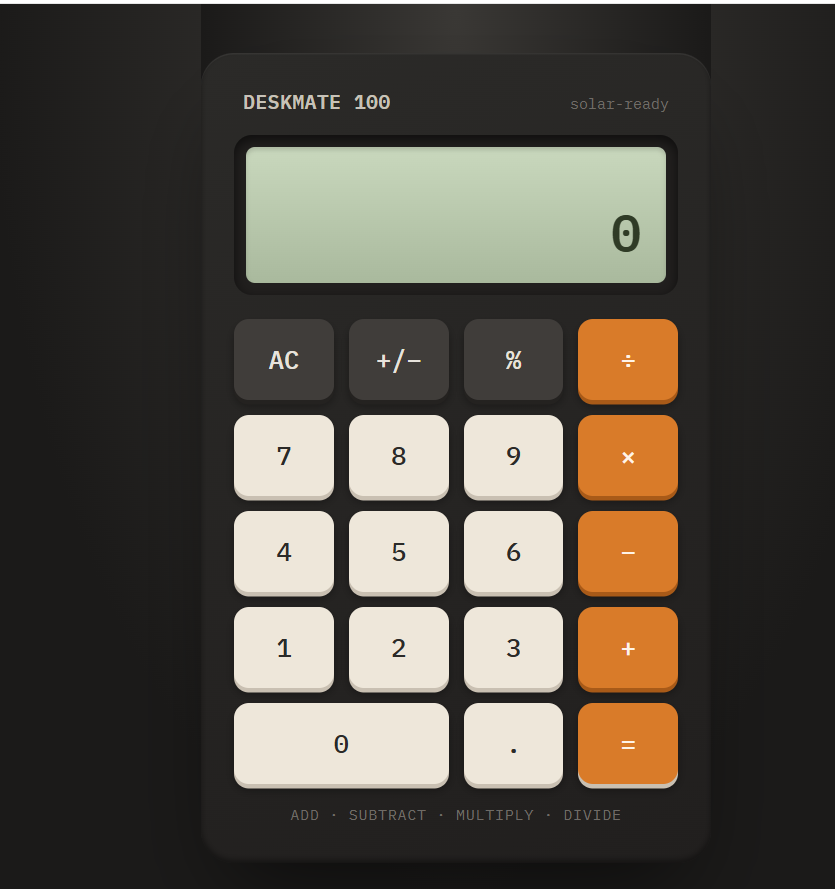
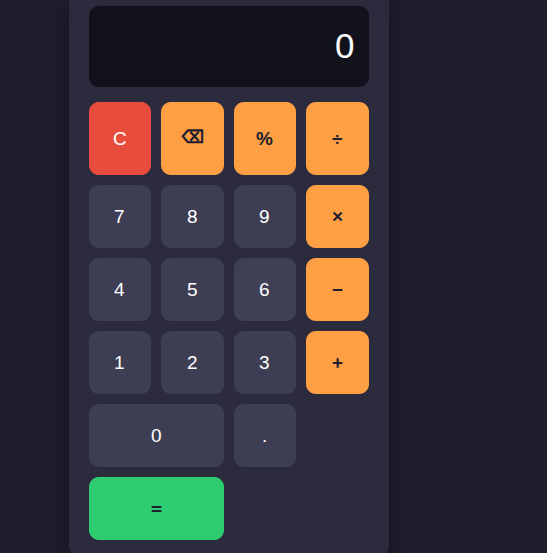
    I created a **Basic Calculator** that performs four fundamental mathematical operations: **Addition , Subtraction , Multiplication , and Division **.
    The purpose of this project was to practice programming concepts by creating a simple and useful calculator. Through this activity, I learned how to take input, process calculations, use mathematical operators, and display the correct result to the user.
    The calculator allows the user to enter numbers and select the required operation. It then performs the calculation and shows the result. This project helped me understand how programming can be used to solve everyday problems in a simple and efficient way.
    ### Operations Included
    **Addition:** Adds two numbers together.
    **Subtraction:** Finds the difference between two numbers.
    **Multiplication:** Multiplies two numbers.
    **Division:** Divides one number by another.
    Creating this calculator was a great learning experience because it helped me improve my understanding of **logic, operators, user input, calculations, and programming fundamentals**.
    I’m happy to share my project and continue improving my coding skills through more practical projects. Every small project is a step toward becoming a better programmer! ‍
    **I have also shared a screenshot of my Basic Calculator to show the project and its working.**
    ### What I Learned
    How to perform basic mathematical operations
    How to use programming operators
    How to work with user input
    How to apply logic in a simple program
    How to create a useful beginner-level project
    How practical projects can improve programming skills
    Thank you for viewing my project!
    I’m looking forward to learning more, creating new projects, and improving my technical skills.
    ### Hashtags
    #BasicCalculator #CalculatorProject #Programming #Coding #CodingJourney #LearnToCode #ProgrammingForBeginners #StudentProject #CodingSkills #TechSkills #ComputerScience #ProgrammingProject #BeginnerProject #LearningProgramming #PracticalLearning #DigitalSkills #FutureProgrammer #RSIF8 #StudentLearning #KeepLearning #LearnAndGrow
    ‍
    RSIF8 Roll No: 112 Coding Post No:1 Coding Post Topic: Basic Calculator ### 🧮💻 My Basic Calculator Project I created a **Basic Calculator** that performs four fundamental mathematical operations: **Addition ➕, Subtraction ➖, Multiplication ✖️, and Division ➗**. The purpose of this project was to practice programming concepts by creating a simple and useful calculator. Through this activity, I learned how to take input, process calculations, use mathematical operators, and display the correct result to the user. 💻📚✨ The calculator allows the user to enter numbers and select the required operation. It then performs the calculation and shows the result. This project helped me understand how programming can be used to solve everyday problems in a simple and efficient way. 🚀🧠 ### 🔢 Operations Included ➕ **Addition:** Adds two numbers together. ➖ **Subtraction:** Finds the difference between two numbers. ✖️ **Multiplication:** Multiplies two numbers. ➗ **Division:** Divides one number by another. Creating this calculator was a great learning experience because it helped me improve my understanding of **logic, operators, user input, calculations, and programming fundamentals**. 🌟💡 I’m happy to share my project and continue improving my coding skills through more practical projects. Every small project is a step toward becoming a better programmer! 👩‍💻🚀📖 📸 **I have also shared a screenshot of my Basic Calculator to show the project and its working.** ### 🌟 What I Learned ✅ How to perform basic mathematical operations ✅ How to use programming operators ✅ How to work with user input ✅ How to apply logic in a simple program ✅ How to create a useful beginner-level project ✅ How practical projects can improve programming skills Thank you for viewing my project! 🙌✨ I’m looking forward to learning more, creating new projects, and improving my technical skills. 💻🌱🚀 ### 🔖 Hashtags #BasicCalculator #CalculatorProject #Programming #Coding #CodingJourney #LearnToCode #ProgrammingForBeginners #StudentProject #CodingSkills #TechSkills #ComputerScience #ProgrammingProject #BeginnerProject #LearningProgramming #PracticalLearning #DigitalSkills #FutureProgrammer #RSIF8 #StudentLearning #KeepLearning #LearnAndGrow 🧮 ➕ ➖ ✖️ ➗ 💻 👩‍💻 📚 🧠 💡 🌟 🚀 🎯 ✨🙌
    0 Comments 0 Shares 2013 Views
  • #rsisb
    roll no.247
    Foundation level
    # Simple Calculator
    **Simple Calculator – Making Everyday Math Easy!**
    A **Simple Calculator** is a useful and beginner-friendly application designed to make basic mathematical calculations quick, accurate, and convenient. Whether you are a student learning mathematics, a beginner exploring programming, or simply someone who needs to calculate numbers quickly, a calculator provides an easy way to perform everyday calculations.
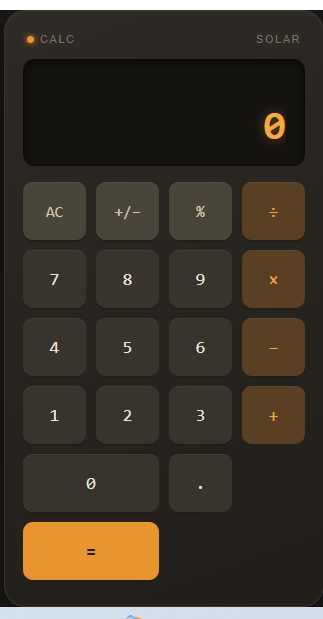
    This project focuses on the fundamental arithmetic operations: **addition (+), subtraction (-), multiplication (×), and division (÷)**. Users can enter numbers, select an operation, and instantly see the result. The simple interface makes it easy to understand and use, while also demonstrating important concepts such as user input, mathematical operators, buttons, functions, and displaying results.
    Creating a Simple Calculator is also an excellent programming project for beginners. ‍‍ It helps learners understand how different parts of an application work together. From designing the interface to writing the calculation logic, every step provides an opportunity to develop problem-solving and programming skills.
    A calculator project can also be expanded with additional features such as decimal numbers, percentage calculations, clear and delete buttons, keyboard support, calculation history, and more advanced mathematical functions. This makes it a great starting point for learning how simple applications can gradually become more powerful and interactive.
    **Key Features:**
    Addition
    Subtraction
    Multiplication
    Division
    Easy-to-use interface
    Fast calculations
    Beginner-friendly design
    Useful for learning programming
    Clear and understandable results
    **Learning Value:**
    Working on a Simple Calculator helps learners practice logical thinking, understand basic programming concepts, handle user input, and create interactive applications. It demonstrates how mathematics and technology can come together to solve everyday problems.
    **Conclusion:**
    The Simple Calculator may be a small project, but it teaches some very important ideas about programming and application development. It is a perfect beginner project for turning basic mathematical operations into an interactive digital tool. Keep learning, keep experimenting, and keep building!
    #SimpleCalculator #Calculator #Math #Mathematics #Programming #Coding #BeginnerProject #CodingForBeginners #LearnProgramming #ComputerScience #Technology #Education #StudentProject #MathSkills #ProblemSolving #ProgrammingProject #DigitalLearning #CodingSkills #CreativeCoding #LearnToCode #TechEducation #BasicCalculator #EasyCoding #Innovation
    #rsisb roll no.247 Foundation level # Simple Calculator 🧮✨ 🧮 **Simple Calculator – Making Everyday Math Easy!** 🔢💡 A **Simple Calculator** is a useful and beginner-friendly application designed to make basic mathematical calculations quick, accurate, and convenient. ➕➖✖️➗ Whether you are a student learning mathematics, a beginner exploring programming, or simply someone who needs to calculate numbers quickly, a calculator provides an easy way to perform everyday calculations. 📚💻 This project focuses on the fundamental arithmetic operations: **addition (+), subtraction (-), multiplication (×), and division (÷)**. Users can enter numbers, select an operation, and instantly see the result. ⚡🔢 The simple interface makes it easy to understand and use, while also demonstrating important concepts such as user input, mathematical operators, buttons, functions, and displaying results. 🎯 Creating a Simple Calculator is also an excellent programming project for beginners. 👨‍💻👩‍💻 It helps learners understand how different parts of an application work together. From designing the interface to writing the calculation logic, every step provides an opportunity to develop problem-solving and programming skills. 🚀🧠 A calculator project can also be expanded with additional features such as decimal numbers, percentage calculations, clear and delete buttons, keyboard support, calculation history, and more advanced mathematical functions. 🌟📱 This makes it a great starting point for learning how simple applications can gradually become more powerful and interactive. ✨ **Key Features:** 🔹 Addition ➕ 🔹 Subtraction ➖ 🔹 Multiplication ✖️ 🔹 Division ➗ 🔹 Easy-to-use interface 🖥️ 🔹 Fast calculations ⚡ 🔹 Beginner-friendly design 🌱 🔹 Useful for learning programming 💻 🔹 Clear and understandable results ✅ 📚 **Learning Value:** Working on a Simple Calculator helps learners practice logical thinking, understand basic programming concepts, handle user input, and create interactive applications. 🧠💻 It demonstrates how mathematics and technology can come together to solve everyday problems. 🌟 **Conclusion:** The Simple Calculator may be a small project, but it teaches some very important ideas about programming and application development. 🧮🚀 It is a perfect beginner project for turning basic mathematical operations into an interactive digital tool. Keep learning, keep experimenting, and keep building! 💡🌈 #SimpleCalculator #Calculator #Math #Mathematics #Programming #Coding #BeginnerProject #CodingForBeginners #LearnProgramming #ComputerScience #Technology #Education #StudentProject #MathSkills #ProblemSolving #ProgrammingProject #DigitalLearning #CodingSkills #CreativeCoding #LearnToCode #TechEducation #BasicCalculator #EasyCoding #Innovation
    0 Comments 0 Shares 4123 Views
  • #rsisb
    Roll No.247
    Foundation level

    # Currency Converter – Fast, Simple & Accurate Currency Conversion

    **Currency Converter** is a simple and useful digital tool designed to help users convert money from one currency into another quickly and easily. Whether you are learning about international currencies, planning a trip, comparing prices, studying global economics, or simply curious about exchange rates, this application makes currency conversion convenient and understandable.

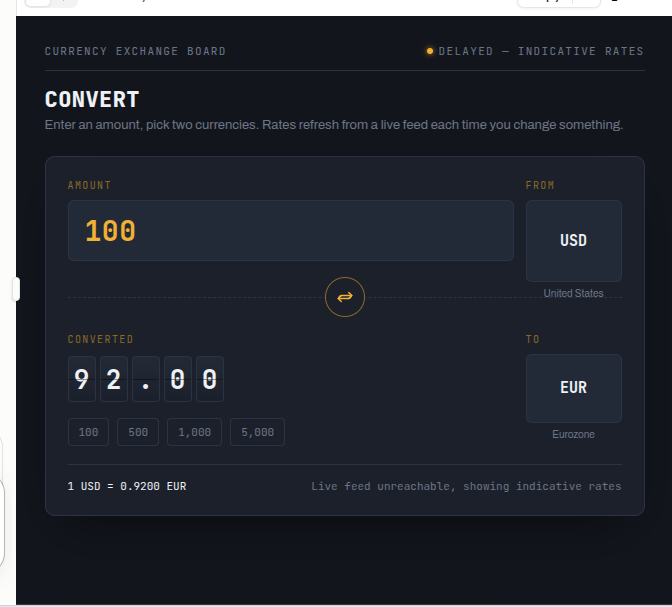
    With a **Currency Converter**, users can enter an amount, select the currency they want to convert **from**, choose the currency they want to convert **to**, and instantly view the converted value. The clean and user-friendly interface makes the process simple for beginners as well as experienced users.

    Currency conversion is especially helpful in today's connected world. People regularly deal with different currencies when traveling, shopping internationally, studying abroad, sending money, or comparing products and services from different countries. A currency converter provides a quick way to understand the approximate value of money across different currencies.

    This project is also a great example of how technology can solve everyday problems. It demonstrates concepts such as **user input, calculations, exchange rates, numerical processing, and interactive interfaces**. Students can use it as an educational project to understand how a practical application works.

    The Currency Converter can be improved further by adding more currencies, live exchange-rate updates, conversion history, favorite currencies, charts, and a responsive design for mobile and desktop devices. These features can make the application even more powerful and useful.

    **Learn about currencies, explore the global economy, and make conversions easier with a simple Currency Converter!**

    ### Hashtags

    #CurrencyConverter #CurrencyExchange #MoneyConverter #ExchangeRates #FinanceApp #FinTech #GlobalCurrency #InternationalFinance #MoneyManagement #TravelTools #TravelTechnology #DigitalTools #ProgrammingProject #CodingProject #StudentProject #EducationalTechnology #Technology #Innovation #WebDevelopment #AppDevelopment #Learning #Finance #Economics #GlobalEconomy #CurrencyExchangeApp
    #rsisb Roll No.247 Foundation level # 💱 Currency Converter – Fast, Simple & Accurate Currency Conversion 🌍💰 💵 **Currency Converter** is a simple and useful digital tool designed to help users convert money from one currency into another quickly and easily. Whether you are learning about international currencies, planning a trip, comparing prices, studying global economics, or simply curious about exchange rates, this application makes currency conversion convenient and understandable. 🌎✨ 🔄 With a **Currency Converter**, users can enter an amount, select the currency they want to convert **from**, choose the currency they want to convert **to**, and instantly view the converted value. The clean and user-friendly interface makes the process simple for beginners as well as experienced users. 📱💻 🌐 Currency conversion is especially helpful in today's connected world. People regularly deal with different currencies when traveling, shopping internationally, studying abroad, sending money, or comparing products and services from different countries. A currency converter provides a quick way to understand the approximate value of money across different currencies. 💳✈️🛍️ 📊 This project is also a great example of how technology can solve everyday problems. It demonstrates concepts such as **user input, calculations, exchange rates, numerical processing, and interactive interfaces**. Students can use it as an educational project to understand how a practical application works. 🎓💡 🚀 The Currency Converter can be improved further by adding more currencies, live exchange-rate updates, conversion history, favorite currencies, charts, and a responsive design for mobile and desktop devices. These features can make the application even more powerful and useful. 🔥📈 🌍 **Learn about currencies, explore the global economy, and make conversions easier with a simple Currency Converter!** 💱✨ ### 🔖 Hashtags #CurrencyConverter #CurrencyExchange #MoneyConverter #ExchangeRates #FinanceApp #FinTech #GlobalCurrency #InternationalFinance #MoneyManagement #TravelTools #TravelTechnology #DigitalTools #ProgrammingProject #CodingProject #StudentProject #EducationalTechnology #Technology #Innovation #WebDevelopment #AppDevelopment #Learning #Finance #Economics #GlobalEconomy #CurrencyExchangeApp 💱🌎💰📱🚀🎓✨
    0 Comments 0 Shares 8606 Views
  • #rsisb
    Roll No.247
    coding task
    Foundation Level

    # Basic Quiz Application

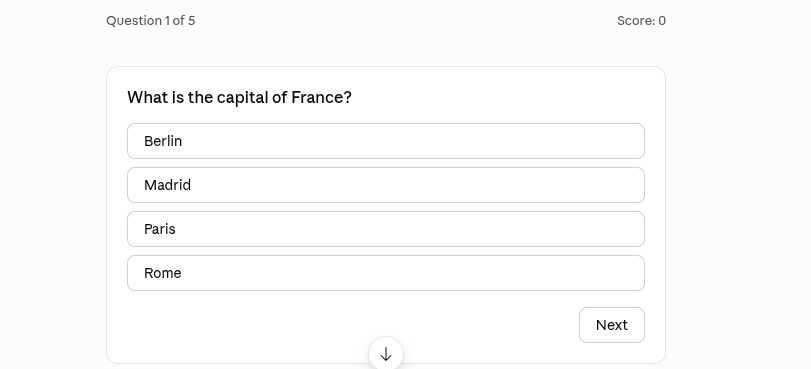
    The **Basic Quiz Application** is a simple, interactive, and engaging project designed to make learning more enjoyable and accessible. This application allows users to answer multiple-choice questions, test their knowledge, and receive their scores at the end of the quiz. Whether you're a student practicing school subjects, a beginner learning general knowledge, or simply someone who enjoys challenging their brain, this quiz application provides a fun way to learn and improve.

    The application features a clean and user-friendly interface that makes navigation easy for everyone. ‍ Users can read each question carefully, select the answer they believe is correct, and move through the quiz step by step. At the end, the application calculates the score and provides feedback on the user's performance.

    One of the main goals of this project is to demonstrate how a simple software application can combine **education, interaction, and technology**. It can also be customized with different subjects, question categories, difficulty levels, timers, scoreboards, and many other features.

    ### Key Features

    * Multiple-choice quiz questions
    * Simple and easy-to-use interface
    * Knowledge-testing activities
    * Automatic score calculation
    * Final results and performance feedback
    * Option to restart and take the quiz again
    * Suitable for educational and practice purposes
    * Beginner-friendly application concept
    * Easy to customize with new questions and topics

    This **Basic Quiz Application** is an excellent beginner project for understanding fundamental programming concepts such as variables, conditional statements, loops, functions, user input, and score calculation. ‍ It can serve as a foundation for developing more advanced quiz systems in the future.

    Overall, the Basic Quiz Application combines **learning and fun** in one simple platform. It encourages users to think, learn, practice, and improve their knowledge while demonstrating the power of interactive applications.

    #BasicQuiz #QuizApplication #QuizApp #Learning #Education #OnlineQuiz #KnowledgeTest #BrainChallenge #StudentProject #ProgrammingProject #BeginnerProject #InteractiveLearning #EducationalA
    pp #Coding #ComputerScience #TechProject #PracticeQuiz #GeneralKnowledge #LearningIsFun #QuizTime
    #rsisb Roll No.247 coding task Foundation Level # Basic Quiz Application 🎯🧠 The **Basic Quiz Application** is a simple, interactive, and engaging project designed to make learning more enjoyable and accessible. 📚✨ This application allows users to answer multiple-choice questions, test their knowledge, and receive their scores at the end of the quiz. Whether you're a student practicing school subjects, a beginner learning general knowledge, or simply someone who enjoys challenging their brain, this quiz application provides a fun way to learn and improve. 📝💡 The application features a clean and user-friendly interface that makes navigation easy for everyone. 👨‍💻🖥️ Users can read each question carefully, select the answer they believe is correct, and move through the quiz step by step. At the end, the application calculates the score and provides feedback on the user's performance. 🏆📊 One of the main goals of this project is to demonstrate how a simple software application can combine **education, interaction, and technology**. 🚀💻 It can also be customized with different subjects, question categories, difficulty levels, timers, scoreboards, and many other features. ### 🌟 Key Features * 📝 Multiple-choice quiz questions * 🎯 Simple and easy-to-use interface * 🧠 Knowledge-testing activities * 📊 Automatic score calculation * 🏆 Final results and performance feedback * 🔄 Option to restart and take the quiz again * 📚 Suitable for educational and practice purposes * 💻 Beginner-friendly application concept * 🎨 Easy to customize with new questions and topics This **Basic Quiz Application** is an excellent beginner project for understanding fundamental programming concepts such as variables, conditional statements, loops, functions, user input, and score calculation. 👨‍💻⚙️ It can serve as a foundation for developing more advanced quiz systems in the future. Overall, the Basic Quiz Application combines **learning and fun** in one simple platform. 🌟📖 It encourages users to think, learn, practice, and improve their knowledge while demonstrating the power of interactive applications. 🚀🧠 #BasicQuiz #QuizApplication #QuizApp #Learning #Education #OnlineQuiz #KnowledgeTest #BrainChallenge #StudentProject #ProgrammingProject #BeginnerProject #InteractiveLearning #EducationalA pp #Coding #ComputerScience #TechProject #PracticeQuiz #GeneralKnowledge #LearningIsFun #QuizTime 🎯🧠📚💻🏆✨🚀
    0 Comments 0 Shares 6242 Views
  • #rsisb
    Roll no 248
    Coding Task 1
    Foundation level
    **Create a Basic Calculator!**
    Want to improve your programming skills? Build a **basic calculator** that can perform simple operations like Addition, Subtraction, Multiplication, and Division. It's a great beginner project to practice coding, problem-solving, and logical thinking.
    Start small, learn consistently, and keep building amazing projects!
    **Skills You'll Learn:**
    Variables
    User Input
    Conditional Statements
    Functions
    Basic Math Operations
    Every great programmer starts with simple projects—this could be yours!
    #BasicCalculator #Coding #Programming #LearnToCode #Python #JavaScript #CodingForBeginners #TechSkills #SoftwareDevelopment #ComputerScience #CodeEveryDay #STEM #DeveloperLife #ProgrammingProjects #LearningJourney See less
    #rsisb Roll no 248 Coding Task 1 Foundation level 🧮 **Create a Basic Calculator!** 💻✨ Want to improve your programming skills? Build a **basic calculator** that can perform simple operations like ➕ Addition, ➖ Subtraction, ✖️ Multiplication, and ➗ Division. It's a great beginner project to practice coding, problem-solving, and logical thinking. 🚀 Start small, learn consistently, and keep building amazing projects! 🌟 💡 **Skills You'll Learn:** 🔹 Variables 🔹 User Input 🔹 Conditional Statements 🔹 Functions 🔹 Basic Math Operations 📚 Every great programmer starts with simple projects—this could be yours! 💪 #BasicCalculator #Coding #Programming #LearnToCode #Python #JavaScript #CodingForBeginners #TechSkills #SoftwareDevelopment #ComputerScience #CodeEveryDay #STEM #DeveloperLife #ProgrammingProjects #LearningJourney 🚀💻 See less
    0 Comments 0 Shares 4342 Views