• RSIF8
    ROLLNO:13
    CLASS: FOUNDATION LEVEL
    CODING TASK NO:9
    Claude Calendar is a web-based calendar app that lets you add events either the traditional way (filling in a form) or by simply typing what you want in plain English and letting Claude figure out the details. It runs as a published page on Claude.ai, so you can open it from any browser using the link, and it adapts to phones, tablets and desktops.

    The Main Calendar

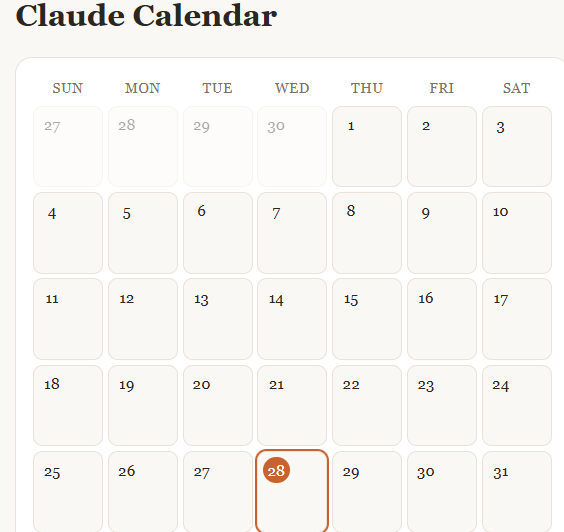
    The center of the app is a full month view laid out in a seven-column grid, Sunday through Saturday. Each day is a clickable cell showing its date number. Days from the previous and next months appear faded so the grid is always complete. Today’s date is highlighted with an orange circle, so you can find your place instantly. When a day has events, small labels appear inside the cell showing the time and title. If a day is busy, the cell shows the first two and the rest are visible in the detail panel.

    At the top, arrow buttons move you backward and forward one month, and a “Today” button jumps you straight back to the current month and selects today’s date.

    Adding Events with Claude

    This is the headline feature. In the “Add with Claude” box, you type a natural sentence such as:

    “Lunch with Sara next Friday at 1pm”
    “Team meeting tomorrow at 9:30”
    “Mom’s birthday on November 14”
    “Dentist appointment in two weeks”

    When you press Add (or hit Enter), the app sends your sentence to Claude along with today’s date, so relative phrases like “tomorrow,” “next Friday” or “in two weeks” are resolved correctly. Claude returns a clean title, an exact date and, if you mentioned one, a time. The event is then placed on the calendar, the view jumps to the right month, and a confirmation message tells you exactly what was added. If Claude can’t understand the request, or if too many requests are made in a short period, the app shows a friendly message and suggests rephrasing or using manual entry instead. The first time you use this feature, Claude.ai will ask for your permission.

    Adding Events Manually

    For times when you’d rather be precise, there’s an “Add manually” card with a title field, a date picker and an optional time picker.
    RSIF8 ROLLNO:13 CLASS: FOUNDATION LEVEL CODING TASK NO:9 Claude Calendar is a web-based calendar app that lets you add events either the traditional way (filling in a form) or by simply typing what you want in plain English and letting Claude figure out the details. It runs as a published page on Claude.ai, so you can open it from any browser using the link, and it adapts to phones, tablets and desktops. The Main Calendar The center of the app is a full month view laid out in a seven-column grid, Sunday through Saturday. Each day is a clickable cell showing its date number. Days from the previous and next months appear faded so the grid is always complete. Today’s date is highlighted with an orange circle, so you can find your place instantly. When a day has events, small labels appear inside the cell showing the time and title. If a day is busy, the cell shows the first two and the rest are visible in the detail panel. At the top, arrow buttons move you backward and forward one month, and a “Today” button jumps you straight back to the current month and selects today’s date. Adding Events with Claude This is the headline feature. In the “Add with Claude” box, you type a natural sentence such as: “Lunch with Sara next Friday at 1pm” “Team meeting tomorrow at 9:30” “Mom’s birthday on November 14” “Dentist appointment in two weeks” When you press Add (or hit Enter), the app sends your sentence to Claude along with today’s date, so relative phrases like “tomorrow,” “next Friday” or “in two weeks” are resolved correctly. Claude returns a clean title, an exact date and, if you mentioned one, a time. The event is then placed on the calendar, the view jumps to the right month, and a confirmation message tells you exactly what was added. If Claude can’t understand the request, or if too many requests are made in a short period, the app shows a friendly message and suggests rephrasing or using manual entry instead. The first time you use this feature, Claude.ai will ask for your permission. Adding Events Manually For times when you’d rather be precise, there’s an “Add manually” card with a title field, a date picker and an optional time picker.
    0 Comments 0 Shares 295 Views
  • #rsisb
    Roll no.247
    coding.4
    Foundation level

    **Calendar App — Organize Your Time, Plan Your Future!**

    Today, I worked on an exciting **Calendar App** project designed to make organizing daily activities, important dates, events, and schedules easier and more convenient.

    The Calendar App provides a simple and user-friendly way to manage your time. Users can easily view different days, weeks, and months, keep track of important events, and plan their schedules in an organized way.

    This project helped me understand important concepts of **web development, user interface design, date management, navigation, and interactive applications**. ‍ It was a great opportunity to practice creating a clean and useful digital experience.

    A good calendar is more than just a way to see dates—it helps us stay organized, remember important moments, manage our responsibilities, and use our time wisely.

    I’m excited to continue learning, improving my coding skills, and creating more useful projects in the future!

    **Project:** Calendar App
    **Category:** Coding / Web Development
    **Focus:** Organization, Scheduling & Time Management
    **Learning:** UI Design, Programming & Interactive Features

    #CalendarApp #Calendar #Coding #WebDevelopment #Programming #CodingProject #Tech #Technology #SoftwareDevelopment #AppDevelopment #UIDesign #WebDesign #LearningToCode #CodingJourney #StudentDeveloper #CreativeCoding #TimeManagement #Productivity #Organization #DigitalCalendar #FutureDeveloper #TechSkills #Innovation #ProjectBasedLearning
    #rsisb Roll no.247 coding.4 Foundation level 📅✨ **Calendar App — Organize Your Time, Plan Your Future!** 🚀🗓️ Today, I worked on an exciting **Calendar App** project designed to make organizing daily activities, important dates, events, and schedules easier and more convenient. 📆💻 The Calendar App provides a simple and user-friendly way to manage your time. Users can easily view different days, weeks, and months, keep track of important events, and plan their schedules in an organized way. ⏰📝 This project helped me understand important concepts of **web development, user interface design, date management, navigation, and interactive applications**. 💡👨‍💻 It was a great opportunity to practice creating a clean and useful digital experience. A good calendar is more than just a way to see dates—it helps us stay organized, remember important moments, manage our responsibilities, and use our time wisely. 🌟⏳ I’m excited to continue learning, improving my coding skills, and creating more useful projects in the future! 🚀🔥 📅 **Project:** Calendar App 💻 **Category:** Coding / Web Development 🎯 **Focus:** Organization, Scheduling & Time Management 🌱 **Learning:** UI Design, Programming & Interactive Features #CalendarApp #Calendar #Coding #WebDevelopment #Programming #CodingProject #Tech #Technology #SoftwareDevelopment #AppDevelopment #UIDesign #WebDesign #LearningToCode #CodingJourney #StudentDeveloper #CreativeCoding #TimeManagement #Productivity #Organization #DigitalCalendar #FutureDeveloper #TechSkills #Innovation #ProjectBasedLearning 🚀💻📅✨🎯
    0 Comments 0 Shares 4165 Views
  • RSIF8
    Roll no 03
    Coding book 1
    Task no 09
    Task topic Create a calendar app where users can add events using Claude.ai.
    Calendar App Using Claude AI — Coding Challenge

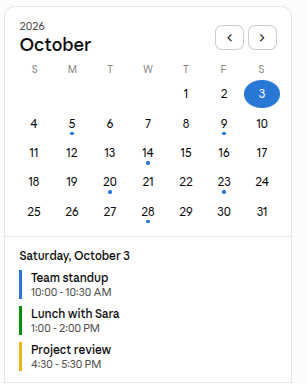
    I created a Calendar App using Claude AI that allows users to add and manage events easily! Users can organize their schedules, keep track of important dates, and stay updated with their upcoming activities.

    This project helped me explore AI-assisted coding, date and time handling, user interaction, event management, and application logic. It was a great learning experience and another exciting step in my coding journey!

    Keep learning, keep building, and keep creating! ‍

    #ClaudeAI #CalendarApp #AICoding #CodingChallenge #AppDevelopment #LearnToCode #ProgrammingJourney #CodePractice #JavaScript #WebDevelopment #TechSkills #CodingStudent #DeveloperJourney #BuildInPublic #FutureDeveloper
    RSIF8 Roll no 03 Coding book 1 Task no 09 Task topic Create a calendar app where users can add events using Claude.ai. 📅 Calendar App Using Claude AI — Coding Challenge 💻🤖 I created a Calendar App using Claude AI that allows users to add and manage events easily! 🗓️✨ Users can organize their schedules, keep track of important dates, and stay updated with their upcoming activities. ⏰📌 This project helped me explore AI-assisted coding, date and time handling, user interaction, event management, and application logic. 💡🚀 It was a great learning experience and another exciting step in my coding journey! Keep learning, keep building, and keep creating! 👨‍💻🔥💻 #ClaudeAI #CalendarApp #AICoding #CodingChallenge #AppDevelopment #LearnToCode #ProgrammingJourney #CodePractice #JavaScript #WebDevelopment #TechSkills #CodingStudent #DeveloperJourney #BuildInPublic #FutureDeveloper 📅💻🤖🚀✨
    0 Comments 0 Shares 3201 Views
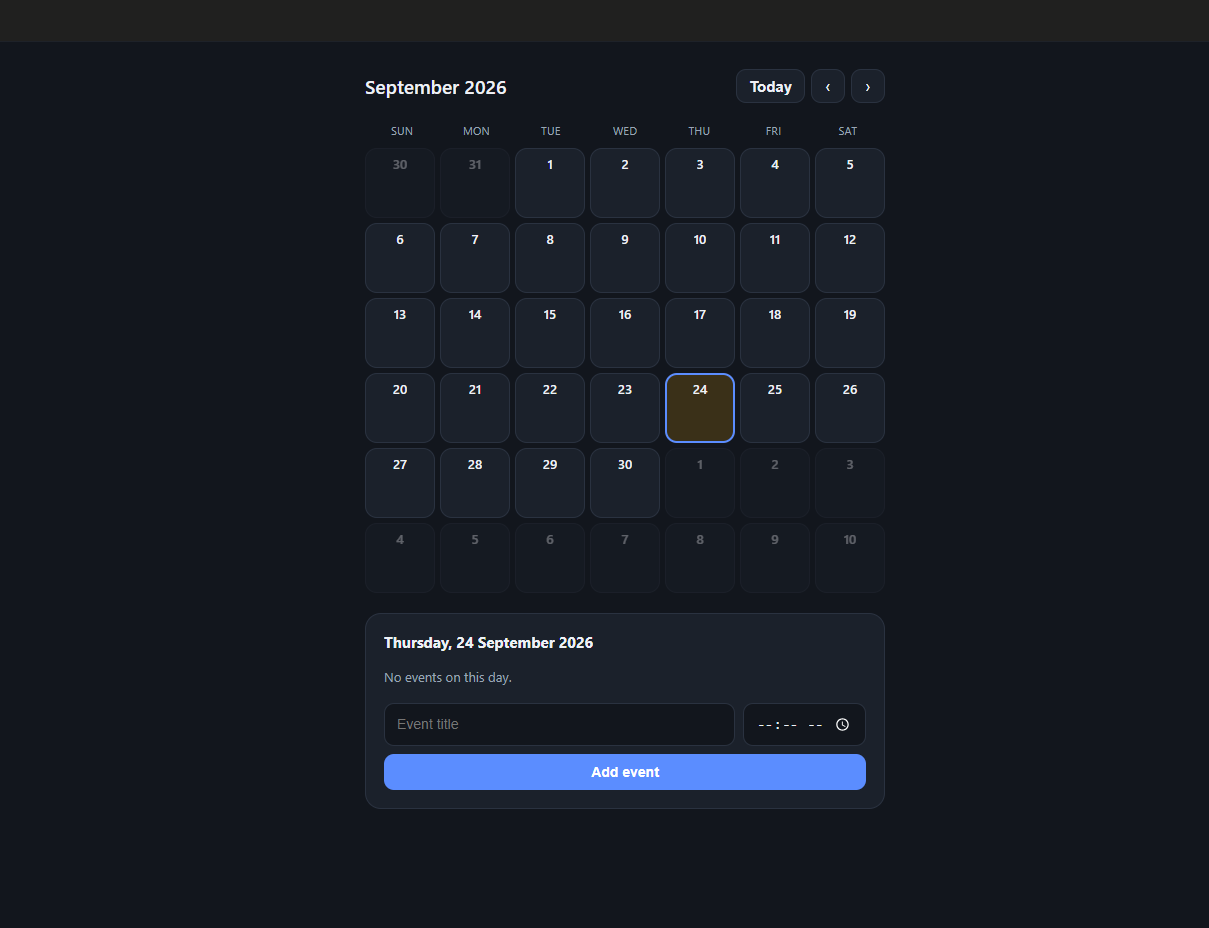
  • https://www.facebook.com/share/p/19R1i6Kmfq/ coding daily task topic omplete a small coding challenge Build a basic calendar that displays the current month and allows navigation week 6 day 11 level 1 @followers
    0 Comments 0 Shares 741 Views


  • #rsisb
    Roll No.240
    Canva No.52
    Foundation Level

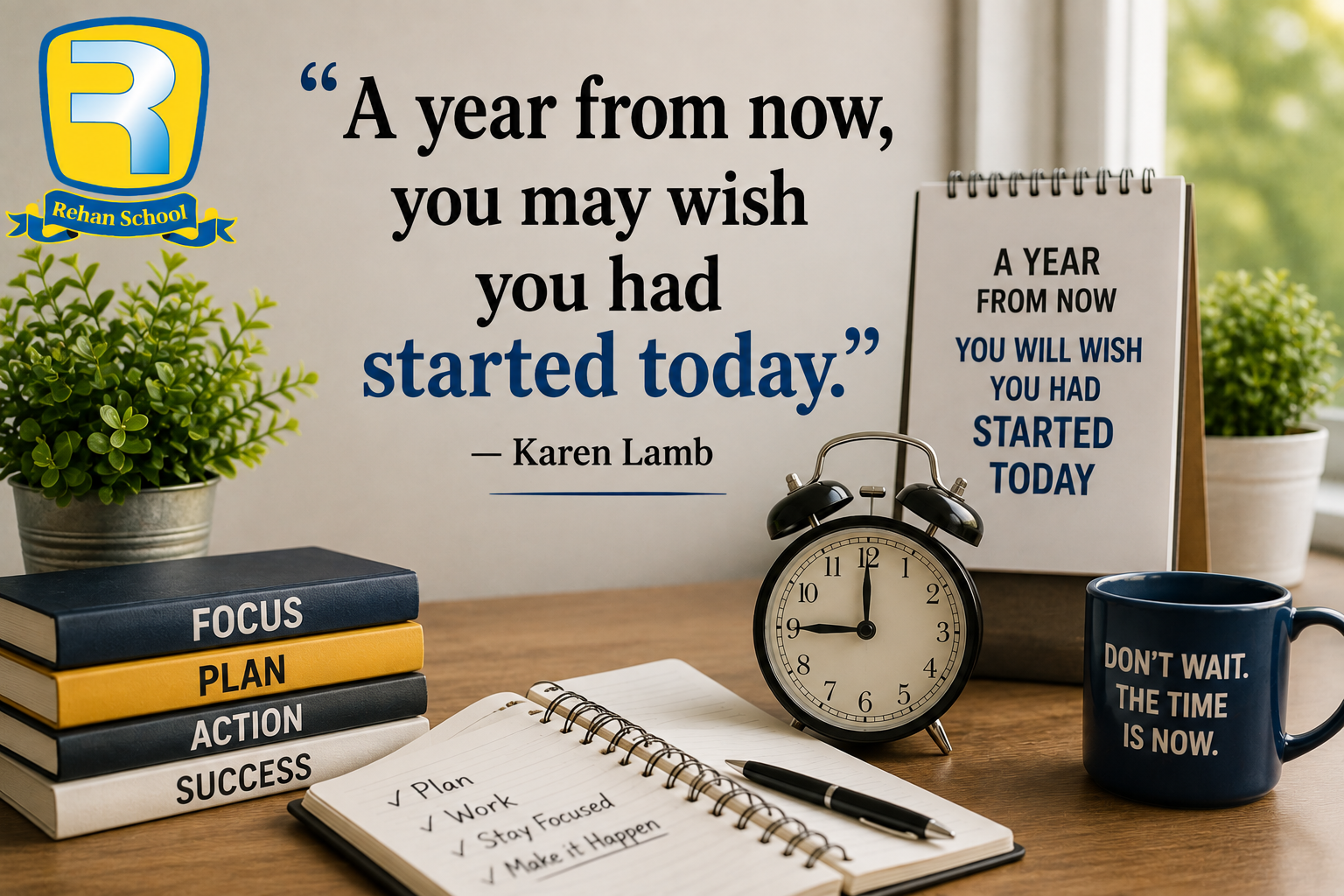
    Time moves forward whether we are ready or not. This powerful motivational quote reminds us that the best time to start working toward our dreams is **today**. Waiting for the perfect moment can cause us to lose valuable time that we could have used to learn, improve, and make progress.

    The realistic image represents **planning, focus, action, and success**. The clock reminds us that every minute matters, while the calendar represents the future we are building. The books symbolize knowledge and education, and the open notebook represents taking action and turning plans into reality.

    A year from now, you can either look back with pride because you started today, or wish you had taken that first step earlier. Even a small action today can become a big achievement over time.

    The **Rehan School logo** is included in the top-left corner, giving the motivational design a professional educational identity

    **Don’t wait for tomorrow.**
    **Start working on your goals today.**
    **Learn something new every day.**
    **Take small steps consistently.**
    **Your future self will thank you.**

    Remember, you don't need to finish everything today. You only need to **start**. One decision, one step, and one day of effort can begin a journey that changes your future.

    **Quote:** “A year from now, you may wish you had started today.”
    **Author:** Karen Lamb
    **Theme:** Motivation | Education | Time Management | Success | Goal Setting | Productivity | Personal Growth

    #Motivation #KarenLamb #StartToday #Success #Education #RehanSchool #StudentMotivation #TimeManagement #GoalSetting #Productivity #SelfImprovement #InspirationalQuotes #FutureSuccess #NeverGiveUp #DreamBig #TakeAction

    Rehan School Islamabad Campus
    Asma Shaheen EducationWali
    Irum Asim
    Saima Happinesswali

    #rsisb Roll No.240 Canva No.52 Foundation Level Time moves forward whether we are ready or not. This powerful motivational quote reminds us that the best time to start working toward our dreams is **today**. Waiting for the perfect moment can cause us to lose valuable time that we could have used to learn, improve, and make progress. The realistic image represents **planning, focus, action, and success**. The clock reminds us that every minute matters, while the calendar represents the future we are building. The books symbolize knowledge and education, and the open notebook represents taking action and turning plans into reality. A year from now, you can either look back with pride because you started today, or wish you had taken that first step earlier. Even a small action today can become a big achievement over time. The **Rehan School logo** is included in the top-left corner, giving the motivational design a professional educational identity ⏰ **Don’t wait for tomorrow.** 🎯 **Start working on your goals today.** 📚 **Learn something new every day.** 💪 **Take small steps consistently.** 🚀 **Your future self will thank you.** Remember, you don't need to finish everything today. You only need to **start**. One decision, one step, and one day of effort can begin a journey that changes your future. **Quote:** “A year from now, you may wish you had started today.” **Author:** Karen Lamb **Theme:** Motivation | Education | Time Management | Success | Goal Setting | Productivity | Personal Growth #Motivation #KarenLamb #StartToday #Success #Education #RehanSchool #StudentMotivation #TimeManagement #GoalSetting #Productivity #SelfImprovement #InspirationalQuotes #FutureSuccess #NeverGiveUp #DreamBig #TakeAction Rehan School Islamabad Campus Asma Shaheen EducationWali Irum Asim Saima Happinesswali
    0 Comments 0 Shares 3127 Views
  • Episode 103 – Review Out Now!
    Missed our powerful session on managing daily follow-ups? Don’t worry!
    In this short review video, we’ll quickly walk you through how you can turn your Google Sheet into a smart reminder system using Google Calendar.

    Learn how to:
    Track follow-ups for every student
    Get daily reminders automatically
    Keep your whole team organized
    Never forget a task again!

    If you're running an academy or handling student queries, this system will save your time and boost your productivity.

    Watch the full review now and upgrade the way you work — smartly and efficiently!

    #Episode103 #ReviewVideo #RehanSchool #FollowUpSystem #GoogleSheetsTips #OnlineAcademy #DailyManagement #ProductivityTools #AutomationMadeEasy #EdTech

    Doulat EducationWala
    Jai Parkash EducationWala
    Rahat CounsellingWali
    Hafsa FairyLand
    Rehan School Korangi Campus
    📺 Episode 103 – Review Out Now! Missed our powerful session on managing daily follow-ups? Don’t worry! In this short review video, we’ll quickly walk you through how you can turn your Google Sheet into a smart reminder system using Google Calendar. 🧠✅ 📌 Learn how to: 🔹 Track follow-ups for every student 🔹 Get daily reminders automatically 🔹 Keep your whole team organized 🔹 Never forget a task again! 🎯 If you're running an academy or handling student queries, this system will save your time and boost your productivity. 🎥 Watch the full review now and upgrade the way you work — smartly and efficiently! #Episode103 #ReviewVideo #RehanSchool #FollowUpSystem #GoogleSheetsTips #OnlineAcademy #DailyManagement #ProductivityTools #AutomationMadeEasy #EdTech Doulat EducationWala Jai Parkash EducationWala Rahat CounsellingWali Hafsa FairyLand Rehan School Korangi Campus
    0 Comments 0 Shares 6705 Views 10
  • AI Coding Journey – Book 1
    Planning ahead with Task No. 09: Calendar App!
    This app allows users to add events and organize their schedule, helping me practice data handling, date functions, and UI design!
    A great step toward building real-world productivity tools!
    Check it out here:
    [https://claude.ai/public/artifacts/cc6f1e3b-b4f5-4f7b-bce0-0b301d7e1e13]

    #AICoding #CalendarApp #LearningByDoing #codinglife #book1
    ⚡💻 AI Coding Journey – Book 1 🚀📘 Planning ahead with Task No. 09: Calendar App! 📅🔥 This app allows users to add events and organize their schedule, helping me practice data handling, date functions, and UI design! 🛠️💡 💻 A great step toward building real-world productivity tools! 🎥 Check it out here: [https://claude.ai/public/artifacts/cc6f1e3b-b4f5-4f7b-bce0-0b301d7e1e13] #AICoding #CalendarApp #LearningByDoing #codinglife #book1
    0 Comments 0 Shares 3132 Views
  • AI Coding Journey – Book 1
    Planning ahead with Task No. 19: Calendar App!
    This app lets users add events and organize their schedules, helping me learn date handling, event management, and UI design!
    A powerful step toward building real-world productivity tools.
    Check it out here:
    https://claude.ai/public/artifacts/4751d652-b332-4fd9-a139-2c1b28cda206

    #AICoding #CalendarApp #LearningByDoing #codinglife #book1
    ⚡💻 AI Coding Journey – Book 1 🚀📘 Planning ahead with Task No. 19: Calendar App! 📅🔥 This app lets users add events and organize their schedules, helping me learn date handling, event management, and UI design! 🛠️💡 💻 A powerful step toward building real-world productivity tools. 🎥 Check it out here: https://claude.ai/public/artifacts/4751d652-b332-4fd9-a139-2c1b28cda206 #AICoding #CalendarApp #LearningByDoing #codinglife #book1
    0 Comments 0 Shares 2115 Views
  • Calendar Web App using Gemini CLI
    Description

    A modern and responsive Calendar web application developed using Gemini CLI. Users can navigate between months, manage events and reminders, highlight important dates, and organize schedules through a clean and professional calendar interface.

    Student Information

    Coding Book: 1
    Task: 9
    Roll No: 71

    Website Link

    http://rsmc71.rehanschool.us/alarmclock/

    Hashtags

    #GeminiCLI #CalendarApp #WebDevelopment #HTML #CSS #JavaScript #CodingBook1 #Task9 #RollNo71 #Programming #FrontendDevelopment #Calendar #EventManager #AI #StudentProject #CodeWithAI #TechEducation #WebAppDevelopment #JavaScriptProject #ProductivityApp #ScheduleManager
    Calendar Web App using Gemini CLI Description A modern and responsive Calendar web application developed using Gemini CLI. Users can navigate between months, manage events and reminders, highlight important dates, and organize schedules through a clean and professional calendar interface. Student Information 📖 Coding Book: 1 📋 Task: 9 🎓 Roll No: 71 Website Link http://rsmc71.rehanschool.us/alarmclock/ Hashtags #GeminiCLI #CalendarApp #WebDevelopment #HTML #CSS #JavaScript #CodingBook1 #Task9 #RollNo71 #Programming #FrontendDevelopment #Calendar #EventManager #AI #StudentProject #CodeWithAI #TechEducation #WebAppDevelopment #JavaScriptProject #ProductivityApp #ScheduleManager
    0 Comments 0 Shares 9415 Views
  • Calendar Web App using Gemini CLI
    Description

    A modern and responsive Calendar Web Application developed using Gemini CLI. Users can manage events, schedule activities, organize reminders, and view monthly, weekly, and yearly calendars through a professional and interactive interface.

    Student Information

    Coding Book: 1
    Task: 19
    Roll No: 71

    Website Link

    http://rsmc71.rehanschool.us/calenderappcode/

    Hashtags

    #GeminiCLI #CalendarApp #WebDevelopment #HTML #CSS #JavaScript #CodingBook1 #Task19 #RollNo71 #Programming #FrontendDevelopment #PWA #StudentProject #CodeWithAI #TechEducation #WebAppDevelopment #ResponsiveDesign #ModernUI #EventManager #CalendarPlanner #JavaScriptProject
    Calendar Web App using Gemini CLI Description A modern and responsive Calendar Web Application developed using Gemini CLI. Users can manage events, schedule activities, organize reminders, and view monthly, weekly, and yearly calendars through a professional and interactive interface. Student Information 📖 Coding Book: 1 📋 Task: 19 🎓 Roll No: 71 Website Link http://rsmc71.rehanschool.us/calenderappcode/ Hashtags #GeminiCLI #CalendarApp #WebDevelopment #HTML #CSS #JavaScript #CodingBook1 #Task19 #RollNo71 #Programming #FrontendDevelopment #PWA #StudentProject #CodeWithAI #TechEducation #WebAppDevelopment #ResponsiveDesign #ModernUI #EventManager #CalendarPlanner #JavaScriptProject
    0 Comments 0 Shares 4739 Views
More Results