• Level 01 Book 01
    Day 07
    Task Canva post

    Summary

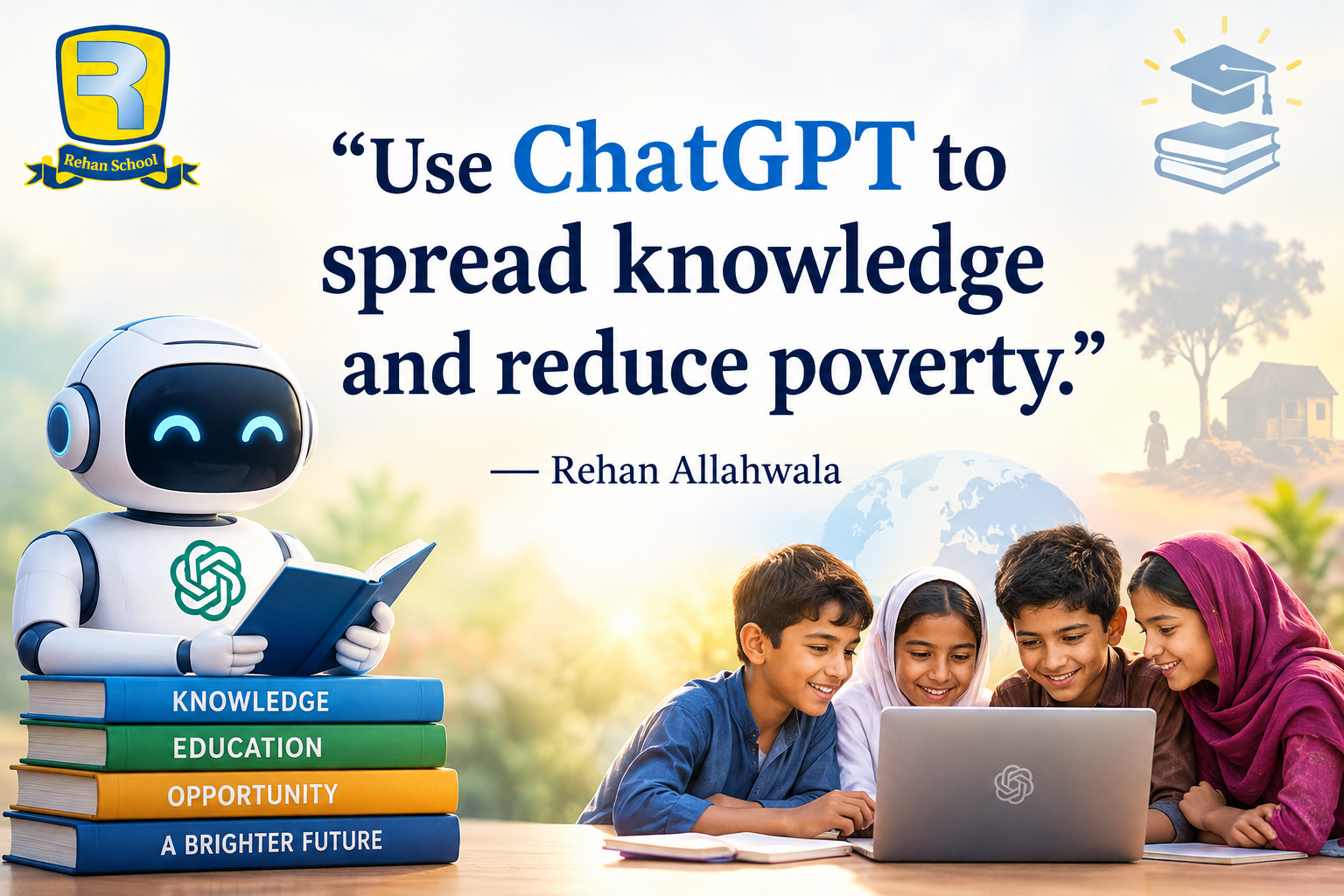
    "Teaching through ChatGPT means less poverty."
    When knowledge becomes accessible, opportunities grow. Every lesson shared has the power to change a life, create new skills, and build a brighter future. Education empowered by AI can help break the cycle of poverty—one learner at a time.

    #TeachingThroughChatGPT #EducationForAll #AIForGood #ChatGPT #Learning #DigitalEducation #Empowerment #Innovation #FutureOfEducation #SkillDevelopment #KnowledgeIsPower #EndPoverty #EducationMatters #RehanAllahwala #PakistanZindabad

    Tania Khan Mentorship Wali
    Mohsin Rathore Seo Wala
    Imran Khan Street Wala
    Shazia Javed
    Hafsa Noor
    Level 01 Book 01 Day 07 Task Canva post Summary "Teaching through ChatGPT means less poverty." 🌍✨ When knowledge becomes accessible, opportunities grow. Every lesson shared has the power to change a life, create new skills, and build a brighter future. Education empowered by AI can help break the cycle of poverty—one learner at a time. #TeachingThroughChatGPT #EducationForAll #AIForGood #ChatGPT #Learning #DigitalEducation #Empowerment #Innovation #FutureOfEducation #SkillDevelopment #KnowledgeIsPower #EndPoverty #EducationMatters #RehanAllahwala #PakistanZindabad Tania Khan Mentorship Wali Mohsin Rathore Seo Wala Imran Khan Street Wala Shazia Javed Hafsa Noor
    0 Kommentare 0 Anteile 1688 Ansichten
  • Level 01 Book 01
    Day 03
    Task Canva post 10
    Topic "ChatGPT can bring education where it's needed most to fight poverty." –

    Education is the greatest investment in a better future.

    "ChatGPT can bring education where it's needed most to fight poverty." — Rehan Allahwala

    When knowledge becomes accessible, lives change. AI has the power to help students learn, entrepreneurs grow, and communities create new opportunities. Together, we can bridge the education gap and empower the next generation.

    Every lesson learned is a step toward a brighter future.

    #ChatGPT #AIForGood #EducationForAll #FightPoverty #DigitalEducation #FutureOfLearning #Empowerment #Innovation #Education #LearnGrowSucceed #TechForGood #Pakistan #RehanAllahwala

    Tania Khan Mentorship Wali
    Mohsin Rathore Seo Wala
    Imran Khan Street Wala
    Shazia EducationWali
    Hafsa Noor
    Rehan School Korangi Campus
    Level 01 Book 01 Day 03 Task Canva post 10 Topic "ChatGPT can bring education where it's needed most to fight poverty." – Education is the greatest investment in a better future. 🌍📚 "ChatGPT can bring education where it's needed most to fight poverty." — Rehan Allahwala When knowledge becomes accessible, lives change. AI has the power to help students learn, entrepreneurs grow, and communities create new opportunities. Together, we can bridge the education gap and empower the next generation. 💚 Every lesson learned is a step toward a brighter future. #ChatGPT #AIForGood #EducationForAll #FightPoverty #DigitalEducation #FutureOfLearning #Empowerment #Innovation #Education #LearnGrowSucceed #TechForGood #Pakistan #RehanAllahwala Tania Khan Mentorship Wali Mohsin Rathore Seo Wala Imran Khan Street Wala Shazia EducationWali Hafsa Noor Rehan School Korangi Campus
    0 Kommentare 0 Anteile 2456 Ansichten
  • #rsisb
    Roll no.239
    Account Creation no.8
    Foundation Level


    **Restream** is a useful online platform for hosting and broadcasting interviews, live conversations, webinars, and other types of video content. It can help you connect with a guest remotely and, depending on your setup and account features, broadcast your interview to multiple platforms at the same time.

    In this topic, **“How to Use Restream for Interviews?”**, we explore the basic process of preparing, hosting, and managing an online interview through Restream.

    The first step is to **create or sign in to your Restream account** and prepare your live-streaming setup. Before starting the interview, you should make sure that your **camera, microphone, internet connection, and computer** are working properly. Good audio is especially important because viewers can tolerate average video quality more easily than unclear or interrupted sound.

    Next, you can prepare your interview space and invite your guest. Depending on the Restream features available to you, your guest may be able to join remotely without needing a complicated setup. Before going live, it is a good idea to send your guest the necessary joining information and explain how the interview will work.

    You should also decide **where you want to broadcast your interview**. Restream can be used to manage streaming destinations, allowing creators to reach audiences across supported social platforms. Connecting your preferred channels ahead of time can make the live-streaming process smoother.

    Preparation is one of the most important parts of a successful interview. Create a list of **questions, discussion topics, introductions, and closing remarks** before going live. You can begin by welcoming viewers, introducing yourself and your guest, and briefly explaining the topic of the interview.

    During the interview, communicate clearly with your guest and give them enough time to answer. Avoid interrupting unnecessarily, listen carefully, and use follow-up questions when an interesting point comes up.

    Restream can also make online interviews more engaging by supporting features such as **on-screen elements, chat interaction, branding, and other streaming tools**, depending on the current plan and features available. These tools can help make your broadcast look more organized and professional.

    Before going live, always perform a **test run**. Check the microphone volume, camera framing, lighting, internet connection, guest audio, and stream destinations. A short test can prevent many technical problems during the actual interview.

    After the interview begins, keep an eye on the stream and watch for technical issues. If your guest's audio becomes unclear or the connection drops, calmly troubleshoot the problem rather than rushing through the conversation.

    A successful Restream interview is not only about technology—it is also about **good communication, preparation, confidence, and audience engagement**. With practice, you can create interviews that are informative, interesting, and enjoyable for your viewers.

    Whether you are interviewing a **student, teacher, professional, entrepreneur, creator, or community member**, learning how to use Restream can help you conduct online interviews and share meaningful conversations with a wider audience.

    **Prepare well, test your equipment, ask thoughtful questions, communicate clearly, and focus on your guest and audience.** With the right preparation, your Restream interview can become a professional and engaging live experience.

    ### Hashtags

    #Restream #RestreamInterview #OnlineInterview #LiveInterview #LiveStreaming #InterviewTips #StreamingTips #VideoInterview #OnlineStreaming #DigitalSkills #ContentCreation #LiveBroadcast #YouTubeLive #SocialMedia #StreamingSetup #InterviewSkills #CommunicationSkills #Technology #DigitalEducation #OnlineLearning #CreatorTips #LiveContent #ProfessionalInterview #StreamOnline #VirtualInterview #InterviewPreparation #TechSkills #LearnRestream #DigitalContent #LiveEvent
    #rsisb Roll no.239 Account Creation no.8 Foundation Level **Restream** is a useful online platform for hosting and broadcasting interviews, live conversations, webinars, and other types of video content. It can help you connect with a guest remotely and, depending on your setup and account features, broadcast your interview to multiple platforms at the same time. In this topic, **“How to Use Restream for Interviews?”**, we explore the basic process of preparing, hosting, and managing an online interview through Restream. 🎙️✨ The first step is to **create or sign in to your Restream account** and prepare your live-streaming setup. Before starting the interview, you should make sure that your **camera, microphone, internet connection, and computer** are working properly. Good audio is especially important because viewers can tolerate average video quality more easily than unclear or interrupted sound. Next, you can prepare your interview space and invite your guest. Depending on the Restream features available to you, your guest may be able to join remotely without needing a complicated setup. Before going live, it is a good idea to send your guest the necessary joining information and explain how the interview will work. 👥🎥 You should also decide **where you want to broadcast your interview**. Restream can be used to manage streaming destinations, allowing creators to reach audiences across supported social platforms. Connecting your preferred channels ahead of time can make the live-streaming process smoother. Preparation is one of the most important parts of a successful interview. Create a list of **questions, discussion topics, introductions, and closing remarks** before going live. You can begin by welcoming viewers, introducing yourself and your guest, and briefly explaining the topic of the interview. During the interview, communicate clearly with your guest and give them enough time to answer. Avoid interrupting unnecessarily, listen carefully, and use follow-up questions when an interesting point comes up. 🎤🗣️ Restream can also make online interviews more engaging by supporting features such as **on-screen elements, chat interaction, branding, and other streaming tools**, depending on the current plan and features available. These tools can help make your broadcast look more organized and professional. Before going live, always perform a **test run**. Check the microphone volume, camera framing, lighting, internet connection, guest audio, and stream destinations. A short test can prevent many technical problems during the actual interview. 🔊💡 After the interview begins, keep an eye on the stream and watch for technical issues. If your guest's audio becomes unclear or the connection drops, calmly troubleshoot the problem rather than rushing through the conversation. A successful Restream interview is not only about technology—it is also about **good communication, preparation, confidence, and audience engagement**. With practice, you can create interviews that are informative, interesting, and enjoyable for your viewers. Whether you are interviewing a **student, teacher, professional, entrepreneur, creator, or community member**, learning how to use Restream can help you conduct online interviews and share meaningful conversations with a wider audience. 🌍🎙️ **Prepare well, test your equipment, ask thoughtful questions, communicate clearly, and focus on your guest and audience.** With the right preparation, your Restream interview can become a professional and engaging live experience. 🚀🎥 ### 🔖 Hashtags #Restream #RestreamInterview #OnlineInterview #LiveInterview #LiveStreaming #InterviewTips #StreamingTips #VideoInterview #OnlineStreaming #DigitalSkills #ContentCreation #LiveBroadcast #YouTubeLive #SocialMedia #StreamingSetup #InterviewSkills #CommunicationSkills #Technology #DigitalEducation #OnlineLearning #CreatorTips #LiveContent #ProfessionalInterview #StreamOnline #VirtualInterview #InterviewPreparation #TechSkills #LearnRestream #DigitalContent #LiveEvent 🎤💻🌐✨
    0 Kommentare 0 Anteile 7041 Ansichten
  • #rsisb
    Roll no.239
    Account Creation no.6


    Instagram is one of the world’s most popular social media platforms, allowing people to **share photos and videos, create Stories and Reels, follow friends and creators, discover new content, and communicate with others**. Creating an Instagram account is a simple process, but understanding the setup and privacy options can help beginners use the platform more confidently and safely.

    In this topic, **“How to Create an Instagram Account?”**, we explore the basic steps involved in joining Instagram and setting up a new profile. The process generally begins by installing the Instagram app or visiting Instagram through a web browser. New users can sign up using an **email address or phone number**, and they may also be offered other sign-up options depending on their device and location.

    After creating an account, the next step is choosing a **username**. Your username is an important part of your Instagram identity because people can use it to find your profile. A good username should be easy to remember, simple to type, and appropriate for the type of content you plan to share.

    You can then personalize your profile by adding a **profile picture, name, biography, and other optional information**. Your bio gives visitors a quick idea about who you are, what you do, or what kind of content they can expect from your account. If you are creating an account for a project, business, educational purpose, or creative work, your profile can be designed to clearly communicate that purpose.

    Instagram also provides different ways to **connect with people and discover content**. You can search for friends, creators, organizations, and topics that interest you. Following relevant accounts can help personalize the content that appears in your feed and recommendations. You can also interact with content through likes, comments, shares, and messages.

    Another important part of creating an Instagram account is **privacy and security**. Before sharing personal information, it is useful to review your account's privacy settings. Depending on your needs, you may choose whether your account is public or private and manage who can interact with you or see your content.

    Security is equally important. Use a **strong and unique password**, protect your email address or phone number, and enable available security features such as **two-factor authentication**. Be careful with suspicious messages, unfamiliar links, fake accounts, and requests for personal information. Remember that protecting your account is just as important as creating it.

    Once your account is ready, you can begin exploring Instagram's features, including **Posts, Stories, Reels, direct messages, and other creative tools**. However, responsible social media use means thinking carefully before posting and remembering that anything shared online can potentially reach a wider audience.

    This topic is especially useful for beginners who want to understand **how to create an Instagram account, personalize a profile, connect with others, manage privacy, and stay secure online**. With the right settings and responsible habits, Instagram can be a useful platform for communication, creativity, learning, and sharing ideas.

    ### Hashtags

    #Instagram #InstagramAccount #CreateInstagramAccount #InstagramTutorial #HowToInstagram #InstagramForBeginners #SocialMedia #SocialMediaTips #InstagramTips #DigitalSkills #DigitalLiteracy #Technology #TechTips #OnlineSafety #InternetSafety #Privacy #AccountSecurity #TwoFactorAuthentication #SocialMediaLearning #LearnInstagram #DigitalEducation #OnlineCommunication #ContentCreation #InstagramReels #InstagramStories #SocialNetworking #ComputerSkills #Education #Learning #TechEducation
    #rsisb Roll no.239 Account Creation no.6 Instagram is one of the world’s most popular social media platforms, allowing people to **share photos and videos, create Stories and Reels, follow friends and creators, discover new content, and communicate with others**. Creating an Instagram account is a simple process, but understanding the setup and privacy options can help beginners use the platform more confidently and safely. In this topic, **“How to Create an Instagram Account?”**, we explore the basic steps involved in joining Instagram and setting up a new profile. The process generally begins by installing the Instagram app or visiting Instagram through a web browser. New users can sign up using an **email address or phone number**, and they may also be offered other sign-up options depending on their device and location. After creating an account, the next step is choosing a **username**. Your username is an important part of your Instagram identity because people can use it to find your profile. A good username should be easy to remember, simple to type, and appropriate for the type of content you plan to share. 👤✨ You can then personalize your profile by adding a **profile picture, name, biography, and other optional information**. Your bio gives visitors a quick idea about who you are, what you do, or what kind of content they can expect from your account. If you are creating an account for a project, business, educational purpose, or creative work, your profile can be designed to clearly communicate that purpose. Instagram also provides different ways to **connect with people and discover content**. You can search for friends, creators, organizations, and topics that interest you. Following relevant accounts can help personalize the content that appears in your feed and recommendations. You can also interact with content through likes, comments, shares, and messages. ❤️💬 Another important part of creating an Instagram account is **privacy and security**. Before sharing personal information, it is useful to review your account's privacy settings. Depending on your needs, you may choose whether your account is public or private and manage who can interact with you or see your content. 🔐🛡️ Security is equally important. Use a **strong and unique password**, protect your email address or phone number, and enable available security features such as **two-factor authentication**. Be careful with suspicious messages, unfamiliar links, fake accounts, and requests for personal information. Remember that protecting your account is just as important as creating it. Once your account is ready, you can begin exploring Instagram's features, including **Posts, Stories, Reels, direct messages, and other creative tools**. However, responsible social media use means thinking carefully before posting and remembering that anything shared online can potentially reach a wider audience. This topic is especially useful for beginners who want to understand **how to create an Instagram account, personalize a profile, connect with others, manage privacy, and stay secure online**. With the right settings and responsible habits, Instagram can be a useful platform for communication, creativity, learning, and sharing ideas. 🌐📚 ### 🔖 Hashtags #Instagram #InstagramAccount #CreateInstagramAccount #InstagramTutorial #HowToInstagram #InstagramForBeginners #SocialMedia #SocialMediaTips #InstagramTips #DigitalSkills #DigitalLiteracy #Technology #TechTips #OnlineSafety #InternetSafety #Privacy #AccountSecurity #TwoFactorAuthentication #SocialMediaLearning #LearnInstagram #DigitalEducation #OnlineCommunication #ContentCreation #InstagramReels #InstagramStories #SocialNetworking #ComputerSkills #Education #Learning #TechEducation 📱📸✨
    0 Kommentare 0 Anteile 6163 Ansichten
  • #rsisb
    Roll no.239
    Account Creation no.5
    Foundation Level


    Creating a Facebook account is a simple way to connect with friends, family, communities, and people who share your interests. In this topic, **“How to Make a Facebook Account and Set It Up,”** we explore the complete process of creating a new account and preparing it for everyday use.

    The process begins with providing basic information such as your **name, date of birth, and contact details**, followed by choosing a strong password. After creating the account, you can verify your information and start setting up your profile.

    A well-organized Facebook profile can include a **profile picture, cover photo, short bio, education or work information, and other details** you want to share. You can also find friends, follow pages, join groups, and explore content based on your interests.

    An important part of setting up a Facebook account is **privacy and security**. You should review who can see your posts, who can contact you, and what personal information is visible on your profile. Using a strong, unique password and enabling available security features can also help protect your account.

    This topic provides beginners with a clear understanding of how to **create, personalize, secure, and manage a Facebook account responsibly**. Whether you want to stay connected with friends, follow useful pages, participate in communities, or share your own content, learning the basics can help you use Facebook with greater confidence.

    **Create smart. Connect responsibly. Stay safe online.**

    ### Hashtags

    #Facebook #FacebookAccount #HowToFacebook #CreateFacebookAccount #FacebookTutorial #SocialMedia #SocialMediaTips #FacebookTips #DigitalSkills #ComputerSkills #InternetSafety #OnlineSafety #Privacy #AccountSecurity #DigitalLiteracy #LearnFacebook #Technology #TechTips #SocialMediaLearning #OnlineCommunication #FacebookForBeginners #LearnTechnology #DigitalEducation #StaySafeOnline #SocialNetworking #FacebookGuide #Education #Learning #TechEducation #InternetSkills
    #rsisb Roll no.239 Account Creation no.5 Foundation Level Creating a Facebook account is a simple way to connect with friends, family, communities, and people who share your interests. In this topic, **“How to Make a Facebook Account and Set It Up,”** we explore the complete process of creating a new account and preparing it for everyday use. The process begins with providing basic information such as your **name, date of birth, and contact details**, followed by choosing a strong password. After creating the account, you can verify your information and start setting up your profile. 👤✨ A well-organized Facebook profile can include a **profile picture, cover photo, short bio, education or work information, and other details** you want to share. You can also find friends, follow pages, join groups, and explore content based on your interests. 👍📸 An important part of setting up a Facebook account is **privacy and security**. You should review who can see your posts, who can contact you, and what personal information is visible on your profile. Using a strong, unique password and enabling available security features can also help protect your account. 🔐🛡️ This topic provides beginners with a clear understanding of how to **create, personalize, secure, and manage a Facebook account responsibly**. Whether you want to stay connected with friends, follow useful pages, participate in communities, or share your own content, learning the basics can help you use Facebook with greater confidence. 📱 **Create smart. Connect responsibly. Stay safe online.** 🌐✨ ### 🔖 Hashtags #Facebook #FacebookAccount #HowToFacebook #CreateFacebookAccount #FacebookTutorial #SocialMedia #SocialMediaTips #FacebookTips #DigitalSkills #ComputerSkills #InternetSafety #OnlineSafety #Privacy #AccountSecurity #DigitalLiteracy #LearnFacebook #Technology #TechTips #SocialMediaLearning #OnlineCommunication #FacebookForBeginners #LearnTechnology #DigitalEducation #StaySafeOnline #SocialNetworking #FacebookGuide #Education #Learning #TechEducation #InternetSkills 📱🔐✨😁
    0 Kommentare 0 Anteile 5054 Ansichten
  • A Day Filled with Learning, Friendship & Beautiful Memories

    Some moments become unforgettable because they bring together learning, inspiration, and amazing people.

    Today was truly a memorable day at Rehan School, where I had the opportunity to meet inspiring individuals, learn new things, and create wonderful memories.

    It was a pleasure taking this picture with Yahya EducationWala, a dedicated college student who is passionate about education, learning, and personal growth.

    Every conversation reminded us that success is built through knowledge, consistency, and the company of people who encourage us to become better every day. Moments like these make our learning journey even more meaningful and enjoyable.

    I'm grateful to be part of such a positive environment where every day brings new lessons, great friendships, and opportunities to grow.

    Thank you, Yahya Bhai, for the wonderful memories. Wishing you continued success and a bright future ahead.

    Thank you everyone for your love and support. Your encouragement motivates me to keep learning, growing, and sharing my journey with all of you.

    Learn • Connect • Grow • Inspire

    #YahyaEducationWala #ZimalKnowledgeWali #RehanSchool #Education #LearningJourney #StudentLife #KnowledgeSharing #FutureLeaders #GrowthMindset #DigitalEducation #Inspiration #ContentCreator #FacebookCreators #LearningEveryday #PositiveVibes #SuccessJourney #Community #DreamBig #KeepLearning #ThankYouForYourSupport
    @highlight
    🌟 A Day Filled with Learning, Friendship & Beautiful Memories 🌟 Some moments become unforgettable because they bring together learning, inspiration, and amazing people. 📸✨ Today was truly a memorable day at Rehan School, where I had the opportunity to meet inspiring individuals, learn new things, and create wonderful memories. It was a pleasure taking this picture with Yahya EducationWala, a dedicated college student who is passionate about education, learning, and personal growth. 🤝📚 Every conversation reminded us that success is built through knowledge, consistency, and the company of people who encourage us to become better every day. Moments like these make our learning journey even more meaningful and enjoyable. 🚀 I'm grateful to be part of such a positive environment where every day brings new lessons, great friendships, and opportunities to grow. 💛 Thank you, Yahya Bhai, for the wonderful memories. Wishing you continued success and a bright future ahead. 💖 Thank you everyone for your love and support. Your encouragement motivates me to keep learning, growing, and sharing my journey with all of you. ✨ Learn • Connect • Grow • Inspire ✨ #YahyaEducationWala #ZimalKnowledgeWali #RehanSchool #Education #LearningJourney #StudentLife #KnowledgeSharing #FutureLeaders #GrowthMindset #DigitalEducation #Inspiration #ContentCreator #FacebookCreators #LearningEveryday #PositiveVibes #SuccessJourney #Community #DreamBig #KeepLearning #ThankYouForYourSupport ❤️ @highlight
    1
    0 Kommentare 0 Anteile 3972 Ansichten

  • #rsisb
    RollNo.247
    Foundation Level
    Task No.2
    Set It Up
    Creating a Facebook account is one of the easiest ways to connect with friends, family, classmates, and communities from all over the world. Whether you want to share photos , watch videos , join groups , or promote your business , Facebook provides everything in one place.
    Step 1: Visit Facebook
    Open your web browser and go to facebook.com, or download the Facebook app from your device's app store.
    Step 2: Sign Up
    Click "Create New Account" and fill in your details:
    First and Last Name
    Email Address or Mobile Number
    Create a Strong Password
    Date of Birth
    Select Your Gender
    Step 3: Verify Your Account
    Facebook will send a verification code to your email or phone number. Enter the code to confirm your account.
    Step 4: Add Your Profile Picture
    Upload a clear and friendly profile photo so people can recognize you easily.
    Step 5: Complete Your Profile
    Add information such as:
    City
    School or College
    Workplace
    Hobbies & Interests
    Cover Photo
    A complete profile helps you connect with others more effectively.
    Step 6: Find Friends
    Search for friends by name, email, or phone number. You can also send friend requests and grow your network.
    Step 7: Adjust Privacy Settings
    Protect your personal information by choosing who can see your posts, photos, and profile details. Privacy settings help keep your account safe.
    Step 8: Start Posting
    Share your thoughts , photos , videos , achievements , and memorable moments with your friends and followers.
    Why Use Facebook?
    Stay connected with family and friends.
    Join educational and interest-based groups.
    Promote your business or personal brand.
    Watch entertaining and educational videos.
    Discover events and communities.
    Chat instantly using Messenger.
    Learning how to create and set up a Facebook account is a valuable digital skill. Once your profile is complete, you can safely explore Facebook's features, communicate with people worldwide, and become part of a global online community. Keep your account secure by using a strong password, enabling two-factor authentication, and avoiding suspicious links. Happy connecting!
    #Facebook #FacebookAccount #SocialMedia #DigitalSkills #OnlineLearning #TechTips #BeginnerGuide #CreateAccount #FacebookSetup #LearnTechnology #InternetBasics #AILearning #StudentLife #RehanSchool #DigitalEducation #SocialNetworking #TechEducation #OnlineCommunity #LearningJourney #StayConnected See less
    #rsisb RollNo.247 Foundation Level Task No.2 Set It Up 🌍📱 Creating a Facebook account is one of the easiest ways to connect with friends, family, classmates, and communities from all over the world. 🌐 Whether you want to share photos 📸, watch videos 🎥, join groups 👥, or promote your business 💼, Facebook provides everything in one place. 🚀 Step 1: Visit Facebook Open your web browser and go to facebook.com, or download the Facebook app from your device's app store. 📱💻 📝 Step 2: Sign Up Click "Create New Account" and fill in your details: 👤 First and Last Name 📧 Email Address or 📱 Mobile Number 🔒 Create a Strong Password 🎂 Date of Birth 🚻 Select Your Gender ✅ Step 3: Verify Your Account Facebook will send a verification code to your email or phone number. Enter the code to confirm your account. ✔️ 🖼️ Step 4: Add Your Profile Picture Upload a clear and friendly profile photo so people can recognize you easily. 😊 📖 Step 5: Complete Your Profile Add information such as: 🏠 City 🎓 School or College 💼 Workplace ❤️ Hobbies & Interests 📸 Cover Photo A complete profile helps you connect with others more effectively. 👥 Step 6: Find Friends Search for friends by name, email, or phone number. You can also send friend requests and grow your network. 🤝 🔒 Step 7: Adjust Privacy Settings Protect your personal information by choosing who can see your posts, photos, and profile details. Privacy settings help keep your account safe. 🛡️ 📢 Step 8: Start Posting Share your thoughts 💭, photos 📸, videos 🎥, achievements 🏆, and memorable moments with your friends and followers. 🌟 Why Use Facebook? 🌍 Stay connected with family and friends. 📚 Join educational and interest-based groups. 💼 Promote your business or personal brand. 🎥 Watch entertaining and educational videos. 📅 Discover events and communities. 💬 Chat instantly using Messenger. Learning how to create and set up a Facebook account is a valuable digital skill. Once your profile is complete, you can safely explore Facebook's features, communicate with people worldwide, and become part of a global online community. Keep your account secure by using a strong password, enabling two-factor authentication, and avoiding suspicious links. Happy connecting! 🚀🌟 #Facebook #FacebookAccount #SocialMedia #DigitalSkills #OnlineLearning #TechTips #BeginnerGuide #CreateAccount #FacebookSetup #LearnTechnology #InternetBasics #AILearning #StudentLife #RehanSchool #DigitalEducation #SocialNetworking #TechEducation #OnlineCommunity #LearningJourney #StayConnected See less
    0 Kommentare 0 Anteile 11704 Ansichten
  • Welcome to Rehan School Islamabad Campus Talha Ihsan Povertywala

    He is son of a Aalim e Deen who will be teaching our students Arabic language so they can understand the quran !

    He wants to end poverty from the world like me so he has chosen this wala like me and Noor Povertywali

    Thank you Mr and Mrs Parvez Abbasi for recommending him to us !

    #RehanSchool #DigitalEducation #aischool
    Welcome to Rehan School Islamabad Campus Talha Ihsan Povertywala 🎉 He is son of a Aalim e Deen who will be teaching our students Arabic language so they can understand the quran ! He wants to end poverty from the world like me so he has chosen this wala like me and Noor Povertywali Thank you Mr and Mrs Parvez Abbasi for recommending him to us ! #RehanSchool #DigitalEducation #aischool
    0 Kommentare 0 Anteile 1050 Ansichten
  • یہ کوئی عام ویڈیو نہیں ہے۔
    یہ آنے والے وقت کی وارننگ ہے۔
    یہ ماؤں، باپوں اور اس قوم کے مستقبل سے براہِ راست بات کرتی ہے۔

    اگر آپ ریحان اللہ والا کی یہ ویڈیو غور سے دیکھ لیں تو ایک بات بالکل واضح ہو جاتی ہے
    جو کام پہلے سالوں، ڈگریوں، لاکھوں روپے اور لمبے راستوں سے ہوتے تھے…
    آج وہی کام AI، ChatGPT اور سادہ ڈیجیٹل ٹولز نے
    آسان، تیز اور ہر انسان کی پہنچ میں کر دیے ہیں۔

    پاکستان کا ہر گھر
    ہر ماں کے ہاتھ میں موبائل
    ہر بچہ اس اسکرین کے سامنے

    سوال یہ نہیں کہ بچہ موبائل استعمال کر رہا ہے یا نہیں
    سوال یہ ہے کہ
    وہ کارٹون دیکھ رہا ہے؟
    یا
    وہ مستقبل سیکھ رہا ہے؟

    یہ ویڈیو خاص طور پر اُن پڑھی لکھی ماؤں کے لیے ہے
    جو ہاؤس وائف ہیں
    بچوں کی پرورش کر رہی ہیں
    اور دل میں بس ایک دعا رکھتی ہیں:
    “میرا بچہ باوقار، خودمختار اور کامیاب ہو”

    یہ کوئی فیس بک موٹیویشن نہیں
    یہ تعلیمی، فکری اور ڈیجیٹل انقلاب ہے
    جس کے تحت
    کوڈنگ، پروگرامنگ، سافٹ ویئر، ایپس، ڈیجیٹل اسکلز
    اب صرف انجینئرز یا امیروں کے لیے نہیں رہیں۔

    ریحان اللہ والا صاف بتا رہے ہیں:
    وقت بدل چکا ہے
    سسٹم بدل چکا ہے
    اور جو آج نہ بدلا… وہ کل پیچھے رہ جائے گا

    یہ وہی قرآنی تصور ہے
    “علم کے ذریعے کائنات کو مسخر کرنا”
    لیکن اب کتابوں میں نہیں
    عملی زندگی میں۔

    یہ ویڈیو دیکھیں
    سوچیں
    اور اگر دل کہے کہ
    “یہ میرے بچے کے کام کی بات ہے”
    تو اسے نظر انداز مت کریں


    کیونکہ کچھ ویڈیوز دیکھی نہیں جاتیں
    وہ زندگیاں بدل دیتی ہیں

    #AIRevolution
    #FutureOfLearning
    #MotherPower
    #PakistanFuture
    #RehanAllahwala
    #ChatGPT
    #DigitalEducation
    #SochBadlo

    Future of learning and life in 2026

    Part 5/6
    یہ کوئی عام ویڈیو نہیں ہے۔ یہ آنے والے وقت کی وارننگ ہے۔ یہ ماؤں، باپوں اور اس قوم کے مستقبل سے براہِ راست بات کرتی ہے۔ اگر آپ ریحان اللہ والا کی یہ ویڈیو غور سے دیکھ لیں تو ایک بات بالکل واضح ہو جاتی ہے👇 جو کام پہلے سالوں، ڈگریوں، لاکھوں روپے اور لمبے راستوں سے ہوتے تھے… آج وہی کام AI، ChatGPT اور سادہ ڈیجیٹل ٹولز نے 👉 آسان، تیز اور ہر انسان کی پہنچ میں کر دیے ہیں۔ 📱 پاکستان کا ہر گھر 📱 ہر ماں کے ہاتھ میں موبائل 📱 ہر بچہ اس اسکرین کے سامنے سوال یہ نہیں کہ بچہ موبائل استعمال کر رہا ہے یا نہیں ❌ سوال یہ ہے کہ وہ کارٹون دیکھ رہا ہے؟ یا وہ مستقبل سیکھ رہا ہے؟ یہ ویڈیو خاص طور پر اُن پڑھی لکھی ماؤں کے لیے ہے جو ہاؤس وائف ہیں بچوں کی پرورش کر رہی ہیں اور دل میں بس ایک دعا رکھتی ہیں: “میرا بچہ باوقار، خودمختار اور کامیاب ہو” یہ کوئی فیس بک موٹیویشن نہیں یہ تعلیمی، فکری اور ڈیجیٹل انقلاب ہے جس کے تحت کوڈنگ، پروگرامنگ، سافٹ ویئر، ایپس، ڈیجیٹل اسکلز اب صرف انجینئرز یا امیروں کے لیے نہیں رہیں۔ ریحان اللہ والا صاف بتا رہے ہیں: 🔹 وقت بدل چکا ہے 🔹 سسٹم بدل چکا ہے 🔹 اور جو آج نہ بدلا… وہ کل پیچھے رہ جائے گا یہ وہی قرآنی تصور ہے “علم کے ذریعے کائنات کو مسخر کرنا” لیکن اب کتابوں میں نہیں عملی زندگی میں۔ یہ ویڈیو دیکھیں سوچیں اور اگر دل کہے کہ “یہ میرے بچے کے کام کی بات ہے” تو اسے نظر انداز مت کریں 👇 کیونکہ کچھ ویڈیوز دیکھی نہیں جاتیں وہ زندگیاں بدل دیتی ہیں #AIRevolution #FutureOfLearning #MotherPower #PakistanFuture #RehanAllahwala #ChatGPT #DigitalEducation #SochBadlo Future of learning and life in 2026 Part 5/6
    0 Kommentare 0 Anteile 1967 Ansichten 0
  • AI Teacher Training – Day 3 | Task 2
    How AI is Changing the Way We Learn

    From chalkboards to chatbots — education is evolving fast.
    This short video captures how AI is transforming learning into something smarter, faster, and personalized for every student.

    We're not just learning — we're reimagining how we learn.

    #AITeacherTraining #Day3Task1 #AIinEducation #FutureOfLearning #SmarterLearning #DigitalEducation #AITransformation
    📚 AI Teacher Training – Day 3 | Task 2 🎥 How AI is Changing the Way We Learn From chalkboards to chatbots — education is evolving fast. This short video captures how AI is transforming learning into something smarter, faster, and personalized for every student. 🚀 We're not just learning — we're reimagining how we learn. #AITeacherTraining #Day3Task1 #AIinEducation #FutureOfLearning #SmarterLearning #DigitalEducation #AITransformation
    0 Kommentare 0 Anteile 2804 Ansichten 0
Suchergebnis