



#rsisb
Roll no.239
Account Creation no.7
Foundation Level
LinkedIn is a professional networking platform that helps people **build professional connections, showcase their skills, discover career opportunities, follow companies, learn about different industries, and share professional content**. Creating a LinkedIn account is an important first step for students, job seekers, professionals, entrepreneurs, freelancers, and anyone interested in developing a professional online presence.
In this topic, **“How to Create a LinkedIn Account?”**, we explore the basic process of creating and setting up a LinkedIn profile from the beginning. The process generally starts by visiting LinkedIn through its website or mobile application and selecting the option to create a new account. You will typically need to provide basic information such as your **name, email address, and password** and follow the instructions provided during registration.
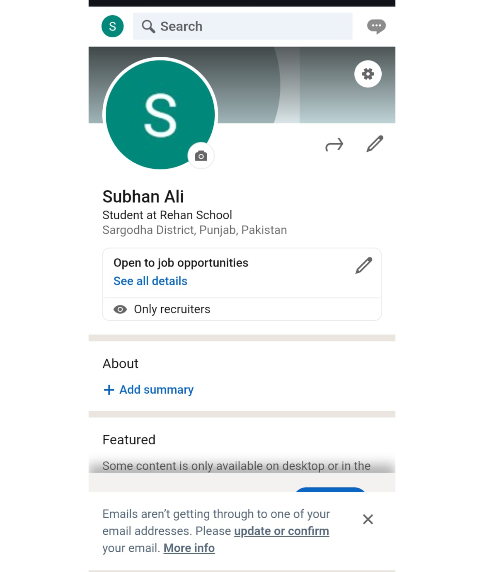
After creating your account, one of the most important steps is completing your **professional profile**. Your profile can include information about your education, work experience, skills, achievements, interests, certifications, and other relevant professional details. A clear profile helps other users understand your background and what you are interested in professionally.
Your **profile photo** is another important part of your LinkedIn presence. A clear and professional-looking photograph can make your profile more recognizable and welcoming. You can also create a strong **headline** that briefly explains who you are, what you do, or what type of professional opportunities you are interested in.
The **About section** provides an opportunity to introduce yourself in more detail. You can use it to describe your goals, experience, skills, interests, and professional journey. For students, this section can highlight areas of study, projects, abilities, and career interests. For professionals, it can summarize experience and areas of expertise.
LinkedIn also allows you to add **education and work experience** to your profile. Providing accurate information can help create a clearer picture of your professional background. You can also highlight important skills and certifications that demonstrate your knowledge and abilities.
One of LinkedIn's most important features is **professional networking**. You can connect with classmates, teachers, colleagues, employers, professionals, entrepreneurs, and people working in industries that interest you. Building a meaningful network can help you learn from others, discover opportunities, and stay informed about developments in your field.
LinkedIn can also be useful for **job searching and career development**. Users can explore job listings, learn about companies, follow organizations, and discover professional opportunities. A complete and accurate profile can make it easier for potential employers or professional contacts to understand your background.
Another useful feature is the ability to **share professional content**. Users can publish posts, share useful information, discuss ideas, celebrate achievements, and participate in professional conversations. Posting thoughtfully and respectfully can help you develop a positive professional reputation online.
Privacy and security should also be considered when creating a LinkedIn account. Avoid sharing unnecessary sensitive information, use a **strong and unique password**, and review your account's privacy and communication settings. Be cautious when receiving unexpected messages, connection requests, or links from unfamiliar people.
For students and beginners, LinkedIn can be more than just a place to search for jobs. It can become a **digital professional portfolio** where you present your learning, projects, skills, achievements, and career goals. Starting early can help you learn how professional networking works and gradually build meaningful connections.
This topic provides beginners with a clear introduction to **creating, completing, and using a LinkedIn account responsibly**. Whether your goal is to find a job, showcase your skills, connect with professionals, promote your work, or explore future career opportunities, a well-prepared LinkedIn profile can be a valuable part of your professional journey.
**Create your profile, showcase your skills, build meaningful connections, and take the next step toward your professional future.**
### Hashtags
#LinkedIn #LinkedInAccount #CreateLinkedInAccount #HowToLinkedIn #LinkedInForBeginners #LinkedInProfile #ProfessionalNetworking #CareerDevelopment #CareerGrowth #JobSearch #ProfessionalProfile #DigitalSkills #DigitalLiteracy #Technology #TechSkills #Networking #ProfessionalDevelopment #Students #CareerOpportunities #JobSeekers #Freelancers #Entrepreneurs #Skills #Education #Learning #OnlineNetworking #PersonalBranding #ProfessionalLife #CareerTips #FutureCareer
Roll no.239
Account Creation no.7
Foundation Level
LinkedIn is a professional networking platform that helps people **build professional connections, showcase their skills, discover career opportunities, follow companies, learn about different industries, and share professional content**. Creating a LinkedIn account is an important first step for students, job seekers, professionals, entrepreneurs, freelancers, and anyone interested in developing a professional online presence.
In this topic, **“How to Create a LinkedIn Account?”**, we explore the basic process of creating and setting up a LinkedIn profile from the beginning. The process generally starts by visiting LinkedIn through its website or mobile application and selecting the option to create a new account. You will typically need to provide basic information such as your **name, email address, and password** and follow the instructions provided during registration.
After creating your account, one of the most important steps is completing your **professional profile**. Your profile can include information about your education, work experience, skills, achievements, interests, certifications, and other relevant professional details. A clear profile helps other users understand your background and what you are interested in professionally.
Your **profile photo** is another important part of your LinkedIn presence. A clear and professional-looking photograph can make your profile more recognizable and welcoming. You can also create a strong **headline** that briefly explains who you are, what you do, or what type of professional opportunities you are interested in.
The **About section** provides an opportunity to introduce yourself in more detail. You can use it to describe your goals, experience, skills, interests, and professional journey. For students, this section can highlight areas of study, projects, abilities, and career interests. For professionals, it can summarize experience and areas of expertise.
LinkedIn also allows you to add **education and work experience** to your profile. Providing accurate information can help create a clearer picture of your professional background. You can also highlight important skills and certifications that demonstrate your knowledge and abilities.
One of LinkedIn's most important features is **professional networking**. You can connect with classmates, teachers, colleagues, employers, professionals, entrepreneurs, and people working in industries that interest you. Building a meaningful network can help you learn from others, discover opportunities, and stay informed about developments in your field.
LinkedIn can also be useful for **job searching and career development**. Users can explore job listings, learn about companies, follow organizations, and discover professional opportunities. A complete and accurate profile can make it easier for potential employers or professional contacts to understand your background.
Another useful feature is the ability to **share professional content**. Users can publish posts, share useful information, discuss ideas, celebrate achievements, and participate in professional conversations. Posting thoughtfully and respectfully can help you develop a positive professional reputation online.
Privacy and security should also be considered when creating a LinkedIn account. Avoid sharing unnecessary sensitive information, use a **strong and unique password**, and review your account's privacy and communication settings. Be cautious when receiving unexpected messages, connection requests, or links from unfamiliar people.
For students and beginners, LinkedIn can be more than just a place to search for jobs. It can become a **digital professional portfolio** where you present your learning, projects, skills, achievements, and career goals. Starting early can help you learn how professional networking works and gradually build meaningful connections.
This topic provides beginners with a clear introduction to **creating, completing, and using a LinkedIn account responsibly**. Whether your goal is to find a job, showcase your skills, connect with professionals, promote your work, or explore future career opportunities, a well-prepared LinkedIn profile can be a valuable part of your professional journey.
**Create your profile, showcase your skills, build meaningful connections, and take the next step toward your professional future.**
### Hashtags
#LinkedIn #LinkedInAccount #CreateLinkedInAccount #HowToLinkedIn #LinkedInForBeginners #LinkedInProfile #ProfessionalNetworking #CareerDevelopment #CareerGrowth #JobSearch #ProfessionalProfile #DigitalSkills #DigitalLiteracy #Technology #TechSkills #Networking #ProfessionalDevelopment #Students #CareerOpportunities #JobSeekers #Freelancers #Entrepreneurs #Skills #Education #Learning #OnlineNetworking #PersonalBranding #ProfessionalLife #CareerTips #FutureCareer
#rsisb
Roll no.239
Account Creation no.7
Foundation Level
LinkedIn is a professional networking platform that helps people **build professional connections, showcase their skills, discover career opportunities, follow companies, learn about different industries, and share professional content**. Creating a LinkedIn account is an important first step for students, job seekers, professionals, entrepreneurs, freelancers, and anyone interested in developing a professional online presence.
In this topic, **“How to Create a LinkedIn Account?”**, we explore the basic process of creating and setting up a LinkedIn profile from the beginning. The process generally starts by visiting LinkedIn through its website or mobile application and selecting the option to create a new account. You will typically need to provide basic information such as your **name, email address, and password** and follow the instructions provided during registration. 👤💻
After creating your account, one of the most important steps is completing your **professional profile**. Your profile can include information about your education, work experience, skills, achievements, interests, certifications, and other relevant professional details. A clear profile helps other users understand your background and what you are interested in professionally.
Your **profile photo** is another important part of your LinkedIn presence. A clear and professional-looking photograph can make your profile more recognizable and welcoming. You can also create a strong **headline** that briefly explains who you are, what you do, or what type of professional opportunities you are interested in. 📸✨
The **About section** provides an opportunity to introduce yourself in more detail. You can use it to describe your goals, experience, skills, interests, and professional journey. For students, this section can highlight areas of study, projects, abilities, and career interests. For professionals, it can summarize experience and areas of expertise.
LinkedIn also allows you to add **education and work experience** to your profile. Providing accurate information can help create a clearer picture of your professional background. You can also highlight important skills and certifications that demonstrate your knowledge and abilities. 🎓🏆
One of LinkedIn's most important features is **professional networking**. You can connect with classmates, teachers, colleagues, employers, professionals, entrepreneurs, and people working in industries that interest you. Building a meaningful network can help you learn from others, discover opportunities, and stay informed about developments in your field. 🤝
LinkedIn can also be useful for **job searching and career development**. Users can explore job listings, learn about companies, follow organizations, and discover professional opportunities. A complete and accurate profile can make it easier for potential employers or professional contacts to understand your background.
Another useful feature is the ability to **share professional content**. Users can publish posts, share useful information, discuss ideas, celebrate achievements, and participate in professional conversations. Posting thoughtfully and respectfully can help you develop a positive professional reputation online. 📝🌍
Privacy and security should also be considered when creating a LinkedIn account. Avoid sharing unnecessary sensitive information, use a **strong and unique password**, and review your account's privacy and communication settings. Be cautious when receiving unexpected messages, connection requests, or links from unfamiliar people.
For students and beginners, LinkedIn can be more than just a place to search for jobs. It can become a **digital professional portfolio** where you present your learning, projects, skills, achievements, and career goals. Starting early can help you learn how professional networking works and gradually build meaningful connections.
This topic provides beginners with a clear introduction to **creating, completing, and using a LinkedIn account responsibly**. Whether your goal is to find a job, showcase your skills, connect with professionals, promote your work, or explore future career opportunities, a well-prepared LinkedIn profile can be a valuable part of your professional journey. 💼🚀
**Create your profile, showcase your skills, build meaningful connections, and take the next step toward your professional future.** 🌟💻
### 🔖 Hashtags
#LinkedIn #LinkedInAccount #CreateLinkedInAccount #HowToLinkedIn #LinkedInForBeginners #LinkedInProfile #ProfessionalNetworking #CareerDevelopment #CareerGrowth #JobSearch #ProfessionalProfile #DigitalSkills #DigitalLiteracy #Technology #TechSkills #Networking #ProfessionalDevelopment #Students #CareerOpportunities #JobSeekers #Freelancers #Entrepreneurs #Skills #Education #Learning #OnlineNetworking #PersonalBranding #ProfessionalLife #CareerTips #FutureCareer 💼🌐🚀✨
0 Comments
0 Shares
12399 Views