• RSIF8
    ROLL NO 100
    CODING TASK NO 1
    CODING TOPIC Create a Basic Calculator

    Here’s a ready-to-post description for your calculator project:

    **Create a Basic Calculator**

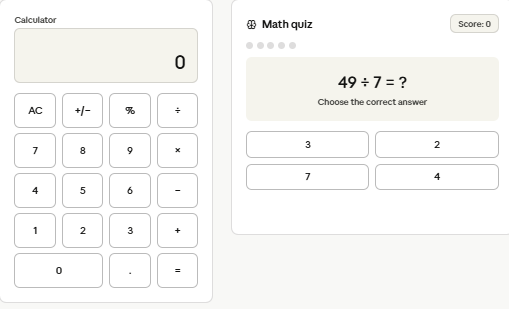
    In this project, I created a basic calculator that can perform essential mathematical operations such as **addition , subtraction , multiplication , and division **.

    This activity helped me practice my **coding, logical thinking, problem-solving, and programming skills**. It was a fun way to learn how simple code can be used to create a useful application!

    #BasicCalculator #Coding #Programming #ComputerScience #LearningToCode #CodingProject #ProblemSolving #LogicalThinking #StudentProject #Technology
    RSIF8 ROLL NO 100 CODING TASK NO 1 CODING TOPIC Create a Basic Calculator Here’s a ready-to-post description for your calculator project: 🧮 **Create a Basic Calculator** 💻✨ In this project, I created a basic calculator that can perform essential mathematical operations such as **addition ➕, subtraction ➖, multiplication ✖️, and division ➗**. This activity helped me practice my **coding, logical thinking, problem-solving, and programming skills**. 🚀📚 It was a fun way to learn how simple code can be used to create a useful application! 😊💡 #BasicCalculator #Coding #Programming #ComputerScience #LearningToCode #CodingProject #ProblemSolving #LogicalThinking #StudentProject #Technology 💻🧮🚀
    0 Comments 0 Shares 475 Views
  • RSIF8
    Roll no:112
    Coding Post no:2
    Coding Post Topic: Create a Tic-Tac-Toe Game
    I’m excited to share my latest programming project — a **two-player Tic-Tac-Toe game that can be played directly in the console!**
    For this project, I created a simple but interactive game where **two players can play against each other** by taking turns placing **X** and **O** on a 3×3 game board.
    The main goal of the game is to get **three matching symbols in a row**, either horizontally, vertically, or diagonally. The program checks the board after each turn and determines whether a player has won or whether the game has ended in a draw.
    While creating this project, I practiced several important programming concepts, including **variables, loops, conditional statements, functions, user input, lists, and logical thinking**.
    This project also helped me understand how **game logic works** and how different conditions can be combined to create an interactive program. Every player’s move is processed by the program, and the board is updated after each turn.
    One of the most interesting parts of this project was creating the **winning conditions** and making sure the program could correctly recognize when a player had completed a row, column, or diagonal. This required careful planning and problem-solving.
    Creating a console-based game may look simple, but it is a great way to strengthen programming fundamentals. It helped me improve my **coding skills, logical reasoning, problem-solving abilities, and understanding of program flow**.
    I’m proud of completing this project and sharing my progress. I have also posted a **screenshot of the Tic-Tac-Toe game running in the console** to show the result of my work.
    I look forward to building more projects, learning new programming concepts, and improving my skills step by step.
    **Project Highlights:**
    Two-player gameplay
    Interactive console game
    3×3 Tic-Tac-Toe board
    Win detection
    Draw detection
    Player input
    Logical problem-solving
    Practice with programming fundamentals
    Improved coding skills
    Thank you for checking out my project!
    #TicTacToe #TicTacToeGame #Coding #Programming #Python #ConsoleGame #GameDevelopment #CodingProject #LearnToCode #ProgrammingSkills #StudentProject #TechLearning #ProblemSolving #LogicalThinking #CodingJourney #BeginnerProgramming #ComputerScience #SoftwareDevelopment #GameProgramming #DigitalSkills #LearningToCode #ProjectBasedLearning #Technology #DeveloperJourney
    RSIF8 Roll no:112 Coding Post no:2 Coding Post Topic: Create a Tic-Tac-Toe Game I’m excited to share my latest programming project — a **two-player Tic-Tac-Toe game that can be played directly in the console!** 💻🎮✨ For this project, I created a simple but interactive game where **two players can play against each other** by taking turns placing **X** and **O** on a 3×3 game board. ❌⭕🧑‍💻 The main goal of the game is to get **three matching symbols in a row**, either horizontally, vertically, or diagonally. 🏆🎯 The program checks the board after each turn and determines whether a player has won or whether the game has ended in a draw. 🤝✨ While creating this project, I practiced several important programming concepts, including **variables, loops, conditional statements, functions, user input, lists, and logical thinking**. 🧠💡📚 This project also helped me understand how **game logic works** and how different conditions can be combined to create an interactive program. Every player’s move is processed by the program, and the board is updated after each turn. 🔄💻 One of the most interesting parts of this project was creating the **winning conditions** and making sure the program could correctly recognize when a player had completed a row, column, or diagonal. 🏅❌⭕ This required careful planning and problem-solving. Creating a console-based game may look simple, but it is a great way to strengthen programming fundamentals. 🚀 It helped me improve my **coding skills, logical reasoning, problem-solving abilities, and understanding of program flow**. 💻🧠🌟 I’m proud of completing this project and sharing my progress. 📸✨ I have also posted a **screenshot of the Tic-Tac-Toe game running in the console** to show the result of my work. I look forward to building more projects, learning new programming concepts, and improving my skills step by step. 🌱💻🚀 🎯 **Project Highlights:** ❌⭕ Two-player gameplay 🎮 Interactive console game 💻 3×3 Tic-Tac-Toe board 🏆 Win detection 🤝 Draw detection ⌨️ Player input 🧠 Logical problem-solving 📚 Practice with programming fundamentals 🚀 Improved coding skills Thank you for checking out my project! 😊✨ #TicTacToe #TicTacToeGame #Coding #Programming #Python #ConsoleGame #GameDevelopment #CodingProject #LearnToCode #ProgrammingSkills #StudentProject #TechLearning #ProblemSolving #LogicalThinking #CodingJourney #BeginnerProgramming #ComputerScience #SoftwareDevelopment #GameProgramming #DigitalSkills #LearningToCode #ProjectBasedLearning #Technology #DeveloperJourney 🎮💻❌⭕🏆🚀✨
    0 Comments 0 Shares 1055 Views
  • RSIF8
    Roll NO:11
    Coding 1
    coding topic Complete a small coding challenge Create a Basic Calculator that performs basic arithmetic operations like addition, subtraction, multiplication, and division.
    Post a screenshot with a short explanation.

    Basic Calculator Coding Challenge Completed!

    I created a Basic Calculator that can perform four important arithmetic operations:

    Addition
    Subtraction
    Multiplication
    Division

    Screenshot Attached: Shows the calculator taking user input and displaying accurate results.

    Short Explanation:
    This calculator is designed to perform simple mathematical calculations. Users enter two numbers and select an operation. The program then calculates and displays the result instantly. It helps beginners understand basic programming concepts such as variables, user input, conditional statements, and arithmetic operations.

    Skills Practiced:
    User Input Handling
    Arithmetic Operations
    Conditional Statements (if/else)
    Output Display
    Problem Solving

    This project is a great way to learn the fundamentals of coding while creating a useful and interactive program.

    #CodingChallenge #Programming #BasicCalculator #LearningToCode #TechSkills #RehanSchool #FutureProgrammer #CodingJourney
    RSIF8 Roll NO:11 Coding 1 coding topic Complete a small coding challenge Create a Basic Calculator that performs basic arithmetic operations like addition, subtraction, multiplication, and division. Post a screenshot with a short explanation. 🚀✨ Basic Calculator Coding Challenge Completed! ✨🚀 💻 I created a Basic Calculator that can perform four important arithmetic operations: ➕ Addition ➖ Subtraction ✖️ Multiplication ➗ Division 📸 Screenshot Attached: Shows the calculator taking user input and displaying accurate results. 📝 Short Explanation: This calculator is designed to perform simple mathematical calculations. Users enter two numbers and select an operation. The program then calculates and displays the result instantly. It helps beginners understand basic programming concepts such as variables, user input, conditional statements, and arithmetic operations. 🌟 Skills Practiced: ✅ User Input Handling ✅ Arithmetic Operations ✅ Conditional Statements (if/else) ✅ Output Display ✅ Problem Solving 🎯 This project is a great way to learn the fundamentals of coding while creating a useful and interactive program. #CodingChallenge 💻 #Programming 🚀 #BasicCalculator ➕➖✖️➗ #LearningToCode 🌟 #TechSkills 🎯 #RehanSchool 📚 #FutureProgrammer 👨‍💻👩‍💻 #CodingJourney 🚀✨
    0 Comments 0 Shares 628 Views
  • RSIF8
    Roll no: 99
    Coding task no: 2
    Coding topic: Create a Tic-Tac-Toe Game
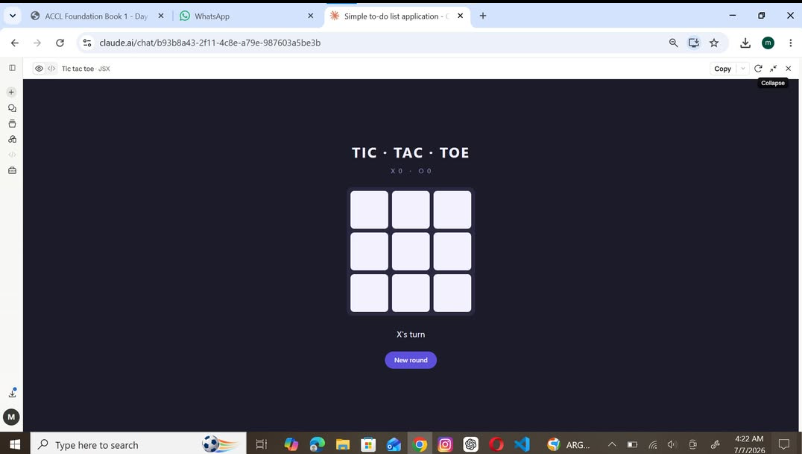
    Built a fully working Tic Tac Toe game using HTML, CSS, and JavaScript.
    The game includes player turns, win/draw detection, winning highlights, and a restart button.
    I used ChatGPT for vibe coding — generated the code with AI, tested it, and learned how the HTML, CSS, and JavaScript work together.
    Another task completed!
    #TicTacToe #VibeCoding #ChatGPT #HTML #CSS #JavaScript #Coding #WebDevelopment #LearningToCode #BuildInPublic
    RSIF8 Roll no: 99 Coding task no: 2 Coding topic: Create a Tic-Tac-Toe Game Built a fully working Tic Tac Toe game using HTML, CSS, and JavaScript. The game includes player turns, win/draw detection, winning highlights, and a restart button. I used ChatGPT for vibe coding 🤖💻 — generated the code with AI, tested it, and learned how the HTML, CSS, and JavaScript work together. Another task completed! ✅🚀 #TicTacToe #VibeCoding #ChatGPT #HTML #CSS #JavaScript #Coding #WebDevelopment #LearningToCode #BuildInPublic
    0 Comments 0 Shares 1249 Views
  • RSIF8
    Roll no: 99
    Coding task no: 1
    Coding topic Create a Basic Calculator
    Today’s task was to build a functional calculator that can perform basic mathematical operations such as:
    Addition
    Subtraction
    Multiplication
    Division
    I built the calculator using HTML, CSS, and JavaScript, with a proper interactive interface where users can enter numbers and perform calculations.
    But here’s the interesting part: I didn’t write all the code from scratch myself. Instead, I used ChatGPT for vibe coding — I described what I wanted, worked with the generated code, tested it, and made sure the final calculator actually worked.
    This task taught me that coding isn’t only about writing every line manually. It’s also about understanding the problem, communicating your idea clearly, testing the result, debugging, and learning from the code.
    One more small project completed!
    One more step forward in my learning journey.
    #VibeCoding #ChatGPT #HTML #CSS #JavaScript #WebDevelopment #Coding #Programming #Calculator #100DaysOfCode #LearningToCode #BuildInPublic #TechJourney #WebDesign #FrontendDevelopment #CodingJourney #AI #ArtificialIntelligence #Developer #StudentDeveloper
    RSIF8 Roll no: 99 Coding task no: 1 Coding topic Create a Basic Calculator Today’s task was to build a functional calculator that can perform basic mathematical operations such as: ➕ Addition ➖ Subtraction ✖️ Multiplication ➗ Division I built the calculator using HTML, CSS, and JavaScript, with a proper interactive interface where users can enter numbers and perform calculations. But here’s the interesting part: I didn’t write all the code from scratch myself. Instead, I used ChatGPT for vibe coding 🤖💻 — I described what I wanted, worked with the generated code, tested it, and made sure the final calculator actually worked. This task taught me that coding isn’t only about writing every line manually. It’s also about understanding the problem, communicating your idea clearly, testing the result, debugging, and learning from the code. One more small project completed! ✅ One more step forward in my learning journey. 📚🚀 #VibeCoding #ChatGPT #HTML #CSS #JavaScript #WebDevelopment #Coding #Programming #Calculator #100DaysOfCode #LearningToCode #BuildInPublic #TechJourney #WebDesign #FrontendDevelopment #CodingJourney #AI #ArtificialIntelligence #Developer #StudentDeveloper
    0 Comments 0 Shares 2430 Views
  • #rsisb
    Roll no. 214
    Foundation level
    Coding task no.20

    Never forget an important task again! The **Reminder App** helps you create, manage, and organize reminders for your daily activities, homework, meetings, birthdays, and special events.

    This simple and useful app is great for learning **app development, coding, and time management**. Stay organized, stay focused, and complete your tasks on time!

    #ReminderApp #AppDevelopment #Coding #Programming #StudentProjects #TimeManagement #DailyTasks #LearningToCode #TechProject #SimpleApp
    #rsisb Roll no. 214 Foundation level Coding task no.20 Never forget an important task again! ✅ The **Reminder App** helps you create, manage, and organize reminders for your daily activities, homework, meetings, birthdays, and special events. 📝🔔 This simple and useful app is great for learning **app development, coding, and time management**. 💻🚀 Stay organized, stay focused, and complete your tasks on time! 🎯🌟 #ReminderApp ⏰ #AppDevelopment 📱 #Coding 💻 #Programming 👩‍💻 #StudentProjects 🎓 #TimeManagement ⏳ #DailyTasks 📝 #LearningToCode 🚀 #TechProject 🌟 #SimpleApp ❤️
    0 Comments 0 Shares 1068 Views
  • # Calculator App using Claude AI

    ### Description

    A modern and responsive Calculator Web Application developed using Claude AI. The application performs basic arithmetic operations including addition, subtraction, multiplication, and division. It features a clean user interface, responsive design, and smooth user experience across desktop and mobile devices.

    ### Student Information

    Coding Book: 1
    Task: 11
    Roll No: 71

    ### Website Link

    https://claude.ai/public/artifacts/a8031acf-5ce9-4bbb-903a-ce483628d0dc

    ### Hashtags

    #ClaudeAI #CalculatorApp #WebDevelopment #HTML #CSS #JavaScript #CodingBook1 #Task11 #RollNo71 #Programming #FrontendDevelopment #StudentProject #CodeWithAI #TechEducation #WebAppDevelopment #ResponsiveDesign #ModernUI #Calculator #LearningToCode
    # Calculator App using Claude AI ### Description A modern and responsive Calculator Web Application developed using Claude AI. The application performs basic arithmetic operations including addition, subtraction, multiplication, and division. It features a clean user interface, responsive design, and smooth user experience across desktop and mobile devices. ### Student Information 📖 Coding Book: 1 📋 Task: 11 🎓 Roll No: 71 ### Website Link https://claude.ai/public/artifacts/a8031acf-5ce9-4bbb-903a-ce483628d0dc ### Hashtags #ClaudeAI #CalculatorApp #WebDevelopment #HTML #CSS #JavaScript #CodingBook1 #Task11 #RollNo71 #Programming #FrontendDevelopment #StudentProject #CodeWithAI #TechEducation #WebAppDevelopment #ResponsiveDesign #ModernUI #Calculator #LearningToCode
    0 Comments 0 Shares 1845 Views