#rsisb
RollNo.247
Foundation LEVEL
##
How to Use Restream for Interviews | Complete Beginner's Guide
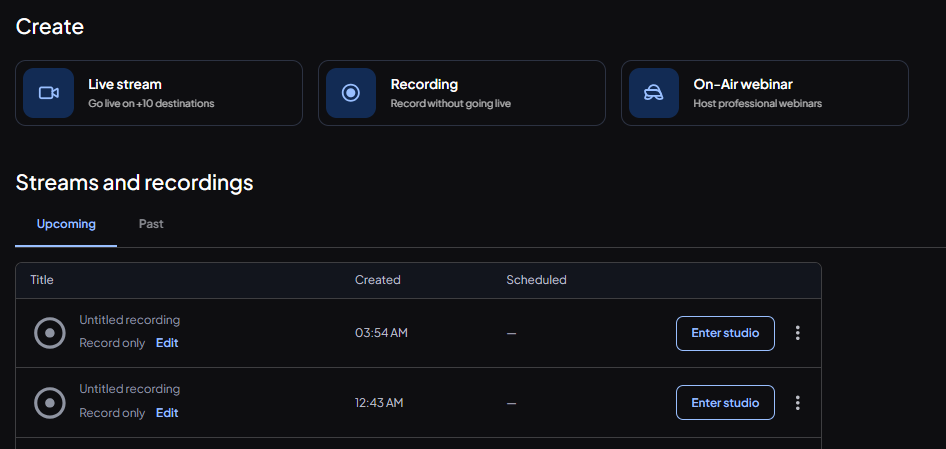
Restream is a powerful live streaming platform that makes online interviews simple, professional, and engaging. Whether you're hosting a podcast, interviewing industry experts, conducting educational sessions, or streaming live events, Restream allows you to broadcast to multiple platforms at the same time—including YouTube, Facebook, LinkedIn, Twitch, and more.
To get started, create a Restream account and connect your favorite social media channels. Once connected, open **Restream Studio** directly in your web browser—no software installation is required!
Invite your interview guest by sending them a unique invitation link. They can join with just a browser, webcam, and microphone. Before going live, check your audio, video, lighting, and internet connection to ensure a smooth experience.
Customize your live stream with your brand logo, banners, overlays, and backgrounds to make your interview look polished and professional. You can also display viewer comments on screen, making your audience feel involved and encouraging real-time interaction.
During the interview:
*
Ask clear and engaging questions.
*
Listen carefully to your guest.
*
Maintain eye contact with the camera.
*
Encourage meaningful discussion.
*
Interact with viewers by responding to comments and questions.
One of Restream's biggest advantages is that you can reach audiences across multiple platforms with a single live broadcast, saving both time and effort. This helps increase your visibility, grow your audience, and build stronger connections with your community.
After the interview ends, review your stream, note areas for improvement, and reuse the recording as valuable content for future posts, clips, or podcasts. Continuous practice will help you become a more confident and professional interviewer.
Whether you're a beginner or an experienced content creator, Restream provides an easy and reliable way to create high-quality live interviews that educate, inspire, and engage audiences around the world. Start your live streaming journey today and share your voice with the world!
#Restream #LiveStreaming #Interviews #Podcast #StreamingTips #ContentCreator #YouTubeLive #FacebookLive #LinkedInLive #LiveInterview #OnlineInterview #StreamingGuide #VideoMarketing #SocialMedia #Broadcast #DigitalCreator #TechTips #LiveVideo #RemoteInterview #ProfessionalStreaming #GrowYourAudience #CreatorTools #OnlineLearning #Success #Innovation #rsisb
RollNo.247
Foundation LEVEL
## 🎤 How to Use Restream for Interviews | Complete Beginner's Guide 🚀
Restream is a powerful live streaming platform that makes online interviews simple, professional, and engaging. Whether you're hosting a podcast, interviewing industry experts, conducting educational sessions, or streaming live events, Restream allows you to broadcast to multiple platforms at the same time—including YouTube, Facebook, LinkedIn, Twitch, and more. 🌍✨
To get started, create a Restream account and connect your favorite social media channels. Once connected, open **Restream Studio** directly in your web browser—no software installation is required! 🖥️💡
Invite your interview guest by sending them a unique invitation link. They can join with just a browser, webcam, and microphone. Before going live, check your audio, video, lighting, and internet connection to ensure a smooth experience. 🎥🎙️
Customize your live stream with your brand logo, banners, overlays, and backgrounds to make your interview look polished and professional. You can also display viewer comments on screen, making your audience feel involved and encouraging real-time interaction. 💬❤️
During the interview:
* 🎤 Ask clear and engaging questions.
* 👂 Listen carefully to your guest.
* 😊 Maintain eye contact with the camera.
* 💡 Encourage meaningful discussion.
* 📢 Interact with viewers by responding to comments and questions.
One of Restream's biggest advantages is that you can reach audiences across multiple platforms with a single live broadcast, saving both time and effort. This helps increase your visibility, grow your audience, and build stronger connections with your community. 🌐📈
After the interview ends, review your stream, note areas for improvement, and reuse the recording as valuable content for future posts, clips, or podcasts. Continuous practice will help you become a more confident and professional interviewer.
Whether you're a beginner or an experienced content creator, Restream provides an easy and reliable way to create high-quality live interviews that educate, inspire, and engage audiences around the world. Start your live streaming journey today and share your voice with the world! 🚀🎉
#Restream #LiveStreaming #Interviews #Podcast #StreamingTips #ContentCreator #YouTubeLive #FacebookLive #LinkedInLive #LiveInterview #OnlineInterview #StreamingGuide #VideoMarketing #SocialMedia #Broadcast #DigitalCreator #TechTips #LiveVideo #RemoteInterview #ProfessionalStreaming #GrowYourAudience #CreatorTools #OnlineLearning #Success #Innovation