• Saturday means new adventures and reliable choices! Discover

    Saturday means new adventures and reliable choices! Discover
    Saturday means new adventures and reliable choices! Discover Saturday means new adventures and reliable choices! Discover
    0 Commenti 0 condivisioni 152 Views
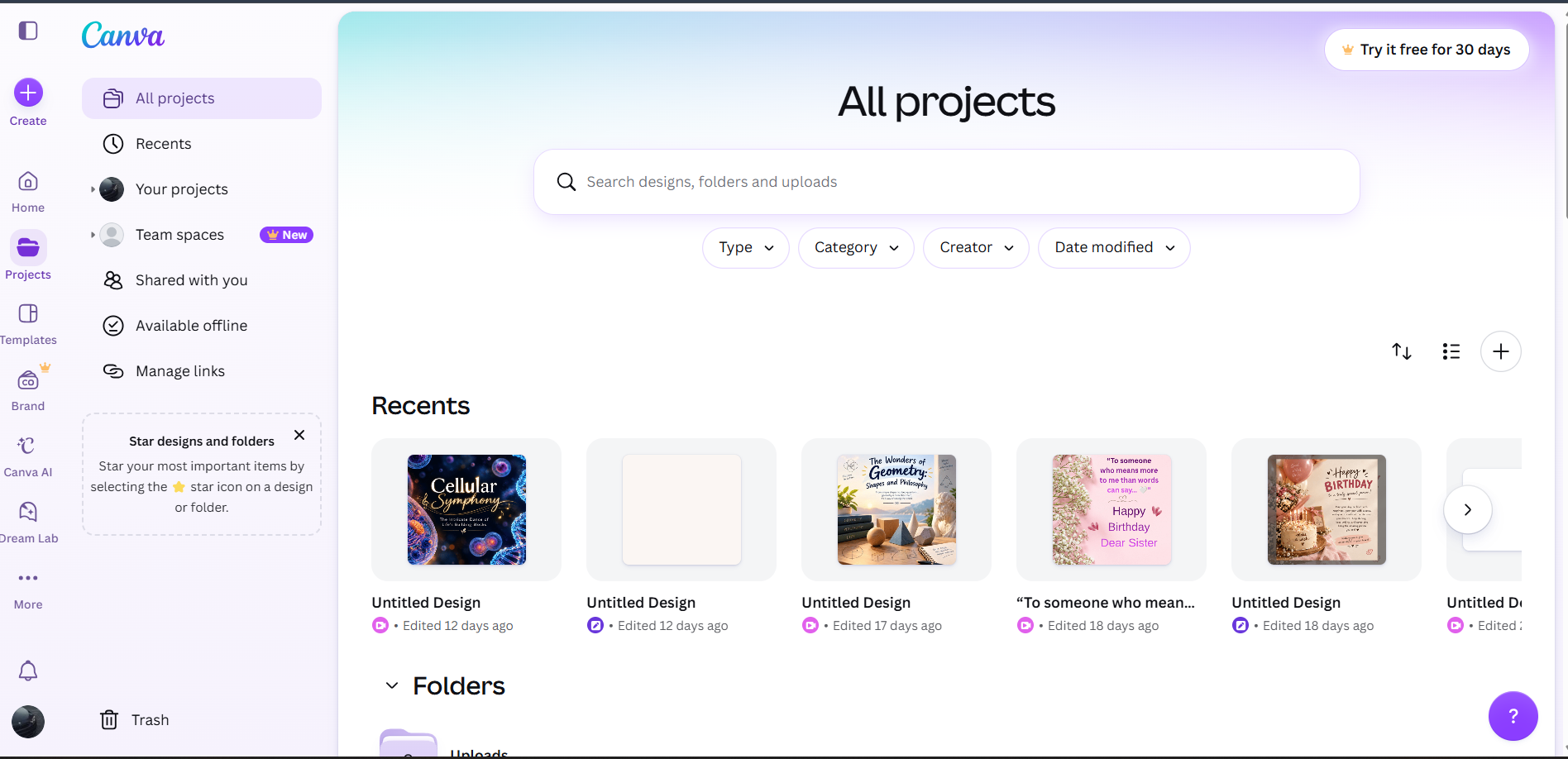
  • My Canva Account – Exploring the World of Creativity
    Today, I successfully created my own Canva Account and explored its creative tools and features. Canva is an online graphic design platform that helps us create attractive designs, presentations, posters, social media posts, videos and much more.
    Book: A — Foundation Level
    Date: 31 October 2026
    Day: Saturday
    What I Learned:
    How to create a Canva account.
    How to explore Canva's dashboard.
    Understanding templates and design elements.
    How to create posters and social media posts.
    Exploring fonts, colours, images and graphics.
    Learning the basics of graphic designing.
    Understanding how Canva helps bring creative ideas to life.
    My Learning Journey:
    This activity helped me explore my creative side and understand how digital tools can turn simple ideas into beautiful designs. It was a great step towards improving my creativity and digital designing skills.
    Imagine • Design • Create • Inspire!
    #Canva #CanvaAccount #GraphicDesign #Creativity #DigitalSkills #GraphicDesigning #SocialMediaDesign #LearningJourney #FoundationLevel #RehanSchool
    🎨✨ My Canva Account – Exploring the World of Creativity πŸš€ Today, I successfully created my own Canva Account and explored its creative tools and features. Canva is an online graphic design platform that helps us create attractive designs, presentations, posters, social media posts, videos and much more. 🌈 πŸ“š Book: A — Foundation Level πŸ“… Date: 31 October 2026 πŸ—“οΈ Day: Saturday πŸ’‘ What I Learned: How to create a Canva account. How to explore Canva's dashboard. Understanding templates and design elements. How to create posters and social media posts. Exploring fonts, colours, images and graphics. Learning the basics of graphic designing. Understanding how Canva helps bring creative ideas to life. 🌟 My Learning Journey: This activity helped me explore my creative side and understand how digital tools can turn simple ideas into beautiful designs. It was a great step towards improving my creativity and digital designing skills. 🎨 Imagine • Design • Create • Inspire! #Canva #CanvaAccount #GraphicDesign #Creativity #DigitalSkills #GraphicDesigning #SocialMediaDesign #LearningJourney #FoundationLevel #RehanSchool
    1
    0 Commenti 0 condivisioni 1334 Views
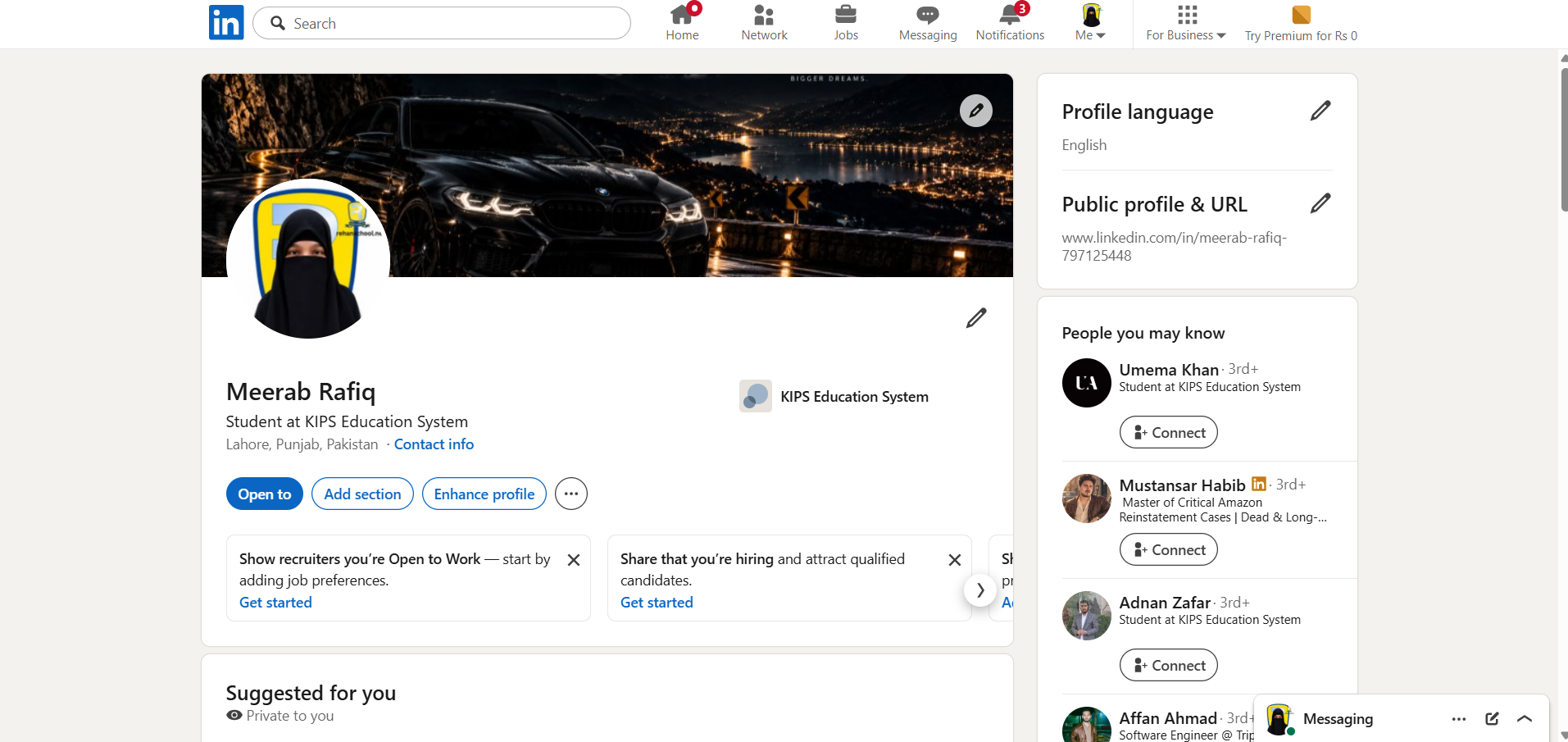
  • My LinkedIn Profile – Building My Professional Identity

    Today, I successfully created and explored my own LinkedIn Profile – Meerab Rafiq. LinkedIn is a professional networking platform that helps people showcase their skills, education, achievements and connect with professionals around the world.

    Book: A — Foundation Level
    Date: 31 October 2026
    Day: Saturday

    What I Learned:

    How to create and manage a LinkedIn profile.

    How to add educational information and professional details.

    Understanding profile pictures and cover photos.

    How to build a professional online identity.

    Exploring networking and connection features.

    Understanding how LinkedIn helps people discover career and learning opportunities.

    Learning the importance of personal branding.

    My Profile Highlights:

    Name: Meerab Rafiq

    Education: Student at KIPS Education System

    Location: Lahore, Punjab, Pakistan

    Platform: LinkedIn

    My Learning Journey:

    This activity helped me understand the importance of professional networking and building a strong digital identity. It is another step towards my future goals and career development.

    Connect • Learn • Network • Grow!

    #LinkedIn #ProfessionalProfile #Networking #PersonalBranding #DigitalIdentity #CareerDevelopment #DigitalSkills #LearningJourney #FoundationLevel #RehanSchool
    πŸ’Όβœ¨ My LinkedIn Profile – Building My Professional Identity πŸš€ Today, I successfully created and explored my own LinkedIn Profile – Meerab Rafiq. LinkedIn is a professional networking platform that helps people showcase their skills, education, achievements and connect with professionals around the world. 🌍 πŸ“š Book: A — Foundation Level πŸ“… Date: 31 October 2026 πŸ—“οΈ Day: Saturday πŸ’‘ What I Learned: How to create and manage a LinkedIn profile. How to add educational information and professional details. Understanding profile pictures and cover photos. How to build a professional online identity. Exploring networking and connection features. Understanding how LinkedIn helps people discover career and learning opportunities. Learning the importance of personal branding. 🎯 My Profile Highlights: Name: Meerab Rafiq Education: Student at KIPS Education System Location: Lahore, Punjab, Pakistan Platform: LinkedIn 🌟 My Learning Journey: This activity helped me understand the importance of professional networking and building a strong digital identity. It is another step towards my future goals and career development. πŸ’» Connect • Learn • Network • Grow! #LinkedIn #ProfessionalProfile #Networking #PersonalBranding #DigitalIdentity #CareerDevelopment #DigitalSkills #LearningJourney #FoundationLevel #RehanSchool
    1
    0 Commenti 0 condivisioni 1572 Views
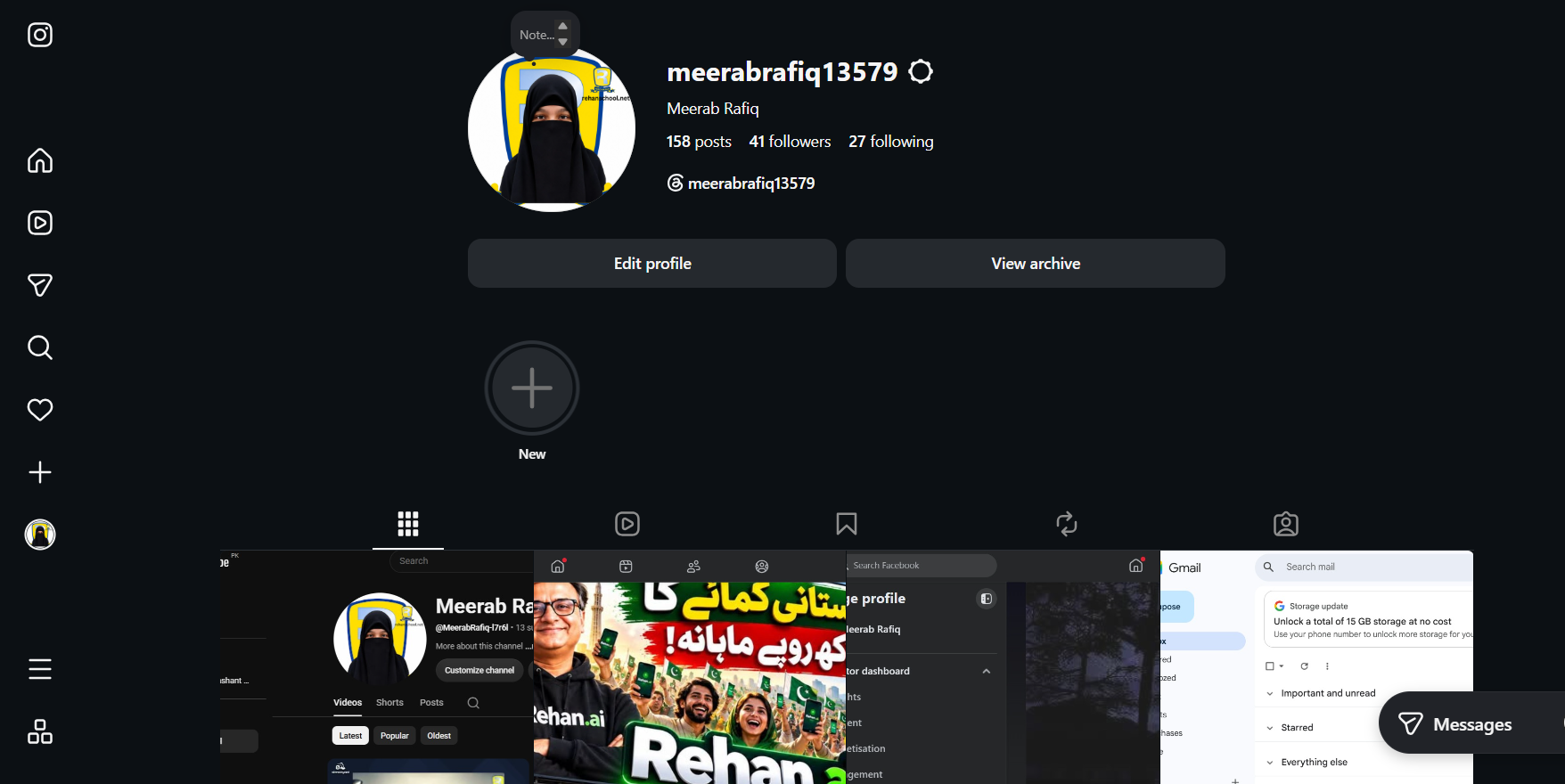
  • **My Instagram Profile – Creating My Digital Presence**

    Today, I explored and set up my own **Instagram Profile – Meerab Rafiq**. Instagram is a social media platform where I can share photos, videos, reels, stories and creative ideas with others.

    **Book:** A — Foundation Level
    **Date:** 31 October 2026
    **Day:** Saturday

    ** What I Learned:**

    - How to create and manage an Instagram profile.
    - How to set a username and profile picture.
    - Understanding posts, reels and stories.
    - Exploring followers and following features.
    - How to share photos, videos and creative content.
    - Understanding profile settings and account management.
    - Learning how to build a digital presence.

    ** My Profile Highlights:**
    - Username: @meerabrafiq13579
    - Posts: 158
    - Followers: 41
    - Following: 27

    **My Learning Journey:**

    This activity helped me understand how Instagram can be used for creativity, communication, personal branding and sharing my learning journey with the world.

    **Create • Connect • Inspire • Grow!**

    #Instagram #InstagramProfile #DigitalPresence #SocialMedia #PersonalBranding #DigitalSkills #ContentCreation #LearningJourney #FoundationLevel #RehanSchool
    πŸ“Έβœ¨ **My Instagram Profile – Creating My Digital Presence** πŸš€ Today, I explored and set up my own **Instagram Profile – Meerab Rafiq**. Instagram is a social media platform where I can share photos, videos, reels, stories and creative ideas with others. 🌍 πŸ“š **Book:** A — Foundation Level πŸ“… **Date:** 31 October 2026 πŸ—“οΈ **Day:** Saturday **πŸ’‘ What I Learned:** - How to create and manage an Instagram profile. - How to set a username and profile picture. - Understanding posts, reels and stories. - Exploring followers and following features. - How to share photos, videos and creative content. - Understanding profile settings and account management. - Learning how to build a digital presence. **🎯 My Profile Highlights:** - Username: @meerabrafiq13579 - Posts: 158 - Followers: 41 - Following: 27 🌟 **My Learning Journey:** This activity helped me understand how Instagram can be used for creativity, communication, personal branding and sharing my learning journey with the world. πŸ“± **Create • Connect • Inspire • Grow!** #Instagram #InstagramProfile #DigitalPresence #SocialMedia #PersonalBranding #DigitalSkills #ContentCreation #LearningJourney #FoundationLevel #RehanSchool
    0 Commenti 0 condivisioni 1518 Views
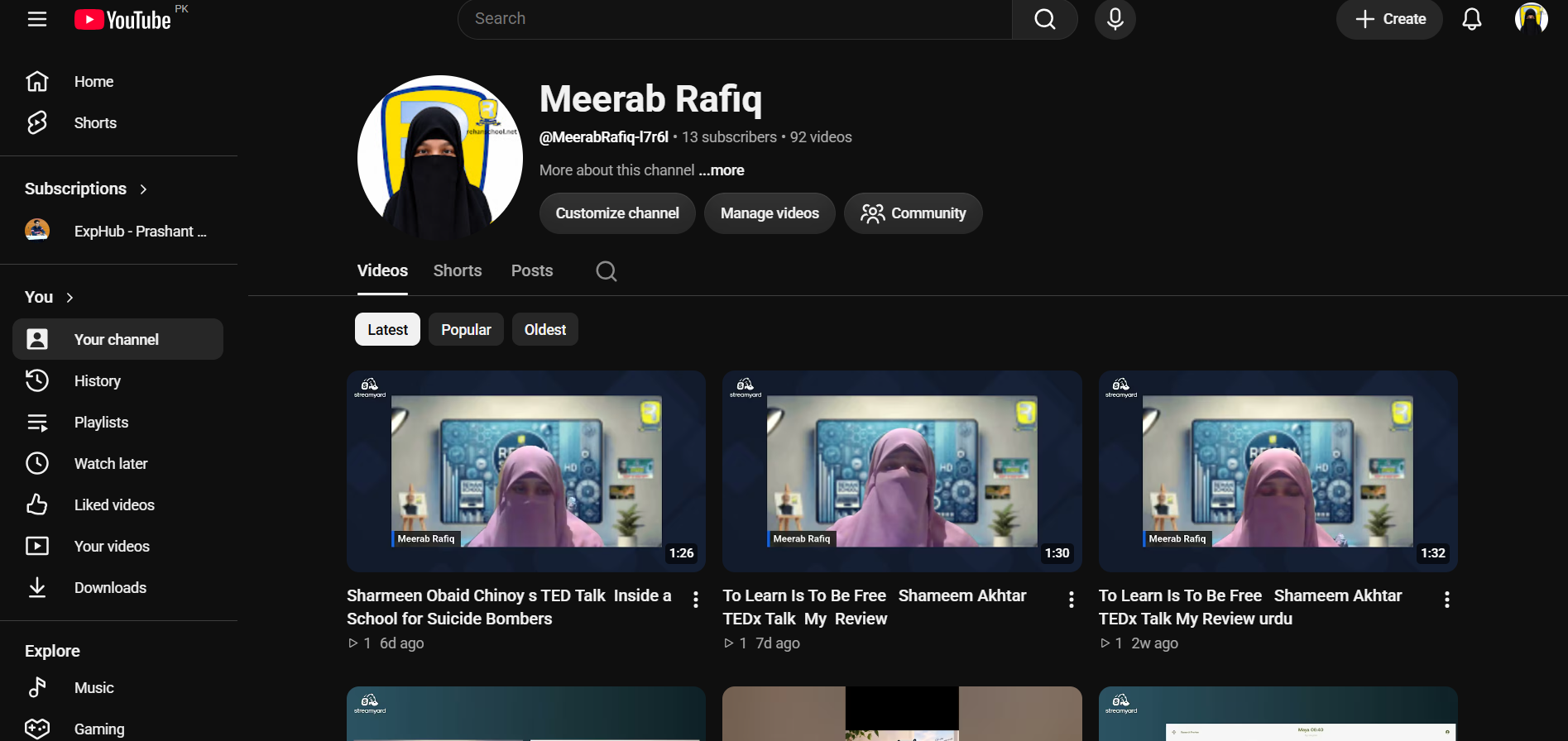
  • My YouTube Channel – Sharing Knowledge with the World

    Today, I explored and set up my own YouTube Channel – Meerab Rafiq. YouTube is a platform where I can share my videos, express my creativity, showcase my learning activities and connect with an audience.

    Book: A — Foundation Level
    Date: 31 October 2026
    Day: Saturday

    What I Learned:

    How to create and manage a YouTube channel.

    How to customize my channel.

    How to upload and manage videos.

    Understanding YouTube Shorts, Posts and Playlists.

    How to organize and share video content.

    Understanding the importance of consistency and creativity.

    My Channel Highlights:

    Channel Name: Meerab Rafiq

    92 Videos

    13 Subscribers

    My Learning Journey:

    This activity helped me understand how YouTube can be used as a platform for learning, creativity, communication and sharing knowledge with others.

    Create • Share • Inspire • Grow!

    #YouTube #YouTubeChannel #MeerabRafiq #ContentCreator #DigitalSkills #VideoCreation #Creativity #LearningJourney #FoundationLevel #RehanSchool
    β–ΆοΈβœ¨ My YouTube Channel – Sharing Knowledge with the World πŸš€ Today, I explored and set up my own YouTube Channel – Meerab Rafiq. YouTube is a platform where I can share my videos, express my creativity, showcase my learning activities and connect with an audience. 🌍 πŸ“š Book: A — Foundation Level πŸ“… Date: 31 October 2026 πŸ—“οΈ Day: Saturday πŸ’‘ What I Learned: How to create and manage a YouTube channel. How to customize my channel. How to upload and manage videos. Understanding YouTube Shorts, Posts and Playlists. How to organize and share video content. Understanding the importance of consistency and creativity. 🎯 My Channel Highlights: Channel Name: Meerab Rafiq 92 Videos 13 Subscribers 🌟 My Learning Journey: This activity helped me understand how YouTube can be used as a platform for learning, creativity, communication and sharing knowledge with others. 🎬 Create • Share • Inspire • Grow! #YouTube #YouTubeChannel #MeerabRafiq #ContentCreator #DigitalSkills #VideoCreation #Creativity #LearningJourney #FoundationLevel #RehanSchool
    1
    0 Commenti 0 condivisioni 1347 Views
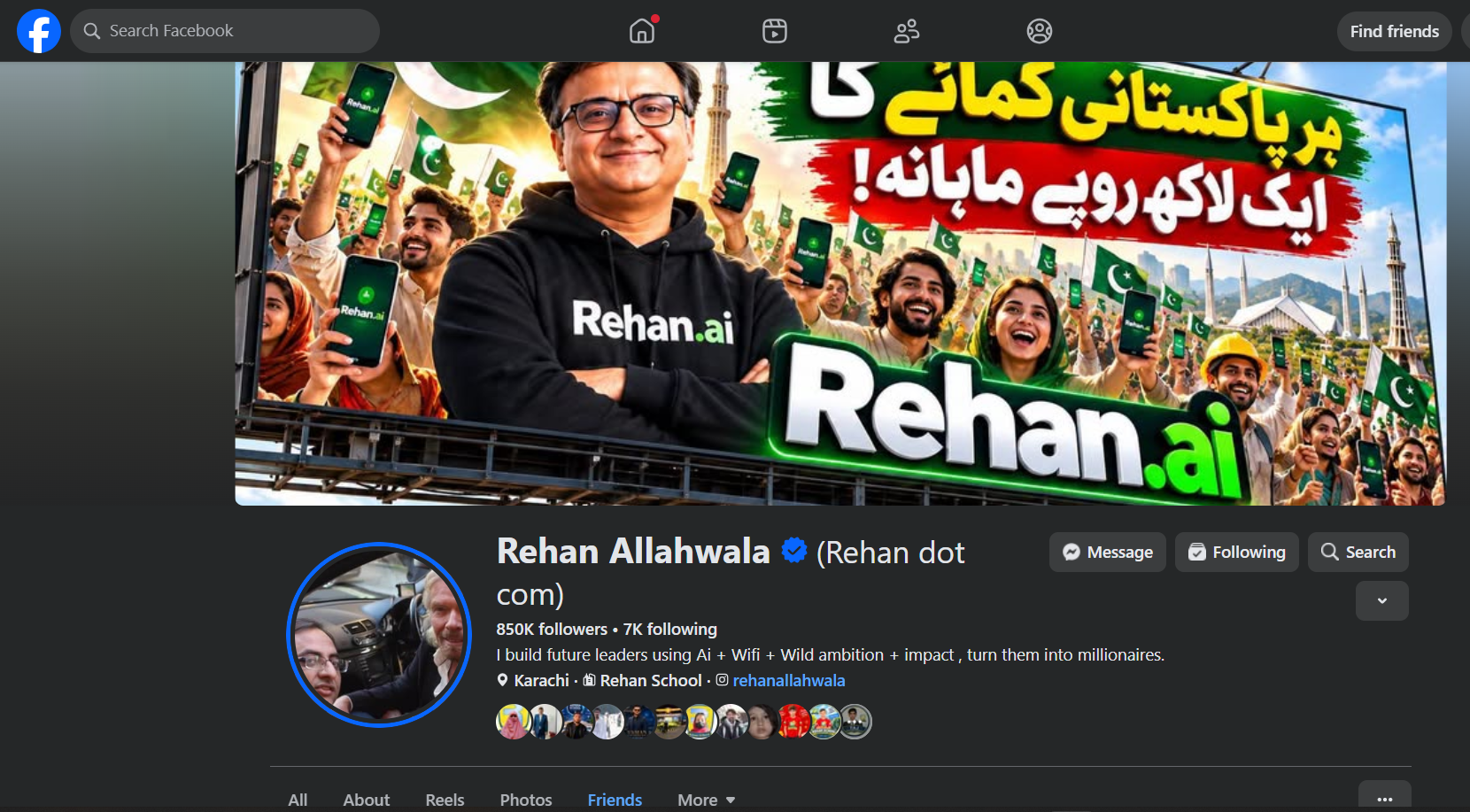
  • Following Rehan Allahwala – Learning from a Visionary Leader
    Today, I explored the Facebook profile of Rehan Allahwala Sir, a visionary entrepreneur, educator and founder of Rehan School.
    His profile highlights his mission of building future leaders through AI, technology, Wi-Fi and ambition. His work inspires young people to learn new skills, think creatively and create opportunities for themselves.
    Book: A — Foundation Level
    Date: 31 October 2026
    Day: Saturday
    What I Learned:
    How to explore and understand someone's professional Facebook profile.
    How social media can be used for learning and inspiration.
    Understanding the importance of personal branding.
    Learning how leaders share their vision and achievements.
    Exploring how AI and technology can create new opportunities.
    My Learning Journey:
    This activity helped me understand how social media can be more than entertainment. It can be a powerful platform for knowledge, networking, inspiration and personal growth.
    Dream Big • Learn More • Create Impact!
    #RehanAllahwala #RehanSchool #Facebook #DigitalLearning #PersonalBranding #ArtificialIntelligence #Leadership #Technology #LearningJourney #FoundationLevel
    🌟 Following Rehan Allahwala – Learning from a Visionary Leader πŸš€ Today, I explored the Facebook profile of Rehan Allahwala Sir, a visionary entrepreneur, educator and founder of Rehan School. His profile highlights his mission of building future leaders through AI, technology, Wi-Fi and ambition. His work inspires young people to learn new skills, think creatively and create opportunities for themselves. πŸ’‘ πŸ“š Book: A — Foundation Level πŸ“… Date: 31 October 2026 πŸ—“οΈ Day: Saturday πŸ’‘ What I Learned: How to explore and understand someone's professional Facebook profile. How social media can be used for learning and inspiration. Understanding the importance of personal branding. Learning how leaders share their vision and achievements. Exploring how AI and technology can create new opportunities. 🌍 My Learning Journey: This activity helped me understand how social media can be more than entertainment. It can be a powerful platform for knowledge, networking, inspiration and personal growth. ✨ Dream Big • Learn More • Create Impact! #RehanAllahwala #RehanSchool #Facebook #DigitalLearning #PersonalBranding #ArtificialIntelligence #Leadership #Technology #LearningJourney #FoundationLevel
    1
    0 Commenti 0 condivisioni 1936 Views
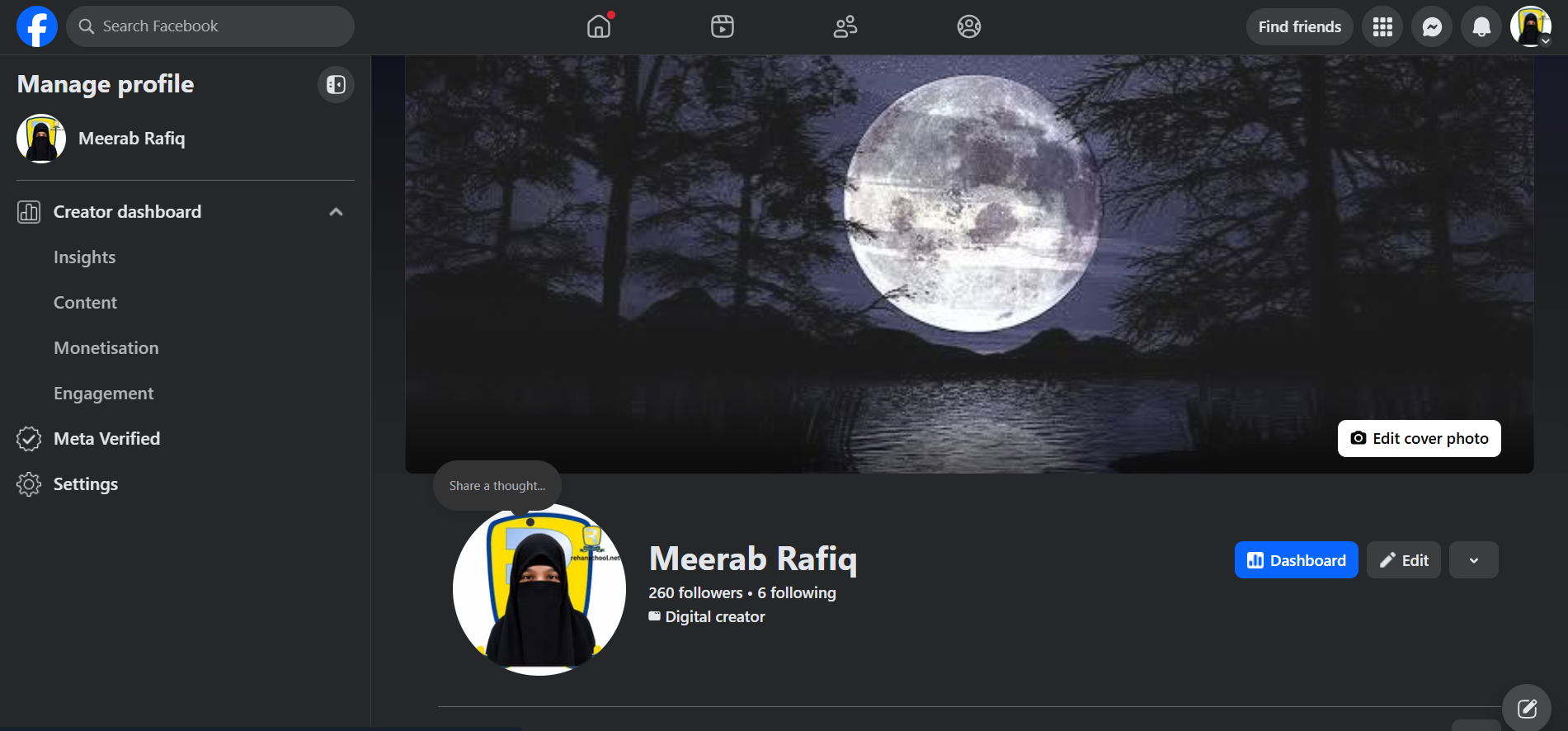
  • My Facebook Profile – Building My Digital Identity
    Today, I successfully created my Facebook Profile and explored its features. Facebook is a social media platform that helps people connect, communicate, share ideas and showcase their activities with others.
    Book: A — Foundation Level
    Date: 31 October 2026
    Day: Saturday
    What I Learned:
    How to create and manage a Facebook profile.
    How to add a profile picture and cover photo.
    Understanding profile settings and personal information.
    Exploring followers and following features.
    Learning how to share thoughts, posts and updates.
    Understanding the basics of social media and digital identity.
    My Learning Journey:
    This activity helped me understand how to build my digital identity, connect with people and use social media for learning, creativity and communication.
    Create • Connect • Learn • Grow!
    #Facebook #FacebookProfile #SocialMedia #DigitalIdentity #DigitalSkills #Technology #LearningJourney #FoundationLevel #RehanSchool
    πŸ“±βœ¨ My Facebook Profile – Building My Digital Identity πŸš€ Today, I successfully created my Facebook Profile and explored its features. Facebook is a social media platform that helps people connect, communicate, share ideas and showcase their activities with others. 🌍 πŸ“š Book: A — Foundation Level πŸ“… Date: 31 October 2026 πŸ—“οΈ Day: Saturday πŸ’‘ What I Learned: How to create and manage a Facebook profile. How to add a profile picture and cover photo. Understanding profile settings and personal information. Exploring followers and following features. Learning how to share thoughts, posts and updates. Understanding the basics of social media and digital identity. 🌟 My Learning Journey: This activity helped me understand how to build my digital identity, connect with people and use social media for learning, creativity and communication. πŸ’» Create • Connect • Learn • Grow! #Facebook #FacebookProfile #SocialMedia #DigitalIdentity #DigitalSkills #Technology #LearningJourney #FoundationLevel #RehanSchool
    1
    0 Commenti 0 condivisioni 1091 Views
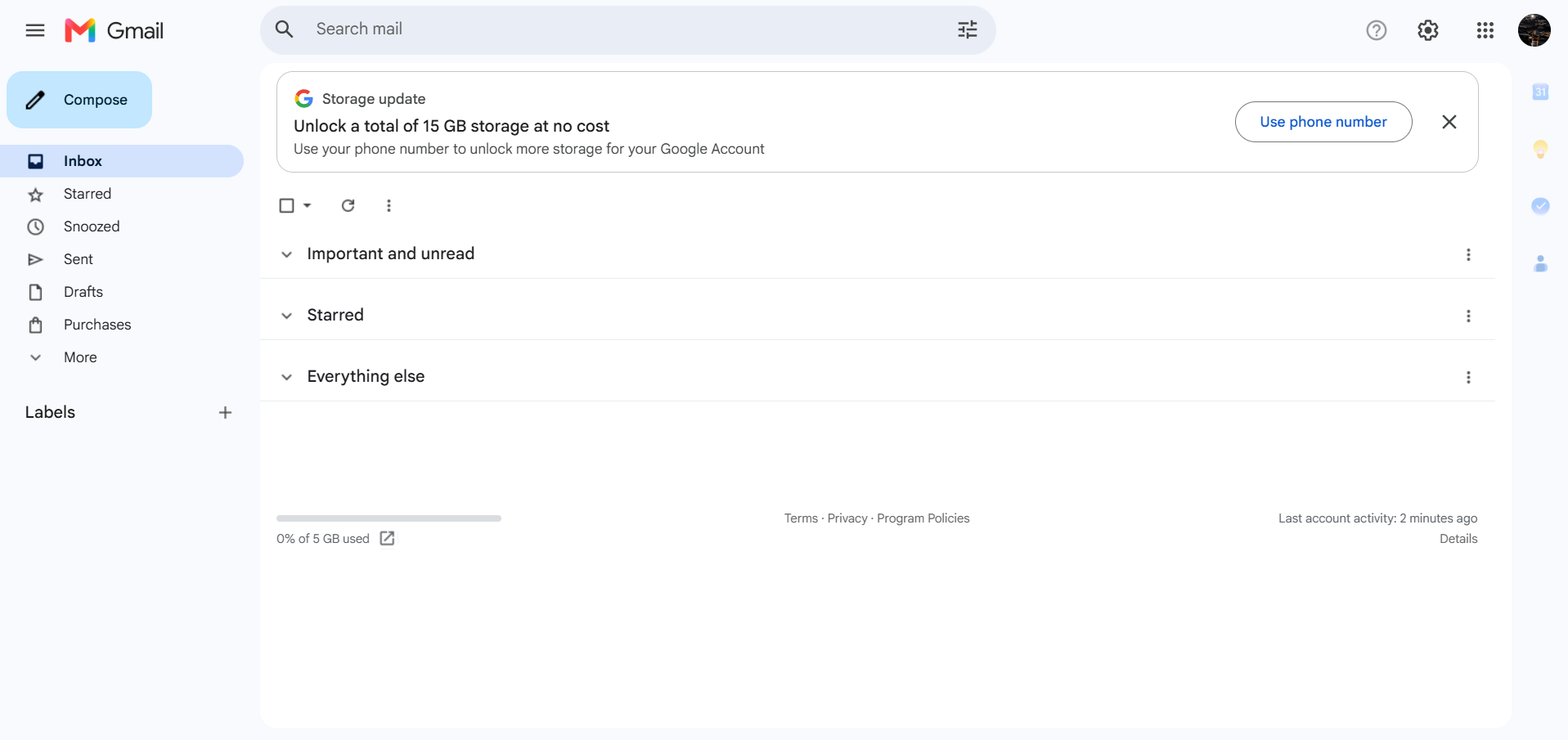
  • My Gmail Account Creation – Digital Communication Journey
    Today, I successfully created my own Gmail Account and explored the Gmail interface.
    Book: A — Foundation Level
    Date: 31 October 2026
    Day: Saturday
    What I Learned:
    How to create a Gmail account.
    Understanding the Gmail inbox.
    Exploring Compose, Inbox, Sent, Drafts and Starred.
    Learning the basics of email communication.
    Understanding how Gmail helps us stay connected.
    My Learning Journey:
    This activity helped me take another step towards becoming digitally skilled and improving my communication skills.
    Learn, Explore & Grow!
    #Gmail #Google #EmailAccount #DigitalSkills #Technology #LearningJourney #FoundationLevel #RehanSchool
    πŸ“§βœ¨ My Gmail Account Creation – Digital Communication Journey πŸš€ Today, I successfully created my own Gmail Account and explored the Gmail interface. πŸŽ‰ πŸ“š Book: A — Foundation Level πŸ“… Date: 31 October 2026 πŸ—“οΈ Day: Saturday πŸ’‘ What I Learned: How to create a Gmail account. Understanding the Gmail inbox. Exploring Compose, Inbox, Sent, Drafts and Starred. Learning the basics of email communication. Understanding how Gmail helps us stay connected. 🌍 My Learning Journey: This activity helped me take another step towards becoming digitally skilled and improving my communication skills. πŸ“© Learn, Explore & Grow! #Gmail #Google #EmailAccount #DigitalSkills #Technology #LearningJourney #FoundationLevel #RehanSchool
    1
    0 Commenti 0 condivisioni 749 Views
  • RSIF8
    ROLLNO:13
    CLASS: FOUNDATION LEVEL
    CODING TASK NO:9
    Claude Calendar is a web-based calendar app that lets you add events either the traditional way (filling in a form) or by simply typing what you want in plain English and letting Claude figure out the details. It runs as a published page on Claude.ai, so you can open it from any browser using the link, and it adapts to phones, tablets and desktops.

    The Main Calendar

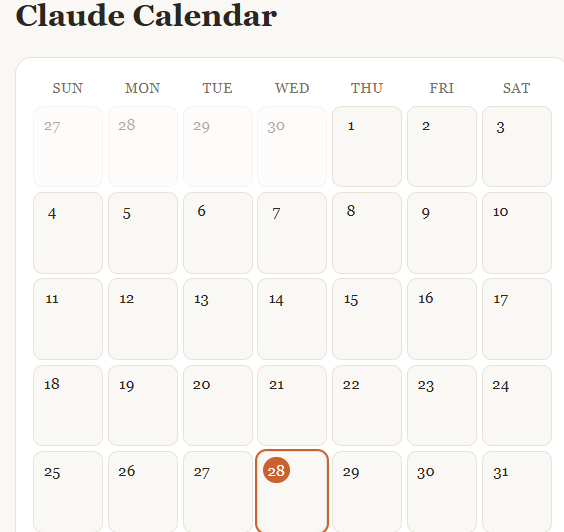
    The center of the app is a full month view laid out in a seven-column grid, Sunday through Saturday. Each day is a clickable cell showing its date number. Days from the previous and next months appear faded so the grid is always complete. Today’s date is highlighted with an orange circle, so you can find your place instantly. When a day has events, small labels appear inside the cell showing the time and title. If a day is busy, the cell shows the first two and the rest are visible in the detail panel.

    At the top, arrow buttons move you backward and forward one month, and a “Today” button jumps you straight back to the current month and selects today’s date.

    Adding Events with Claude

    This is the headline feature. In the “Add with Claude” box, you type a natural sentence such as:

    “Lunch with Sara next Friday at 1pm”
    “Team meeting tomorrow at 9:30”
    “Mom’s birthday on November 14”
    “Dentist appointment in two weeks”

    When you press Add (or hit Enter), the app sends your sentence to Claude along with today’s date, so relative phrases like “tomorrow,” “next Friday” or “in two weeks” are resolved correctly. Claude returns a clean title, an exact date and, if you mentioned one, a time. The event is then placed on the calendar, the view jumps to the right month, and a confirmation message tells you exactly what was added. If Claude can’t understand the request, or if too many requests are made in a short period, the app shows a friendly message and suggests rephrasing or using manual entry instead. The first time you use this feature, Claude.ai will ask for your permission.

    Adding Events Manually

    For times when you’d rather be precise, there’s an “Add manually” card with a title field, a date picker and an optional time picker.

    RSIF8 ROLLNO:13 CLASS: FOUNDATION LEVEL CODING TASK NO:9 Claude Calendar is a web-based calendar app that lets you add events either the traditional way (filling in a form) or by simply typing what you want in plain English and letting Claude figure out the details. It runs as a published page on Claude.ai, so you can open it from any browser using the link, and it adapts to phones, tablets and desktops. The Main Calendar The center of the app is a full month view laid out in a seven-column grid, Sunday through Saturday. Each day is a clickable cell showing its date number. Days from the previous and next months appear faded so the grid is always complete. Today’s date is highlighted with an orange circle, so you can find your place instantly. When a day has events, small labels appear inside the cell showing the time and title. If a day is busy, the cell shows the first two and the rest are visible in the detail panel. At the top, arrow buttons move you backward and forward one month, and a “Today” button jumps you straight back to the current month and selects today’s date. Adding Events with Claude This is the headline feature. In the “Add with Claude” box, you type a natural sentence such as: “Lunch with Sara next Friday at 1pm” “Team meeting tomorrow at 9:30” “Mom’s birthday on November 14” “Dentist appointment in two weeks” When you press Add (or hit Enter), the app sends your sentence to Claude along with today’s date, so relative phrases like “tomorrow,” “next Friday” or “in two weeks” are resolved correctly. Claude returns a clean title, an exact date and, if you mentioned one, a time. The event is then placed on the calendar, the view jumps to the right month, and a confirmation message tells you exactly what was added. If Claude can’t understand the request, or if too many requests are made in a short period, the app shows a friendly message and suggests rephrasing or using manual entry instead. The first time you use this feature, Claude.ai will ask for your permission. Adding Events Manually For times when you’d rather be precise, there’s an “Add manually” card with a title field, a date picker and an optional time picker.

    0 Commenti 0 condivisioni 754 Views
  • Unlock the power of robots: boost productivity, elevate safety, and spark creati

    Unlock the power of robots: boost productivity, elevate safety, and spark creativity!

    #robotics #automation #futuretech #smartliving #innovation #ai #productivity #techsavvy #saturdayvibes #techtrend
    Unlock the power of robots: boost productivity, elevate safety, and spark creati Unlock the power of robots: boost productivity, elevate safety, and spark creativity! πŸ€–βœ¨ #robotics #automation #futuretech #smartliving #innovation #ai #productivity #techsavvy #saturdayvibes #techtrend
    0 Commenti 0 condivisioni 2446 Views
Pagine in Evidenza