



#rsisb
Roll No.240
Coding No.15
Foundation Level
# Basic Calculator with GUI
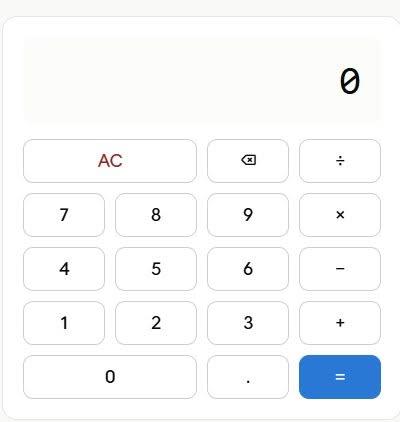
A **Basic Calculator with GUI (Graphical User Interface)** is a beginner-friendly programming project that allows users to perform everyday mathematical calculations through an interactive visual interface instead of typing commands. The calculator typically includes buttons for numbers (0–9), arithmetic operators (+, −, ×, ÷), a display screen, and function buttons such as **Clear (C)** and **Equals )**.
This project is an excellent way to learn the fundamentals of GUI development using programming languages such as Python with Tkinter, Java Swing, C# Windows Forms, or other GUI frameworks. It helps developers understand how user interface components, event handling, and programming logic work together to create a functional desktop application.
A basic calculator can perform operations like addition, subtraction, multiplication, and division instantly, making calculations simple and efficient. As users interact with the buttons, the application processes the input, performs the requested calculation, and displays the result in real time.
Building a GUI calculator strengthens programming skills by introducing concepts such as variables, functions, conditional statements, error handling, and interface design. It also serves as a strong foundation for creating more advanced applications with additional features like scientific calculations, memory functions, percentage operations, and square roots.
Whether you're
a student learning programming or a beginner exploring software development, creating a Basic Calculator with GUI is a practical and rewarding project that combines logic, creativity, and user-friendly design into one useful application.
**#BasicCalculator #GUI #Python #Tkinter #Programming #Coding #SoftwareDevelopment #PythonProject #DesktopApplication #LearnToCode #BeginnerProject #CodingJourney #ComputerScience #Technology #AppDevelopment**
Rehan School Islamabad Campus
Asma Shaheen EducationWali
Irum Asim
Saima Happinesswali
Roll No.240
Coding No.15
Foundation Level
# Basic Calculator with GUI
A **Basic Calculator with GUI (Graphical User Interface)** is a beginner-friendly programming project that allows users to perform everyday mathematical calculations through an interactive visual interface instead of typing commands. The calculator typically includes buttons for numbers (0–9), arithmetic operators (+, −, ×, ÷), a display screen, and function buttons such as **Clear (C)** and **Equals )**.
This project is an excellent way to learn the fundamentals of GUI development using programming languages such as Python with Tkinter, Java Swing, C# Windows Forms, or other GUI frameworks. It helps developers understand how user interface components, event handling, and programming logic work together to create a functional desktop application.
A basic calculator can perform operations like addition, subtraction, multiplication, and division instantly, making calculations simple and efficient. As users interact with the buttons, the application processes the input, performs the requested calculation, and displays the result in real time.
Building a GUI calculator strengthens programming skills by introducing concepts such as variables, functions, conditional statements, error handling, and interface design. It also serves as a strong foundation for creating more advanced applications with additional features like scientific calculations, memory functions, percentage operations, and square roots.
Whether you're
a student learning programming or a beginner exploring software development, creating a Basic Calculator with GUI is a practical and rewarding project that combines logic, creativity, and user-friendly design into one useful application.
**#BasicCalculator #GUI #Python #Tkinter #Programming #Coding #SoftwareDevelopment #PythonProject #DesktopApplication #LearnToCode #BeginnerProject #CodingJourney #ComputerScience #Technology #AppDevelopment**
Rehan School Islamabad Campus
Asma Shaheen EducationWali
Irum Asim
Saima Happinesswali
#rsisb
Roll No.240
Coding No.15
Foundation Level
# 🧮 Basic Calculator with GUI
A **Basic Calculator with GUI (Graphical User Interface)** is a beginner-friendly programming project that allows users to perform everyday mathematical calculations through an interactive visual interface instead of typing commands. The calculator typically includes buttons for numbers (0–9), arithmetic operators (+, −, ×, ÷), a display screen, and function buttons such as **Clear (C)** and **Equals 😊)**.
This project is an excellent way to learn the fundamentals of GUI development using programming languages such as Python with Tkinter, Java Swing, C# Windows Forms, or other GUI frameworks. It helps developers understand how user interface components, event handling, and programming logic work together to create a functional desktop application.
A basic calculator can perform operations like addition, subtraction, multiplication, and division instantly, making calculations simple and efficient. As users interact with the buttons, the application processes the input, performs the requested calculation, and displays the result in real time.
Building a GUI calculator strengthens programming skills by introducing concepts such as variables, functions, conditional statements, error handling, and interface design. It also serves as a strong foundation for creating more advanced applications with additional features like scientific calculations, memory functions, percentage operations, and square roots.
Whether you're
a student learning programming or a beginner exploring software development, creating a Basic Calculator with GUI is a practical and rewarding project that combines logic, creativity, and user-friendly design into one useful application.
**#BasicCalculator #GUI #Python #Tkinter #Programming #Coding #SoftwareDevelopment #PythonProject #DesktopApplication #LearnToCode #BeginnerProject #CodingJourney #ComputerScience #Technology #AppDevelopment** 🧮💻🚀
Rehan School Islamabad Campus
Asma Shaheen EducationWali
Irum Asim
Saima Happinesswali
0 Comentários
0 Compartilhamentos
5972 Visualizações