
• RSIF8
    Roll no.49
    Coding task no.32
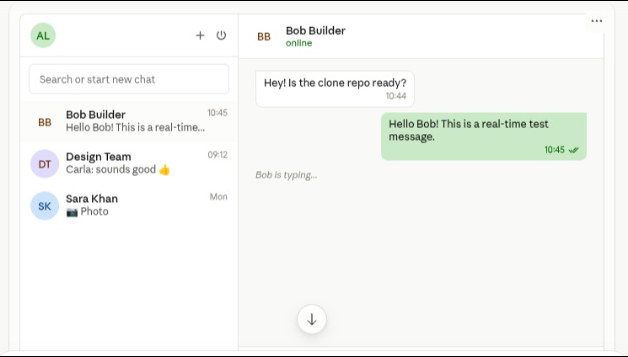
    Coding task topic:WHATSAPP FUNCTIONAL CLONE (WEB-BASED)

    In this project, I built a fully functional WhatsApp Web Clone using modern web technologies. This application replicates the core features of WhatsApp Web, providing a clean, responsive, and real-time messaging experience.

    Features:
    Real-time messaging
    Online/Offline user status
    Typing indicators
    Message delivery/read status
    Responsive WhatsApp-inspired UI
    User authentication
    Chat list with recent conversations
    Search chats functionality
    Fast and smooth user experience

    This project helped me strengthen my skills in full-stack web development, real-time communication, authentication, database management, and responsive UI design.

    If you enjoyed this project, don't forget to Like, Comment, Share, and Subscribe for more web development projects and tutorials!

    Hashtags

    #WhatsAppClone #WebDevelopment #FullStackDeveloper #JavaScript #ReactJS #NodeJS #SocketIO #MongoDB #Firebase #RealTimeChat #Frontend #Backend #ResponsiveDesign #Coding #Programming #WebApp #DeveloperPortfolio #TechProject #SoftwareDevelopment
    RSIF8 Roll no.49 Coding task no.32 Coding task topic:WHATSAPP FUNCTIONAL CLONE (WEB-BASED) In this project, I built a fully functional WhatsApp Web Clone using modern web technologies. This application replicates the core features of WhatsApp Web, providing a clean, responsive, and real-time messaging experience. ✨ Features: 💬 Real-time messaging 🟢 Online/Offline user status ⌨️ Typing indicators ✔️ Message delivery/read status 📱 Responsive WhatsApp-inspired UI 👤 User authentication 📋 Chat list with recent conversations 🔍 Search chats functionality ⚡ Fast and smooth user experience This project helped me strengthen my skills in full-stack web development, real-time communication, authentication, database management, and responsive UI design. If you enjoyed this project, don't forget to Like, Comment, Share, and Subscribe for more web development projects and tutorials! Hashtags #WhatsAppClone #WebDevelopment #FullStackDeveloper #JavaScript #ReactJS #NodeJS #SocketIO #MongoDB #Firebase #RealTimeChat #Frontend #Backend #ResponsiveDesign #Coding #Programming #WebApp #DeveloperPortfolio #TechProject #SoftwareDevelopment
    0 Commentarios 0 Acciones 2504 Views
  • RSISB
    Roll No:56
    Level 2
    Work Book A
    Story Post No : 03
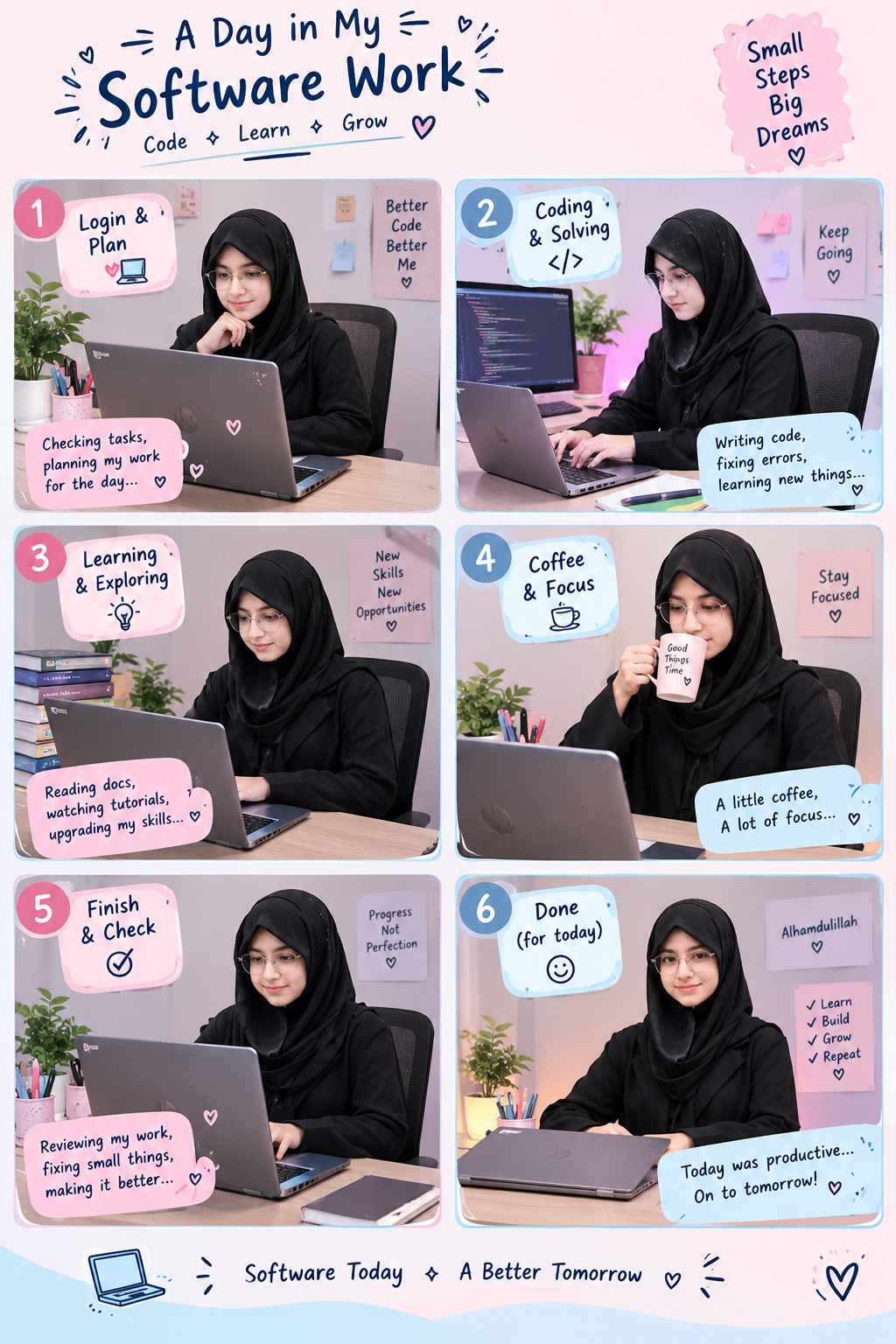
    A Day in My Software Work – Learn, Code & Grow!

    Today, I spent my time working on my laptop, exploring the world of software, improving my digital skills, and learning something new! Every small step brings me closer to my dreams.

    Frame 1 – Login & Plan
    I started my day by opening my laptop, checking my tasks, and planning my software work. A productive day begins with a clear plan!

    Frame 2 – Coding & Solving ‍
    I focused on writing code, understanding software concepts, solving problems, and discovering how technology works. Every challenge is an opportunity to learn something new!

    Frame 3 – Learning & Exploring
    Learning never stops! I explored tutorials, read useful information, and practised new computer skills to improve my knowledge.

    Frame 4 – Coffee & Focus
    A little break, a fresh mind, and lots of motivation! I continued my work with patience, concentration, and positive energy.

    Frame 5 – Finish & Check
    After completing my tasks, I reviewed my work, checked for mistakes, and made improvements because progress matters more than perfection!

    Frame 6 – Done for Today!
    Alhamdulillah! Another productive day completed. I learned new things, practised my skills, and moved one step closer to achieving my goals.

    My Message:
    Software is not just about computers and coding. It is about creativity, problem-solving, patience, and continuous learning.

    I believe that today's small efforts will become tomorrow's big achievements!

    Dream Big. Start Small. Keep Learning. Never Give Up!

    Software Today, A Better Tomorrow!

    #SoftwareWork #MyLearningJourney #DigitalSkills #CodingLife #Technology #WomenInTech #ProductiveDay #KeepGrowing #LearningEveryday
    RSISB Roll No:56 Level 2 Work Book A Story Post No : 03 💻🌸 A Day in My Software Work – Learn, Code & Grow! 💙✨ Today, I spent my time working on my laptop, exploring the world of software, improving my digital skills, and learning something new! Every small step brings me closer to my dreams. 🚀💕 🌷 Frame 1 – Login & Plan 📝 I started my day by opening my laptop, checking my tasks, and planning my software work. A productive day begins with a clear plan! 💻 Frame 2 – Coding & Solving 👩‍💻 I focused on writing code, understanding software concepts, solving problems, and discovering how technology works. Every challenge is an opportunity to learn something new! 📚 Frame 3 – Learning & Exploring 🌟 Learning never stops! I explored tutorials, read useful information, and practised new computer skills to improve my knowledge. ☕ Frame 4 – Coffee & Focus 💗 A little break, a fresh mind, and lots of motivation! I continued my work with patience, concentration, and positive energy. ✅ Frame 5 – Finish & Check 🔍 After completing my tasks, I reviewed my work, checked for mistakes, and made improvements because progress matters more than perfection! 🌸 Frame 6 – Done for Today! 🎉 Alhamdulillah! Another productive day completed. I learned new things, practised my skills, and moved one step closer to achieving my goals. 💡 My Message: Software is not just about computers and coding. It is about creativity, problem-solving, patience, and continuous learning. I believe that today's small efforts will become tomorrow's big achievements! 💖 ✨ Dream Big. Start Small. Keep Learning. Never Give Up! 💻 Software Today, A Better Tomorrow! 🚀🌷 #SoftwareWork #MyLearningJourney #DigitalSkills #CodingLife #Technology #WomenInTech #ProductiveDay #KeepGrowing #LearningEveryday 💙
    0 Commentarios 0 Acciones 3024 Views
  • #rsisb
    Roll no # 273
    Earning Task no # 1
    Level # 1

    **What Is AI? Teaching My Father About Artificial Intelligence! ‍**

    Technology is changing the world, and Artificial Intelligence (AI) is becoming an important part of our daily lives! In this special learning session, I am guiding my father and explaining what AI is, why it matters, and how we can use AI tools to learn new skills, solve problems, and make our lives easier.

    **What Is AI?**
    Artificial Intelligence is a technology that enables computers to perform tasks such as understanding language, answering questions, generating ideas, and helping people learn.

    **AI Tools We Explored:**
    **ChatGPT** — For learning, answering questions, writing, and generating ideas.
    **Claude AI** — For explanations, writing assistance, and working through complex topics.
    **AI Skills** — Discovering new ways to improve creativity, productivity, and digital knowledge.

    ‍ **Learning Together, Growing Together!**
    My goal is to show that learning technology has no age limit. Whether you are a student, a parent, a teacher, or a beginner, you can start exploring AI step by step. The future belongs to those who stay curious, keep learning, and use technology wisely!

    **Your Turn:** Have you ever explained AI to your parents or family members? Share your experience in the comments!

    Like, Share, and Follow for more educational content, AI tutorials, digital skills, and exciting learning sessions!

    #️⃣ **Hashtags:**

    #ArtificialIntelligence #WhatIsAI #TeachingMyFather #AIForBeginners #ChatGPT #ClaudeAI #AISkills #LearnAI #DigitalSkills #AIEducation #Technology #FutureOfAI #FamilyLearning #LearnTogether #TechEducation #SmartLearning #DigitalLiteracy #Innovation #OnlineLearning #KeepLearning Asma Shaheen EducationWali@highlight
    #rsisb Roll no # 273 Earning Task no # 1 Level # 1 🤖💡 **What Is AI? Teaching My Father About Artificial Intelligence! 👨‍💻❤️** Technology is changing the world, and Artificial Intelligence (AI) is becoming an important part of our daily lives! 🌍🚀 In this special learning session, I am guiding my father and explaining what AI is, why it matters, and how we can use AI tools to learn new skills, solve problems, and make our lives easier. 💻📚 🤖 **What Is AI?** Artificial Intelligence is a technology that enables computers to perform tasks such as understanding language, answering questions, generating ideas, and helping people learn. ✨ **AI Tools We Explored:** 🔹 **ChatGPT** — For learning, answering questions, writing, and generating ideas. 🔹 **Claude AI** — For explanations, writing assistance, and working through complex topics. 🔹 **AI Skills** — Discovering new ways to improve creativity, productivity, and digital knowledge. 👨‍👦 **Learning Together, Growing Together!** ❤️ My goal is to show that learning technology has no age limit. Whether you are a student, a parent, a teacher, or a beginner, you can start exploring AI step by step. The future belongs to those who stay curious, keep learning, and use technology wisely! 🌟 💬 **Your Turn:** Have you ever explained AI to your parents or family members? Share your experience in the comments! 👇 ❤️ Like, Share, and Follow for more educational content, AI tutorials, digital skills, and exciting learning sessions! #️⃣ **Hashtags:** #ArtificialIntelligence #WhatIsAI #TeachingMyFather #AIForBeginners #ChatGPT #ClaudeAI #AISkills #LearnAI #DigitalSkills #AIEducation #Technology #FutureOfAI #FamilyLearning #LearnTogether #TechEducation #SmartLearning #DigitalLiteracy #Innovation #OnlineLearning #KeepLearning 🤖💻🚀Asma Shaheen EducationWali@highlight
    0 Commentarios 0 Acciones 3375 Views
  • In this tutorial, I’m showing how to build a fully interactive patient intake app using Google AI Studio + Gemini Live.
    The app includes a visual form with multiple fields — and the coolest part is that Gemini Live talks naturally with the user, asks questions during the conversation, and automatically fills in the form step-by-step.

    I created it using Google AI Studio:
    https://aistudio.google.com/apps

    You can copy-paste this prompt to build the same app:

    Create an app that includes a patient intake form with multiple fields.
    Show the form visually to the user.
    Use the Gemini Live API to have a natural conversation.
    During the conversation, gather the user’s details like name, address, symptoms, etc., and fill each part of the form automatically.
    The conversation should feel friendly, helpful, and interactive.

    Rehan Allahwala
    In this tutorial, I’m showing how to build a fully interactive patient intake app using Google AI Studio + Gemini Live. The app includes a visual form with multiple fields — and the coolest part is that Gemini Live talks naturally with the user, asks questions during the conversation, and automatically fills in the form step-by-step. I created it using Google AI Studio: 👉 https://aistudio.google.com/apps You can copy-paste this prompt to build the same app: Create an app that includes a patient intake form with multiple fields. Show the form visually to the user. Use the Gemini Live API to have a natural conversation. During the conversation, gather the user’s details like name, address, symptoms, etc., and fill each part of the form automatically. The conversation should feel friendly, helpful, and interactive. Rehan Allahwala
    0 Commentarios 0 Acciones 913 Views 0
  • RSIF8
    Roll no.29
    Task no.4
    Task Topic: How to create a YouTube account

    Starting your journey on YouTube is incredibly easy! Because YouTube is owned by Google, your passport to the platform is simply a Google Account. Whether you want to subscribe to your favorite creators, save playlists, or start uploading your own videos, here is exactly how to set up your account in just a few minutes.

    **Step 1: Sign In with Google**
    First, open your web browser and head over to YouTube.com, or simply open the YouTube app on your mobile device. Click the "Sign In" button located in the top right-hand corner of the screen. Enter your existing Google or Gmail credentials to log in. If you do not have a Google account yet, click "Create account" and follow the quick prompts to set one up.

    **Step 2: Access the Channel Creation Menu**
    Once you are logged in, look at the top right corner of the page where your profile icon is located. Click on your profile picture, and a dropdown menu will appear. From this menu, click on the option that says "Create a channel."

    **Step 3: Choose Your Account Type**
    You will now see a prompt asking how you want to create your channel. You have two choices:

    * **Personal Channel:** Choose this if you want to use your own name and profile picture.
    * **Brand/Business Channel:** Choose this if you want to use a custom name, a business name, or if you plan to have multiple people manage the account with you in the future.

    **Step 4: Customize and Launch**
    Name your channel, upload a profile picture, and add a brief bio to your "About" section telling viewers what your channel is all about. Once you click "Create," your brand new YouTube account is fully active and ready for action!

    ---

    #YouTube #HowTo #YouTubeTutorial #CreateAccount #TechTips ContentCreator #NewChannel #TechGuide #YouTubeCommunity
    RSIF8 Roll no.29 Task no.4 Task Topic: How to create a YouTube account Starting your journey on YouTube is incredibly easy! Because YouTube is owned by Google, your passport to the platform is simply a Google Account. Whether you want to subscribe to your favorite creators, save playlists, or start uploading your own videos, here is exactly how to set up your account in just a few minutes. **Step 1: Sign In with Google** First, open your web browser and head over to YouTube.com, or simply open the YouTube app on your mobile device. Click the "Sign In" button located in the top right-hand corner of the screen. Enter your existing Google or Gmail credentials to log in. If you do not have a Google account yet, click "Create account" and follow the quick prompts to set one up. **Step 2: Access the Channel Creation Menu** Once you are logged in, look at the top right corner of the page where your profile icon is located. Click on your profile picture, and a dropdown menu will appear. From this menu, click on the option that says "Create a channel." **Step 3: Choose Your Account Type** You will now see a prompt asking how you want to create your channel. You have two choices: * **Personal Channel:** Choose this if you want to use your own name and profile picture. * **Brand/Business Channel:** Choose this if you want to use a custom name, a business name, or if you plan to have multiple people manage the account with you in the future. **Step 4: Customize and Launch** Name your channel, upload a profile picture, and add a brief bio to your "About" section telling viewers what your channel is all about. Once you click "Create," your brand new YouTube account is fully active and ready for action! --- #YouTube ✨#HowTo #YouTubeTutorial #CreateAccount #TechTips 🚀ContentCreator #NewChannel 🎥 #TechGuide #YouTubeCommunity📱
    0 Commentarios 0 Acciones 3702 Views
  • RSIF8
    Roll no 94
    Task no 7
    Task topic How to download and use canva
    How to Download and Use Canva?

    Canva is an easy-to-use design tool that helps you create beautiful posters, presentations, social media posts, logos, resumes, and much more!

    To get started:
    Download the Canva app from your device's app store or visit Canva on your web browser.
    Sign up using your email, Google, or Facebook account.
    Choose a template or start from a blank design.
    Customize with text, images, colors, stickers, and graphics.
    Save and download your design in your preferred format.

    Canva makes designing simple and fun, even if you're a beginner. Start creating amazing designs and bring your ideas to life!

    #Canva #GraphicDesign #DesignMadeEasy #CreativeTools #DigitalDesign #CanvaTutorial #LearnDesign #Creativity #OnlineTools #DesignTips
    RSIF8 Roll no 94 Task no 7 Task topic How to download and use canva 🎨✨ How to Download and Use Canva? ✨🎨 Canva is an easy-to-use design tool that helps you create beautiful posters, presentations, social media posts, logos, resumes, and much more! 🚀 📥 To get started: 1️⃣ Download the Canva app from your device's app store or visit Canva on your web browser. 2️⃣ Sign up using your email, Google, or Facebook account. 3️⃣ Choose a template or start from a blank design. 4️⃣ Customize with text, images, colors, stickers, and graphics. 5️⃣ Save and download your design in your preferred format. 💡 Canva makes designing simple and fun, even if you're a beginner. Start creating amazing designs and bring your ideas to life! 🌟🎉 #Canva #GraphicDesign #DesignMadeEasy #CreativeTools #DigitalDesign #CanvaTutorial #LearnDesign #Creativity #OnlineTools #DesignTips 🎨💻✨🚀
    0 Commentarios 0 Acciones 3539 Views
  • RSIF8
    roll no 94
    task no 4
    task topic How to create a youtube account
    How to Create a YouTube Account!

    Want to watch videos, subscribe to your favorite creators, and upload your own content? Creating a YouTube account is quick and easy!

    Go to YouTube
    Click Sign In
    Sign in with your Google/Gmail account (or create one if you don't have it)
    Set up your profile and channel name
    Start watching, subscribing, commenting, and uploading videos!

    A YouTube account opens the door to learning new skills, sharing your creativity, and connecting with millions of people around the world.

    #YouTube #YouTubeAccount #CreateYouTubeAccount #YouTubeChannel #DigitalSkills #LearnOnline #ContentCreator #SocialMediaTips #TechTutorial #OnlineLearning #VideoCreation #YouTuber
    RSIF8 roll no 94 task no 4 task topic How to create a youtube account 🎥 How to Create a YouTube Account! 📱✨ Want to watch videos, subscribe to your favorite creators, and upload your own content? Creating a YouTube account is quick and easy! 🚀 ✅ Go to YouTube ✅ Click Sign In ✅ Sign in with your Google/Gmail account (or create one if you don't have it) ✅ Set up your profile and channel name ✅ Start watching, subscribing, commenting, and uploading videos! 🎬🌟 A YouTube account opens the door to learning new skills, sharing your creativity, and connecting with millions of people around the world. 🌍💡 #YouTube #YouTubeAccount #CreateYouTubeAccount #YouTubeChannel #DigitalSkills #LearnOnline #ContentCreator #SocialMediaTips #TechTutorial #OnlineLearning #VideoCreation #YouTuber 🚀🎥📱✨
    0 Commentarios 0 Acciones 4411 Views
  • RSIF8
    roll no 94
    task no 1
    task topic HOW TO CREATE A GMAIL ACCOUNT
    How to Create a Gmail Account
    Creating a Gmail account is quick and easy!
    Go to the Gmail sign-up page.
    Enter your first and last name.
    Choose a unique username.
    Create a strong password .
    Add your phone number for security .
    Verify your account and complete the setup.
    Start sending emails, using Google Drive, YouTube, Google Meet, and more!
    Your Gmail account is now ready to use!
    #Gmail #GoogleAccount #EmailAccount #TechTips #DigitalSkills #OnlineLearning #GmailTutorial #Technology #InternetBasics #HowTo #EmailSetup
    RSIF8 roll no 94 task no 1 task topic HOW TO CREATE A GMAIL ACCOUNT 📧✨ How to Create a Gmail Account ✨📧 Creating a Gmail account is quick and easy! 🚀 1️⃣ Go to the Gmail sign-up page. 2️⃣ Enter your first and last name. 3️⃣ Choose a unique username. 4️⃣ Create a strong password 🔒. 5️⃣ Add your phone number for security 📱. 6️⃣ Verify your account and complete the setup. ✅ 7️⃣ Start sending emails, using Google Drive, YouTube, Google Meet, and more! 🌐💡 🎉 Your Gmail account is now ready to use! #Gmail #GoogleAccount #EmailAccount #TechTips #DigitalSkills #OnlineLearning #GmailTutorial #Technology #InternetBasics #HowTo #EmailSetup 📧✨🚀
    0 Commentarios 0 Acciones 4216 Views
  • RSIF8
    Roll no 101
    task no 05
    task topic How to Create an Instagram Account?
    Ready to join Instagram and start sharing your favorite moments? This simple step-by-step guide is perfect for beginners who want to learn how to create an Instagram account and set up their profile with ease.

    From creating your account to choosing a username, adding a profile picture, finding people you know, and adjusting your privacy settings, this tutorial covers the essential basics.

    What you'll learn:
    How to get started with Instagram
    How to create your account
    How to choose a username
    How to add a profile picture
    How to find and follow accounts
    How to explore photos, videos, and Reels
    How to manage basic privacy settings
    Simple tips for new Instagram users

    Perfect for beginners! Whether you're using an Android phone, iPhone, or tablet, these simple steps will help you understand the basics of Instagram.

    Follow the complete tutorial and start exploring Instagram today!

    Enjoying the guide?
    Like
    Share
    Follow for more easy technology tutorials!

    #Instagram #InstagramAccount #CreateInstagramAccount #InstagramTutorial #InstagramGuide #InstagramTips #HowTo #StepByStep #BeginnerGuide #InstagramForBeginners #SocialMedia #SocialMediaTips #TechTips #DigitalSkills #LearnInstagram #OnlineTutorial #Technology #EasyGuide #DigitalLearning #Tutorial #NewUsers #InstagramHelp #LearnTechnology
    RSIF8 Roll no 101 task no 05 task topic How to Create an Instagram Account? Ready to join Instagram and start sharing your favorite moments? ✨📱 This simple step-by-step guide is perfect for beginners who want to learn how to create an Instagram account and set up their profile with ease. 👤💜 From creating your account to choosing a username, adding a profile picture, finding people you know, and adjusting your privacy settings, this tutorial covers the essential basics. 🔐🌟 🎯 What you'll learn: ✅ How to get started with Instagram 📲 ✅ How to create your account ✅ How to choose a username 👤 ✅ How to add a profile picture 🖼️ ✅ How to find and follow accounts 👥 ✅ How to explore photos, videos, and Reels 🎥 ✅ How to manage basic privacy settings 🔒 ✅ Simple tips for new Instagram users 💡 🌟 Perfect for beginners! Whether you're using an Android phone, iPhone, or tablet, these simple steps will help you understand the basics of Instagram. 👉 Follow the complete tutorial and start exploring Instagram today! 📸🚀 💜 Enjoying the guide? 👍 Like 🔄 Share ➕ Follow for more easy technology tutorials! #Instagram #InstagramAccount #CreateInstagramAccount #InstagramTutorial #InstagramGuide #InstagramTips #HowTo #StepByStep #BeginnerGuide #InstagramForBeginners #SocialMedia #SocialMediaTips #TechTips #DigitalSkills #LearnInstagram #OnlineTutorial #Technology #EasyGuide #DigitalLearning #Tutorial #NewUsers #InstagramHelp #LearnTechnology 📸📱💻✨🚀
    0 Commentarios 0 Acciones 7789 Views
  • RSIF8
    Roll no 101
    task no 04
    task topic How to Create a YouTube Account?
    Ready to explore YouTube and discover amazing videos? This simple and beginner-friendly tutorial will guide you through the basics of creating and setting up a YouTube account.

    Whether you're completely new to YouTube or just want to understand how the platform works, this guide will help you get started step by step.

    In this video, you'll learn:
    How to get started with YouTube
    How to sign in using a Google Account
    How to set up your YouTube profile
    How to search for videos and channels
    How to subscribe to channels
    How to save videos for later
    How to manage basic account settings
    Helpful privacy and safety tips

    Perfect for beginners! Follow along with the tutorial and learn the essential YouTube features at your own pace.

    Start your YouTube experience today and discover content, creators, and topics you enjoy!

    Like the video
    Share your thoughts
    Follow for more simple tech tutorials
    Share this guide with someone who is new to YouTube!

    #YouTube #YouTubeAccount #CreateYouTubeAccount #YouTubeTutorial #YouTubeGuide #YouTubeTips #HowTo #StepByStep #YouTubeForBeginners #BeginnerTutorial #GoogleAccount #TechTips #Technology #DigitalSkills #LearnYouTube #OnlineTutorial #VideoTutorial #TechGuide #DigitalLearning #SocialMediaTips #EasyGuide #YouTubeHelp #Tutorial #LearnTechnology #NewToYouTube
    RSIF8 Roll no 101 task no 04 task topic How to Create a YouTube Account? Ready to explore YouTube and discover amazing videos? 🌎✨ This simple and beginner-friendly tutorial will guide you through the basics of creating and setting up a YouTube account. 📱💻 Whether you're completely new to YouTube or just want to understand how the platform works, this guide will help you get started step by step. 😊 📌 In this video, you'll learn: 🔹 How to get started with YouTube 🔹 How to sign in using a Google Account 🔐 🔹 How to set up your YouTube profile 👤 🔹 How to search for videos and channels 🔎 🔹 How to subscribe to channels 🔔 🔹 How to save videos for later ⭐ 🔹 How to manage basic account settings ⚙️ 🔹 Helpful privacy and safety tips 🔒 💡 Perfect for beginners! Follow along with the tutorial and learn the essential YouTube features at your own pace. 🎬 Start your YouTube experience today and discover content, creators, and topics you enjoy! 🌟 👍 Like the video 💬 Share your thoughts 🔔 Follow for more simple tech tutorials 📲 Share this guide with someone who is new to YouTube! #YouTube #YouTubeAccount #CreateYouTubeAccount #YouTubeTutorial #YouTubeGuide #YouTubeTips #HowTo #StepByStep #YouTubeForBeginners #BeginnerTutorial #GoogleAccount #TechTips #Technology #DigitalSkills #LearnYouTube #OnlineTutorial #VideoTutorial #TechGuide #DigitalLearning #SocialMediaTips #EasyGuide #YouTubeHelp #Tutorial #LearnTechnology #NewToYouTube 🎥📱💻✨🚀
    0 Commentarios 0 Acciones 9022 Views
Resultados de la búsqueda