ACCL TASK
Day:29
Roll NO:003
Coding task
Student at Rehan School Urdu bazar campus
# Basic Calculator (Arithmetic Operations)
A basic calculator is a simple and useful mathematical tool designed to perform essential arithmetic operations quickly and accurately. It helps users solve everyday mathematical problems by performing addition, subtraction, multiplication, and division. Whether you are a student learning mathematics, a teacher explaining calculations, or someone managing daily tasks, a basic calculator makes calculations easier and more convenient.
The four fundamental arithmetic operations are the foundation of mathematics. **Addition** is used to combine numbers, **subtraction** helps find the difference between numbers, **multiplication** makes repeated addition easier, and **division** allows us to distribute quantities into equal parts. These operations are important in many everyday situations, including shopping, budgeting, measuring, studying, and managing time.
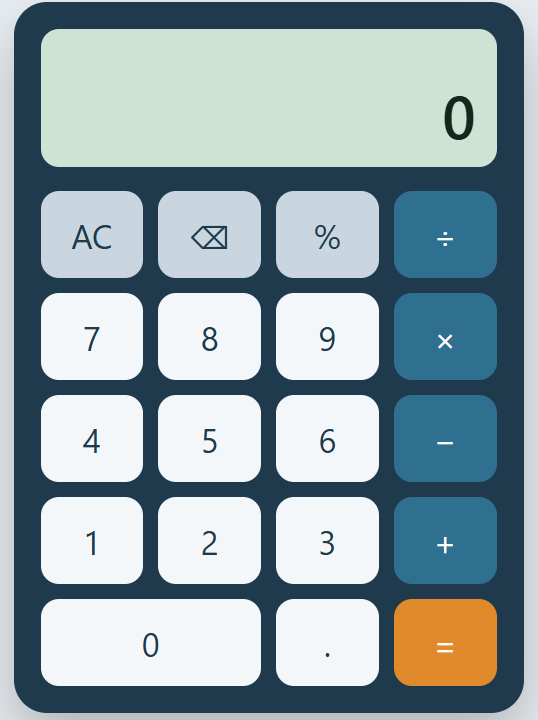
A basic calculator typically features a simple interface with number buttons, arithmetic operators, a clear button, and an equals button. Users can enter numbers, select an operation, and receive an immediate result. Its straightforward design makes it easy for beginners to understand and use without requiring advanced mathematical knowledge.
In the digital world, basic calculators are available on computers, smartphones, tablets, and websites. They save time, reduce manual calculation effort, and help users check their answers efficiently. Although a basic calculator may not offer advanced scientific functions, it provides all the essential tools needed for common mathematical tasks.
**In conclusion, a basic calculator is an essential tool for everyday mathematics.** By making arithmetic operations quick, simple, and accessible, it supports learning, improves convenience, and helps people solve numerical problems with greater confidence.
https://claude.ai/artifact/GpKfXU3iwFMhSLgfzb96Y3jj
Day:29
Roll NO:003
Coding task
Student at Rehan School Urdu bazar campus
# Basic Calculator (Arithmetic Operations)
A basic calculator is a simple and useful mathematical tool designed to perform essential arithmetic operations quickly and accurately. It helps users solve everyday mathematical problems by performing addition, subtraction, multiplication, and division. Whether you are a student learning mathematics, a teacher explaining calculations, or someone managing daily tasks, a basic calculator makes calculations easier and more convenient.
The four fundamental arithmetic operations are the foundation of mathematics. **Addition** is used to combine numbers, **subtraction** helps find the difference between numbers, **multiplication** makes repeated addition easier, and **division** allows us to distribute quantities into equal parts. These operations are important in many everyday situations, including shopping, budgeting, measuring, studying, and managing time.
A basic calculator typically features a simple interface with number buttons, arithmetic operators, a clear button, and an equals button. Users can enter numbers, select an operation, and receive an immediate result. Its straightforward design makes it easy for beginners to understand and use without requiring advanced mathematical knowledge.
In the digital world, basic calculators are available on computers, smartphones, tablets, and websites. They save time, reduce manual calculation effort, and help users check their answers efficiently. Although a basic calculator may not offer advanced scientific functions, it provides all the essential tools needed for common mathematical tasks.
**In conclusion, a basic calculator is an essential tool for everyday mathematics.** By making arithmetic operations quick, simple, and accessible, it supports learning, improves convenience, and helps people solve numerical problems with greater confidence.
https://claude.ai/artifact/GpKfXU3iwFMhSLgfzb96Y3jj
ACCL TASK
Day:29
Roll NO:003
Coding task
Student at Rehan School Urdu bazar campus
# Basic Calculator (Arithmetic Operations)
A basic calculator is a simple and useful mathematical tool designed to perform essential arithmetic operations quickly and accurately. It helps users solve everyday mathematical problems by performing addition, subtraction, multiplication, and division. Whether you are a student learning mathematics, a teacher explaining calculations, or someone managing daily tasks, a basic calculator makes calculations easier and more convenient.
The four fundamental arithmetic operations are the foundation of mathematics. **Addition** is used to combine numbers, **subtraction** helps find the difference between numbers, **multiplication** makes repeated addition easier, and **division** allows us to distribute quantities into equal parts. These operations are important in many everyday situations, including shopping, budgeting, measuring, studying, and managing time.
A basic calculator typically features a simple interface with number buttons, arithmetic operators, a clear button, and an equals button. Users can enter numbers, select an operation, and receive an immediate result. Its straightforward design makes it easy for beginners to understand and use without requiring advanced mathematical knowledge.
In the digital world, basic calculators are available on computers, smartphones, tablets, and websites. They save time, reduce manual calculation effort, and help users check their answers efficiently. Although a basic calculator may not offer advanced scientific functions, it provides all the essential tools needed for common mathematical tasks.
**In conclusion, a basic calculator is an essential tool for everyday mathematics.** By making arithmetic operations quick, simple, and accessible, it supports learning, improves convenience, and helps people solve numerical problems with greater confidence.
https://claude.ai/artifact/GpKfXU3iwFMhSLgfzb96Y3jj
0 Reacties
0 aandelen
132 Views