


RSIF8
Roll no:14
coding task no:13
coding topic:**Basic Calculator with GUI
**Basic Calculator with GUI – A Simple and User-Friendly Application**
**Description:**
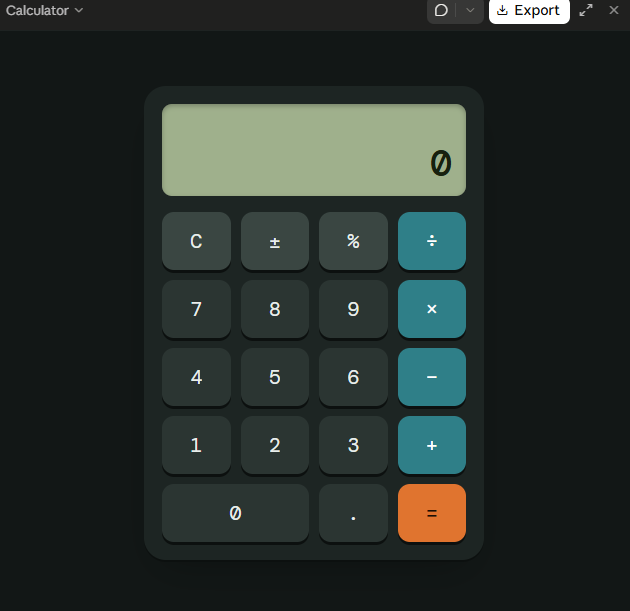
The Basic Calculator with GUI is a beginner-friendly programming project designed to perform essential mathematical calculations through a simple, interactive, and user-friendly graphical interface. Instead of entering commands, users can perform calculations by clicking buttons, making the application easy and convenient to use.
This project allows users to perform basic arithmetic operations, including **addition (+), subtraction (−), multiplication (×), and division (÷)**. It features a clear display screen for showing numbers and results, along with dedicated buttons for entering values, selecting operations, clearing the display, and calculating answers.
**Key Features:**
- **Addition:** Add two or more numbers easily.
- **Subtraction:** Calculate the difference between numbers.
- **Multiplication:** Multiply numbers quickly.
- **Division:** Divide numbers and display the results.
- **Graphical User Interface (GUI):** An interactive layout with clickable buttons.
- **Clear Button:** Reset the display and start a new calculation.
- **Instant Results:** Perform calculations quickly and efficiently.
- **Error Handling:** Handle invalid calculations, such as division by zero.
**Learning Objectives:**
The main goal of this project is to help beginners understand the fundamentals of programming and GUI development. It introduces important concepts such as button events, user input, mathematical operators, functions, conditional statements, and displaying output on the screen.
**Conclusion:**
The Basic Calculator with GUI is an excellent project for anyone beginning their programming journey. It combines practical mathematical operations with an interactive design, demonstrating how code can be transformed into a useful desktop application. With further improvements, the calculator can also include percentage calculations, decimal numbers, keyboard support, and a more attractive interface.
**Project Goal:** To create a simple, reliable, and easy-to-use calculator that makes everyday mathematical calculations faster and more convenient.
#BasicCalculator #GUI #ProgrammingProject #BeginnerCoding #PythonProgramming #AppDevelopment #LearnToCode #ComputerScience #CodingForBeginners #SoftwareDevelopment
Roll no:14
coding task no:13
coding topic:**Basic Calculator with GUI
**Basic Calculator with GUI – A Simple and User-Friendly Application**
**Description:**
The Basic Calculator with GUI is a beginner-friendly programming project designed to perform essential mathematical calculations through a simple, interactive, and user-friendly graphical interface. Instead of entering commands, users can perform calculations by clicking buttons, making the application easy and convenient to use.
This project allows users to perform basic arithmetic operations, including **addition (+), subtraction (−), multiplication (×), and division (÷)**. It features a clear display screen for showing numbers and results, along with dedicated buttons for entering values, selecting operations, clearing the display, and calculating answers.
**Key Features:**
- **Addition:** Add two or more numbers easily.
- **Subtraction:** Calculate the difference between numbers.
- **Multiplication:** Multiply numbers quickly.
- **Division:** Divide numbers and display the results.
- **Graphical User Interface (GUI):** An interactive layout with clickable buttons.
- **Clear Button:** Reset the display and start a new calculation.
- **Instant Results:** Perform calculations quickly and efficiently.
- **Error Handling:** Handle invalid calculations, such as division by zero.
**Learning Objectives:**
The main goal of this project is to help beginners understand the fundamentals of programming and GUI development. It introduces important concepts such as button events, user input, mathematical operators, functions, conditional statements, and displaying output on the screen.
**Conclusion:**
The Basic Calculator with GUI is an excellent project for anyone beginning their programming journey. It combines practical mathematical operations with an interactive design, demonstrating how code can be transformed into a useful desktop application. With further improvements, the calculator can also include percentage calculations, decimal numbers, keyboard support, and a more attractive interface.
**Project Goal:** To create a simple, reliable, and easy-to-use calculator that makes everyday mathematical calculations faster and more convenient.
#BasicCalculator #GUI #ProgrammingProject #BeginnerCoding #PythonProgramming #AppDevelopment #LearnToCode #ComputerScience #CodingForBeginners #SoftwareDevelopment
RSIF8
Roll no:14
coding task no:13
coding topic:**Basic Calculator with GUI
🧮 **Basic Calculator with GUI – A Simple and User-Friendly Application** 💻
✨ **Description:**
The Basic Calculator with GUI is a beginner-friendly programming project designed to perform essential mathematical calculations through a simple, interactive, and user-friendly graphical interface. Instead of entering commands, users can perform calculations by clicking buttons, making the application easy and convenient to use. 🚀📱
This project allows users to perform basic arithmetic operations, including **addition (+), subtraction (−), multiplication (×), and division (÷)**. It features a clear display screen for showing numbers and results, along with dedicated buttons for entering values, selecting operations, clearing the display, and calculating answers.
🎯 **Key Features:**
- ➕ **Addition:** Add two or more numbers easily.
- ➖ **Subtraction:** Calculate the difference between numbers.
- ✖️ **Multiplication:** Multiply numbers quickly.
- ➗ **Division:** Divide numbers and display the results.
- 🖥️ **Graphical User Interface (GUI):** An interactive layout with clickable buttons.
- 🔄 **Clear Button:** Reset the display and start a new calculation.
- ⚡ **Instant Results:** Perform calculations quickly and efficiently.
- ⚠️ **Error Handling:** Handle invalid calculations, such as division by zero.
📚 **Learning Objectives:**
The main goal of this project is to help beginners understand the fundamentals of programming and GUI development. It introduces important concepts such as button events, user input, mathematical operators, functions, conditional statements, and displaying output on the screen.
🌟 **Conclusion:**
The Basic Calculator with GUI is an excellent project for anyone beginning their programming journey. It combines practical mathematical operations with an interactive design, demonstrating how code can be transformed into a useful desktop application. With further improvements, the calculator can also include percentage calculations, decimal numbers, keyboard support, and a more attractive interface.
💡 **Project Goal:** To create a simple, reliable, and easy-to-use calculator that makes everyday mathematical calculations faster and more convenient.
#BasicCalculator #GUI #ProgrammingProject #BeginnerCoding #PythonProgramming #AppDevelopment #LearnToCode #ComputerScience #CodingForBeginners #SoftwareDevelopment 💻🧮🚀
0 Commentarii
0 Distribuiri
72 Views