• RSIF8
    ROll no:82
    Story post: 1
    Story post topic:Sound Waves: The Physics of Hearing and Communication

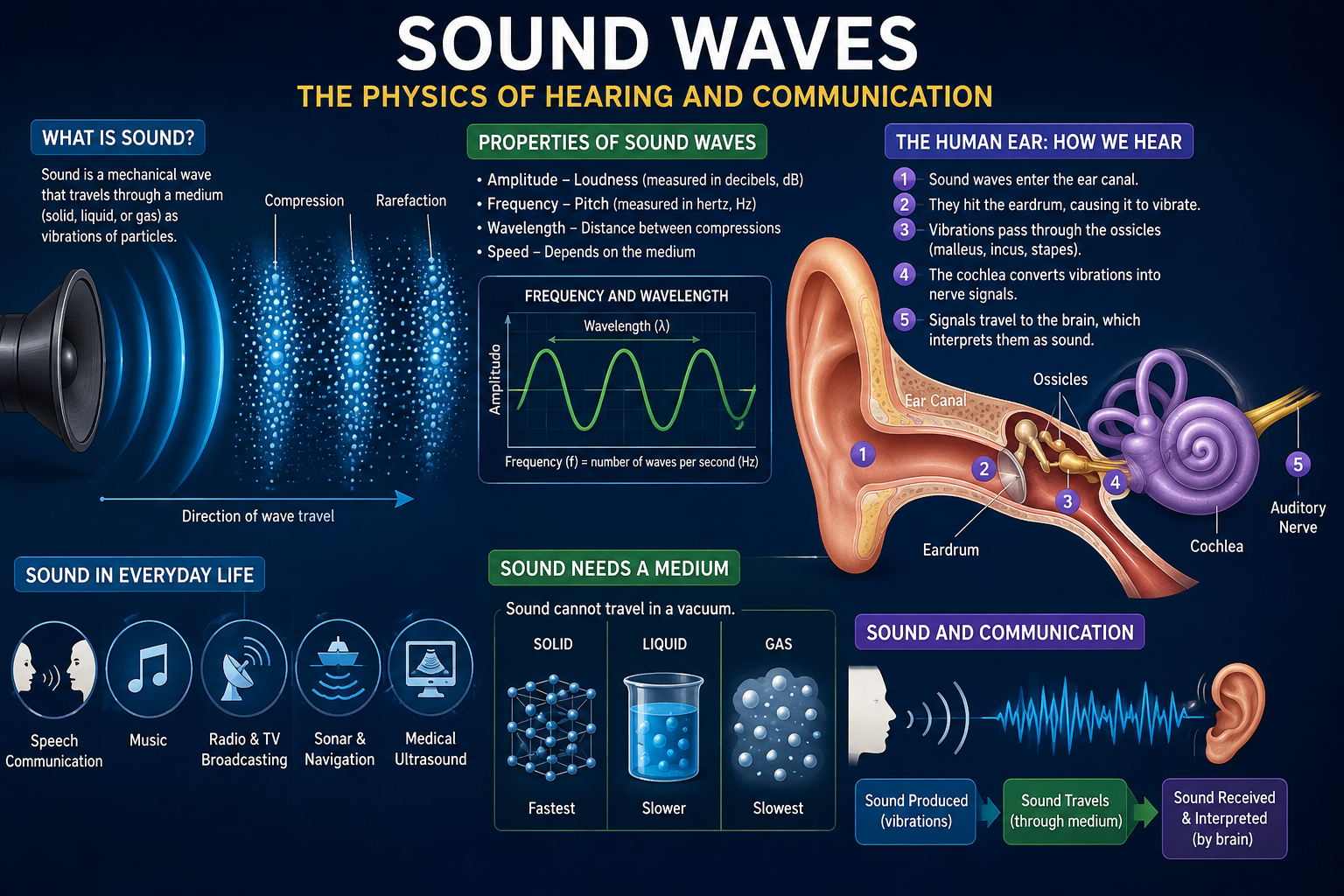
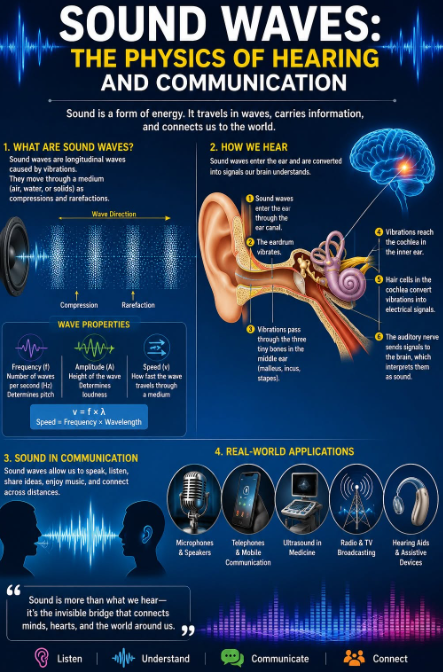
    Sound is an invisible form of energy that plays a vital role in our everyday lives. It travels as waves created by vibrating objects and moves through air, water, or solid materials until it reaches our ears. These waves allow us to hear voices, enjoy music, recognize warning signals, and communicate with people around the world.

    The process of hearing is a remarkable example of nature and science working together. Sound waves enter the ear canal, causing the eardrum to vibrate. These vibrations travel through tiny bones in the middle ear and reach the cochlea, where specialized hair cells convert them into electrical signals. The brain then interprets these signals, allowing us to recognize speech, music, and countless other sounds.

    The physics of sound is also the foundation of modern communication. Technologies such as microphones, speakers, telephones, hearing aids, ultrasound devices, and broadcasting systems all rely on the transmission and interpretation of sound waves. From education and healthcare to entertainment and global communication, sound connects people and makes the exchange of ideas possible.

    Understanding sound waves helps us appreciate both the complexity of the human body and the power of scientific discovery. Every conversation, every melody, and every echo reminds us that invisible waves carry information, emotions, and knowledge across the world.

    "Sound is more than something we hear—it is the invisible force that connects people, powers communication, and brings the world to life."
    RSIF8 ROll no:82 Story post: 1 Story post topic:Sound Waves: The Physics of Hearing and Communication Sound is an invisible form of energy that plays a vital role in our everyday lives. It travels as waves created by vibrating objects and moves through air, water, or solid materials until it reaches our ears. These waves allow us to hear voices, enjoy music, recognize warning signals, and communicate with people around the world. The process of hearing is a remarkable example of nature and science working together. Sound waves enter the ear canal, causing the eardrum to vibrate. These vibrations travel through tiny bones in the middle ear and reach the cochlea, where specialized hair cells convert them into electrical signals. The brain then interprets these signals, allowing us to recognize speech, music, and countless other sounds. The physics of sound is also the foundation of modern communication. Technologies such as microphones, speakers, telephones, hearing aids, ultrasound devices, and broadcasting systems all rely on the transmission and interpretation of sound waves. From education and healthcare to entertainment and global communication, sound connects people and makes the exchange of ideas possible. Understanding sound waves helps us appreciate both the complexity of the human body and the power of scientific discovery. Every conversation, every melody, and every echo reminds us that invisible waves carry information, emotions, and knowledge across the world. "Sound is more than something we hear—it is the invisible force that connects people, powers communication, and brings the world to life."
    0 Σχόλια 0 Μοιράστηκε 564 Views
  • RSIF8
    Roll no : 83
    Task no :9
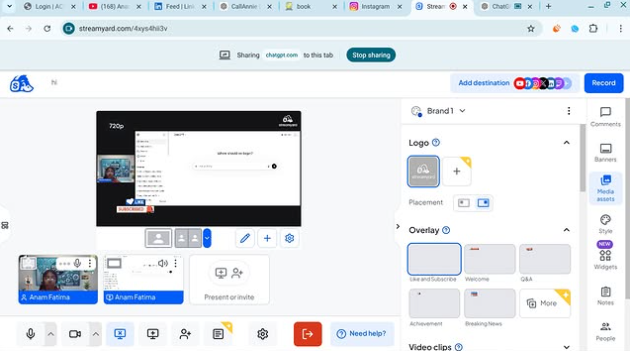
    Task Topic : How to use streamyard for
    interviews?
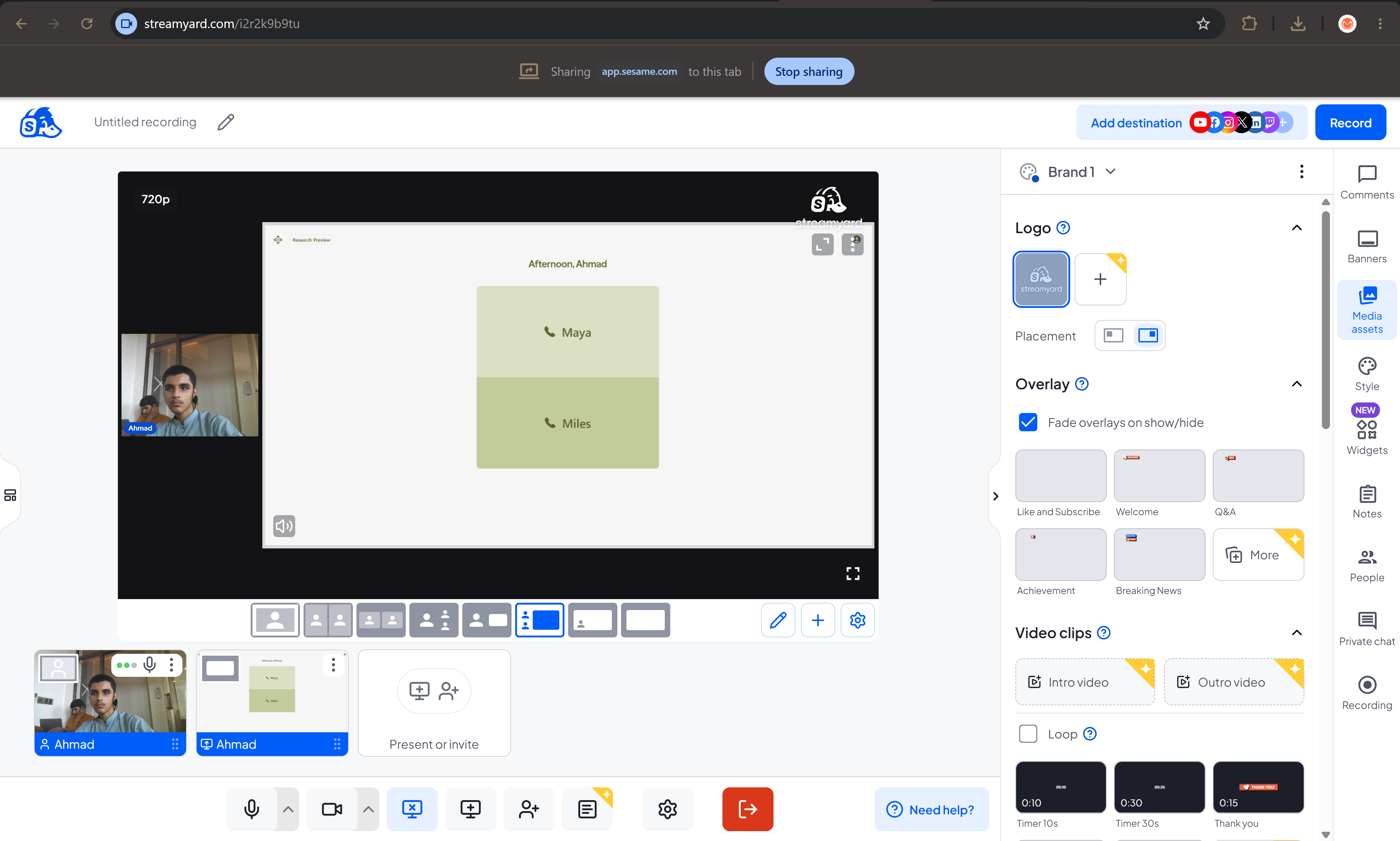
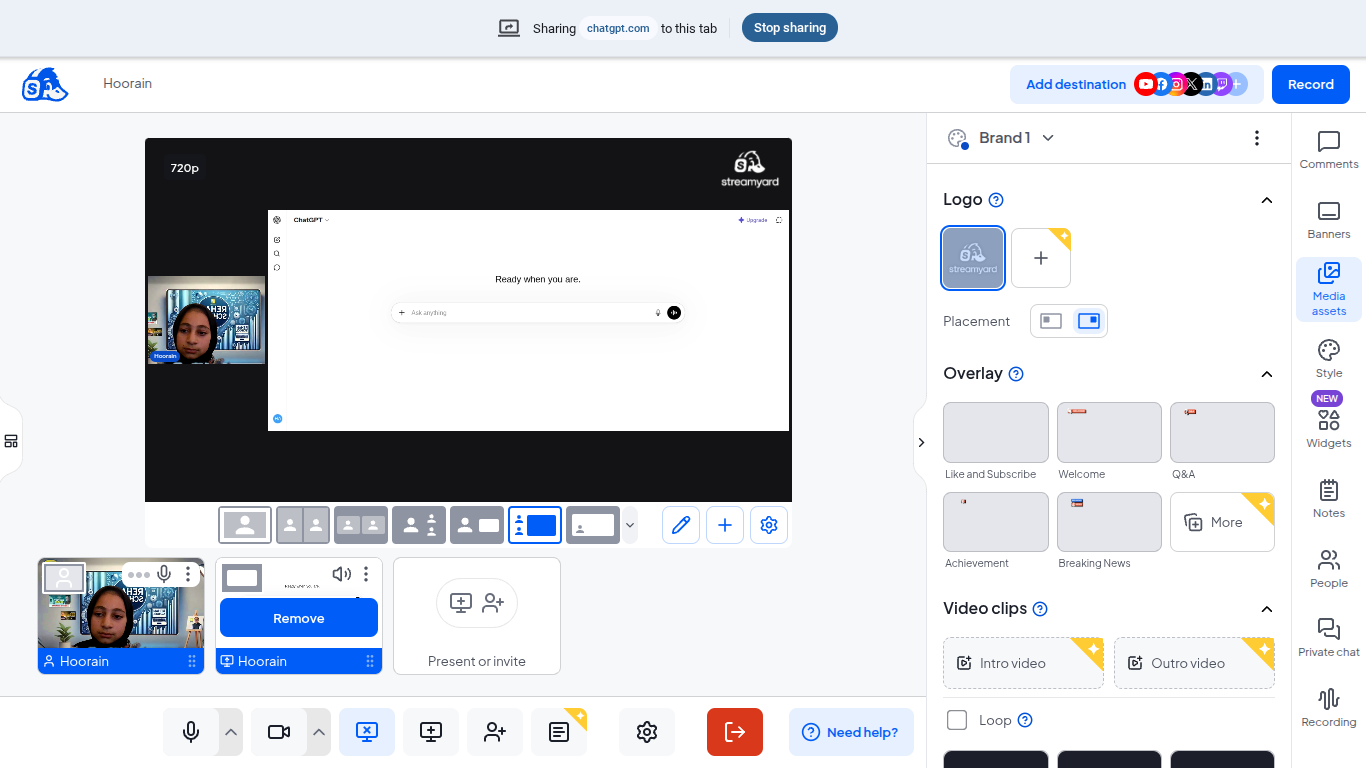
    Use StreamYard to host professional interviews with ease! Simply create a studio, invite your guest with a shareable link, and start your conversation live or record it for later. Customize your layout, display names and branding, share your screen, and engage with your audience through live comments—all from your browser with no downloads required.
    #StreamYard #LiveStreaming #Interviews #Podcasting #ContentCreator #VideoMarketing #LiveVideo #StreamingTips #OnlineInterviews #Broadcasting See less
    13w
    RSIF8 Roll no : 83 Task no :9 Task Topic : How to use streamyard for interviews? 🎙️✨ Use StreamYard to host professional interviews with ease! Simply create a studio, invite your guest with a shareable link, and start your conversation live or record it for later. Customize your layout, display names and branding, share your screen, and engage with your audience through live comments—all from your browser with no downloads required. 🚀📹💬 #StreamYard #LiveStreaming #Interviews #Podcasting #ContentCreator #VideoMarketing #LiveVideo #StreamingTips #OnlineInterviews #Broadcasting 🎙️✨🚀📹💬🎤🌟 See less 13w
    0 Σχόλια 0 Μοιράστηκε 1080 Views
  • RSIF8
    Roll NO:11
    Task post no : 9
    Task topic How to use streamyard for interviews?

    How to Use StreamYard for Interviews
    Want to host online interviews like a pro? StreamYard lets you go live on YouTube, Facebook, or record professional interviews directly from your browser
    Step 1 — Open StreamYard
    Start here
    Open StreamYard Studio
    Sign up with Google / Facebook / Email
    Allow camera & microphone
    You are now ready to create your studio
    Step 2 — Create Your Interview Studio
    Click Create a Broadcast
    Choose platform (YouTube / Facebook / Record Only )
    Enter interview title
    Enter the studio
    Boom Your virtual interview room is ready!
    Step 3 — Invite Your Guest
    This is the magic part
    Click Invite Guests
    Copy the invite link
    Send it to your guest on WhatsApp or Email
    Your guest joins with one click
    Step 4 — Start the Interview
    When your guest joins
    Add them to screen
    Choose layout (side-by-side / full screen)
    Add name banners
    Click Go Live or Record
    You are now LIVE like a real TV show
    Pro Interview Features
    Show comments on screen
    Add logo & background
    Share screen for slides
    Play intro music
    Download recording after interview
    Interview Tips for Success
    Test mic & camera before going live
    Smile and look at camera
    Keep questions ready
    Keep interview 5–15 minutes
    Now you can host professional online interviews from home like a real presenter!
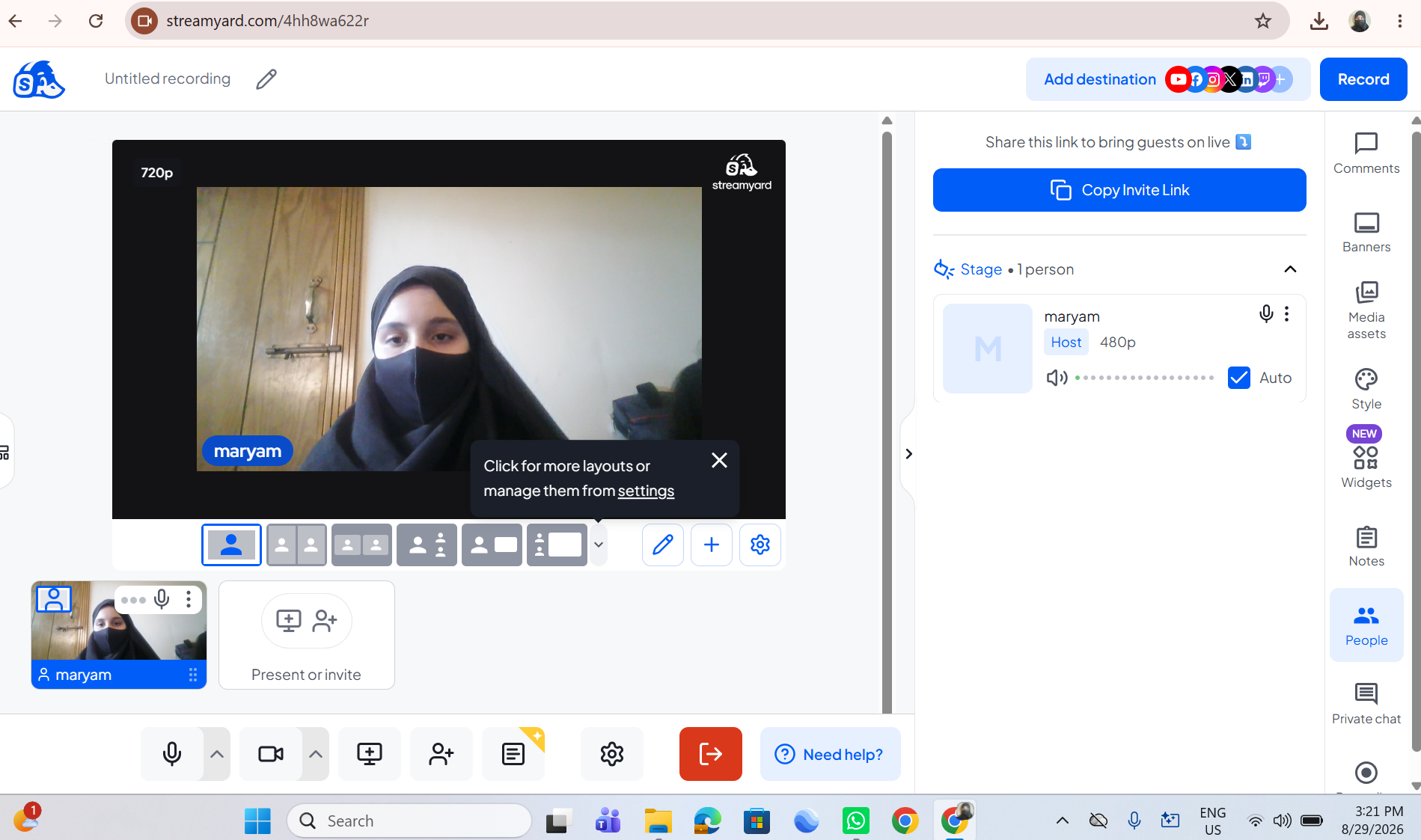
    RSIF8 Roll NO:11 Task post no : 9 Task topic How to use streamyard for interviews? 🎤📺 How to Use StreamYard for Interviews 🤩🎙️💻 Want to host online interviews like a pro? StreamYard lets you go live on YouTube, Facebook, or record professional interviews directly from your browser 🚀🌍✨ ⬇️🌐 Step 1 — Open StreamYard Start here 👇 Open StreamYard Studio🚀 👉 Sign up with Google / Facebook / Email ✉️ 👉 Allow camera 📷 & microphone 🎤 You are now ready to create your studio 🏢✨ 🎬 Step 2 — Create Your Interview Studio 1️⃣ Click Create a Broadcast 🎥 2️⃣ Choose platform (YouTube ▶️ / Facebook 👍 / Record Only 🎬) 3️⃣ Enter interview title 📝 4️⃣ Enter the studio 💻 Boom 💥 Your virtual interview room is ready! 👩‍💻📩 Step 3 — Invite Your Guest This is the magic part ✨ 👉 Click Invite Guests 🔗 👉 Copy the invite link 📋 👉 Send it to your guest on WhatsApp or Email 📲✉️ Your guest joins with one click 😍 🎤🗣️ Step 4 — Start the Interview When your guest joins 👇 ✅ Add them to screen 👥 ✅ Choose layout (side-by-side / full screen) 🖥️ ✅ Add name banners 🏷️ ✅ Click Go Live 🔴 or Record 🎬 You are now LIVE like a real TV show 📺🔥 ✨🎯 Pro Interview Features 🌟 Show comments on screen 💬 🌟 Add logo & background 🖼️ 🌟 Share screen for slides 📊 🌟 Play intro music 🎵 🌟 Download recording after interview 💾 💡🔥 Interview Tips for Success 🎯 Test mic & camera before going live 😊 Smile and look at camera 📋 Keep questions ready ⏰ Keep interview 5–15 minutes 🎉📺 Now you can host professional online interviews from home like a real presenter! 🎤🌍💥
    0 Σχόλια 0 Μοιράστηκε 1023 Views
  • RSIF8
    Roll no:100
    Task no:9
    Task topic:How to use StreamYard for interviews?
    How to Use StreamYard for Interviews
    Want to host professional online interviews with ease? Here's how:
    Create your broadcast in StreamYard
    Invite your guest with a simple link—no software download needed!
    Customize your layout, add your logo, and display names.
    Highlight audience comments live during the interview.
    Stream directly to YouTube, Facebook, LinkedIn, or other platforms.
    Record your interview for future editing and sharing.
    Whether you're hosting podcasts, business discussions, educational sessions, or live Q&As, StreamYard makes interviewing simple and professional.
    #StreamYard #OnlineInterview #LiveStreaming #Podcast #ContentCreator #YouTubeLive #FacebookLive #LinkedInLive #VirtualInterview #LiveShow #StreamingTips #VideoMarketing #DigitalCreator #InterviewTips #ContentMarketing
    RSIF8 Roll no:100 Task no:9 Task topic:How to use StreamYard for interviews? 🎙️ How to Use StreamYard for Interviews 🎥 Want to host professional online interviews with ease? 🚀 Here's how: ✅ Create your broadcast in StreamYard 🎤 Invite your guest with a simple link—no software download needed! 🎥 Customize your layout, add your logo, and display names. 💬 Highlight audience comments live during the interview. 📡 Stream directly to YouTube, Facebook, LinkedIn, or other platforms. 🎬 Record your interview for future editing and sharing. Whether you're hosting podcasts, business discussions, educational sessions, or live Q&As, StreamYard makes interviewing simple and professional. 🌟 #StreamYard #OnlineInterview #LiveStreaming #Podcast #ContentCreator #YouTubeLive #FacebookLive #LinkedInLive #VirtualInterview #LiveShow #StreamingTips #VideoMarketing #DigitalCreator #InterviewTips #ContentMarketing
    0 Σχόλια 0 Μοιράστηκε 3287 Views
  • **Batch 14**
    **Task No. 9**
    **Book ACCl**

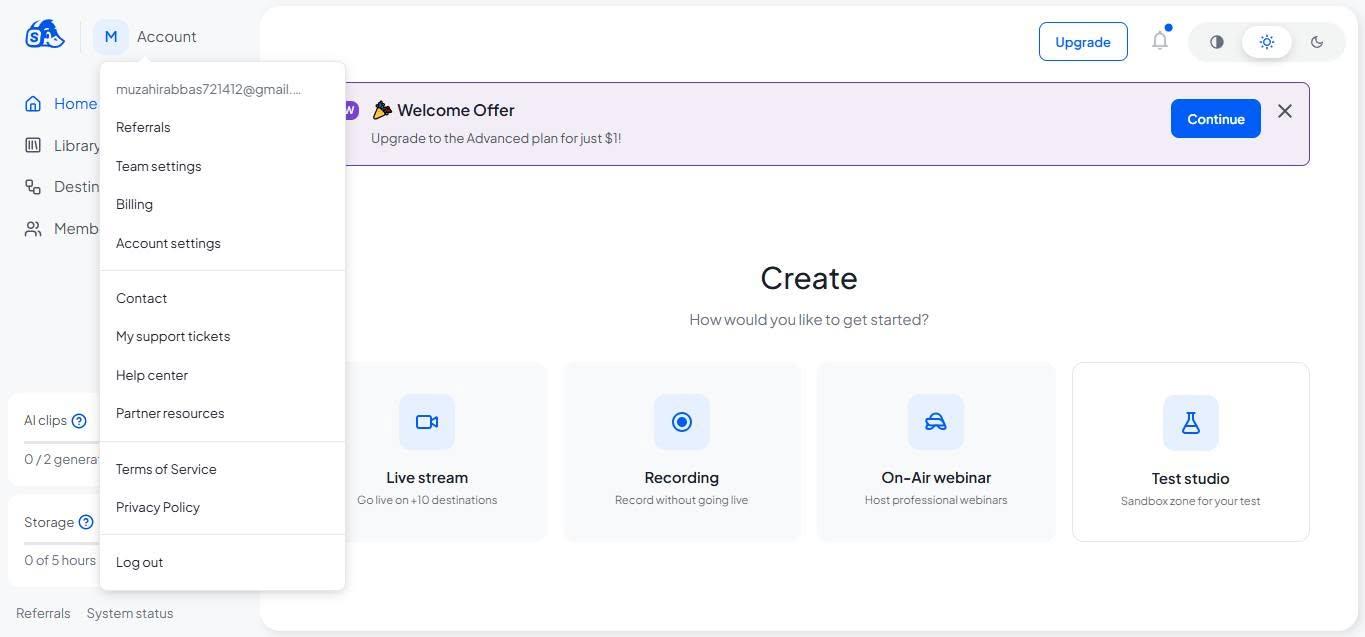
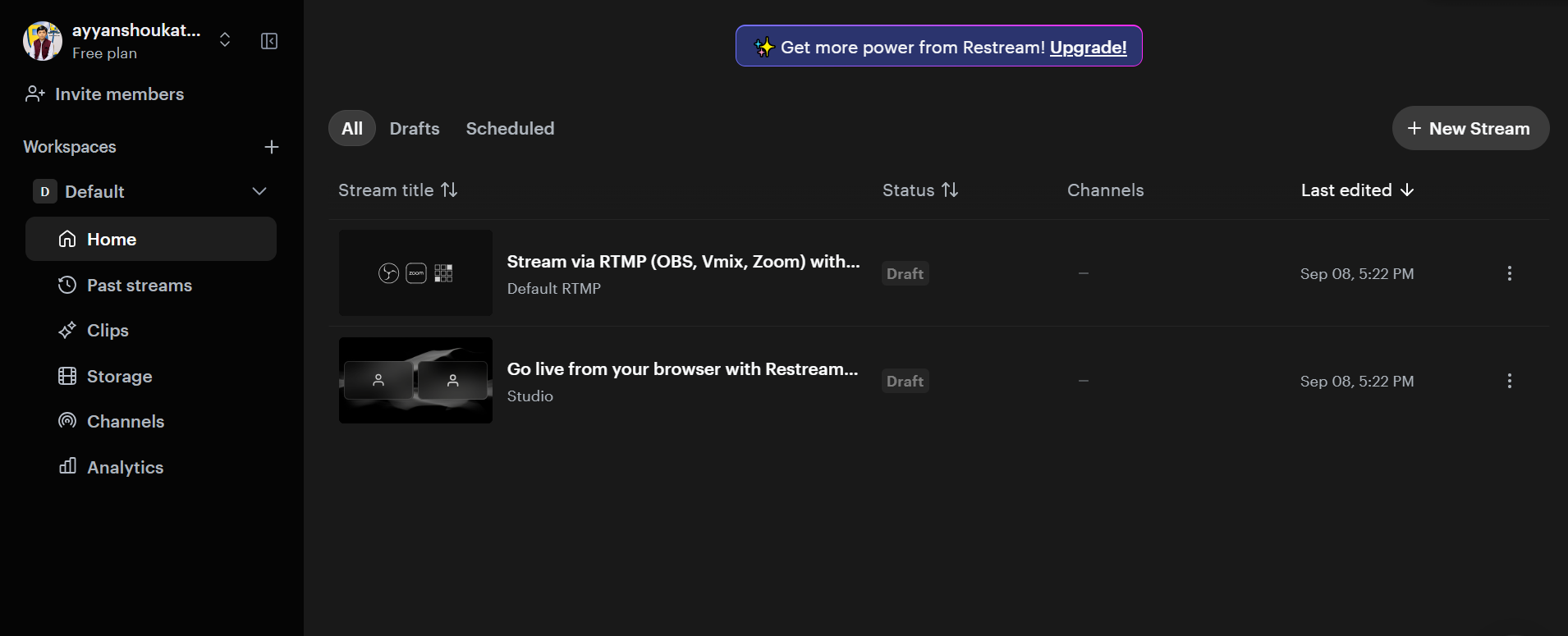
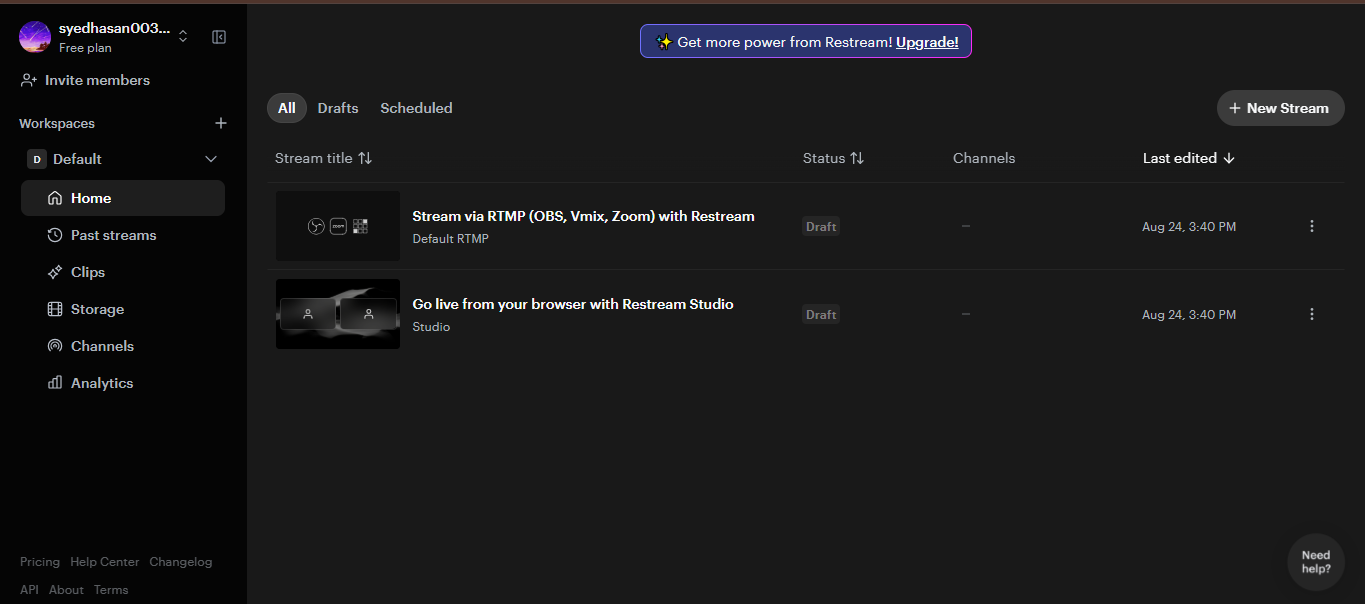
    Today, I successfully completed my task of using **Restream for interviews**. I learned how to set up an online interview, manage the live studio, and use essential features such as camera, microphone, guest invitations, and live broadcasting. This hands-on experience helped me strengthen my skills in virtual communication, live streaming, and professional online interview management.

    #TaskCompleted #Restream #OnlineInterview #LiveStreaming #VirtualCommunication #DigitalSkills #ProfessionalGrowth #Learning
    **Batch 14** **Task No. 9** **Book ACCl** Today, I successfully completed my task of using **Restream for interviews**. I learned how to set up an online interview, manage the live studio, and use essential features such as camera, microphone, guest invitations, and live broadcasting. This hands-on experience helped me strengthen my skills in virtual communication, live streaming, and professional online interview management. #TaskCompleted #Restream #OnlineInterview #LiveStreaming #VirtualCommunication #DigitalSkills #ProfessionalGrowth #Learning
    0 Σχόλια 0 Μοιράστηκε 1840 Views
  • RSIF8
    Roll No: 112
    Task No: 9
    Task Topic: How to Use StreamYard for Interviews?
    In this video, I explain the simple steps to use StreamYard for conducting online interviews and live broadcasts.
    StreamYard is a useful platform for hosting interviews, live streams, and online conversations with guests.
    In this tutorial, you will learn how to:
    Sign up or log in to StreamYard
    Create a broadcast and choose a platform
    Add a title for your interview
    Enter the studio and allow camera and microphone access
    Invite a guest using a share link
    Click Go Live to start the interview
    End the broadcast when the interview is finished
    This activity helped me improve my digital, communication, and online presentation skills.
    Tip: Check your camera, microphone, and internet connection before going live.
    Watch the video and follow the steps!
    Learn • Connect • Interview • Improve
    #RSIF8 #RollNo113 #PostNo8 #StreamYard #OnlineInterview #LiveStreaming #DigitalSkills #DigitalLiteracy #CommunicationSkills #Technology #OnlineLearning #InterviewSkills #PresentationSkills #VirtualInterview #TechSkills #LearningJourney #StudentLife #KeepLearning
    RSIF8 Roll No: 112 Task No: 9 Task Topic: How to Use StreamYard for Interviews? In this video, I explain the simple steps to use StreamYard for conducting online interviews and live broadcasts. 💻🎙️ StreamYard is a useful platform for hosting interviews, live streams, and online conversations with guests. 🌐🗣️ In this tutorial, you will learn how to: 🔹 Sign up or log in to StreamYard 👤 🔹 Create a broadcast and choose a platform 📡 🔹 Add a title for your interview 📝 🔹 Enter the studio and allow camera and microphone access 🎥🎙️ 🔹 Invite a guest using a share link 🔗 🔹 Click Go Live to start the interview 🔴 🔹 End the broadcast when the interview is finished ✅ This activity helped me improve my digital, communication, and online presentation skills. 💻🗣️✨ 💡 Tip: Check your camera, microphone, and internet connection before going live. 🎙️📶 🎬 Watch the video and follow the steps! 👇 Learn • Connect • Interview • Improve 🚀✨ #RSIF8 #RollNo113 #PostNo8 #StreamYard #OnlineInterview #LiveStreaming #DigitalSkills #DigitalLiteracy #CommunicationSkills #Technology #OnlineLearning #InterviewSkills #PresentationSkills #VirtualInterview #TechSkills #LearningJourney #StudentLife #KeepLearning
    0 Σχόλια 0 Μοιράστηκε 2210 Views
  • RSIF8
    Roll No: 113
    Post No: 9
    Post Topic: How to Use StreamYard for Interviews?

    How to Use StreamYard for Interviews?

    In this video, I explain how to use StreamYard to conduct professional and engaging online interviews.

    StreamYard is a useful platform for hosting live streams, interviews, podcasts, and online conversations. It makes it easy to invite guests, manage the interview, and share the conversation with an audience.

    In this tutorial, you will learn how to:

    Open and set up StreamYard
    Create a broadcast or interview
    Invite a guest using a link
    Set up your camera and microphone
    Manage the interview screen
    Share your interview with an audience
    Use StreamYard's features for a professional interview

    This activity helped me improve my **digital communication, online interview, and content creation skills**.

    Tip: Before starting an interview, check your internet connection, microphone, camera, and background to make sure everything is ready.

    Watch the video and follow the steps!

    Learn • Connect • Interview • Create

    #RSIF8 #RollNo113 #PostNo9 #StreamYard #StreamYardTutorial #OnlineInterview #InterviewSkills #LiveStreaming #ContentCreation #DigitalSkills #DigitalLiteracy #Technology #CommunicationSkills #OnlineLearning #ComputerSkills #LearningJourney #StudentLife #TechSkills #DigitalWorld #Podcast #VirtualInterview #LiveInterview #KeepLearning #LearnAndGrow #StepByStep
    RSIF8 🎓✨ Roll No: 113 🎯 Post No: 9 📝 Post Topic: How to Use StreamYard for Interviews? 🎥🎙️ 🎥✨ How to Use StreamYard for Interviews? In this video, I explain how to use StreamYard to conduct professional and engaging online interviews. 💻🎙️ StreamYard is a useful platform for hosting live streams, interviews, podcasts, and online conversations. It makes it easy to invite guests, manage the interview, and share the conversation with an audience. 🌐🚀 In this tutorial, you will learn how to: 🔹 Open and set up StreamYard 💻 🔹 Create a broadcast or interview 🎥 🔹 Invite a guest using a link 🔗 🔹 Set up your camera and microphone 🎙️ 🔹 Manage the interview screen 👥 🔹 Share your interview with an audience 🌍 🔹 Use StreamYard's features for a professional interview ✨ This activity helped me improve my **digital communication, online interview, and content creation skills**. 📚💻🎤 💡 Tip: Before starting an interview, check your internet connection, microphone, camera, and background to make sure everything is ready. 🎬 Watch the video and follow the steps! 👇 Learn • Connect • Interview • Create 🚀✨ #RSIF8 #RollNo113 #PostNo9 #StreamYard #StreamYardTutorial #OnlineInterview #InterviewSkills #LiveStreaming #ContentCreation #DigitalSkills #DigitalLiteracy #Technology #CommunicationSkills #OnlineLearning #ComputerSkills #LearningJourney #StudentLife #TechSkills #DigitalWorld #Podcast #VirtualInterview #LiveInterview #KeepLearning #LearnAndGrow #StepByStep
    0 Σχόλια 0 Μοιράστηκε 3124 Views
  • #rsisb
    Roll no.247
    Foundation level

    # Sound Waves: The Physics of Hearing and Communication

    Have you ever wondered how a sound travels from one place to another? How does a musical instrument produce beautiful melodies? How can we hear someone speaking from across a room? The fascinating answer lies in the science of **sound waves!**

    In this exciting exploration of **“Sound Waves: The Physics of Hearing and Communication,”** we dive into the amazing world of sound and discover the physics behind one of the most important ways humans experience and understand the world around them.

    Sound is a form of energy that travels through a medium such as air, water, or solids. When an object vibrates, it causes nearby particles to vibrate, creating a wave that carries energy from one location to another. These vibrations eventually reach our ears, allowing our brains to recognize sounds.

    We’ll explore important concepts such as **frequency, wavelength, amplitude, speed, and pitch**. Understanding these properties helps explain why some sounds are high or low, loud or soft.

    The journey of sound into the human ear is equally fascinating! Sound waves enter the ear and cause tiny structures to vibrate. These vibrations are transformed into electrical signals that travel to the brain, where they are interpreted as meaningful sounds. This incredible process allows us to enjoy music , understand speech , recognize familiar sounds , and communicate with people around us.

    Communication depends heavily on sound. From everyday conversations to public speaking, telephone calls, radio broadcasts, and educational videos, sound allows information to travel between people. Modern technology also uses the principles of sound waves in microphones, speakers, headphones, medical imaging, and many other applications.

    This topic is a wonderful opportunity for students, science lovers, and curious minds to connect **physics with everyday life**. Instead of thinking of sound as something we simply hear, we can understand it as a physical phenomenon involving vibrations, energy, waves, and the remarkable human hearing system.

    **In this learning journey, you can discover:**
    What sound waves are
    How vibrations create sound
    How sound travels through different materials
    The relationship between frequency and pitch
    How amplitude affects loudness
    How the human ear detects sound
    How the brain interprets sound signals
    How sound enables communication
    How microphones and speakers work
    Everyday applications of sound-wave technology

    **Sound is everywhere!** From the gentle sound of rain to birds singing , from the voices of our friends to the music we enjoy , sound surrounds us every day. By understanding its physics, we gain a deeper appreciation for the invisible waves that connect our world.

    So get ready to listen, learn, explore, and discover the fascinating science behind the sounds we hear every day!

    **Learn the science. Understand the waves. Discover the power of sound!**

    #SoundWaves #Physics #Science #PhysicsOfSound #Hearing #Communication #Waves #SoundPhysics #ScienceEducation #PhysicsEducation #LearnScience #STEM #STEMEducation #HumanEar #Frequency #Amplitude #Wavelength #Pitch #Vibrations #ScienceForStudents #EducationalVideo #Learning #ScienceExploration #Technology #Acoustics #SoundAndCommunication #Curiosity #Knowledge #Education #ExploreScience
    #rsisb Roll no.247 Foundation level # 🔊 Sound Waves: The Physics of Hearing and Communication 🎧🌊 Have you ever wondered how a sound travels from one place to another? 🤔🔊 How does a musical instrument produce beautiful melodies? 🎵 How can we hear someone speaking from across a room? 🗣️👂 The fascinating answer lies in the science of **sound waves!** 🌊✨ In this exciting exploration of **“Sound Waves: The Physics of Hearing and Communication,”** we dive into the amazing world of sound and discover the physics behind one of the most important ways humans experience and understand the world around them. 🌍🔬 Sound is a form of energy that travels through a medium such as air, water, or solids. 🌬️💧🪨 When an object vibrates, it causes nearby particles to vibrate, creating a wave that carries energy from one location to another. These vibrations eventually reach our ears, allowing our brains to recognize sounds. 🧠👂💡 We’ll explore important concepts such as **frequency, wavelength, amplitude, speed, and pitch**. 📚📐 Understanding these properties helps explain why some sounds are high or low, loud or soft. 🎶🔉🔊 The journey of sound into the human ear is equally fascinating! 👂✨ Sound waves enter the ear and cause tiny structures to vibrate. These vibrations are transformed into electrical signals that travel to the brain, where they are interpreted as meaningful sounds. 🧠⚡ This incredible process allows us to enjoy music 🎼, understand speech 🗣️, recognize familiar sounds 👋, and communicate with people around us. ❤️🌎 Communication depends heavily on sound. From everyday conversations to public speaking, telephone calls, radio broadcasts, and educational videos, sound allows information to travel between people. 📞📻🎙️ Modern technology also uses the principles of sound waves in microphones, speakers, headphones, medical imaging, and many other applications. 💻🎧🔬 This topic is a wonderful opportunity for students, science lovers, and curious minds to connect **physics with everyday life**. 🌟📖 Instead of thinking of sound as something we simply hear, we can understand it as a physical phenomenon involving vibrations, energy, waves, and the remarkable human hearing system. 🌊⚛️👂 🎯 **In this learning journey, you can discover:** 🔹 What sound waves are 🔹 How vibrations create sound 🔹 How sound travels through different materials 🔹 The relationship between frequency and pitch 🔹 How amplitude affects loudness 🔹 How the human ear detects sound 🔹 How the brain interprets sound signals 🔹 How sound enables communication 🔹 How microphones and speakers work 🔹 Everyday applications of sound-wave technology 🌈 **Sound is everywhere!** From the gentle sound of rain 🌧️ to birds singing 🐦, from the voices of our friends 🗣️ to the music we enjoy 🎵, sound surrounds us every day. By understanding its physics, we gain a deeper appreciation for the invisible waves that connect our world. 🌍🌊✨ So get ready to listen, learn, explore, and discover the fascinating science behind the sounds we hear every day! 🔊🎧🔬📚 💡 **Learn the science. Understand the waves. Discover the power of sound!** 🌊🔊✨ #SoundWaves #Physics #Science #PhysicsOfSound #Hearing #Communication #Waves #SoundPhysics #ScienceEducation #PhysicsEducation #LearnScience #STEM #STEMEducation #HumanEar #Frequency #Amplitude #Wavelength #Pitch #Vibrations #ScienceForStudents #EducationalVideo #Learning #ScienceExploration #Technology #Acoustics #SoundAndCommunication #Curiosity #Knowledge #Education #ExploreScience 🔬📚🌍🎧🔊✨
    0 Σχόλια 0 Μοιράστηκε 6227 Views
  • #rsisb
    Roll No.269
    Foundation Level
    Account Creation

    ## How to Use Restream for Interviews?

    **Restream** is a streaming platform that lets you host an online interview and broadcast it to multiple platforms at the same time. It can be useful for school interviews, online discussions, podcasts, and live sessions.

    ### Video Description

    In this video, I will explain **how to use Restream for interviews** step by step. We will learn how to create a Restream account, set up a live studio, invite a guest, check the microphone and camera, and prepare everything before starting the interview.

    I will also explain how to add your guest to the interview, manage the interview screen, use the chat, share your screen, and control the live broadcast.

    ### Topics Covered

    What is Restream?
    How to create an account
    How to open Restream Studio
    How to set up your camera and microphone
    How to invite a guest
    How to prepare interview questions
    How to check audio and video
    How to share your screen
    How to use the interview layout
    How to manage comments and chat
    How to start and end the interview
    Basic tips for a smooth online interview

    Restream can make online interviews more organized and professional. Whether you are a **student, teacher, content creator, or beginner**, this tutorial will help you understand the basic process of conducting an interview online.

    If you enjoy this video, don't forget to **Like , Share , and Subscribe ** for more tutorials, technology guides, and student projects.

    Thank you for watching!
    Keep learning, keep practicing, and keep creating!

    #Restream #RestreamStudio #HowToUseRestream #RestreamInterview #OnlineInterview #InterviewTutorial #LiveStreaming #LiveInterview #StreamingTips #DigitalSkills #Technology #StudentProjects #OnlineLearning #ContentCreation #LiveStream #TechTutorial #BeginnerGuide #Education
    #rsisb Roll No.269 Foundation Level Account Creation ## 🎥 How to Use Restream for Interviews? **Restream** is a streaming platform that lets you host an online interview and broadcast it to multiple platforms at the same time. It can be useful for school interviews, online discussions, podcasts, and live sessions. 🎤💻 ### 📝 Video Description In this video, I will explain **how to use Restream for interviews** step by step. 🎙️✨ We will learn how to create a Restream account, set up a live studio, invite a guest, check the microphone and camera, and prepare everything before starting the interview. I will also explain how to add your guest to the interview, manage the interview screen, use the chat, share your screen, and control the live broadcast. 💻🎤 ### 🎯 Topics Covered ✅ What is Restream? ✅ How to create an account ✅ How to open Restream Studio ✅ How to set up your camera and microphone ✅ How to invite a guest ✅ How to prepare interview questions ✅ How to check audio and video ✅ How to share your screen ✅ How to use the interview layout ✅ How to manage comments and chat ✅ How to start and end the interview ✅ Basic tips for a smooth online interview Restream can make online interviews more organized and professional. Whether you are a **student, teacher, content creator, or beginner**, this tutorial will help you understand the basic process of conducting an interview online. 🌟📚 If you enjoy this video, don't forget to **Like 👍, Share 📤, and Subscribe 🔔** for more tutorials, technology guides, and student projects. Thank you for watching! 🙏 Keep learning, keep practicing, and keep creating! 🚀💻🎙️ #Restream #RestreamStudio #HowToUseRestream #RestreamInterview #OnlineInterview #InterviewTutorial #LiveStreaming #LiveInterview #StreamingTips #DigitalSkills #Technology #StudentProjects #OnlineLearning #ContentCreation #LiveStream #TechTutorial #BeginnerGuide #Education 🎤💻✨
    0 Σχόλια 0 Μοιράστηκε 4776 Views
  • Task: How to Download and Use CallAnnie
    Book: Accl
    Task no: 8
    *StreamYard Studio Setup Screen*
    This image shows the StreamYard studio setup page before entering a live broadcast. On the left side, there is a webcam preview displaying a person sitting in front of a plain wall. The camera quality is set to *480p*, and microphone, camera, and settings controls are visible below the video preview. Device options for the camera, microphone, and speakers are also shown at the bottom.
    On the right side, StreamYard displays the message *"Let's set up your studio", indicating that the user is preparing to join the studio. The microphone status shows *"Working"*, confirming that audio is being detected. There are fields to enter a **Display Name* and an optional *Headline, along with a blue *"Enter studio"** button to proceed.
    This screen is used to check your camera, microphone, and audio settings before starting or joining a live stream.
    #StreamYard #LiveStreaming #StudioSetup #OnlineBroadcast #ContentCreator #VideoStreaming #StreamingTools See less See less
    Task: How to Download and Use CallAnnie Book: Accl Task no: 8 📹 *StreamYard Studio Setup Screen* This image shows the StreamYard studio setup page before entering a live broadcast. On the left side, there is a webcam preview displaying a person sitting in front of a plain wall. The camera quality is set to *480p*, and microphone, camera, and settings controls are visible below the video preview. Device options for the camera, microphone, and speakers are also shown at the bottom. On the right side, StreamYard displays the message *"Let's set up your studio", indicating that the user is preparing to join the studio. The microphone status shows *"Working"*, confirming that audio is being detected. There are fields to enter a **Display Name* and an optional *Headline, along with a blue *"Enter studio"** button to proceed. 💡 This screen is used to check your camera, microphone, and audio settings before starting or joining a live stream. #StreamYard #LiveStreaming #StudioSetup #OnlineBroadcast #ContentCreator #VideoStreaming #StreamingTools 🚀 See less See less
    0 Σχόλια 0 Μοιράστηκε 3029 Views
Αναζήτηση αποτελεσμάτων