#rsisb
Roll no.247
Foundation level# Basic Calculator with GUI
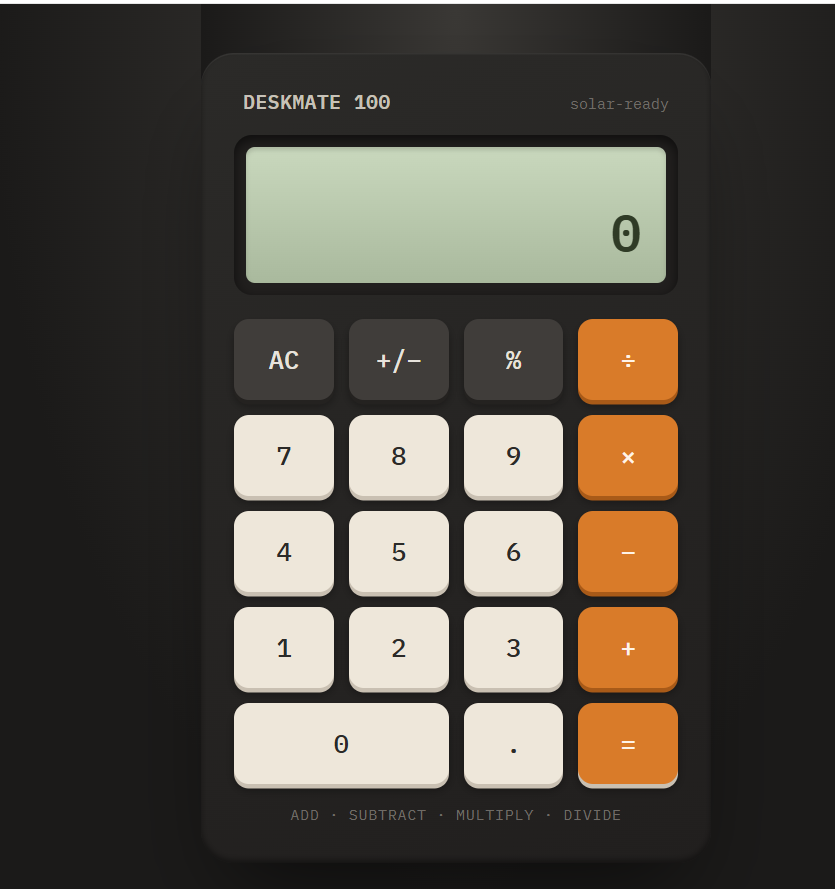
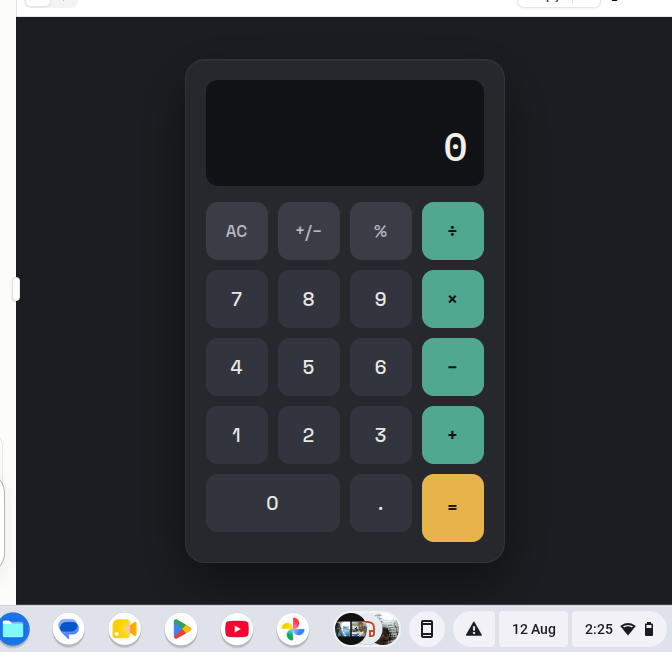
Welcome to **Basic Calculator with GUI** — a simple, user-friendly, and interactive calculator project designed to make everyday mathematical calculations quick, easy, and enjoyable!
This project demonstrates how a calculator can be built with a **Graphical User Interface (GUI)**, allowing users to perform calculations by simply clicking buttons instead of typing commands.
The calculator provides essential mathematical operations such as **addition
, subtraction
, multiplication
, and division
**. It is designed with a clean and straightforward interface so that beginners, students, and anyone interested in programming can easily understand how a GUI-based application works.
One of the most interesting aspects of this project is the combination of **programming logic and visual design**.
Users can enter numbers, select mathematical operators, and instantly see the result displayed on the calculator screen. This makes the project a great example of how programming can be used to create practical and interactive applications.
The **Basic Calculator with GUI** is also an excellent learning project for students who are beginning their programming journey.
Through this project, learners can understand important concepts such as **variables, functions, event handling, buttons, input fields, operators, conditional logic, and GUI components**. These concepts provide a strong foundation for developing more advanced software applications in the future.
The simple design makes the calculator easy to navigate, while the interactive buttons provide a smooth user experience.
Whether you want to calculate a total, subtract numbers, multiply values, or divide one number by another, this calculator provides the essential tools needed for basic arithmetic.
This project also highlights the importance of creating applications that are not only functional but also **easy to use and visually understandable**.
A well-designed GUI helps users interact with software naturally and makes complex programming concepts more accessible.
Overall, the **Basic Calculator with GUI** is a fun, educational, and practical programming project.
It is perfect for beginners who want to practice GUI development while building something useful. With additional features, the project can later be expanded into a more advanced calculator with percentage calculations, decimal support, square roots, memory functions, calculation history, and more!
**Project Highlights:**
Simple and clean GUI design
Addition, subtraction, multiplication, and division
Interactive calculator buttons
Easy-to-understand interface
Beginner-friendly programming project
Useful for learning GUI development
Great practice for programming logic
Can be expanded with advanced features
**Learn. Code. Calculate. Create!**
#BasicCalculator #CalculatorGUI #GUICalculator #Programming #Coding #ComputerScience #PythonProject #BeginnerProject #ProgrammingForBeginners #GUIProgramming #SoftwareDevelopment #CodingProject #MathCalculator #LearnProgramming #StudentProject #TechProject #InteractiveApplication #ComputerProgramming #CodingJourney #ProgrammingSkills #Education #Technology #Developer #CodeLearning #CreativeCoding #Math #CalculatorProject #rsisb
Roll no.247
Foundation level# Basic Calculator with GUI 🧮💻
Welcome to **Basic Calculator with GUI** — a simple, user-friendly, and interactive calculator project designed to make everyday mathematical calculations quick, easy, and enjoyable! 🎉✨ This project demonstrates how a calculator can be built with a **Graphical User Interface (GUI)**, allowing users to perform calculations by simply clicking buttons instead of typing commands. 🖱️🔢
The calculator provides essential mathematical operations such as **addition ➕, subtraction ➖, multiplication ✖️, and division ➗**. It is designed with a clean and straightforward interface so that beginners, students, and anyone interested in programming can easily understand how a GUI-based application works. 💡👨💻👩💻
One of the most interesting aspects of this project is the combination of **programming logic and visual design**. 🎨💻 Users can enter numbers, select mathematical operators, and instantly see the result displayed on the calculator screen. This makes the project a great example of how programming can be used to create practical and interactive applications. 🚀
The **Basic Calculator with GUI** is also an excellent learning project for students who are beginning their programming journey. 📚🌟 Through this project, learners can understand important concepts such as **variables, functions, event handling, buttons, input fields, operators, conditional logic, and GUI components**. These concepts provide a strong foundation for developing more advanced software applications in the future. 🧠💻
The simple design makes the calculator easy to navigate, while the interactive buttons provide a smooth user experience. 🔢🖱️ Whether you want to calculate a total, subtract numbers, multiply values, or divide one number by another, this calculator provides the essential tools needed for basic arithmetic. ✅
This project also highlights the importance of creating applications that are not only functional but also **easy to use and visually understandable**. 🌟 A well-designed GUI helps users interact with software naturally and makes complex programming concepts more accessible.
Overall, the **Basic Calculator with GUI** is a fun, educational, and practical programming project. 🧮✨ It is perfect for beginners who want to practice GUI development while building something useful. With additional features, the project can later be expanded into a more advanced calculator with percentage calculations, decimal support, square roots, memory functions, calculation history, and more! 🚀🔢
🎯 **Project Highlights:**
🔹 Simple and clean GUI design
🔹 Addition, subtraction, multiplication, and division
🔹 Interactive calculator buttons
🔹 Easy-to-understand interface
🔹 Beginner-friendly programming project
🔹 Useful for learning GUI development
🔹 Great practice for programming logic
🔹 Can be expanded with advanced features
💻 **Learn. Code. Calculate. Create!** 🧮🚀
#BasicCalculator #CalculatorGUI #GUICalculator #Programming #Coding #ComputerScience #PythonProject #BeginnerProject #ProgrammingForBeginners #GUIProgramming #SoftwareDevelopment #CodingProject #MathCalculator #LearnProgramming #StudentProject #TechProject #InteractiveApplication #ComputerProgramming #CodingJourney #ProgrammingSkills #Education #Technology #Developer #CodeLearning #CreativeCoding #Math #CalculatorProject 🧮💻