Mohsin RSi F8
Roll NO:13
Coding Task NO:16
Class: Foundation Level
Made by Me
BMI Calculator – A Simple Coding Project
Today, I completed a BMI Calculator coding task as part of my learning journey. This project helped me understand how a simple web application can take user input, perform a calculation, and display the result instantly.
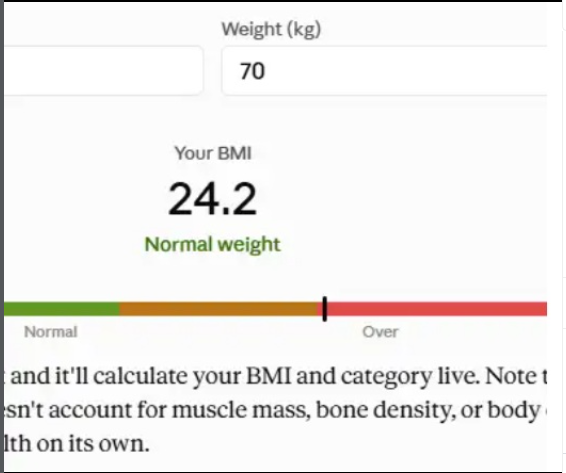
The BMI Calculator allows the user to enter their weight in kilograms and height in centimeters. After clicking the Calculate BMI button, the program converts the height into meters and uses the BMI formula to calculate the result.
The basic formula is:
BMI = Weight (kg) ÷ Height² (m)
This project was a great way to practice important programming concepts such as HTML, CSS, JavaScript, user input, variables, mathematical calculations, functions, conditions, and displaying results on a webpage.
I also added a Reset button, which makes it easy to clear the previous information and try the calculator again. The design is simple and user-friendly so that anyone can understand how to use it.
While working on this project, I learned that coding is not only about writing lines of code. It is also about understanding a problem, creating a logical solution, testing the program, and improving the user experience.
This task also helped me improve my confidence in JavaScript because the calculator needs to take the information entered by the user, calculate the BMI, and show the result dynamically without refreshing the page.
Overall, creating the BMI Calculator was a useful and interesting learning experience. It gave me more practice with web development and helped me understand how HTML, CSS, and JavaScript work together to create an interactive application.
I am excited to continue learning more coding skills and build more useful projects in the future. Every small project is another step toward becoming a better programmer.
Task Completed
Project: BMI Calculator
Calculation: BMI
Technologies: HTML, CSS & JavaScript
User Input: Weight & Height
Feature: Reset Button
Skills Practiced: Logic, Functions, Conditions & Web Development
#RSF8 #Storypost112 #BMICalculator #CodingP
Roll NO:13
Coding Task NO:16
Class: Foundation Level
Made by Me
BMI Calculator – A Simple Coding Project
Today, I completed a BMI Calculator coding task as part of my learning journey. This project helped me understand how a simple web application can take user input, perform a calculation, and display the result instantly.
The BMI Calculator allows the user to enter their weight in kilograms and height in centimeters. After clicking the Calculate BMI button, the program converts the height into meters and uses the BMI formula to calculate the result.
The basic formula is:
BMI = Weight (kg) ÷ Height² (m)
This project was a great way to practice important programming concepts such as HTML, CSS, JavaScript, user input, variables, mathematical calculations, functions, conditions, and displaying results on a webpage.
I also added a Reset button, which makes it easy to clear the previous information and try the calculator again. The design is simple and user-friendly so that anyone can understand how to use it.
While working on this project, I learned that coding is not only about writing lines of code. It is also about understanding a problem, creating a logical solution, testing the program, and improving the user experience.
This task also helped me improve my confidence in JavaScript because the calculator needs to take the information entered by the user, calculate the BMI, and show the result dynamically without refreshing the page.
Overall, creating the BMI Calculator was a useful and interesting learning experience. It gave me more practice with web development and helped me understand how HTML, CSS, and JavaScript work together to create an interactive application.
I am excited to continue learning more coding skills and build more useful projects in the future. Every small project is another step toward becoming a better programmer.
Task Completed
Project: BMI Calculator
Calculation: BMI
Technologies: HTML, CSS & JavaScript
User Input: Weight & Height
Feature: Reset Button
Skills Practiced: Logic, Functions, Conditions & Web Development
#RSF8 #Storypost112 #BMICalculator #CodingP
Mohsin RSi F8 🎓✨
Roll NO:13
Coding Task NO:16
Class: Foundation Level 📚
Made by Me 💻🚀
⚖️ BMI Calculator – A Simple Coding Project 💻✨
Today, I completed a BMI Calculator coding task as part of my learning journey. This project helped me understand how a simple web application can take user input, perform a calculation, and display the result instantly.
The BMI Calculator allows the user to enter their weight in kilograms and height in centimeters. After clicking the Calculate BMI button, the program converts the height into meters and uses the BMI formula to calculate the result.
The basic formula is:
BMI = Weight (kg) ÷ Height² (m)
This project was a great way to practice important programming concepts such as HTML, CSS, JavaScript, user input, variables, mathematical calculations, functions, conditions, and displaying results on a webpage.
I also added a Reset button, which makes it easy to clear the previous information and try the calculator again. The design is simple and user-friendly so that anyone can understand how to use it.
While working on this project, I learned that coding is not only about writing lines of code. It is also about understanding a problem, creating a logical solution, testing the program, and improving the user experience.
This task also helped me improve my confidence in JavaScript because the calculator needs to take the information entered by the user, calculate the BMI, and show the result dynamically without refreshing the page.
Overall, creating the BMI Calculator was a useful and interesting learning experience. 🚀 It gave me more practice with web development and helped me understand how HTML, CSS, and JavaScript work together to create an interactive application.
I am excited to continue learning more coding skills and build more useful projects in the future. Every small project is another step toward becoming a better programmer. 💻📚🌟
Task Completed ✅
💻 Project: BMI Calculator
🧮 Calculation: BMI
🌐 Technologies: HTML, CSS & JavaScript
🔢 User Input: Weight & Height
🔄 Feature: Reset Button
📚 Skills Practiced: Logic, Functions, Conditions & Web Development
#RSF8🎓✨ #Storypost112 #BMICalculator #CodingP
0 Commentarios
0 Acciones
218 Views