• Foundation level
    Day:- 96
    Rollno:-005

    code task

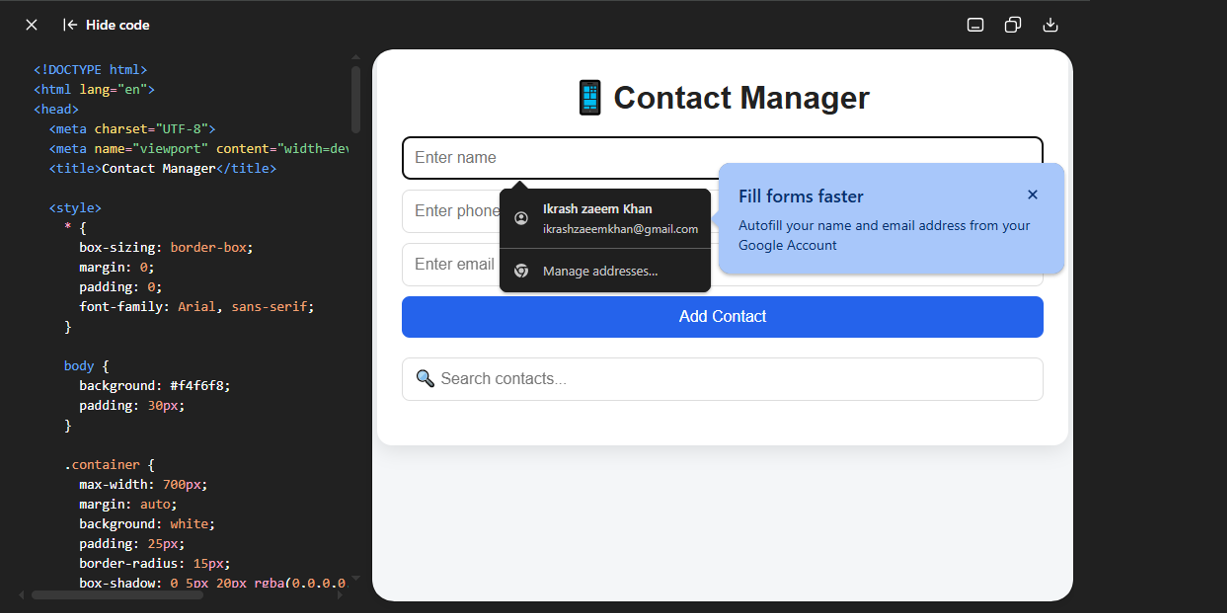
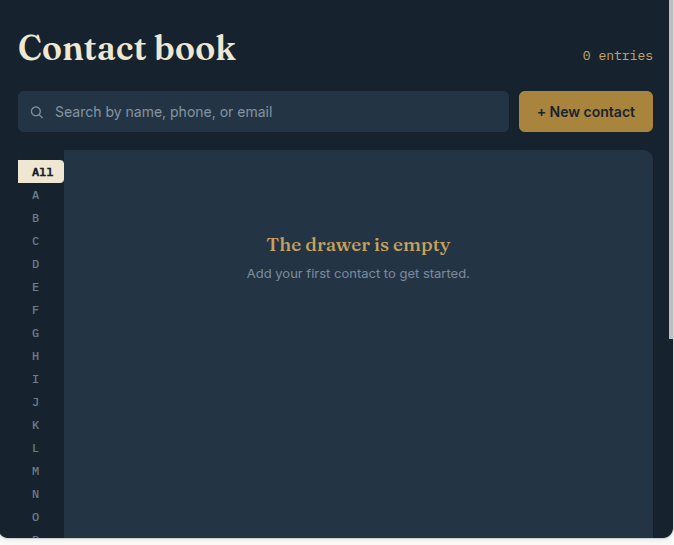
    Contact Manager

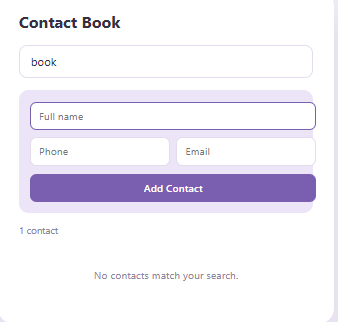
    Contact Manager is a simple and user-friendly web application designed to help users easily store and manage their contacts. Users can add names, phone numbers, and email addresses, then search, edit, or delete contacts whenever needed. The application uses Local Storage to save contact information directly in the browser, so the contacts remain available even after refreshing the page. It features a clean, responsive, and modern interface that works well on both desktop and mobile devices.
    Foundation level Day:- 96 Rollno:-005 code task 📱 Contact Manager Contact Manager is a simple and user-friendly web application designed to help users easily store and manage their contacts. Users can add names, phone numbers, and email addresses, then search, edit, or delete contacts whenever needed. The application uses Local Storage to save contact information directly in the browser, so the contacts remain available even after refreshing the page. It features a clean, responsive, and modern interface that works well on both desktop and mobile devices.
    0 التعليقات 0 المشاركات 247 مشاهدة
  • #rsisb
    Roll No.280
    Coding Task.10
    Fundation Level
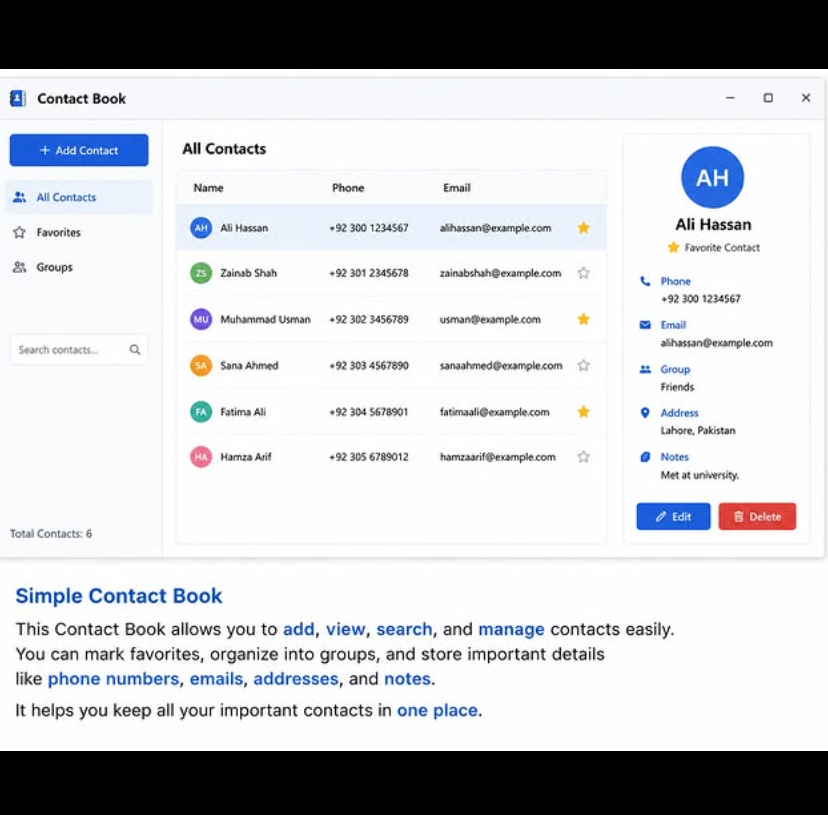
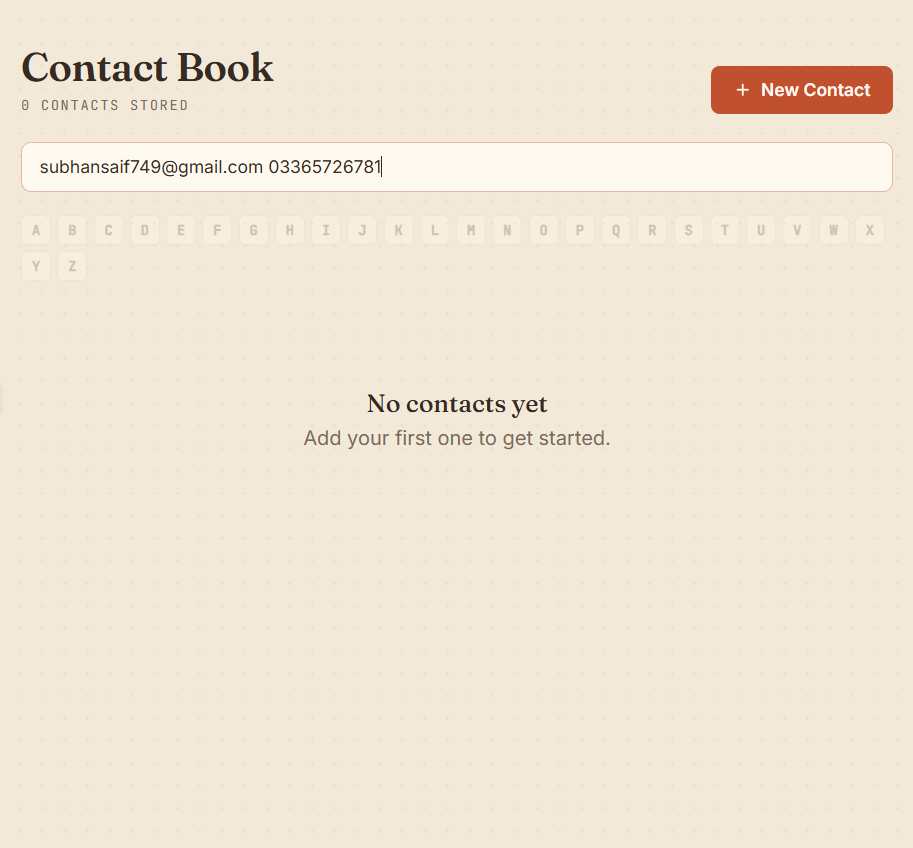
    **Simple Contact Book – Store & Manage Contacts**
    The **Simple Contact Book** is a useful and easy-to-use application designed to help users **store, manage, and organize their contacts** in one convenient place.
    With this project, users can easily add new contacts, view saved information, update contact details, and remove contacts when they are no longer needed.
    This beginner-friendly project is a great way to learn important programming concepts such as **data storage, user input, contact management, and GUI/application design**.
    **Features:**
    Add new contacts
    Store names and phone numbers
    View saved contacts
    Update contact information
    Delete unwanted contacts
    Simple and user-friendly interface
    Beginner-friendly project
    A perfect project for students and beginners who want to practice programming while creating a practical everyday application!
    #SimpleContactBook #ContactBook #ContactManager #Coding #Programming #Python #GUI #AppDevelopment #CodingProject #BeginnerProject #SoftwareDevelopment #Tech #LearnProgramming #StudentProject #Contacts
    #rsisb Roll No.280 Coding Task.10 Fundation Level 📱📒 **Simple Contact Book – Store & Manage Contacts** 📒📱 The **Simple Contact Book** is a useful and easy-to-use application designed to help users **store, manage, and organize their contacts** in one convenient place. 👤📞✨ With this project, users can easily add new contacts, view saved information, update contact details, and remove contacts when they are no longer needed. 📝➕🔄🗑️ This beginner-friendly project is a great way to learn important programming concepts such as **data storage, user input, contact management, and GUI/application design**. 💻🚀📚 🌟 **Features:** ✅ Add new contacts ✅ Store names and phone numbers ✅ View saved contacts ✅ Update contact information ✅ Delete unwanted contacts ✅ Simple and user-friendly interface ✅ Beginner-friendly project 💡 A perfect project for students and beginners who want to practice programming while creating a practical everyday application! 🎓💻🔥 #SimpleContactBook #ContactBook #ContactManager #Coding #Programming #Python #GUI #AppDevelopment #CodingProject #BeginnerProject #SoftwareDevelopment #Tech #LearnProgramming #StudentProject #Contacts 📱💻🚀
    0 التعليقات 0 المشاركات 558 مشاهدة
  • RSIF8
    Roll no 68
    Task no 96
    Task topic;Simple Contact Book

    The Simple Contact Book is a user-friendly application designed to store and manage contact information in one place. It allows users to easily add, edit, search, and delete contacts, making it simple to keep important phone numbers and email addresses organized. With its clean interface and basic features, it is an ideal project for learning contact management and improving programming skills.

    Stay organized and keep all your important contacts just a click away!
    RSIF8 Roll no 68 Task no 96 Task topic;Simple Contact Book The Simple Contact Book is a user-friendly application designed to store and manage contact information in one place. It allows users to easily add, edit, search, and delete contacts, making it simple to keep important phone numbers and email addresses organized. With its clean interface and basic features, it is an ideal project for learning contact management and improving programming skills. 📱 Stay organized and keep all your important contacts just a click away!
    0 التعليقات 0 المشاركات 398 مشاهدة
  • RSIF8
    Roll NO:11
    Task post no : 5
    Task topic How to Create an Instagram
    Account?
    How to Create an Instagram Account (Step-by-Step Guide)

    Want to join the world of reels, photos, and creativity? Let’s make your Instagram account in just a few minutes!

    Step 1: Download the App

    Open Play Store (Android) or App Store (iPhone)
    Search for Instagram
    Tap Install / Get

    Step 2: Open & Sign Up

    Open the app
    Tap Sign Up
    Choose one option:

    Sign up with Email
    Sign up with Phone Number
    Step 3: Create Login Details

    Enter your name
    Create a username (your unique ID)
    Create a strong password

    Tip: Pick a cool username like:
    anam_creates
    life.with.anam
    official.anam

    Step 4: Add Profile Info

    Now make your profile attractive

    Add a Profile Photo
    Write a Bio (short intro)
    Example bio ideas:

    Dream big | Work hard | Stay kind
    Student | Creator | Learner
    Living my story one post at a time
    Step 5: Find Friends

    Instagram will ask to connect contacts
    Tap Follow to start building your community

    Step 6: Your Account is Ready!

    Congratulations You are now on Instagram!

    Post your first photo:
    Tap + icon → Upload → Write caption → Post

    Something Different (Fun First Post Idea)

    Instead of a normal photo, make a “Hello Instagram” intro post

    Caption idea:
    Hello world!
    This is my new space to share my journey, creativity and daily life
    Follow me for positivity, learning & fun
    #NewOnInstagram #FirstPost #HelloWorld #InstaJourney #DreamBigRSIF8RSIF8
    RSIF8 Roll NO:11 Task post no : 5 Task topic How to Create an Instagram Account? 📸✨ How to Create an Instagram Account (Step-by-Step Guide) 🚀🔥 Want to join the world of reels, photos, and creativity? Let’s make your Instagram account in just a few minutes! 💥💬 📲 Step 1: Download the App 👉 Open Play Store (Android) or App Store (iPhone) 🔍 Search for Instagram ⬇️ Tap Install / Get 📝 Step 2: Open & Sign Up 1️⃣ Open the app 2️⃣ Tap Sign Up 3️⃣ Choose one option: 📧 Sign up with Email 📱 Sign up with Phone Number 🔐 Step 3: Create Login Details ✔️ Enter your name ✔️ Create a username (your unique ID) 😎 ✔️ Create a strong password 🔑 Tip: Pick a cool username like: ✨ anam_creates ✨ life.with.anam ✨ official.anam 👤 Step 4: Add Profile Info Now make your profile attractive 💖 📷 Add a Profile Photo 📝 Write a Bio (short intro) Example bio ideas: 🌸 Dream big | Work hard | Stay kind 🎓 Student | 📸 Creator | 💫 Learner ✨ Living my story one post at a time 👥 Step 5: Find Friends Instagram will ask to connect contacts 📱 Tap Follow to start building your community 🤝💬 🎉 Step 6: Your Account is Ready! Congratulations 🥳 You are now on Instagram! Post your first photo: 📸 Tap + icon → Upload → Write caption → Post 🚀 💡 Something Different (Fun First Post Idea) 🌈 Instead of a normal photo, make a “Hello Instagram” intro post 👋 Caption idea: ✨ Hello world! This is my new space to share my journey, creativity and daily life 💫 Follow me for positivity, learning & fun 🌸💖 #NewOnInstagram #FirstPost #HelloWorld #InstaJourney #DreamBigRSIF8RSIF8
    0 التعليقات 0 المشاركات 2628 مشاهدة
  • Accl portal
    book 1
    day 96
    task cooding
    topic Simple Contact Book (store/manage contacts)

    Rehan Allahwala
    Accl portal book 1 day 96 task cooding topic Simple Contact Book (store/manage contacts) [rehan]
    0 التعليقات 0 المشاركات 542 مشاهدة
  • #rsisb
    Roll no.239
    Account Creation no.7
    Foundation Level


    LinkedIn is a professional networking platform that helps people **build professional connections, showcase their skills, discover career opportunities, follow companies, learn about different industries, and share professional content**. Creating a LinkedIn account is an important first step for students, job seekers, professionals, entrepreneurs, freelancers, and anyone interested in developing a professional online presence.

    In this topic, **“How to Create a LinkedIn Account?”**, we explore the basic process of creating and setting up a LinkedIn profile from the beginning. The process generally starts by visiting LinkedIn through its website or mobile application and selecting the option to create a new account. You will typically need to provide basic information such as your **name, email address, and password** and follow the instructions provided during registration.

    After creating your account, one of the most important steps is completing your **professional profile**. Your profile can include information about your education, work experience, skills, achievements, interests, certifications, and other relevant professional details. A clear profile helps other users understand your background and what you are interested in professionally.

    Your **profile photo** is another important part of your LinkedIn presence. A clear and professional-looking photograph can make your profile more recognizable and welcoming. You can also create a strong **headline** that briefly explains who you are, what you do, or what type of professional opportunities you are interested in.

    The **About section** provides an opportunity to introduce yourself in more detail. You can use it to describe your goals, experience, skills, interests, and professional journey. For students, this section can highlight areas of study, projects, abilities, and career interests. For professionals, it can summarize experience and areas of expertise.

    LinkedIn also allows you to add **education and work experience** to your profile. Providing accurate information can help create a clearer picture of your professional background. You can also highlight important skills and certifications that demonstrate your knowledge and abilities.

    One of LinkedIn's most important features is **professional networking**. You can connect with classmates, teachers, colleagues, employers, professionals, entrepreneurs, and people working in industries that interest you. Building a meaningful network can help you learn from others, discover opportunities, and stay informed about developments in your field.

    LinkedIn can also be useful for **job searching and career development**. Users can explore job listings, learn about companies, follow organizations, and discover professional opportunities. A complete and accurate profile can make it easier for potential employers or professional contacts to understand your background.

    Another useful feature is the ability to **share professional content**. Users can publish posts, share useful information, discuss ideas, celebrate achievements, and participate in professional conversations. Posting thoughtfully and respectfully can help you develop a positive professional reputation online.

    Privacy and security should also be considered when creating a LinkedIn account. Avoid sharing unnecessary sensitive information, use a **strong and unique password**, and review your account's privacy and communication settings. Be cautious when receiving unexpected messages, connection requests, or links from unfamiliar people.

    For students and beginners, LinkedIn can be more than just a place to search for jobs. It can become a **digital professional portfolio** where you present your learning, projects, skills, achievements, and career goals. Starting early can help you learn how professional networking works and gradually build meaningful connections.

    This topic provides beginners with a clear introduction to **creating, completing, and using a LinkedIn account responsibly**. Whether your goal is to find a job, showcase your skills, connect with professionals, promote your work, or explore future career opportunities, a well-prepared LinkedIn profile can be a valuable part of your professional journey.

    **Create your profile, showcase your skills, build meaningful connections, and take the next step toward your professional future.**

    ### Hashtags

    #LinkedIn #LinkedInAccount #CreateLinkedInAccount #HowToLinkedIn #LinkedInForBeginners #LinkedInProfile #ProfessionalNetworking #CareerDevelopment #CareerGrowth #JobSearch #ProfessionalProfile #DigitalSkills #DigitalLiteracy #Technology #TechSkills #Networking #ProfessionalDevelopment #Students #CareerOpportunities #JobSeekers #Freelancers #Entrepreneurs #Skills #Education #Learning #OnlineNetworking #PersonalBranding #ProfessionalLife #CareerTips #FutureCareer
    #rsisb Roll no.239 Account Creation no.7 Foundation Level LinkedIn is a professional networking platform that helps people **build professional connections, showcase their skills, discover career opportunities, follow companies, learn about different industries, and share professional content**. Creating a LinkedIn account is an important first step for students, job seekers, professionals, entrepreneurs, freelancers, and anyone interested in developing a professional online presence. In this topic, **“How to Create a LinkedIn Account?”**, we explore the basic process of creating and setting up a LinkedIn profile from the beginning. The process generally starts by visiting LinkedIn through its website or mobile application and selecting the option to create a new account. You will typically need to provide basic information such as your **name, email address, and password** and follow the instructions provided during registration. 👤💻 After creating your account, one of the most important steps is completing your **professional profile**. Your profile can include information about your education, work experience, skills, achievements, interests, certifications, and other relevant professional details. A clear profile helps other users understand your background and what you are interested in professionally. Your **profile photo** is another important part of your LinkedIn presence. A clear and professional-looking photograph can make your profile more recognizable and welcoming. You can also create a strong **headline** that briefly explains who you are, what you do, or what type of professional opportunities you are interested in. 📸✨ The **About section** provides an opportunity to introduce yourself in more detail. You can use it to describe your goals, experience, skills, interests, and professional journey. For students, this section can highlight areas of study, projects, abilities, and career interests. For professionals, it can summarize experience and areas of expertise. LinkedIn also allows you to add **education and work experience** to your profile. Providing accurate information can help create a clearer picture of your professional background. You can also highlight important skills and certifications that demonstrate your knowledge and abilities. 🎓🏆 One of LinkedIn's most important features is **professional networking**. You can connect with classmates, teachers, colleagues, employers, professionals, entrepreneurs, and people working in industries that interest you. Building a meaningful network can help you learn from others, discover opportunities, and stay informed about developments in your field. 🤝 LinkedIn can also be useful for **job searching and career development**. Users can explore job listings, learn about companies, follow organizations, and discover professional opportunities. A complete and accurate profile can make it easier for potential employers or professional contacts to understand your background. Another useful feature is the ability to **share professional content**. Users can publish posts, share useful information, discuss ideas, celebrate achievements, and participate in professional conversations. Posting thoughtfully and respectfully can help you develop a positive professional reputation online. 📝🌍 Privacy and security should also be considered when creating a LinkedIn account. Avoid sharing unnecessary sensitive information, use a **strong and unique password**, and review your account's privacy and communication settings. Be cautious when receiving unexpected messages, connection requests, or links from unfamiliar people. For students and beginners, LinkedIn can be more than just a place to search for jobs. It can become a **digital professional portfolio** where you present your learning, projects, skills, achievements, and career goals. Starting early can help you learn how professional networking works and gradually build meaningful connections. This topic provides beginners with a clear introduction to **creating, completing, and using a LinkedIn account responsibly**. Whether your goal is to find a job, showcase your skills, connect with professionals, promote your work, or explore future career opportunities, a well-prepared LinkedIn profile can be a valuable part of your professional journey. 💼🚀 **Create your profile, showcase your skills, build meaningful connections, and take the next step toward your professional future.** 🌟💻 ### 🔖 Hashtags #LinkedIn #LinkedInAccount #CreateLinkedInAccount #HowToLinkedIn #LinkedInForBeginners #LinkedInProfile #ProfessionalNetworking #CareerDevelopment #CareerGrowth #JobSearch #ProfessionalProfile #DigitalSkills #DigitalLiteracy #Technology #TechSkills #Networking #ProfessionalDevelopment #Students #CareerOpportunities #JobSeekers #Freelancers #Entrepreneurs #Skills #Education #Learning #OnlineNetworking #PersonalBranding #ProfessionalLife #CareerTips #FutureCareer 💼🌐🚀✨

    0 التعليقات 0 المشاركات 9574 مشاهدة
  • #rsisb
    Roll no.239
    Foundation Level

    A **Simple Contact Book** is a basic application designed to help users **store and manage contact information** in an organized way. It can be used to save details such as a person’s **name, phone number, email address, and address**.

    The application can provide useful features such as **adding new contacts, viewing saved contacts, searching for a contact, editing information, and deleting unwanted contacts**. This makes it easier to keep important contact details organized and quickly accessible.

    A Simple Contact Book is also a great beginner programming project because it helps learners understand **data storage, user input, searching, updating records, and basic application management**.

    **Store your contacts. Manage them easily. Find information quickly.**
    #rsisb Roll no.239 Foundation Level A **Simple Contact Book** is a basic application designed to help users **store and manage contact information** in an organized way. It can be used to save details such as a person’s **name, phone number, email address, and address**. The application can provide useful features such as **adding new contacts, viewing saved contacts, searching for a contact, editing information, and deleting unwanted contacts**. This makes it easier to keep important contact details organized and quickly accessible. A Simple Contact Book is also a great beginner programming project because it helps learners understand **data storage, user input, searching, updating records, and basic application management**. **Store your contacts. Manage them easily. Find information quickly.** 📱📇
    0 التعليقات 0 المشاركات 790 مشاهدة
  • AI Coding Journey – Book 2
    Proud to share my WhatsApp Clone (Non-Functional) built with AI + code!
    Coding Task no 02 " WhatsApp Clone "
    Every project — functional or not — is a step forward in mastering code!
    Chats, contacts, and layout — all designed in my own version.
    Take a look at the demo here:
    [https://claude.ai/public/artifacts/3ac546d0-ebbd-48c9-9f6f-4b56e916871d]

    #AICoding #AppClone #WhatsApp #LearningByDoing #codinglife
    ⚡💻 AI Coding Journey – Book 2 🚀📘 Proud to share my WhatsApp Clone (Non-Functional) built with AI + code! 🤖🔥 Coding Task no 02 " WhatsApp Clone " Every project — functional or not — is a step forward in mastering code! 🌍🛠️ 💬 Chats, contacts, and layout — all designed in my own version. 🎥 Take a look at the demo here: [https://claude.ai/public/artifacts/3ac546d0-ebbd-48c9-9f6f-4b56e916871d] #AICoding #AppClone #WhatsApp #LearningByDoing #codinglife
    0 التعليقات 0 المشاركات 1076 مشاهدة
  • Phoneopia – Pakistan's Own AI Communication Platform

    Welcome to the future of communication with Phoneopia, an AI-powered platform designed to make messaging smarter, faster, and more secure. Whether you're chatting with friends or managing business conversations, Phoneopia helps you stay connected with intelligent features that save time and enhance productivity.

    Features
    AI Auto Reply
    Voice Transcriptions
    Scam Detection
    AI Voice Call Summary
    Business Tools
    Multi-Country Contacts
    Privacy & Security First

    Built with innovation at its core, Phoneopia is redefining digital communication through AI-powered automation and seamless user experience.

    Visit: phoneopia.com

    Connect. Share. Belong.

    #Phoneopia #AICommunication #Pakistan #ArtificialIntelligence #Startup #TechInnovation #MessagingApp #ScamDetection #VoiceTranscription #AutoReply #BusinessTools #MadeInPakistan #FutureOfCommunication
    🚀 Phoneopia – Pakistan's Own AI Communication Platform 🇵🇰 Welcome to the future of communication with Phoneopia, an AI-powered platform designed to make messaging smarter, faster, and more secure. Whether you're chatting with friends or managing business conversations, Phoneopia helps you stay connected with intelligent features that save time and enhance productivity. ✨ Features 🤖 AI Auto Reply 🎙️ Voice Transcriptions 🛡️ Scam Detection 📞 AI Voice Call Summary 💼 Business Tools 🌍 Multi-Country Contacts 🔒 Privacy & Security First Built with innovation at its core, Phoneopia is redefining digital communication through AI-powered automation and seamless user experience. 🌐 Visit: phoneopia.com Connect. Share. Belong. #Phoneopia #AICommunication #Pakistan #ArtificialIntelligence #Startup #TechInnovation #MessagingApp #ScamDetection #VoiceTranscription #AutoReply #BusinessTools #MadeInPakistan #FutureOfCommunication
    0 التعليقات 0 المشاركات 4334 مشاهدة
  • Introducing Phoneopia – Pakistan's Own AI Communication Platform!

    Phoneopia is a next-generation AI-powered communication platform designed to make messaging smarter, faster, and more secure. With powerful features like AI Auto Reply, Voice Transcriptions, Scam Detection, AI Voice Call Summary, Business Tools, and Multi-Country Contacts, Phoneopia helps individuals and businesses communicate more efficiently while protecting their privacy.

    Visit: https://phoneopia.com

    Connect. Share. Belong.

    #Phoneopia #AI #Pakistan #Startup #ArtificialIntelligence #Tech #Innovation #Messaging #MadeInPakistan #FutureOfCommunication #VoiceTranscription #ScamDetection #AutoReply #BusinessTools #TechStartup
    🚀 Introducing Phoneopia – Pakistan's Own AI Communication Platform! 🇵🇰 Phoneopia is a next-generation AI-powered communication platform designed to make messaging smarter, faster, and more secure. With powerful features like AI Auto Reply, Voice Transcriptions, Scam Detection, AI Voice Call Summary, Business Tools, and Multi-Country Contacts, Phoneopia helps individuals and businesses communicate more efficiently while protecting their privacy. 🌐 Visit: https://phoneopia.com Connect. Share. Belong. #Phoneopia #AI #Pakistan #Startup #ArtificialIntelligence #Tech #Innovation #Messaging #MadeInPakistan #FutureOfCommunication #VoiceTranscription #ScamDetection #AutoReply #BusinessTools #TechStartup
    0 التعليقات 0 المشاركات 2087 مشاهدة 0
الصفحات المعززة