RSIF8
Roll no:14
coding no:23
coding topic:Simple Chat Application
**Simple Chat Application – Connecting People Through Technology**
A Simple Chat Application is a user-friendly software project designed to make communication between users easy, convenient, and efficient. In today's digital world, messaging applications have become an essential part of everyday life, allowing people to exchange information, share ideas, and stay connected regardless of distance. This project demonstrates the basic concepts of chat application development and provides an excellent opportunity to understand how digital communication systems work.
**Project Overview**
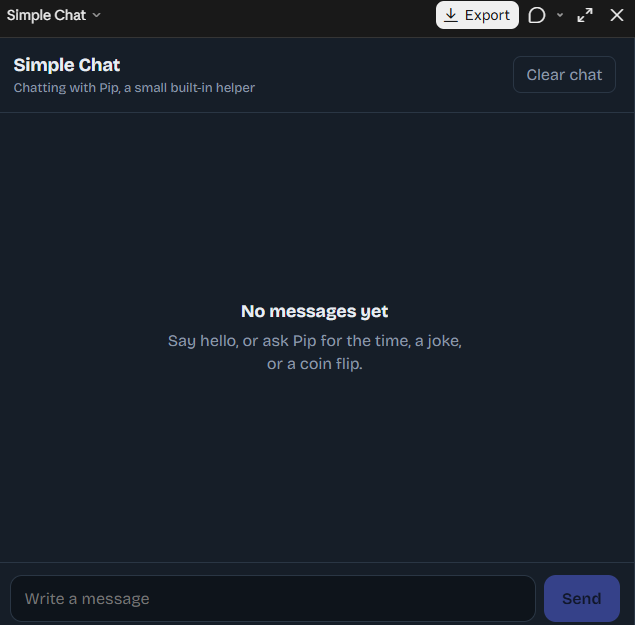
The Simple Chat Application focuses on creating a clean and straightforward messaging interface where users can type messages, send them, and view conversations in an organized format. The application can include essential features such as a message input field, a send button, a chat display area, timestamps, and a simple user interface. These features help make communication smooth and allow users to interact with the application without unnecessary complexity.
**Key Features of the Application**
**User-Friendly Interface:** A clean and organized design that makes the application easy to understand and use.
**Message Sending:** Users can type messages and send them through the chat interface.
**Conversation Display:** Messages appear in a structured chat window, making conversations easier to follow.
**Simple Navigation:** Easy-to-use controls help users interact with the application efficiently.
**Responsive Design:** With suitable implementation, the interface can adapt to different screen sizes and devices.
**Future Improvements:** Additional features such as usernames, timestamps, message history, notifications, and real-time messaging can be added as the project develops.
**Learning and Development**
Developing a Simple Chat Application is a valuable learning experience for beginners in programming and software development. It helps students understand user interface design, event handling, input processing, data management, and the basic principles of communication between software components. Depending on the programming language and technologies used, the project can also introduce concepts such as client-server architecture, databases, networking, and real-time communication.
For example, a basic version may display messages locally within one application, while an advanced version can use a backend server and communication protocols to exchange messages between multiple users. This makes the project suitable for gradual improvement, from a simple beginner-level exercise to a more advanced messaging system.
**Why Is This Project Important?**
A Simple Chat Application demonstrates how small software projects can solve practical communication problems. It encourages logical thinking, improves programming skills, and provides hands-on experience in building interactive applications. It can also serve as a foundation for more advanced projects, including group chats, online messaging platforms, customer support systems, and collaborative communication tools.
**Conclusion**
The Simple Chat Application is an excellent project for anyone interested in learning programming, application development, and digital communication. Its simple design and essential messaging features make it a useful starting point for exploring software engineering. With creativity, practice, and continuous improvement, this basic application can evolve into a more powerful communication platform.
**Code. Connect. Communicate. Create Something Amazing!**
#SimpleChatApplication #ChatApp #SoftwareDevelopment #Programming #CodingProject #AppDevelopment #ComputerScience #WebDevelopment #PythonProgramming #UserInterface #Technology #BeginnerProject #LearnToCode #StudentProject #TaskCompleted
Roll no:14
coding no:23
coding topic:Simple Chat Application
**Simple Chat Application – Connecting People Through Technology**
A Simple Chat Application is a user-friendly software project designed to make communication between users easy, convenient, and efficient. In today's digital world, messaging applications have become an essential part of everyday life, allowing people to exchange information, share ideas, and stay connected regardless of distance. This project demonstrates the basic concepts of chat application development and provides an excellent opportunity to understand how digital communication systems work.
**Project Overview**
The Simple Chat Application focuses on creating a clean and straightforward messaging interface where users can type messages, send them, and view conversations in an organized format. The application can include essential features such as a message input field, a send button, a chat display area, timestamps, and a simple user interface. These features help make communication smooth and allow users to interact with the application without unnecessary complexity.
**Key Features of the Application**
**User-Friendly Interface:** A clean and organized design that makes the application easy to understand and use.
**Message Sending:** Users can type messages and send them through the chat interface.
**Conversation Display:** Messages appear in a structured chat window, making conversations easier to follow.
**Simple Navigation:** Easy-to-use controls help users interact with the application efficiently.
**Responsive Design:** With suitable implementation, the interface can adapt to different screen sizes and devices.
**Future Improvements:** Additional features such as usernames, timestamps, message history, notifications, and real-time messaging can be added as the project develops.
**Learning and Development**
Developing a Simple Chat Application is a valuable learning experience for beginners in programming and software development. It helps students understand user interface design, event handling, input processing, data management, and the basic principles of communication between software components. Depending on the programming language and technologies used, the project can also introduce concepts such as client-server architecture, databases, networking, and real-time communication.
For example, a basic version may display messages locally within one application, while an advanced version can use a backend server and communication protocols to exchange messages between multiple users. This makes the project suitable for gradual improvement, from a simple beginner-level exercise to a more advanced messaging system.
**Why Is This Project Important?**
A Simple Chat Application demonstrates how small software projects can solve practical communication problems. It encourages logical thinking, improves programming skills, and provides hands-on experience in building interactive applications. It can also serve as a foundation for more advanced projects, including group chats, online messaging platforms, customer support systems, and collaborative communication tools.
**Conclusion**
The Simple Chat Application is an excellent project for anyone interested in learning programming, application development, and digital communication. Its simple design and essential messaging features make it a useful starting point for exploring software engineering. With creativity, practice, and continuous improvement, this basic application can evolve into a more powerful communication platform.
**Code. Connect. Communicate. Create Something Amazing!**
#SimpleChatApplication #ChatApp #SoftwareDevelopment #Programming #CodingProject #AppDevelopment #ComputerScience #WebDevelopment #PythonProgramming #UserInterface #Technology #BeginnerProject #LearnToCode #StudentProject #TaskCompleted
RSIF8
Roll no:14
coding no:23
coding topic:Simple Chat Application
💬 **Simple Chat Application – Connecting People Through Technology** 🌐✨
A Simple Chat Application is a user-friendly software project designed to make communication between users easy, convenient, and efficient. In today's digital world, messaging applications have become an essential part of everyday life, allowing people to exchange information, share ideas, and stay connected regardless of distance. This project demonstrates the basic concepts of chat application development and provides an excellent opportunity to understand how digital communication systems work. 💻📱
🚀 **Project Overview**
The Simple Chat Application focuses on creating a clean and straightforward messaging interface where users can type messages, send them, and view conversations in an organized format. The application can include essential features such as a message input field, a send button, a chat display area, timestamps, and a simple user interface. These features help make communication smooth and allow users to interact with the application without unnecessary complexity.
💡 **Key Features of the Application**
🔹 **User-Friendly Interface:** A clean and organized design that makes the application easy to understand and use.
🔹 **Message Sending:** Users can type messages and send them through the chat interface.
🔹 **Conversation Display:** Messages appear in a structured chat window, making conversations easier to follow.
🔹 **Simple Navigation:** Easy-to-use controls help users interact with the application efficiently.
🔹 **Responsive Design:** With suitable implementation, the interface can adapt to different screen sizes and devices.
🔹 **Future Improvements:** Additional features such as usernames, timestamps, message history, notifications, and real-time messaging can be added as the project develops.
🛠️ **Learning and Development**
Developing a Simple Chat Application is a valuable learning experience for beginners in programming and software development. It helps students understand user interface design, event handling, input processing, data management, and the basic principles of communication between software components. Depending on the programming language and technologies used, the project can also introduce concepts such as client-server architecture, databases, networking, and real-time communication.
For example, a basic version may display messages locally within one application, while an advanced version can use a backend server and communication protocols to exchange messages between multiple users. This makes the project suitable for gradual improvement, from a simple beginner-level exercise to a more advanced messaging system.
🎯 **Why Is This Project Important?**
A Simple Chat Application demonstrates how small software projects can solve practical communication problems. It encourages logical thinking, improves programming skills, and provides hands-on experience in building interactive applications. It can also serve as a foundation for more advanced projects, including group chats, online messaging platforms, customer support systems, and collaborative communication tools.
🌟 **Conclusion**
The Simple Chat Application is an excellent project for anyone interested in learning programming, application development, and digital communication. Its simple design and essential messaging features make it a useful starting point for exploring software engineering. With creativity, practice, and continuous improvement, this basic application can evolve into a more powerful communication platform.
💻 **Code. Connect. Communicate. Create Something Amazing!** 💬🚀
#SimpleChatApplication #ChatApp #SoftwareDevelopment #Programming #CodingProject #AppDevelopment #ComputerScience #WebDevelopment #PythonProgramming #UserInterface #Technology #BeginnerProject #LearnToCode #StudentProject #TaskCompleted ✅
0 Kommentare
0 Anteile
1344 Ansichten