

• Accl Foundation Level (Rehan School Urdu Bazar Campus )
    Day : 145 Coding Task
    Roll No : 17
    Accl Task
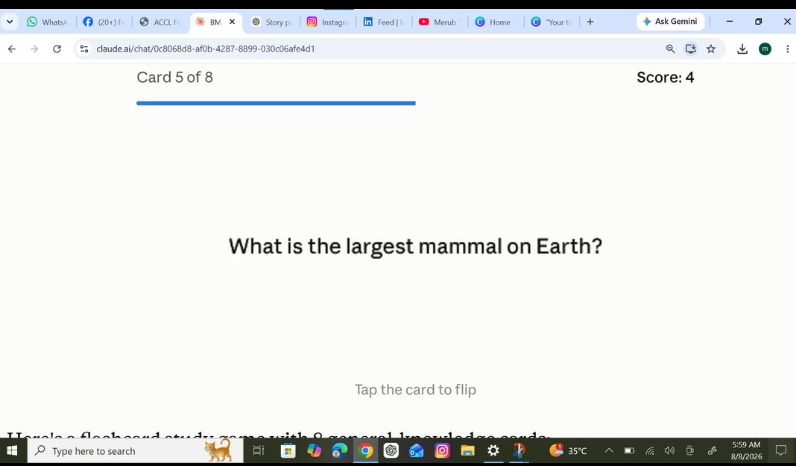
    > Flashcards App - Study Made Fun!
    >
    > Studying is boring? Not anymore!
    > I just made this super fun Flashcards App!
    >
    > In this card:
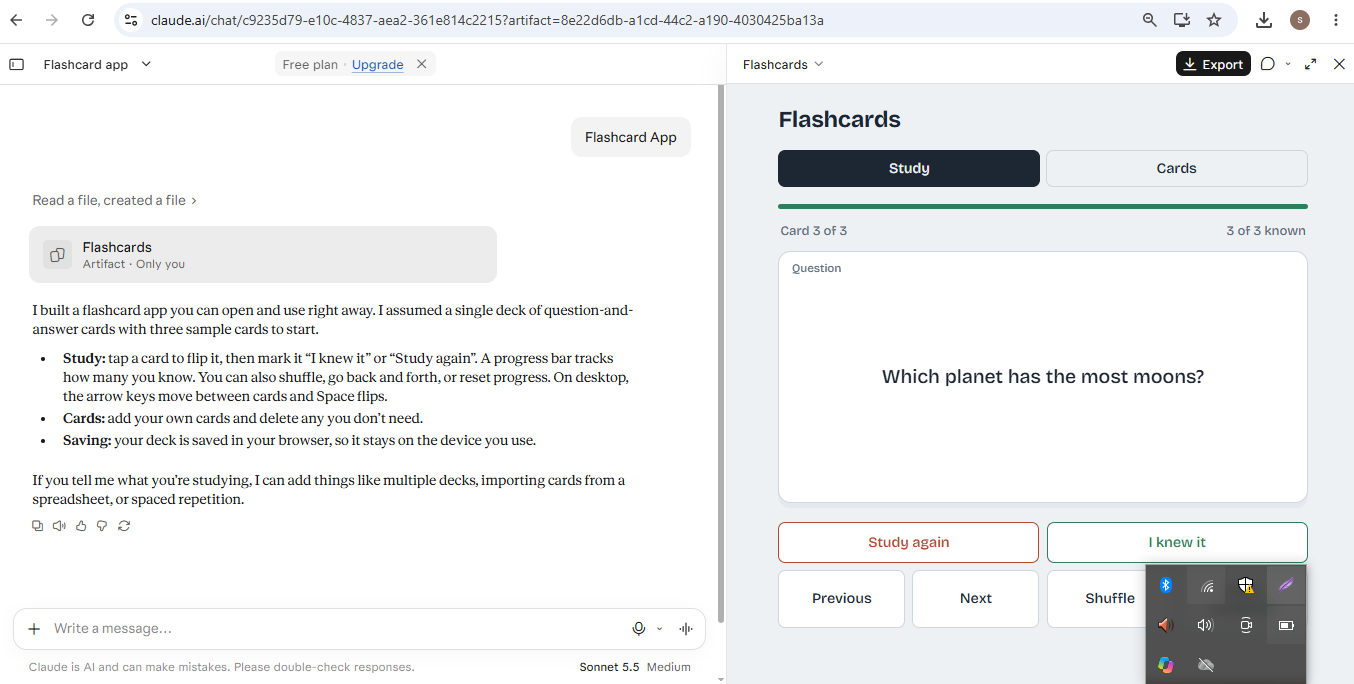
    > Q: Which planet has the most moons?
    > Can you guess the answer? Flip the card to check!
    >
    > Features:
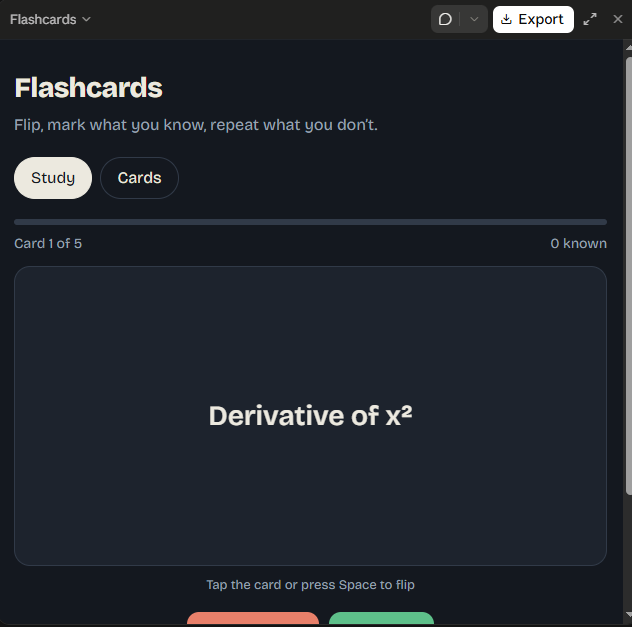
    > Tap to Flip Cards
    > Mark "I Know It" or "Study Again"
    > Track Your Progress
    > Shuffle Cards
    > Add Your Own Cards
    > Saves Automatically - No Tension!
    >
    > Perfect for exams, quizzes & quick revision!
    > Study smart, not hard!
    >
    > Tell me in comments - Do you know which planet has the most moons?
    >
    > #Flashcards #StudyWithMe #LearnAndGrow #StudentLife #MyProject #StudySmart
    Link : https://claude.ai/share/858b0976-021b-43ef-8c70-0c39fee0c339 See less
    Accl Foundation Level (Rehan School Urdu Bazar Campus ) Day : 145 Coding Task Roll No : 17 Accl Task > 🃏✨ Flashcards App - Study Made Fun! ✨📚 > > Studying is boring? Not anymore! 😍 > I just made this super fun Flashcards App! 💻🎉 > > In this card: > Q: Which planet has the most moons? 🪐🌙 > Can you guess the answer? Flip the card to check! 👀 > > Features: > ✅ Tap to Flip Cards 🔄 > ✅ Mark "I Know It" or "Study Again" 🧠 > ✅ Track Your Progress 📊 > ✅ Shuffle Cards 🔀 > ✅ Add Your Own Cards ✍️ > ✅ Saves Automatically - No Tension! 💾 > > Perfect for exams, quizzes & quick revision! 🎓📖 > Study smart, not hard! 💪✨ > > Tell me in comments - Do you know which planet has the most moons? 👇💬 > > #Flashcards #StudyWithMe #LearnAndGrow #StudentLife #MyProject #StudySmart Link : https://claude.ai/share/858b0976-021b-43ef-8c70-0c39fee0c339 See less
    0 Comments 0 Shares 70 Views
  • RSIF8
    Roll no:14
    coding atsk no:23
    coding topic:Flashcard App

    # Flashcard App – A Smart Learning and Revision Tool

    The **Flashcard App** is a simple and interactive application designed to make learning, memorization, and revision easier and more effective. It allows users to create digital flashcards containing questions on one side and answers on the other, helping them practice important concepts and remember information more efficiently.

    Whether you are a student preparing for exams, learning a new language, or trying to memorize important facts, the Flashcard App provides a convenient way to organize your study material and improve your learning experience.

    ## Key Features

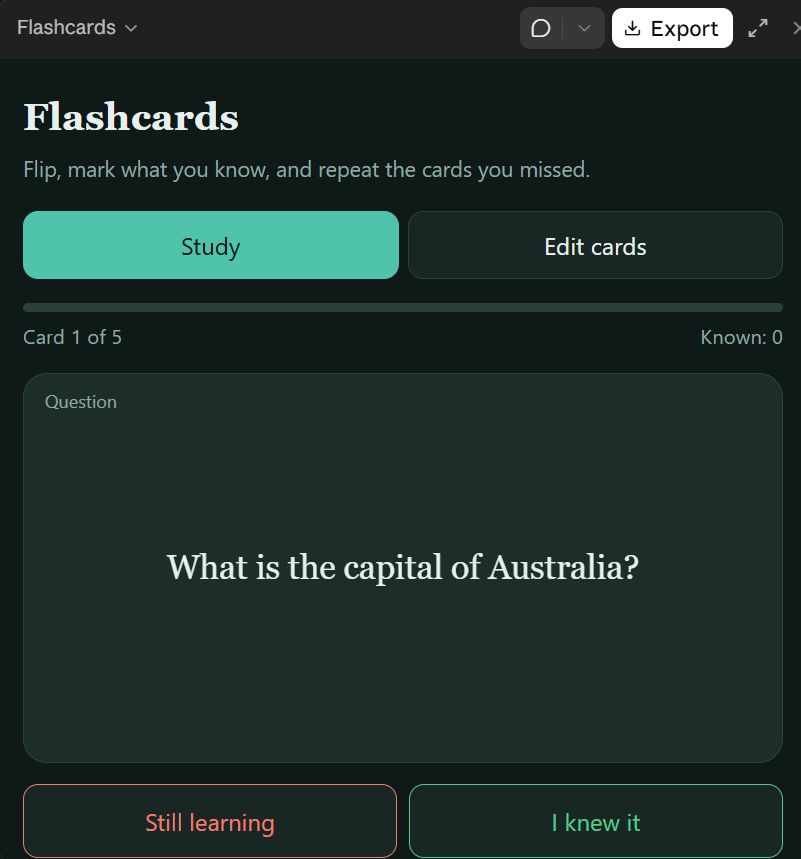
    - **Create Flashcards:** Add questions, terms, and their corresponding answers.
    - **Flip Cards:** Reveal answers whenever you are ready to check your knowledge.
    - **Easy Revision:** Review important information anytime.
    - **Organize Topics:** Group flashcards by subjects or categories.
    - **Improve Memory:** Practice recalling information to strengthen learning.
    - **User-Friendly Interface:** Enjoy a simple design that makes studying convenient.
    - **Self-Assessment:** Test your understanding and identify topics that need more practice.

    ## Project Purpose

    The main purpose of this project is to demonstrate how technology can support education through an interactive learning tool. It also helps beginners understand programming concepts such as user input, data management, interface design, and interactive controls.

    ## Conclusion

    The Flashcard App is a useful educational project that combines technology and effective study techniques in one convenient application. By encouraging active recall and regular revision, it can help learners develop better study habits and build confidence in their knowledge.

    **Learn smarter, revise regularly, and turn small study sessions into meaningful progress!**

    #FlashcardApp #EducationalApp #StudyTools #LearningMadeEasy #ProgrammingProject #StudentProject #ActiveRecall #StudySmarter #MemoryTechniques #CodingForBeginners #EducationTechnology
    RSIF8 Roll no:14 coding atsk no:23 coding topic:Flashcard App # 📚 Flashcard App – A Smart Learning and Revision Tool The **Flashcard App** is a simple and interactive application designed to make learning, memorization, and revision easier and more effective. It allows users to create digital flashcards containing questions on one side and answers on the other, helping them practice important concepts and remember information more efficiently. 🧠✨ Whether you are a student preparing for exams, learning a new language, or trying to memorize important facts, the Flashcard App provides a convenient way to organize your study material and improve your learning experience. ## 🌟 Key Features - 📝 **Create Flashcards:** Add questions, terms, and their corresponding answers. - 🔄 **Flip Cards:** Reveal answers whenever you are ready to check your knowledge. - 📖 **Easy Revision:** Review important information anytime. - 🗂️ **Organize Topics:** Group flashcards by subjects or categories. - 🧠 **Improve Memory:** Practice recalling information to strengthen learning. - 💻 **User-Friendly Interface:** Enjoy a simple design that makes studying convenient. - 🎯 **Self-Assessment:** Test your understanding and identify topics that need more practice. ## 🎯 Project Purpose The main purpose of this project is to demonstrate how technology can support education through an interactive learning tool. It also helps beginners understand programming concepts such as user input, data management, interface design, and interactive controls. ## 🚀 Conclusion The Flashcard App is a useful educational project that combines technology and effective study techniques in one convenient application. By encouraging active recall and regular revision, it can help learners develop better study habits and build confidence in their knowledge. **Learn smarter, revise regularly, and turn small study sessions into meaningful progress!** 🌟📚 #FlashcardApp #EducationalApp #StudyTools #LearningMadeEasy #ProgrammingProject #StudentProject #ActiveRecall #StudySmarter #MemoryTechniques #CodingForBeginners #EducationTechnology
    0 Comments 0 Shares 4448 Views
  • RSIF8
    Roll no 94
    Coding task no 19
    Coding task topic
    Flashcard App for Smarter Studying!
    I created a Flashcard App that helps students learn and revise topics quickly and efficiently. Users can flip flashcards to view questions and answers, making studying more interactive and engaging.
    This app is perfect for exam preparation, vocabulary building, and memorizing important concepts. With a simple and user-friendly design, learning becomes easier and more fun!
    #FlashcardApp #StudySmart #LearningMadeEasy #StudentLife #Education #EdTech #Programming #AppDevelopment #ExamPreparation #TechProjects #Coding #LearningTools
    RSIF8 Roll no 94 Coding task no 19 Coding task topic 📚✨ Flashcard App for Smarter Studying! 🎓💡 I created a Flashcard App that helps students learn and revise topics quickly and efficiently. Users can flip flashcards to view questions and answers, making studying more interactive and engaging. 🔄📝 This app is perfect for exam preparation, vocabulary building, and memorizing important concepts. With a simple and user-friendly design, learning becomes easier and more fun! 🚀📖 #FlashcardApp #StudySmart #LearningMadeEasy #StudentLife #Education #EdTech #Programming #AppDevelopment #ExamPreparation #TechProjects #Coding #LearningTools 📚💻✨🎯
    0 Comments 0 Shares 2910 Views

  • **Roll No: 2**

    **Batch: 14**

    **Book: ACCL**

    **Task No: 143**

    ## Flashcard App — Coding Task

    Today’s task is to develop a **Flashcard App** that makes learning, revision, and memorization more interactive and effective. The application will allow users to create digital flashcards with questions on one side and answers on the other, helping them review important information whenever they need it. Users will be able to reveal answers, move between cards, and organize study material for different subjects and topics. The app can also include features such as adding new cards, deleting unwanted cards, and tracking learning progress. Through this coding project, I will practice programming concepts such as variables, functions, data storage, user interaction, and conditional statements while developing my logical thinking and problem-solving skills. This task will demonstrate how technology can support education by turning ordinary revision into an organized, engaging, and convenient learning experience.

    #Batch14 #Task143 #ACCL #FlashcardApp #CodingTask #Programming #AppDevelopment #DigitalLearning #StudyTools #EducationTechnology #ProblemSolving #LearningByDoing #ComputerScience #DailyTask
    👤 **Roll No: 2** 📚 **Batch: 14** 📖 **Book: ACCL** 🎯 **Task No: 143** ## 💻 Flashcard App — Coding Task 🧠📚 Today’s task is to develop a **Flashcard App** that makes learning, revision, and memorization more interactive and effective. 💡 The application will allow users to create digital flashcards with questions on one side and answers on the other, helping them review important information whenever they need it. 🔄 Users will be able to reveal answers, move between cards, and organize study material for different subjects and topics. The app can also include features such as adding new cards, deleting unwanted cards, and tracking learning progress. 🚀 Through this coding project, I will practice programming concepts such as variables, functions, data storage, user interaction, and conditional statements while developing my logical thinking and problem-solving skills. This task will demonstrate how technology can support education by turning ordinary revision into an organized, engaging, and convenient learning experience. ✨ #Batch14 #Task143 #ACCL #FlashcardApp #CodingTask #Programming #AppDevelopment #DigitalLearning #StudyTools #EducationTechnology #ProblemSolving #LearningByDoing #ComputerScience #DailyTask
    0 Comments 0 Shares 4471 Views

  • Mohsin RS F8
    Roll NO:13
    Coding Task NO:14
    Class: Foundation Level
    Made by Me

    Flashcard App

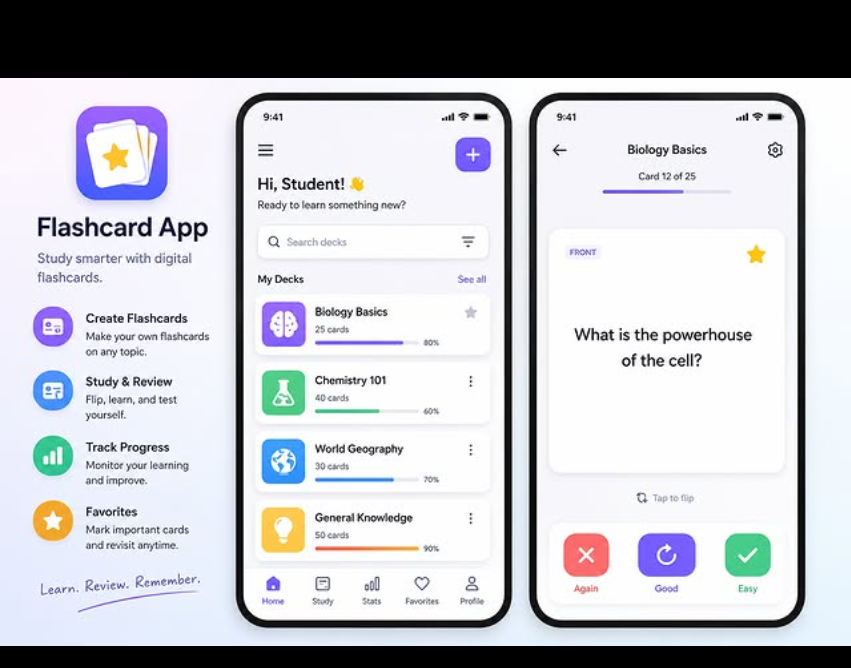
    A Flashcard App is a simple and useful learning tool designed to help students remember important information through interactive question-and-answer cards. Instead of reading long notes repeatedly, users can study small pieces of information at a time, making learning easier, faster, and more engaging.

    The main idea of a flashcard app is very simple. Each card contains a question, term, or prompt on one side and the corresponding answer or explanation on the other side. The user can view the question first, think about the answer, and then reveal the answer to check their understanding. This active approach encourages the brain to recall information instead of simply reading it.

    A good Flashcard App can include features such as adding new flashcards, editing cards, deleting cards, flipping cards, and moving between previous and next cards. It can also keep track of progress so that users can see how many cards they have reviewed. These features make the application useful for subjects such as science, mathematics, English vocabulary, history, computer studies, and many other topics.

    The app can also make learning more enjoyable by using a clean interface, simple buttons, animations, and visual feedback. For example, a user could mark a card as “Known” or “Needs Practice.” This allows the learner to spend more time reviewing difficult information while quickly moving through concepts they already understand.

    Creating a Flashcard App is also an excellent coding project because it teaches several important programming concepts. HTML can be used to create the structure of the application, CSS can make the interface attractive and responsive, and JavaScript can control the interactive features such as flipping cards, changing questions,
    Mohsin RS F8 🎓✨ Roll NO:13 Coding Task NO:14 Class: Foundation Level 📚 Made by Me 💻🚀 Flashcard App 📚💡 A Flashcard App is a simple and useful learning tool designed to help students remember important information through interactive question-and-answer cards. Instead of reading long notes repeatedly, users can study small pieces of information at a time, making learning easier, faster, and more engaging. The main idea of a flashcard app is very simple. Each card contains a question, term, or prompt on one side and the corresponding answer or explanation on the other side. The user can view the question first, think about the answer, and then reveal the answer to check their understanding. This active approach encourages the brain to recall information instead of simply reading it. A good Flashcard App can include features such as adding new flashcards, editing cards, deleting cards, flipping cards, and moving between previous and next cards. It can also keep track of progress so that users can see how many cards they have reviewed. These features make the application useful for subjects such as science, mathematics, English vocabulary, history, computer studies, and many other topics. The app can also make learning more enjoyable by using a clean interface, simple buttons, animations, and visual feedback. For example, a user could mark a card as “Known” or “Needs Practice.” This allows the learner to spend more time reviewing difficult information while quickly moving through concepts they already understand. Creating a Flashcard App is also an excellent coding project because it teaches several important programming concepts. HTML can be used to create the structure of the application, CSS can make the interface attractive and responsive, and JavaScript can control the interactive features such as flipping cards, changing questions,
    0 Comments 0 Shares 1328 Views
  • Mohsin RS F8
    Roll NO:13
    Coding Task NO:14
    Class: Foundation Level
    Made by Me

    Flashcard App

    A Flashcard App is a simple and useful learning tool designed to help students remember important information through interactive question-and-answer cards. Instead of reading long notes repeatedly, users can study small pieces of information at a time, making learning easier, faster, and more engaging.

    The main idea of a flashcard app is very simple. Each card contains a question, term, or prompt on one side and the corresponding answer or explanation on the other side. The user can view the question first, think about the answer, and then reveal the answer to check their understanding. This active approach encourages the brain to recall information instead of simply reading it.

    A good Flashcard App can include features such as adding new flashcards, editing cards, deleting cards, flipping cards, and moving between previous and next cards. It can also keep track of progress so that users can see how many cards they have reviewed. These features make the application useful for subjects such as science, mathematics, English vocabulary, history, computer studies, and many other topics.

    The app can also make learning more enjoyable by using a clean interface, simple buttons, animations, and visual feedback. For example, a user could mark a card as “Known” or “Needs Practice.” This allows the learner to spend more time reviewing difficult information while quickly moving through concepts they already understand.

    Creating a Flashcard App is also an excellent coding project because it teaches several important programming concepts. HTML can be used to create the structure of the application, CSS can make the interface attractive and responsive, and JavaScript can control the interactive features such as flipping cards, changing questions,
    Mohsin RS F8 🎓✨ Roll NO:13 Coding Task NO:14 Class: Foundation Level 📚 Made by Me 💻🚀 Flashcard App 📚💡 A Flashcard App is a simple and useful learning tool designed to help students remember important information through interactive question-and-answer cards. Instead of reading long notes repeatedly, users can study small pieces of information at a time, making learning easier, faster, and more engaging. The main idea of a flashcard app is very simple. Each card contains a question, term, or prompt on one side and the corresponding answer or explanation on the other side. The user can view the question first, think about the answer, and then reveal the answer to check their understanding. This active approach encourages the brain to recall information instead of simply reading it. A good Flashcard App can include features such as adding new flashcards, editing cards, deleting cards, flipping cards, and moving between previous and next cards. It can also keep track of progress so that users can see how many cards they have reviewed. These features make the application useful for subjects such as science, mathematics, English vocabulary, history, computer studies, and many other topics. The app can also make learning more enjoyable by using a clean interface, simple buttons, animations, and visual feedback. For example, a user could mark a card as “Known” or “Needs Practice.” This allows the learner to spend more time reviewing difficult information while quickly moving through concepts they already understand. Creating a Flashcard App is also an excellent coding project because it teaches several important programming concepts. HTML can be used to create the structure of the application, CSS can make the interface attractive and responsive, and JavaScript can control the interactive features such as flipping cards, changing questions,
    0 Comments 0 Shares 1063 Views
  • RSIF8
    Roll no 99
    Coding Task no: 16
    Task topic: Flashcard Study App
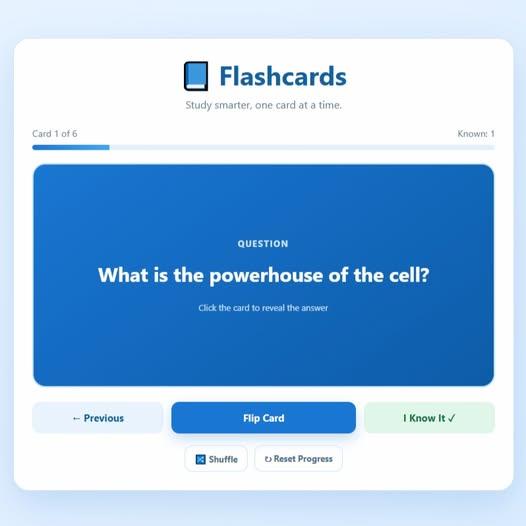
    A simple Flashcard Study App built with HTML, CSS, and JavaScript. It allows users to study questions and answers using interactive flashcards. Users can flip cards to reveal answers, move between cards, shuffle the deck, track the cards they know, and reset their progress. It is designed to make studying and memorizing information more interactive and effective.
    #HTML #CSS #JavaScript #WebDevelopment #Coding #FlashcardApp #StudyApp #JavaScriptProject
    RSIF8 Roll no 99 Coding Task no: 16 Task topic: Flashcard Study App A simple Flashcard Study App built with HTML, CSS, and JavaScript. It allows users to study questions and answers using interactive flashcards. Users can flip cards to reveal answers, move between cards, shuffle the deck, track the cards they know, and reset their progress. It is designed to make studying and memorizing information more interactive and effective. #HTML #CSS #JavaScript #WebDevelopment #Coding #FlashcardApp #StudyApp #JavaScriptProject
    0 Comments 0 Shares 2012 Views
  • # Foundation Level

    ## Day 145

    ## Coding Task

    ### Flashcard App

    **Roll Number: 005**

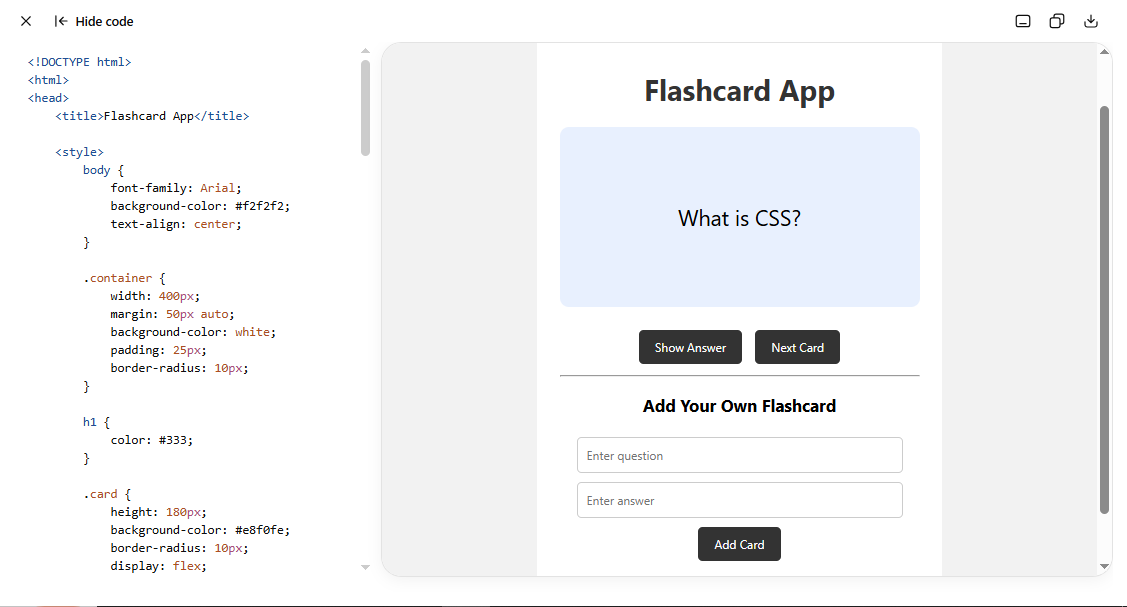
    The **Flashcard App** is a simple educational web application created using **HTML, CSS, and JavaScript**. It helps users learn and remember information using digital flashcards.

    The app displays questions on flashcards and allows users to click **Show Answer** to see the answer. Users can also move to the **Next Card** and add their own questions and answers.

    HTML is used to create the structure, CSS is used to design the app, and JavaScript is used to make the flashcards interactive.

    This project helps practice **arrays, objects, variables, functions, buttons, input fields, and DOM manipulation**.
    # Foundation Level ## Day 145 ## Coding Task ### Flashcard App **Roll Number: 005** The **Flashcard App** is a simple educational web application created using **HTML, CSS, and JavaScript**. It helps users learn and remember information using digital flashcards. The app displays questions on flashcards and allows users to click **Show Answer** to see the answer. Users can also move to the **Next Card** and add their own questions and answers. HTML is used to create the structure, CSS is used to design the app, and JavaScript is used to make the flashcards interactive. This project helps practice **arrays, objects, variables, functions, buttons, input fields, and DOM manipulation**.
    0 Comments 0 Shares 941 Views
  • RSIF8
    Rol no 68
    Task no 136
    Task topic; Flashcard App

    The **Flashcard App** is a simple and interactive study tool designed to help students learn and review information using digital flashcards. Users can view a question or term on the front and reveal the answer on the back. It makes studying more organized, engaging, and convenient.
    RSIF8 Rol no 68 Task no 136 Task topic; Flashcard App 📚🧠 The **Flashcard App** is a simple and interactive study tool designed to help students learn and review information using digital flashcards. Users can view a question or term on the front and reveal the answer on the back. It makes studying more organized, engaging, and convenient.
    0 Comments 0 Shares 611 Views