


RSIF8
Roll No: 113
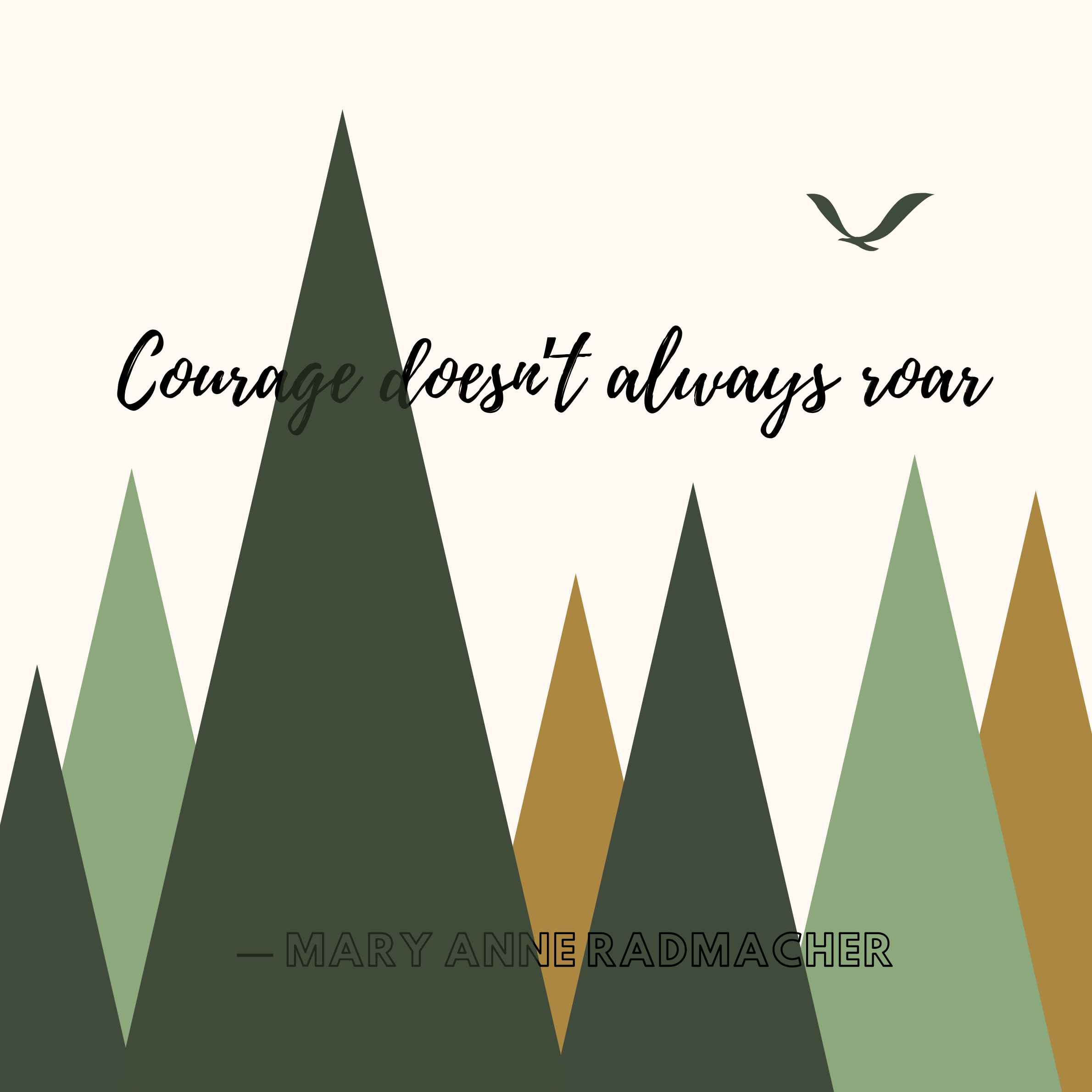
**Coding Task:** **"Courage doesn’t always roar." — Mary Anne Radmacher**
**"Courage doesn’t always roar." — Mary Anne Radmacher **
This project presents an inspiring message about **courage, inner strength, confidence, and perseverance**. The quote reminds us that courage is not always loud or dramatic. Sometimes, true courage can be found in quiet decisions, small steps, and the strength to continue even when we are afraid.
Courage can mean facing difficult situations, speaking up when necessary, trying again after failure, or simply choosing to move forward despite uncertainty. It teaches us that being brave does not mean having no fear; it means continuing forward even when fear is present.
**The message teaches us:**
Courage can be quiet and powerful
Being afraid does not mean being weak
Small acts can require great bravery
Believe in yourself during difficult moments
Face challenges with determination
Learn from failures and keep moving forward
Inner strength can help us overcome obstacles
Working on this project helped me practice creativity, visual communication, typography, layout, and presenting a meaningful motivational message through an engaging digital design. It also helped me understand how powerful ideas can be communicated through simple words and effective visual presentation.
**Key Message:** Courage does not always have to be loud. Sometimes, courage is simply taking one more step, trying one more time, or believing in yourself when things become difficult.
**Be Brave • Trust Yourself • Keep Moving Forward **
#RSIF8 #RollNo113 #CodingTask #MaryAnneRadmacher #Courage #Bravery #InnerStrength #Motivation #Inspiration #Confidence #Determination #Perseverance #SelfBelief #GrowthMindset #PositiveThinking #PersonalGrowth #Success #Creativity #DigitalSkills #StudentProject #VisualDesign #GraphicDesign #KeepGoing #NeverGiveUp #BeBrave
Roll No: 113
**Coding Task:** **"Courage doesn’t always roar." — Mary Anne Radmacher**
**"Courage doesn’t always roar." — Mary Anne Radmacher **
This project presents an inspiring message about **courage, inner strength, confidence, and perseverance**. The quote reminds us that courage is not always loud or dramatic. Sometimes, true courage can be found in quiet decisions, small steps, and the strength to continue even when we are afraid.
Courage can mean facing difficult situations, speaking up when necessary, trying again after failure, or simply choosing to move forward despite uncertainty. It teaches us that being brave does not mean having no fear; it means continuing forward even when fear is present.
**The message teaches us:**
Courage can be quiet and powerful
Being afraid does not mean being weak
Small acts can require great bravery
Believe in yourself during difficult moments
Face challenges with determination
Learn from failures and keep moving forward
Inner strength can help us overcome obstacles
Working on this project helped me practice creativity, visual communication, typography, layout, and presenting a meaningful motivational message through an engaging digital design. It also helped me understand how powerful ideas can be communicated through simple words and effective visual presentation.
**Key Message:** Courage does not always have to be loud. Sometimes, courage is simply taking one more step, trying one more time, or believing in yourself when things become difficult.
**Be Brave • Trust Yourself • Keep Moving Forward **
#RSIF8 #RollNo113 #CodingTask #MaryAnneRadmacher #Courage #Bravery #InnerStrength #Motivation #Inspiration #Confidence #Determination #Perseverance #SelfBelief #GrowthMindset #PositiveThinking #PersonalGrowth #Success #Creativity #DigitalSkills #StudentProject #VisualDesign #GraphicDesign #KeepGoing #NeverGiveUp #BeBrave
RSIF8
Roll No: 113
**Coding Task:** **"Courage doesn’t always roar." — Mary Anne Radmacher** 🦁💪
**"Courage doesn’t always roar." — Mary Anne Radmacher 🌟🕊️**
This project presents an inspiring message about **courage, inner strength, confidence, and perseverance**. The quote reminds us that courage is not always loud or dramatic. Sometimes, true courage can be found in quiet decisions, small steps, and the strength to continue even when we are afraid. 💪✨
Courage can mean facing difficult situations, speaking up when necessary, trying again after failure, or simply choosing to move forward despite uncertainty. 🌱🎯 It teaches us that being brave does not mean having no fear; it means continuing forward even when fear is present.
💡 **The message teaches us:**
🔹 Courage can be quiet and powerful
🔹 Being afraid does not mean being weak
🔹 Small acts can require great bravery
🔹 Believe in yourself during difficult moments
🔹 Face challenges with determination
🔹 Learn from failures and keep moving forward
🔹 Inner strength can help us overcome obstacles
Working on this project helped me practice creativity, visual communication, typography, layout, and presenting a meaningful motivational message through an engaging digital design. 🎨💻 It also helped me understand how powerful ideas can be communicated through simple words and effective visual presentation.
🌟 **Key Message:** Courage does not always have to be loud. Sometimes, courage is simply taking one more step, trying one more time, or believing in yourself when things become difficult. 🕊️💫
**Be Brave • Trust Yourself • Keep Moving Forward 🚀**
#RSIF8 #RollNo113 #CodingTask #MaryAnneRadmacher #Courage #Bravery #InnerStrength #Motivation #Inspiration #Confidence #Determination #Perseverance #SelfBelief #GrowthMindset #PositiveThinking #PersonalGrowth #Success #Creativity #DigitalSkills #StudentProject #VisualDesign #GraphicDesign #KeepGoing #NeverGiveUp #BeBrave
0 Kommentare
0 Anteile
442 Ansichten