RSIF8
Roll no:14
story no:24
story topic:The Nature of Light: Exploring Waves and Particles
**The Nature of Light: Exploring Waves and Particles**
Have you ever wondered what light really is? How does sunlight travel across millions of kilometers through space, how do rainbows form, and how can light behave like both a wave and a particle? The nature of light is one of the most fascinating topics in physics, revealing the extraordinary connection between the visible world and the mysterious laws of quantum mechanics. From the light that illuminates our homes to the distant stars shining in the universe, light plays an essential role in understanding the world around us.
**1. The Wave Nature of Light **
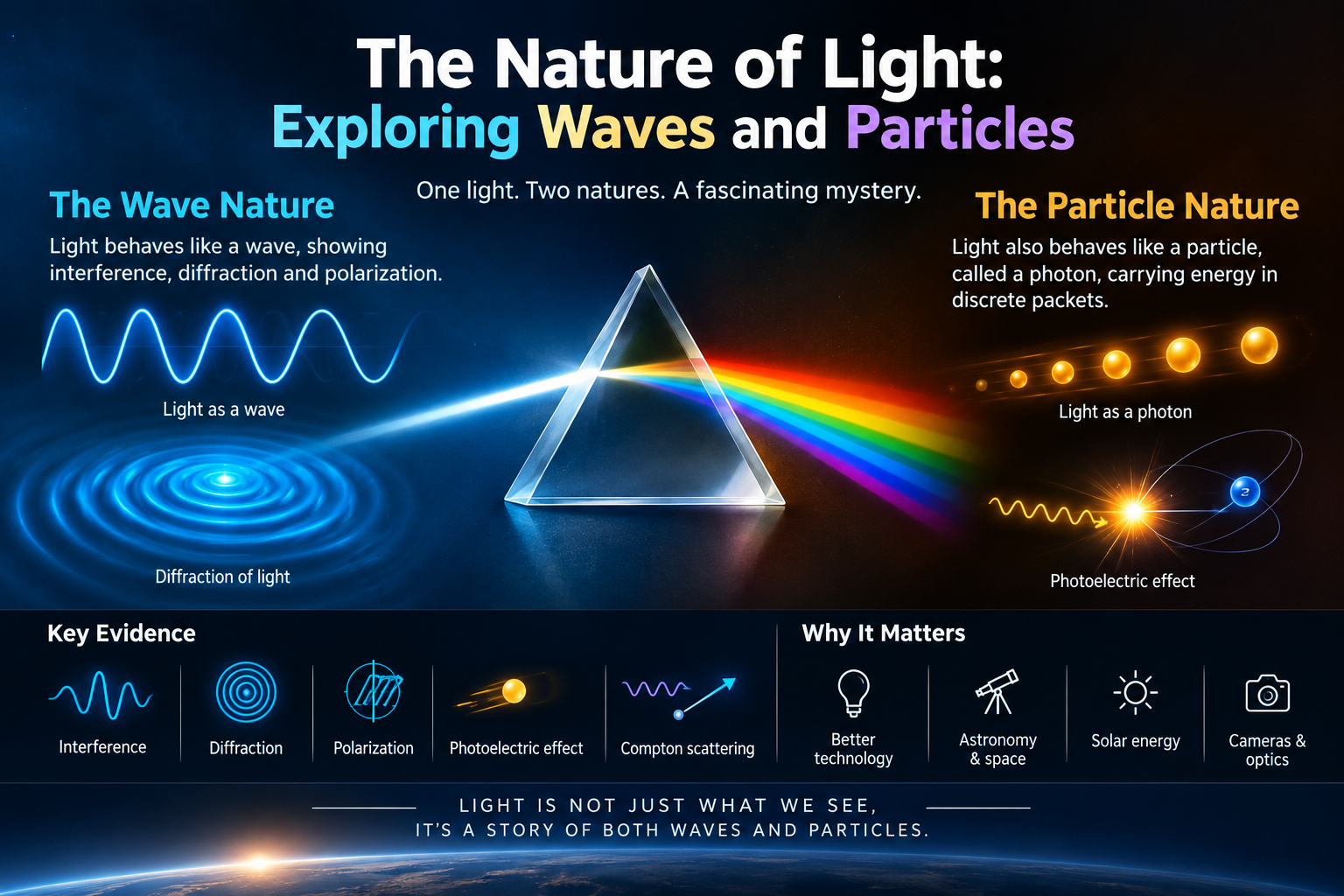
For many years, scientists have studied light as a wave because it demonstrates important wave-like properties. Light can undergo interference, diffraction, and polarization. Interference occurs when light waves overlap and combine, producing patterns of brightness and darkness. Diffraction happens when light spreads around an obstacle or passes through a narrow opening. Polarization describes the orientation of light's oscillations and helps us understand how light interacts with different materials.
These properties demonstrate that the wave model is essential for explaining many optical phenomena. From colorful patterns created by thin films to the operation of polarized sunglasses, the wave nature of light has many applications in everyday life and modern technology.
**2. The Particle Nature of Light **
Light also behaves in ways that reveal its particle nature. In quantum physics, light energy is exchanged in discrete packets called **photons**. Each photon carries energy determined by its frequency, described by the equation **E = hf**, where E represents energy, h is Planck's constant, and f is frequency.
The photoelectric effect provides important evidence for this particle nature. When light of a suitable frequency strikes certain materials, it can release electrons from their surfaces. This phenomenon helped scientists understand that light energy is transferred in individual quanta rather than always behaving like a continuous wave.
Another important example is Compton scattering, in which photons exchange energy and momentum with electrons. These discoveries transformed our understanding of light and helped establish the foundations of quantum physics.
**3. Wave-Particle Duality: Two Sides of Light**
One of the most remarkable discoveries in science is that light cannot be fully explained by treating it only as a classical wave or only as a classical particle. Its behavior depends on the physical process being investigated and how it is measured. This concept is known as **wave-particle duality**.
Experiments involving interference reveal wave-like patterns, while experiments involving photon detection show that light energy is detected in discrete units. Quantum mechanics brings these observations together into a more complete description of nature. Rather than being an ordinary wave or a tiny classical object, light is a quantum phenomenon with properties that challenge our everyday intuition.
**4. How Do We Discover the Secrets of Light?**
Scientists use carefully designed experiments to explore the behavior of light. Prisms separate white light into different colors, optical instruments measure its properties, and advanced detectors record individual photons. Interference experiments reveal patterns that cannot be explained by simple particle models, while photoelectric experiments demonstrate the importance of quantized energy.
The work of scientists such as Isaac Newton, Thomas Young, Max Planck, Albert Einstein, and Arthur Compton helped build our modern understanding of light. Their discoveries show how scientific knowledge develops through observation, experimentation, mathematical reasoning, and new ideas.
**5. Why Is the Nature of Light Important?**
Understanding light is essential to many technologies that shape modern life. Lasers are used in medicine, manufacturing, and scientific research. Fiber-optic cables transmit information across the world using pulses of light. Solar panels convert light energy into electrical energy, while cameras and telescopes help us capture images and explore distant objects in space.
The principles of light are also important in astronomy, microscopy, optical communication, quantum technologies, and the study of the universe. By investigating how light behaves, scientists can examine distant galaxies, study the structure of matter, and develop new tools that improve our understanding of nature.
**6. Light: Connecting Science and the Universe**
Light is much more than what allows us to see. It carries information about distant stars, reveals the composition of celestial objects, and provides clues about the physical processes occurring throughout the cosmos. By analyzing the light received from distant galaxies, astronomers can learn about their temperatures, chemical compositions, and motion.
At the smallest scales, the study of photons helps scientists investigate the quantum world and understand how energy interacts with matter. From the smallest laboratory experiments to the largest astronomical observations, light connects different areas of science in extraordinary ways.
**Conclusion: The Extraordinary Mystery of Light**
The study of light demonstrates how nature can be far more complex than it first appears. Its wave-like properties explain interference, diffraction, and polarization, while its particle-like properties help explain the photoelectric effect and Compton scattering. Together, these discoveries form an important part of our modern understanding of physics.
Learning about wave-particle duality encourages us to question assumptions, explore scientific evidence, and appreciate the discoveries that continue to expand human knowledge. Every beam of sunlight, every shining star, and every photon detected by a scientific instrument reminds us that there is still much to discover about the universe.
**Light Is More Than What We See—It Is a Window into the Fundamental Nature of Reality!**
If you enjoyed this science topic, share it with others and continue exploring the fascinating world of physics. Stay curious, keep asking questions, and never stop learning!
#NatureOfLight #WaveParticleDuality #Physics #QuantumPhysics #ScienceEducation #Photons #LightWaves #PhotoelectricEffect #ComptonScattering #Optics #Astronomy #ScientificDiscoveries #STEMEducation #LearnPhysics #ScienceExplained #EducationalContent #WavesAndParticles
Roll no:14
story no:24
story topic:The Nature of Light: Exploring Waves and Particles
**The Nature of Light: Exploring Waves and Particles**
Have you ever wondered what light really is? How does sunlight travel across millions of kilometers through space, how do rainbows form, and how can light behave like both a wave and a particle? The nature of light is one of the most fascinating topics in physics, revealing the extraordinary connection between the visible world and the mysterious laws of quantum mechanics. From the light that illuminates our homes to the distant stars shining in the universe, light plays an essential role in understanding the world around us.
**1. The Wave Nature of Light **
For many years, scientists have studied light as a wave because it demonstrates important wave-like properties. Light can undergo interference, diffraction, and polarization. Interference occurs when light waves overlap and combine, producing patterns of brightness and darkness. Diffraction happens when light spreads around an obstacle or passes through a narrow opening. Polarization describes the orientation of light's oscillations and helps us understand how light interacts with different materials.
These properties demonstrate that the wave model is essential for explaining many optical phenomena. From colorful patterns created by thin films to the operation of polarized sunglasses, the wave nature of light has many applications in everyday life and modern technology.
**2. The Particle Nature of Light **
Light also behaves in ways that reveal its particle nature. In quantum physics, light energy is exchanged in discrete packets called **photons**. Each photon carries energy determined by its frequency, described by the equation **E = hf**, where E represents energy, h is Planck's constant, and f is frequency.
The photoelectric effect provides important evidence for this particle nature. When light of a suitable frequency strikes certain materials, it can release electrons from their surfaces. This phenomenon helped scientists understand that light energy is transferred in individual quanta rather than always behaving like a continuous wave.
Another important example is Compton scattering, in which photons exchange energy and momentum with electrons. These discoveries transformed our understanding of light and helped establish the foundations of quantum physics.
**3. Wave-Particle Duality: Two Sides of Light**
One of the most remarkable discoveries in science is that light cannot be fully explained by treating it only as a classical wave or only as a classical particle. Its behavior depends on the physical process being investigated and how it is measured. This concept is known as **wave-particle duality**.
Experiments involving interference reveal wave-like patterns, while experiments involving photon detection show that light energy is detected in discrete units. Quantum mechanics brings these observations together into a more complete description of nature. Rather than being an ordinary wave or a tiny classical object, light is a quantum phenomenon with properties that challenge our everyday intuition.
**4. How Do We Discover the Secrets of Light?**
Scientists use carefully designed experiments to explore the behavior of light. Prisms separate white light into different colors, optical instruments measure its properties, and advanced detectors record individual photons. Interference experiments reveal patterns that cannot be explained by simple particle models, while photoelectric experiments demonstrate the importance of quantized energy.
The work of scientists such as Isaac Newton, Thomas Young, Max Planck, Albert Einstein, and Arthur Compton helped build our modern understanding of light. Their discoveries show how scientific knowledge develops through observation, experimentation, mathematical reasoning, and new ideas.
**5. Why Is the Nature of Light Important?**
Understanding light is essential to many technologies that shape modern life. Lasers are used in medicine, manufacturing, and scientific research. Fiber-optic cables transmit information across the world using pulses of light. Solar panels convert light energy into electrical energy, while cameras and telescopes help us capture images and explore distant objects in space.
The principles of light are also important in astronomy, microscopy, optical communication, quantum technologies, and the study of the universe. By investigating how light behaves, scientists can examine distant galaxies, study the structure of matter, and develop new tools that improve our understanding of nature.
**6. Light: Connecting Science and the Universe**
Light is much more than what allows us to see. It carries information about distant stars, reveals the composition of celestial objects, and provides clues about the physical processes occurring throughout the cosmos. By analyzing the light received from distant galaxies, astronomers can learn about their temperatures, chemical compositions, and motion.
At the smallest scales, the study of photons helps scientists investigate the quantum world and understand how energy interacts with matter. From the smallest laboratory experiments to the largest astronomical observations, light connects different areas of science in extraordinary ways.
**Conclusion: The Extraordinary Mystery of Light**
The study of light demonstrates how nature can be far more complex than it first appears. Its wave-like properties explain interference, diffraction, and polarization, while its particle-like properties help explain the photoelectric effect and Compton scattering. Together, these discoveries form an important part of our modern understanding of physics.
Learning about wave-particle duality encourages us to question assumptions, explore scientific evidence, and appreciate the discoveries that continue to expand human knowledge. Every beam of sunlight, every shining star, and every photon detected by a scientific instrument reminds us that there is still much to discover about the universe.
**Light Is More Than What We See—It Is a Window into the Fundamental Nature of Reality!**
If you enjoyed this science topic, share it with others and continue exploring the fascinating world of physics. Stay curious, keep asking questions, and never stop learning!
#NatureOfLight #WaveParticleDuality #Physics #QuantumPhysics #ScienceEducation #Photons #LightWaves #PhotoelectricEffect #ComptonScattering #Optics #Astronomy #ScientificDiscoveries #STEMEducation #LearnPhysics #ScienceExplained #EducationalContent #WavesAndParticles
RSIF8
Roll no:14
story no:24
story topic:The Nature of Light: Exploring Waves and Particles
🌟 **The Nature of Light: Exploring Waves and Particles** 🌈🔬
Have you ever wondered what light really is? How does sunlight travel across millions of kilometers through space, how do rainbows form, and how can light behave like both a wave and a particle? The nature of light is one of the most fascinating topics in physics, revealing the extraordinary connection between the visible world and the mysterious laws of quantum mechanics. From the light that illuminates our homes to the distant stars shining in the universe, light plays an essential role in understanding the world around us. 🌍✨
💡 **1. The Wave Nature of Light 🌊**
For many years, scientists have studied light as a wave because it demonstrates important wave-like properties. Light can undergo interference, diffraction, and polarization. Interference occurs when light waves overlap and combine, producing patterns of brightness and darkness. Diffraction happens when light spreads around an obstacle or passes through a narrow opening. Polarization describes the orientation of light's oscillations and helps us understand how light interacts with different materials.
These properties demonstrate that the wave model is essential for explaining many optical phenomena. From colorful patterns created by thin films to the operation of polarized sunglasses, the wave nature of light has many applications in everyday life and modern technology.
⚛️ **2. The Particle Nature of Light ✨**
Light also behaves in ways that reveal its particle nature. In quantum physics, light energy is exchanged in discrete packets called **photons**. Each photon carries energy determined by its frequency, described by the equation **E = hf**, where E represents energy, h is Planck's constant, and f is frequency.
The photoelectric effect provides important evidence for this particle nature. When light of a suitable frequency strikes certain materials, it can release electrons from their surfaces. This phenomenon helped scientists understand that light energy is transferred in individual quanta rather than always behaving like a continuous wave.
Another important example is Compton scattering, in which photons exchange energy and momentum with electrons. These discoveries transformed our understanding of light and helped establish the foundations of quantum physics.
🔬 **3. Wave-Particle Duality: Two Sides of Light**
One of the most remarkable discoveries in science is that light cannot be fully explained by treating it only as a classical wave or only as a classical particle. Its behavior depends on the physical process being investigated and how it is measured. This concept is known as **wave-particle duality**.
Experiments involving interference reveal wave-like patterns, while experiments involving photon detection show that light energy is detected in discrete units. Quantum mechanics brings these observations together into a more complete description of nature. Rather than being an ordinary wave or a tiny classical object, light is a quantum phenomenon with properties that challenge our everyday intuition.
🌈 **4. How Do We Discover the Secrets of Light?**
Scientists use carefully designed experiments to explore the behavior of light. Prisms separate white light into different colors, optical instruments measure its properties, and advanced detectors record individual photons. Interference experiments reveal patterns that cannot be explained by simple particle models, while photoelectric experiments demonstrate the importance of quantized energy.
The work of scientists such as Isaac Newton, Thomas Young, Max Planck, Albert Einstein, and Arthur Compton helped build our modern understanding of light. Their discoveries show how scientific knowledge develops through observation, experimentation, mathematical reasoning, and new ideas.
🚀 **5. Why Is the Nature of Light Important?**
Understanding light is essential to many technologies that shape modern life. Lasers are used in medicine, manufacturing, and scientific research. Fiber-optic cables transmit information across the world using pulses of light. Solar panels convert light energy into electrical energy, while cameras and telescopes help us capture images and explore distant objects in space.
The principles of light are also important in astronomy, microscopy, optical communication, quantum technologies, and the study of the universe. By investigating how light behaves, scientists can examine distant galaxies, study the structure of matter, and develop new tools that improve our understanding of nature.
🌍 **6. Light: Connecting Science and the Universe**
Light is much more than what allows us to see. It carries information about distant stars, reveals the composition of celestial objects, and provides clues about the physical processes occurring throughout the cosmos. By analyzing the light received from distant galaxies, astronomers can learn about their temperatures, chemical compositions, and motion.
At the smallest scales, the study of photons helps scientists investigate the quantum world and understand how energy interacts with matter. From the smallest laboratory experiments to the largest astronomical observations, light connects different areas of science in extraordinary ways.
💫 **Conclusion: The Extraordinary Mystery of Light**
The study of light demonstrates how nature can be far more complex than it first appears. Its wave-like properties explain interference, diffraction, and polarization, while its particle-like properties help explain the photoelectric effect and Compton scattering. Together, these discoveries form an important part of our modern understanding of physics.
Learning about wave-particle duality encourages us to question assumptions, explore scientific evidence, and appreciate the discoveries that continue to expand human knowledge. Every beam of sunlight, every shining star, and every photon detected by a scientific instrument reminds us that there is still much to discover about the universe.
✨ **Light Is More Than What We See—It Is a Window into the Fundamental Nature of Reality!** 🔭🌌
👍 If you enjoyed this science topic, share it with others and continue exploring the fascinating world of physics. Stay curious, keep asking questions, and never stop learning!
#NatureOfLight #WaveParticleDuality #Physics #QuantumPhysics #ScienceEducation #Photons #LightWaves #PhotoelectricEffect #ComptonScattering #Optics #Astronomy #ScientificDiscoveries #STEMEducation #LearnPhysics #ScienceExplained #EducationalContent #WavesAndParticles 🌈🔬🚀
0 Comments
0 Shares
130 Views