• RSIF8
    Roll no:14
    coding task no:23
    coding topic:Expense Tracker

    **Expense Tracker – Manage Your Money Smartly!**

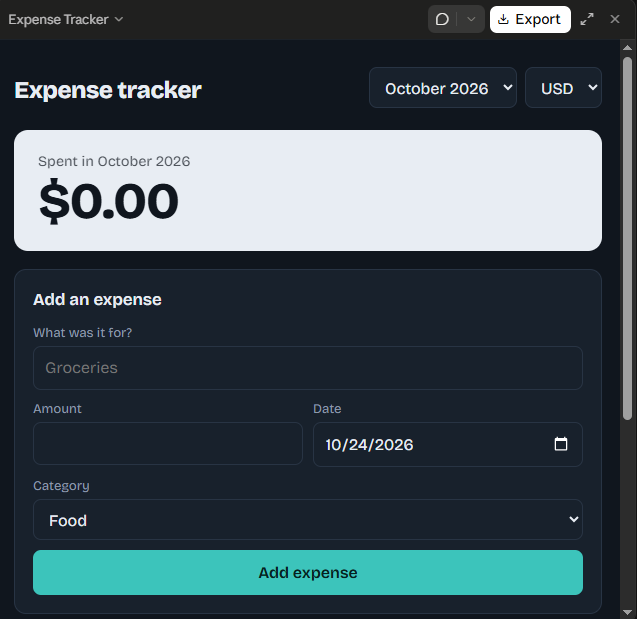
    The Expense Tracker is a simple and useful application designed to help users record, organize, and monitor their daily expenses. With this application, users can easily track their spending, manage their budgets, and understand where their money goes. It helps maintain a clear record of income and expenses, making it easier to identify spending habits and avoid unnecessary purchases. Whether you want to manage personal finances, control your daily spending, or save money for future goals, an Expense Tracker can make financial management more organized and convenient.

    **Track Your Expenses. Control Your Budget. Build Better Financial Habits!**

    #ExpenseTracker #BudgetManagement #PersonalFinance #MoneyManagement #SmartSpending #FinancialPlanning #SavingMoney #Productivity #AppDevelopment #ProjectCompleted
    RSIF8 Roll no:14 coding task no:23 coding topic:Expense Tracker 💰 **Expense Tracker – Manage Your Money Smartly!** 📊 The Expense Tracker is a simple and useful application designed to help users record, organize, and monitor their daily expenses. With this application, users can easily track their spending, manage their budgets, and understand where their money goes. 💵 It helps maintain a clear record of income and expenses, making it easier to identify spending habits and avoid unnecessary purchases. Whether you want to manage personal finances, control your daily spending, or save money for future goals, an Expense Tracker can make financial management more organized and convenient. ✨ 🎯 **Track Your Expenses. Control Your Budget. Build Better Financial Habits!** #ExpenseTracker #BudgetManagement #PersonalFinance #MoneyManagement #SmartSpending #FinancialPlanning #SavingMoney #Productivity #AppDevelopment #ProjectCompleted ✅
    0 Comments 0 Shares 814 Views
  • RSIF8
    Roll No : 87
    claude ai No : 2
    claude ai topic: Basic Calculator (arithmetic operations)
    **Basic Calculator Project – My Completed Task**
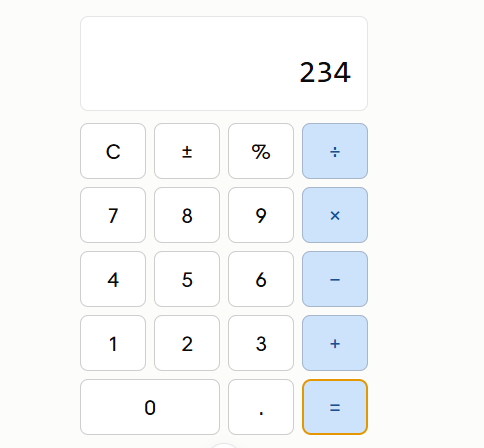
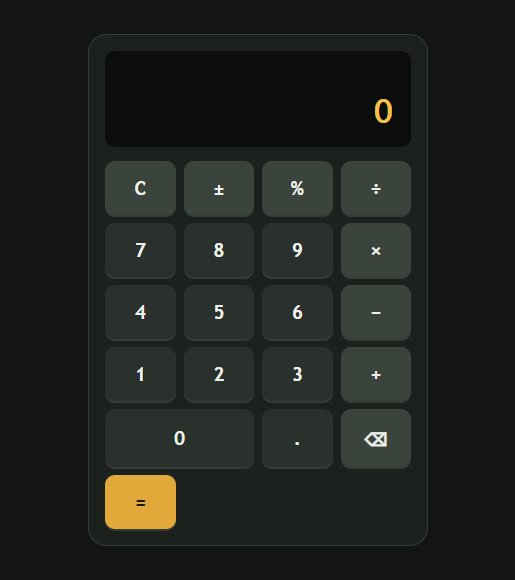
    I have successfully created a **Basic Calculator** as part of my learning and coding practice. This calculator has a simple, clean, and user-friendly interface that makes it easy to perform everyday mathematical calculations. The calculator includes important buttons such as **addition (+), subtraction (−), multiplication (×), division (÷), percentage (%), decimal (.), plus/minus (±), clear (C), and equals )**.
    The calculator display shows the numbers and results clearly, while the organized button layout makes it easy for users to enter numbers and select the required mathematical operation. I focused on making the design simple and easy to understand so that anyone can use it without difficulty.
    Creating this calculator helped me understand how a calculator works and gave me valuable practice with **HTML, CSS, and JavaScript**. I learned how to design buttons, create a calculator layout, handle user input, perform mathematical operations, and display the final result.
    This project was a great opportunity to improve my **coding, problem-solving, logical thinking, and web development skills**. I am happy to complete this project and excited to continue learning and creating more useful projects in the future.
    #BasicCalculator #Calculator #Coding #WebDevelopment #HTML #CSS #JavaScript #Programming #CodingPractice #Learning #StudentProject #ProjectCompleted #Math #Technology #ComputerSkills #ProblemSolving #ProgrammingSkills #KeepLearning #KeepGrowing
    RSIF8 Roll No : 87 claude ai No : 2 claude ai topic: Basic Calculator (arithmetic operations) 🧮✨ **Basic Calculator Project – My Completed Task** ✨🧮 I have successfully created a **Basic Calculator** as part of my learning and coding practice. This calculator has a simple, clean, and user-friendly interface that makes it easy to perform everyday mathematical calculations. The calculator includes important buttons such as **addition (+), subtraction (−), multiplication (×), division (÷), percentage (%), decimal (.), plus/minus (±), clear (C), and equals 😊)**. The calculator display shows the numbers and results clearly, while the organized button layout makes it easy for users to enter numbers and select the required mathematical operation. I focused on making the design simple and easy to understand so that anyone can use it without difficulty. Creating this calculator helped me understand how a calculator works and gave me valuable practice with **HTML, CSS, and JavaScript**. I learned how to design buttons, create a calculator layout, handle user input, perform mathematical operations, and display the final result. 💻📚 This project was a great opportunity to improve my **coding, problem-solving, logical thinking, and web development skills**. I am happy to complete this project and excited to continue learning and creating more useful projects in the future. 🚀💯 #BasicCalculator #Calculator #Coding #WebDevelopment #HTML #CSS #JavaScript #Programming #CodingPractice #Learning #StudentProject #ProjectCompleted #Math #Technology #ComputerSkills #ProblemSolving #ProgrammingSkills #KeepLearning #KeepGrowing 🧮💻🚀✨
    0 Comments 0 Shares 2782 Views
  • RSIF8
    Roll No : 87
    claude ai No : 1
    claude ai topic: Create a Basic Calculator
    **Basic Calculator Project – My Completed Task**
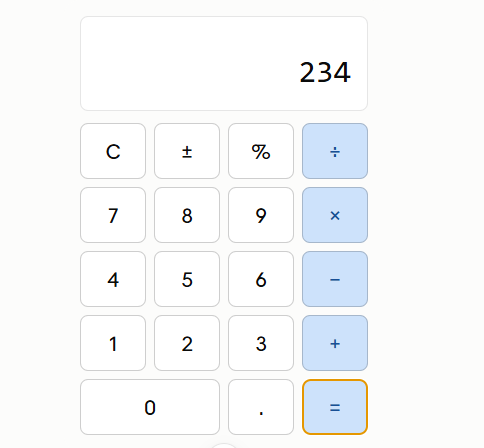
    I have successfully created a **Basic Calculator** as part of my learning and coding practice. This calculator has a simple, clean, and user-friendly interface that makes it easy to perform everyday mathematical calculations. The calculator includes important buttons such as **addition (+), subtraction (−), multiplication (×), division (÷), percentage (%), decimal (.), plus/minus (±), clear (C), and equals )**.
    The calculator display shows the numbers and results clearly, while the organized button layout makes it easy for users to enter numbers and select the required mathematical operation. I focused on making the design simple and easy to understand so that anyone can use it without difficulty.
    Creating this calculator helped me understand how a calculator works and gave me valuable practice with **HTML, CSS, and JavaScript**. I learned how to design buttons, create a calculator layout, handle user input, perform mathematical operations, and display the final result.
    This project was a great opportunity to improve my **coding, problem-solving, logical thinking, and web development skills**. I am happy to complete this project and excited to continue learning and creating more useful projects in the future.
    #BasicCalculator #Calculator #Coding #WebDevelopment #HTML #CSS #JavaScript #Programming #CodingPractice #Learning #StudentProject #ProjectCompleted #Math #Technology #ComputerSkills #ProblemSolving #ProgrammingSkills #KeepLearning #KeepGrowing
    RSIF8 Roll No : 87 claude ai No : 1 claude ai topic: Create a Basic Calculator 🧮✨ **Basic Calculator Project – My Completed Task** ✨🧮 I have successfully created a **Basic Calculator** as part of my learning and coding practice. This calculator has a simple, clean, and user-friendly interface that makes it easy to perform everyday mathematical calculations. The calculator includes important buttons such as **addition (+), subtraction (−), multiplication (×), division (÷), percentage (%), decimal (.), plus/minus (±), clear (C), and equals 😊)**. The calculator display shows the numbers and results clearly, while the organized button layout makes it easy for users to enter numbers and select the required mathematical operation. I focused on making the design simple and easy to understand so that anyone can use it without difficulty. Creating this calculator helped me understand how a calculator works and gave me valuable practice with **HTML, CSS, and JavaScript**. I learned how to design buttons, create a calculator layout, handle user input, perform mathematical operations, and display the final result. 💻📚 This project was a great opportunity to improve my **coding, problem-solving, logical thinking, and web development skills**. I am happy to complete this project and excited to continue learning and creating more useful projects in the future. 🚀💯 #BasicCalculator #Calculator #Coding #WebDevelopment #HTML #CSS #JavaScript #Programming #CodingPractice #Learning #StudentProject #ProjectCompleted #Math #Technology #ComputerSkills #ProblemSolving #ProgrammingSkills #KeepLearning #KeepGrowing 🧮💻🚀✨
    0 Comments 0 Shares 2354 Views
  • RSIF8
    Roll no:14
    coding task no:9
    coding task topic:Countdown Timer

    **COUNTDOWN TIMER – TASK COMPLETED SUCCESSFULLY!**

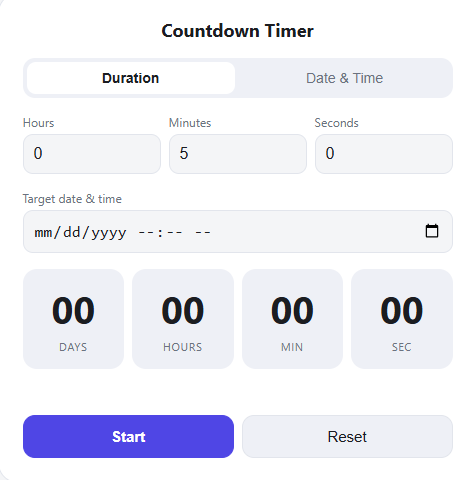
    The **Countdown Timer** is an interactive coding project designed to display the remaining time until a specific event or deadline. The timer continuously counts down in **hours, minutes, and seconds**, providing users with a clear and engaging way to track time.

    This project demonstrates several important programming concepts, including **time management, variables, functions, loops, conditional statements, user interaction, and real-time updates**. By automatically updating the displayed time every second, the application creates a smooth and dynamic user experience.

    The Countdown Timer can be useful for **events, presentations, study sessions, deadlines, competitions, reminders, and productivity activities**. It also provides valuable practice in developing interactive applications and understanding how programs handle time-based operations.

    **Key Features:**

    * Real-time countdown
    * Hours, minutes, and seconds display
    * Automatic time updates
    * Clear and simple interface
    * Interactive programming logic
    * Completion notification when the timer reaches zero

    This task successfully combines **programming logic, time-based functionality, and user interaction** to create a practical and engaging application.

    **TASK COMPLETED WITH SUCCESS!**

    #CountdownTimer #Coding #Programming #CodingProject #WebDevelopment #BeginnerProject #JavaScript #ProgrammingSkills #TimeManagement #Productivity #Technology #LearningToCode #LogicBuilding #InteractiveApplication #TaskCompleted #CodingSkills #ProjectCompleted #Developer #ComputerScience
    RSIF8 Roll no:14 coding task no:9 coding task topic:Countdown Timer ⏳ **COUNTDOWN TIMER – TASK COMPLETED SUCCESSFULLY!** 🎯 The **Countdown Timer** is an interactive coding project designed to display the remaining time until a specific event or deadline. The timer continuously counts down in **hours, minutes, and seconds**, providing users with a clear and engaging way to track time. 🕐💻 This project demonstrates several important programming concepts, including **time management, variables, functions, loops, conditional statements, user interaction, and real-time updates**. By automatically updating the displayed time every second, the application creates a smooth and dynamic user experience. ⚙️✨ The Countdown Timer can be useful for **events, presentations, study sessions, deadlines, competitions, reminders, and productivity activities**. It also provides valuable practice in developing interactive applications and understanding how programs handle time-based operations. 📚🚀 💡 **Key Features:** * ⏱️ Real-time countdown * 🕐 Hours, minutes, and seconds display * 🔄 Automatic time updates * 🎯 Clear and simple interface * 💻 Interactive programming logic * 🏁 Completion notification when the timer reaches zero ✨ This task successfully combines **programming logic, time-based functionality, and user interaction** to create a practical and engaging application. 🏆 **TASK COMPLETED WITH SUCCESS!** 🏆 #CountdownTimer #Coding #Programming #CodingProject #WebDevelopment #BeginnerProject #JavaScript #ProgrammingSkills #TimeManagement #Productivity #Technology #LearningToCode #LogicBuilding #InteractiveApplication #TaskCompleted #CodingSkills #ProjectCompleted #Developer #ComputerScience
    0 Comments 0 Shares 3071 Views
  • RSIF8
    Roll no:14
    coding task no:3
    coding task topic:Simple To-Do List App

    **Build a Simple To-Do List**

    I have successfully completed my **Simple To-Do List** task!

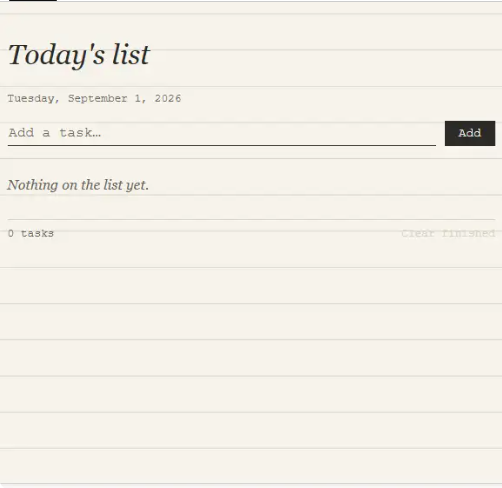
    In this project, I created a simple and useful To-Do List that allows users to easily **add, remove, and view tasks**.

    The main purpose of this project was to understand how a basic task-management application works and how users can interact with different features. Through this activity, I practiced organizing tasks and creating a simple user-friendly experience.

    **Key Features:**
    Add new tasks
    View existing tasks
    Remove completed or unwanted tasks
    Keep tasks organized in one place

    This task helped me improve my **problem-solving, logical thinking, and basic programming skills**. It also gave me practical experience in building an interactive application from the beginning.

    Completing this project is another step forward in my learning journey. I learned that even a simple project can teach valuable concepts and build confidence for creating more advanced applications in the future.

    **Task Completed Successfully!**

    #ToDoList #TaskCompleted #Programming #Coding #WebDevelopment #ProjectCompleted #Learning #FoundationLevel #FoundationTask #CodingJourney #ProblemSolving #ProgrammingSkills #Technology #StudentProject #KeepLearning #KeepGrowing #Success #Achievement
    RSIF8 Roll no:14 coding task no:3 coding task topic:Simple To-Do List App 📝✨ **Build a Simple To-Do List** ✨📝 I have successfully completed my **Simple To-Do List** task! 🎉💻 In this project, I created a simple and useful To-Do List that allows users to easily **add, remove, and view tasks**. ✅➕🗑️ The main purpose of this project was to understand how a basic task-management application works and how users can interact with different features. Through this activity, I practiced organizing tasks and creating a simple user-friendly experience. 🎯📚 💡 **Key Features:** ➕ Add new tasks 👀 View existing tasks 🗑️ Remove completed or unwanted tasks 📋 Keep tasks organized in one place This task helped me improve my **problem-solving, logical thinking, and basic programming skills**. It also gave me practical experience in building an interactive application from the beginning. 🚀🧠 🌟 Completing this project is another step forward in my learning journey. I learned that even a simple project can teach valuable concepts and build confidence for creating more advanced applications in the future. 💪💻 🎯 **Task Completed Successfully!** ✅🏆 #ToDoList #TaskCompleted #Programming #Coding #WebDevelopment #ProjectCompleted #Learning #FoundationLevel #FoundationTask #CodingJourney #ProblemSolving #ProgrammingSkills #Technology #StudentProject #KeepLearning #KeepGrowing #Success #Achievement 💻🚀✨
    0 Comments 0 Shares 2267 Views
  • RSIF8
    Roll no:14
    song no:12
    song topic:RAWALPINDI BLUES – SONG PROJECT
    **RAWALPINDI BLUES – SONG PROJECT SUCCESSFULLY COMPLETED**
    I am pleased to share the successful completion of my creative music project, **“Rawalpindi Blues.”**
    This song is a musical reflection of **Rawalpindi’s streets, city lights, rainy evenings, everyday life, memories, and the emotions connected with home.** Through a blues-inspired style, the song explores the feeling of growing up, remembering familiar places, chasing dreams, and carrying unforgettable memories wherever life takes us.
    The project combines **storytelling, songwriting, emotions, and creativity** to present Rawalpindi from a personal and artistic perspective. Every verse and melody was designed to capture the unique atmosphere of the city while creating a relatable and meaningful musical experience.
    **Project Highlights:**
    **Title:** Rawalpindi Blues
    **Genre/Style:** Blues-Inspired
    **Theme:** City Life, Memories & Dreams
    **Focus:** Songwriting & Creative Storytelling
    **Status:** Successfully Completed
    Completing **“Rawalpindi Blues”** was a valuable creative experience that allowed me to transform the sights, sounds, emotions, and memories of a city into a musical story.
    **A city has many streets, but some streets become memories.
    “Rawalpindi Blues” is a song about those memories.**
    #RawalpindiBlues #Rawalpindi #MusicProject #Songwriting #CreativeProject #BluesMusic #CreativeWriting #MusicAndStorytelling #CityLife #UrbanVibes #Memories #Dreams #PakistaniMusic #CreativeLearning #ProjectCompleted #MusicCreation
    RSIF8 Roll no:14 song no:12 song topic:RAWALPINDI BLUES – SONG PROJECT 🎸🌧️ **RAWALPINDI BLUES – SONG PROJECT SUCCESSFULLY COMPLETED** 🎶 I am pleased to share the successful completion of my creative music project, **“Rawalpindi Blues.”** 🎵✨ This song is a musical reflection of **Rawalpindi’s streets, city lights, rainy evenings, everyday life, memories, and the emotions connected with home.** 🌃🌧️ Through a blues-inspired style, the song explores the feeling of growing up, remembering familiar places, chasing dreams, and carrying unforgettable memories wherever life takes us. The project combines **storytelling, songwriting, emotions, and creativity** to present Rawalpindi from a personal and artistic perspective. Every verse and melody was designed to capture the unique atmosphere of the city while creating a relatable and meaningful musical experience. 🎶💙 ✨ **Project Highlights:** 🎵 **Title:** Rawalpindi Blues 🎸 **Genre/Style:** Blues-Inspired 🏙️ **Theme:** City Life, Memories & Dreams ✍️ **Focus:** Songwriting & Creative Storytelling 🎯 **Status:** Successfully Completed ✅ Completing **“Rawalpindi Blues”** was a valuable creative experience that allowed me to transform the sights, sounds, emotions, and memories of a city into a musical story. 🎼🌧️ **A city has many streets, but some streets become memories. “Rawalpindi Blues” is a song about those memories.** 💙🎸 #RawalpindiBlues #Rawalpindi #MusicProject #Songwriting #CreativeProject #BluesMusic #CreativeWriting #MusicAndStorytelling #CityLife #UrbanVibes #Memories #Dreams #PakistaniMusic #CreativeLearning #ProjectCompleted #MusicCreation 🎶🎸🌧️🏙️✨
    0 Comments 0 Shares 6651 Views 9
  • RSIF8
    Roll No : 87
    claude ai No : 1
    claude ai topic: Create a Basic Calculator
    **Basic Calculator Project – My Completed Task**
    I have successfully created a **Basic Calculator** as part of my learning and coding practice. This calculator has a simple, clean, and user-friendly interface that makes it easy to perform everyday mathematical calculations. The calculator includes important buttons such as **addition (+), subtraction (−), multiplication (×), division (÷), percentage (%), decimal (.), plus/minus (±), clear (C), and equals )**.
    The calculator display shows the numbers and results clearly, while the organized button layout makes it easy for users to enter numbers and select the required mathematical operation. I focused on making the design simple and easy to understand so that anyone can use it without difficulty.
    Creating this calculator helped me understand how a calculator works and gave me valuable practice with **HTML, CSS, and JavaScript**. I learned how to design buttons, create a calculator layout, handle user input, perform mathematical operations, and display the final result.
    This project was a great opportunity to improve my **coding, problem-solving, logical thinking, and web development skills**. I am happy to complete this project and excited to continue learning and creating more useful projects in the future.
    #BasicCalculator #Calculator #Coding #WebDevelopment #HTML #CSS #JavaScript #Programming #CodingPractice #Learning #StudentProject #ProjectCompleted #Math #Technology #ComputerSkills #ProblemSolving #ProgrammingSkills #KeepLearning #KeepGrowing
    RSIF8 Roll No : 87 claude ai No : 1 claude ai topic: Create a Basic Calculator 🧮✨ **Basic Calculator Project – My Completed Task** ✨🧮 I have successfully created a **Basic Calculator** as part of my learning and coding practice. This calculator has a simple, clean, and user-friendly interface that makes it easy to perform everyday mathematical calculations. The calculator includes important buttons such as **addition (+), subtraction (−), multiplication (×), division (÷), percentage (%), decimal (.), plus/minus (±), clear (C), and equals 😊)**. The calculator display shows the numbers and results clearly, while the organized button layout makes it easy for users to enter numbers and select the required mathematical operation. I focused on making the design simple and easy to understand so that anyone can use it without difficulty. Creating this calculator helped me understand how a calculator works and gave me valuable practice with **HTML, CSS, and JavaScript**. I learned how to design buttons, create a calculator layout, handle user input, perform mathematical operations, and display the final result. 💻📚 This project was a great opportunity to improve my **coding, problem-solving, logical thinking, and web development skills**. I am happy to complete this project and excited to continue learning and creating more useful projects in the future. 🚀💯 #BasicCalculator #Calculator #Coding #WebDevelopment #HTML #CSS #JavaScript #Programming #CodingPractice #Learning #StudentProject #ProjectCompleted #Math #Technology #ComputerSkills #ProblemSolving #ProgrammingSkills #KeepLearning #KeepGrowing 🧮💻🚀✨
    0 Comments 0 Shares 3957 Views