• RSIF8
    CLASS: FOUNDATION LEVEL
    CODING TASK NO:8

    Day 8 – AI Game: Create an Alarm Clock App Using Claude.ai

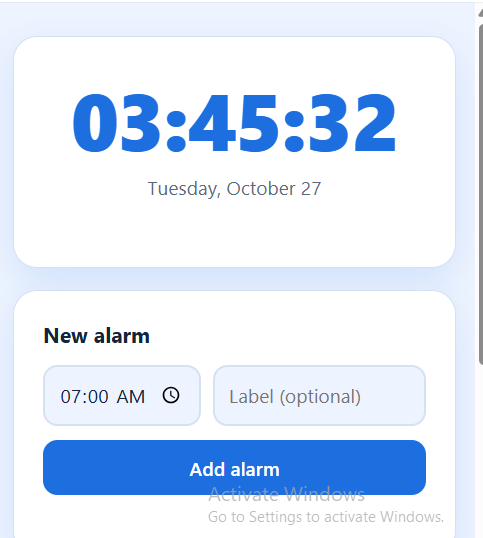
    Today, I worked on the Day 8 AI Game task, which was to create an Alarm Clock App using Claude.ai. The main objective of this task was to build a simple and useful application that allows users to set an alarm for their desired time. This project helped me explore how artificial intelligence can assist in creating applications and make everyday activities easier and more convenient.

    An alarm clock is a useful tool that helps people manage their daily routines and stay organized. People use alarms to wake up in the morning, remember important tasks, prepare for school, attend meetings, and follow their schedules. By creating an alarm clock application, I explored how technology can help users manage their time more effectively.

    During this task, I focused on designing an easy-to-use interface where users can select a specific time and set an alarm. A good alarm clock app should display the current time clearly and provide simple controls for setting, activating, and canceling an alarm. The interface should be organized, attractive, and user-friendly so that people can use it without difficulty.

    I used Claude.ai as an AI assistant to help me develop the application. AI tools can make coding easier by helping users generate code, understand programming concepts, identify errors, and improve their designs. This experience helped me understand how artificial intelligence can support the software development process and turn an idea into a working project.

    While working on this application, I learned about important programming concepts such as time handling, user input, event handling, and application logic. These concepts are useful for developing many other applications, including digital clocks, timers, reminders, and scheduling tools. I also learned that testing an application is important to make sure its features work correctly.

    One of the most important parts of this project was thinking about the user's experience.
    RSIF8 CLASS: FOUNDATION LEVEL CODING TASK NO:8 ⏰ Day 8 – AI Game: Create an Alarm Clock App Using Claude.ai Today, I worked on the Day 8 AI Game task, which was to create an Alarm Clock App using Claude.ai. The main objective of this task was to build a simple and useful application that allows users to set an alarm for their desired time. This project helped me explore how artificial intelligence can assist in creating applications and make everyday activities easier and more convenient. An alarm clock is a useful tool that helps people manage their daily routines and stay organized. People use alarms to wake up in the morning, remember important tasks, prepare for school, attend meetings, and follow their schedules. By creating an alarm clock application, I explored how technology can help users manage their time more effectively. During this task, I focused on designing an easy-to-use interface where users can select a specific time and set an alarm. A good alarm clock app should display the current time clearly and provide simple controls for setting, activating, and canceling an alarm. The interface should be organized, attractive, and user-friendly so that people can use it without difficulty. I used Claude.ai as an AI assistant to help me develop the application. AI tools can make coding easier by helping users generate code, understand programming concepts, identify errors, and improve their designs. This experience helped me understand how artificial intelligence can support the software development process and turn an idea into a working project. While working on this application, I learned about important programming concepts such as time handling, user input, event handling, and application logic. These concepts are useful for developing many other applications, including digital clocks, timers, reminders, and scheduling tools. I also learned that testing an application is important to make sure its features work correctly. One of the most important parts of this project was thinking about the user's experience.
    0 Комментарии 0 Поделились 354 Просмотры
  • #rsisb
    Roll no.247
    coding.4
    Foundation level

    **Calendar App — Organize Your Time, Plan Your Future!**

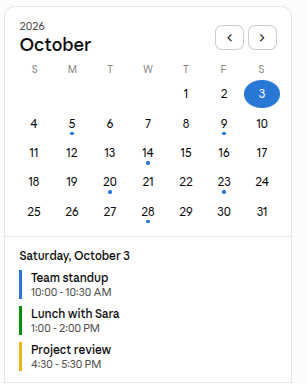
    Today, I worked on an exciting **Calendar App** project designed to make organizing daily activities, important dates, events, and schedules easier and more convenient.

    The Calendar App provides a simple and user-friendly way to manage your time. Users can easily view different days, weeks, and months, keep track of important events, and plan their schedules in an organized way.

    This project helped me understand important concepts of **web development, user interface design, date management, navigation, and interactive applications**. ‍ It was a great opportunity to practice creating a clean and useful digital experience.

    A good calendar is more than just a way to see dates—it helps us stay organized, remember important moments, manage our responsibilities, and use our time wisely.

    I’m excited to continue learning, improving my coding skills, and creating more useful projects in the future!

    **Project:** Calendar App
    **Category:** Coding / Web Development
    **Focus:** Organization, Scheduling & Time Management
    **Learning:** UI Design, Programming & Interactive Features

    #CalendarApp #Calendar #Coding #WebDevelopment #Programming #CodingProject #Tech #Technology #SoftwareDevelopment #AppDevelopment #UIDesign #WebDesign #LearningToCode #CodingJourney #StudentDeveloper #CreativeCoding #TimeManagement #Productivity #Organization #DigitalCalendar #FutureDeveloper #TechSkills #Innovation #ProjectBasedLearning
    #rsisb Roll no.247 coding.4 Foundation level 📅✨ **Calendar App — Organize Your Time, Plan Your Future!** 🚀🗓️ Today, I worked on an exciting **Calendar App** project designed to make organizing daily activities, important dates, events, and schedules easier and more convenient. 📆💻 The Calendar App provides a simple and user-friendly way to manage your time. Users can easily view different days, weeks, and months, keep track of important events, and plan their schedules in an organized way. ⏰📝 This project helped me understand important concepts of **web development, user interface design, date management, navigation, and interactive applications**. 💡👨‍💻 It was a great opportunity to practice creating a clean and useful digital experience. A good calendar is more than just a way to see dates—it helps us stay organized, remember important moments, manage our responsibilities, and use our time wisely. 🌟⏳ I’m excited to continue learning, improving my coding skills, and creating more useful projects in the future! 🚀🔥 📅 **Project:** Calendar App 💻 **Category:** Coding / Web Development 🎯 **Focus:** Organization, Scheduling & Time Management 🌱 **Learning:** UI Design, Programming & Interactive Features #CalendarApp #Calendar #Coding #WebDevelopment #Programming #CodingProject #Tech #Technology #SoftwareDevelopment #AppDevelopment #UIDesign #WebDesign #LearningToCode #CodingJourney #StudentDeveloper #CreativeCoding #TimeManagement #Productivity #Organization #DigitalCalendar #FutureDeveloper #TechSkills #Innovation #ProjectBasedLearning 🚀💻📅✨🎯
    0 Комментарии 0 Поделились 4135 Просмотры
  • Mohsin #RSF8
    Coding Task No:6
    Class Foundation Level

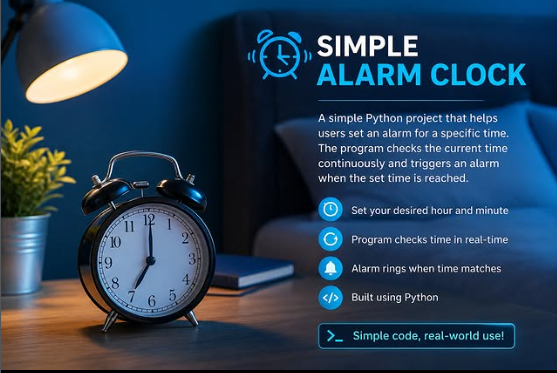
    Yeh **Simple Alarm Clock** coding task ke liye ek **long aur professional social media description** hai:

    **Simple Alarm Clock – Python Coding Challenge**

    Today, I successfully completed a **Simple Alarm Clock** project using Python. This project may seem simple at first, but it is an excellent exercise for understanding how programming can solve real-life problems through automation. The alarm clock allows users to enter a specific time, continuously monitors the current system time, and automatically triggers an alarm notification when the set time is reached.

    While developing this project, I gained practical experience with important Python concepts such as **loops, conditional statements, user input, the `datetime` module, and time management**. I also learned how a program can interact with the system clock to perform tasks automatically without constant user interaction. This project helped me strengthen my logical thinking and improve my problem-solving skills.

    One of the most valuable lessons from this coding challenge is that even a small program can have a meaningful real-world application. Alarm clocks, reminders, scheduling systems, and notification apps all rely on similar programming concepts. By completing this project, I took another step toward understanding how software is built to make everyday life easier and more organized.

    Every coding challenge teaches something new. With each project, I become more confident in writing clean code, debugging errors, and creating useful applications. I believe that consistency, practice, and continuous learning are the keys to becoming a skilled programmer.

    This project has motivated me to keep exploring Python and develop more advanced applications in the future. Every line of code brings me one step closer to achieving my goals in technology and software development.

    **Learning never stops. Keep coding, keep improving, and keep building the future—one project at a time!**

    #Python #CodingChallenge #SimpleAlarmClock #Programming #PythonDeveloper #LearnToCode #CodingJourney #SoftwareDevelopment #TechSkills #FutureDeveloper #RSF8
    Mohsin #RSF8🎓✨ Coding Task No:6 Class Foundation Level Yeh **Simple Alarm Clock** coding task ke liye ek **long aur professional social media description** hai: ⏰ **Simple Alarm Clock – Python Coding Challenge** Today, I successfully completed a **Simple Alarm Clock** project using Python. This project may seem simple at first, but it is an excellent exercise for understanding how programming can solve real-life problems through automation. The alarm clock allows users to enter a specific time, continuously monitors the current system time, and automatically triggers an alarm notification when the set time is reached. While developing this project, I gained practical experience with important Python concepts such as **loops, conditional statements, user input, the `datetime` module, and time management**. I also learned how a program can interact with the system clock to perform tasks automatically without constant user interaction. This project helped me strengthen my logical thinking and improve my problem-solving skills. One of the most valuable lessons from this coding challenge is that even a small program can have a meaningful real-world application. Alarm clocks, reminders, scheduling systems, and notification apps all rely on similar programming concepts. By completing this project, I took another step toward understanding how software is built to make everyday life easier and more organized. Every coding challenge teaches something new. With each project, I become more confident in writing clean code, debugging errors, and creating useful applications. I believe that consistency, practice, and continuous learning are the keys to becoming a skilled programmer. This project has motivated me to keep exploring Python and develop more advanced applications in the future. Every line of code brings me one step closer to achieving my goals in technology and software development. 🚀 **Learning never stops. Keep coding, keep improving, and keep building the future—one project at a time!** #Python #CodingChallenge #SimpleAlarmClock #Programming #PythonDeveloper #LearnToCode #CodingJourney #SoftwareDevelopment #TechSkills #FutureDeveloper #RSF8🎓✨
    0 Комментарии 0 Поделились 2653 Просмотры
  • Episode 238 | Remote Work & Freelancing Tips

    Struggling to fit everything into your day as a freelancer or remote worker?
    In this episode, we share 6 powerful ways to add more hours to your day—without burning out.

    Key Takeaways:
    Wake up earlier (even 30 mins makes a difference)
    Be intentional with breaks
    Stop multitasking & focus on one task
    Automate your scheduling
    Outsource what drains your energy
    Learn to say "no" and protect your time

    These strategies will help you work smarter, stay productive, and create balance in your freelance journey.

    Watch Episode 238 now and start making every hour count.
    Episode 238 🎥 | Remote Work & Freelancing Tips Struggling to fit everything into your day as a freelancer or remote worker? ⏳ In this episode, we share 6 powerful ways to add more hours to your day—without burning out. 💡 Key Takeaways: ✅ Wake up earlier (even 30 mins makes a difference) ✅ Be intentional with breaks ✅ Stop multitasking & focus on one task ✅ Automate your scheduling ✅ Outsource what drains your energy ✅ Learn to say "no" and protect your time These strategies will help you work smarter, stay productive, and create balance in your freelance journey. 👉 Watch Episode 238 now and start making every hour count.
    0 Комментарии 0 Поделились 1396 Просмотры 0
  • AI Coding Journey – Book 1
    Waking up my coding skills with Task No. 08: Alarm Clock App!
    This project lets users set alarms — teaching me how to handle time functions, scheduling, and user input!
    A practical tool that combines logic and creativity.
    Check it out here:
    https://claude.ai/public/artifacts/89e6aa59-229b-4074-ace5-560d104aa175

    #AICoding #AlarmClock #LearningByDoing #codinglife #book1
    ⚡💻 AI Coding Journey – Book 1 🚀📘 Waking up my coding skills with Task No. 08: Alarm Clock App! ⏰🔥 This project lets users set alarms — teaching me how to handle time functions, scheduling, and user input! 🛠️💡 💻 A practical tool that combines logic and creativity. 🎥 Check it out here: https://claude.ai/public/artifacts/89e6aa59-229b-4074-ace5-560d104aa175 #AICoding #AlarmClock #LearningByDoing #codinglife #book1
    0 Комментарии 0 Поделились 3069 Просмотры
  • AI Coding Journey – Book 1
    Ringing in progress with Task No. 18: Alarm Clock App!
    This project lets users set alarms — a great way to practice time functions, scheduling, and user input handling!
    A practical project that combines creativity and functionality.
    Check it out here:
    https://claude.ai/public/artifacts/571db396-bac7-4fec-a31a-d8c611a15d6e

    #AICoding #AlarmClock #LearningByDoing #codinglife #book1
    ⚡💻 AI Coding Journey – Book 1 🚀📘 Ringing in progress with Task No. 18: Alarm Clock App! ⏰🔥 This project lets users set alarms — a great way to practice time functions, scheduling, and user input handling! 🛠️💡 💻 A practical project that combines creativity and functionality. 🎥 Check it out here: https://claude.ai/public/artifacts/571db396-bac7-4fec-a31a-d8c611a15d6e #AICoding #AlarmClock #LearningByDoing #codinglife #book1
    0 Комментарии 0 Поделились 1530 Просмотры
  • Reminder Web App using Gemini CLI
    Description

    A modern and responsive Reminder web application developed using Gemini CLI. Users can create, edit, delete, and manage reminders with date and time scheduling. The application provides notifications, sound alerts, reminder tracking, and a professional user experience across all devices.

    Student Information

    Coding Book: 1
    Task: 10
    Roll No: 71

    Website Link

    http://rsmc71.rehanschool.us/reminder/

    Hashtags

    #GeminiCLI #ReminderApp #WebDevelopment #HTML #CSS #JavaScript #CodingBook1 #Task10 #RollNo71 #Programming #FrontendDevelopment #ProductivityApp #AI #StudentProject #CodeWithAI #TechEducation #WebAppDevelopment #JavaScriptProject #ReminderSystem #TaskManager #NotificationApp
    Reminder Web App using Gemini CLI Description A modern and responsive Reminder web application developed using Gemini CLI. Users can create, edit, delete, and manage reminders with date and time scheduling. The application provides notifications, sound alerts, reminder tracking, and a professional user experience across all devices. Student Information 📖 Coding Book: 1 📋 Task: 10 🎓 Roll No: 71 Website Link http://rsmc71.rehanschool.us/reminder/ Hashtags #GeminiCLI #ReminderApp #WebDevelopment #HTML #CSS #JavaScript #CodingBook1 #Task10 #RollNo71 #Programming #FrontendDevelopment #ProductivityApp #AI #StudentProject #CodeWithAI #TechEducation #WebAppDevelopment #JavaScriptProject #ReminderSystem #TaskManager #NotificationApp
    0 Комментарии 0 Поделились 9512 Просмотры
  • alendly Clone – Project Description

    This Calendly-inspired scheduling platform is a professional web application designed to streamline appointment booking and eliminate the inefficiencies of manual scheduling. It allows users to generate a personalized booking link, enabling clients, teammates, or customers to instantly view availability and schedule meetings with ease. Built with a focus on speed, reliability, and user experience, the platform enhances productivity for individuals, professionals, and organizations.

    STUDENT INFORMATION
    Coding Book 1 – Task 15
    Roll No: 71

    This project has been developed as part of a structured web development learning program. It demonstrates practical implementation of modern frontend concepts, UI/UX design principles, and real-world SaaS-style functionality.

    Web Link:

    https://rsmc71.rehanschool.us/Calendly.com_clone/

    Hashtags:
    #CalendlyClone #SchedulingSystem #WebDevelopment #StudentProject #CodingBook1 #Task15 #Roll71 #UIUXDesign #FrontendDevelopment #SaaS #ProductivityTools
    alendly Clone – Project Description This Calendly-inspired scheduling platform is a professional web application designed to streamline appointment booking and eliminate the inefficiencies of manual scheduling. It allows users to generate a personalized booking link, enabling clients, teammates, or customers to instantly view availability and schedule meetings with ease. Built with a focus on speed, reliability, and user experience, the platform enhances productivity for individuals, professionals, and organizations. STUDENT INFORMATION Coding Book 1 – Task 15 Roll No: 71 This project has been developed as part of a structured web development learning program. It demonstrates practical implementation of modern frontend concepts, UI/UX design principles, and real-world SaaS-style functionality. Web Link: https://rsmc71.rehanschool.us/Calendly.com_clone/ Hashtags: #CalendlyClone #SchedulingSystem #WebDevelopment #StudentProject #CodingBook1 #Task15 #Roll71 #UIUXDesign #FrontendDevelopment #SaaS #ProductivityTools
    0 Комментарии 0 Поделились 6520 Просмотры
  • Coding Task: 40
    Prompt :
    " Develop a fully functional Calendly-like scheduling platform where users can set availability, book appointments, and manage meetings."
    Click Here for Try : https://rsk152.rehanschool.us/calendly.com_clone/signup.php
    Coding Task: 40 Prompt : " Develop a fully functional Calendly-like scheduling platform where users can set availability, book appointments, and manage meetings." Click Here for Try : https://rsk152.rehanschool.us/calendly.com_clone/signup.php
    0 Комментарии 0 Поделились 886 Просмотры 0
  • Title

    Calendly Clone (Functional) | Coding Book 2 Task 15

    Description

    Completed Coding Book 2 – Task 15 (Calendly Clone – Functional).

    This project is a complete enterprise-grade scheduling and appointment management platform inspired by Calendly. Users can create personalized booking pages, define availability, schedule one-on-one or group meetings, manage appointments, automate reminders, accept paid bookings, synchronize calendars, and streamline meeting workflows. The platform includes dedicated dashboards for individuals, teams, organizations, and administrators with AI-powered scheduling, analytics, workflow automation, and secure role-based access control for real-world deployment.

    Features

    Smart Appointment Scheduling
    Personal Booking Pages
    Availability & Calendar Management
    One-on-One & Group Meetings
    Team Scheduling & Round Robin Assignment
    AI Scheduling Assistant
    Automated Email & SMS Reminders
    Paid Appointments & Invoicing
    Customer, Team & Admin Dashboards
    Reports & Analytics
    Secure Authentication & Role Management
    Responsive Premium UI
    PHP, Laravel & MySQL Backend
    Enterprise Production-Ready Architecture

    Student Details:
    Coding Book: 2
    Task: 15 – Calendly Clone (Functional)
    Roll No: 51

    Website Link:
    https://rsmc51.rehanschool.us/Calendly-Clone/

    Hashtags

    #CodingBook2 #Task15 #CalendlyClone #AppointmentBooking #SchedulingPlatform #CalendarManagement #SaaS #Laravel #PHP #MySQL #HTML #CSS #JavaScript #Bootstrap #TailwindCSS #FullStackDevelopment #WebDevelopment #ResponsiveDesign #Programming #StudentProject #PortfolioProject #LearnToCode
    Title Calendly Clone (Functional) | Coding Book 2 Task 15 Description 📅 Completed Coding Book 2 – Task 15 (Calendly Clone – Functional). This project is a complete enterprise-grade scheduling and appointment management platform inspired by Calendly. Users can create personalized booking pages, define availability, schedule one-on-one or group meetings, manage appointments, automate reminders, accept paid bookings, synchronize calendars, and streamline meeting workflows. The platform includes dedicated dashboards for individuals, teams, organizations, and administrators with AI-powered scheduling, analytics, workflow automation, and secure role-based access control for real-world deployment. Features ✅ Smart Appointment Scheduling ✅ Personal Booking Pages ✅ Availability & Calendar Management ✅ One-on-One & Group Meetings ✅ Team Scheduling & Round Robin Assignment ✅ AI Scheduling Assistant ✅ Automated Email & SMS Reminders ✅ Paid Appointments & Invoicing ✅ Customer, Team & Admin Dashboards ✅ Reports & Analytics ✅ Secure Authentication & Role Management ✅ Responsive Premium UI ✅ PHP, Laravel & MySQL Backend ✅ Enterprise Production-Ready Architecture Student Details: 📚 Coding Book: 2 📝 Task: 15 – Calendly Clone (Functional) 🎓 Roll No: 51 🌐 Website Link: https://rsmc51.rehanschool.us/Calendly-Clone/ Hashtags #CodingBook2 #Task15 #CalendlyClone #AppointmentBooking #SchedulingPlatform #CalendarManagement #SaaS #Laravel #PHP #MySQL #HTML #CSS #JavaScript #Bootstrap #TailwindCSS #FullStackDevelopment #WebDevelopment #ResponsiveDesign #Programming #StudentProject #PortfolioProject #LearnToCode
    0 Комментарии 0 Поделились 8314 Просмотры 0
Расширенные страницы