• #rsisb
    Roll No.190
    Call Anni.No.46
    Foundation Level


    1. *My First Conversation With AI! *

    Start a video by introducing AI and asking simple questions like: “What are you?”*, *“How do you answer questions?”*, and *“What can you help me with?” Then move into more interesting questions about school, technology, hobbies, and the future. Finish by asking AI what advice it would give to someone who wants to learn new things.

    2. *Can AI Answer 20 Questions? *

    Create a fun challenge where you ask AI 20 completely different questions. Start with easy questions and slowly make them more difficult. Ask about science, space, computers, animals, history, and everyday life. The goal is to see how interesting and useful AI's answers can be.

    3. *AI and the Future of Technology *

    Talk with AI about how technology might change in the future. Ask about smart homes, robots, self-driving cars, virtual reality, and future computers. You can also ask, “What might technology look like 20 years from now?” This can make an exciting educational conversation.

    4. *AI Becomes My Teacher! *

    Pretend that AI is your personal teacher for one day. Ask it to explain mathematics, science, English, and computer topics in very simple language. You can then ask follow-up questions whenever something is difficult.

    5. *Ask AI About Our Amazing Planet *

    Have a conversation about Earth and nature. Ask AI about oceans, mountains, forests, weather, animals, and interesting natural phenomena. You can make each question more surprising than the previous one.

    6. *Talking to AI About Space! *

    Take your audience on a virtual journey through space. Ask AI about planets, stars, galaxies, black holes, astronauts, and space exploration. End with an imaginative question such as, “What could humans discover in space in the future?”

    7. *AI and Video Games *

    Discuss how AI is used in modern games. Ask about computer-controlled characters, game worlds, racing games, and how AI can make games more challenging. You can also ask AI to invent an idea for a brand-new game.

    8. *My Dream Smart Home With AI *

    Ask AI to imagine a futuristic smart home. Talk about automatic lights, smart security, helpful robots, voice commands, smart appliances, and energy-saving technology. Then ask AI to design your perfect futuristic room.

    9. *AI Helps Me Learn Coding! *

    Make a beginner-friendly coding conversation. Ask AI what coding is, why people learn it, and how simple programs work. You can ask it to explain concepts like variables, loops, and functions using easy examples.

    10. *Can AI Solve My Brain Challenges? *

    Give AI fun puzzles, riddles, logic questions, and math challenges. Don't reveal the answers immediately—let your audience think first! Then compare your answer with AI's explanation.

    11. *Improve My English With AI! *

    Have a daily English conversation with AI. Talk about school, hobbies, food, sports, technology, and your daily routine. Ask AI to correct your grammar and teach you new vocabulary in a simple way.

    12. *AI Predicts the Future! *

    Ask AI questions about the future of computers, phones, robots, transportation, education, and space exploration. Make it clear that these are **ideas or predictions, not guaranteed facts**.

    13. *Can AI Help Save the Planet? *

    Talk about pollution, recycling, renewable energy, forests, oceans, and wildlife. Ask AI how technology could help people protect the environment. This gives your video an educational and positive message.

    14. *Funny Questions for AI! *

    Ask AI unusual but harmless questions such as “If you could have a favorite hobby, what would it be?” or “What would a robot's perfect vacation look like?” Turn the answers into a fun conversation with reactions and jokes.

    15. *A Full Day With My AI Assistant! *

    Create a story where AI helps you throughout an imaginary day. Start with planning your morning, then studying, learning something new, organizing tasks, solving a puzzle, and finishing the day with a fun conversation. It can become a complete *“Day With AI”* episode.
    #rsisb Roll No.190 Call Anni.No.46 Foundation Level 🤖 1. *My First Conversation With AI! 🌟* Start a video by introducing AI and asking simple questions like: “What are you?”*, *“How do you answer questions?”*, and *“What can you help me with?” Then move into more interesting questions about school, technology, hobbies, and the future. Finish by asking AI what advice it would give to someone who wants to learn new things. 📚✨ 🧠 2. *Can AI Answer 20 Questions? 🎯* Create a fun challenge where you ask AI 20 completely different questions. Start with easy questions and slowly make them more difficult. Ask about science, space, computers, animals, history, and everyday life. The goal is to see how interesting and useful AI's answers can be. 🚀🌍 💻 3. *AI and the Future of Technology 🚀* Talk with AI about how technology might change in the future. Ask about smart homes, robots, self-driving cars, virtual reality, and future computers. You can also ask, “What might technology look like 20 years from now?” This can make an exciting educational conversation. 🤖🏠🚗 📚 4. *AI Becomes My Teacher! 👨‍🏫🤖* Pretend that AI is your personal teacher for one day. Ask it to explain mathematics, science, English, and computer topics in very simple language. You can then ask follow-up questions whenever something is difficult. 📖✏️ 🌎 5. *Ask AI About Our Amazing Planet 🌍* Have a conversation about Earth and nature. Ask AI about oceans, mountains, forests, weather, animals, and interesting natural phenomena. You can make each question more surprising than the previous one. 🌊🏔️🦁 👨‍🚀 6. *Talking to AI About Space! 🌌🚀* Take your audience on a virtual journey through space. Ask AI about planets, stars, galaxies, black holes, astronauts, and space exploration. End with an imaginative question such as, “What could humans discover in space in the future?” 🌙⭐ 🎮 7. *AI and Video Games 🎮🤖* Discuss how AI is used in modern games. Ask about computer-controlled characters, game worlds, racing games, and how AI can make games more challenging. You can also ask AI to invent an idea for a brand-new game. 🏎️🎯 🏠 8. *My Dream Smart Home With AI 🏡✨* Ask AI to imagine a futuristic smart home. Talk about automatic lights, smart security, helpful robots, voice commands, smart appliances, and energy-saving technology. Then ask AI to design your perfect futuristic room. 💡🤖🏠 🧑‍💻 9. *AI Helps Me Learn Coding! 💻🔥* Make a beginner-friendly coding conversation. Ask AI what coding is, why people learn it, and how simple programs work. You can ask it to explain concepts like variables, loops, and functions using easy examples. 🖥️⌨️ 🧩 10. *Can AI Solve My Brain Challenges? 🧠🏆* Give AI fun puzzles, riddles, logic questions, and math challenges. Don't reveal the answers immediately—let your audience think first! Then compare your answer with AI's explanation. 🤔💡 🗣️ 11. *Improve My English With AI! 🇬🇧🤖* Have a daily English conversation with AI. Talk about school, hobbies, food, sports, technology, and your daily routine. Ask AI to correct your grammar and teach you new vocabulary in a simple way. 📚🗣️✨ 🔮 12. *AI Predicts the Future! 🚀🔮* Ask AI questions about the future of computers, phones, robots, transportation, education, and space exploration. Make it clear that these are **ideas or predictions, not guaranteed facts**. 🌍🤖 🌱 13. *Can AI Help Save the Planet? 🌳🌎* Talk about pollution, recycling, renewable energy, forests, oceans, and wildlife. Ask AI how technology could help people protect the environment. This gives your video an educational and positive message. ♻️🌳🐼 😂 14. *Funny Questions for AI! 🤣🤖* Ask AI unusual but harmless questions such as “If you could have a favorite hobby, what would it be?” or “What would a robot's perfect vacation look like?” Turn the answers into a fun conversation with reactions and jokes. 😄🎉 🌟 15. *A Full Day With My AI Assistant! 🤖☀️🌙* Create a story where AI helps you throughout an imaginary day. Start with planning your morning, then studying, learning something new, organizing tasks, solving a puzzle, and finishing the day with a fun conversation. It can become a complete *“Day With AI”* episode. 🚀📚🎮🌙
    0 Commentarii 0 Distribuiri 2523 Views 8
  • #rsisb
    Roll no 248
    Foundation level
    song no 15
    **The Magic of Algebra: Solving Problems**

    Algebra turns confusing numbers into clear solutions! By using variables, equations, and logical thinking, we can solve problems step by step and discover the magic behind mathematics.

    Keep practicing, stay curious, and remember: **every problem has a solution!**

    #AlgebraMagic #Mathematics #MathSkills #ProblemSolving #LearnMath #MathIsFun #Education #StudentLife #LearningJourney #LogicalThinking #MathLovers #StudyMotivation
    #rsisb Roll no 248 Foundation level song no 15 ✨ **The Magic of Algebra: Solving Problems** ➗🧮 Algebra turns confusing numbers into clear solutions! 🔢💡 By using variables, equations, and logical thinking, we can solve problems step by step and discover the magic behind mathematics. 🚀📚 Keep practicing, stay curious, and remember: **every problem has a solution!** 🌟💪 #AlgebraMagic #Mathematics #MathSkills #ProblemSolving #LearnMath #MathIsFun #Education #StudentLife #LearningJourney #LogicalThinking #MathLovers #StudyMotivation 📚✨🧠
    1 Commentarii 0 Distribuiri 2081 Views 21
  • #rsisb
    Roll No.247
    coding task
    Foundation Level

    # Basic Quiz Application

    The **Basic Quiz Application** is a simple, interactive, and engaging project designed to make learning more enjoyable and accessible. This application allows users to answer multiple-choice questions, test their knowledge, and receive their scores at the end of the quiz. Whether you're a student practicing school subjects, a beginner learning general knowledge, or simply someone who enjoys challenging their brain, this quiz application provides a fun way to learn and improve.

    The application features a clean and user-friendly interface that makes navigation easy for everyone. Users can read each question carefully, select the answer they believe is correct, and move through the quiz step by step. At the end, the application calculates the score and provides feedback on the user's performance.

    One of the main goals of this project is to demonstrate how a simple software application can combine **education, interaction, and technology**. It can also be customized with different subjects, question categories, difficulty levels, timers, scoreboards, and many other features.

    ### Key Features

    * Multiple-choice quiz questions
    * Simple and easy-to-use interface
    * Knowledge-testing activities
    * Automatic score calculation
    * Final results and performance feedback
    * Option to restart and take the quiz again
    * Suitable for educational and practice purposes
    * Beginner-friendly application concept
    * Easy to customize with new questions and topics

    This **Basic Quiz Application** is an excellent beginner project for understanding fundamental programming concepts such as variables, conditional statements, loops, functions, user input, and score calculation. It can serve as a foundation for developing more advanced quiz systems in the future.

    Overall, the Basic Quiz Application combines **learning and fun** in one simple platform. It encourages users to think, learn, practice, and improve their knowledge while demonstrating the power of interactive applications.

    #BasicQuiz #QuizApplication #QuizApp #Learning #Education #OnlineQuiz #KnowledgeTest #BrainChallenge #StudentProject #ProgrammingProject #BeginnerProject #InteractiveLearning #EducationalA
    pp #Coding #ComputerScience #TechProject #PracticeQuiz #GeneralKnowledge #LearningIsFun #QuizTime
    #rsisb Roll No.247 coding task Foundation Level # Basic Quiz Application 🎯🧠 The **Basic Quiz Application** is a simple, interactive, and engaging project designed to make learning more enjoyable and accessible. 📚✨ This application allows users to answer multiple-choice questions, test their knowledge, and receive their scores at the end of the quiz. Whether you're a student practicing school subjects, a beginner learning general knowledge, or simply someone who enjoys challenging their brain, this quiz application provides a fun way to learn and improve. 📝💡 The application features a clean and user-friendly interface that makes navigation easy for everyone. 👨‍💻🖥️ Users can read each question carefully, select the answer they believe is correct, and move through the quiz step by step. At the end, the application calculates the score and provides feedback on the user's performance. 🏆📊 One of the main goals of this project is to demonstrate how a simple software application can combine **education, interaction, and technology**. 🚀💻 It can also be customized with different subjects, question categories, difficulty levels, timers, scoreboards, and many other features. ### 🌟 Key Features * 📝 Multiple-choice quiz questions * 🎯 Simple and easy-to-use interface * 🧠 Knowledge-testing activities * 📊 Automatic score calculation * 🏆 Final results and performance feedback * 🔄 Option to restart and take the quiz again * 📚 Suitable for educational and practice purposes * 💻 Beginner-friendly application concept * 🎨 Easy to customize with new questions and topics This **Basic Quiz Application** is an excellent beginner project for understanding fundamental programming concepts such as variables, conditional statements, loops, functions, user input, and score calculation. 👨‍💻⚙️ It can serve as a foundation for developing more advanced quiz systems in the future. Overall, the Basic Quiz Application combines **learning and fun** in one simple platform. 🌟📖 It encourages users to think, learn, practice, and improve their knowledge while demonstrating the power of interactive applications. 🚀🧠 #BasicQuiz #QuizApplication #QuizApp #Learning #Education #OnlineQuiz #KnowledgeTest #BrainChallenge #StudentProject #ProgrammingProject #BeginnerProject #InteractiveLearning #EducationalA pp #Coding #ComputerScience #TechProject #PracticeQuiz #GeneralKnowledge #LearningIsFun #QuizTime 🎯🧠📚💻🏆✨🚀
    0 Commentarii 0 Distribuiri 4586 Views
  • #rsisb
    Roll no.247
    Foundation level# Basic Calculator with GUI

    Welcome to **Basic Calculator with GUI** — a simple, user-friendly, and interactive calculator project designed to make everyday mathematical calculations quick, easy, and enjoyable! This project demonstrates how a calculator can be built with a **Graphical User Interface (GUI)**, allowing users to perform calculations by simply clicking buttons instead of typing commands.

    The calculator provides essential mathematical operations such as **addition , subtraction , multiplication , and division **. It is designed with a clean and straightforward interface so that beginners, students, and anyone interested in programming can easily understand how a GUI-based application works.

    One of the most interesting aspects of this project is the combination of **programming logic and visual design**. Users can enter numbers, select mathematical operators, and instantly see the result displayed on the calculator screen. This makes the project a great example of how programming can be used to create practical and interactive applications.

    The **Basic Calculator with GUI** is also an excellent learning project for students who are beginning their programming journey. Through this project, learners can understand important concepts such as **variables, functions, event handling, buttons, input fields, operators, conditional logic, and GUI components**. These concepts provide a strong foundation for developing more advanced software applications in the future.

    The simple design makes the calculator easy to navigate, while the interactive buttons provide a smooth user experience. Whether you want to calculate a total, subtract numbers, multiply values, or divide one number by another, this calculator provides the essential tools needed for basic arithmetic.

    This project also highlights the importance of creating applications that are not only functional but also **easy to use and visually understandable**. A well-designed GUI helps users interact with software naturally and makes complex programming concepts more accessible.

    Overall, the **Basic Calculator with GUI** is a fun, educational, and practical programming project. It is perfect for beginners who want to practice GUI development while building something useful. With additional features, the project can later be expanded into a more advanced calculator with percentage calculations, decimal support, square roots, memory functions, calculation history, and more!

    **Project Highlights:**
    Simple and clean GUI design
    Addition, subtraction, multiplication, and division
    Interactive calculator buttons
    Easy-to-understand interface
    Beginner-friendly programming project
    Useful for learning GUI development
    Great practice for programming logic
    Can be expanded with advanced features

    **Learn. Code. Calculate. Create!**

    #BasicCalculator #CalculatorGUI #GUICalculator #Programming #Coding #ComputerScience #PythonProject #BeginnerProject #ProgrammingForBeginners #GUIProgramming #SoftwareDevelopment #CodingProject #MathCalculator #LearnProgramming #StudentProject #TechProject #InteractiveApplication #ComputerProgramming #CodingJourney #ProgrammingSkills #Education #Technology #Developer #CodeLearning #CreativeCoding #Math #CalculatorProject
    #rsisb Roll no.247 Foundation level# Basic Calculator with GUI 🧮💻 Welcome to **Basic Calculator with GUI** — a simple, user-friendly, and interactive calculator project designed to make everyday mathematical calculations quick, easy, and enjoyable! 🎉✨ This project demonstrates how a calculator can be built with a **Graphical User Interface (GUI)**, allowing users to perform calculations by simply clicking buttons instead of typing commands. 🖱️🔢 The calculator provides essential mathematical operations such as **addition ➕, subtraction ➖, multiplication ✖️, and division ➗**. It is designed with a clean and straightforward interface so that beginners, students, and anyone interested in programming can easily understand how a GUI-based application works. 💡👨‍💻👩‍💻 One of the most interesting aspects of this project is the combination of **programming logic and visual design**. 🎨💻 Users can enter numbers, select mathematical operators, and instantly see the result displayed on the calculator screen. This makes the project a great example of how programming can be used to create practical and interactive applications. 🚀 The **Basic Calculator with GUI** is also an excellent learning project for students who are beginning their programming journey. 📚🌟 Through this project, learners can understand important concepts such as **variables, functions, event handling, buttons, input fields, operators, conditional logic, and GUI components**. These concepts provide a strong foundation for developing more advanced software applications in the future. 🧠💻 The simple design makes the calculator easy to navigate, while the interactive buttons provide a smooth user experience. 🔢🖱️ Whether you want to calculate a total, subtract numbers, multiply values, or divide one number by another, this calculator provides the essential tools needed for basic arithmetic. ✅ This project also highlights the importance of creating applications that are not only functional but also **easy to use and visually understandable**. 🌟 A well-designed GUI helps users interact with software naturally and makes complex programming concepts more accessible. Overall, the **Basic Calculator with GUI** is a fun, educational, and practical programming project. 🧮✨ It is perfect for beginners who want to practice GUI development while building something useful. With additional features, the project can later be expanded into a more advanced calculator with percentage calculations, decimal support, square roots, memory functions, calculation history, and more! 🚀🔢 🎯 **Project Highlights:** 🔹 Simple and clean GUI design 🔹 Addition, subtraction, multiplication, and division 🔹 Interactive calculator buttons 🔹 Easy-to-understand interface 🔹 Beginner-friendly programming project 🔹 Useful for learning GUI development 🔹 Great practice for programming logic 🔹 Can be expanded with advanced features 💻 **Learn. Code. Calculate. Create!** 🧮🚀 #BasicCalculator #CalculatorGUI #GUICalculator #Programming #Coding #ComputerScience #PythonProject #BeginnerProject #ProgrammingForBeginners #GUIProgramming #SoftwareDevelopment #CodingProject #MathCalculator #LearnProgramming #StudentProject #TechProject #InteractiveApplication #ComputerProgramming #CodingJourney #ProgrammingSkills #Education #Technology #Developer #CodeLearning #CreativeCoding #Math #CalculatorProject 🧮💻
    0 Commentarii 0 Distribuiri 6549 Views
  • #rsisb
    Roll No.240
    Coding No.15
    Foundation Level

    # Basic Calculator with GUI

    A **Basic Calculator with GUI (Graphical User Interface)** is a beginner-friendly programming project that allows users to perform everyday mathematical calculations through an interactive visual interface instead of typing commands. The calculator typically includes buttons for numbers (0–9), arithmetic operators (+, −, ×, ÷), a display screen, and function buttons such as **Clear (C)** and **Equals )**.

    This project is an excellent way to learn the fundamentals of GUI development using programming languages such as Python with Tkinter, Java Swing, C# Windows Forms, or other GUI frameworks. It helps developers understand how user interface components, event handling, and programming logic work together to create a functional desktop application.

    A basic calculator can perform operations like addition, subtraction, multiplication, and division instantly, making calculations simple and efficient. As users interact with the buttons, the application processes the input, performs the requested calculation, and displays the result in real time.

    Building a GUI calculator strengthens programming skills by introducing concepts such as variables, functions, conditional statements, error handling, and interface design. It also serves as a strong foundation for creating more advanced applications with additional features like scientific calculations, memory functions, percentage operations, and square roots.

    Whether you're
    a student learning programming or a beginner exploring software development, creating a Basic Calculator with GUI is a practical and rewarding project that combines logic, creativity, and user-friendly design into one useful application.

    **#BasicCalculator #GUI #Python #Tkinter #Programming #Coding #SoftwareDevelopment #PythonProject #DesktopApplication #LearnToCode #BeginnerProject #CodingJourney #ComputerScience #Technology #AppDevelopment**

    Rehan School Islamabad Campus
    Asma Shaheen EducationWali
    Irum Asim
    Saima Happinesswali
    #rsisb Roll No.240 Coding No.15 Foundation Level # 🧮 Basic Calculator with GUI A **Basic Calculator with GUI (Graphical User Interface)** is a beginner-friendly programming project that allows users to perform everyday mathematical calculations through an interactive visual interface instead of typing commands. The calculator typically includes buttons for numbers (0–9), arithmetic operators (+, −, ×, ÷), a display screen, and function buttons such as **Clear (C)** and **Equals 😊)**. This project is an excellent way to learn the fundamentals of GUI development using programming languages such as Python with Tkinter, Java Swing, C# Windows Forms, or other GUI frameworks. It helps developers understand how user interface components, event handling, and programming logic work together to create a functional desktop application. A basic calculator can perform operations like addition, subtraction, multiplication, and division instantly, making calculations simple and efficient. As users interact with the buttons, the application processes the input, performs the requested calculation, and displays the result in real time. Building a GUI calculator strengthens programming skills by introducing concepts such as variables, functions, conditional statements, error handling, and interface design. It also serves as a strong foundation for creating more advanced applications with additional features like scientific calculations, memory functions, percentage operations, and square roots. Whether you're a student learning programming or a beginner exploring software development, creating a Basic Calculator with GUI is a practical and rewarding project that combines logic, creativity, and user-friendly design into one useful application. **#BasicCalculator #GUI #Python #Tkinter #Programming #Coding #SoftwareDevelopment #PythonProject #DesktopApplication #LearnToCode #BeginnerProject #CodingJourney #ComputerScience #Technology #AppDevelopment** 🧮💻🚀 Rehan School Islamabad Campus Asma Shaheen EducationWali Irum Asim Saima Happinesswali
    0 Commentarii 0 Distribuiri 5248 Views
  • #rsisb
    Roll no.239
    Foundation Level

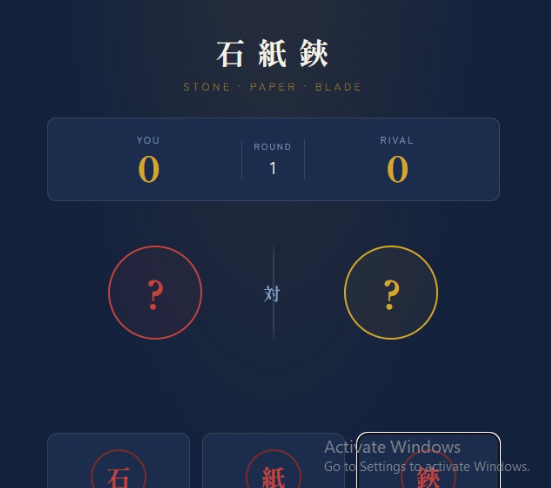
    **Rock, Paper, Scissors** is a simple and fun game that can be played between two players. It is also an excellent beginner programming project because it teaches **user input, conditions, random choices, and game logic**.

    ### How the Game Works

    There are three choices:

    * **Rock** beats Scissors
    * **Paper** beats Rock
    * **Scissors** beats Paper

    If both players choose the same option, the game is a **draw**.

    ### Basic Game Flow

    1. The computer randomly chooses Rock, Paper, or Scissors.
    2. The player selects one choice.
    3. The program compares both choices.
    4. The winner is displayed.
    5. The player can play again.

    ### Example

    **Player:** Rock
    **Computer:** Scissors
    **Result:** **You Win! **

    ### Learning Objectives

    By creating this game, you can learn:

    * Variables
    * `if/else` conditions
    * User input
    * Random numbers
    * Functions
    * Loops
    * Basic game logic

    It is a great **first programming project** for practicing problem-solving and building confidence in coding.
    #rsisb Roll no.239 Foundation Level **Rock, Paper, Scissors** is a simple and fun game that can be played between two players. It is also an excellent beginner programming project because it teaches **user input, conditions, random choices, and game logic**. ### 🎮 How the Game Works There are three choices: * 🪨 **Rock** beats Scissors * 📄 **Paper** beats Rock * ✂️ **Scissors** beats Paper If both players choose the same option, the game is a **draw**. ### 💻 Basic Game Flow 1. The computer randomly chooses Rock, Paper, or Scissors. 2. The player selects one choice. 3. The program compares both choices. 4. The winner is displayed. 5. The player can play again. ### 🌟 Example **Player:** Rock 🪨 **Computer:** Scissors ✂️ **Result:** **You Win! 🎉** ### 🎯 Learning Objectives By creating this game, you can learn: * Variables * `if/else` conditions * User input * Random numbers * Functions * Loops * Basic game logic It is a great **first programming project** for practicing problem-solving and building confidence in coding.
    0 Commentarii 0 Distribuiri 1266 Views
  • #rsisb
    Roll no.239
    Foundation Level

    A **Basic Quiz Application** is a simple interactive program that allows users to answer questions and test their knowledge. It can be designed for students, teachers, or anyone who wants to practice a particular subject.

    A basic quiz application usually displays **multiple-choice questions**, allows the user to select an answer, and then shows whether the answer is correct or incorrect. At the end, the application can calculate and display the user's **total score**.

    This type of project is a great way to learn basic programming concepts such as **variables, conditions, functions, arrays, user input, and score calculation**.

    A simple quiz app can make learning more **interactive, engaging, and enjoyable** while helping users identify areas where they need more practice.
    #rsisb Roll no.239 Foundation Level A **Basic Quiz Application** is a simple interactive program that allows users to answer questions and test their knowledge. It can be designed for students, teachers, or anyone who wants to practice a particular subject. A basic quiz application usually displays **multiple-choice questions**, allows the user to select an answer, and then shows whether the answer is correct or incorrect. At the end, the application can calculate and display the user's **total score**. This type of project is a great way to learn basic programming concepts such as **variables, conditions, functions, arrays, user input, and score calculation**. A simple quiz app can make learning more **interactive, engaging, and enjoyable** while helping users identify areas where they need more practice.
    0 Commentarii 0 Distribuiri 735 Views
  • #rsisb
    Roll no 248
    Coding Task 1
    Foundation level
    **Create a Basic Calculator!**
    Want to improve your programming skills? Build a **basic calculator** that can perform simple operations like Addition, Subtraction, Multiplication, and Division. It's a great beginner project to practice coding, problem-solving, and logical thinking.
    Start small, learn consistently, and keep building amazing projects!
    **Skills You'll Learn:**
    Variables
    User Input
    Conditional Statements
    Functions
    Basic Math Operations
    Every great programmer starts with simple projects—this could be yours!
    #BasicCalculator #Coding #Programming #LearnToCode #Python #JavaScript #CodingForBeginners #TechSkills #SoftwareDevelopment #ComputerScience #CodeEveryDay #STEM #DeveloperLife #ProgrammingProjects #LearningJourney See less
    #rsisb Roll no 248 Coding Task 1 Foundation level 🧮 **Create a Basic Calculator!** 💻✨ Want to improve your programming skills? Build a **basic calculator** that can perform simple operations like ➕ Addition, ➖ Subtraction, ✖️ Multiplication, and ➗ Division. It's a great beginner project to practice coding, problem-solving, and logical thinking. 🚀 Start small, learn consistently, and keep building amazing projects! 🌟 💡 **Skills You'll Learn:** 🔹 Variables 🔹 User Input 🔹 Conditional Statements 🔹 Functions 🔹 Basic Math Operations 📚 Every great programmer starts with simple projects—this could be yours! 💪 #BasicCalculator #Coding #Programming #LearnToCode #Python #JavaScript #CodingForBeginners #TechSkills #SoftwareDevelopment #ComputerScience #CodeEveryDay #STEM #DeveloperLife #ProgrammingProjects #LearningJourney 🚀💻 See less
    0 Commentarii 0 Distribuiri 3635 Views
  • #rsisb
    Roll No.247
    Coding task No.1
    Foundation Level

    # Create a Basic Calculator | Beginner Programming Project

    Creating a **Basic Calculator** is one of the best beginner programming projects for anyone who wants to learn coding. It helps you understand the fundamentals of programming, including variables, user input, operators, functions, and conditional statements. Whether you're using **Python, JavaScript, C++, Java, or any other programming language**, building a calculator is a great way to strengthen your coding skills.

    A basic calculator typically performs the four essential mathematical operations:
    Addition
    Subtraction
    Multiplication
    Division

    As you build your calculator, you'll also learn how to accept user input, process calculations, display results, and handle invalid inputs gracefully. This project improves logical thinking and problem-solving abilities while giving you hands-on experience with real programming concepts.

    Once you've mastered a basic calculator, you can enhance it with advanced features such as:
    Percentage calculations
    Square root and power functions
    Scientific calculator features
    Memory storage
    User-friendly graphical interface (GUI)
    Error handling for invalid operations
    Keyboard shortcuts and responsive design

    This beginner-friendly project is perfect for students, aspiring software developers, and anyone starting their programming journey. Every successful programmer begins with small projects like this before moving on to larger applications. Keep practicing, experiment with new features, and continue learning every day. Small steps today lead to big achievements tomorrow!

    Happy Coding! Keep building, keep learning, and never stop creating amazing projects!

    #BasicCalculator #Programming #Coding #Python #JavaScript #Java #Cpp #SoftwareDevelopment #CodingForBeginners #LearnProgramming #CodeNewbie #Developer #ComputerScience #TechEducation #CodingProject #ProgrammingTutorial #STEM #ArtificialIntelligence #WebDevelopment #AppDevelopment #ProblemSolving #TechSkills #LearnToCode #CodingJourney #ProgrammingLife #BeginnerProjects #Innovation #Technology #FutureDevelopers
    #rsisb Roll No.247 Coding task No.1 Foundation Level # 🧮 Create a Basic Calculator | Beginner Programming Project 💻✨ Creating a **Basic Calculator** is one of the best beginner programming projects for anyone who wants to learn coding. 🚀 It helps you understand the fundamentals of programming, including variables, user input, operators, functions, and conditional statements. Whether you're using **Python, JavaScript, C++, Java, or any other programming language**, building a calculator is a great way to strengthen your coding skills. A basic calculator typically performs the four essential mathematical operations: ➕ Addition ➖ Subtraction ✖️ Multiplication ➗ Division As you build your calculator, you'll also learn how to accept user input, process calculations, display results, and handle invalid inputs gracefully. This project improves logical thinking and problem-solving abilities while giving you hands-on experience with real programming concepts. Once you've mastered a basic calculator, you can enhance it with advanced features such as: 🔹 Percentage calculations 🔹 Square root and power functions 🔹 Scientific calculator features 🔹 Memory storage 🔹 User-friendly graphical interface (GUI) 🔹 Error handling for invalid operations 🔹 Keyboard shortcuts and responsive design This beginner-friendly project is perfect for students, aspiring software developers, and anyone starting their programming journey. Every successful programmer begins with small projects like this before moving on to larger applications. Keep practicing, experiment with new features, and continue learning every day. Small steps today lead to big achievements tomorrow! 🌟 Happy Coding! 💻🎯 Keep building, keep learning, and never stop creating amazing projects! 🚀 #BasicCalculator #Programming #Coding #Python #JavaScript #Java #Cpp #SoftwareDevelopment #CodingForBeginners #LearnProgramming #CodeNewbie #Developer #ComputerScience #TechEducation #CodingProject #ProgrammingTutorial #STEM #ArtificialIntelligence #WebDevelopment #AppDevelopment #ProblemSolving #TechSkills #LearnToCode #CodingJourney #ProgrammingLife #BeginnerProjects #Innovation #Technology #FutureDevelopers
    0 Commentarii 0 Distribuiri 6439 Views
  • #riab
    RollNo.247
    Foundional Level

    **"Believe in the impossible." — Charles Kingsleigh**

    What does it truly mean to **believe in the impossible**? It means having the courage to dream beyond limits, to keep moving forward even when the world says you can't, and to trust that today's impossible can become tomorrow's reality.

    Every great invention, every successful entrepreneur, every inspiring leader, and every life-changing achievement began as someone's "impossible" dream. People laughed at ideas that later changed the world. They doubted dreams that eventually became history. The only difference between those who succeeded and those who gave up was **belief**.

    Life will test your patience. You may face failures, rejection, criticism, and moments when giving up seems easier than trying again. But remember, every challenge is preparing you for something greater. Your struggles are not signs to quit—they are stepping stones toward success.

    Never let fear stop you from chasing your dreams. Believe in your abilities, trust your journey, and keep learning every day. Every small step you take brings you closer to your goals. Even when you cannot see the entire path, keep walking with faith.

    Success doesn't come overnight. It comes through persistence, determination, hard work, and an unwavering belief that anything is possible. When you believe in yourself, you unlock the power to overcome obstacles, inspire others, and create opportunities where none seemed to exist.

    Today, choose to believe in your dreams. Dream bigger than your fears. Work harder than your excuses. Stay positive despite setbacks. Your future is created by the decisions you make today. Never underestimate what you can achieve with faith, consistency, and determination.

    **Remember:** The word **"Impossible"** itself says **"I'm Possible."** Believe in yourself, stay focused, and never stop chasing your dreams. The impossible is only impossible until someone proves it can be done.

    **Do you believe that nothing is impossible? Share your thoughts in the comments!**

    #BelieveInTheImpossible #CharlesKingsleigh #DreamBig #NeverGiveUp #SuccessMindset #StayPositive #BelieveInYourself #Motivation #Inspiration #GrowthMindset #HardWork #Determination #PositiveThinking #SelfConfidence #Goals #SuccessJourney #MindsetMatters #KeepGoing #AchieveYourDreams #FaithOverFear #InspireOthers #DailyMotivation #LimitlessPossibilities #DreamBelieveAchieve
    #riab RollNo.247 Foundional Level ✨🌟 **"Believe in the impossible." — Charles Kingsleigh** 🌟✨ What does it truly mean to **believe in the impossible**? 💭 It means having the courage to dream beyond limits, to keep moving forward even when the world says you can't, and to trust that today's impossible can become tomorrow's reality. 🚀 Every great invention, every successful entrepreneur, every inspiring leader, and every life-changing achievement began as someone's "impossible" dream. 💡 People laughed at ideas that later changed the world. They doubted dreams that eventually became history. The only difference between those who succeeded and those who gave up was **belief**. 💪 Life will test your patience. 🌧️ You may face failures, rejection, criticism, and moments when giving up seems easier than trying again. But remember, every challenge is preparing you for something greater. Your struggles are not signs to quit—they are stepping stones toward success. 🌈 Never let fear stop you from chasing your dreams. Believe in your abilities, trust your journey, and keep learning every day. 📚 Every small step you take brings you closer to your goals. Even when you cannot see the entire path, keep walking with faith. 🌟 Success doesn't come overnight. It comes through persistence, determination, hard work, and an unwavering belief that anything is possible. 💯 When you believe in yourself, you unlock the power to overcome obstacles, inspire others, and create opportunities where none seemed to exist. 🔥 Today, choose to believe in your dreams. 🌍 Dream bigger than your fears. Work harder than your excuses. Stay positive despite setbacks. Your future is created by the decisions you make today. Never underestimate what you can achieve with faith, consistency, and determination. ❤️ ✨ **Remember:** The word **"Impossible"** itself says **"I'm Possible."** Believe in yourself, stay focused, and never stop chasing your dreams. The impossible is only impossible until someone proves it can be done. 🚀🌟 💬 **Do you believe that nothing is impossible? Share your thoughts in the comments!** 👇 #BelieveInTheImpossible #CharlesKingsleigh #DreamBig 🌟 #NeverGiveUp 💪 #SuccessMindset 🚀 #StayPositive ✨ #BelieveInYourself ❤️ #Motivation 💯 #Inspiration 🌈 #GrowthMindset 📚 #HardWork 🔥 #Determination 🌍 #PositiveThinking 💡 #SelfConfidence 🌟 #Goals 🎯 #SuccessJourney 🚀 #MindsetMatters 💖 #KeepGoing 💪 #AchieveYourDreams ✨ #FaithOverFear 🙌 #InspireOthers 🌟 #DailyMotivation 📈 #LimitlessPossibilities 🚀 #DreamBelieveAchieve 💫
    0 Commentarii 0 Distribuiri 6790 Views
Sponsorizeaza Paginile