


#rsisb
roll no.247
Foundation level
# Simple Calculator
**Simple Calculator – Making Everyday Math Easy!**
A **Simple Calculator** is a useful and beginner-friendly application designed to make basic mathematical calculations quick, accurate, and convenient. Whether you are a student learning mathematics, a beginner exploring programming, or simply someone who needs to calculate numbers quickly, a calculator provides an easy way to perform everyday calculations.
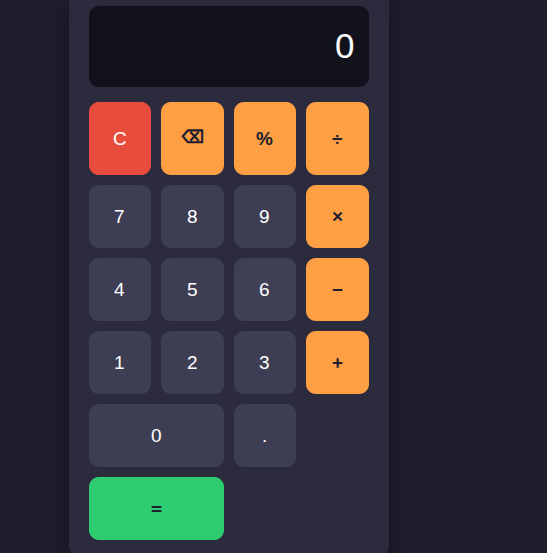
This project focuses on the fundamental arithmetic operations: **addition (+), subtraction (-), multiplication (×), and division (÷)**. Users can enter numbers, select an operation, and instantly see the result. The simple interface makes it easy to understand and use, while also demonstrating important concepts such as user input, mathematical operators, buttons, functions, and displaying results.
Creating a Simple Calculator is also an excellent programming project for beginners. It helps learners understand how different parts of an application work together. From designing the interface to writing the calculation logic, every step provides an opportunity to develop problem-solving and programming skills.
A calculator project can also be expanded with additional features such as decimal numbers, percentage calculations, clear and delete buttons, keyboard support, calculation history, and more advanced mathematical functions. This makes it a great starting point for learning how simple applications can gradually become more powerful and interactive.
**Key Features:**
Addition
Subtraction
Multiplication
Division
Easy-to-use interface
Fast calculations
Beginner-friendly design
Useful for learning programming
Clear and understandable results
**Learning Value:**
Working on a Simple Calculator helps learners practice logical thinking, understand basic programming concepts, handle user input, and create interactive applications. It demonstrates how mathematics and technology can come together to solve everyday problems.
**Conclusion:**
The Simple Calculator may be a small project, but it teaches some very important ideas about programming and application development. It is a perfect beginner project for turning basic mathematical operations into an interactive digital tool. Keep learning, keep experimenting, and keep building!
#SimpleCalculator #Calculator #Math #Mathematics #Programming #Coding #BeginnerProject #CodingForBeginners #LearnProgramming #ComputerScience #Technology #Education #StudentProject #MathSkills #ProblemSolving #ProgrammingProject #DigitalLearning #CodingSkills #CreativeCoding #LearnToCode #TechEducation #BasicCalculator #EasyCoding #Innovation
#rsisb
roll no.247
Foundation level
# Simple Calculator 🧮✨
🧮 **Simple Calculator – Making Everyday Math Easy!** 🔢💡
A **Simple Calculator** is a useful and beginner-friendly application designed to make basic mathematical calculations quick, accurate, and convenient. ➕➖✖️➗ Whether you are a student learning mathematics, a beginner exploring programming, or simply someone who needs to calculate numbers quickly, a calculator provides an easy way to perform everyday calculations. 📚💻
This project focuses on the fundamental arithmetic operations: **addition (+), subtraction (-), multiplication (×), and division (÷)**. Users can enter numbers, select an operation, and instantly see the result. ⚡🔢 The simple interface makes it easy to understand and use, while also demonstrating important concepts such as user input, mathematical operators, buttons, functions, and displaying results. 🎯
Creating a Simple Calculator is also an excellent programming project for beginners. 👨💻👩💻 It helps learners understand how different parts of an application work together. From designing the interface to writing the calculation logic, every step provides an opportunity to develop problem-solving and programming skills. 🚀🧠
A calculator project can also be expanded with additional features such as decimal numbers, percentage calculations, clear and delete buttons, keyboard support, calculation history, and more advanced mathematical functions. 🌟📱 This makes it a great starting point for learning how simple applications can gradually become more powerful and interactive.
✨ **Key Features:**
🔹 Addition ➕
🔹 Subtraction ➖
🔹 Multiplication ✖️
🔹 Division ➗
🔹 Easy-to-use interface 🖥️
🔹 Fast calculations ⚡
🔹 Beginner-friendly design 🌱
🔹 Useful for learning programming 💻
🔹 Clear and understandable results ✅
📚 **Learning Value:**
Working on a Simple Calculator helps learners practice logical thinking, understand basic programming concepts, handle user input, and create interactive applications. 🧠💻 It demonstrates how mathematics and technology can come together to solve everyday problems.
🌟 **Conclusion:**
The Simple Calculator may be a small project, but it teaches some very important ideas about programming and application development. 🧮🚀 It is a perfect beginner project for turning basic mathematical operations into an interactive digital tool. Keep learning, keep experimenting, and keep building! 💡🌈
#SimpleCalculator #Calculator #Math #Mathematics #Programming #Coding #BeginnerProject #CodingForBeginners #LearnProgramming #ComputerScience #Technology #Education #StudentProject #MathSkills #ProblemSolving #ProgrammingProject #DigitalLearning #CodingSkills #CreativeCoding #LearnToCode #TechEducation #BasicCalculator #EasyCoding #Innovation
0 Reacties
0 aandelen
5298 Views