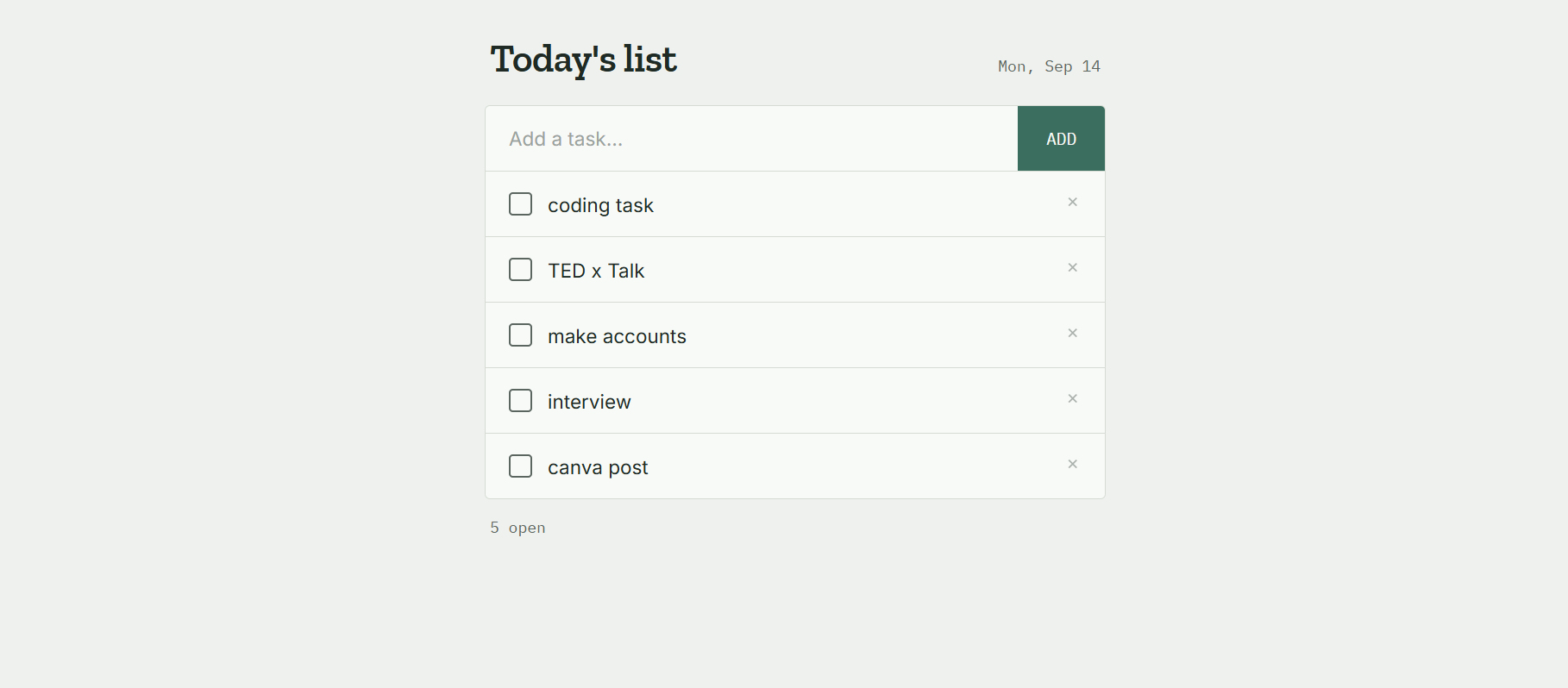
• RSIF8
    Roll no:14
    coding task no:3
    coding task topic:Simple To-Do List App

    **Build a Simple To-Do List**

    I have successfully completed my **Simple To-Do List** task!

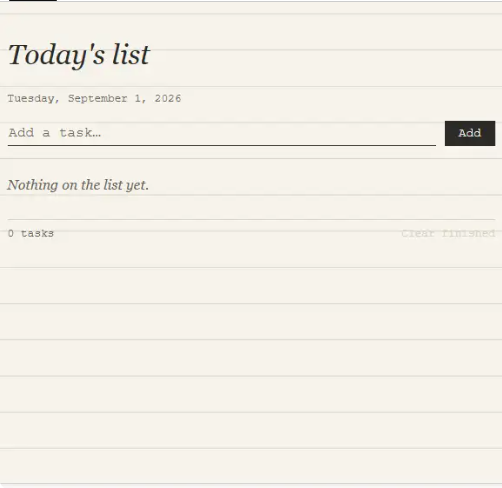
    In this project, I created a simple and useful To-Do List that allows users to easily **add, remove, and view tasks**.

    The main purpose of this project was to understand how a basic task-management application works and how users can interact with different features. Through this activity, I practiced organizing tasks and creating a simple user-friendly experience.

    **Key Features:**
    Add new tasks
    View existing tasks
    Remove completed or unwanted tasks
    Keep tasks organized in one place

    This task helped me improve my **problem-solving, logical thinking, and basic programming skills**. It also gave me practical experience in building an interactive application from the beginning.

    Completing this project is another step forward in my learning journey. I learned that even a simple project can teach valuable concepts and build confidence for creating more advanced applications in the future.

    **Task Completed Successfully!**

    #ToDoList #TaskCompleted #Programming #Coding #WebDevelopment #ProjectCompleted #Learning #FoundationLevel #FoundationTask #CodingJourney #ProblemSolving #ProgrammingSkills #Technology #StudentProject #KeepLearning #KeepGrowing #Success #Achievement
    RSIF8 Roll no:14 coding task no:3 coding task topic:Simple To-Do List App ๐Ÿ“โœจ **Build a Simple To-Do List** โœจ๐Ÿ“ I have successfully completed my **Simple To-Do List** task! ๐ŸŽ‰๐Ÿ’ป In this project, I created a simple and useful To-Do List that allows users to easily **add, remove, and view tasks**. โœ…โž•๐Ÿ—‘๏ธ The main purpose of this project was to understand how a basic task-management application works and how users can interact with different features. Through this activity, I practiced organizing tasks and creating a simple user-friendly experience. ๐ŸŽฏ๐Ÿ“š ๐Ÿ’ก **Key Features:** โž• Add new tasks ๐Ÿ‘€ View existing tasks ๐Ÿ—‘๏ธ Remove completed or unwanted tasks ๐Ÿ“‹ Keep tasks organized in one place This task helped me improve my **problem-solving, logical thinking, and basic programming skills**. It also gave me practical experience in building an interactive application from the beginning. ๐Ÿš€๐Ÿง  ๐ŸŒŸ Completing this project is another step forward in my learning journey. I learned that even a simple project can teach valuable concepts and build confidence for creating more advanced applications in the future. ๐Ÿ’ช๐Ÿ’ป ๐ŸŽฏ **Task Completed Successfully!** โœ…๐Ÿ† #ToDoList #TaskCompleted #Programming #Coding #WebDevelopment #ProjectCompleted #Learning #FoundationLevel #FoundationTask #CodingJourney #ProblemSolving #ProgrammingSkills #Technology #StudentProject #KeepLearning #KeepGrowing #Success #Achievement ๐Ÿ’ป๐Ÿš€โœจ
    0 Commenti 0 condivisioni 1015 Views
  • RSIF8
    ROLL NO 77
    CODING BOOK 1
    TASK NO 2
    TASK TOPIC Create a Tic-Tac-Toe game for two players using Claude.ai.

    **Tic-Tac-Toe Game – My Coding Project!**

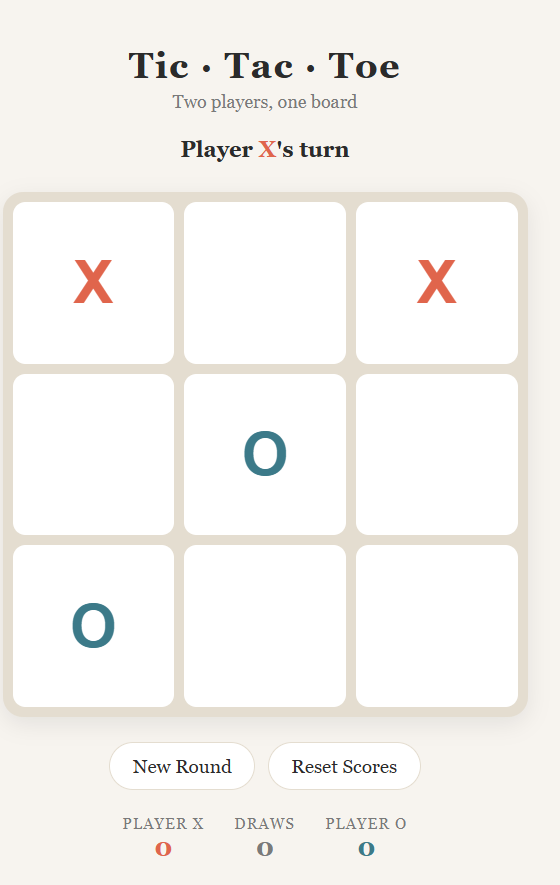
    I created a fun **Tic-Tac-Toe game for two players!**

    Players can take turns placing **X and O** on the game board and try to get three symbols in a row to win!

    This project helped me practice **programming logic, game development, user interaction, and problem-solving skills**.

    Every project is a new opportunity to learn something!
    **Keep learning. Keep coding. Keep creating!**

    #TicTacToe #CodingProject #Programming #GameDevelopment #LearnToCode #Coding #WebDevelopment #ProblemSolving #ProgrammingSkills #StudentProject #TechLearning #KeepLearning #KeepCoding
    RSIF8 ROLL NO 77 CODING BOOK 1 TASK NO 2 TASK TOPIC Create a Tic-Tac-Toe game for two players using Claude.ai. ๐ŸŽฎโŒโญ• **Tic-Tac-Toe Game – My Coding Project!** ๐Ÿ’ป๐Ÿš€ I created a fun **Tic-Tac-Toe game for two players!** ๐ŸŽฏ๐Ÿ”ฅ Players can take turns placing **X and O** on the game board and try to get three symbols in a row to win! ๐Ÿ†๐Ÿ˜„ This project helped me practice **programming logic, game development, user interaction, and problem-solving skills**. ๐Ÿง ๐Ÿ’ก Every project is a new opportunity to learn something! ๐Ÿ“šโœจ **Keep learning. Keep coding. Keep creating!** ๐Ÿš€๐Ÿ’ป #TicTacToe #CodingProject #Programming #GameDevelopment #LearnToCode #Coding #WebDevelopment #ProblemSolving #ProgrammingSkills #StudentProject #TechLearning #KeepLearning #KeepCoding ๐ŸŽฎโŒโญ•๐Ÿ’ป๐Ÿ”ฅ
    0 Commenti 0 condivisioni 940 Views
  • RSIF8
    Roll No: 112
    Coding Post No: 3
    Coding Post Topic: Simple To-Do List App
    **Completed My Simple To-Do List App Coding Task!**
    Today, I completed my coding task of creating a **Simple To-Do List App**. This project was a great opportunity to practice programming concepts while building something useful for managing daily tasks.
    The main purpose of this app is to help users organize their tasks in a simple and easy-to-use way. Users can add tasks to their to-do list, view the tasks they need to complete, and keep track of their progress.
    While working on this project, I practiced important coding concepts such as **variables, functions, user input, lists, conditions, loops, and task management logic**. Each part of the program helped me understand how different programming concepts work together to create a functional application.
    One of the most interesting parts of this task was thinking about how the user would interact with the app. ‍ I wanted the process to be simple so that users could easily add tasks, check their list, and manage their daily activities.
    This project also helped me improve my **problem-solving skills**. When writing code, small errors can sometimes prevent the program from working correctly. Finding those errors, understanding what caused them, and fixing them helped me become more patient and careful while coding.
    Creating a To-Do List App also showed me how coding can be used to solve everyday problems. Something as simple as organizing tasks can be turned into a useful digital tool through programming.
    I learned that successful coding is not only about writing lines of code. It is also about planning the project, understanding the requirements, testing the program, finding mistakes, and continuously improving the solution.
    This task increased my confidence in programming and motivated me to continue learning more about software development. Every small project gives me a chance to learn something new and improve my skills.
    **My key learning from this project:**
    Practiced programming fundamentals
    Improved problem-solving skills
    Learned how to manage a list of tasks
    Practiced functions and conditions
    Improved logical thinking
    Learned the importance of testing and debugging
    Built a simple but useful coding project
    Overall, completing this **Simple To-Do List App** was a valuable and enjoyable learning experience. I am happy with my progress and excited to work on more coding projects in the future.
    **Small projects, consistent practice, and continuous learning can help us become better programmers!**
    #RSIF8 #RollNo112 #CodingTask #TodoList #TodoListApp #SimpleTodoList #Coding #Programming #ComputerScience #ProgrammingSkills #CodingJourney #LearnToCode #CodeNewbie #StudentCoder #ProblemSolving #LogicalThinking #SoftwareDevelopment #AppDevelopment #ProgrammingPractice #CodingProject #TechSkills #DigitalSkills #LearningJourney #StudentLife #ProjectBasedLearning #Debugging #ProgrammingFundamentals #KeepLearning #LearnAndGrow #FutureDeveloper
    ‍
    RSIF8 Roll No: 112 Coding Post No: 3 Coding Post Topic: Simple To-Do List App ๐ŸŒŸ **Completed My Simple To-Do List App Coding Task!** ๐ŸŒŸ Today, I completed my coding task of creating a **Simple To-Do List App**. ๐Ÿ’ป๐Ÿ“ This project was a great opportunity to practice programming concepts while building something useful for managing daily tasks. โœ…๐Ÿ“‹ The main purpose of this app is to help users organize their tasks in a simple and easy-to-use way. ๐Ÿ“…โœจ Users can add tasks to their to-do list, view the tasks they need to complete, and keep track of their progress. ๐ŸŽฏโœ… While working on this project, I practiced important coding concepts such as **variables, functions, user input, lists, conditions, loops, and task management logic**. ๐Ÿง ๐Ÿ’ป Each part of the program helped me understand how different programming concepts work together to create a functional application. One of the most interesting parts of this task was thinking about how the user would interact with the app. ๐Ÿ‘ฉ‍๐Ÿ’ป๐Ÿ’ก I wanted the process to be simple so that users could easily add tasks, check their list, and manage their daily activities. This project also helped me improve my **problem-solving skills**. ๐Ÿงฉ๐Ÿš€ When writing code, small errors can sometimes prevent the program from working correctly. Finding those errors, understanding what caused them, and fixing them helped me become more patient and careful while coding. ๐Ÿ”๐Ÿ’ปโœจ Creating a To-Do List App also showed me how coding can be used to solve everyday problems. ๐ŸŒŸ๐Ÿ“š Something as simple as organizing tasks can be turned into a useful digital tool through programming. I learned that successful coding is not only about writing lines of code. It is also about planning the project, understanding the requirements, testing the program, finding mistakes, and continuously improving the solution. ๐Ÿง ๐Ÿ“๐Ÿ”ง This task increased my confidence in programming and motivated me to continue learning more about software development. ๐Ÿ’ช๐Ÿ’ป๐ŸŒฑ Every small project gives me a chance to learn something new and improve my skills. โœจ **My key learning from this project:** โœ… Practiced programming fundamentals โœ… Improved problem-solving skills โœ… Learned how to manage a list of tasks โœ… Practiced functions and conditions โœ… Improved logical thinking โœ… Learned the importance of testing and debugging โœ… Built a simple but useful coding project Overall, completing this **Simple To-Do List App** was a valuable and enjoyable learning experience. ๐ŸŽ‰๐Ÿ’ป I am happy with my progress and excited to work on more coding projects in the future. ๐Ÿš€๐ŸŒŸ ๐Ÿ“Œ **Small projects, consistent practice, and continuous learning can help us become better programmers!** ๐Ÿ’ป๐Ÿ”ฅ๐Ÿ“š #RSIF8 #RollNo112 #CodingTask #TodoList #TodoListApp #SimpleTodoList #Coding #Programming #ComputerScience #ProgrammingSkills #CodingJourney #LearnToCode #CodeNewbie #StudentCoder #ProblemSolving #LogicalThinking #SoftwareDevelopment #AppDevelopment #ProgrammingPractice #CodingProject #TechSkills #DigitalSkills #LearningJourney #StudentLife #ProjectBasedLearning #Debugging #ProgrammingFundamentals #KeepLearning #LearnAndGrow #FutureDeveloper ๐Ÿ’ป๐Ÿ“โœ…๐Ÿ“‹๐ŸŽฏ๐Ÿง ๐Ÿ”ง๐Ÿ”๐Ÿš€๐ŸŒฑ๐Ÿ“š๐Ÿ’ก๐Ÿ‘ฉ‍๐Ÿ’ป๐Ÿ”ฅโœจ๐ŸŽ‰๐Ÿ™Œ๐Ÿ†๐ŸŒŸ
    0 Commenti 0 condivisioni 2240 Views
  • RSIF8
    Roll no:100
    Task no:27
    Task topic:Create a Basic Calculator
    **Task Completed: Basic Calculator!**
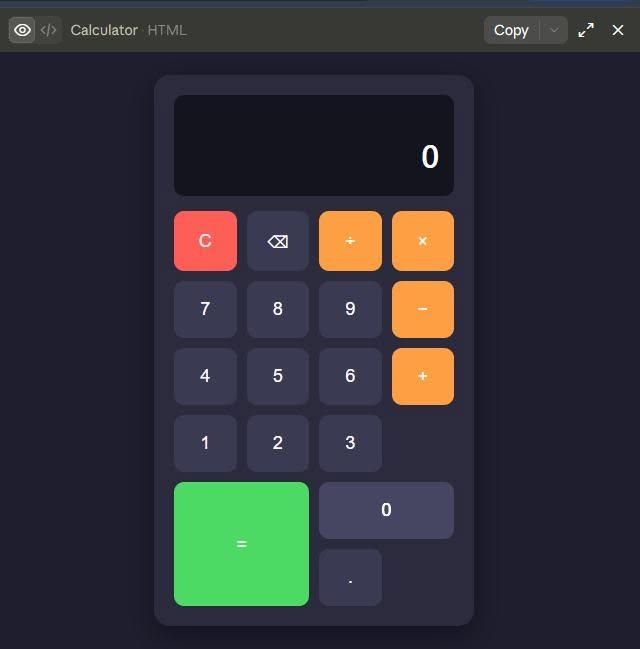
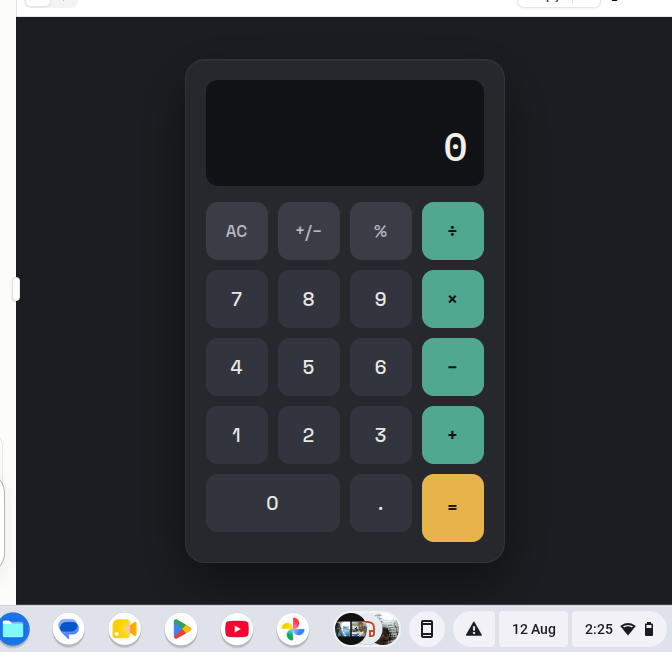
    I successfully completed a task to **create a Basic Calculator** that performs four important mathematical operations: **Addition**, **Subtraction**, **Multiplication**, and **Division**.
    Through this task, I learned how to apply basic programming concepts to create a simple and useful application. I also gained a better understanding of **logic, calculations, user input, and handling different operations** within a program.
    Building the calculator was a great hands-on experience because it allowed me to turn basic mathematical operations into a functional digital tool. It also helped me improve my **problem-solving and programming skills** while giving me more confidence in creating simple projects.
    Every task is another opportunity to learn something new, and this project has helped me take another step forward in my **coding journey**. I’m looking forward to learning more, taking on new challenges, and building even better projects in the future!
    #BasicCalculator #Programming #Coding #Calculator #Math #Learning #CodingJourney #ProblemSolving #ProgrammingSkills #TechSkills #WebDevelopment #TaskCompleted #LearningByDoing #FutureDeveloper #KeepLearning
    RSIF8 Roll no:100 Task no:27 Task topic:Create a Basic Calculator ๐Ÿงฎโœจ **Task Completed: Basic Calculator!** โœจ๐Ÿงฎ I successfully completed a task to **create a Basic Calculator** that performs four important mathematical operations: โž• **Addition**, โž– **Subtraction**, โœ–๏ธ **Multiplication**, and โž— **Division**. Through this task, I learned how to apply basic programming concepts to create a simple and useful application. ๐Ÿ’ป๐Ÿ“š I also gained a better understanding of **logic, calculations, user input, and handling different operations** within a program. ๐Ÿง โš™๏ธ Building the calculator was a great hands-on experience because it allowed me to turn basic mathematical operations into a functional digital tool. ๐Ÿš€ It also helped me improve my **problem-solving and programming skills** while giving me more confidence in creating simple projects. ๐Ÿ’ช๐ŸŒŸ Every task is another opportunity to learn something new, and this project has helped me take another step forward in my **coding journey**. ๐Ÿ“ˆ๐Ÿ’ป I’m looking forward to learning more, taking on new challenges, and building even better projects in the future! ๐Ÿ”ฅ๐Ÿš€โœจ #BasicCalculator #Programming #Coding #Calculator #Math #Learning #CodingJourney #ProblemSolving #ProgrammingSkills #TechSkills #WebDevelopment #TaskCompleted #LearningByDoing #FutureDeveloper #KeepLearning ๐Ÿ’ป๐Ÿงฎ๐Ÿ“š๐Ÿš€
    0 Commenti 0 condivisioni 1106 Views
  • RSIF8
    Roll no: 09
    Coding task no: 04
    Coding task topic: "Complete a small coding challenge Number Guessing Game".

    Coding Task – Number Guessing Game

    Today, I completed a small coding challenge by creating a Number Guessing Game. ‍ This activity helped me practice programming logic, problem-solving, and user interaction. It was a fun way to improve my coding skills while learning how to create an interactive game!

    #CodingTask #NumberGuessingGame #Coding #Programming #Python #ProblemSolving #CodingChallenge #LearnToCode #ProgrammingSkills #StudentLife #AIEducation #TechSkills
    RSIF8 Roll no: 09 Coding task no: 04 Coding task topic: "Complete a small coding challenge Number Guessing Game". ๐ŸŽฎ๐Ÿ’ป Coding Task – Number Guessing Game ๐Ÿ”ขโœจ Today, I completed a small coding challenge by creating a Number Guessing Game. ๐ŸŽฏ๐Ÿ‘ฉ‍๐Ÿ’ป This activity helped me practice programming logic, problem-solving, and user interaction. ๐Ÿง ๐Ÿš€ It was a fun way to improve my coding skills while learning how to create an interactive game! ๐ŸŒŸ๐Ÿ’™ #CodingTask #NumberGuessingGame #Coding #Programming #Python #ProblemSolving #CodingChallenge #LearnToCode #ProgrammingSkills #StudentLife #AIEducation #TechSkills ๐Ÿ’ป๐ŸŽฏโœจ
    0 Commenti 0 condivisioni 730 Views
  • RSIF8
    Roll no:112
    Coding Post no:2
    Coding Post Topic: Create a Tic-Tac-Toe Game
    I’m excited to share my latest programming project — a **two-player Tic-Tac-Toe game that can be played directly in the console!**
    For this project, I created a simple but interactive game where **two players can play against each other** by taking turns placing **X** and **O** on a 3×3 game board. ‍
    The main goal of the game is to get **three matching symbols in a row**, either horizontally, vertically, or diagonally. The program checks the board after each turn and determines whether a player has won or whether the game has ended in a draw.
    While creating this project, I practiced several important programming concepts, including **variables, loops, conditional statements, functions, user input, lists, and logical thinking**.
    This project also helped me understand how **game logic works** and how different conditions can be combined to create an interactive program. Every player’s move is processed by the program, and the board is updated after each turn.
    One of the most interesting parts of this project was creating the **winning conditions** and making sure the program could correctly recognize when a player had completed a row, column, or diagonal. This required careful planning and problem-solving.
    Creating a console-based game may look simple, but it is a great way to strengthen programming fundamentals. It helped me improve my **coding skills, logical reasoning, problem-solving abilities, and understanding of program flow**.
    I’m proud of completing this project and sharing my progress. I have also posted a **screenshot of the Tic-Tac-Toe game running in the console** to show the result of my work.
    I look forward to building more projects, learning new programming concepts, and improving my skills step by step.
    **Project Highlights:**
    Two-player gameplay
    Interactive console game
    3×3 Tic-Tac-Toe board
    Win detection
    Draw detection
    Player input
    Logical problem-solving
    Practice with programming fundamentals
    Improved coding skills
    Thank you for checking out my project!
    #TicTacToe #TicTacToeGame #Coding #Programming #Python #ConsoleGame #GameDevelopment #CodingProject #LearnToCode #ProgrammingSkills #StudentProject #TechLearning #ProblemSolving #LogicalThinking #CodingJourney #BeginnerProgramming #ComputerScience #SoftwareDevelopment #GameProgramming #DigitalSkills #LearningToCode #ProjectBasedLearning #Technology #DeveloperJourney
    RSIF8 Roll no:112 Coding Post no:2 Coding Post Topic: Create a Tic-Tac-Toe Game I’m excited to share my latest programming project — a **two-player Tic-Tac-Toe game that can be played directly in the console!** ๐Ÿ’ป๐ŸŽฎโœจ For this project, I created a simple but interactive game where **two players can play against each other** by taking turns placing **X** and **O** on a 3×3 game board. โŒโญ•๐Ÿง‘‍๐Ÿ’ป The main goal of the game is to get **three matching symbols in a row**, either horizontally, vertically, or diagonally. ๐Ÿ†๐ŸŽฏ The program checks the board after each turn and determines whether a player has won or whether the game has ended in a draw. ๐Ÿคโœจ While creating this project, I practiced several important programming concepts, including **variables, loops, conditional statements, functions, user input, lists, and logical thinking**. ๐Ÿง ๐Ÿ’ก๐Ÿ“š This project also helped me understand how **game logic works** and how different conditions can be combined to create an interactive program. Every player’s move is processed by the program, and the board is updated after each turn. ๐Ÿ”„๐Ÿ’ป One of the most interesting parts of this project was creating the **winning conditions** and making sure the program could correctly recognize when a player had completed a row, column, or diagonal. ๐Ÿ…โŒโญ• This required careful planning and problem-solving. Creating a console-based game may look simple, but it is a great way to strengthen programming fundamentals. ๐Ÿš€ It helped me improve my **coding skills, logical reasoning, problem-solving abilities, and understanding of program flow**. ๐Ÿ’ป๐Ÿง ๐ŸŒŸ I’m proud of completing this project and sharing my progress. ๐Ÿ“ธโœจ I have also posted a **screenshot of the Tic-Tac-Toe game running in the console** to show the result of my work. I look forward to building more projects, learning new programming concepts, and improving my skills step by step. ๐ŸŒฑ๐Ÿ’ป๐Ÿš€ ๐ŸŽฏ **Project Highlights:** โŒโญ• Two-player gameplay ๐ŸŽฎ Interactive console game ๐Ÿ’ป 3×3 Tic-Tac-Toe board ๐Ÿ† Win detection ๐Ÿค Draw detection โŒจ๏ธ Player input ๐Ÿง  Logical problem-solving ๐Ÿ“š Practice with programming fundamentals ๐Ÿš€ Improved coding skills Thank you for checking out my project! ๐Ÿ˜Šโœจ #TicTacToe #TicTacToeGame #Coding #Programming #Python #ConsoleGame #GameDevelopment #CodingProject #LearnToCode #ProgrammingSkills #StudentProject #TechLearning #ProblemSolving #LogicalThinking #CodingJourney #BeginnerProgramming #ComputerScience #SoftwareDevelopment #GameProgramming #DigitalSkills #LearningToCode #ProjectBasedLearning #Technology #DeveloperJourney ๐ŸŽฎ๐Ÿ’ปโŒโญ•๐Ÿ†๐Ÿš€โœจ
    0 Commenti 0 condivisioni 2784 Views
  • RSIF8
    Roll No : 87
    claude ai No : 1
    claude ai topic: Create a Basic Calculator
    **Basic Calculator Project – My Completed Task**
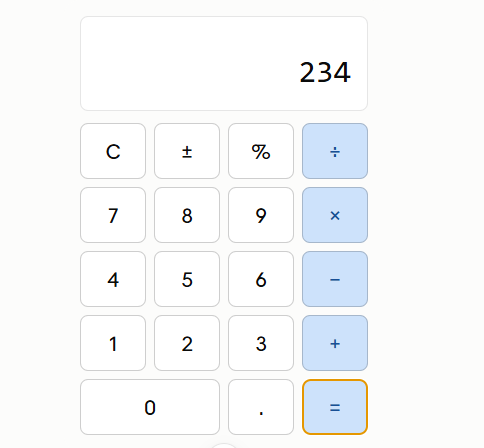
    I have successfully created a **Basic Calculator** as part of my learning and coding practice. This calculator has a simple, clean, and user-friendly interface that makes it easy to perform everyday mathematical calculations. The calculator includes important buttons such as **addition (+), subtraction (−), multiplication (×), division (÷), percentage (%), decimal (.), plus/minus (±), clear (C), and equals )**.
    The calculator display shows the numbers and results clearly, while the organized button layout makes it easy for users to enter numbers and select the required mathematical operation. I focused on making the design simple and easy to understand so that anyone can use it without difficulty.
    Creating this calculator helped me understand how a calculator works and gave me valuable practice with **HTML, CSS, and JavaScript**. I learned how to design buttons, create a calculator layout, handle user input, perform mathematical operations, and display the final result.
    This project was a great opportunity to improve my **coding, problem-solving, logical thinking, and web development skills**. I am happy to complete this project and excited to continue learning and creating more useful projects in the future.
    #BasicCalculator #Calculator #Coding #WebDevelopment #HTML #CSS #JavaScript #Programming #CodingPractice #Learning #StudentProject #ProjectCompleted #Math #Technology #ComputerSkills #ProblemSolving #ProgrammingSkills #KeepLearning #KeepGrowing
    RSIF8 Roll No : 87 claude ai No : 1 claude ai topic: Create a Basic Calculator ๐Ÿงฎโœจ **Basic Calculator Project – My Completed Task** โœจ๐Ÿงฎ I have successfully created a **Basic Calculator** as part of my learning and coding practice. This calculator has a simple, clean, and user-friendly interface that makes it easy to perform everyday mathematical calculations. The calculator includes important buttons such as **addition (+), subtraction (−), multiplication (×), division (÷), percentage (%), decimal (.), plus/minus (±), clear (C), and equals ๐Ÿ˜Š)**. The calculator display shows the numbers and results clearly, while the organized button layout makes it easy for users to enter numbers and select the required mathematical operation. I focused on making the design simple and easy to understand so that anyone can use it without difficulty. Creating this calculator helped me understand how a calculator works and gave me valuable practice with **HTML, CSS, and JavaScript**. I learned how to design buttons, create a calculator layout, handle user input, perform mathematical operations, and display the final result. ๐Ÿ’ป๐Ÿ“š This project was a great opportunity to improve my **coding, problem-solving, logical thinking, and web development skills**. I am happy to complete this project and excited to continue learning and creating more useful projects in the future. ๐Ÿš€๐Ÿ’ฏ #BasicCalculator #Calculator #Coding #WebDevelopment #HTML #CSS #JavaScript #Programming #CodingPractice #Learning #StudentProject #ProjectCompleted #Math #Technology #ComputerSkills #ProblemSolving #ProgrammingSkills #KeepLearning #KeepGrowing ๐Ÿงฎ๐Ÿ’ป๐Ÿš€โœจ
    0 Commenti 0 condivisioni 3226 Views
  • RSISB
    Roll No: 209
    Story Post No.30

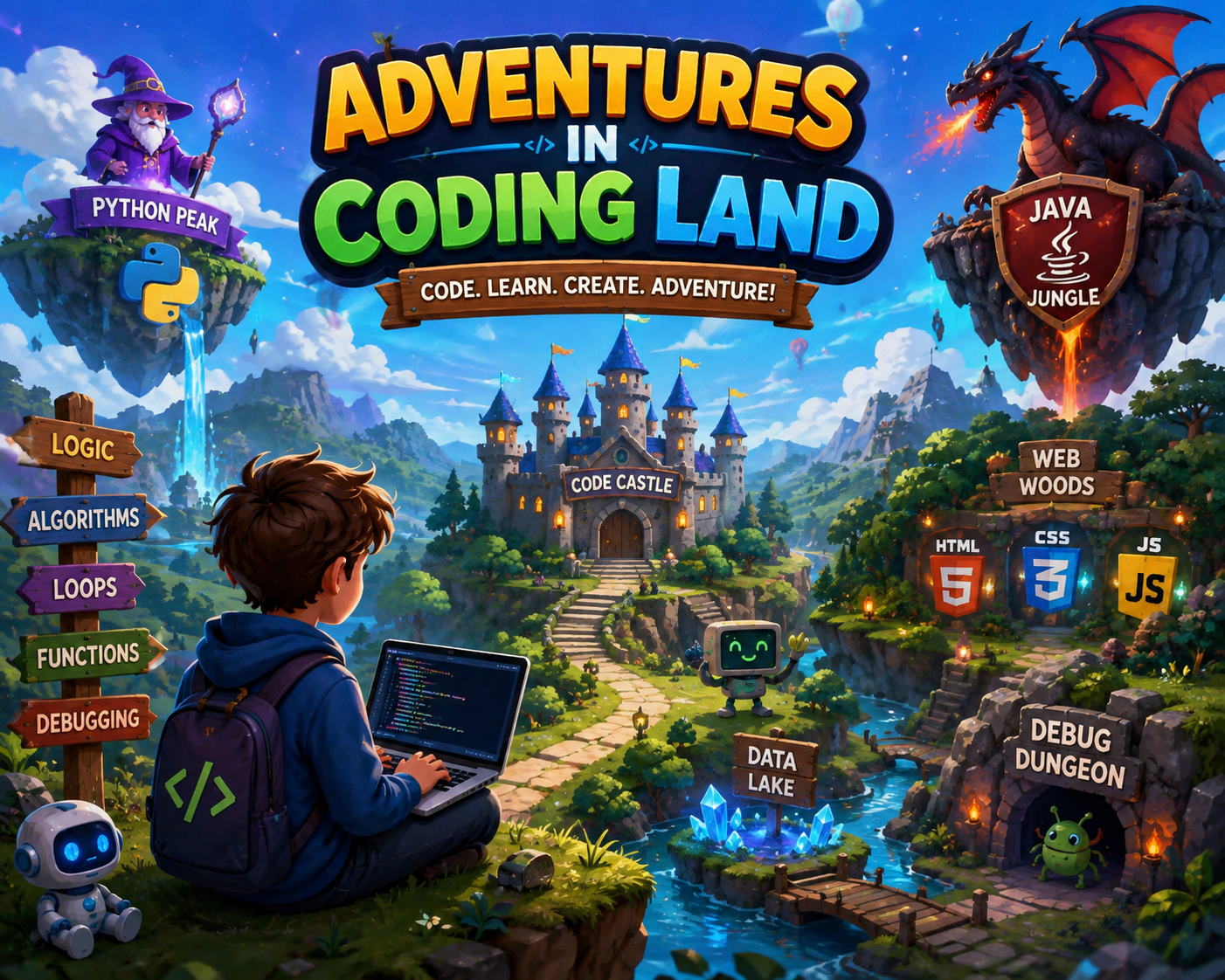
    **Adventures in Coding Land**

    Welcome to **Coding Land**, where every line of code becomes a new adventure! ‍ Explore the exciting world of **programming, logic, algorithms, loops, functions, debugging, and technology** through creativity and curiosity.

    Just like an adventure, coding is full of challenges, discoveries, and amazing possibilities. Every error is a lesson, every solution is a victory, and every project is a step toward becoming a better coder!

    **Code. Learn. Create. Adventure!**
    Let your curiosity guide you and turn your ideas into reality through the power of coding.

    #AdventuresInCodingLand #Coding #Programming #LearnToCode #CodingJourney #FutureCoder #ComputerScience #Technology #CodingAdventure #ProgrammingSkills #Algorithms #Debugging #Innovation #Creativity #YoungCoders #CodeLearnCreate
    RSISB Roll No: 209 Story Post No.30 ๐ŸŒŸ๐Ÿ’ป **Adventures in Coding Land** ๐Ÿš€๐ŸŒˆ Welcome to **Coding Land**, where every line of code becomes a new adventure! ๐Ÿง‘‍๐Ÿ’ปโœจ Explore the exciting world of **programming, logic, algorithms, loops, functions, debugging, and technology** through creativity and curiosity. ๐Ÿง ๐Ÿ”๐Ÿค– Just like an adventure, coding is full of challenges, discoveries, and amazing possibilities. ๐Ÿฐ๐ŸŒŸ Every error is a lesson, every solution is a victory, and every project is a step toward becoming a better coder! ๐Ÿ’ก๐Ÿ† ๐Ÿš€ **Code. Learn. Create. Adventure!** Let your curiosity guide you and turn your ideas into reality through the power of coding. ๐ŸŒ๐Ÿ’ปโœจ #AdventuresInCodingLand #Coding #Programming #LearnToCode #CodingJourney #FutureCoder #ComputerScience #Technology #CodingAdventure #ProgrammingSkills #Algorithms #Debugging #Innovation #Creativity #YoungCoders #CodeLearnCreate ๐Ÿš€๐Ÿ’ป๐Ÿง ๐ŸŒŸ๐Ÿค–
    0 Commenti 0 condivisioni 3986 Views
  • #rsisb
    Roll no.247
    Foundation level# Basic Calculator with GUI

    Welcome to **Basic Calculator with GUI** — a simple, user-friendly, and interactive calculator project designed to make everyday mathematical calculations quick, easy, and enjoyable! This project demonstrates how a calculator can be built with a **Graphical User Interface (GUI)**, allowing users to perform calculations by simply clicking buttons instead of typing commands.

    The calculator provides essential mathematical operations such as **addition , subtraction , multiplication , and division **. It is designed with a clean and straightforward interface so that beginners, students, and anyone interested in programming can easily understand how a GUI-based application works. ‍‍

    One of the most interesting aspects of this project is the combination of **programming logic and visual design**. Users can enter numbers, select mathematical operators, and instantly see the result displayed on the calculator screen. This makes the project a great example of how programming can be used to create practical and interactive applications.

    The **Basic Calculator with GUI** is also an excellent learning project for students who are beginning their programming journey. Through this project, learners can understand important concepts such as **variables, functions, event handling, buttons, input fields, operators, conditional logic, and GUI components**. These concepts provide a strong foundation for developing more advanced software applications in the future.

    The simple design makes the calculator easy to navigate, while the interactive buttons provide a smooth user experience. Whether you want to calculate a total, subtract numbers, multiply values, or divide one number by another, this calculator provides the essential tools needed for basic arithmetic.

    This project also highlights the importance of creating applications that are not only functional but also **easy to use and visually understandable**. A well-designed GUI helps users interact with software naturally and makes complex programming concepts more accessible.

    Overall, the **Basic Calculator with GUI** is a fun, educational, and practical programming project. It is perfect for beginners who want to practice GUI development while building something useful. With additional features, the project can later be expanded into a more advanced calculator with percentage calculations, decimal support, square roots, memory functions, calculation history, and more!

    **Project Highlights:**
    Simple and clean GUI design
    Addition, subtraction, multiplication, and division
    Interactive calculator buttons
    Easy-to-understand interface
    Beginner-friendly programming project
    Useful for learning GUI development
    Great practice for programming logic
    Can be expanded with advanced features

    **Learn. Code. Calculate. Create!**

    #BasicCalculator #CalculatorGUI #GUICalculator #Programming #Coding #ComputerScience #PythonProject #BeginnerProject #ProgrammingForBeginners #GUIProgramming #SoftwareDevelopment #CodingProject #MathCalculator #LearnProgramming #StudentProject #TechProject #InteractiveApplication #ComputerProgramming #CodingJourney #ProgrammingSkills #Education #Technology #Developer #CodeLearning #CreativeCoding #Math #CalculatorProject
    #rsisb Roll no.247 Foundation level# Basic Calculator with GUI ๐Ÿงฎ๐Ÿ’ป Welcome to **Basic Calculator with GUI** — a simple, user-friendly, and interactive calculator project designed to make everyday mathematical calculations quick, easy, and enjoyable! ๐ŸŽ‰โœจ This project demonstrates how a calculator can be built with a **Graphical User Interface (GUI)**, allowing users to perform calculations by simply clicking buttons instead of typing commands. ๐Ÿ–ฑ๏ธ๐Ÿ”ข The calculator provides essential mathematical operations such as **addition โž•, subtraction โž–, multiplication โœ–๏ธ, and division โž—**. It is designed with a clean and straightforward interface so that beginners, students, and anyone interested in programming can easily understand how a GUI-based application works. ๐Ÿ’ก๐Ÿ‘จ‍๐Ÿ’ป๐Ÿ‘ฉ‍๐Ÿ’ป One of the most interesting aspects of this project is the combination of **programming logic and visual design**. ๐ŸŽจ๐Ÿ’ป Users can enter numbers, select mathematical operators, and instantly see the result displayed on the calculator screen. This makes the project a great example of how programming can be used to create practical and interactive applications. ๐Ÿš€ The **Basic Calculator with GUI** is also an excellent learning project for students who are beginning their programming journey. ๐Ÿ“š๐ŸŒŸ Through this project, learners can understand important concepts such as **variables, functions, event handling, buttons, input fields, operators, conditional logic, and GUI components**. These concepts provide a strong foundation for developing more advanced software applications in the future. ๐Ÿง ๐Ÿ’ป The simple design makes the calculator easy to navigate, while the interactive buttons provide a smooth user experience. ๐Ÿ”ข๐Ÿ–ฑ๏ธ Whether you want to calculate a total, subtract numbers, multiply values, or divide one number by another, this calculator provides the essential tools needed for basic arithmetic. โœ… This project also highlights the importance of creating applications that are not only functional but also **easy to use and visually understandable**. ๐ŸŒŸ A well-designed GUI helps users interact with software naturally and makes complex programming concepts more accessible. Overall, the **Basic Calculator with GUI** is a fun, educational, and practical programming project. ๐Ÿงฎโœจ It is perfect for beginners who want to practice GUI development while building something useful. With additional features, the project can later be expanded into a more advanced calculator with percentage calculations, decimal support, square roots, memory functions, calculation history, and more! ๐Ÿš€๐Ÿ”ข ๐ŸŽฏ **Project Highlights:** ๐Ÿ”น Simple and clean GUI design ๐Ÿ”น Addition, subtraction, multiplication, and division ๐Ÿ”น Interactive calculator buttons ๐Ÿ”น Easy-to-understand interface ๐Ÿ”น Beginner-friendly programming project ๐Ÿ”น Useful for learning GUI development ๐Ÿ”น Great practice for programming logic ๐Ÿ”น Can be expanded with advanced features ๐Ÿ’ป **Learn. Code. Calculate. Create!** ๐Ÿงฎ๐Ÿš€ #BasicCalculator #CalculatorGUI #GUICalculator #Programming #Coding #ComputerScience #PythonProject #BeginnerProject #ProgrammingForBeginners #GUIProgramming #SoftwareDevelopment #CodingProject #MathCalculator #LearnProgramming #StudentProject #TechProject #InteractiveApplication #ComputerProgramming #CodingJourney #ProgrammingSkills #Education #Technology #Developer #CodeLearning #CreativeCoding #Math #CalculatorProject ๐Ÿงฎ๐Ÿ’ป
    0 Commenti 0 condivisioni 8242 Views
  • #rsisb
    roll no 46
    3 coding task
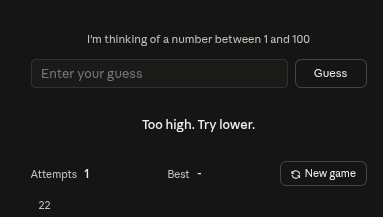
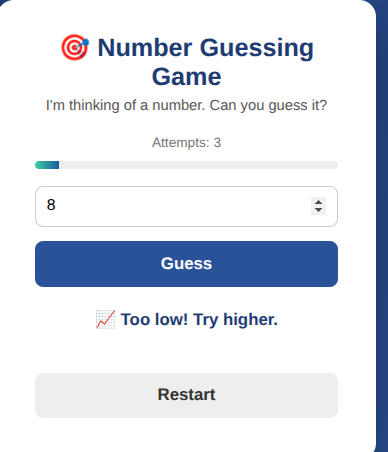
    I’m excited to share my latest coding project: Number Guessing Game! This fun and interactive game challenges players to guess a secret number within a limited number of attempts. Each guess gives a helpful hint, making the game exciting and engaging!

    Through this coding task, I practiced programming logic, problem-solving, user interaction, and game development skills. ‍ It was a great learning experience and a fun way to turn code into an interactive game!

    Can you guess the number?
    Keep coding, keep learning, and keep creating!

    #NumberGuessingGame #CodingTask #CodingProject #Programming #LearnToCode #GameDevelopment #CodingForBeginners #ProblemSolving #ProgrammingSkills #InteractiveGame #TechLearning #CodingJourney #KeepLearning #KeepCoding #CodeWithFun
    #rsisb roll no 46 3 coding task I’m excited to share my latest coding project: Number Guessing Game! ๐ŸŽฎ๐Ÿ”ข This fun and interactive game challenges players to guess a secret number within a limited number of attempts. Each guess gives a helpful hint, making the game exciting and engaging! ๐Ÿง ๐Ÿ’ก Through this coding task, I practiced programming logic, problem-solving, user interaction, and game development skills. ๐Ÿš€๐Ÿ‘จ‍๐Ÿ’ป It was a great learning experience and a fun way to turn code into an interactive game! ๐ŸŒŸ ๐ŸŽฎ Can you guess the number? ๐Ÿค”๐Ÿ”ข ๐Ÿ’ป Keep coding, keep learning, and keep creating! ๐Ÿš€๐Ÿ“šโœจ #NumberGuessingGame #CodingTask #CodingProject #Programming #LearnToCode #GameDevelopment #CodingForBeginners #ProblemSolving #ProgrammingSkills #InteractiveGame #TechLearning #CodingJourney #KeepLearning #KeepCoding #CodeWithFun ๐ŸŽฏ๐Ÿ’ป๐ŸŽฎ๐Ÿง ๐Ÿš€โœจ
    0 Commenti 0 condivisioni 4977 Views
Pagine in Evidenza