


• RSIF8
    ROLL NO:13
    TASK NO:7

    How to Download and Use Canva?

    Canva is a simple and powerful design platform that helps people create beautiful graphics, presentations, posters, social media posts, videos, documents, and many other creative projects. It is especially useful for students, beginners, content creators, teachers, and anyone who wants to learn graphic designing without needing advanced technical skills.

    To get started with Canva, the first step is to download the Canva app on your device or open Canva through a web browser. Canva is available on different devices, so you can choose the option that works best for you. After opening Canva, you can create an account using an available sign-in option and begin exploring the platform.

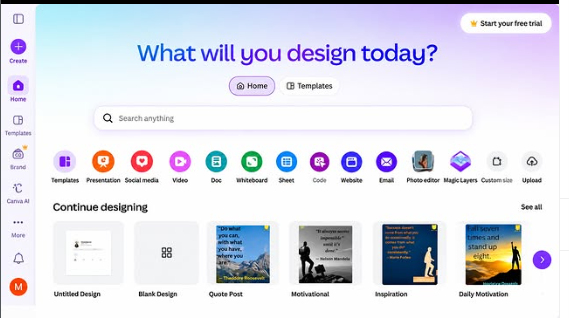
    Once you enter Canva, you will find many different design options and ready-made templates. You can search for the type of project you want to create, such as an Instagram post, presentation, poster, invitation, video, document, or other design. Templates can be very helpful for beginners because they provide a starting point and allow you to customize the design according to your own ideas.

    Using Canva is quite easy. You can select a template and then change its text, images, fonts, layouts, and other design elements. You can also upload your own pictures and add them to your project. Canva provides different tools that allow you to arrange elements and create a design that matches your topic and personal style.

    Another useful feature is the ability to create designs from a blank page. This gives you more freedom to experiment with different layouts and ideas. You can choose a background, add headings, insert pictures, and organize everything in a clean and creative way.

    After completing your design, you can preview it and make any necessary changes. When you are satisfied with your work, you can export or share the design using the options provided by Canva. Depending on the type of project and available features, you can use different formats for sa
    RSIF8 ROLL NO:13 TASK NO:7 🎨 How to Download and Use Canva? Canva is a simple and powerful design platform that helps people create beautiful graphics, presentations, posters, social media posts, videos, documents, and many other creative projects. It is especially useful for students, beginners, content creators, teachers, and anyone who wants to learn graphic designing without needing advanced technical skills. To get started with Canva, the first step is to download the Canva app on your device or open Canva through a web browser. Canva is available on different devices, so you can choose the option that works best for you. After opening Canva, you can create an account using an available sign-in option and begin exploring the platform. Once you enter Canva, you will find many different design options and ready-made templates. You can search for the type of project you want to create, such as an Instagram post, presentation, poster, invitation, video, document, or other design. Templates can be very helpful for beginners because they provide a starting point and allow you to customize the design according to your own ideas. Using Canva is quite easy. You can select a template and then change its text, images, fonts, layouts, and other design elements. You can also upload your own pictures and add them to your project. Canva provides different tools that allow you to arrange elements and create a design that matches your topic and personal style. Another useful feature is the ability to create designs from a blank page. This gives you more freedom to experiment with different layouts and ideas. You can choose a background, add headings, insert pictures, and organize everything in a clean and creative way. After completing your design, you can preview it and make any necessary changes. When you are satisfied with your work, you can export or share the design using the options provided by Canva. Depending on the type of project and available features, you can use different formats for sa
    0 Commenti 0 condivisioni 1507 Views
  • Exporting water !
    Exporting water !
    0 Commenti 0 condivisioni 196 Views
  • RSIF8
    Roll no.29
    Task no.7
    Task Topic: How To download and use Canva


    **Step 1: Download or Access Canva**

    * **On Mobile (iPhone/Android) & iPad:** Open the App Store or Google Play Store, search for **Canva**, and tap download.
    * **On Desktop (Mac/Windows):** You can download the official Canva desktop app from their website, or simply use it directly in your web browser at [canva.com](https://www.canva.com) without downloading anything.

    **Step 2: Sign Up / Log In**

    * Open Canva and create a free account using your Google account, Facebook, Apple ID, or email.

    **Step 3: Create Your First Design**

    * Tap the **"+" button** or use the search bar to choose what you want to make (e.g., "Instagram Post", "Flyer", "Resume").
    * Pick a professional, pre-made template or start with a blank canvas.

    **Step 4: Customize & Export**

    * Tap on text to change it, swap out images, tweak colors, or add stickers.
    * Once you are happy with your creation, tap the **Share/Download button** (usually an arrow icon in the top right corner) to save it to your device as a PNG, JPG, or PDF


    #Canva #GraphicDesign #ContentCreator #DesignMadeEasy #CreativityUnleashed #DIYDesign #SocialMediaMarketing #CanvaLove #SmallBusinessTools
    RSIF8 Roll no.29 Task no.7 Task Topic: How To download and use Canva **Step 1: Download or Access Canva** * **On Mobile (iPhone/Android) & iPad:** Open the App Store or Google Play Store, search for **Canva**, and tap download. * **On Desktop (Mac/Windows):** You can download the official Canva desktop app from their website, or simply use it directly in your web browser at [canva.com](https://www.canva.com) without downloading anything. **Step 2: Sign Up / Log In** * Open Canva and create a free account using your Google account, Facebook, Apple ID, or email. **Step 3: Create Your First Design** * Tap the **"+" button** or use the search bar to choose what you want to make (e.g., "Instagram Post", "Flyer", "Resume"). * Pick a professional, pre-made template or start with a blank canvas. **Step 4: Customize & Export** * Tap on text to change it, swap out images, tweak colors, or add stickers. * Once you are happy with your creation, tap the **Share/Download button** (usually an arrow icon in the top right corner) to save it to your device as a PNG, JPG, or PDF #Canva #GraphicDesign #ContentCreator #DesignMadeEasy #CreativityUnleashed #DIYDesign #SocialMediaMarketing #CanvaLove #SmallBusinessTools
    0 Commenti 0 condivisioni 5627 Views
  • Title:
    Multi-Function Productivity Website Using Gemini CLI | Coding Book 1 Task 13

    Description:
    Completed Coding Book 1 – Task 13 (Multi-Function Productivity Website) using Gemini CLI.

    This all-in-one productivity platform expands the traditional To-Do List application into a comprehensive task management system designed to help users stay organized and productive.

    Features:
    Add, Edit & Delete Tasks
    Task Categories & Priorities
    Due Date & Time Management
    Search & Advanced Filters
    Task Statistics Dashboard
    Notes System
    Daily Goal Tracker
    Weekly Progress Tracker
    Local Storage Support
    Import & Export Data
    Dark/Light Mode
    Responsive Design
    Modern User Interface

    Built using HTML, CSS, JavaScript, and AI-assisted development with Gemini CLI.

    Student Details:
    Coding Book: 1
    Task: 13 – Multi-Function Productivity Website
    Roll No: 51

    Website Link:
    [https://rsmc51.rehanschool.us/Multi-Function-Productivity-Website]

    Hashtags:
    #CodingBook1 #Task13 #ToDoList #ProductivityWebsite #GeminiCLI #AIProgramming #WebDevelopment #HTML #CSS #JavaScript #FrontendDevelopment #CodingJourney #Programming #TechEducation #RehanSchool #RollNo51 #StudentProject #BuildInPublic #AITools #DeveloperLife #TaskManagement #Productivity #LearnToCode #WebAppDevelopment
    Title: Multi-Function Productivity Website Using Gemini CLI | Coding Book 1 Task 13 Description: πŸ“ Completed Coding Book 1 – Task 13 (Multi-Function Productivity Website) using Gemini CLI. This all-in-one productivity platform expands the traditional To-Do List application into a comprehensive task management system designed to help users stay organized and productive. Features: βœ… Add, Edit & Delete Tasks βœ… Task Categories & Priorities βœ… Due Date & Time Management βœ… Search & Advanced Filters βœ… Task Statistics Dashboard βœ… Notes System βœ… Daily Goal Tracker βœ… Weekly Progress Tracker βœ… Local Storage Support βœ… Import & Export Data βœ… Dark/Light Mode βœ… Responsive Design βœ… Modern User Interface Built using HTML, CSS, JavaScript, and AI-assisted development with Gemini CLI. Student Details: πŸ“š Coding Book: 1 πŸ“ Task: 13 – Multi-Function Productivity Website πŸŽ“ Roll No: 51 🌐 Website Link: [https://rsmc51.rehanschool.us/Multi-Function-Productivity-Website] Hashtags: #CodingBook1 #Task13 #ToDoList #ProductivityWebsite #GeminiCLI #AIProgramming #WebDevelopment #HTML #CSS #JavaScript #FrontendDevelopment #CodingJourney #Programming #TechEducation #RehanSchool #RollNo51 #StudentProject #BuildInPublic #AITools #DeveloperLife #TaskManagement #Productivity #LearnToCode #WebAppDevelopment
    0 Commenti 0 condivisioni 3203 Views
  • Title:
    Multi-Function Calendar & Event Management Website Using Gemini CLI | Coding Book 1 Task 19

    Description:
    Completed Coding Book 1 – Task 19 (Multi-Function Calendar & Event Management Website) using Gemini CLI.

    This advanced scheduling platform transforms a basic calendar application into a complete event management system designed to help users organize their personal and professional activities efficiently.

    Features:
    Interactive Monthly Calendar
    Add, Edit & Delete Events
    Weekly & Daily Calendar Views
    Event Categories & Filters
    Recurring Events Support
    Event Notifications & Reminders
    Search & Filter Functionality
    Event Statistics Dashboard
    Import & Export Calendar Data
    Local Storage Support
    Dark/Light Mode
    Responsive Design
    Modern User Interface

    Built using HTML, CSS, JavaScript, and AI-assisted development with Gemini CLI.

    Student Details:
    Coding Book: 1
    Task: 19 – Multi-Function Calendar & Event Management Website
    Roll No: 51

    Website Link:
    [https://rsmc51.rehanschool.us/Multi-Function-Calendar-%26-Event-Management-Website/]

    Hashtags:
    #CodingBook1 #Task19 #CalendarApp #EventManagement #GeminiCLI #AIProgramming #WebDevelopment #HTML #CSS #JavaScript #FrontendDevelopment #CodingJourney #Programming #TechEducation #RehanSchool #RollNo51 #StudentProject #BuildInPublic #AITools #DeveloperLife #Productivity #Scheduling #LearnToCode #WebAppDevelopment
    Title: Multi-Function Calendar & Event Management Website Using Gemini CLI | Coding Book 1 Task 19 Description: πŸ“… Completed Coding Book 1 – Task 19 (Multi-Function Calendar & Event Management Website) using Gemini CLI. This advanced scheduling platform transforms a basic calendar application into a complete event management system designed to help users organize their personal and professional activities efficiently. Features: βœ… Interactive Monthly Calendar βœ… Add, Edit & Delete Events βœ… Weekly & Daily Calendar Views βœ… Event Categories & Filters βœ… Recurring Events Support βœ… Event Notifications & Reminders βœ… Search & Filter Functionality βœ… Event Statistics Dashboard βœ… Import & Export Calendar Data βœ… Local Storage Support βœ… Dark/Light Mode βœ… Responsive Design βœ… Modern User Interface Built using HTML, CSS, JavaScript, and AI-assisted development with Gemini CLI. Student Details: πŸ“š Coding Book: 1 πŸ“ Task: 19 – Multi-Function Calendar & Event Management Website πŸŽ“ Roll No: 51 🌐 Website Link: [https://rsmc51.rehanschool.us/Multi-Function-Calendar-%26-Event-Management-Website/] Hashtags: #CodingBook1 #Task19 #CalendarApp #EventManagement #GeminiCLI #AIProgramming #WebDevelopment #HTML #CSS #JavaScript #FrontendDevelopment #CodingJourney #Programming #TechEducation #RehanSchool #RollNo51 #StudentProject #BuildInPublic #AITools #DeveloperLife #Productivity #Scheduling #LearnToCode #WebAppDevelopment
    0 Commenti 0 condivisioni 3722 Views
  • Title:
    Multi-Function Reminder & Task Management Website Using Gemini CLI | Coding Book 1 Task 20

    Description:
    Completed Coding Book 1 – Task 20 (Multi-Function Reminder & Task Management Website) using Gemini CLI.

    This advanced productivity platform transforms a basic reminder application into a comprehensive task and reminder management system, helping users stay organized, productive, and on schedule.

    Features:
    Add, Edit & Delete Reminders
    Browser Notifications & Alert Sounds
    Recurring Reminder Support
    Reminder Categories & Priorities
    Search & Advanced Filters
    Productivity Dashboard
    Calendar Integration
    Import & Export Reminder Data
    Reminder History & Analytics
    Local Storage Support
    Dark/Light Mode
    Responsive Design
    Modern User Interface

    Built using HTML, CSS, JavaScript, and AI-assisted development with Gemini CLI.

    Student Details:
    Coding Book: 1
    Task: 20 – Multi-Function Reminder & Task Management Website
    Roll No: 51

    Website Link:
    [https://rsmc51.rehanschool.us/Multi-Function%20Reminder%20&%20Task%20Management%20Website]

    Hashtags:
    #CodingBook1 #Task20 #ReminderApp #TaskManagement #GeminiCLI #AIProgramming #WebDevelopment #HTML #CSS #JavaScript #FrontendDevelopment #CodingJourney #Programming #TechEducation #RehanSchool #RollNo51 #StudentProject #BuildInPublic #AITools #DeveloperLife #Productivity #TimeManagement #LearnToCode #WebAppDevelopment
    Title: Multi-Function Reminder & Task Management Website Using Gemini CLI | Coding Book 1 Task 20 Description: πŸ”” Completed Coding Book 1 – Task 20 (Multi-Function Reminder & Task Management Website) using Gemini CLI. This advanced productivity platform transforms a basic reminder application into a comprehensive task and reminder management system, helping users stay organized, productive, and on schedule. Features: βœ… Add, Edit & Delete Reminders βœ… Browser Notifications & Alert Sounds βœ… Recurring Reminder Support βœ… Reminder Categories & Priorities βœ… Search & Advanced Filters βœ… Productivity Dashboard βœ… Calendar Integration βœ… Import & Export Reminder Data βœ… Reminder History & Analytics βœ… Local Storage Support βœ… Dark/Light Mode βœ… Responsive Design βœ… Modern User Interface Built using HTML, CSS, JavaScript, and AI-assisted development with Gemini CLI. Student Details: πŸ“š Coding Book: 1 πŸ“ Task: 20 – Multi-Function Reminder & Task Management Website πŸŽ“ Roll No: 51 🌐 Website Link: [https://rsmc51.rehanschool.us/Multi-Function%20Reminder%20&%20Task%20Management%20Website] Hashtags: #CodingBook1 #Task20 #ReminderApp #TaskManagement #GeminiCLI #AIProgramming #WebDevelopment #HTML #CSS #JavaScript #FrontendDevelopment #CodingJourney #Programming #TechEducation #RehanSchool #RollNo51 #StudentProject #BuildInPublic #AITools #DeveloperLife #Productivity #TimeManagement #LearnToCode #WebAppDevelopment
    0 Commenti 0 condivisioni 3245 Views
  • Coding Task: 122
    Prompt :
    "Generate professional resumes from user inputs/templates and export PDF/DOC."
    Click Here for Try :
    http://rsk152.rehanschool.us/Resume%20Builder%20Agent/
    Coding Task: 122 Prompt : "Generate professional resumes from user inputs/templates and export PDF/DOC." Click Here for Try : http://rsk152.rehanschool.us/Resume%20Builder%20Agent/
    0 Commenti 0 condivisioni 394 Views
  • Coding Task: 126
    Prompt :
    "Translate text/docs in real-time and export results."
    Click Here for Try :
    http://rsk152.rehanschool.us/Language%20Translator%20Agent/
    Coding Task: 126 Prompt : "Translate text/docs in real-time and export results." Click Here for Try : http://rsk152.rehanschool.us/Language%20Translator%20Agent/
    0 Commenti 0 condivisioni 492 Views
  • Coding Task: 122
    Prompt :
    "Generate professional resumes from user inputs/templates and export PDF/DOC."
    Click Here for Try :
    http://rsk152.rehanschool.us/Resume%20Builder%20Agent/
    Coding Task: 122 Prompt : "Generate professional resumes from user inputs/templates and export PDF/DOC." Click Here for Try : http://rsk152.rehanschool.us/Resume%20Builder%20Agent/
    0 Commenti 0 condivisioni 378 Views
  • Coding Task: 126
    Prompt :
    "Translate text/docs in real-time and export results."
    Click Here for Try :
    http://rsk152.rehanschool.us/Language%20Translator%20Agent/
    Coding Task: 126 Prompt : "Translate text/docs in real-time and export results." Click Here for Try : http://rsk152.rehanschool.us/Language%20Translator%20Agent/
    0 Commenti 0 condivisioni 478 Views
Pagine in Evidenza